前言
前面已經寫過文字識別和人臉檢測。都是在使用現成的輪子(直接呼叫的百度 SDK),其實仔細看看文件,也就都知道怎麼寫了,而且百度還提供了多種語言的程式碼範例;
所以如果後面沒什麼特殊需求的話,關於呼叫百度 API 來實現 AI 部分功能的程式碼就到此為止了;之所以寫這三個,是因為這三種場景在日常生活、工作中使用得比較頻繁。
人臉比對功能,一般會用在人臉與本人身份證做比對驗證的情況下。
實現功能
- 驗證兩張人臉是否是同一個人
開發環境
開發工具:Visual Studio 2013
.NET Framework 版本:4.5
實作程式碼
//從官網下載AipSdk.dll引用到自己專案
//API文件地址:https://cloud.baidu.com/doc/FACE/s/Lk37c1tpf

//填寫自己帳號的api_key和secret_key
string api_key = "", secret_key = "";

 private void btnCompare_Click(object sender, EventArgs e)
{
    if (pictureBox1.Image == null || pictureBox2.Image == null)
    {
        MessageBox.Show("請先複製圖片到圖片框");
        return;
    }

    Baidu.Aip.Face.Face client = new Baidu.Aip.Face.Face(api_key, secret_key);
    List<byte[]> list = new List<byte[]>();
    list.Add(ImageToByte((Bitmap)pictureBox1.Image));
    list.Add(ImageToByte((Bitmap)pictureBox2.Image));
    JObject result = client.Match(list);
    if ((int)result["result_num"]==0)
    {
        textBox1.Text = "匹配失敗";
    }
    else
    {
        JArray jarr = (JArray)result["result"];
        string score = jarr[0]["score"].ToString();
        textBox1.Text = "匹配度:" + score;
    }
}

//複製圖片方法
private Image CopyImage()
{
    try
    {
        Image image = null;
        IDataObject iData = Clipboard.GetDataObject();
        if (iData.GetDataPresent(DataFormats.FileDrop))
        {
            object obj = iData.GetData(DataFormats.FileDrop);
            image = Image.FromFile((obj as string[])[0].ToString());
        }
        else if (iData.GetDataPresent(DataFormats.Bitmap))
        {
            object obj = iData.GetData(DataFormats.Bitmap);
            image = obj as Image;
        }
        return image;
    }
    catch { return null; }

}

//圖片轉byte[]
public byte[] ImageToByte(Bitmap inImg)
{
    MemoryStream mstream = new MemoryStream();
    inImg.Save(mstream, ImageFormat.Bmp);
    byte[] bytes = new Byte[mstream.Length];
    mstream.Position = 0;
    mstream.Read(bytes, 0, bytes.Length);
    mstream.Close();
    return bytes;
}

private void pictureBox1_Click(object sender, EventArgs e)
{
    //pictureBox1獲得焦點
    pictureBox1.Focus();
}
private void pictureBox2_Click(object sender, EventArgs e)
{
     //pictureBox2獲得焦點
    pictureBox2.Focus();
}
private void pictureBox1_PreviewKeyDown(object sender, PreviewKeyDownEventArgs e)
{
    //貼上圖片到pictureBox1
    if (e.Control && e.KeyCode == Keys.V)
    {
        pictureBox1.Image = CopyImage();
    }
}
private void pictureBox2_PreviewKeyDown(object sender, PreviewKeyDownEventArgs e)
{
    //貼上圖片到pictureBox2
    if (e.Control && e.KeyCode == Keys.V)
    {
        pictureBox2.Image = CopyImage();
    }
}
實作效果
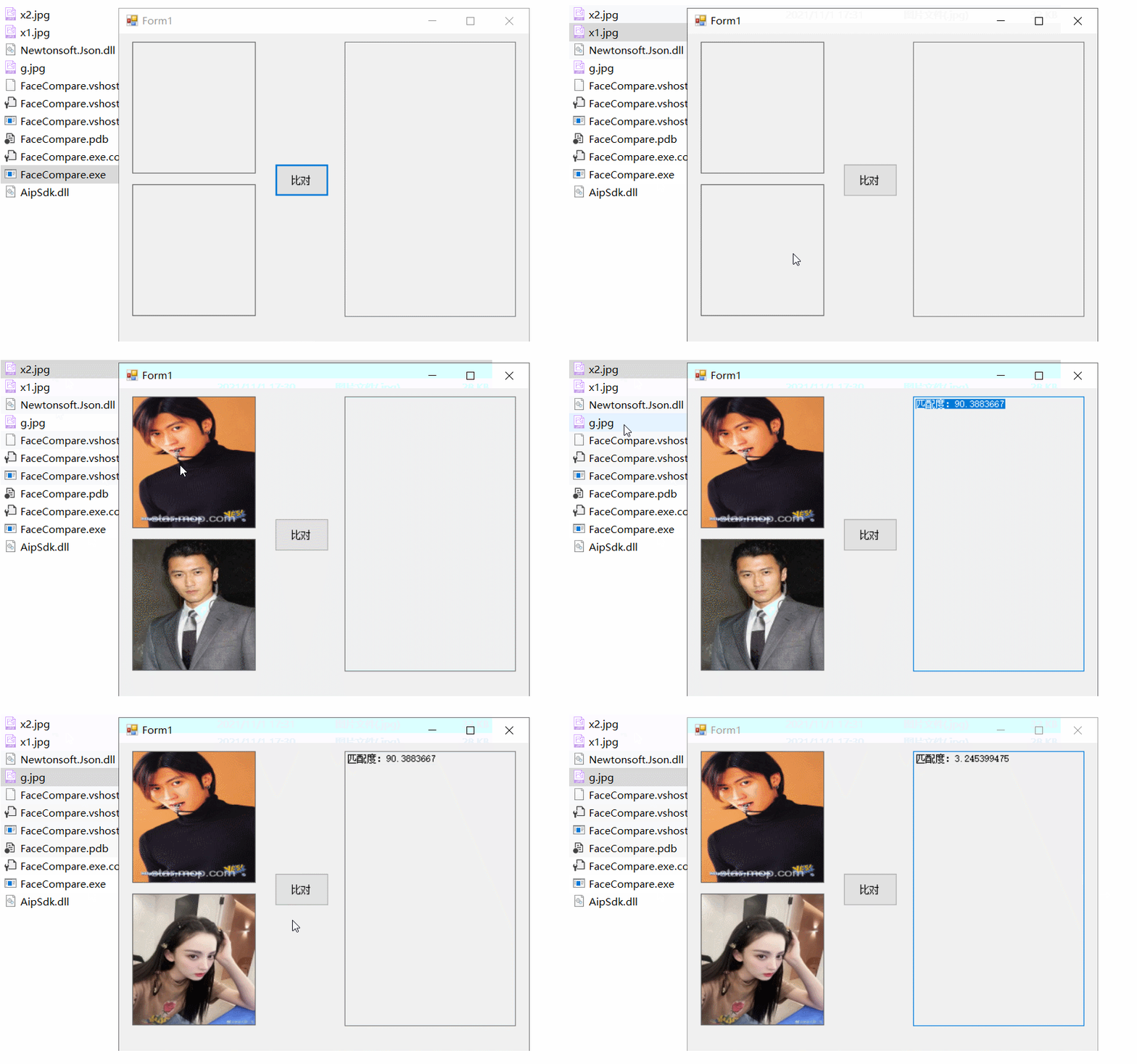
根據百度的說法就是:相似度大於 80 一般會認為是同一個人。
大家在讀文件的時候可能會發現官網提供的參數與我寫的不一致,是因為官方提供了 V2 和 V3 兩種 API。根據需要選擇就行。
由簡入繁,拿來即用
後續精彩,持續關注