
以下將介紹如何透過 LiteDB 將自己的程式進行加密,並簡單介紹 LiteDB。
LiteDB
LiteDB 是一個輕量級的嵌入式資料庫,它是用 C# 撰寫的,適用於 .NET 平台。它的設計目標是提供一個簡單易用的資料庫解決方案,可以在各種應用程式中使用。
LiteDB 使用單一檔案作為資料庫儲存,這個檔案可以在磁碟上或記憶體中。它支援文件儲存模型,類似於 NoSQL 資料庫,每個文件都是一個 JSON 格式的物件。這意味著你可以儲存和檢索任意類型的資料,而不需要預先定義模式。
LiteDB 提供了一組簡單的 API 來執行各種資料庫操作,包括插入、更新、刪除和查詢。它也支援交易,可以確保資料的一致性和完整性。
LiteDB 還提供了一些進階功能,如索引、全文搜尋和檔案儲存。索引可以加快查詢的速度,全文搜尋可以在文字資料中進行關鍵字搜尋,檔案儲存可以直接將檔案儲存在資料庫中。
LiteDB 的優點包括易於使用、輕量級、快速和可嵌入性。它的程式碼庫非常小,可以很容易地整合到你的應用程式中。此外,它還具有跨平台的能力,可以在 Windows、Linux 和 Mac 等作業系統上執行。
總之,LiteDB 是一個簡單易用的嵌入式資料庫,適用於各種應用程式。它提供了一組簡單的 API 來執行資料庫操作,並支援一些進階功能。如果你需要一個輕量級的資料庫解決方案,可以考慮使用 LiteDB。
加密封裝
建立 LiteDB.Service 的 WebApi 專案。
右鍵發佈:
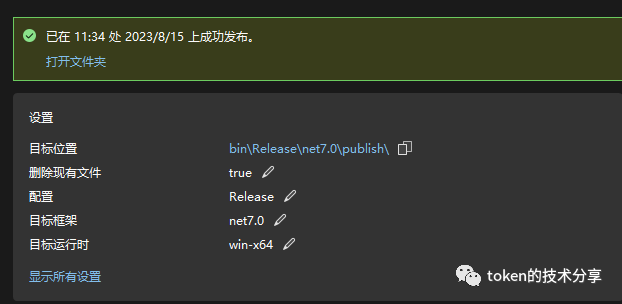
建立主控台 LiteDB.Launch 專案。
EntryPointDiscoverer.cs 用於尋找執行方法。
internal class EntryPointDiscoverer
{
    public static MethodInfo FindStaticEntryMethod(Assembly assembly, string? entryPointFullTypeName = null)
    {
        var candidates = new List<MethodInfo>();

        if (!string.IsNullOrWhiteSpace(entryPointFullTypeName))
        {
            var typeInfo = assembly.GetType(entryPointFullTypeName, false, false)?.GetTypeInfo();
            if (typeInfo == null)
            {
                throw new InvalidProgramException($"Could not find '{entryPointFullTypeName}' specified for Main method. See <StartupObject> project property.");
            }
            FindMainMethodCandidates(typeInfo, candidates);
        }
        else
        {
            foreach (var type in assembly
                         .DefinedTypes
                         .Where(t => t.IsClass)
                         .Where(t => t.GetCustomAttribute<CompilerGeneratedAttribute>() is null))
            {
                FindMainMethodCandidates(type, candidates);
            }
        }

        string MainMethodFullName()
        {
            return string.IsNullOrWhiteSpace(entryPointFullTypeName) ? "Main" : $"{entryPointFullTypeName}.Main";
        }

        if (candidates.Count > 1)
        {
            throw new AmbiguousMatchException(
                $"Ambiguous entry point. Found multiple static functions named '{MainMethodFullName()}'. Could not identify which method is the main entry point for this function.");
        }

        if (candidates.Count == 0)
        {
            throw new InvalidProgramException(
                $"Could not find a static entry point '{MainMethodFullName()}'.");
        }

        return candidates[0];
    }

    private static void FindMainMethodCandidates(TypeInfo type, List<MethodInfo> candidates)
    {
        foreach (var method in type
                     .GetMethods(BindingFlags.Static |
                                 BindingFlags.Public |
                                 BindingFlags.NonPublic)
                     .Where(m =>
                         string.Equals("Main", m.Name, StringComparison.OrdinalIgnoreCase)))
        {
            if (method.ReturnType == typeof(void)
                || method.ReturnType == typeof(int)
                || method.ReturnType == typeof(Task)
                || method.ReturnType == typeof(Task<int>))
            {
                candidates.Add(method);
            }
        }
    }
}
然後開啟 Program.cs 檔案,請注意修改 SaveDb 的參數為自己專案打包的位址
// 用於打包指定程式。
SaveDb(@"E:\Project\LiteDB-Application\LiteDB.Service\bin\Release\net7.0\publish");

// 開啟 db
var db = new LiteDatabase("Launch.db");

// 開啟資料表。
var files = db.GetCollection<FileAssembly>("files");

// 接管未找到的組件處理
AppDomain.CurrentDomain.AssemblyResolve += (sender, eventArgs) =>
{
    try
    {
        var name = eventArgs.Name.Split(",")[0];
        if (!name.EndsWith(".dll"))
        {
            name += ".dll";
        }

        var file = files.FindOne(x => x.Name == name);

        return file != null ? Assembly.Load(file.Bytes) : default;
    }
    catch (Exception)
    {
        return default;
    }
};

// 啟動程式。
StartServer("LiteDB.Service", new string[] { });

Console.ReadKey();

void StartServer(string assemblyName, string[] args)
{
    var value = files!.FindOne(x => x.Name == assemblyName + ".dll");
    var assembly = Assembly.Load(value!.Bytes);

    var entryPoint = EntryPointDiscoverer.FindStaticEntryMethod(assembly);

    try
    {
        var parameters = entryPoint.GetParameters();
        if (parameters.Length != 0)
        {
            var parameterValues = parameters.Select(p =>
                    p.ParameterType.IsValueType ? Activator.CreateInstance(p.ParameterType) : null)
                .ToArray();
            entryPoint.Invoke(null, parameterValues);
        }
        else
        {
            entryPoint.Invoke(null, null);
        }
    }
    catch (Exception e)
    {

    }
}


// 掃描指定目錄下所有檔案和子目錄,儲存到 LiteDB 資料庫中。
void SaveDb(string path)
{
    var files = ScanDirectory(path);
    using var db = new LiteDatabase("Launch.db");
    var col = db.GetCollection<FileAssembly>("files");
    col.InsertBulk(files);
}

// 實作一個方法,掃描指定目錄下所有檔案和子目錄,回傳一個集合。
List<FileAssembly> ScanDirectory(string path)
{
    var files = new List<FileAssembly>();
    var dir = new DirectoryInfo(path);
    var fileInfos = dir.GetFiles("*", SearchOption.AllDirectories);
    foreach (var fileInfo in fileInfos)
    {
        var file = new FileAssembly
        {
            Name = fileInfo.Name,
            Bytes = File.ReadAllBytes(fileInfo.FullName)
        };
        files.Add(file);
    }

    return files;
}

class FileAssembly
{
    /// <summary>
    /// 檔名
    /// </summary>
    public string Name { get; set; }

    /// <summary>
    /// 檔案的內容
    /// </summary>
    public byte[] Bytes { get; set; }
}
點擊 LiteDB.Launch 專案檔案,新增 LiteDB 相依,並修改 SDK 為 Microsoft.NET.Sdk.Web
<Project Sdk="Microsoft.NET.Sdk.Web">

    <PropertyGroup>
        <OutputType>Exe</OutputType>
        <TargetFramework>net7.0</TargetFramework>
        <ImplicitUsings>enable</ImplicitUsings>
        <Nullable>enable</Nullable>
    </PropertyGroup>

    <ItemGroup>
      <PackageReference Include="LiteDB" Version="5.0.17" />
    </ItemGroup>

</Project>
在啟動專案的時候先將 LiteDB.Service 發佈一下。然後修改 SaveDb 參數為發佈的目錄(會自動掃描所有檔案打包到 LiteDB 的檔案中。)
然後啟動專案;
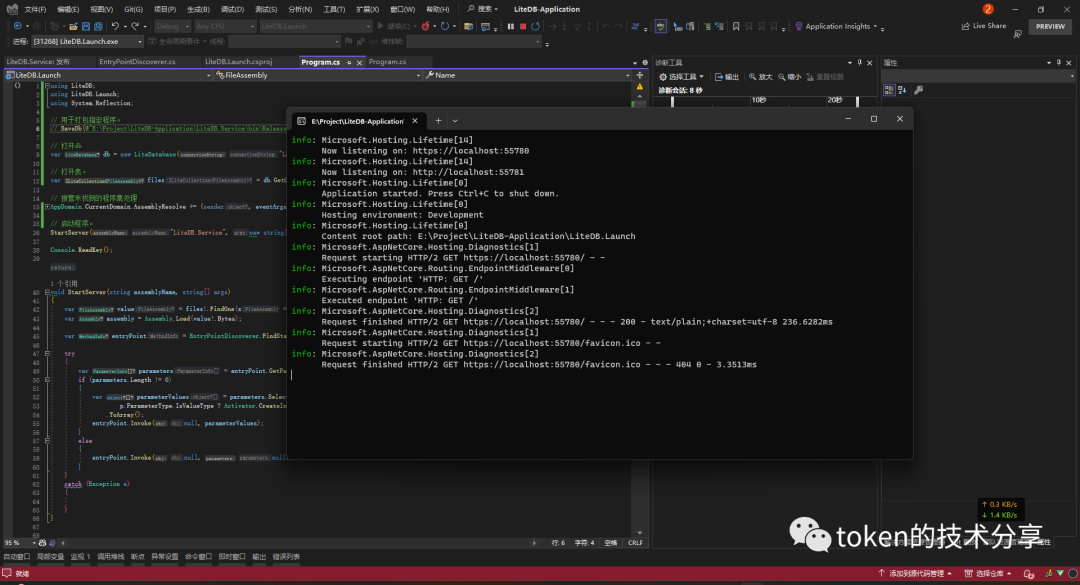
當我們啟動了 LiteDB.Launch 以後在 StartServer 方法裡面就會開啟建立的 LiteDB 檔案中搜尋到指定的啟動程式集。
然後在 AppDomain.CurrentDomain.AssemblyResolve 中會將啟動程式集缺少的組件載入到網域中。
AppDomain.CurrentDomain.AssemblyResolve 會在未找到相依時觸發的一個事件。
在儲存到 LiteDB 的時候可以對儲存的內容進行加密,然後在 AppDomain.CurrentDomain.AssemblyResolve 觸發的時候將讀取 LiteDB 檔案的內容的時候進行解密。
結尾
來自 token 的分享
qq 技術交流群:737776595