本文由網友投稿
作者:陳顯達
原文標題:【微信自動化】使用 c#實現微信自動化
原文連結:https://www.cnblogs.com/1996-Chinese-Chen/p/17663064.html
引言
上個月,在一個群裡摸魚划水空度日,看到了一個老哥分享的一個微信自動化的一個類庫,便下載了他的 Demo,其本意就是模擬滑鼠來操作 UI,實現 UI 自動化;然後自己在瞎琢磨研究,寫了一個簡單的例子,用來獲取好友列表,獲取聊天列表,以及最後一次接收或者發送訊息的時間,以及最後一次聊天的內容,還有自動刷朋友圈,獲取朋友圈誰發的,發的什麼文字,以及配的圖片是什麼,什麼時候發的,再就是一個根據獲取的好友列表,來實現給指定好友發送訊息的功能。
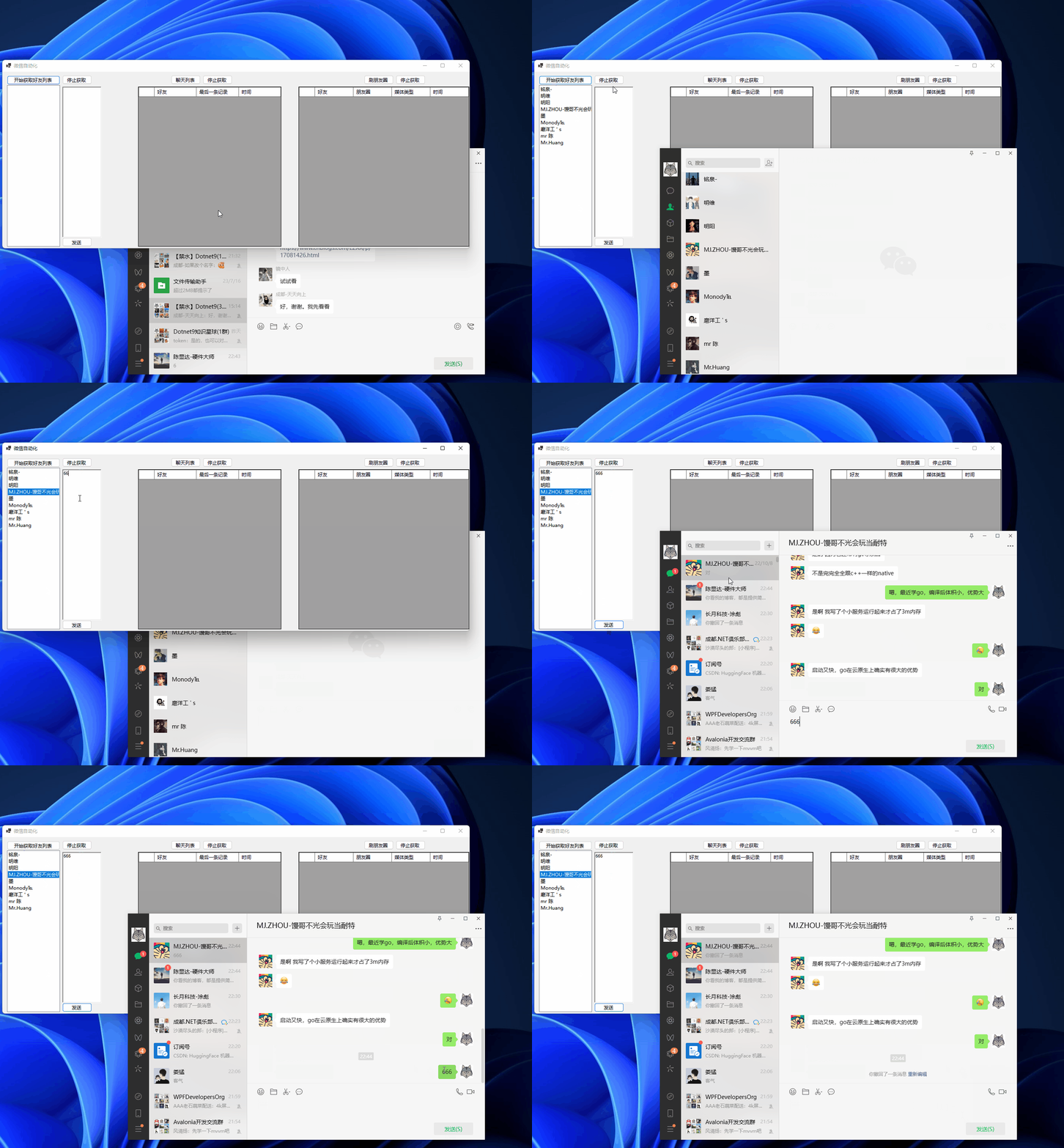
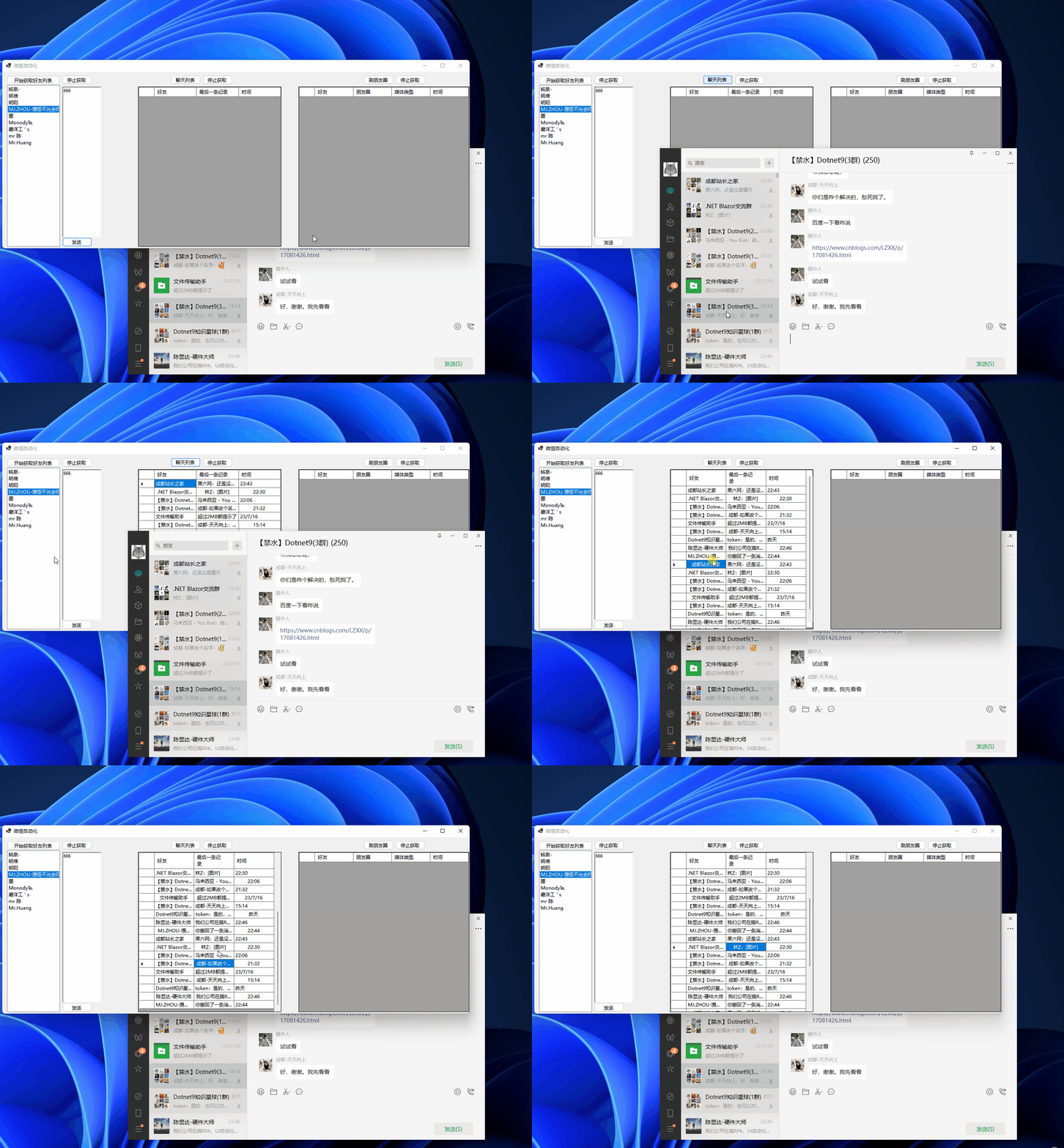
先貼幾張圖給點吸引力:
獲取好友列表,發送訊息
獲取聊天記錄
刷朋友圈

正文
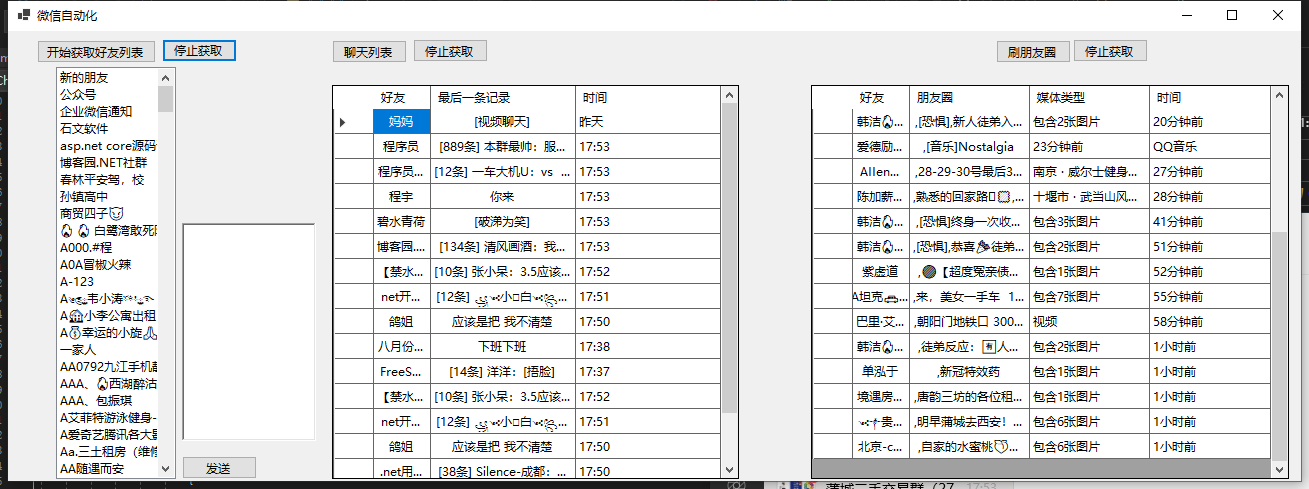
話不多說,咱們開始,首先映入眼簾的是介面,左側是獲取好友列表,然後在右邊就是一個 RichTextBox 用來根據左側選中的好友列表來發送訊息,中間是獲取聊天列表,好友名稱,最後一次聊天的內容,以及最後一次聊天的時間,最右邊是獲取朋友圈的內容,刷朋友圈,找到好友發的朋友圈內容,以及附帶的媒體是圖片還是影片,發朋友圈的時間。
首先需要在 NuGet 下載兩個套件,FlaUI.Core 和 FlaUI.UIA3,用這兩個套件,來實現滑鼠模擬,UI 自動化的,接下來,咱們看程式碼。
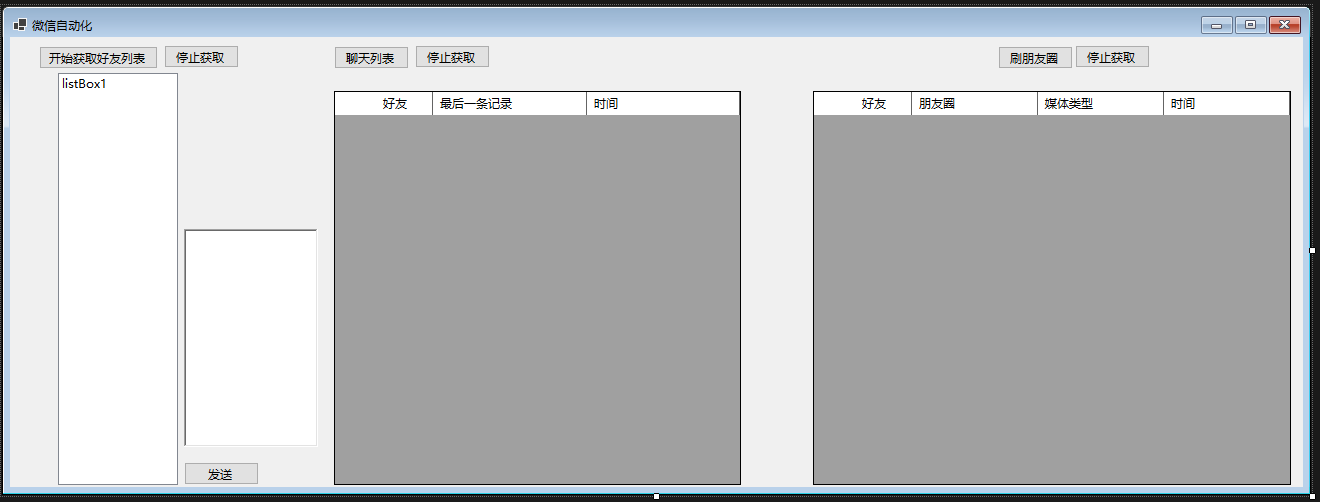
上面就是一整個介面的截圖,接下來,咱們講講程式碼,在介面被建立的時候,去取得微信的處理程序 ID,然後,給獲取好友列表,聊天列表,朋友圈的 CancelTokenSource 賦值以及所關聯的 CancelToken,以此來實現中斷取消的功能,同時在上面的 List 是用來儲存朋友圈資訊的,下面的 Content 儲存聊天列表的內容的,Key 是聊天的用戶暱稱,Value 是最後一次的聊天內容,在往下的 SendInput 是我們用來模擬滑鼠滾動的這樣我們才可以滾動獲取聊天列表,朋友圈內容,好友列表,在下面的 FindWindow,GetWindowThreadProcessID 是用來根據介面名稱找到對應的處理程序 Id 的,因為如果雙擊了朋友圈在彈出介面中,使用 Process 找不太方便,直接就引用這個來查詢朋友圈的彈出介面。
private List<dynamic> list = new List<dynamic>();
private Dictionary<string, string> Content = new Dictionary<string, string>();
/// <summary>
/// 滾動條模擬
/// </summary>
/// <param name="nInputs"></param>
/// <param name="pInputs"></param>
/// <param name="cbSize"></param>
/// <returns></returns>
[DllImport("user32.dll", SetLastError = true, CharSet = CharSet.Auto)]
public static extern uint SendInput(uint nInputs, INPUT[] pInputs, int cbSize);
//根據名稱獲取視窗控制代碼
[DllImport("user32.dll", EntryPoint = "FindWindow")]
private extern static IntPtr FindWindow(string lpClassName, string lpWindowName);
//根據控制代碼獲取處理程序ID
[DllImport("User32.dll", CharSet = CharSet.Auto)]
public static extern int GetWindowThreadProcessId(IntPtr hwnd, out int ID);
public Form1()
{
     InitializeComponent();
     GetWxHandle();
     GetFriendTokenSource = new CancellationTokenSource();
     GetFriendCancellationToken = GetFriendTokenSource.Token;
     ChatListTokenSource = new CancellationTokenSource();
     ChatListCancellationToken = ChatListTokenSource.Token;
     FriendTokenSource = new CancellationTokenSource();
     FriendCancellationToken = FriendTokenSource.Token;
}
private CancellationToken FriendCancellationToken { get; set; }
private CancellationTokenSource FriendTokenSource { get; set; }
private CancellationToken ChatListCancellationToken { get; set; }
private CancellationTokenSource ChatListTokenSource { get; set; }
private CancellationToken GetFriendCancellationToken { get; set; }
private CancellationTokenSource GetFriendTokenSource { get; set; }
private int ProcessId { get; set; }
private Window wxWindow { get; set; }
private bool IsInit { get; set; } = false;
void GetWxHandle()
{
     var process = Process.GetProcessesByName("Wechat").FirstOrDefault();
     if (process != null)
     {
          ProcessId = process.Id;
     }

}
接下來則是使用取得的處理程序 ID 和 Flaui 綁定起來,然後取得微信的主 UI 介面,
void InitWechat()
{
     IsInit = true;
     //根據微信處理程序ID綁定FLAUI
     var application = FlaUI.Core.Application.Attach(ProcessId);
     var automation = new UIA3Automation();

     //取得微信window自動化操作物件
     wxWindow = application.GetMainWindow(automation);
     //喚起微信

}
接下來是取得好友列表,判斷微信介面是否載入,如果沒有,就呼叫 InitWeChat 方法,然後在下面判斷主介面不為空,設定介面為活動介面,然後在主介面找到 ui 控制項的 name 是通訊錄的,然後模擬點擊,這樣就從聊天介面切換到了通訊錄介面,預設的介面第一條都是新朋友,而我沒有做就是說當前列表在哪裡就從哪裡取得,雖然你點擊了取得好友列表哪怕沒有在最頂部的新朋友那裡,也依舊是可以模擬滾動來實現取得好友列表的,然後接下來呼叫 FindAllDescendants,取得主介面的所有子節點,在裡面找到所有父節點不為空並且父節點的 Name 是聯繫人的節點,之所以是 Parent 的 Name 是聯繫人, 是因為我們的好友列表,都是隸屬於聯繫人這個父節點之下的,找到之後呢,我們去走訪找到的這些聯繫人,名字不為空的過濾掉了,如果存在同名的也可能會過濾掉,沒有做處理,並且,找到的類型必須是 ListItem,因為聯繫人本身就是一個列表,他的子類具體的聯繫人肯定就是一個列表項目,就需要這樣過濾,就可以找到好友列表,同時新增到介面上,在最後我們呼叫了 Scroll 方法,模擬滾動 700 像素,這塊可能有的電腦大小不一樣或者是微信最大化,可以根據具體情況設定。最後在寫了取消取得好友列表的事件。
/// <summary>
/// 取得好友列表
/// </summary>
/// <param name="sender"></param>
/// <param name="e"></param>
private void button1_Click(object sender, EventArgs e)
{
     if (!IsInit)
     {
          InitWechat();
     }
     if (wxWindow != null)
     {
          if (wxWindow.AsWindow().Patterns.Window.PatternOrDefault != null)
          {
          //將微信表單設定為預設焦點狀態
          wxWindow.AsWindow().Patterns.Window.Pattern.SetWindowVisualState(FlaUI.Core.Definitions.WindowVisualState.Normal);
          }
     }
     wxWindow.FindAllDescendants().Where(s => s.Name == "通訊錄").FirstOrDefault().Click(false);
     wxWindow.FindAllDescendants().Where(s => s.Name == "新的朋友").FirstOrDefault()?.Click(false);
     string LastName = string.Empty;
     var list = new List<AutomationElement>();
     var sync = SynchronizationContext.Current;
     Task.Run(() =>
     {
          while (true)
          {
          if (GetFriendCancellationToken.IsCancellationRequested)
          {
               break;
          }
          var all = wxWindow.FindAllDescendants();
          var allItem = all.Where(s => s.Parent != null && s.Parent.Name == "聯絡人").ToList();
          var sss = all.Where(s => s.ControlType == ControlType.Text && !string.IsNullOrWhiteSpace(s.Name)).ToList();
          foreach (var item in allItem)
          {
               if (item.Name != null && item.ControlType == ControlType.ListItem && !string.IsNullOrWhiteSpace(item.Name) && !listBox1.Items.Contains(item.Name.ToString()))
               {
                    sync.Post(s =>
                    {
                         listBox1.Items.Add(s);
                    }, item.Name.ToString());
               }
          }
          Scroll(-700);
          }
     }, GetFriendCancellationToken);
}
private void button4_Click(object sender, EventArgs e)
{
     GetFriendTokenSource.Cancel();
}

接下來是取得朋友圈的事件,找到了處理程序 ID 實際上和之前 Process 取得的一樣,此處應該是可以不需要呼叫 Finwindow 也可以,找到之後取得 Window 的具體操作物件,即點擊朋友圈彈出的朋友圈介面,然後找到第一個項目模擬點擊一下,本意在將滑鼠移動過去,不然後面不可以實現自動滾動,在迴圈裡,取得這個介面的所有子元素,同時找到父類屬於朋友圈,列表這個的 ListItem,找到之後,開始走訪找到的集合,由於找到的朋友圈的暱稱還有媒體類型,以及時間,還有具體的朋友圈文字內容都包含在了 Name 裡面,所以就需要我們根據他的格式去進行拆分,取得對應的時間,暱稱,還有朋友圈內容,媒體類型等,最後新增到 DataGridView 裡面。
private void button3_Click(object sender, EventArgs e)
{
     if (!IsInit)
     {
          InitWechat();
     }
     if (wxWindow != null)
     {
          if (wxWindow.AsWindow().Patterns.Window.PatternOrDefault != null)
          {
          //將微信表單設定為預設焦點狀態
          wxWindow.AsWindow().Patterns.Window.Pattern.SetWindowVisualState(FlaUI.Core.Definitions.WindowVisualState.Normal);
          }
     }
     var a = Process.GetProcesses().Where(s => s.ProcessName == "朋友圈");
     wxWindow.FindAllDescendants().Where(s => s.Name == "朋友圈").FirstOrDefault().Click(false);
     var handls = FindWindow(null, "朋友圈");
     if (handls != IntPtr.Zero)
     {
          GetWindowThreadProcessId(handls, out int FridId);
          var applicationFrid = FlaUI.Core.Application.Attach(FridId);
          var automationFrid = new UIA3Automation();

          //取得微信window自動化操作物件
          var Friend = applicationFrid.GetMainWindow(automationFrid);
          Friend.FindAllDescendants().FirstOrDefault(s => s.ControlType == ControlType.List).Click(false);

          var sync = SynchronizationContext.Current;
          Task.Run(async () =>
          {
          while (true)
          {
               try
               {
                    if (FriendCancellationToken.IsCancellationRequested)
                    {
                         break;
                    }
                    var allInfo = Friend.FindAllDescendants();
                    var itema = allInfo.Where(s => s.ControlType == ControlType.ListItem && s.Parent.Name == "朋友圈" && s.Parent.ControlType == ControlType.List);
                    if (itema != null)
                    {
                         foreach (var item in itema)
                         {
                              var ass = item.FindAllDescendants().FirstOrDefault(s => s.ControlType == ControlType.Text);
                              //ass.FocusNative();
                              //ass.Focus();
                              var index = item.Name.IndexOf(':');
                              var name = item.Name.Substring(0, index);
                              var content = item.Name.Substring(index + 1);
                              var split = content.Split("\n");
                              if (split.Length > 3)
                              {
                              var time = split[split.Length - 2];
                              var mediaType = split[split.Length - 3];
                              var FriendContent = split[0..(split.Length - 3)];
                              var con = string.Join(",", FriendContent);
                              if (list.Any(s => s.Content == con))
                              {
                                   continue;
                              }
                              sync.Post(s =>
                              {
                                   dataGridView2.Rows.Add(name, s, mediaType, time);
                                   dynamic entity = new
                                   {
                                        Name = name,
                                        Content = s,
                                        MediaType = mediaType,
                                        Time = time
                                   };
                                   list.Add(entity);
                              }, con);
                              }
                         }
                         Scroll(-500);
                         await Task.Delay(100);

                    }

               }
               catch (Exception ex)
               {
                    continue;
               }

          }
          });
     }
}
private void button6_Click(object sender, EventArgs e)
{
     FriendTokenSource.Cancel();
}
然後接下來就是取得聊天列表,以及給指定好友發送訊息的功能了,在下面這段程式碼裡,上面都是判斷有沒有設定為活動介面,然後找到所有的子元素,找到屬於會話的子節點,並且子節點是 ListItem,過濾掉摺疊的群聊,如果點擊倒摺疊的群聊,就得在模擬點擊退回回來,這裡我沒有寫具體的程式碼,不過也很簡單,找到對應的聊天列表之後,開始走訪每一個聊天物件,根據 Xpath,我們找到了符合條件的 Text,這 Text 包括我們的時間,內容,還有暱稱,關於 Xpath,不熟悉結構的可以看看我們的 C:\Program Files (x86)\Windows Kits\10\bin\10.0.19041.0\x64 路徑下,可能有的 Bin 裡面的版本不是我這個版本,你們可以根據自己的系統版本去找對應 64 或者 32 位裡面有一個程式叫做 inspect.exe 這塊可以看需要操作介面的 UI 結構,然後根據這個去寫 Xpath 就行,在取得倒這些內容之後,我們新增到介面上面去,然後模擬滾動去取得聊天列表,
private void button2_Click(object sender, EventArgs e)
{
     if (!IsInit)
     {
          InitWechat();
     }
     if (wxWindow != null)
     {
          if (wxWindow.AsWindow().Patterns.Window.PatternOrDefault != null)
          {
          //將微信表單設定為預設焦點狀態
          wxWindow.AsWindow().Patterns.Window.Pattern.SetWindowVisualState(FlaUI.Core.Definitions.WindowVisualState.Normal);
          }
     }
     wxWindow.FindAllDescendants().Where(s => s.Name == "聊天").FirstOrDefault().Click(false);
     wxWindow.FindAllDescendants().Where(s => s.Name == "媽媽").FirstOrDefault().Click(false);
     var sync = SynchronizationContext.Current;
     Task.Run(async () =>
     {
          object obj;
          while (true)
          {
          var all = wxWindow.FindAllDescendants();
          try
          {
               if (ChatListCancellationToken.IsCancellationRequested)
               {
                    break;
               }
               var allItem = all.Where(s => s.ControlType == ControlType.ListItem && !string.IsNullOrEmpty(s.Name) && s.Parent.Name == "會話" && s.Name != "摺疊的群聊");

               foreach (var item in allItem)
               {
                    var allText = item.FindAllByXPath("//*/Text");
                    if (allText != null && allText.Length >= 3)
                    {
                         var name = allText[0].Name;
                         var time = allText[1].Name;
                         var content = allText[2].Name;
                         if (Content.ContainsKey(name))
                         {
                              var val = Content[name];
                              if (val != content)
                              {
                              Content.Remove(name);
                              Content.Add(name, content);
                              }
                         }
                         else
                         {
                              Content.Add(name, content);
                         }
                         sync.Post(s =>
                         {
                              dataGridView1.Rows.Add(item.Name, content, time);
                         }, null);
                    }
               }

               Scroll(-700);
               await Task.Delay(100);
          }
          catch (Exception)
          {
               continue;
          }
          }
     }, ChatListCancellationToken);
}

private void button5_Click(object sender, EventArgs e)
{
     ChatListTokenSource.Cancel();
}
接下來有一個發送的按鈕的事件,主要功能就是根據所選擇的好友列表,去發送 RichTextBox 的訊息,在主要程式碼區塊中,我們是取得了 PC 微信的搜尋框,然後設定焦點,然後模擬點擊,模擬點擊之後將我們選擇的好友名稱輸入到搜尋框中,等待 500 毫秒之後,在重新取得介面的子元素,這樣我們的查詢結果才可以在介面上顯示出來,不等待的話是取得不到的,找到了之後呢,我們拿到預設的第一個然後模擬點擊,就到了聊天介面,取得了聊天介面,然後取得輸入資訊的 文字方塊,也就是程式碼的 MsgBox,將他的 Text 的值設定為我們在 Richtextbox 輸入的值,然後找到發送的按鈕,模擬點擊發送,即可實現自動發送。
private async void button7_Click(object sender, EventArgs e)
{
     var sendMsg=richTextBox1.Text.Trim();
     var itemName = listBox1.SelectedItem?.ToString();
     if (!IsInit)
     {
          InitWechat();
     }
     if (wxWindow != null)
     {
          if (wxWindow.AsWindow().Patterns.Window.PatternOrDefault != null)
          {
          //將微信表單設定為預設焦點狀態
          wxWindow.AsWindow().Patterns.Window.Pattern.SetWindowVisualState(FlaUI.Core.Definitions.WindowVisualState.Normal);
          }
     }
     var search=wxWindow.FindAllDescendants().FirstOrDefault(s => s.Name == "搜尋");
     search.FocusNative();
     search.Focus();
     search.Click();
     await Task.Delay(500);
     var text=wxWindow.FindAllDescendants().FirstOrDefault(s => s.Name == "搜尋").Parent;
     if (text!=null)
     {
          await Task.Delay(500);
          var txt=text.FindAllChildren().FirstOrDefault(s=>s.ControlType==ControlType.Text) .AsTextBox();
          txt.Text = itemName;
          await Task.Delay(500);
          var item = wxWindow.FindAllDescendants().Where(s =>  s.Name==itemName&&s.ControlType==ControlType.ListItem).ToList();
          wxWindow.FocusNative();
          if (item!=null&& item.Count>0&&!string.IsNullOrWhiteSpace(sendMsg))
          {
          if (item.Count<=1)
          {
               item.FirstOrDefault().Click();
          }
          else
          {
               item.FirstOrDefault(s => s.Parent != null && s.Parent.Name.Contains("@str:IDS_FAV_SEARCH_RESULT")).Click();
          }

          var msgBox = wxWindow.FindFirstDescendant(x => x.ByControlType(FlaUI.Core.Definitions.ControlType.Text)).AsTextBox();
          msgBox.Text = sendMsg;
          var button = wxWindow.FindAllDescendants().Where(s => s.Name == "傳送(S)").FirstOrDefault();
          button?.Click();
          }
     }
}
下圖是我取得的好友列表,朋友圈列表,以及聊天列表的資訊。
下面是使用 c#呼叫 win api 模擬滑鼠滾動的程式碼。有關 SendInput 的講解,詳情請看官網 SendInput function (winuser.h)。
#region Scroll Event
void Scroll(int scroll)
{


     INPUT[] inputs = new INPUT[1];

     // 設定滑鼠滾動事件
     inputs[0].type = InputType.INPUT_MOUSE;
     inputs[0].mi.dwFlags = MouseEventFlags.MOUSEEVENTF_WHEEL;
     inputs[0].mi.mouseData = (uint)scroll;

     // 傳送輸入事件
     SendInput(1, inputs, Marshal.SizeOf(typeof(INPUT)));
}
public struct INPUT
{
     public InputType type;
     public MouseInput mi;
}

// 輸入類型
public enum InputType : uint
{
     INPUT_MOUSE = 0x0000,
     INPUT_KEYBOARD = 0x0001,
     INPUT_HARDWARE = 0x0002
}

// 滑鼠輸入結構體
public struct MouseInput
{
     public int dx;
     public int dy;
     public uint mouseData;
     public MouseEventFlags dwFlags;
     public uint time;
     public IntPtr dwExtraInfo;
}

// 滑鼠事件旗標位
[Flags]
public enum MouseEventFlags : uint
{
     MOUSEEVENTF_MOVE = 0x0001,
     MOUSEEVENTF_LEFTDOWN = 0x0002,
     MOUSEEVENTF_LEFTUP = 0x0004,
     MOUSEEVENTF_RIGHTDOWN = 0x0008,
     MOUSEEVENTF_RIGHTUP = 0x0010,
     MOUSEEVENTF_MIDDLEDOWN = 0x0020,
     MOUSEEVENTF_MIDDLEUP = 0x0040,
     MOUSEEVENTF_XDOWN = 0x0080,
     MOUSEEVENTF_XUP = 0x0100,
     MOUSEEVENTF_WHEEL = 0x0800,
     MOUSEEVENTF_HWHEEL = 0x1000,
     MOUSEEVENTF_MOVE_NOCOALESCE = 0x2000,
     MOUSEEVENTF_VIRTUALDESK = 0x4000,
     MOUSEEVENTF_ABSOLUTE = 0x8000
}
const int MOUSEEVENTF_WHEEL = 0x800;
#endregion
結尾
使用這個類庫當然可以實現一個自動回覆機器人,以及訊息朋友圈某人更新訂閱,訊息訂閱等等,公眾號啊 一些資訊的收錄。
以上是使用 FlaUi 模擬微信自動化的一個簡單 Demo,記得好像也可以模擬 QQ 的,之前簡單的嘗試了一下,可以取得一些東西,程式碼位址:https://gitee.com/cxd199645/we-chat-auto.git。歡迎各位大佬討論