

一、设置配置文件实时生效
1.1 配置
在 Program.cs 的 CreateHostBuilder()处增加加载配置文件的时候,reloadOnChange:true。
这样配置文件修改的时候,程序就会监听到文件发生变化,自动重新加载了。
public static IHostBuilder CreateHostBuilder(string[] args) =>
            Host.CreateDefaultBuilder(args)
            .ConfigureAppConfiguration((context, config) =>
            {
                config.AddJsonFile("appsettings.json", optional: true, reloadOnChange: true);
            })
            .ConfigureWebHostDefaults(webBuilder =>
            {
                webBuilder.UseStartup<Startup>();

            });
1.2 验证
appsettings.json 文件内容如下
{
  "TestSetting": "123",
  "AppOptions": {
    "UserName": "zhangsan"
  }
}
代码:
public class HomeController : Controller
{
    private readonly ILogger<HomeController> _logger;
    private readonly IConfiguration _configuration;
    public HomeController(ILogger<HomeController> logger, IConfiguration configuration)
    {
        _logger = logger;
        _configuration = configuration;
    }

    public IActionResult Index()
    {
        string Name = _configuration["TestSetting"];
        string Name2 = _configuration["AppOptions:UserName"];
        ViewBag.Name = Name;
        ViewBag.Name2 = Name2;
        return View();
    }
}
界面显示:
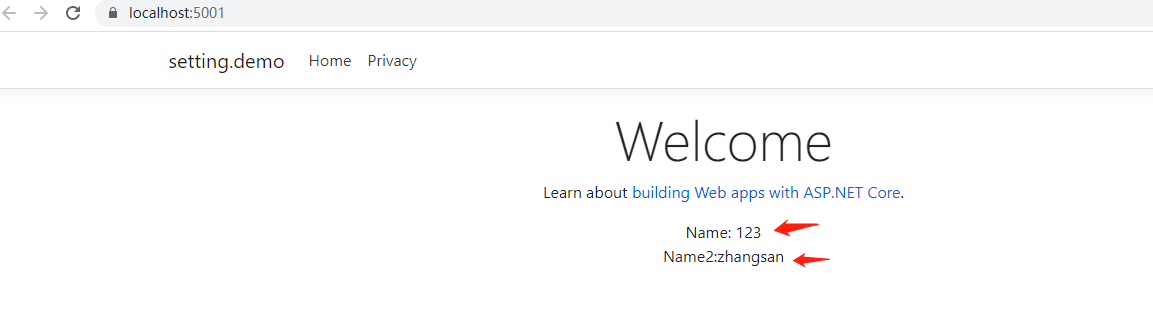
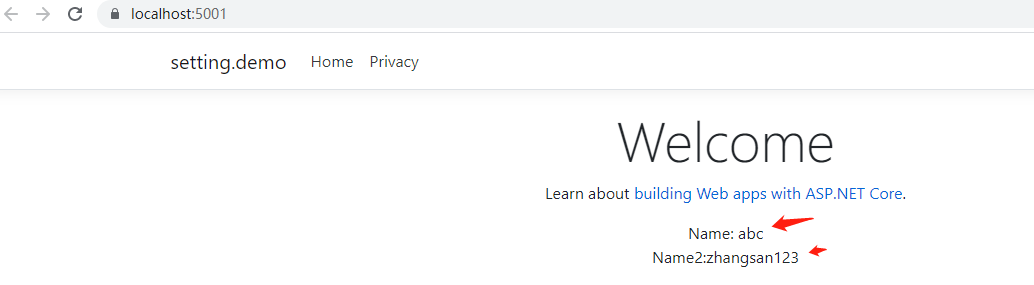
把配置文件修改为:
{
  "TestSetting": "abc",
  "AppOptions": {
    "UserName": "zhangsan123"
  }
}
刷新页面,已经发生变化:
1.3 IOptions 方式实时生效
新建 AppOptions.cs 类
/// <summary>
/// 配置文件
/// </summary>
public class AppOptions
{
    public string UserName { get; set; }
}
在 Startup.cs 处把配置加到 Options
public void ConfigureServices(IServiceCollection services)
{
    services.AddControllersWithViews();
    services.Configure<AppOptions>(Configuration.GetSection("AppOptions"));
}
使用:
public class HomeController : Controller
{
    private readonly ILogger<HomeController> _logger;
    private readonly IConfiguration _configuration;
    private IOptionsMonitor<AppOptions> _options;

    public HomeController(ILogger<HomeController> logger, IConfiguration configuration, IOptionsMonitor<AppOptions> appOptions)
    {
        _logger = logger;
        _configuration = configuration;
        _options = appOptions;
    }

    public IActionResult Index()
    {
        string Name = _configuration["TestSetting"];
        string Name2 = _options.CurrentValue.UserName;
        ViewBag.Name = Name;
        ViewBag.Name2 = Name2;
        return View();
    }
}
IOptions 有三种方式
1. IOptions<T>          //站点启动后,获取到的值永远不变
2. IOptionsMonitor<T>   //站点启动后,如果配置文件有变化会发布事件 (加载配置时,reloadOnChange:true 必须为true)
3. IOptionsSnapshot<T>  //站点启动后,每次获取到的值都是配置文件里的最新值 (加载配置时,reloadOnChange:true 必须为true)
注意:
IOptionsMonitor<T> 和 IOptionsSnapshot<T> 的最大区别是前者可以被其他的 Singleton Services 使用而后者不可以, 因为前者被注册为 Singleton 而后者是被注册为 Scoped,也就是说文件被修改了前者会立即 Reload,而后者是在每个请求才被 Reload。
例:
public class HomeController : Controller
{
    private readonly ILogger<HomeController> _logger;
    private UserService _userService;

    public HomeController(ILogger<HomeController> logger, UserService userService)
    {

        _userService = userService;
    }

    public IActionResult Index()
    {
        string Name2 = _userService.GetName();
        ViewBag.Name2 = Name2;
        return View();
    }
}
public class UserService
{
    private IOptionsMonitor<AppOptions> _options;

    public UserService(IOptionsMonitor<AppOptions> appOptions)
    {
        _options = appOptions;
    }

    public string GetName()
    {
        var Name = _options.CurrentValue.UserName;
        return Name;
    }
}
public void ConfigureServices(IServiceCollection services)
{
    services.AddControllersWithViews();
    services.Configure<AppOptions>(Configuration.GetSection("AppOptions"));
    services.AddSingleton<UserService>();
}
上面的 UserService 是单例注入的,通过 IOptionsMonitor<T>的方式是可以实现配置实时刷新的,而 IOptionsSnapshot<T>启动就会报错。
1.4 多个配置文件加载实时生效
增加多一个 db 配置文件
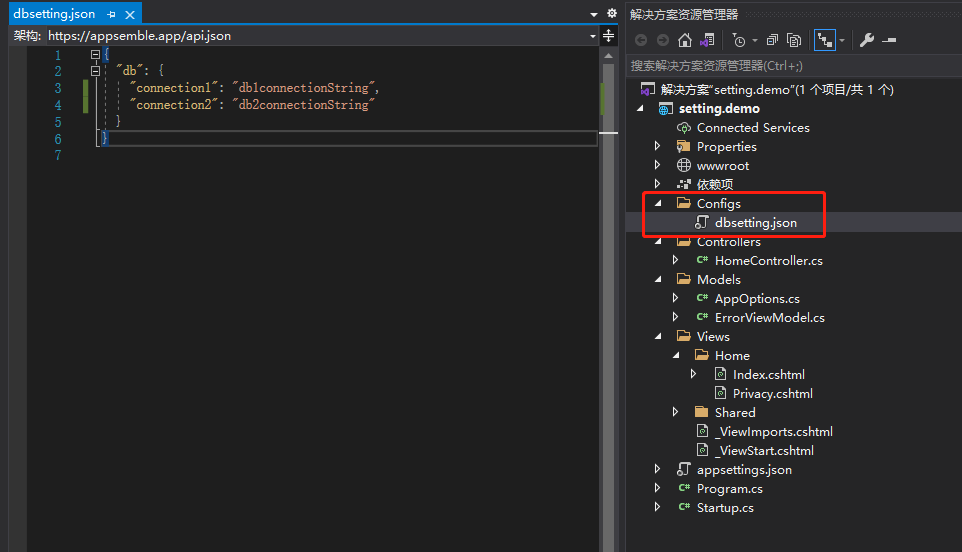
修改 Program.cs 处 CreateHostBuilder(),也是加载时加上 reloadOnChange:true 就可以了。
public static IHostBuilder CreateHostBuilder(string[] args) =>
            Host.CreateDefaultBuilder(args)
            .ConfigureAppConfiguration((context, config) =>
            {
                config.AddJsonFile("appsettings.json", optional: true, reloadOnChange: true);
                config.AddJsonFile("Configs/dbsetting.json", optional: true, reloadOnChange: true);
            })
                .ConfigureWebHostDefaults(webBuilder =>
                {
                    webBuilder.UseStartup<Startup>();

                });
使用也是一样的:
public class HomeController : Controller
{
    private readonly ILogger<HomeController> _logger;
    private readonly IConfiguration _configuration;
    private AppOptions _options;
    public HomeController(ILogger<HomeController> logger, IConfiguration configuration, IOptionsMonitor<AppOptions> appOptions)
    {
        _logger = logger;
        _configuration = configuration;
        _options = appOptions.CurrentValue;
    }

    public IActionResult Index()
    {
        string Name = _configuration["TestSetting"];
        string Name2 = _configuration["db:connection1"];
        ViewBag.Name = Name;
        ViewBag.Name2 = Name2;
        return View();
    }
}