Introduce this library: Markdown files are displayed in C#Blazor

Introduce this library: Markdown files are displayed in C#Blazor

My idea is that in addition to providing the tool for free use, we can also let everyone understand how this tool was developed, which should be more convenient.

最后更新 2/26/2022 10:15 PM
沙漠尽头的狼
预计阅读 3 分钟
分类
Blazor
标签
.NET C# Blazor Markdown

1 Talk about purpose

前几天上线了一个在线 Icon 转换工具,为了让大家使用放心,改了点代码,在转换下载 Icon 图标后立即删除临时文件,并在工具下面贴上了工具的开发步骤和代码,大家看这样改是否合适,见Issue 1

这篇不讲代码修改过程(因为工具和网站博文已经同步更新),本文讲讲在工具下方展示 Markdown 文件的实现方式,先看效果:

Blazor中显示Markdown

** Why add this function? **

My idea is that in addition to providing the tool for free use, we can also let everyone understand how this tool was developed. This should be more convenient:

  1. 默认是不显示的,点击如何开发的?的按钮加载开发文章说明。
  2. 评论功能目前没有(不排除后面加上),需要点击我要建议(吐槽)按钮跳转到Dotnet9网站同篇博文留言。
  3. 旁边有个按钮我要浏览源码可以点击浏览工具源码。

Let's talk about how to display the Markdown file in Blazor, first explaining the functions completed so far:

  1. Just display the Markdown file as html.
  2. Highlight is not currently added.

2 Development steps

参考blazor-markdown

  1. introduced with the
<PackageReference Include="BlazorMarkdown" Version="1.0.0" />
<PackageReference Include="HtmlSanitizer" Version="7.1.488" />
  1. injection assembly

Program.cs

builder.Services.AddScoped<IHtmlSanitizer, HtmlSanitizer>(x =>
{
    // Configure sanitizer rules as needed here.
    // For now, just use default rules + allow class attributes
    var sanitizer = new HtmlSanitizer();
    sanitizer.AllowedAttributes.Add("class");
    return sanitizer;
});
  1. reference namespace

_Imports.razor

@using BlazorMarkdown
  1. use

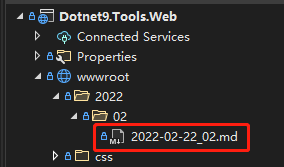
Prepare the Markdown file, for example, if I put it under wwwroot:

Markdown文件

IcoTool.razor中就可以直接使用了:

<Markdown FilePath="wwwroot/2022/02/2022-02-22_02.md" />

summary

It's over, it's as simple as that. See the beginning of the article for the effect. I won't be wordy today.

Forget that there are multimedia files such as pictures in markdown, remember to add these styles to achieve adaptability:

<style>
    h3 {
        border-bottom: 1px solid #eee;
        margin-top: 50px;
        padding-bottom: 10px;
    }

    pre {
        background: #1E1E1E;
        color: #eee;
        overflow-x: auto;
        padding: 0.5em !important;
        white-space: pre;
        word-break: normal;
        word-wrap: normal;
    }

    img, video, source { max-width: 100% }

    pre > code { white-space: pre; }
</style>
Keep Exploring

延伸阅读

更多文章
同分类 / 同标签 11/6/2024

Why is my blog site back in Blazor?

The blog website has gone through hardships in development. It has tried nearly 10 versions such as MVC, Vue, and Go. Now it has returned to Blazor and adopts static SSR. The speed has skyrocketed and it has been successfully launched.

继续阅读
同分类 / 同标签 2/29/2024

Data display can also be done in Winform

In the process of developing winform, data display functions are often needed. I have been using the gridcontrol before. Today, I want to use an example to introduce to you how to use the table component in ant design blazor hybrid to display data.

继续阅读
同分类 / 同标签 2/29/2024

Can Winform's interface become better?

A few days ago, I introduced to you the use of blazor hybrid in winform, and I also said that with blazor's ui, our winform program design can be more beautiful. Next, I want to use an example of drawing in winform blazor hybrid to illustrate it, hoping to be helpful to you.

继续阅读