
原文链接:https://devblogs.microsoft.com/dotnet/asp-net-core-updates-in-dotnet-7-rc-1/
原文作者:Daniel Roth
翻译:沙漠尽头的狼(谷歌翻译加持)
.NET 7 Release Candidate 1 (RC1) 现已推出,其中包括对 ASP.NET Core 的许多重大新改进。
以下是此预览版中新增功能的摘要:
- Blazor WebAssembly 中的动态身份验证请求
- 处理位置变化事件
- Blazor WebAssembly 调试改进
- .NET 6 项目的.NET WebAssembly 项目构建工具
- WebAssembly 上的 .NET JavaScript 互操作
- Kestrel 完整的证书链改进
- 更快的 HTTP/2 上传
- HTTP/3 改进
- 通过 HTTP/3 对 WebTransport 的实验性 Kestrel 支持
- 对 gRPC JSON 转码的实验性 OpenAPI 支持
- 速率限制中间件改进
- macOS 开发证书改进
有关为 .NET 7 计划的 ASP.NET Core 工作的更多详细信息,请参阅 GitHub 上的 .NET 7 的完整 ASP.NET Core 路线图。
开始使用
要开始使用 .NET 7 Release Candidate 1 中的 ASP.NET Core,请安装 .NET 7 SDK。
如果你在 Windows 上使用 Visual Studio,我们建议安装最新的Visual Studio 2022 预览版。如果您使用的是 macOS,我们建议您安装最新的Visual Studio 2022 for Mac 预览版。
要安装最新的 .NET WebAssembly 构建工具,请从提升的命令提示符处运行以下命令:
dotnet workload install wasm-tools
升级现有项目
要将现有的 ASP.NET Core 应用从 .NET 7 Preview 7 升级到 .NET 7 RC1:
- 将所有 Microsoft.AspNetCore._ 包引用更新为
.7.0.0-rc.1._ - 将所有 Microsoft.Extensions._ 包引用更新为
.7.0.0-rc.1._
另请参阅.NET 7 的 ASP.NET Core 中的重大更改的完整列表。
Blazor WebAssembly 中的动态身份验证请求
Blazor 为使用 OpenID Connect 和各种身份提供程序(包括 Azure Active Directory (Azure AD) 和 Azure AD B2C)的身份验证提供开箱即用的支持。在 .NET 7 中,Blazor 现在支持在运行时使用自定义参数创建动态身份验证请求,以处理 Blazor WebAssembly 应用中更高级的身份验证方案。要指定其他参数,请使用新的InteractiveRequestOptions类型和NavigateToLogin``辅助方法NavigationManager。
例如,您可以为身份提供者指定一个登录提示,以便像这样进行身份验证:
InteractiveRequestOptions requestOptions = new()
{
    Interaction = InteractionType.SignIn,
    ReturnUrl = NavigationManager.Uri,
};
requestOptions.TryAddAdditionalParameter("login_hint", "user@example.com");
NavigationManager.NavigateToLogin("authentication/login", requestOptions);
同样,您可以指定 OpenID Connect prompt 参数,例如当您想要强制交互式登录时:
InteractiveRequestOptions requestOptions = new()
{
    Interaction = InteractionType.SignIn,
    ReturnUrl = NavigationManager.Uri,
};
requestOptions.TryAddAdditionalParameter("prompt", "login");
NavigationManager.NavigateToLogin("authentication/login", requestOptions);
您可以使用IAccessTokenProvider直接用于请求令牌时指定这些选项:
var accessTokenResult = await AccessTokenProvider.RequestAccessToken(
    new AccessTokenRequestOptions
    {
        Scopes = new[] { "SecondAPI" }
    });

if (!accessTokenResult.TryGetToken(out var token))
{
    accessTokenResult.InteractiveOptions.AddAdditionalParameter("login_hint", "user@example.com");
    NavigationManager.NavigateToLogin(accessTokenResult.InteractiveRequestUrl, accessTokenResult.InteractionOptions);
}
当无法获取令牌时,您还可以通过AuthorizationMessageHandler指定身份验证请求选项:
try
{
    await httpclient.Get("/orders");

}
catch (AccessTokenNotAvailableException ex)
{
    ex.Redirect(requestOptions =>
    {
        requestOptions.AddAdditionalParameter("login_hint", "user@example.com");
    });
}
为身份验证请求指定的任何其他参数都将传递到底层身份验证库,然后由其处理。
注意:为 msal.js 指定附加参数尚未完全实现,但预计将在即将发布的版本中完成。
处理位置变化事件
.NET 7 中的 Blazor 现在支持处理位置更改事件。这允许您在用户执行页面导航时警告用户未保存的工作或执行相关操作。
使用NavigationManager服务的RegisterLocationChangingHandler方法注册处理程序用于处理位置更改事件。然后,您的处理程序可以在导航时执行异步工作,或者通过调用LocationChangingContext的PreventNavigation取消导航。RegisterLocationChangingHandler返回一个IDisposable实例,该实例在释放时会删除相应的位置更改处理程序。
例如,以下处理程序阻止导航到计数器页面:
var registration = NavigationManager.RegisterLocationChangingHandler(async context =>
{
    if (context.TargetLocation.EndsWith("counter"))
    {
        context.PreventNavigation();
    }
});
请注意,您的处理程序只会被用于应用程序内的内部导航调用。外部导航只能使用 JavaScript 中的beforeunload 事件同步处理。
新NavigationLock组件使处理位置变化事件的常见场景更容易。NavigationLock公开一个OnBeforeInternalNavigation回调,您可以使用它来拦截和处理内部位置更改事件。如果您希望用户也确认外部导航,您可以使用该ConfirmExternalNavigations属性,它将拦截beforeunload事件并触发浏览器特定提示。
<EditForm EditContext="editContext" OnValidSubmit="Submit">
    ...
</EditForm>
<NavigationLock OnBeforeInternalNavigation="ConfirmNavigation" ConfirmExternalNavigation />

@code {
    private readonly EditContext editContext;

    ...

    // Called only for internal navigations
    // External navigations will trigger a browser specific prompt
    async Task ConfirmNavigation(LocationChangingContext context)
    {
        if (editContext.IsModified())
        {
            var isConfirmed = await JS.InvokeAsync<bool>("window.confirm", "Are you sure you want to leave this page?");

            if (!isConfirmed)
            {
                context.PreventNavigation();
            }
        }
    }
}
Blazor WebAssembly 调试改进
.NET 7 中的 Blazor WebAssembly 调试现在具有以下改进:
- 支持 Just My Code 设置以显示或隐藏不在用户代码中的类型成员
- 支持检查多维数组
- 调用堆栈现在显示异步方法的正确名称
- 改进的表达式评估
- 正确处理派生成员的
new关键字 - 在
System.Diagnostics中支持调试器相关的属性
为.NET 6 项目的.NET WebAssembly 构建工具
现在,在使用 .NET 7 SDK 时,您可以将 .NET WebAssembly 构建工具用于 .NET 6 项目。新的wasm-tools-net6工作负载包括用于 .NET 6 项目的 .NET WebAssembly 构建工具,以便它们可以与 .NET 7 SDK 一起使用。要安装新wasm-tools-net6工作负载,请从提升的命令提示符运行以下命令:
dotnet workload install wasm-tools-net6
安装 .NET WebAssembly 构建工具带来的wasm-tools工作负载是为 .NET 7 项目准备的(翻译有点拗口,这句可能翻译错了,原文是:The existing wasm-tools workload installs the .NET WebAssembly build tools for .NET 7 projects.)。但是,.NET 7 版本的 .NET WebAssembly 构建工具与使用 .NET 6 构建的现有项目不兼容。需要同时支持 .NET 6 和 .NET 7 使用 .NET WebAssembly 构建工具的项目将需要使用 multi-targeting。
WebAssembly 上的 .NET JavaScript 互操作
.NET 7 引入了一种新的低级(low-level)机制,用于在基于 JavaScript 的应用程序中使用 .NET。借助这一新的 JavaScript 互操作功能,您可以使用 .NET WebAssembly 运行时从 JavaScript 调用 .NET 代码,也可以从 .NET 调用 JavaScript 功能,而无需依赖 Blazor UI 组件模型。
查看新的 JavaScript 互操作功能的最简单方法是在wasm-experimental工作负载中使用新的实验模板:
dotnet workload install wasm-experimental
此工作负载包含两个项目模板:WebAssembly Browser App 和 WebAssembly Console App。这些模板是实验性的,这意味着它们的开发人员工作流尚未完全整理好(例如,这些模板尚未在 Visual Studio 中运行)。但是 .NET 7 支持这些模板中使用的 .NET 和 JavaScript API,并为通过 JavaScript 在 WebAssembly 上使用 .NET 提供了基础。
您可以通过运行以下命令来创建 WebAssembly 浏览器应用程序:
dotnet new wasmbrowser
此模板创建一个简单的 Web 应用程序,演示如何在浏览器中同时使用 .NET 和 JavaScript。WebAssembly 控制台应用程序类似,但作为 Node.js 控制台应用程序而不是基于浏览器的 Web 应用程序运行。
创建的示例项目中的 main.js 中的 JavaScript 模块演示了如何从 JavaScript 运行 .NET 代码。相关 API 是从 dotnet.js 导入的。这些 API 使您能够设置可以导入到 C# 代码中的命名模块,以及调用 .NET 代码公开的方法,包括Program.Main:
import { dotnet } from "./dotnet.js";

const is_browser = typeof window != "undefined";
if (!is_browser) throw new Error(`Expected to be running in a browser`);

// Setup the .NET WebAssembly runtime
const { setModuleImports, getAssemblyExports, getConfig, runMainAndExit } =
  await dotnet
    .withDiagnosticTracing(false)
    .withApplicationArgumentsFromQuery()
    .create();

// Set module imports that can be called from .NET
setModuleImports("main.js", {
  window: {
    location: {
      href: () => globalThis.window.location.href,
    },
  },
});

const config = getConfig();
const exports = await getAssemblyExports(config.mainAssemblyName);
const text = exports.MyClass.Greeting(); // Call into .NET from JavaScript
console.log(text);

document.getElementById("out").innerHTML = `${text}`;
await runMainAndExit(config.mainAssemblyName, ["dotnet", "is", "great!"]); // Run Program.Main
要导入 JavaScript 函数以便可以从 C# 调用它,请在匹配的方法签名上使用新的JSImportAttribute:
[JSImport("window.location.href", "main.js")]
internal static partial string GetHRef();
JSImportAttribute的第一个参数是要导入的 JavaScript 函数的名称,第二个参数是模块的名称,这两个参数都是由 main.js 中的setModuleImports调用设置的。
在导入的方法签名中,您可以对参数和返回值使用 .NET 类型,这些类型将为您编组。使用JSMarshalAsAttribute<T>控制导入的方法参数的编组方式。例如,您可以选择将一个long 编组为JSType.Number或JSType.BigInt。您可以将Action/Func回调作为参数传递,这些参数将被编组为可调用的 JavaScript 函数。您可以同时传递 JavaScript 和托管对象引用,它们将被编组为代理对象,使对象在边界上保持活动状态,直到代理被垃圾回收。您还可以导入和导出带Task返回值的异步方法,它将作为 JavaScript promises 进行编组。在导入和导出的方法上,大多数封装类型作为参数和返回值双向工作,。
使用JSExportAttribute导出 .NET 方法以便可以从 JavaScript 调用:
[JSExport]
internal static string Greeting()
{
    var text = $"Hello, World! Greetings from {GetHRef()}";
    Console.WriteLine(text);
    return text;
}
Blazor 提供了自己的基于 IJSRuntime 接口的 JavaScript 互操作机制,该机制在所有 Blazor 托管模型中得到统一支持。这种常见的异步抽象使库作者能够构建可在 Blazor 生态系统中共享的 JavaScript 互操作库,并且仍然是在 Blazor 中执行 JavaScript 互操作的推荐方式。但是,在 Blazor WebAssembly 应用程序中,您还可以选择IJSInProcessRuntime进行同步 JavaScript 互操作调用,甚至使用IJSUnmarshalledRuntime进行解组调用。 IJSUnmarshalledRuntime使用起来很棘手,仅部分支持。在 .NET 7 中IJSUnmarshalledRuntime现在已经过时,应该用[JSImport]/[JSExport]机制替换。Blazor 不直接公开从 JavaScript 使用的dotnet运行时实例,但仍然可以通过.getDotnetRuntime(0)调用。您还可以通过在 C#代码中调用JSHost.ImportAsync导入 JavaScript 模块,这可以使模块导出对 [JSImport]可见。
Kestrel 完整的证书链改进
类型X509Certificate2Collection的HttpsConnectionAdapterOptions具有新属性ServerCertificateChaintype ,通过允许指定包含中间证书的完整链,可以更轻松地验证证书链。有关详细信息,请参阅dotnet/aspnetcore#21513。
更快的 HTTP/2 上传
我们已将 Kestrel 的默认 HTTP/2 上传连接窗口大小从 128 KB 增加到 1 MB,这显著提高了使用 Kestrel 的默认配置的高延迟连接的 HTTP/2 上传速度。
在仅引入 10 毫秒的人工延迟后,我们通过在 localhost 上使用单个流上传 108 MB 文件上传来测试增加此限制的影响,并看到上传速度提高了大约 6 倍。
下面的屏幕截图比较了在 Edge 的开发工具网络选项卡中上传 108 MB 所需的时间:
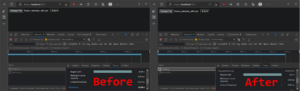
- 之前:26.9 秒
- 之后:4.3 秒
HTTP/3 改进
.NET 7 RC1 继续改进 Kestrel 对 HTTP/3 的支持。改进的两个主要领域是与 HTTP/1.1 和 HTTP/2 的功能对等以及性能。
此版本最大的特点是完全支持ListenOptions.UseHttps使用 HTTP/3。Kestrel 提供了用于配置连接证书的高级选项,例如拦截到Server Name Indication (SNI)。
以下示例显示如何使用 SNI 回调来解析 TLS 选项:
var builder = WebApplication.CreateBuilder(args);
builder.WebHost.ConfigureKestrel(options =>
{
    options.ListenAnyIP(8080, listenOptions =>
    {
        listenOptions.Protocols = HttpProtocols.Http1AndHttp2AndHttp3;
        listenOptions.UseHttps(new TlsHandshakeCallbackOptions
        {
            OnConnection = context =>
            {
                var options = new SslServerAuthenticationOptions
                {
                    ServerCertificate = ResolveCertForHost(context.ClientHelloInfo.ServerName)
                };
                return new ValueTask<SslServerAuthenticationOptions>(options);
            },
        });
    });
});
我们还做了大量工作来减少 .NET 7 RC1 中的 HTTP/3 分配。您可以在这里看到其中的一些改进:
- HTTP/3: Avoid per-request cancellation token allocations
- HTTP/3: Avoid ConnectionAbortedException allocations
- HTTP/3: ValueTask pooling
通过 HTTP/3 对 WebTransport 的实验性 Kestrel 支持
我们很高兴地宣布在 Kestrel 中对基于 HTTP/3 的 WebTransport 的内置实验性支持。此功能是由我们优秀的实习生 Daniel 编写的!WebTransport 对于类似于 WebSockets 的传输协议是一个新的草案规范,它允许每个连接使用多个流。这对于拆分通信通道并因此避免线头阻塞很有用。例如,考虑一个基于网络的在线游戏,其中游戏状态在一个双向流上传输,玩家对游戏语音聊天功能的语音在另一个双向流上传输,而玩家的控制在单向流上传输。使用 WebSockets,这一切都需要放在单独的连接上或压缩到单个流中。使用 WebTransport,您可以将所有流量保留在一个连接上,但将它们分成自己的流,如果一个流阻塞,其他流将继续不间断。
其他详细信息将在单独的博客文章中提供。
对 gRPC JSON 转码的实验性 OpenAPI 支持
gRPC JSON 转码是 .NET 7 中的一项新功能,用于将 gRPC API 转换为 RESTful API。
.NET 7 RC1 增加了从 gRPC 转码 RESTful API 生成 OpenAPI 的实验性支持。带有 gRPC JSON 转码的 OpenAPI 是一个非常需要的功能,我们很高兴提供一种结合这些伟大技术的方法。NuGet 包在 .NET 7 中是实验性的,让我们有时间探索集成这些功能的最佳方式。
要使用 gRPC JSON 转码启用 OpenAPI:
- 添加对Microsoft.AspNetCore.Grpc.Swagger的包引用。版本必须为 0.3.0-xxx 或更高版本。
- 在启动时配置 Swashbuckle。该
AddGrpcSwagger方法将 Swashbuckle 配置为包含 gRPC 端点。
var builder = WebApplication.CreateBuilder(args);
builder.Services.AddGrpc().AddJsonTranscoding();
builder.Services.AddGrpcSwagger();
builder.Services.AddSwaggerGen(c =>
{
    c.SwaggerDoc("v1",
        new OpenApiInfo { Title = "gRPC transcoding", Version = "v1" });
});

var app = builder.Build();
app.UseSwagger();
app.UseSwaggerUI(c =>
{
    c.SwaggerEndpoint("/swagger/v1/swagger.json", "My API V1");
});
app.MapGrpcService<GreeterService>();

app.Run();
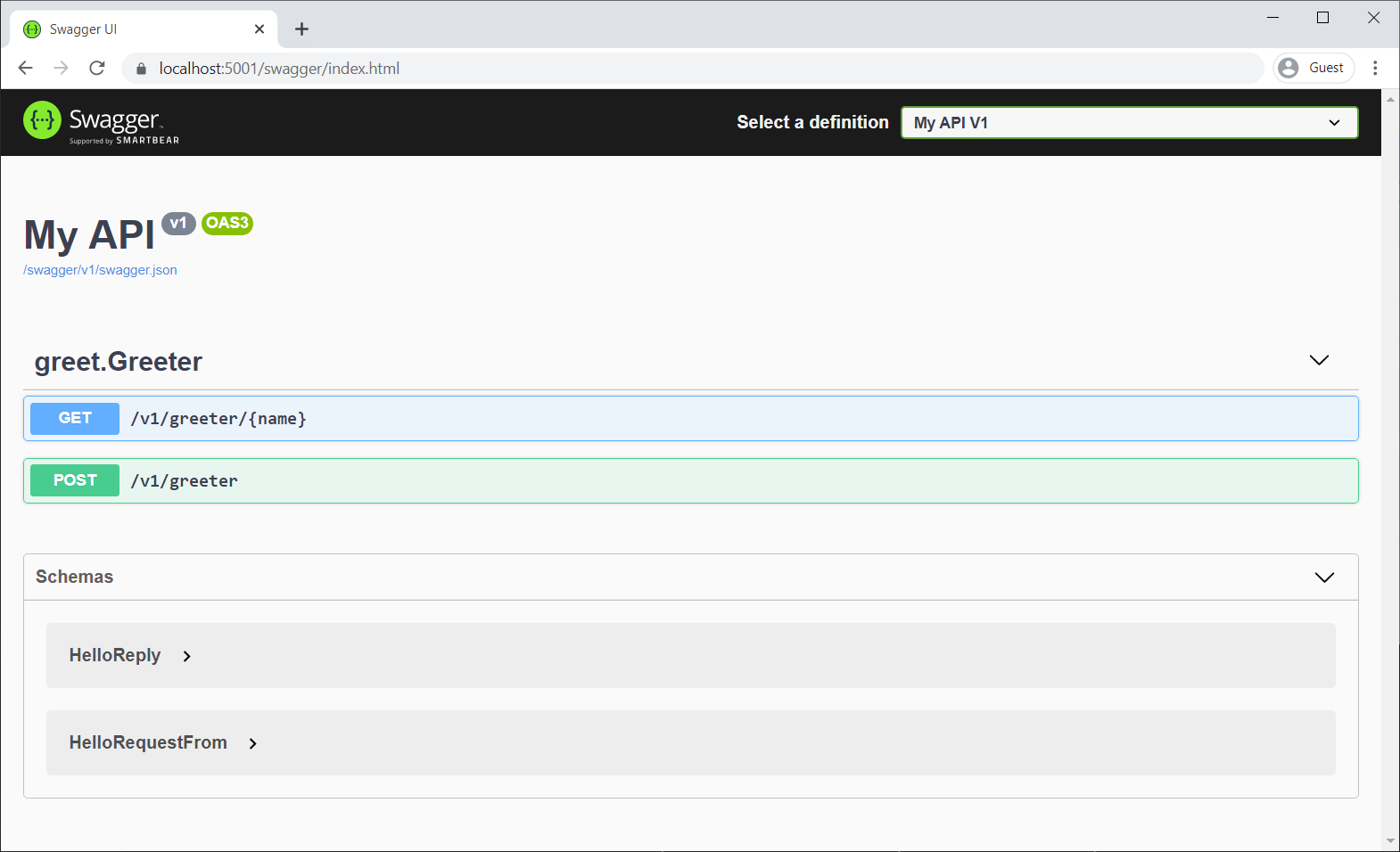
要确认 Swashbuckle 正在为 RESTful gRPC 服务生成 Swagger,请启动应用程序并导航到 Swagger UI 页面:
限流中间件改进
我们为 .NET 7 RC1 中的限流中间件添加了许多功能,使其功能更强大,更易于使用。
我们添加了可用于启用或禁用给定端点上的速率限制的属性。例如,以下是如何将命名策略应用MyControllerPolicy到控制器:
public class MyController : Controller
{
    [EnableRateLimitingAttribute("MyControllerPolicy")]
    public IActionResult Index()
    {
        return View();
    }
}
您还可以在给定端点或一组端点上完全禁用速率限制。假设您在一组端点上启用了速率限制:
app.MapGroup("/public/todos").RequireRateLimiting("MyGroupPolicy");
然后,您可以禁用该组中特定端点的速率限制,如下所示:
app.MapGroup("/public/todos/donothing").DisableRateLimiting();
您现在还可以将策略直接应用于端点。与命名策略不同,以这种方式添加的策略不需要在RateLimiterOptions. 假设您已经定义了一个策略类型:
public class MyRateLimiterPolicy : IRateLimiterPolicy<string>
{
...
}
您可以将其实例直接添加到端点,如下所示:
app.MapGet("/", () => "Hello World!").RequireRateLimiting(new MyRateLimiterPolicy());
最后,我们更新了RateLimiterOptions便捷方法以采用Action<Options>而不是Options实例,还添加了IServiceCollection使用速率限制的扩展方法。因此,要在您的应用中启用上述所有速率限制策略,您可以执行以下操作:
builder.Services.AddRateLimiter(options =>
{
    options.AddTokenBucketLimiter("MyControllerPolicy", options =>
    {
        options.TokenLimit = 1;
        options.QueueProcessingOrder = QueueProcessingOrder.OldestFirst;
        options.QueueLimit = 1;
        options.ReplenishmentPeriod = TimeSpan.FromSeconds(10);
        options.TokensPerPeriod = 1;
    })
    .AddPolicy<string>("MyGroupPolicy", new MyRateLimiterPolicy());
});
这会将 TokenBucketLimiter应用于您的控制器,将您的自定义MyRateLimiterPolicy应用于匹配端点./public/todos(除了/public/todos/donothing),并将您的自定义MyRateLimiterPolicy应用于/。
macOS 开发证书改进
在此版本中,我们对 macOS 用户使用 HTTPS 开发证书的体验进行了一些重大的质量改进,大大减少了在创建、信任、读取和删除 ASP.NET Core HTTPS 开发时显示的身份验证提示的证书。当 macOS 上的 ASP.NET Core 开发人员尝试在其工作流程中使用开发证书时,这一直是一个痛点。
在此版本中,通过dotnet dev-certs工具在 macOS 上生成的开发证书具有更窄的信任范围,现在将设置添加到每个用户的信任设置中而不是系统范围内,并且 Kestrel 将能够绑定到这些新证书而无需访问系统钥匙串。作为这项工作的一部分,还对质量进行了一些改进,例如重新处理一些面向用户的消息以提高清晰度和准确性。
在 macOS 上的开发过程中使用 HTTPS 时,这些更改结合在一起可以带来更流畅的体验和更少的密码提示。
查看新的 Blazor 更新的实际应用!
有关 Blazor WebAssembly 中的动态身份验证请求、Blazor WebAssembly 调试改进以及 WebAssembly 上的 .NET JavaScript 互操作的实时演示,请参阅我们最近的Blazor 社区站会:
给予反馈
我们希望您喜欢 .NET 7 中的 ASP.NET Core 预览版。通过在GitHub 上提交问题,让我们知道您对这些新改进的看法。
感谢您试用 ASP.NET Core!