
大家好,我是沙漠尽头的狼。
网站使用Blazor重构上线一天了,用Blazor开发是真便捷,空闲时间查查gpt和github,又上线一个 正则表达式在线验证工具 和几个在线小游戏,比如 井字棋游戏、扫雷 等。
下面简单介绍一下,看大家有没有兴趣或建议。
1. 新增在线小工具
1.1. 正则表达式在线验证工具
在线访问:https://dotnet9.com/tools/regextester
这个示例演示了如何使用Blazor Server开发一个简单的正则表达式在线验证工具。用户可以输入正则表达式和测试字符串并单击“测试”按钮以测试正则表达式是否匹配测试字符串。此外,这个示例还提供了10几个常用的正则表达式测试,用户可以单击链接加载测试数据并自动填充正则表达式和测试字符串。
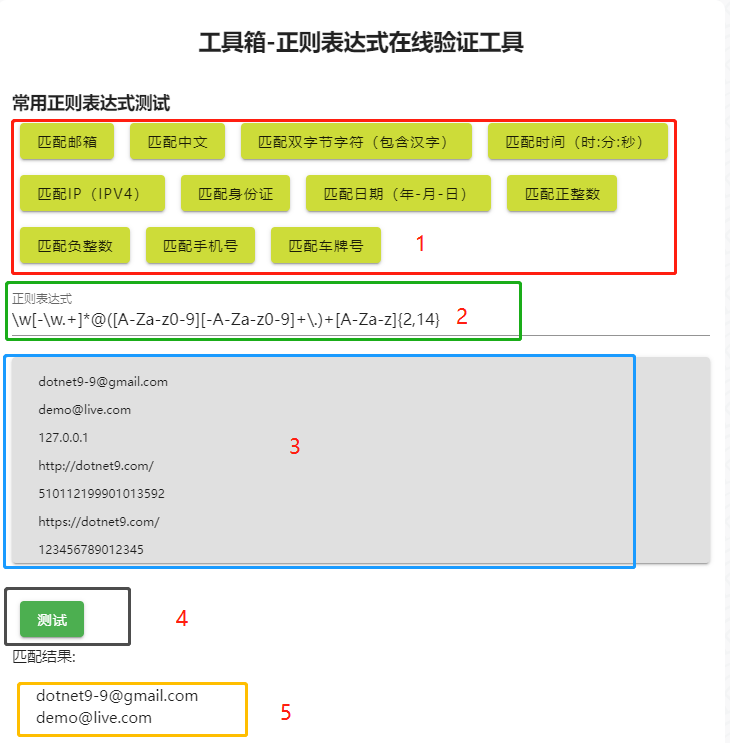
上图的标注简单说明:
- 常用正则表达式:点击自动在下方填充对应的正则表达式(标注2)、测试文本(标注3),点击【测试】(标注4)即可验证
- 正则表达式:填写需要使用的正则表达式
- 测试文本区域:将需要验证提取的字符串填写在这里
- 【测试】按钮:点击应用上面的正则表达式(标注2)并提取测试文本区域(标注3)内容,将匹配结果显示在下方(标注5)
- 显示匹配的结果
代码一共123行,里面有常用的正则表达式,简单吧:
@page "/tools/regextester"
@using System.Text.RegularExpressions

<PageTitle>@_title</PageTitle>

<MApp>
    <h2 style="margin-bottom: 30px; margin-top: 10px; text-align: center;">@_title</h2>


    <h3>常用正则表达式测试</h3>

    <p>
        @foreach (var item in _regexPatterns)
        {
            <MButton Color="lime" Class="ma-2" OnClick='() => LoadTest(item.Pattern)'>@item.Name</MButton>
        }
    </p>

    <div>
        <MTextField Label="正则表达式" Type="string" TValue="string" @bind-Value="_regexPattern"/>
    </div>

    <div>
        <MTextarea BackgroundColor="grey lighten-2" Solo
                   Color="orange orange-darken-4" TValue="string" @bind-Value="_testString"
                   Label="测试字符串" Rows="8" style="font-size:12px;" RowHeight="15" AutoGrow/>
    </div>

    <div>
        <MButton Color="success" class="ma-2" OnClick="TestRegex">测试</MButton>
    </div>

    <div>
        @if (string.IsNullOrEmpty(_regexPattern) || string.IsNullOrEmpty(_testString))
        {
            <p>请输入正则表达式和测试字符串并单击“测试”按钮。</p>
        }
        else
        {
            <p>匹配结果: </p>
            <ul>
                @foreach (var match in _matches)
                {
                    <li>@match</li>
                }
            </ul>
        }
    </div>
</MApp>

@code {
        private const string? _title = "工具箱-正则表达式在线验证工具";
    private string? _regexPattern;
    private string? _testString;

    private string? _defaultString = @"下面是一些测试实例:
    history: v1.0 正则表达式测试工具上线
    v1.1 2023-06-23 刚刚上线
    1. 截至目前为止,最长域名后缀 .cancerresearch
    demo@qq.com
    dotnet9-9@vip.qq.com
    dotnet9-9@gmail.com
    demo@live.com
    127.0.0.1
    http://dotnet9.com/
    510112199901013592
    https://dotnet9.com/
    123456789012345
    18628035382
    13493532389
    川AAA008
    京B45698
    14:22:19";

    private readonly List<RegexItem> _regexPatterns = new()
    {
        new("匹配邮箱", @"\w[-\w.+]*@([A-Za-z0-9][-A-Za-z0-9]+\.)+[A-Za-z]{2,14}"),
        new("匹配中文", @"[\u4e00-\u9fa5]+"),
        new("匹配双字节字符(包含汉字)", @"[^\x00-\xff]+"),
        new("匹配时间(时:分:秒)", @"([01]?\d|2[0-3]):[0-5]?\d:[0-5]?\d"),
        new("匹配IP(IPV4)", @"\d{0,3}\.\d{0,3}\.\d{0,3}\.\d{0,3}"),
        new("匹配身份证", @"\d{17}[0-9Xx]|\d{15}"),
        new("匹配日期(年-月-日)", @"(([0-9]{3}[1-9]|[0-9]{2}[1-9][0-9]{1}|[0-9]{1}[1-9][0-9]{2}|[1-9][0-9]{3})-(((0[13578]|1[02])-(0[1-9]|[12][0-9]|3[01]))|((0[469]|11)-(0[1-9]|[12][0-9]|30))|(02-(0[1-9]|[1][0-9]|2[0-8]))))|((([0-9]{2})(0[48]|[2468][048]|[13579][26])|((0[48]|[2468][048]|[3579][26])00))-02-29)"),
        new("匹配正整数", @"[1-9]\d*"),
        new("匹配负整数", @"-[1-9]\d*"),
        new("匹配手机号", @"(13\d|14[579]|15[^4\D]|17[^49\D]|18\d)\d{8}"),
        new("匹配车牌号", @"(([京津沪渝冀豫云辽黑湘皖鲁新苏浙赣鄂桂甘晋蒙陕吉闽贵粤青藏川宁琼使领][A-Z](([0-9]{5}[DF])|([DF]([A-HJ-NP-Z0-9])[0-9]{4})))|([京津沪渝冀豫云辽黑湘皖鲁新苏浙赣鄂桂甘晋蒙陕吉闽贵粤青藏川宁琼使领][A-Z][A-HJ-NP-Z0-9]{4}[A-HJ-NP-Z0-9挂学警港澳使领]))")
    };

    private readonly List<string> _matches = new();

    private void TestRegex()
    {
        if (string.IsNullOrWhiteSpace(_regexPattern) || string.IsNullOrWhiteSpace(_testString))
        {
            return;
        }
        try
        {
            var regex = new Regex(_regexPattern);
            var match = regex.Match(_testString);
            _matches.Clear();
            while (match.Success)
            {
                _matches.Add(match.Value);
                match = match.NextMatch();
            }
        }
        catch
        {
            _matches.Clear();
        }
    }

    private void LoadTest(string pattern)
    {
        _regexPattern = pattern;
        _testString = _defaultString;
    }

    record RegexItem(string Name, string Pattern);

}
2. 上线在线小游戏
这里先说明,站长上线小游戏,只是为了测试网站服务器压力,如果开发小游戏,建议用客户端模式(wasm),毕竟前者压力在服务器,后者在用户那里。
2.1. 猜数字游戏
在线访问:https://dotnet9.com/games/guessing-numbers
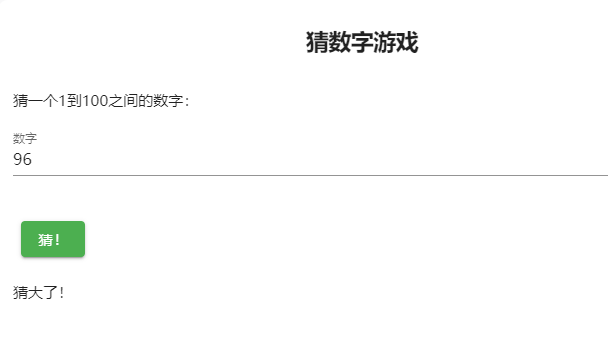
游戏开始时,会生成一个1到100之间的随机数字作为目标数字。玩家需要通过输入数字来猜测目标数字,系统会根据玩家的猜测给出相应的提示。如果玩家猜对了,游戏结束,显示恭喜信息,并提供开始新游戏的按钮。
这个游戏简单,代码几十行:
@page "/games/guessing-numbers"

<PageTitle>@_title</PageTitle>

<MApp>
    <h2 style="margin-bottom: 30px; margin-top: 10px; text-align: center;">@_title</h2>

    @if (_isGameOver)
    {
        <p>@_message</p>
        <p>游戏结束!</p>
        <p>
            <MButton Color="lime" Class="ma-2" OnClick='StartNewGame'>开始新游戏</MButton>
        </p>
    }
    else
    {
        <p>猜一个1到100之间的数字:</p>
        <p>
            <MTextField Label="数字" Type="string" TValue="int" @bind-Value="_guess"/>
        </p>
        <p>
            <MButton Color="success" class="ma-2" OnClick="CheckGuess">猜!</MButton>
        </p>
        <p>@_message</p>
    }
</MApp>


@code {
    readonly string? _title = "猜数字游戏";
    private int _targetNumber;
    private int _guess;
    private string? _message;
    private bool _isGameOver;

    protected override void OnInitialized()
    {
        StartNewGame();
    }

    private void StartNewGame()
    {
        var random = new Random();
        _targetNumber = random.Next(1, 101);
        _guess = 0;
        _message = "";
        _isGameOver = false;
    }

    private void CheckGuess()
    {
        if (_guess == _targetNumber)
        {
            _message = "恭喜你猜对了!";
            _isGameOver = true;
        }
        else if (_guess < _targetNumber)
        {
            _message = "猜小了!";
        }
        else
        {
            _message = "猜大了!";
        }
    }

}
2.2. 井字棋游戏
在线访问:https://dotnet9.com/games/tictactoe
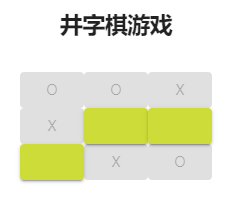
一个简单的井字棋游戏,玩家可以点击棋盘上的方格来下棋。游戏会检查是否有玩家获胜或者平局,并在游戏结束时显示相应的消息。玩家可以点击“开始新游戏”按钮来重新开始游戏。
代码117行:
@page "/games/tictactoe"

<PageTitle>@_title</PageTitle>

<MApp>
    <h2 style="margin-bottom: 30px; margin-top: 10px; text-align: center;">@_title</h2>

    @if (_isGameOver)
    {
        <p>@_message</p>
        <p>游戏结束!</p>
        <MButton Color="lime" Class="ma-2" OnClick='StartNewGame'>开始新游戏</MButton>
    }
    else
    {
        <div style="text-align: center;">
            @for (var i = 0; i < 3; i++)
            {
                <div>
                    @for (var j = 0; j < 3; j++)
                    {
                        var i1 = i * 3 + j;
                        <MButton Color="lime" OnClick='() => MakeMove(i1)' Disabled='IsCellDisabled(i1)'>@_board[i1]</MButton>
                    }
                </div>
            }
        </div>
        <p>@_message</p>
    }
</MApp>

@code {
    readonly string? _title = "井字棋游戏";
    private string?[] _board = new string[9];
    private string _currentPlayer = "X";
    private string? _message;
    private bool _isGameOver;

    private void MakeMove(int index)
    {
        if (_board[index] != null || _isGameOver)
        {
            return;
        }
        _board[index] = _currentPlayer;
        if (CheckWin(_currentPlayer))
        {
            _message = $"玩家 {_currentPlayer} 获胜!";
            _isGameOver = true;
        }
        else if (_board.All(cell => cell != null))
        {
            _message = "平局!";
            _isGameOver = true;
        }
        else
        {
            _currentPlayer = _currentPlayer == "X" ? "O" : "X";
            if (_currentPlayer == "O")
            {
                MakeComputerMove();
            }
        }
    }

    private void MakeComputerMove()
    {
    // 简单的随机选择一个可用的方格来下棋
        var availableMoves = Enumerable.Range(0, 9).Where(i => _board[i] == null).ToList();
        var random = new Random();
        var randomIndex = random.Next(availableMoves.Count);
        var computerMove = availableMoves[randomIndex];
        _board[computerMove] = _currentPlayer;

        if (CheckWin(_currentPlayer))
        {
            _message = $"电脑获胜!";
            _isGameOver = true;
        }
        else if (_board.All(cell => cell != null))
        {
            _message = "平局!";
            _isGameOver = true;
        }
        else
        {
            _currentPlayer = _currentPlayer == "X" ? "O" : "X";
        }
    }

    private bool CheckWin(string player)
    {
    // 检查所有可能的获胜组合
        return (_board[0] == player && _board[1] == player && _board[2] == player) ||
               (_board[3] == player && _board[4] == player && _board[5] == player) ||
               (_board[6] == player && _board[7] == player && _board[8] == player) ||
               (_board[0] == player && _board[3] == player && _board[6] == player) ||
               (_board[1] == player && _board[4] == player && _board[7] == player) ||
               (_board[2] == player && _board[5] == player && _board[8] == player) ||
               (_board[0] == player && _board[4] == player && _board[8] == player) ||
               (_board[2] == player && _board[4] == player && _board[6] == player);
    }

    private bool IsCellDisabled(int index)
    {
        return _isGameOver || _board[index] != null;
    }

    private void StartNewGame()
    {
        _board = new string[9];
        _currentPlayer = "X";
        _message = null;
        _isGameOver = false;
    }

}
2.3. 在线扫雷游戏
在线访问:https://dotnet9.com/games/minesweeper
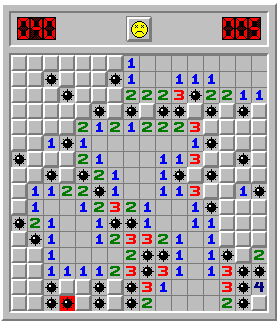
在这个示例中,玩家需要点击方格来揭开它们。如果玩家踩到地雷,游戏结束。如果玩家揭开的方格周围有地雷,方格上会显示相应的数字,表示周围的地雷数量。如果玩家成功揭开所有没有地雷的方格,游戏胜利。
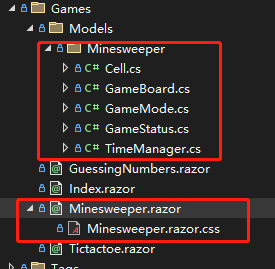
此游戏高度还原早期Window版本扫雷,代码较多,抄自开源项目:https://github.com/jarDotNet/BlazorMinesweeper, 如果对代码感兴趣可查看该开源项目,或阅读 Dotnet9网站 关于扫雷部分代码:
3. 最后的话
再说一次哦,网站的小游戏只是为了测试,Server模式不建议开发游戏类功能,这个交给Client模式吧。
大家有什么工具需求欢迎留言,站长有空会考虑加上。
今天分享到这,祝大家端午安康。
- 网站地址:https://dotnet9.com/
- 网站源码:https://github.com/dotnet9/Dotnet9
- .NET版本: .NET 8.0.0-preview.5.23280.8
- 微信技术群:添加站长微信(codewf),一定要备注【入群】2个字
- QQ技术群:771992300