

如果公司交给你一个任务让你写一个 api 接口,那么我们应该如何设计这个 api 接口来保证这个接口是对外看起来“高大上”,“羡慕崇拜”,并且使用起来和普通 api 接口无感,并且可以完美接入 aspnetcore 的认证授权体系呢,而不是自定义签名来进行自定义过滤器实现呢(虽然也可以但是并不是最完美的),如何让小白羡慕一眼就知道你是老鸟。
接下来我将给大家分享你不知道的自定义认证授体系。
我相信这可能是你面对 aspnetcore 下一个无论如何都要跨过去的坎,也是很多老鸟不熟悉的未知领域(很多人说能用就行,那么你可以直接右上角或者左上角)
如何打造一个最最最安全的 api 接口
技术选型
在不考虑性能的影响下我们选择非对称加密可以选择 sm 或者 rsa 加密,这边我们选择 rsa2048 位 pkcs8 密钥来进行,http 传输可以分为两个一个是 request 一个是 response 两个交互模式。
安全的交互方式在不使用 https 的前提下那么就是我把明文信息加密并且签名后给你,你收到后自己解密然后把你响应给我的明文信息加密后签名在回给我,这样就可以保证数据交互的安全性。
非对称加密一般拥有两个密钥,一个被称作为公钥,一个被称作为私钥,公钥是可以公开的哪怕放到互联网上也是没关系的,私钥是自己保存的,一般而言永远不会用到自己的私钥。
私钥签名的结果只能被对应的公钥校验成功,公钥加密的数据只能被对应的私钥解密
实现原理
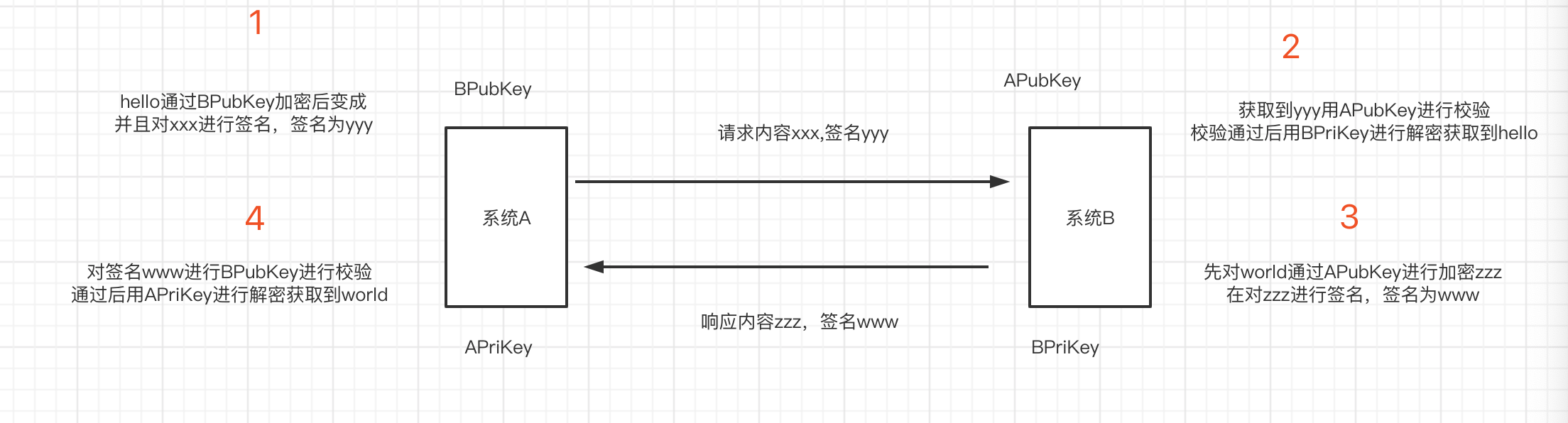
假设我们现在是两个系统间的交互,系统 A,系统 B。系统 A 有一对 rsa 密钥对我们称之为公钥 APubKey,私钥 APriKey,系统 B 有一对 rsa 密钥我们称之为公钥 BPubKey,私钥 BPriKey。
私钥是每个系统生成后自己内部保存的,私钥的作用就是告诉发送方收到的人一定是我,公钥的作用就是告诉接收到是不是我发送的,基于这两条定理我们来设计程序。
首先我们系统 A 调用系统 B 的 Api1 接口假设我们传递一个 hello,然后系统 B 会回复一个 world。那么我们如何设计才可以保证安全呢。首先系统 A 发送消息如何让系统 B 知道是系统 A 发过来的而不是别的中间人共计呢。这里我们需要用到签名,就是说系统 A 用 APriKey 进行对 hello 的加密后那么如果发过去的数据如果签名是 x 内容是 hello,系统 B 收到了就会对 hello 进行签名的校验,如果校验出来的结果是用私钥加密的那么你用哪个公钥进行的前面校验就可以保证系统是由哪个系统发送的。用 APriKey 进行签名的数据只有用 APubKey 进行签名校验才能通过,所以系统 B 就可以确保是有系统 A 发送的而不是别的系统,那么我们到现在还是传送的明文信息,所以我们还需要将数据进行加密,加密一般我们选择的是接收方的公钥,因为只有用接收方的公钥加密后才能由接收方的私钥解密出来。
项目创建
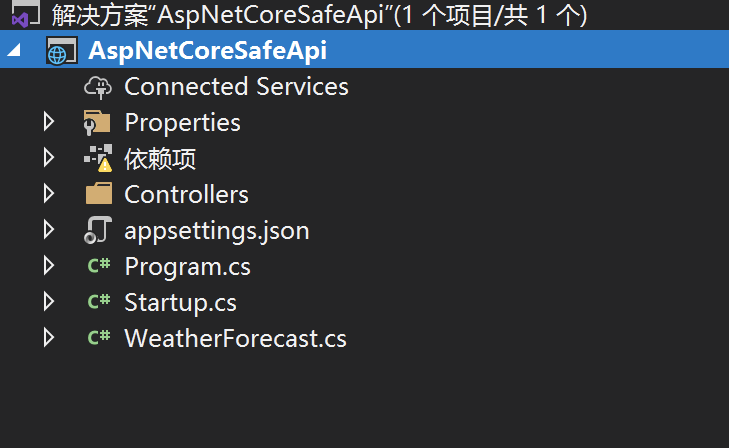
首先我们创建一个简单的 aspnetcore 的 webapi 项目
创建一个配置选项用来存储私钥公钥
public class RsaOptions
{
    public string PrivateKey { get; set; }
}
创建一个 Scheme 选项类
public class AuthSecurityRsaOptions: AuthenticationSchemeOptions
{
}
定义一个常量
public class AuthSecurityRsaDefaults
{
    public const string AuthenticationScheme = "SecurityRsaAuth";
}
创建我们的认证处理器 AuthSecurityRsaAuthenticationHandler
public class AuthSecurityRsaAuthenticationHandler: AuthenticationHandler<AuthSecurityRsaOptions>
{
//正式替换成redis
    private readonly ConcurrentDictionary<string, object> _repeatRequestMap =
        new ConcurrentDictionary<string, object>();

    public AuthSecurityRsaAuthenticationHandler(IOptionsMonitor<AuthSecurityRsaOptions> options, ILoggerFactory logger, UrlEncoder encoder, ISystemClock clock) : base(options, logger, encoder, clock)
    {
    }

    protected override async Task<AuthenticateResult> HandleAuthenticateAsync()
    {
        try
        {
            string authorization = Request.Headers["AuthSecurity-Authorization"];
            // If no authorization header found, nothing to process further
            if (string.IsNullOrWhiteSpace(authorization))
                return AuthenticateResult.NoResult();

            var authorizationSplit = authorization.Split('.');
            if (authorizationSplit.Length != 4)
                return await AuthenticateResultFailAsync("签名参数不正确");
            var reg = new Regex(@"[0-9a-zA-Z]{1,40}");


            var requestId = authorizationSplit[0];
            if (string.IsNullOrWhiteSpace(requestId) || !reg.IsMatch(requestId))
                return await AuthenticateResultFailAsync("请求Id不正确");


            var appid = authorizationSplit[1];
            if (string.IsNullOrWhiteSpace(appid) || !reg.IsMatch(appid))
                return await AuthenticateResultFailAsync("应用Id不正确");


            var timeStamp = authorizationSplit[2];
            if (string.IsNullOrWhiteSpace(timeStamp) || !long.TryParse(timeStamp, out var timestamp))
                return await AuthenticateResultFailAsync("请求时间不正确");
            //请求时间大于30分钟的就抛弃
            if (Math.Abs(UtcTime.CurrentTimeMillis() - timestamp) > 30 * 60 * 1000)
                return await AuthenticateResultFailAsync("请求已过期");


            var sign = authorizationSplit[3];
            if (string.IsNullOrWhiteSpace(sign))
                return await AuthenticateResultFailAsync("签名参数不正确");
            //数据库获取
            //Request.HttpContext.RequestServices.GetService<DbContext>()
            var app = AppCallerStorage.ApiCallers.FirstOrDefault(o=>o.Id==appid);
            if (app == null)
                return AuthenticateResult.Fail("未找到对应的应用信息");
            //获取请求体
            var body = await Request.RequestBodyAsync();

            //验证签名
            if (!RsaFunc.ValidateSignature(app.AppPublickKey, $"{requestId}{appid}{timeStamp}{body}", sign))
                return await AuthenticateResultFailAsync("签名失败");
            var repeatKey = $"AuthSecurityRequestDistinct:{appid}:{requestId}";
            //自行替换成缓存或者redis本项目不带删除key功能没有过期时间原则上需要设置1小时过期,前后30分钟服务器时间差
            if (_repeatRequestMap.ContainsKey(repeatKey) || !_repeatRequestMap.TryAdd(repeatKey,null))
            {
                return await AuthenticateResultFailAsync("请勿重复提交");
            }


            //给Identity赋值
            var identity = new ClaimsIdentity(AuthSecurityRsaDefaults.AuthenticationScheme);
            identity.AddClaim(new Claim("appid", appid));
            identity.AddClaim(new Claim("appname", app.Name));
            identity.AddClaim(new Claim("role", "app"));
            //......

            var principal = new ClaimsPrincipal(identity);
            return HandleRequestResult.Success(new AuthenticationTicket(principal, new AuthenticationProperties(), Scheme.Name));
        }
        catch (Exception ex)
        {
            Logger.LogError(ex, "RSA签名失败");
            return await AuthenticateResultFailAsync("认证失败");
        }
    }

    private async Task<AuthenticateResult> AuthenticateResultFailAsync(string message)
    {
        Response.StatusCode = 401;
        await Response.WriteAsync(message);
        return AuthenticateResult.Fail(message);
    }
}
第三步我们添加扩展方法
public static class AuthSecurityRsaExtension
{
    public static AuthenticationBuilder AddAuthSecurityRsa(this AuthenticationBuilder builder)
        => builder.AddAuthSecurityRsa(AuthSecurityRsaDefaults.AuthenticationScheme, _ => { });

    public static AuthenticationBuilder AddAuthSecurityRsa(this AuthenticationBuilder builder, Action<AuthSecurityRsaOptions> configureOptions)
        => builder.AddAuthSecurityRsa(AuthSecurityRsaDefaults.AuthenticationScheme, configureOptions);

    public static AuthenticationBuilder AddAuthSecurityRsa(this AuthenticationBuilder builder, string authenticationScheme, Action<AuthSecurityRsaOptions> configureOptions)
        => builder.AddAuthSecurityRsa(authenticationScheme, displayName: null, configureOptions: configureOptions);

    public static AuthenticationBuilder AddAuthSecurityRsa(this AuthenticationBuilder builder, string authenticationScheme, string displayName, Action<AuthSecurityRsaOptions> configureOptions)
    {
        return builder.AddScheme<AuthSecurityRsaOptions, AuthSecurityRsaAuthenticationHandler>(authenticationScheme, displayName, configureOptions);
    }
}
添加返回结果加密解密 SafeResponseMiddleware
public class SafeResponseMiddleware
{
    private readonly RequestDelegate _next;

    public SafeResponseMiddleware(RequestDelegate next)
    {
        _next = next;
    }

    public async Task Invoke(HttpContext context)
    {

        //AuthSecurity-Authorization
        if ( context.Request.Headers.TryGetValue("AuthSecurity-Authorization", out var authorization) && !string.IsNullOrWhiteSpace(authorization))
        {
            //获取Response.Body内容
            var originalBodyStream = context.Response.Body;
            await using (var newResponse = new MemoryStream())
            {
                //替换response流
                context.Response.Body = newResponse;
                await _next(context);
                string responseString = null;
                var identityIsAuthenticated = context.User?.Identity?.IsAuthenticated;
                if (identityIsAuthenticated.HasValue && identityIsAuthenticated.Value)
                {
                    var authorizationSplit = authorization.ToString().Split('.');
                    var requestId = authorizationSplit[0];
                    var appid = authorizationSplit[1];

                    using (var reader = new StreamReader(newResponse))
                    {
                        newResponse.Position = 0;
                        responseString = (await reader.ReadToEndAsync())??string.Empty;
                            var responseStr = JsonConvert.SerializeObject(responseString);
                            var app = AppCallerStorage.ApiCallers.FirstOrDefault(o => o.Id == appid);
                            var encryptBody = RsaFunc.Encrypt(app.AppPublickKey, responseStr);
                            var signature = RsaFunc.CreateSignature(app.MyPrivateKey, $"{requestId}{appid}{encryptBody}");
                            context.Response.Headers.Add("AuthSecurity-Signature", signature);
                            responseString = encryptBody;
                    }

                    await using (var writer = new StreamWriter(originalBodyStream))
                    {
                        await writer.WriteAsync(responseString);
                        await writer.FlushAsync();
                    }
                }
            }
        }
        else
        {
            await _next(context);
        }
    }
}
新增基础基类来实现认证
[Authorize(AuthenticationSchemes =AuthSecurityRsaDefaults.AuthenticationScheme )]
public class RsaBaseController : ControllerBase
{
}
到这个时候我们的接口已经差不多写完了,只是适配了微软的框架,但是还是不能happy coding,接下来我们要实现模型的解析和校验
模型解析
首先我们要确保微软是如何通过 request body 的字符串到 model 的绑定的,通过源码解析我们可以发现 aspnetcore 是通过IModelBinder。
首先实现模型绑定
public class EncryptBodyModelBinder : IModelBinder
{
    public async Task BindModelAsync(ModelBindingContext bindingContext)
    {
        var httpContext = bindingContext.HttpContext;
        //if (bindingContext.ModelType != typeof(string))
        //    return;
        string authorization = httpContext.Request.Headers["AuthSecurity-Authorization"];
        if (!string.IsNullOrWhiteSpace(authorization))
        {
            //有参数接收就反序列化并且进行校验
            if (bindingContext.ModelType != null)
            {
                //获取请求体
                var encryptBody = await httpContext.Request.RequestBodyAsync();
                if (string.IsNullOrWhiteSpace(encryptBody))
                    return;
                //解密
                var rsaOptions = httpContext.RequestServices.GetService<RsaOptions>();
                var body = RsaFunc.Decrypt(rsaOptions.PrivateKey, encryptBody);
                var request = JsonConvert.DeserializeObject(body, bindingContext.ModelType);
                if (request == null)
                {
                    return;
                }
                bindingContext.Result = ModelBindingResult.Success(request);

            }
        }
    }
}
添加 attribute 的特性解析
[AttributeUsage(AttributeTargets.Class | AttributeTargets.Struct | AttributeTargets.Enum | AttributeTargets.Property | AttributeTargets.Parameter, AllowMultiple = false, Inherited = true)]
public class RsaModelParseAttribute : Attribute, IBinderTypeProviderMetadata, IBindingSourceMetadata, IModelNameProvider
{
    private readonly ModelBinderAttribute modelBinderAttribute = new ModelBinderAttribute() { BinderType = typeof(EncryptBodyModelBinder) };

    public BindingSource BindingSource => modelBinderAttribute.BindingSource;

    public string Name => modelBinderAttribute.Name;

    public Type BinderType => modelBinderAttribute.BinderType;
}
添加测试 dto
[RsaModelParse]
public class TestModel
{
    [Display(Name = "id"),Required(ErrorMessage = "{0}不能为空")]
    public string Id { get; set; }
}
创建模型控制器
[Route("api/[controller]/[action]")]
[ApiController]
public class TestController: RsaBaseController
{
    [AllowAnonymous]
    public IActionResult Test()
    {
        return Ok();
    }

//正常测试
    public IActionResult Test1()
    {
        var appid = Request.HttpContext.User.Claims.FirstOrDefault(o=>o.Type== "appid").Value;
        var appname = Request.HttpContext.User.Claims.FirstOrDefault(o=>o.Type== "appname").Value;

        return Ok($"appid:{appid},appname:{appname}");
    }
///模型校验
    public IActionResult Test2(TestModel request)
    {
        return Ok(JsonConvert.SerializeObject(request));
    }
//异常错误校验
    public IActionResult Test3(TestModel request)
    {
        var x = 0;
        var a = 1 / x;
        return Ok("ok");
    }
}
添加异常全局捕获
public class HttpGlobalExceptionFilter : IExceptionFilter
{
    private readonly ILogger<HttpGlobalExceptionFilter> _logger;

    public HttpGlobalExceptionFilter(ILogger<HttpGlobalExceptionFilter> logger)
    {
        _logger = logger;
    }

    public void OnException(ExceptionContext context)
    {
        _logger.LogError(new EventId(context.Exception.HResult),
            context.Exception,
            context.Exception.Message);
        context.Result = new OkObjectResult("未知异常");
        context.HttpContext.Response.StatusCode = (int)HttpStatusCode.OK;
        context.ExceptionHandled = true;
    }
}
添加模型校验
public class ValidateModelStateFilter : ActionFilterAttribute
{
    public override void OnActionExecuting(ActionExecutingContext context)
    {
        if (context.ModelState.IsValid)
        {
            return;
        }

        var validationErrors = context.ModelState
            .Keys
            .SelectMany(k => context.ModelState[k].Errors)
            .Select(e => e.ErrorMessage)
            .ToArray();

        context.Result = new OkObjectResult(string.Join(",", validationErrors));
        context.HttpContext.Response.StatusCode = (int)HttpStatusCode.OK;
    }

}
startup 配置
public void ConfigureServices(IServiceCollection services)
{
    services.Configure<ApiBehaviorOptions>(options =>
    {
        //忽略系统自带校验你[ApiController]
        options.SuppressModelStateInvalidFilter = true;
    });
    services.AddControllers(options =>
    {
        options.Filters.Add<HttpGlobalExceptionFilter>();
        options.Filters.Add<ValidateModelStateFilter>();
    });
    services.AddControllers();

    services.AddAuthentication().AddAuthSecurityRsa();
        services.AddSingleton(sp =>
        {
            return new RsaOptions()
            {
                PrivateKey = Configuration.GetSection("RsaConfig")["PrivateKey"],
            };
        });
}


public void Configure(IApplicationBuilder app, IWebHostEnvironment env)
{
    if (env.IsDevelopment())
    {
        app.UseDeveloperExceptionPage();
    }

    app.UseMiddleware<SafeResponseMiddleware>();
    app.UseRouting();
    app.UseAuthentication();
    app.UseAuthorization();

    app.UseEndpoints(endpoints =>
    {
        endpoints.MapControllers();
    });
}
到此为止我们服务端的所有 api 接口和配置都已经完成了接下来我们通过编写客户端接口和生成 rsa 密钥对就可以开始使用 api 了
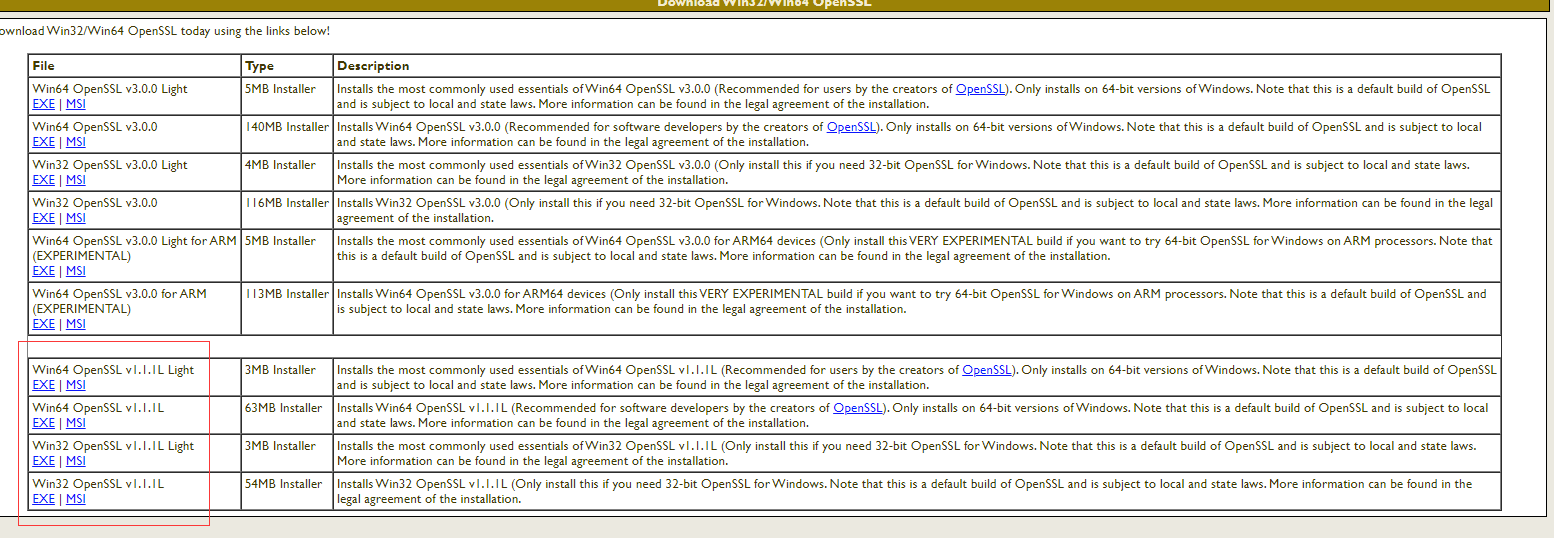
如何生成 rsa 秘钥首先我们下载 openssl
下载地址openssl
双击
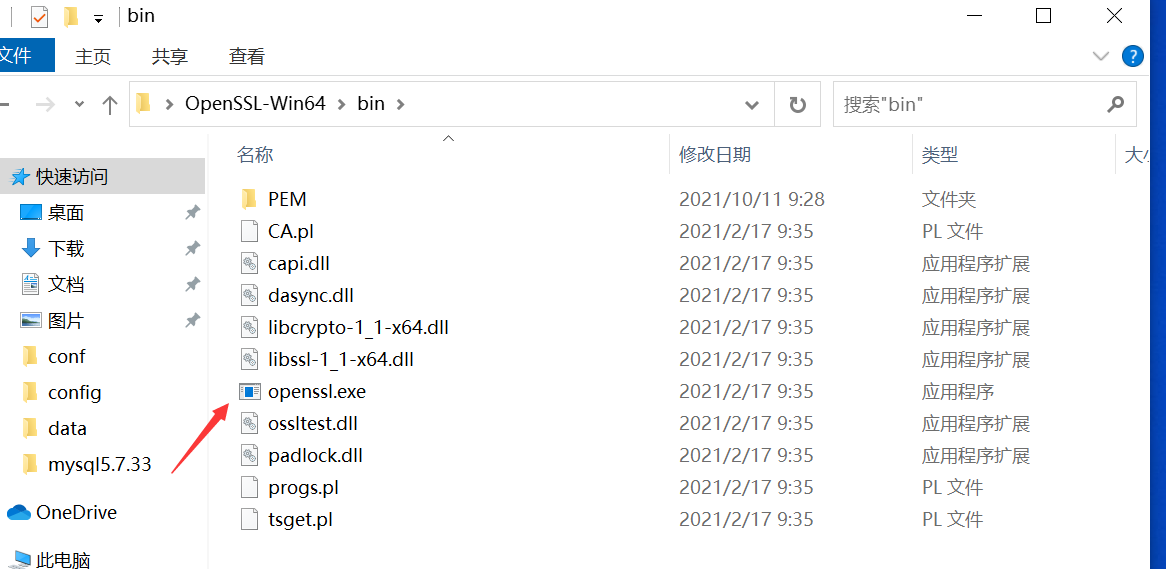
输入创建命令
打开bin下openssl.exe
生成RSA私钥
openssl>genrsa -out rsa_private_key.pem 2048

生成RSA公钥
openssl>rsa -in rsa_private_key.pem -pubout -out rsa_public_key.pem

将RSA私钥转换成PKCS8格式
openssl>pkcs8 -topk8 -inform PEM -in rsa_private_key.pem -outform PEM -nocrypt -out rsa_pkcs8_private_key.pem
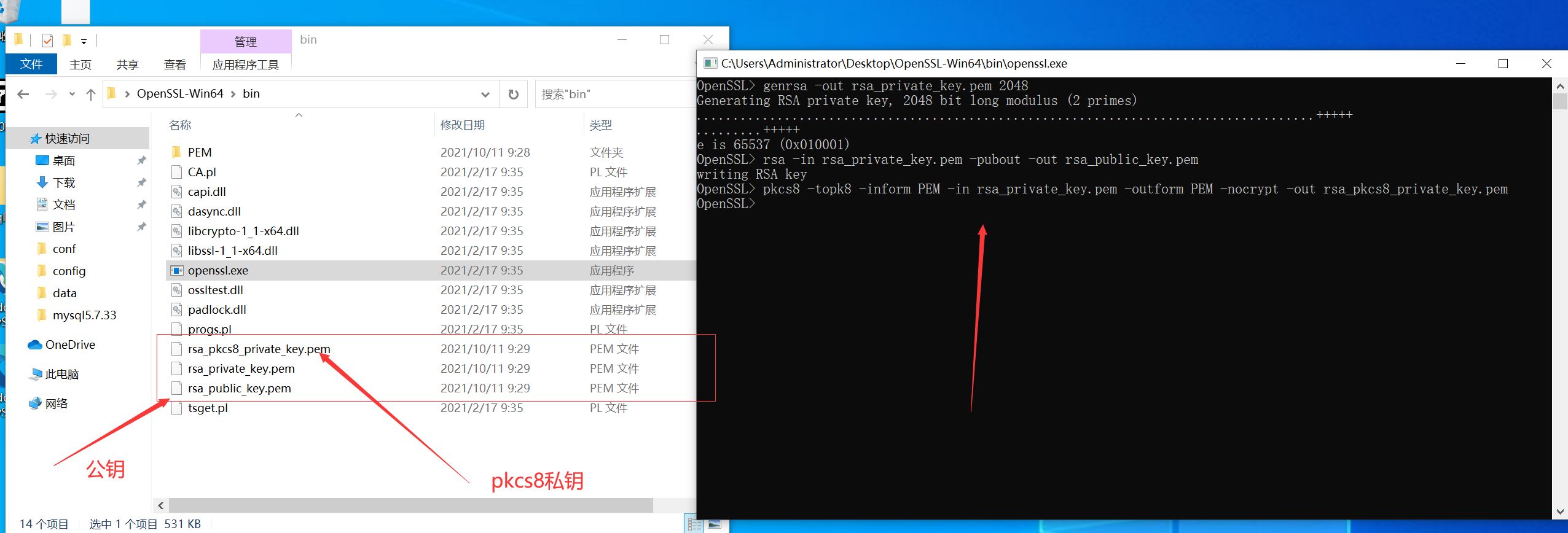
公钥和私钥不是 xml 格式的 C#使用 rsa 需要 xml 格式的秘钥,所以先转换对应的秘钥
首先 nuget 下载公钥私钥转换工具
Install-Package BouncyCastle.NET Core -Version 1.8.8
public class RsaKeyConvert
{
    private RsaKeyConvert()
    {

    }
    public static string RsaPrivateKeyJava2DotNet(string privateKey)
    {
        RsaPrivateCrtKeyParameters privateKeyParam = (RsaPrivateCrtKeyParameters)PrivateKeyFactory.CreateKey(Convert.FromBase64String(TrimPrivatePrefixSuffix(privateKey)));

        return string.Format("<RSAKeyValue><Modulus>{0}</Modulus><Exponent>{1}</Exponent><P>{2}</P><Q>{3}</Q><DP>{4}</DP><DQ>{5}</DQ><InverseQ>{6}</InverseQ><D>{7}</D></RSAKeyValue>",
            Convert.ToBase64String(privateKeyParam.Modulus.ToByteArrayUnsigned()),
            Convert.ToBase64String(privateKeyParam.PublicExponent.ToByteArrayUnsigned()),
            Convert.ToBase64String(privateKeyParam.P.ToByteArrayUnsigned()),
            Convert.ToBase64String(privateKeyParam.Q.ToByteArrayUnsigned()),
            Convert.ToBase64String(privateKeyParam.DP.ToByteArrayUnsigned()),
            Convert.ToBase64String(privateKeyParam.DQ.ToByteArrayUnsigned()),
            Convert.ToBase64String(privateKeyParam.QInv.ToByteArrayUnsigned()),
            Convert.ToBase64String(privateKeyParam.Exponent.ToByteArrayUnsigned()));
    }

    public static string RsaPrivateKeyDotNet2Java(string privateKey)
    {
        XmlDocument doc = new XmlDocument();
        doc.LoadXml(TrimPrivatePrefixSuffix(privateKey));
        BigInteger m = new BigInteger(1, Convert.FromBase64String(doc.DocumentElement.GetElementsByTagName("Modulus")[0].InnerText));
        BigInteger exp = new BigInteger(1, Convert.FromBase64String(doc.DocumentElement.GetElementsByTagName("Exponent")[0].InnerText));
        BigInteger d = new BigInteger(1, Convert.FromBase64String(doc.DocumentElement.GetElementsByTagName("D")[0].InnerText));
        BigInteger p = new BigInteger(1, Convert.FromBase64String(doc.DocumentElement.GetElementsByTagName("P")[0].InnerText));
        BigInteger q = new BigInteger(1, Convert.FromBase64String(doc.DocumentElement.GetElementsByTagName("Q")[0].InnerText));
        BigInteger dp = new BigInteger(1, Convert.FromBase64String(doc.DocumentElement.GetElementsByTagName("DP")[0].InnerText));
        BigInteger dq = new BigInteger(1, Convert.FromBase64String(doc.DocumentElement.GetElementsByTagName("DQ")[0].InnerText));
        BigInteger qinv = new BigInteger(1, Convert.FromBase64String(doc.DocumentElement.GetElementsByTagName("InverseQ")[0].InnerText));

        RsaPrivateCrtKeyParameters privateKeyParam = new RsaPrivateCrtKeyParameters(m, exp, d, p, q, dp, dq, qinv);

        PrivateKeyInfo privateKeyInfo = PrivateKeyInfoFactory.CreatePrivateKeyInfo(privateKeyParam);
        byte[] serializedPrivateBytes = privateKeyInfo.ToAsn1Object().GetEncoded();
        return Convert.ToBase64String(serializedPrivateBytes);
    }

    public static string RsaPublicKeyJava2DotNet(string publicKey)
    {
        RsaKeyParameters publicKeyParam = (RsaKeyParameters)PublicKeyFactory.CreateKey(Convert.FromBase64String(TrimPublicPrefixSuffix(publicKey)));
        return string.Format("<RSAKeyValue><Modulus>{0}</Modulus><Exponent>{1}</Exponent></RSAKeyValue>",
            Convert.ToBase64String(publicKeyParam.Modulus.ToByteArrayUnsigned()),
            Convert.ToBase64String(publicKeyParam.Exponent.ToByteArrayUnsigned()));
    }

    public static string RsaPublicKeyDotNet2Java(string publicKey)
    {
        XmlDocument doc = new XmlDocument();
        doc.LoadXml(TrimPublicPrefixSuffix(publicKey));
        BigInteger m = new BigInteger(1, Convert.FromBase64String(doc.DocumentElement.GetElementsByTagName("Modulus")[0].InnerText));
        BigInteger p = new BigInteger(1, Convert.FromBase64String(doc.DocumentElement.GetElementsByTagName("Exponent")[0].InnerText));
        RsaKeyParameters pub = new RsaKeyParameters(false, m, p);

        SubjectPublicKeyInfo publicKeyInfo = SubjectPublicKeyInfoFactory.CreateSubjectPublicKeyInfo(pub);
        byte[] serializedPublicBytes = publicKeyInfo.ToAsn1Object().GetDerEncoded();
        return Convert.ToBase64String(serializedPublicBytes);
    }

    public static string TrimPublicPrefixSuffix(string publicKey)
    {
        return publicKey
            .Replace("-----BEGIN PUBLIC KEY-----", string.Empty)
            .Replace("-----END PUBLIC KEY-----", string.Empty)
            .Replace("\r\n", "");
    }
    public static string TrimPrivatePrefixSuffix(string privateKey)
    {
        return privateKey
            .Replace("-----BEGIN PRIVATE KEY-----", string.Empty)
            .Replace("-----END PRIVATE KEY-----", string.Empty)
            .Replace("\r\n", "");
    }
}
编写好 client 后开始调用
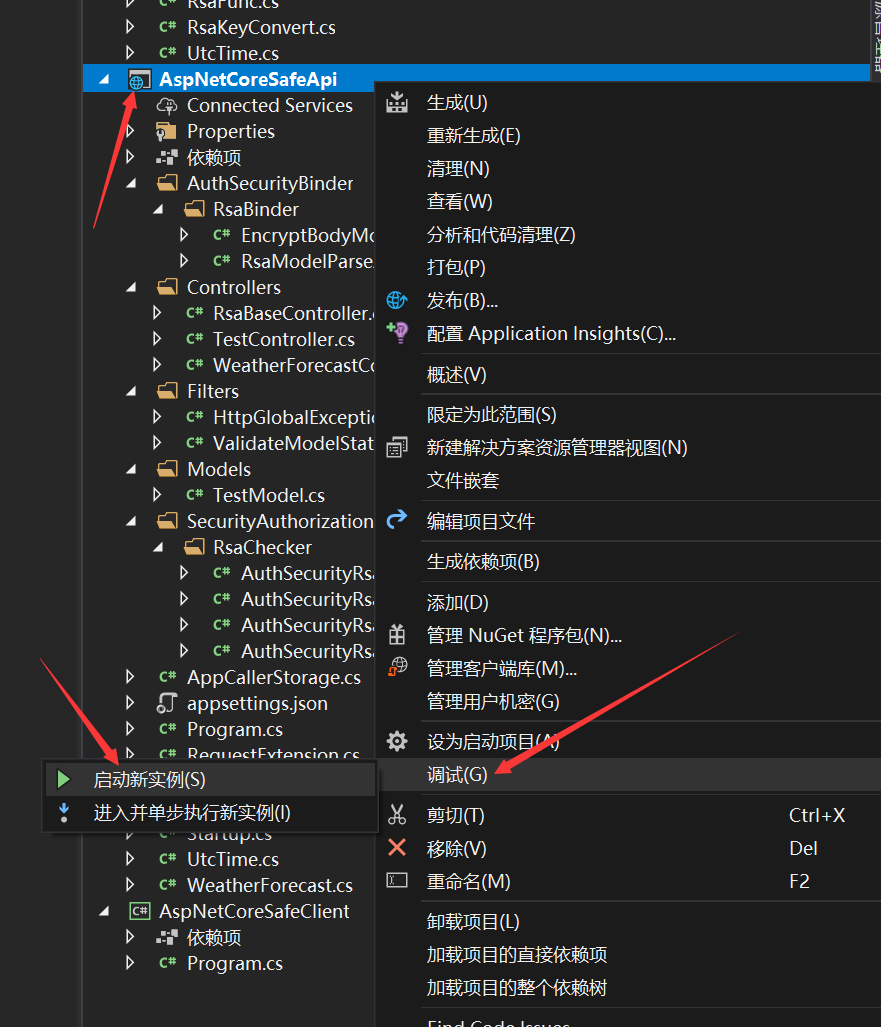
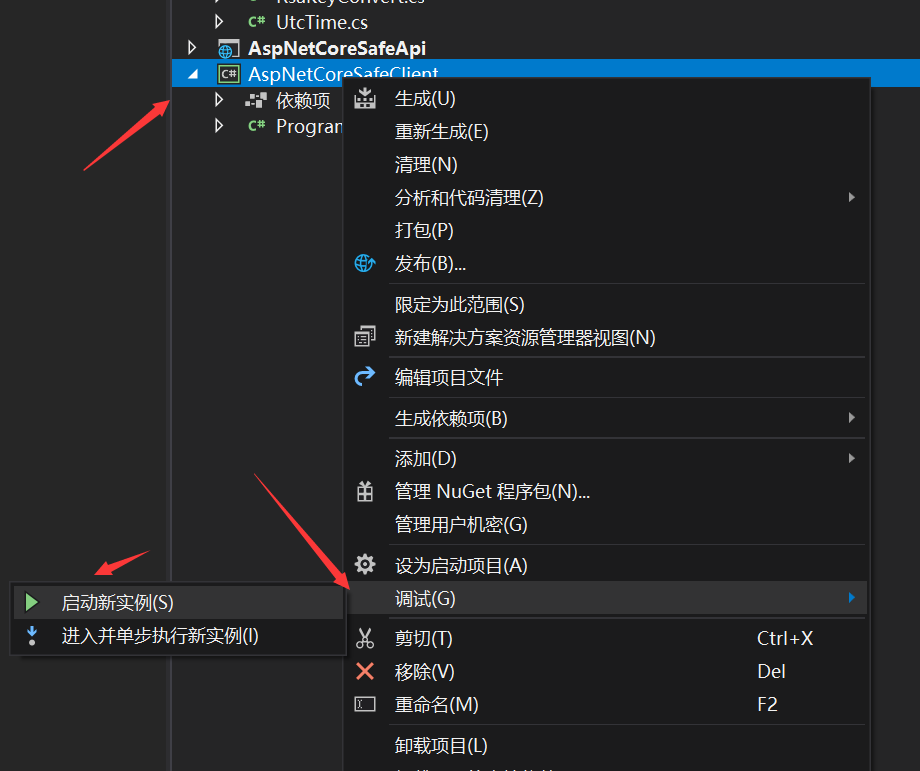
依次启动两个项目就可以看到我们调用成功了,
本项目采用 rsa 双向签名和加密来接入 aspnetcore 的权限系统并且可以获取到系统调用方用户
完美接入 aspnetcore 认证系统和权限系统(后续会出一篇如何设计权限)
系统交互采用双向加密和签名认证
完美接入模型校验
完美处理响应结果
注意本项目仅仅只是是一个学习 demo,而且根据实践得出的结论 rsa 加密仅仅是满足了最最最安全的 api 这个条件,但是性能上而言会随着 body 的变大性能急剧下降,所以并不是一个很好的抉择当然可以用在双方交互的时候设置秘钥提供 api 接口,实际情况下可以选择使用对称加密比如:AES 或者 DES 进行 body 体的加密解密,但是在签名方面完全没问题可以选择 rsa,本次使用的是 rsa2(rsa 2048 位的秘钥)秘钥位数越大加密等级越高但是解密性能越低
当然你可以直接上 https,本文章也不是说一定要双向处理更多的是分享如何接入 aspnetcore 的认证体系中和模型校验,而不用帖一大堆的 attribute
demo:AspNetCoreSafeApi
最后
分享本人开发的 efcore 分表分库读写分离组件,希望为.net 生态做一份共享,如果喜欢或者觉得有用请点下 star 或者赞让更多的人看到
Gitee Star 助力 dotnet 生态 GitHub Star