
タイムスタンプ変換
砂漠の果ての狼 - 2022-02-27 23:20:12 - 



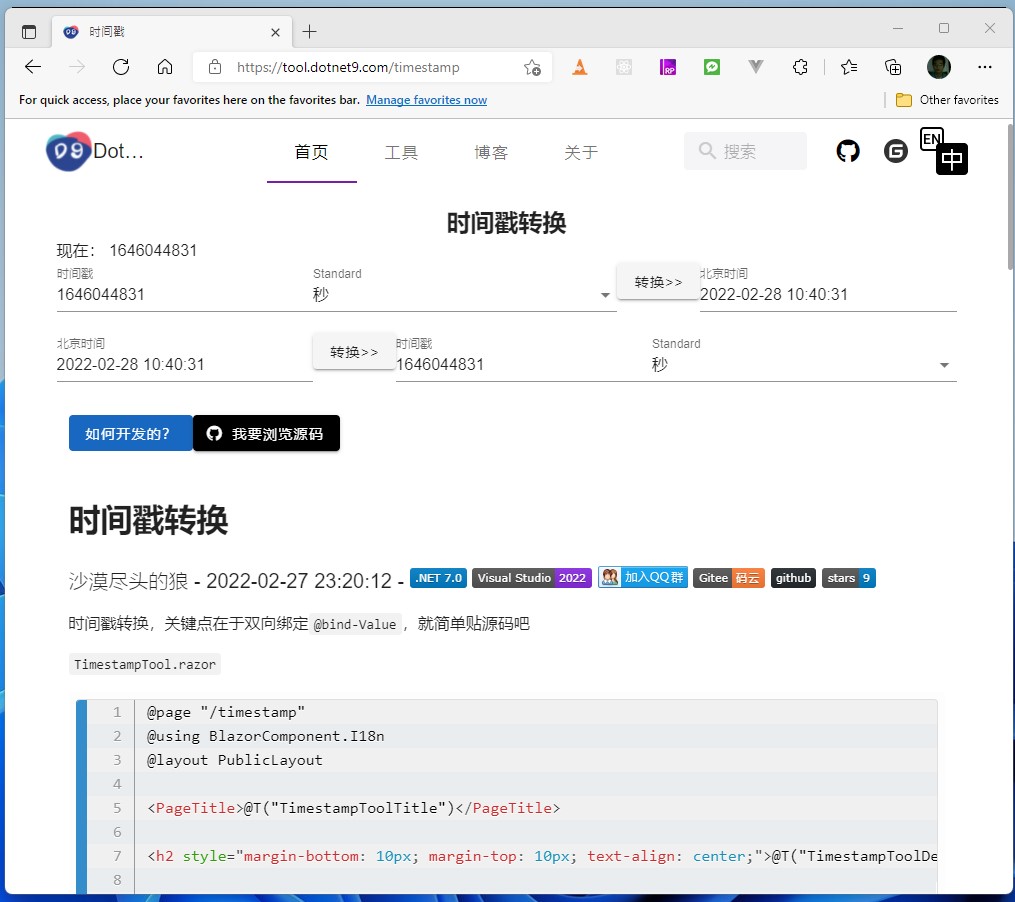
タイムスタンプ変換のポイントは双方向バインディング
@bind-Valueです。そのままソースコードを掲載します。
TimestampTool.razor
@page "/timestamp"
@using BlazorComponent.I18n
@layout PublicLayout

<PageTitle>@T("TimestampToolTitle")</PageTitle>

<h2 style="margin-bottom: 10px; margin-top: 10px; text-align: center;">@T("TimestampToolDesc")</h2>

<MRow>
    @T("TimestampToolDateNow") @DateToTimestamp(DateTime.Now, TimestampKind.Seconds)
</MRow>
<MRow>
    <MTextField Label="@T("TimestampToolTimestamp")" TValue="long" @bind-Value="@_timestamp1"/>
    <MSelect @bind-Value="@_kindValue1"
             Label="@T("TimestampToolTimestampKind")"
             Items="@_items"
             ItemText="u => u.Label"
             ItemValue="u => u.Value"
             Class="mx-3"
             MenuProps="props => props.OffsetY = true">
    </MSelect>
    <MButton OnClick="@Convert1">@T("TimestampToolConvert")</MButton>
    <MTextField Label="@T("TimestampToolBeijingTime")"
                TValue="string" @bind-Value="@_datetime1"
                Class="ml-3"/>
</MRow>
<MRow>
    <MTextField Label="@T("TimestampToolBeijingTime")" TValue="string" @bind-Value="@_datetime2"/>
    <MButton Class="mx-3" OnClick="@Convert2">@T("TimestampToolConvert")</MButton>
    <MTextField Label="@T("TimestampToolTimestamp")" TValue="long" @bind-Value="@_timestamp2"/>
    <MSelect @bind-Value="@_kindValue2"
             Label="@T("TimestampToolTimestampKind")"
             Items="@_items"
             ItemText="u => u.Label"
             ItemValue="u => u.Value"
             MenuProps="props => props.OffsetY = true"
             Class="ml-3">
    </MSelect>
</MRow>

<MarkdownComponent
    LocalPostFilePath="wwwroot/2022/02/2022-02-27_03.md"
    SourceCodeUrl="https://github.com/dotnet9/dotnet9.com/blob/develop/src/Dotnet9.Tools.Web/Pages/Public/TimeTools/TimestampTool.razor"/>

@code
{
    [Inject]
    private I18n I18N { get; set; } = default!;

    private DateTime _currentDatetime;
    private long _timestamp1;
    private long _timestamp2;
    private string? _datetime1;
    private string? _datetime2;
    private TimestampKind _kindValue1;
    private TimestampKind _kindValue2;

    private readonly List<TimestampItem> _items = new();

    protected override Task OnInitializedAsync()
    {
        _items.Add(new TimestampItem(T("TimestampToolKindSeconds")!, TimestampKind.Seconds));
        _items.Add(new TimestampItem(T("TimestampToolKindMilliseconds")!, TimestampKind.Milliseconds));
        _currentDatetime = DateTime.Now;
        _timestamp1 = _timestamp2 = DateToTimestamp(_currentDatetime, TimestampKind.Seconds);
        _datetime1 = _datetime2 = _currentDatetime.ToString("yyyy-MM-dd HH:mm:ss");
        return base.OnInitializedAsync();
    }

    private void Convert1()
    {
        _datetime1 = TimestampToDate(_timestamp1, _kindValue1).ToString(_kindValue1 == TimestampKind.Seconds ? "yyyy-MM-dd HH:mm:ss" : "yyyy-MM-dd HH:mm:ss.fff");
    }

    private void Convert2()
    {
        try
        {
            _timestamp2 = DateToTimestamp(DateTime.Parse(_datetime2), _kindValue2);
        }
        catch
        {
        }
    }

    private static long DateToTimestamp(DateTime date, TimestampKind kind)
    {
        try
        {
            var point = new DateTime(1970, 1, 1);
            var time = date.Subtract(point);

            return (long)(kind == TimestampKind.Seconds ? time.TotalSeconds : time.TotalMilliseconds);
        }
        catch
        {
            return default;
        }
    }


    private static DateTime TimestampToDate(long timestamp, TimestampKind kind)
    {
        try
        {
            var point = new DateTime(1970, 1, 1);
            var time = kind == TimestampKind.Seconds ? point.AddSeconds(timestamp) : point.AddMilliseconds(timestamp);

            return time;
        }
        catch
        {
            return default;
        }
    }

    public string? T(string key)
    {
        return I18N.LanguageMap.GetValueOrDefault(key);
    }

    enum TimestampKind
    {
        Seconds,
        Milliseconds
    }

    class TimestampItem
    {
        public string Label { get; }
        public TimestampKind Value { get; }

        public TimestampItem(string label, TimestampKind value)
        {
            Label = label;
            Value = value;
        }
    }
}
Dotnet9ツールボックスでは、新しい無料・オープンソース・オンラインツールを随時追加していきます。スターでの応援をお願いします。ご要望があれば考慮いたします。リポジトリアドレス:Dotnet9.Tools、Issueの送信、サイトへのコメント、WeChat公式アカウント(dotnet9)などでご連絡ください。
本ツールのソースコード:TimestampTool