

本文来自转载
原文作者:RyzenAdorer
原文标题:.NET Core 3 WPF MVVM 框架 Prism 系列之事件聚合器
原文链接:https://www.cnblogs.com/ryzen/p/12196619.html
本文将介绍如何在.NET Core3 环境下使用 MVVM 框架 Prism 的使用事件聚合器实现模块间的通信
1. 事件聚合器
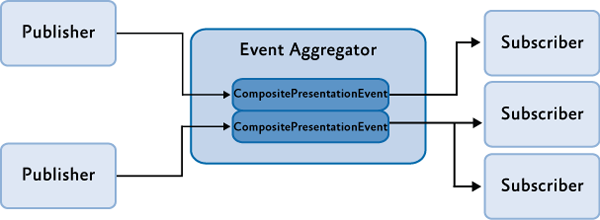
在上一篇 [].NET Core 3 WPF MVVM 框架 Prism 系列之模块化](https://dotnet9.com/2023/06/Modularization-of-the-Prism-family-of-the-dotNET-Core-3-WPF-MVVM-framework) 我们留下了一些问题,就是如何处理同模块不同窗体之间的通信和不同模块之间不同窗体的通信,Prism 提供了一种事件机制,可以在应用程序中低耦合的模块之间进行通信,该机制基于事件聚合器服务,允许发布者和订阅者之间通过事件进行通讯,且彼此之间没有之间引用,这就实现了模块之间低耦合的通信方式,下面引用官方的一个事件聚合器模型图:
2. 创建和发布事件
2.1. 创建事件
首先我们来处理同模块不同窗体之间的通讯,我们在 PrismMetroSample.Infrastructure 新建一个文件夹 Events,然后新建一个类 PatientSentEvent,代码如下:
PatientSentEvent.cs:
public class PatientSentEvent: PubSubEvent<Patient>
{
}
2.2. 订阅事件
然后我们在病人详细窗体的 PatientDetailViewModel 类订阅该事件,代码如下:
PatientDetailViewModel.cs:
 public class PatientDetailViewModel : BindableBase
 {
    IEventAggregator _ea;
    IMedicineSerivce _medicineSerivce;

    private Patient _currentPatient;
     //当前病人
    public Patient CurrentPatient
    {
        get { return _currentPatient; }
        set { SetProperty(ref _currentPatient, value); }
    }

    private ObservableCollection<Medicine> _lstMedicines;
     //当前病人的药物列表
    public ObservableCollection<Medicine> lstMedicines
    {
        get { return _lstMedicines; }
        set { SetProperty(ref _lstMedicines, value); }
    }

     //构造函数
    public PatientDetailViewModel(IEventAggregator ea, IMedicineSerivce medicineSerivce)
    {
        _medicineSerivce = medicineSerivce;
        _ea = ea;
        _ea.GetEvent<PatientSentEvent>().Subscribe(PatientMessageReceived);//订阅事件
    }

     //处理接受消息函数
    private void PatientMessageReceived(Patient patient)
    {
        this.CurrentPatient = patient;
        this.lstMedicines = new ObservableCollection<Medicine>(_medicineSerivce.GetRecipesByPatientId(this.CurrentPatient.Id).FirstOrDefault().LstMedicines);
        }
    }
2.3. 发布消息
然后我们在病人列表窗体的 PatientListViewModel 中发布消息,代码如下:
PatientListViewModel.cs:
public class PatientListViewModel : BindableBase
{

    private IApplicationCommands _applicationCommands;
    public IApplicationCommands ApplicationCommands
    {
        get { return _applicationCommands; }
        set { SetProperty(ref _applicationCommands, value); }
    }

    private List<Patient> _allPatients;
    public List<Patient> AllPatients
    {
        get { return _allPatients; }
        set { SetProperty(ref _allPatients, value); }
    }

    private DelegateCommand<Patient> _mouseDoubleClickCommand;
    public DelegateCommand<Patient> MouseDoubleClickCommand =>
        _mouseDoubleClickCommand ?? (_mouseDoubleClickCommand = new DelegateCommand<Patient>(ExecuteMouseDoubleClickCommand));

    IEventAggregator _ea;

    IPatientService _patientService;

        /// <summary>
        /// 构造函数
        /// </summary>
    public PatientListViewModel(IPatientService patientService, IEventAggregator ea, IApplicationCommands applicationCommands)
    {
         _ea = ea;
         this.ApplicationCommands = applicationCommands;
         _patientService = patientService;
         this.AllPatients = _patientService.GetAllPatients();
    }

    /// <summary>
    /// DataGrid 双击按钮命令方法
    /// </summary>
    void ExecuteMouseDoubleClickCommand(Patient patient)
    {
        //打开窗体
        this.ApplicationCommands.ShowCommand.Execute(FlyoutNames.PatientDetailFlyout);
        //发布消息
        _ea.GetEvent<PatientSentEvent>().Publish(patient);
    }

}
效果如下:

2.4. 实现多订阅多发布
同理,我们实现搜索后的 Medicine 添加到当前病人列表中也是跟上面步骤一样,在 Events 文件夹创建事件类 MedicineSentEvent:
MedicineSentEvent.cs:
 public class MedicineSentEvent: PubSubEvent<Medicine>
 {

 }
在病人详细窗体的 PatientDetailViewModel 类订阅该事件:
PatientDetailViewModel.cs:
 public PatientDetailViewModel(IEventAggregator ea, IMedicineSerivce medicineSerivce)
 {
      _medicineSerivce = medicineSerivce;
      _ea = ea;
      _ea.GetEvent<PatientSentEvent>().Subscribe(PatientMessageReceived);
      _ea.GetEvent<MedicineSentEvent>().Subscribe(MedicineMessageReceived);
 }

 /// <summary>
 // 接受事件消息函数
 /// </summary>
 private void MedicineMessageReceived(Medicine  medicine)
 {
      this.lstMedicines?.Add(medicine);
 }
在药物列表窗体的 MedicineMainContentViewModel 也订阅该事件:
MedicineMainContentViewModel.cs:
public class MedicineMainContentViewModel : BindableBase
{
   IMedicineSerivce _medicineSerivce;
   IEventAggregator _ea;

   private ObservableCollection<Medicine> _allMedicines;
   public ObservableCollection<Medicine> AllMedicines
   {
        get { return _allMedicines; }
        set { SetProperty(ref _allMedicines, value); }
   }
   public MedicineMainContentViewModel(IMedicineSerivce medicineSerivce,IEventAggregator ea)
   {
        _medicineSerivce = medicineSerivce;
        _ea = ea;
        this.AllMedicines = new ObservableCollection<Medicine>(_medicineSerivce.GetAllMedicines());
        _ea.GetEvent<MedicineSentEvent>().Subscribe(MedicineMessageReceived);//订阅事件
   }

   /// <summary>
   /// 事件消息接受函数
   /// </summary>
   private void MedicineMessageReceived(Medicine medicine)
   {
        this.AllMedicines?.Add(medicine);
   }
}
在搜索 Medicine 窗体的 SearchMedicineViewModel 类发布事件消息:
SearchMedicineViewModel.cs:
 IEventAggregator _ea;

 private DelegateCommand<Medicine> _addMedicineCommand;
 public DelegateCommand<Medicine> AddMedicineCommand =>
     _addMedicineCommand ?? (_addMedicineCommand = new DelegateCommand<Medicine>(ExecuteAddMedicineCommand));

public SearchMedicineViewModel(IMedicineSerivce medicineSerivce, IEventAggregator ea)
{
     _ea = ea;
     _medicineSerivce = medicineSerivce;
     this.CurrentMedicines = this.AllMedicines = _medicineSerivce.GetAllMedicines();
 }

 void ExecuteAddMedicineCommand(Medicine currentMedicine)
 {
     _ea.GetEvent<MedicineSentEvent>().Publish(currentMedicine);//发布消息
 }
效果如下:

然后我们看看现在 Demo 项目的事件模型和程序集引用情况,如下图:
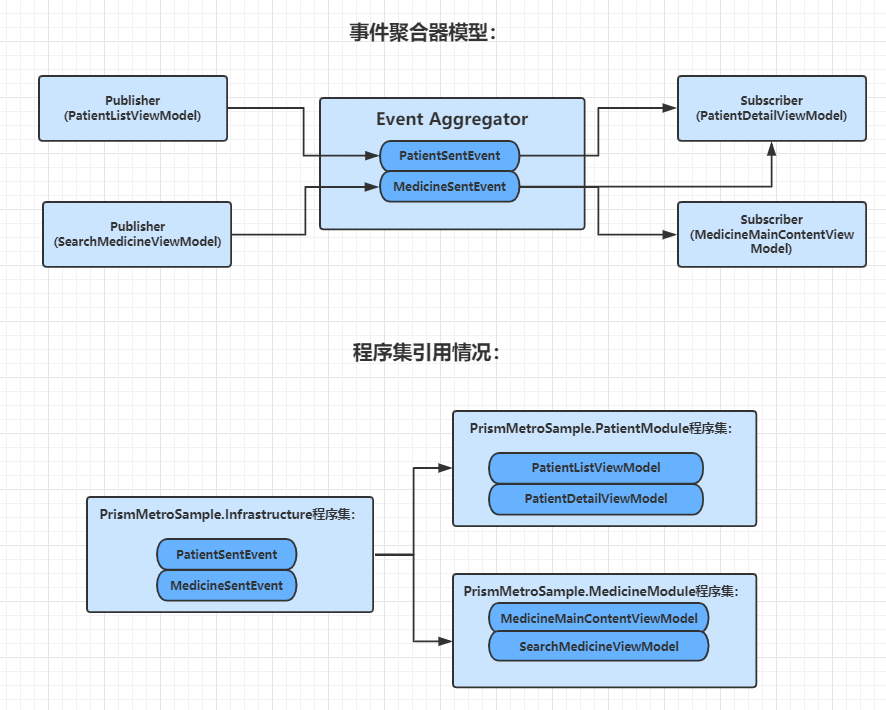
我们发现 PatientModule 和 MedicineModule 两个模块之间做到了通讯,但却不相互引用,依靠引用 PrismMetroSample.Infrastructure 程序集来实现间接依赖关系,实现了不同模块之间通讯且低耦合的情况
3. 取消订阅事件
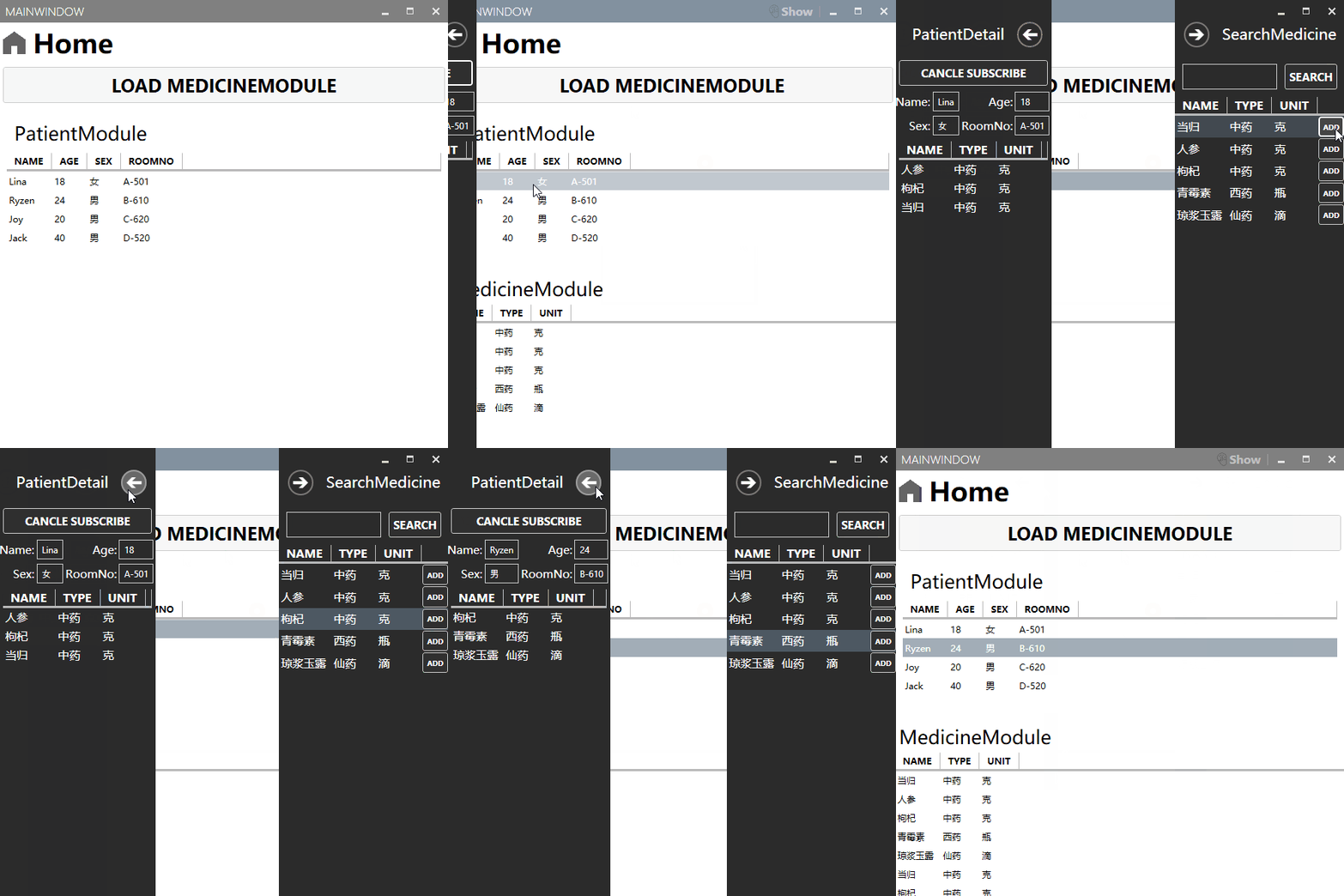
Prism 还提供了取消订阅的功能,我们在病人详细窗体提供该功能,PatientDetailViewModel 加上这几句:
PatientDetailViewModel.cs:
 private DelegateCommand _cancleSubscribeCommand;
 public DelegateCommand CancleSubscribeCommand =>
       _cancleSubscribeCommand ?? (_cancleSubscribeCommand = new DelegateCommand(ExecuteCancleSubscribeCommand));

  void ExecuteCancleSubscribeCommand()
  {
      _ea.GetEvent<MedicineSentEvent>().Unsubscribe(MedicineMessageReceived);
  }
效果如下:
4. 几种订阅方式设置
我们在 Demo 已经通过消息聚合器的事件机制,实现订阅者和发布者之间的通讯,我们再来看看,Prim 都有哪些订阅方式,我们可以通过 PubSubEvent 类上面的 Subscribe 函数的其中最多参数的重载方法来说明:
Subscribe.cs:
public virtual SubscriptionToken Subscribe(Action<TPayload> action, ThreadOption threadOption, bool keepSubscriberReferenceAlive, Predicate<TPayload> filter);
4.1. action 参数
其中 action 参数则是我们接受消息的函数
4.2. threadOption 参数
ThreadOption 类型参数 threadOption 是个枚举类型参数,代码如下:
ThreadOption.cs
public enum ThreadOption
{
        /// <summary>
        /// The call is done on the same thread on which the <see    cref="PubSubEvent{TPayload}"/> was published.
        /// </summary>
        PublisherThread,

        /// <summary>
        /// The call is done on the UI thread.
        /// </summary>
        UIThread,

        /// <summary>
        /// The call is done asynchronously on a background thread.
        /// </summary>
        BackgroundThread
}
三种枚举值的作用:
- PublisherThread:默认设置,使用此设置能接受发布者传递的消息
- UIThread:可以在 UI 线程上接受事件
- BackgroundThread:可以在线程池在异步接受事件
4.3. keepSubscriberReferenceAlive 参数
默认 keepSubscriberReferenceAlive 为 false,在 Prism 官方是这么说的,该参数指示订阅使用弱引用还是强引用,false 为弱引用,true 为强引用:
- 设置为 true,能够提升短时间发布多个事件的性能,但是要手动取消订阅事件,因为事件实例对保留对订阅者实例的强引用,否则就算窗体关闭,也不会进行 GC 回收.
- 设置为 false,事件维护对订阅者实例的弱引用,当窗体关闭时,会自动取消订阅事件,也就是不用手动取消订阅事件
4.4. filter 参数
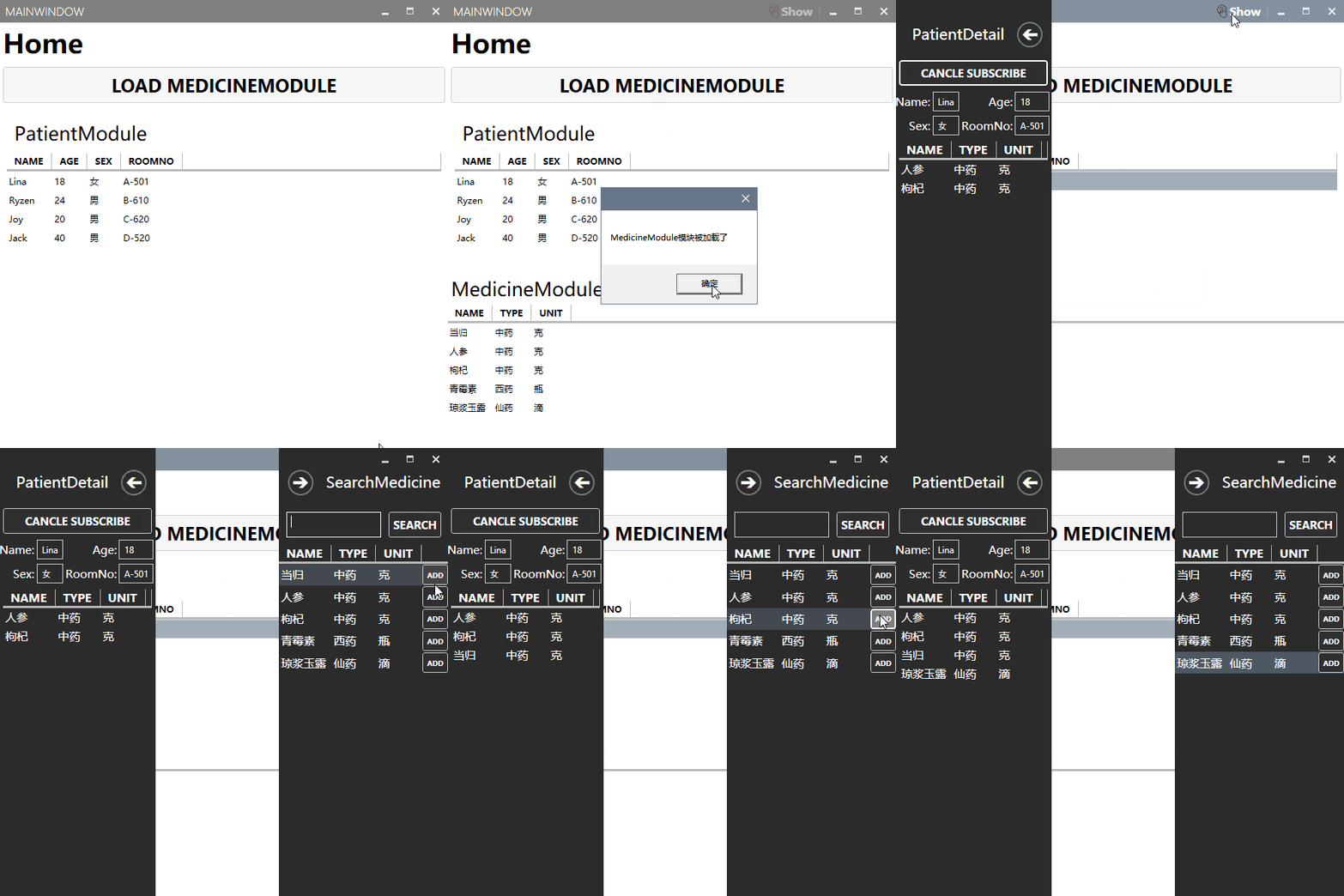
filter 是一个 Predicate 的泛型委托参数,返回值为布尔值,可用来订阅过滤,以我们 demo 为例子,更改 PatientDetailViewModel 订阅,代码如下:
PatientDetailViewModel.cs:
  _ea.GetEvent<MedicineSentEvent>().Subscribe(MedicineMessageReceived,
ThreadOption.PublisherThread,false,medicine=>medicine.Name=="当归"|| medicine.Name== "琼浆玉露");
效果如下:
五. 源码
最后,附上整个 demo 的源代码:PrismDemo 源码