本文只是簡單的登入介面佈局,沒有太重要的功能效果。
1. 實作效果
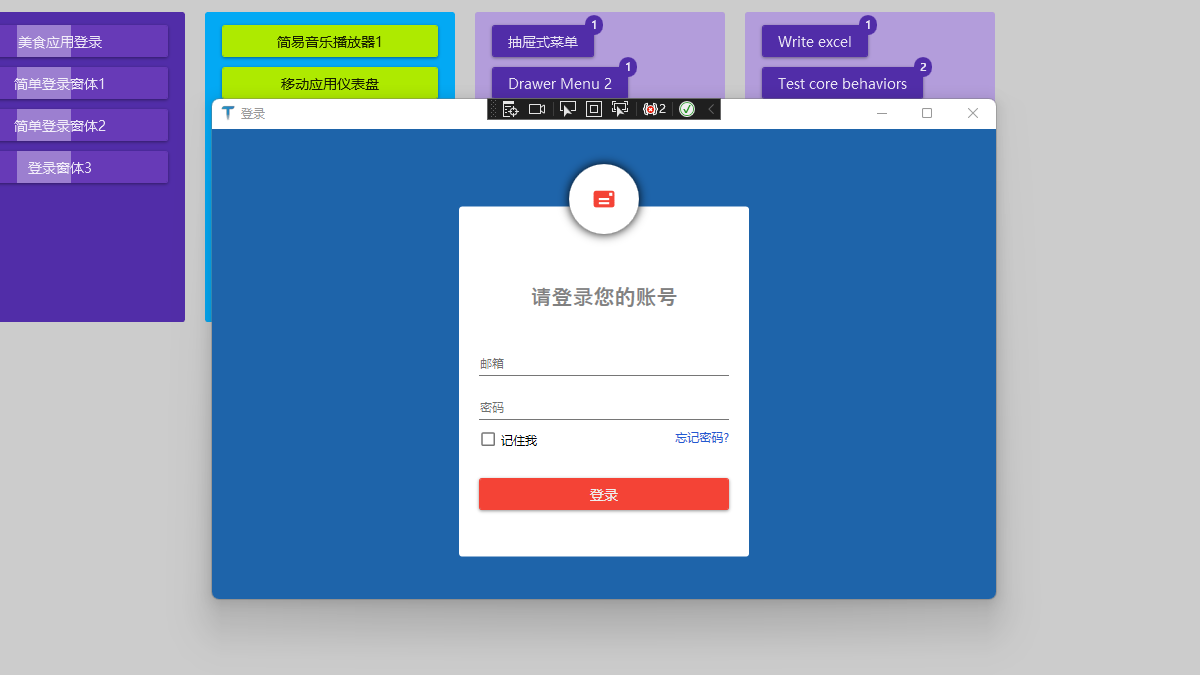
2. 業務場景
常規業務
3. 編碼實作
3.1 新增 NuGet 套件
使用 .NET Core 3.1 建立名為 "Login" 的 WPF 解決方案,新增 1 個 NuGet 套件:MaterialDesignThemes。
3.2 專案結構
2 個檔案變動:
- App.xaml:新增 MD 控制項樣式
- MainWindow.xaml:主視窗實作效果
3.2.1 App.xaml 引入 MD 控制項樣式
關鍵樣式引用程式碼
<Application.Resources>
  <ResourceDictionary>
    <ResourceDictionary.MergedDictionaries>
      <ResourceDictionary
        Source="pack://application:,,,/MaterialDesignThemes.Wpf;component/Themes/MaterialDesignTheme.Light.xaml"
      />
      <ResourceDictionary
        Source="pack://application:,,,/MaterialDesignThemes.Wpf;component/Themes/MaterialDesignTheme.Defaults.xaml"
      />
    </ResourceDictionary.MergedDictionaries>
    <!--Primary-->
    <SolidColorBrush x:Key="PrimaryHueLightBrush" Color="#FFCDD2" />
    <SolidColorBrush x:Key="PrimaryHueLightForegroundBrush" Color="#FF333333" />
    <SolidColorBrush x:Key="PrimaryHueMidBrush" Color="#f44336" />
    <SolidColorBrush x:Key="PrimaryHueMidForegroundBrush" Color="#FFEEEEEE" />
    <SolidColorBrush x:Key="PrimaryHueDarkBrush" Color="#b71c1c" />
    <SolidColorBrush x:Key="PrimaryHueDarkForegroundBrush" Color="#FFFFFFFF" />
    <!--Accent-->
    <SolidColorBrush x:Key="SecondaryAccentBrush" Color="#ff1744" />
    <SolidColorBrush x:Key="SecondaryAccentForegroundBrush" Color="#FFFFFF" />
  </ResourceDictionary>
</Application.Resources>
3.2.2 主視窗 MainWindow.xaml
全部程式碼,登入視窗佈局
<Window
x:Class="WpfApp2.MainWindow"
xmlns="http://schemas.microsoft.com/winfx/2006/xaml/presentation"
xmlns:x="http://schemas.microsoft.com/winfx/2006/xaml"
xmlns:d="http://schemas.microsoft.com/expression/blend/2008"
xmlns:mc="http://schemas.openxmlformats.org/markup-compatibility/2006"
xmlns:local="clr-namespace:WpfApp2"
mc:Ignorable="d"
xmlns:materialDesign="http://materialdesigninxaml.net/winfx/xaml/themes"
Title="登入"
Height="450"
Width="800"
>
<Grid Background="#FF1E64AA">
<Grid Width="300" Height="400">
<Border
CornerRadius="3"
HorizontalAlignment="Center"
Width="290"
Height="350"
VerticalAlignment="Center"
Background="White"
Margin="0 35 0 0"
>
<StackPanel Margin="0 50 0 0">
<TextBlock
Text="請登入您的帳號"
HorizontalAlignment="Center"
Foreground="Gray"
Margin="30"
FontSize="21"
FontFamily="Champagne & Limousines"
FontWeight="SemiBold"
/>
<TextBox Margin="20 10" materialDesign:HintAssist.Hint="電子郵件" />
<PasswordBox Margin="20 10" materialDesign:HintAssist.Hint="密碼" />
<Grid Margin="20 0">
<CheckBox Content="記住我" HorizontalAlignment="Left" />
<TextBlock
Text="忘記密碼?"
Foreground="#FF2259D1"
HorizontalAlignment="Right"
Cursor="Hand"
/>
</Grid>
<button Content="登入" Margin="20 30" />
</StackPanel>
</Border>
<Border
Width="70"
Height="70"
HorizontalAlignment="Center"
VerticalAlignment="Top"
Background="White"
CornerRadius="50"
>
<Border.Effect>
<DropShadowEffect BlurRadius="15" ShadowDepth="0" />
</Border.Effect>
<materialDesign:PackIcon
Kind="Mail"
Foreground="{StaticResource PrimaryHueMidBrush}"
HorizontalAlignment="Center"
VerticalAlignment="Center"
Width="25"
Height="25"
/>
</Border>
</Grid>
</Grid>
</Window>
4. 本文參考
- Design com WPF 大神的學習影片:First Impressions and new VS 2019
- 開源控制項套件:MaterialDesignInXamlToolkit
- 本站對 MD 開源控制項套件的介紹:控制項介紹
5. 程式碼下載
GitHub 原始碼下載:HelloDotNetCore