

1 简单要求
- 使用开源控件库
- 在 XAML 中声明托盘菜单,就像给控件添加 ContextMenu 一样
- 封装了常用命令,比如:打开主窗体、退出应用程序等

我在 TerminalMACS 中添加了托盘菜单,最终实现的托盘菜单效果:


2 如何做?
【Step 1】在已创建的 WPF 项目中,添加 HandyControl 库,并安装:
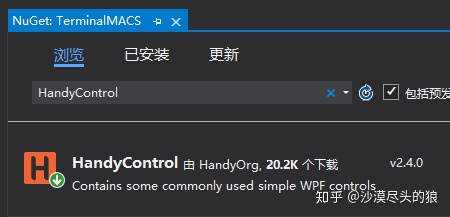
你问我为什么要使用 HC 控件库?先看 Demo 效果:
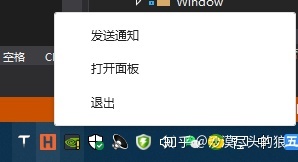


常用的托盘效果应该都能满足了吧?而实现这些效果,我们自己要码的代码真的不多,因为 HC 已经封装了,我们直接使用即可。
【Step 2】在窗体中添加 HandyControl 命名空间
xmlns:hc="https://handyorg.github.io/handycontrol"
【Step 3】声明托盘菜单关键的 19 行代码
<hc:NotifyIcon x:Name="NotifyIconContextContent"
            Text="{markup:I18n {x:Static i18NResources:Language.AppTitle}}"
            Visibility="Visible"
            Icon="/Images/logo.ico">
    <hc:NotifyIcon.ContextMenu>
        <ContextMenu>
            <MenuItem Command="hc:ControlCommands.PushMainWindow2Top" Header="{markup:I18n {x:Static i18NResources:Language.PushMainWindow2Top}}"/>
            <MenuItem Command="hc:ControlCommands.ShutdownApp" Header="{markup:I18n {x:Static i18NResources:Language.Exit}}"/>
        </ContextMenu>
    </hc:NotifyIcon.ContextMenu>
    <hc:Interaction.Triggers>
        <hc:EventTrigger EventName="Click">
            <hc:EventToCommand Command="hc:ControlCommands.PushMainWindow2Top"/>
        </hc:EventTrigger>
    </hc:Interaction.Triggers>
</hc:NotifyIcon>
上面的代码,一个托盘菜单基本上算完事了,简单说一下:
- NotifyIcon 为托盘菜单控件,Text 显示托盘菜单名称,将鼠标放在托盘图标上,ToolTip 显示该字符串,一般显示应用程序名称,如下图:

- hc:NotifyIcon.ContextMenu 用于声明菜单项,本项目目前加了打开主窗体、退出应用程序两个菜单,而这两个菜单对应的命令 HC 已经封装,方便使用。 - 另外,单击托盘菜单,也可弹出应用程序主窗口
【Step 4】手动关闭主窗体时,隐藏而不退出
添加了托盘菜单后,在关闭主窗体时,应该重写 OnClosing 事件,隐藏主窗体,而不是直接关闭它。
protected override void OnClosing(CancelEventArgs e)
{
    this.Hide();
    e.Cancel = true;
}
3 更多参考
更多 Demo 源码请参考 HandyControl
本文源码TerminalMACS