

本文阅读前了解知识:什么时候需要使用 UrlEncode 和 UrlDecode 函数
作者使用谷歌浏览器,通过按下 F12 对第三方网站 http 协议的接口抓包进行分析操作。
场景
运维小哥哥偶尔使用某某外包公司的网站系统,做设备录入工作,流程简单:
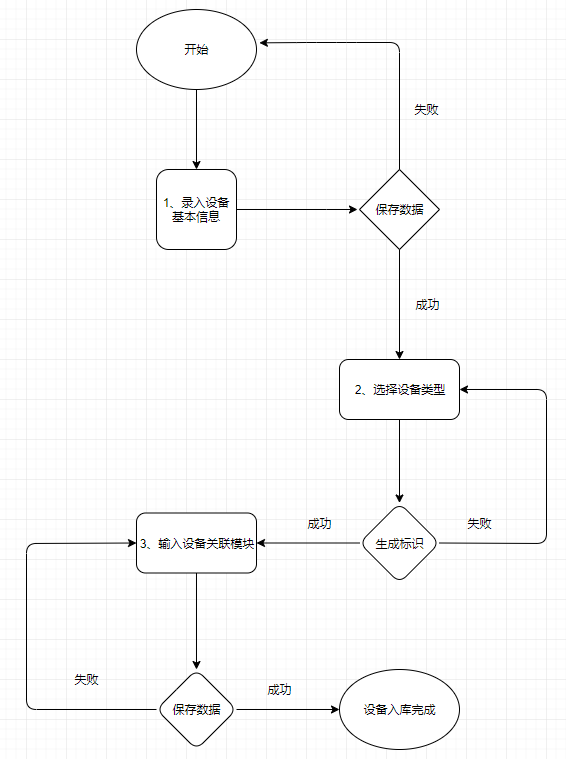
- 录入设备基本信息,有 7、8 个字段需要输入,然后点击保存按钮;
- 基本信息保存成功,进入设备类型选择操作,然后点击生成设备标识按钮;
- 设备标识生成成功,录入设备关联的模块信息,简单设备只需要录入 2 条模块,复杂的设备有 6 条模块,每个模块有 3、4 个字段需要输入,最后点击保存。
一条设备录入成功,单身多年的手速可能也花不了几分钟,其实这也没啥。
突然领导说有 1000 个设备需要搞?运维小哥哥哭了 😂,这时就该开发人员上场了:
- 运维准备一个 Excel 模板,输入需要录入的 1000 个设备基本信息、设备类型信息,这个工作量不大,就半天吧,最多一天工作量;
- 开发做个 C/S 客户端小工具,程序中按业务要求配置模块录入规则;
- 程序执行过程中录入一个设备就把生成的设备标识与设备关联;
- 全部录入完成,提供一个 Excel 导出,可将设备基本信息、生成的设备标识全部关联导出,工作完成。
经过几天的开发工作,开发哥哥将精心打磨的小工具交给运维小哥,运维小哥哥使用后投来了赞许的目光...
问题
前面铺垫的话有点啰嗦了,开发这个小工具时,开发小哥遇到一个问题:
xxx 接口
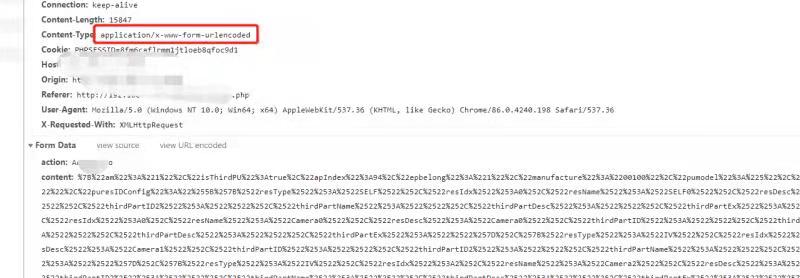
这是某个接口的信息,Content-Type 是 application/x-www-form-urlencoded,下面参数使用的Form Data,即参数使用了UrlEncode,比如未编码前的一个参数:
"Content":"{"AP_Name":"HK_7889","IP":"192.168.0.1"}"
编码后(可以使用这个在线 URL 编码解码工具验证):
"Content":"%7B%22AP_Name%22%3A%22HK_7889%22%2C%22IP%22%3A%2292.168.0.1%22%7D"
使用Postman测试时,未对参数使用UrlEncode,接口测试成功,开发这个小工具时,有 3 个接口都是类似的,未进行UrlEncode操作:
var client = new RestClient("http://admin.lqclass.com/api/device");
client.Timeout = -1;
var request = new RestRequest(Method.POST);
request.AddHeader("Content-Type", "application/x-www-form-urlencoded");
request.AddParameter("Content", "{\"AP_Name\":\"HK_7889\",\"IP\":\"92.168.0.1\"}");
IRestResponse response = client.Execute(request);
Console.WriteLine(response.Content);
但遇到稍微复杂一点的接口,比如截图中的参数为:
"Content":"{"AP_Name":"HK_7889","IP":"192.168.0.1","Module":[{"M_Name":"cameri0","Desc":"cameri0","AP_PUID":"54632325461320320"},{"M_Name":"cameri1","Desc":"cameri1","AP_PUID":"54636325461320320"},{"M_Name":"cameri2","Desc":"cameri2","AP_PUID":"54632325421320320"}]}"
Content值格式化看得清楚一点,Module是设备关联的模块信息:
{
  "AP_Name": "HK_7889",
  "IP": "192.168.0.1",
  "Module": [
    {
      "M_Name": "cameri0",
      "Desc": "cameri0",
      "AP_PUID": "54632325461320320"
    },
    {
      "M_Name": "cameri1",
      "Desc": "cameri1",
      "AP_PUID": "54636325461320320"
    },
    {
      "M_Name": "cameri2",
      "Desc": "cameri2",
      "AP_PUID": "54632325421320320"
    }
  ]
}
实际UrlEncode后的参数为:
"Content":"%7B%22AP_Name%22%3A%22HK_7889%22%2C%22IP%22%3A%22192.168.0.1%22%2C%22Module%22%3A%22%255B%257B%2522M_Name%2522%253A%2522cameri0%2522%252C%2522Desc%2522%253A%2522cameri0%2522%252C%2522AP_PUID%2522%253A%252254632325461320320%2522%257D%252C%257B%2522M_Name%2522%253A%2522cameri1%2522%252C%2522Desc%2522%253A%2522cameri1%2522%252C%2522AP_PUID%2522%253A%252254636325461320320%2522%257D%252C%257B%2522M_Name%2522%253A%2522cameri2%2522%252C%2522Desc%2522%253A%2522cameri2%2522%252C%2522AP_PUID%2522%253A%252254632325421320320%2522%257D%255D%22%7D"
本来一般接口,如上面成功执行的 C#代码那般直接未UrlEncode调用是没问题的。
但这个接口调用,服务器返回错误信息:“xxx 解析失败”,调用代码如下:
var client = new RestClient("http://admin.lqclass.com/api/device");
client.Timeout = -1;
var request = new RestRequest(Method.POST);
request.AddHeader("Content-Type", "application/x-www-form-urlencoded");
request.AddParameter("Content", "{\"AP_Name\":\"HK_7889\",\"IP\":\"192.168.0.1\",\"Module\":[{\"M_Name\":\"cameri0\",\"Desc\":\"cameri0\",\"AP_PUID\":\"54632325461320320\"},{\"M_Name\":\"cameri1\",\"Desc\":\"cameri1\",\"AP_PUID\":\"54636325461320320\"},{\"M_Name\":\"cameri2\",\"Desc\":\"cameri2\",\"AP_PUID\":\"54632325421320320\"}]}");
IRestResponse response = client.Execute(request);
Console.WriteLine(response.Content);
两处调用代码哪里不同?只是 Content 值不一样,最后怀疑是不是需要手动进行UrlEncode?又不是 url 参数,为啥需要编码呢?不管啦,先编码了再说。
问题解决
参数编码后,调用:
var client = new RestClient("http://admin.lqclass.com/api/device");
client.Timeout = -1;
var request = new RestRequest(Method.POST);
request.AddHeader("Content-Type", "application/x-www-form-urlencoded");
request.AddParameter("Content", "%7B%22AP_Name%22%3A%22HK_7889%22%2C%22IP%22%3A%22192.168.0.1%22%2C%22Module%22%3A%22%255B%257B%2522M_Name%2522%253A%2522cameri0%2522%252C%2522Desc%2522%253A%2522cameri0%2522%252C%2522AP_PUID%2522%253A%252254632325461320320%2522%257D%252C%257B%2522M_Name%2522%253A%2522cameri1%2522%252C%2522Desc%2522%253A%2522cameri1%2522%252C%2522AP_PUID%2522%253A%252254636325461320320%2522%257D%252C%257B%2522M_Name%2522%253A%2522cameri2%2522%252C%2522Desc%2522%253A%2522cameri2%2522%252C%2522AP_PUID%2522%253A%252254632325421320320%2522%257D%255D%22%7D");
IRestResponse response = client.Execute(request);
Console.WriteLine(response.Content);
哈哈,成功了,这里简单猜测下:别人的服务对接收的参数可能做了UrlDecode操作。
其实中间还做了一个参数的UrlEncode操作,即下面的Module参数值:
"Content":{"AP_Name":"HK_7889","IP":"192.168.0.1","Module":[{"M_Name":"cameri0","Desc":"cameri0","AP_PUID":"54632325461320320"},{"M_Name":"cameri1","Desc":"cameri1","AP_PUID":"54636325461320320"},{"M_Name":"cameri2","Desc":"cameri2","AP_PUID":"54632325421320320"}]}
第一次UrlEncode,即先对Module的值进行UrlEncode:
"Content":{"AP_Name":"HK_7889","IP":"192.168.0.1","Module":%5B%7B%22M_Name%22%3A%22cameri0%22%2C%22Desc%22%3A%22cameri0%22%2C%22AP_PUID%22%3A%2254632325461320320%22%7D%2C%7B%22M_Name%22%3A%22cameri1%22%2C%22Desc%22%3A%22cameri1%22%2C%22AP_PUID%22%3A%2254636325461320320%22%7D%2C%7B%22M_Name%22%3A%22cameri2%22%2C%22Desc%22%3A%22cameri2%22%2C%22AP_PUID%22%3A%2254632325421320320%22%7D%5D}
第二次UrlEncode即是上面成功的参数方式了,对整个Content的值进行UrlEncode,看上面成功的参数,不重复贴了。
最后总结
抓别人数据包时,不要凭印象、已有知识判定该怎么怎么做,比如前面的参数,不使用UrlEncode时,调用成功了,其他包我是否也沿用相同的方式使用就正确呢?搞不定时,多尝试猜测的方法。
总结:“管他的,干就是了”。
本文使用的UrlEncode C# 代码:
public static string UrlEncode(string str)
{
    StringBuilder sb = new StringBuilder();
    byte[] byStr = System.Text.Encoding.UTF8.GetBytes(str); //默认是System.Text.Encoding.Default.GetBytes(str)
    for (int i = 0; i < byStr.Length; i++)
    {
        sb.Append(@"%" + Convert.ToString(byStr[i], 16));
    }

    return (sb.ToString());
}