

昨天说到单元测试,但有些时候可能由于时间关系没办法完整测试,就可能因为某个Component 出错导致整个系统崩溃(如下图),因为Blazor Server 是在 Server 建立一个circuit(流程),一旦有未处理的错误 Server 就会将 circuit 终止以避免安全问题。
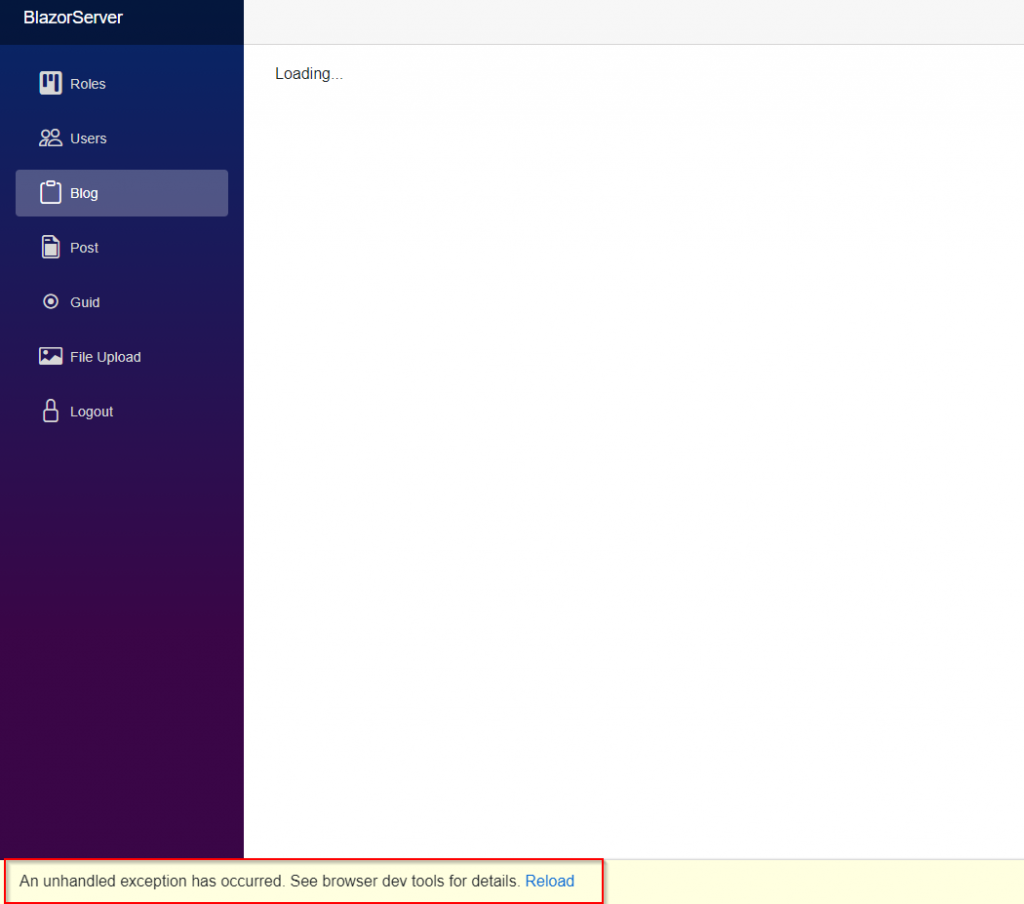
我们不想每次出错都终止整个系统,也不想在每个方法都用 try…catch… 包住程序处理所有错误,所以要用.NET 6 新推出的 Component <ErrorBoundary>。
在React 这个前端框架中同样有 ErrorBoundary 概念,它会捕捉任何Component 产生的错误并展示预设 UI 页面,当错误发生就会将错误限缩到该 Component,其他 Component 则维持功能性。
Blazor 也是借用这个概念,不过 Blaozr 团队有说明这并不能捕捉所有可能的例外状况,而且 <ErrorBoundary> 并不是要处理全域错误拦截,那是 ILogger 的任务,<ErrorBoundary>主要目的还是处理渲染或是生命周期方法( OnInitializedAsync、OnParametersSetAsync)产生的错误,另外还有许多可能的风险,例如开发者以为 <ErrorBoundary> 可以处理所有错误、开发者觉得不需要再针对不同错误产生定制化 UI 而导致复数不同错误产生时感到困惑、大量同类型 <ErrorBoundary> 同时产生时开发者又刚好针对该错误记录每笔 log 可能导致 log 堵塞…等等,所以不能把这个当成处理错误的最后一关。
虽然上面说得有些惊悚,但 <ErrorBoundary> 用来处理简单的页面逻辑还是可以的,就来试试看吧!
(注:如果是直接用 Visual Studio 2022 建立项目的人可以省略下面一段的步骤)
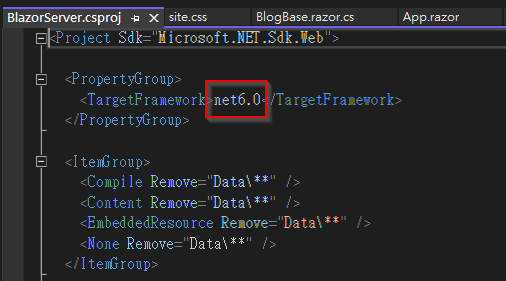
因为笔者用的是Visual Studio 2019,.NET 6 只能以Visual Studio 2022 执行,所以先去下载Visual Studio 2022,接着开启BlaozrPractice 方案,将BlazorServer、BlazorServerMsTest 两个项目的 <TargetFramework> 都改成net6.0。
然后记得去 wwwroot/css/site.css 加入下列 class,<ErrorBoundary>会产生一个带有blazor-error-boundaryclass 的<div>。
.blazor-error-boundary {
    background: url(data:image/svg+xml;base64,PHN2ZyB3aWR0aD0iNTYiIGhlaWdodD0iNDkiIHhtbG5zPSJodHRwOi8vd3d3LnczLm9yZy8yMDAwL3N2ZyIgeG1sbnM6eGxpbms9Imh0dHA6Ly93d3cudzMub3JnLzE5OTkveGxpbmsiIG92ZXJmbG93PSJoaWRkZW4iPjxkZWZzPjxjbGlwUGF0aCBpZD0iY2xpcDAiPjxyZWN0IHg9IjIzNSIgeT0iNTEiIHdpZHRoPSI1NiIgaGVpZ2h0PSI0OSIvPjwvY2xpcFBhdGg+PC9kZWZzPjxnIGNsaXAtcGF0aD0idXJsKCNjbGlwMCkiIHRyYW5zZm9ybT0idHJhbnNsYXRlKC0yMzUgLTUxKSI+PHBhdGggZD0iTTI2My41MDYgNTFDMjY0LjcxNyA1MSAyNjUuODEzIDUxLjQ4MzcgMjY2LjYwNiA1Mi4yNjU4TDI2Ny4wNTIgNTIuNzk4NyAyNjcuNTM5IDUzLjYyODMgMjkwLjE4NSA5Mi4xODMxIDI5MC41NDUgOTIuNzk1IDI5MC42NTYgOTIuOTk2QzI5MC44NzcgOTMuNTEzIDI5MSA5NC4wODE1IDI5MSA5NC42NzgyIDI5MSA5Ny4wNjUxIDI4OS4wMzggOTkgMjg2LjYxNyA5OUwyNDAuMzgzIDk5QzIzNy45NjMgOTkgMjM2IDk3LjA2NTEgMjM2IDk0LjY3ODIgMjM2IDk0LjM3OTkgMjM2LjAzMSA5NC4wODg2IDIzNi4wODkgOTMuODA3MkwyMzYuMzM4IDkzLjAxNjIgMjM2Ljg1OCA5Mi4xMzE0IDI1OS40NzMgNTMuNjI5NCAyNTkuOTYxIDUyLjc5ODUgMjYwLjQwNyA1Mi4yNjU4QzI2MS4yIDUxLjQ4MzcgMjYyLjI5NiA1MSAyNjMuNTA2IDUxWk0yNjMuNTg2IDY2LjAxODNDMjYwLjczNyA2Ni4wMTgzIDI1OS4zMTMgNjcuMTI0NSAyNTkuMzEzIDY5LjMzNyAyNTkuMzEzIDY5LjYxMDIgMjU5LjMzMiA2OS44NjA4IDI1OS4zNzEgNzAuMDg4N0wyNjEuNzk1IDg0LjAxNjEgMjY1LjM4IDg0LjAxNjEgMjY3LjgyMSA2OS43NDc1QzI2Ny44NiA2OS43MzA5IDI2Ny44NzkgNjkuNTg3NyAyNjcuODc5IDY5LjMxNzkgMjY3Ljg3OSA2Ny4xMTgyIDI2Ni40NDggNjYuMDE4MyAyNjMuNTg2IDY2LjAxODNaTTI2My41NzYgODYuMDU0N0MyNjEuMDQ5IDg2LjA1NDcgMjU5Ljc4NiA4Ny4zMDA1IDI1OS43ODYgODkuNzkyMSAyNTkuNzg2IDkyLjI4MzcgMjYxLjA0OSA5My41Mjk1IDI2My41NzYgOTMuNTI5NSAyNjYuMTE2IDkzLjUyOTUgMjY3LjM4NyA5Mi4yODM3IDI2Ny4zODcgODkuNzkyMSAyNjcuMzg3IDg3LjMwMDUgMjY2LjExNiA4Ni4wNTQ3IDI2My41NzYgODYuMDU0N1oiIGZpbGw9IiNGRkU1MDAiIGZpbGwtcnVsZT0iZXZlbm9kZCIvPjwvZz48L3N2Zz4=) no-repeat 1rem/1.8rem, #b32121;
    padding: 1rem 1rem 1rem 3.7rem;
    color: white;
}

    .blazor-error-boundary::after {
        content: "An error has occurred."
    }
再去 MainLayout.razor 用 <ErrorBoundary> 将 @Body 包住,最后去 BlogBase.razor.cs 在 LoadData() 加入一段程序抛出错误。

private async Task LoadData()
{
    …
    throw new Exception("这是测试错误信息");
}
开启网站看看,可以看到这次没有再看到底下黄色的例外状况错误信息,而是呈现预设的 UI。
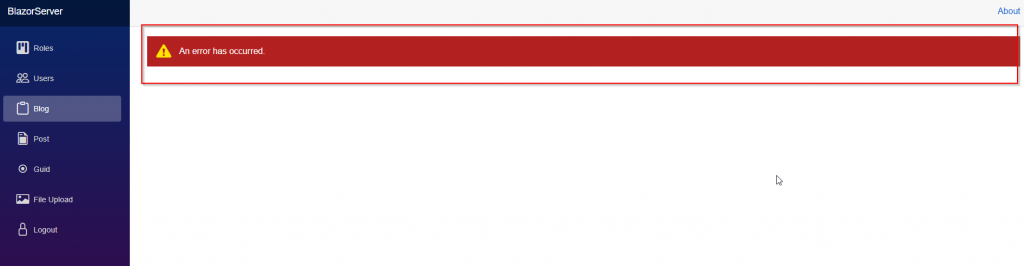
不过不管什么错误都会呈现这样的信息,对使用者来说似乎不太友善,我们来用 <ChildContent> 跟 <ErrorContent> 定制化,它们其实就是RenderFragment,可以放入任何HTML 标签或是Component。

<ErrorBoundary>
  <ChildContent> @Body </ChildContent>
  <ErrorContent>
    <p>很抱歉,目前出現未知錯誤,請聯絡管理員</p>
  </ErrorContent>
</ErrorBoundary>
但这时候如果切换到Roles 或是Users,会发现那块红色错误信息依旧在页面上,这是因为 <ErrorBoundary> 只要侦测到错误就会呈现,此时要调用方法Recover(),这方法可以将错误数量重设为0,并调用 StateHasChanged()去通知各个 Component 状态已经改变了,如此就会将 Component 重新渲染,千万记得要使用 @ref 去引用指定的<ErrorBoundary>,否则 Recover() 是不会执行的。

…
<div class="content px-4">
  <ErrorBoundary @ref="errorBoundary">
    <ChildContent> @Body </ChildContent>
    <ErrorContent>
      <p>很抱歉,目前出現未知错误,请联系管理员</p>
    </ErrorContent>
  </ErrorBoundary>
</div>
… @code { private ErrorBoundary errorBoundary; protected override void
OnParametersSet() { errorBoundary?.Recover(); } }
另外 <ErrorBoundary> 有一个变量 MaximumErrorCount 预设 100,只要 MaximumErrorCount 超过指定数量系统就会崩溃。

感言
笔者当初报名IT 铁人赛只是想把写项目的心得记录下来,当时很担心会没办法完赛,结果第 17 天真的忘记了,实在很惭愧,竟然犯下这种低级错误。后面几天因为想到已经失败就有些灌水了,这心态实在不可取,笔者会再将几篇文章合并,另发新的主题。
虽然没办法完赛,但笔者也从记录心得中学到了一些东西,过去一年多工作就算写心得也都是片段式纪录,没有完整始末,这次铁人赛为了写得详细,很多资料都查了好几遍,这才是正确的写心得方式,希望明年的铁人赛会有更多的进步。
引用:
- Unhandled Exceptions in Blazor Server with Error Boundaries
- Blazor "Error boundaries" design proposal #30940
- Blazor .NET 6 - Error Boundaries - Custom UI for Errors
- How To Get .NET 6 in Visual Studio 2019
(注:笔者照这视频的做法还是无法在 Visual Studio 2019 切换.NET 6,若有人有其他方法还请告知) Ref:
(注:微软官方下载网站指名.NET 6 不支援 Visual Studio 2019 SDK,不清楚上面视频的作者是如何办到的。)