
前言
我们都知道 InnoDB 在模糊查询数据时使用 "%xx" 会导致索引失效,但有时需求就是如此,类似这样的需求还有很多,例如,搜索引擎需要根据用户数据的关键字进行全文查找,电子商务网站需要根据用户的查询条件,在可能需要在商品的详细介绍中进行查找,这些都不是 B+树索引能很好完成的工作。
通过数值比较,范围过滤等就可以完成绝大多数我们需要的查询了。但是,如果希望通过关键字的匹配来进行查询过滤,那么就需要基于相似度的查询,而不是原来的精确数值比较,全文索引就是为这种场景设计的。
全文索引(Full-Text Search)是将存储于数据库中的整本书或整篇文章中的任意信息查找出来的技术。它可以根据需要获得全文中有关章、节、段、句、词等信息,也可以进行各种统计和分析。
在早期的 MySQL 中,InnoDB 并不支持全文检索技术,从 MySQL 5.6 开始,InnoDB 开始支持全文检索。
倒排索引
全文检索通常使用倒排索引(inverted index)来实现,倒排索引同 B+Tree 一样,也是一种索引结构。它在辅助表中存储了单词与单词自身在一个或多个文档中所在位置之间的映射,这通常利用关联数组实现,拥有两种表现形式:
- inverted file index:{单词,单词所在文档的 id}
- full inverted index:{单词,(单词所在文档的 id,再具体文档中的位置)}

上图为 inverted file index 关联数组,可以看到其中单词"code"存在于文档 1,4 中,这样存储再进行全文查询就简单了,可以直接根据 Documents 得到包含查询关键字的文档;而 full inverted index 存储的是对,即(DocumentId,Position),因此其存储的倒排索引如下图,如关键字"code"存在于文档 1 的第 6 个单词和文档 4 的第 8 个单词。相比之下,full inverted index 占用了更多的空间,但是能更好的定位数据,并扩充一些其他搜索特性。

全文检索
创建全文索引
1、创建表时创建全文索引语法如下:
CREATE TABLE table_name ( id INT UNSIGNED AUTO_INCREMENT NOT NULL PRIMARY KEY, author VARCHAR(200),
title VARCHAR(200), content TEXT(500), FULLTEXT full_index_name (col_name) ) ENGINE=InnoDB;
输入查询语句:
SELECT table_id, name, space from INFORMATION_SCHEMA.INNODB_TABLES
WHERE name LIKE 'test/%';

上述六个索引表构成倒排索引,称为辅助索引表。当传入的文档被标记化时,单个词与位置信息和关联的 DOC_ID,根据单词的第一个字符的字符集排序权重,在六个索引表中对单词进行完全排序和分区。
2、在已创建的表上创建全文索引语法如下:
CREATE FULLTEXT INDEX full_index_name ON table_name(col_name);
使用全文索引
MySQL 数据库支持全文检索的查询,全文索引只能在 InnoDB 或 MyISAM 的表上使用,并且只能用于创建 char,varchar,text 类型的列。
其语法如下:
MATCH(col1,col2,...) AGAINST(expr[search_modifier])
search_modifier:
{
    IN NATURAL LANGUAGE MODE
    | IN NATURAL LANGUAGE MODE WITH QUERY EXPANSION
    | IN BOOLEAN MODE
    | WITH QUERY EXPANSION
}
全文搜索使用 MATCH() AGAINST()语法进行,其中,MATCH() 采用逗号分隔的列表,命名要搜索的列。AGAINST()接收一个要搜索的字符串,以及一个要执行的搜索类型的可选修饰符。全文检索分为三种类型:自然语言搜索、布尔搜索、查询扩展搜索,下面将对各种查询模式进行介绍。
Natural Language
自然语言搜索将搜索字符串解释为自然人类语言中的短语,MATCH()默认采用 Natural Language 模式,其表示查询带有指定关键字的文档。
接下来结合 demo 来更好的理解 Natural Language
SELECT
    count(*) AS count
FROM
    `fts_articles`
WHERE
    MATCH ( title, body ) AGAINST ( 'MySQL' );
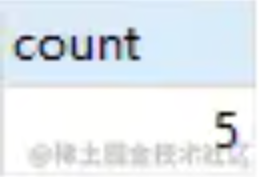
上述语句,查询 title,body 列中包含 'MySQL' 关键字的行数量。上述语句还可以这样写:
SELECT
    count(IF(MATCH ( title, body )
    against ( 'MySQL' ), 1, NULL )) AS count
FROM
    `fts_articles`;
上述两种语句虽然得到的结果是一样的,但从内部运行来看,第二句 SQL 的执行速度更快些,因为第一句 SQL(基于 where 索引查询的方式)还需要进行相关性的排序统计,而第二种方式是不需要的。
还可以通过 SQL 语句查询相关性:
SELECT
    *,
    MATCH ( title, body ) against ( 'MySQL' ) AS Relevance
FROM
    fts_articles;
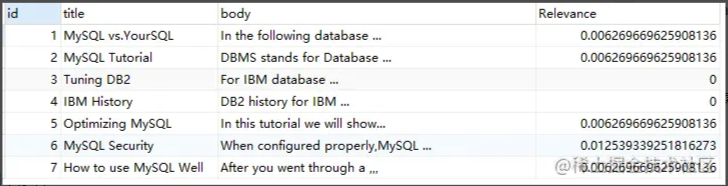
相关性的计算依据以下四个条件:
- word 是否在文档中出现
- word 在文档中出现的次数
- word 在索引列中的数量 多少个文档包含该 word
对于 InnoDB 存储引擎的全文检索,还需要考虑以下的因素:
- 查询的 word 在 stopword 列中,忽略该字符串的查询
- 查询的 word 的字符长度是否在区间 [innodb_ft_min_token_size,innodb_ft_max_token_size] 内
如果词在 stopword 中,则不对该词进行查询,如对 'for' 这个词进行查询,结果如下所示:
SELECT
    *,
    MATCH ( title, body ) against ( 'for' ) AS Relevance
FROM
    fts_articles;

可以看到,'for'虽然在文档 2,4 中出现,但由于其是 stopword ,故其相关性为 0
参数 innodb_ft_min_token_size 和 innodb_ft_max_token_size 控制 InnoDB 引擎查询字符的长度,当长度小于 innodb_ft_min_token_size 或者长度大于 innodb_ft_max_token_size 时,会忽略该词的搜索。在 InnoDB 引擎中,参数 innodb_ft_min_token_size 的默认值是 3,innodb_ft_max_token_size 的默认值是 84
Boolean
布尔搜索使用特殊查询语言的规则来解释搜索字符串,该字符串包含要搜索的词,它还可以包含指定要求的运算符,例如匹配行中必须存在或不存在某个词,或者它的权重应高于或低于通常情况。例如,下面的语句要求查询有字符串"Pease"但没有"hot"的文档,其中+和-分别表示单词必须存在,或者一定不存在。
select * from fts_test where MATCH(content) AGAINST('+Pease -hot' IN BOOLEAN MODE);
Boolean 全文检索支持的类型包括:
- +:表示该 word 必须存在
- -:表示该 word 必须不存在
- (no operator)表示该 word 是可选的,但是如果出现,其相关性会更高
- @distance 表示查询的多个单词之间的距离是否在 distance 之内,distance 的单位是字节,这种全文检索的查询也称为
Proximity Search,如MATCH(context) AGAINST('"Pease hot"@30' IN - BOOLEAN MODE)语句表示字符串 Pease 和 hot 之间的距离需在 30 字节内 -
:表示出现该单词时增加相关性
- <:表示出现该单词时降低相关性
- ~:表示允许出现该单词,但出现时相关性为负
-
- :表示以该单词开头的单词,如
lik*,表示可以是lik,like,likes
- :表示以该单词开头的单词,如
- " :表示短语
下面是一些 demo,看看 Boolean Mode 是如何使用的。
demo1:+ -
SELECT
    *
FROM
    `fts_articles`
WHERE
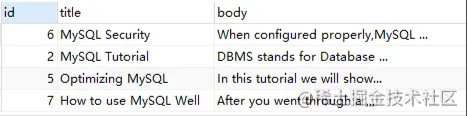
    MATCH ( title, body ) AGAINST ( '+MySQL -YourSQL' IN BOOLEAN MODE );
上述语句,查询的是包含 'MySQL' 但不包含 'YourSQL' 的信息
demo2: no operator
SELECT
    *
FROM
    `fts_articles`
WHERE
    MATCH ( title, body ) AGAINST ( 'MySQL IBM' IN BOOLEAN MODE );
上述语句,查询的 'MySQL IBM' 没有 '+','-'的标识,代表 word 是可选的,如果出现,其相关性会更高

demo3:@
SELECT
    *
FROM
    `fts_articles`
WHERE
    MATCH ( title, body ) AGAINST ( '"DB2 IBM"@3' IN BOOLEAN MODE );
复制代码
上述语句,代表 "DB2" ,"IBM"两个词之间的距离在3字节之内
demo4:> <
SELECT
    *
FROM
    `fts_articles`
WHERE
    MATCH ( title, body ) AGAINST ( '+MySQL +(>database <DBMS)' IN BOOLEAN MODE );
上述语句,查询同时包含 'MySQL','database','DBMS' 的行信息,但不包含'DBMS'的行的相关性高于包含'DBMS'的行。

demo5: ~
SELECT
    *
FROM
    `fts_articles`
WHERE
    MATCH ( title, body ) AGAINST ( 'MySQL ~database' IN BOOLEAN MODE );
上述语句,查询包含 'MySQL' 的行,但如果该行同时包含 'database',则降低相关性。

demo6:*
SELECT
    *
FROM
    `fts_articles`
WHERE
    MATCH ( title, body ) AGAINST ( 'My*' IN BOOLEAN MODE );
上述语句,查询关键字中包含'My'的行信息。
demo7:"
SELECT
    *
FROM
    `fts_articles`
WHERE
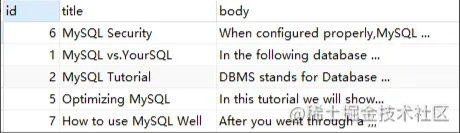
    MATCH ( title, body ) AGAINST ( '"MySQL Security"' IN BOOLEAN MODE );
上述语句,查询包含确切短语 'MySQL Security' 的行信息。

Query Expansion
查询扩展搜索是对自然语言搜索的修改,这种查询通常在查询的关键词太短,用户需要 implied knowledge(隐含知识)时进行,例如,对于单词 database 的查询,用户可能希望查询的不仅仅是包含 database 的文档,可能还指那些包含 MySQL、Oracle、RDBMS 的单词,而这时可以使用 Query Expansion 模式来开启全文检索的 implied knowledge
通过在查询语句中添加 WITH QUERY EXPANSION / IN NATURAL LANGUAGE MODE WITH QUERY EXPANSION 可以开启 blind query expansion(又称为 automatic relevance feedback),该查询分为两个阶段。
- 第一阶段:根据搜索的单词进行全文索引查询
- 第二阶段:根据第一阶段产生的分词再进行一次全文检索的查询
接着来看一个例子,看看 Query Expansion 是如何使用的。
-- 创建索引
create FULLTEXT INDEX title_body_index on fts_articles(title,body);
-- 使用 Natural Language 模式查询
SELECT
    *
FROM
    `fts_articles`
WHERE
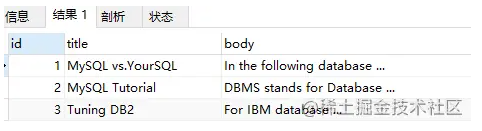
    MATCH(title,body) AGAINST('database');
使用 Query Expansion 前查询结果如下:
-- 当使用 Query Expansion 模式查询
SELECT
    *
FROM
    `fts_articles`
WHERE
    MATCH(title,body) AGAINST('database' WITH QUERY expansion);
使用 Query Expansion 后查询结果如下:

由于 Query Expansion 的全文检索可能带来许多非相关性的查询,因此在使用时,用户可能需要非常谨慎。
删除全文索引
1、直接删除全文索引语法如下:
DROP INDEX full_idx_name ON db_name.table_name;
2、使用 alter table 删除全文索引语法如下:
ALTER TABLE db_name.table_name DROP INDEX full_idx_name;
小结
本文从理论与实践结合的角度对 fulltext index 做了介绍,如对 MySQL 感兴趣可继续关注 MySQL 专栏。