9 options to increase domestic access to GitHub

9 options to increase domestic access to GitHub

For some reasons, the access speed of github is really too slow, pictures often cannot be swiped, and projects cannot even be downloaded. Although the code cloud is good, it still cannot replace github's position in the programming world.

最后更新 4/15/2022 8:23 PM
猪哥
预计阅读 4 分钟
分类
share
标签
GitHub

source| https://urlify.cn/IFzQRb

For some reasons, the access speed of github is really too slow, pictures often cannot be swiped, and projects cannot even be downloaded. Although the code cloud is good, it still cannot replace github's position in the programming world. So today, Brother Pig recommends several solutions to improve github's access speed. Just choose the one you like!

1. GitHub mirror access

Here are the two most commonly used mirror addresses:

In other words, the above image is a cloned version of GitHub. You can visit the above image website. The content of the website is a fully synchronized image with GitHub, and then perform operations such as downloading and cloning in this website.

2. GitHub file acceleration

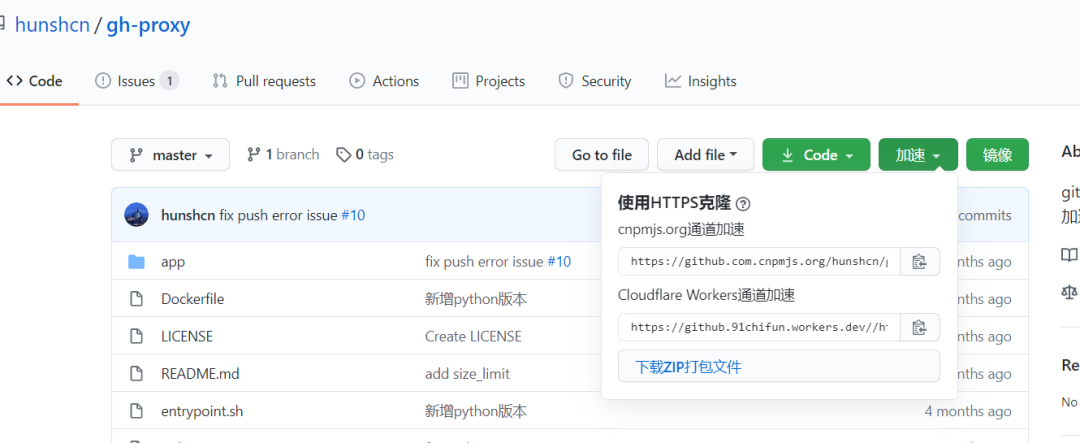
Use Cloudflare Workers to accelerate github release, archive, and project files, and deploy them without servers and come with a CDN.

The above website is a demonstration site. If you cannot open it, you can view the open source project: gh-proxy-GitHub(https://hunsh.net/archives/23/) file accelerates self-deployment.

3. GitHub accelerates downloads

Just copy the current GitHub address and paste it into the input box to speed up the download!

Address: toolwa.com/github/

4. Accelerate your GitHub

https://github.zhlh6.cn

Enter the GitHub repository address and use the generated address to perform git ssh and other operations

6. GitHub raw acceleration

The GitHub raw domain name is not github.com but raw.githubusercontent.com. If the GitHub acceleration above cannot accelerate this domain name, you can use the anti-substitution service provided by Static CDN.

Accelerate by replacing raw.githubusercontent.com with raw.staticdn.net.

7. GitHub + Jsdelivr

The only fly in the ointment with jsdelivr is that it cannot obtain exe files and the exe and dmg files attached at the Release.

In other words, if the exe file is attached to the Release but not in the code, it cannot be obtained. Therefore, it can only be used as a static file cdn, and cannot be used as a release to accelerate download.

8. Download via Gitee transfer fork warehouse

There are many related tutorials on the Internet, and here is a brief explanation of how to do it.

Visit the gitee website: gitee.com/ and log in. Select "Import Warehouse from GitHub/GitLab" at the top as follows:

Paste your GitHub repository address on the import page and click Import:

Wait for the import operation to complete, and then download and browse the corresponding GitHub warehouse code in the imported warehouse. You can also click the "Refresh" button at the top of the warehouse to synchronize the GitHub code warehouse.

9. Accelerate by modifying HOSTS files

Manually bind cdn to ip address.

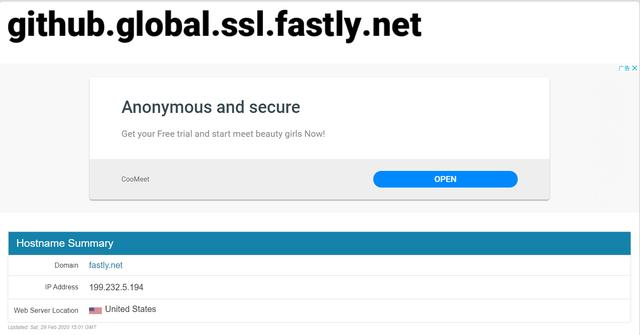
Step 1: Get github's global.ssl. fast address: github.global.ssl.fastly.net.ipaddress.com/#ipinfo Get cdn and ip domain names:

Received: 199.232.69.194 https://github.global.ssl.fastly.net

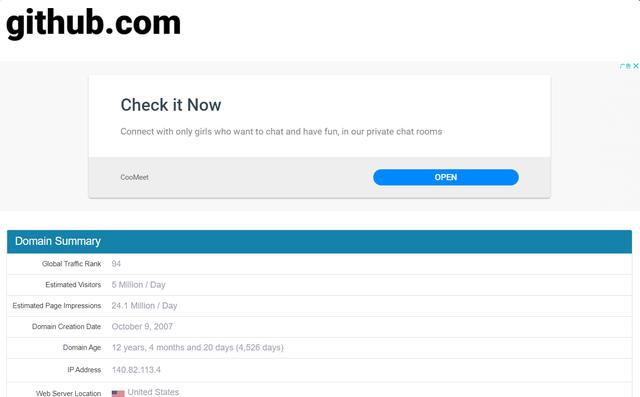
Step 2: Get the address of github.com

Visit: github.com.ipaddress.com/#ipinfo for cdn and ip:

Get: 140.82.114.4 http://github.com

Step 3: Modify the host file mapping to find the IP above

Windows system:

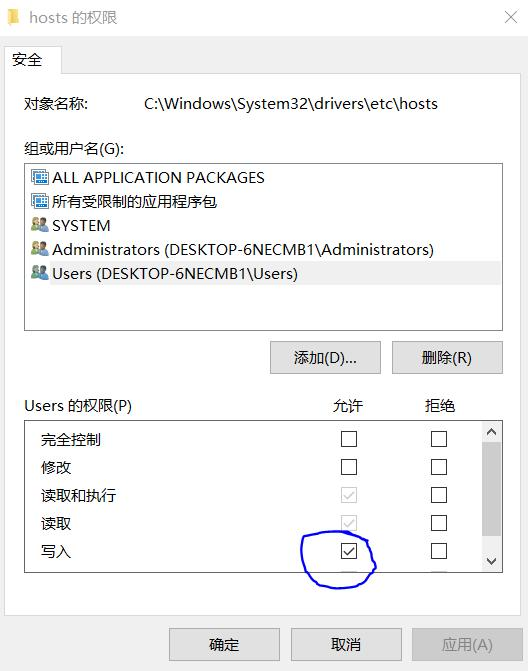
  1. Modify the permissions of the C:\Windows\System32\drivers\etc\hosts file and specify that it can be written: right-click->hosts-> Properties-> Security-> Edit-> Click Users-> to check the "Write" permissions of Users. As follows:

Then click OK.

  1. Right-click->hosts-> Open method-> Select Notepad (or your favorite editor)-> Add the following at the end:
199.232.69.194 github.global.ssl.fastly.net
140.82.114.4 github.com
Keep Exploring

延伸阅读

更多文章
同标签 4/13/2022

Xamarin Forms Goodlooking UI

Introduction to open source mobile apps developed using `Xamarin.Forms`. Interested parties can visit the [Github](https://github.com/jsuarezruiz/xamarin-forms-goodlooking-UI) and [Gitee](https://gitee.com/dotnet9/xamarin-forms-goodlooking-UI) repositories and download the corresponding App project research.

继续阅读