

1. 安装 Openxml sdk
首先,我们先安装 nuget 的需要的有关的 Openxml sdk,我们开源了解析 pptx 的Openxml 拍平层,下面两种方式都可以安装:
- nuget 包管理器控制台:
Install-Package dotnetCampus.DocumentFormat.OpenXml.Flatten -Version 2.0.0
- csproj 引用:
<PackageReference Include="dotnetCampus.DocumentFormat.OpenXml.Flatten" Version="2.0.0" />
2. 解析 Pptx
我这里用 PPTX 的 7 种直线,分别设置 7 种能够设置的虚线类型,PPTX 的显示效果是这样的:
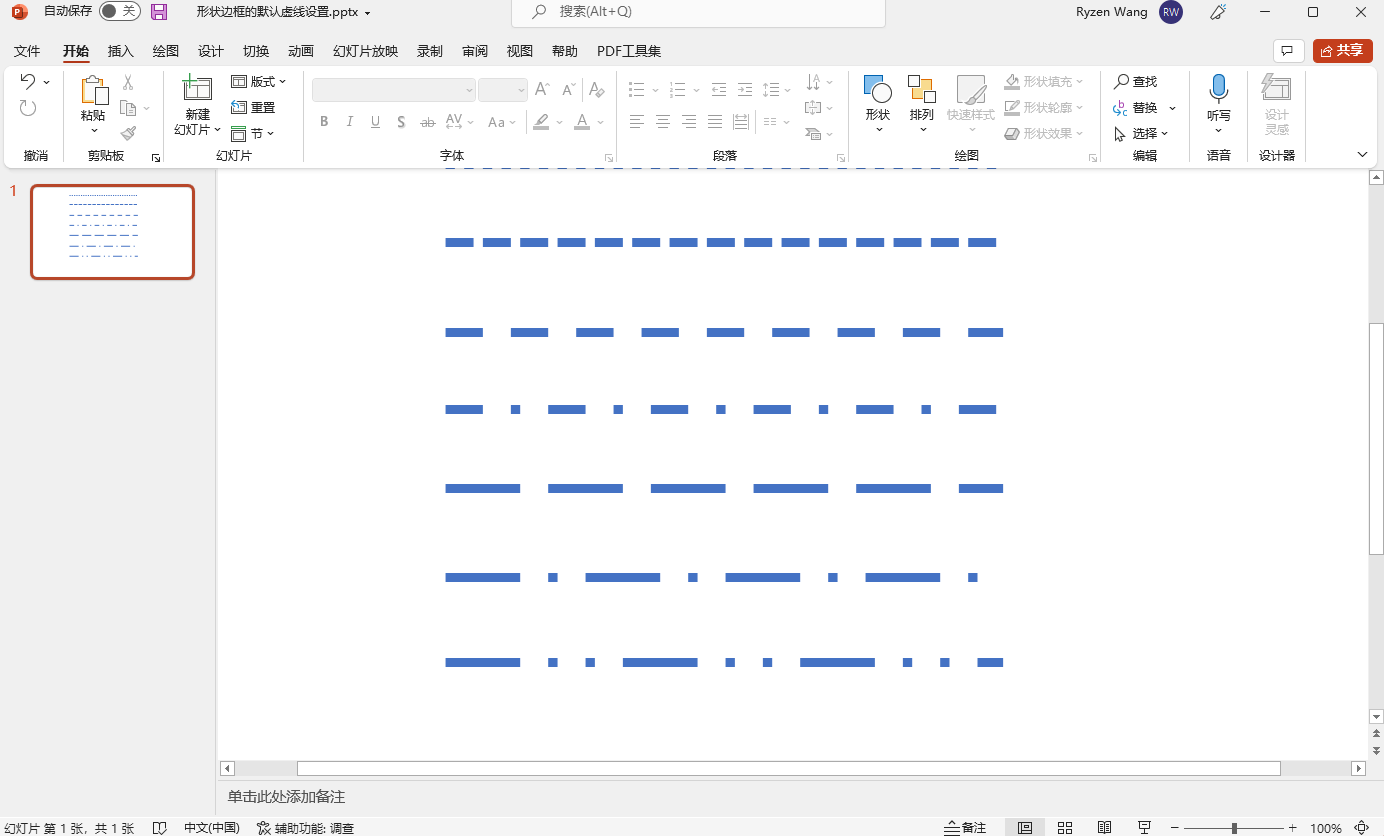
然后解析代码如下,解析主要逻辑部分:
private void PptxToGeometry(string filePath)
{
    if (!File.Exists(filePath) || !filePath.EndsWith(".pptx", StringComparison.OrdinalIgnoreCase))
    {
        return;
    }

    var lines = new List<Line>();
    using var presentationDocument = PresentationDocument.Open(filePath, false);
    var presentationPart = presentationDocument.PresentationPart;
    var presentation = presentationPart?.Presentation;
    var slideIdList = presentation?.SlideIdList;
    if (slideIdList == null)
    {
        return;
    }
    foreach (var slideId in slideIdList.ChildElements.OfType<SlideId>())
    {
        var slidePart = (SlidePart)presentationPart.GetPartById(slideId.RelationshipId);
        var slide = slidePart.Slide;
        foreach (var shapeProperties in slide.Descendants<ShapeProperties>())
        {
            var presetGeometry = shapeProperties.GetFirstChild<PresetGeometry>();
            if (presetGeometry != null && presetGeometry.Preset.HasValue)
            {
                if (presetGeometry.Preset == ShapeTypeValues.StraightConnector1)
                {
                    var transform2D = shapeProperties.GetFirstChild<Transform2D>();
                    var extents = transform2D?.GetFirstChild<Extents>();
                    if (extents != null)
                    {
                        var width = new Emu(extents.Cx!.Value).ToPixel().Value;
                        var height = new Emu(extents.Cy!.Value).ToPixel().Value;


                        var presetDash = shapeProperties.GetFirstChild<Outline>()?.GetFirstChild<PresetDash>()?.Val;
                        var dashArray = GetDashArrayByPresetLineDashValues(presetDash);
                        var line = ConverterToGeometry( width, height, dashArray);
                        lines.Add(line);
                    }
                }
            }
        }
    }

    this.ListBox.ItemsSource = lines;
}
PPTX 映射成 WPF 虚线的方法:
private DoubleCollection GetDashArrayByPresetLineDashValues(PresetLineDashValues presetLineDashValues)
{
    DoubleCollection dashStyle = presetLineDashValues switch
    {
        PresetLineDashValues.Solid => new(),
        PresetLineDashValues.Dot => new() { 0, 2 },
        PresetLineDashValues.Dash => new() { 3, 3 },
        PresetLineDashValues.LargeDash => new() { 8, 3 },
        PresetLineDashValues.DashDot => new() { 3, 3, 1, 3 },
        PresetLineDashValues.LargeDashDot => new() { 7.5, 3.5, 1, 3.5 },
        PresetLineDashValues.LargeDashDotDot => new() { 8, 3, 1, 3, 1, 3 },
        PresetLineDashValues.SystemDash => new() { 3, 1 },
        PresetLineDashValues.SystemDot => new() { 1, 1 },
        PresetLineDashValues.SystemDashDot => new() { 2, 2, 0, 2 },
        PresetLineDashValues.SystemDashDotDot => new() { 2, 2, 0, 2 },
        _ => new DoubleCollection()
    };
    return dashStyle;
}
最终绘制线条的方法:
private Line ConverterToGeometry(double width, double height, DoubleCollection dashDoubleCollection)
{
    var line = new Line
    {
        X1 = 0,
        Y1 = 0,
        X2 = width,
        Y2 = height,
        StrokeDashArray = dashDoubleCollection,
        Stroke = Stroke,
        StrokeThickness = StrokeThickness
    };
    return line;
}
最终的效果:
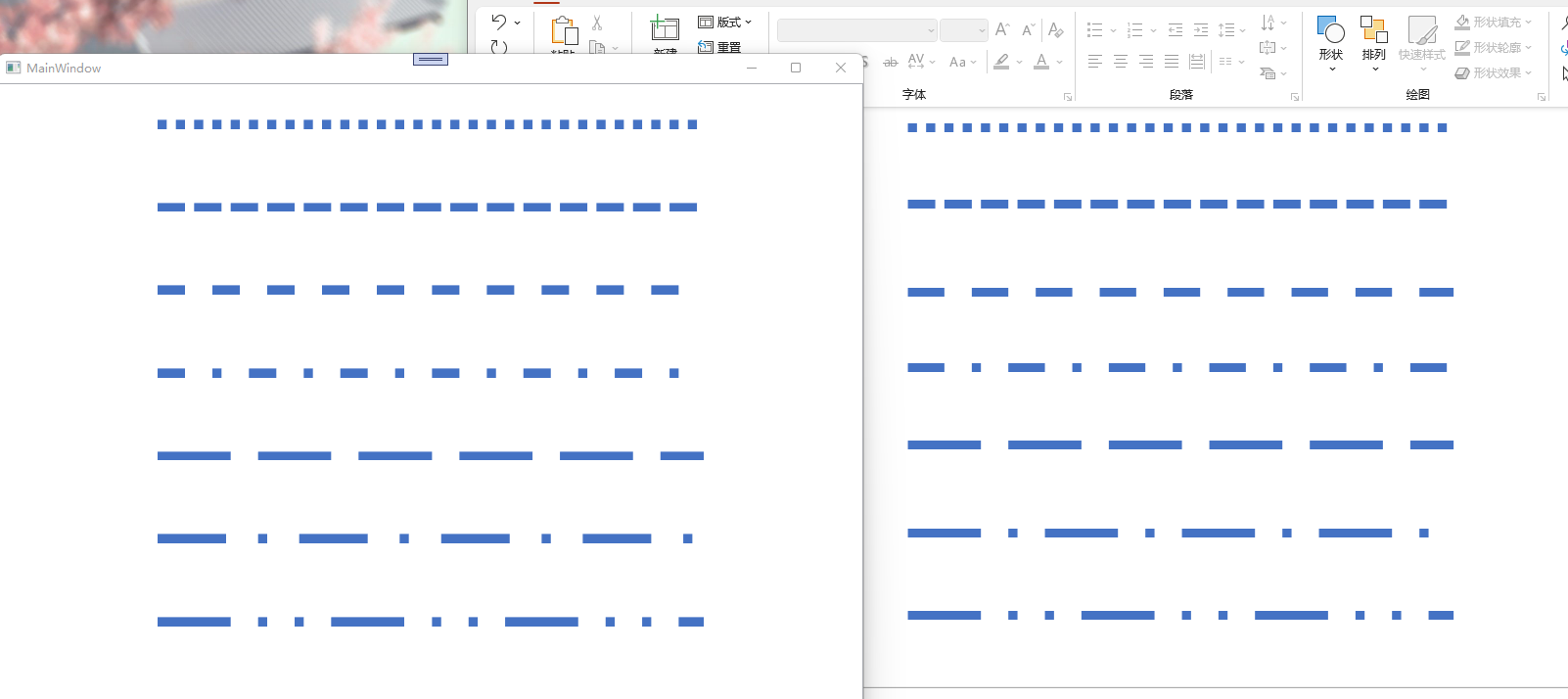
我们可以看到几乎是接近的效果了,当然你也可以根据我的代码去微调更精确的值,只需要稍微改下GetDashArrayByPresetLineDashValues方法内相对应的值即可
3. 后话
实际上,openxml 文档是给出了 PresetDash 的值的,大致如下:
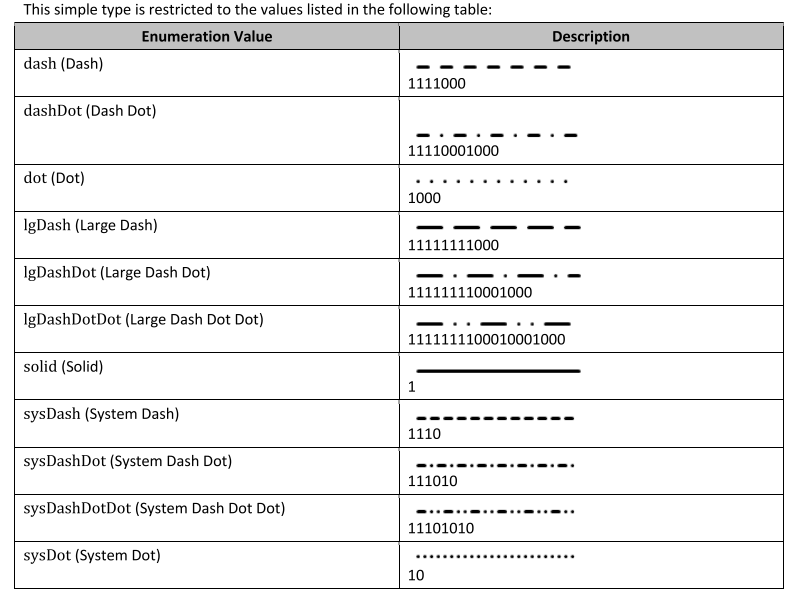
但是其值跟 WPF 的设置 Dash 的 DoubleCollection 不对应,因此以上的映射值都是我自己微调的
4. 源码
BlogCodeSample/PptDashConverToWpfSample at main · ZhengDaoWang/BlogCodeSample