Today is my second day on the journey of learning Maui. I’m not exactly thrilled to be able to write another article—I just have to say it’s really easy to churn one out.
Without further ado, let’s get down to business. Yesterday I solved the issues with the TitleBar and window size on Windows. Today, the same problems have to be tackled on Mac, which really frustrates and annoys me.
With yesterday’s experience, I’m much smarter about doing Mac development today. Because I knew Microsoft wouldn’t make it easy for me, I went straight to Apple’s official website, opened the Xcode development guide, and prepared myself.
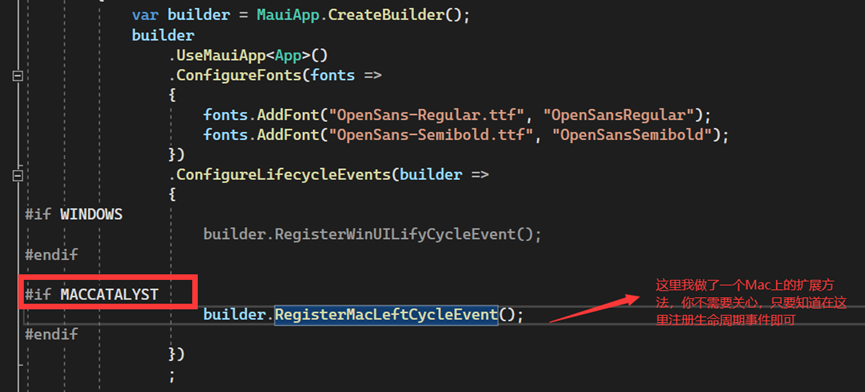
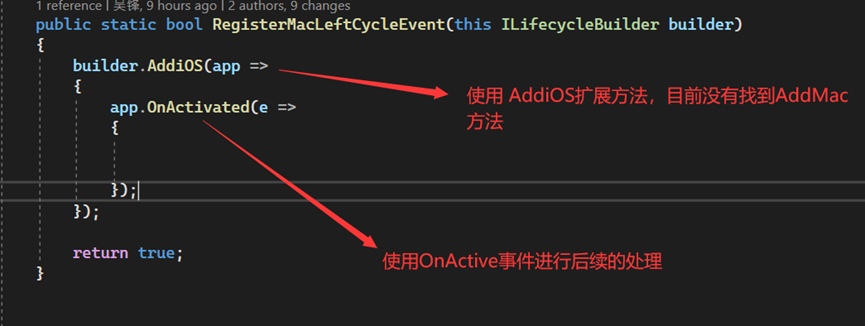
Similarly, before making any window-related changes, you need to register the lifecycle functions for the Mac app. I looked around but couldn’t find an AddMac extension method, so I directly used the AddiOS extension method (I’m just that good, I can pinpoint the key immediately). In the OnActive callback, I perform the operations I need.
Here are the steps:
Register lifecycle functions (you can also override the window’s OnCreate function)
Step 1
Need to hide the TitleBar on Mac. On the Mac system, Microsoft chose to implement it using the UIKit framework, which is different from Windows. So I promptly opened the Apple official documentation and immediately located the target object on the first page of the Apple Developer Guide. It was super easy. Reference: Removing the Title Bar in Your Mac App Built with Mac Catalyst - English Documentation - Apple Developer

- Implementation steps:
- Get the main window under
UIApplication - Hide the
TitleBar
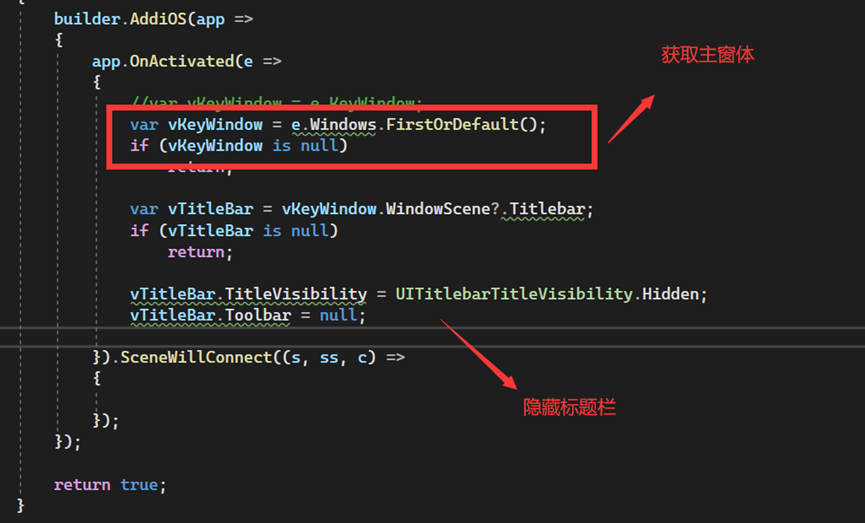
- Code implementation:
builder.AddiOS(app =>
 {
     app.OnActivated(e =>
     {
         //var vKeyWindow = e.KeyWindow;
         var vKeyWindow = e.Windows.FirstOrDefault();
         if (vKeyWindow is null)
             return;

         var vTitleBar = vKeyWindow.WindowScene?.Titlebar;
         if (vTitleBar is null)
             return;

         vTitleBar.TitleVisibility = UITitlebarTitleVisibility.Hidden;
         vTitleBar.Toolbar = null;

     })
 });
- Result:

Step 2
Need to modify the default size of the Mac app window. This is really a headache. I searched through all UIKit related materials (maybe not all), but couldn’t find anything about window sizes. The only information is related to View (modifying Frame), which is useless to me (that’s the implementation under the AppKit framework). Fortunately, my eyes are sharp, and I noticed this information in the documentation:
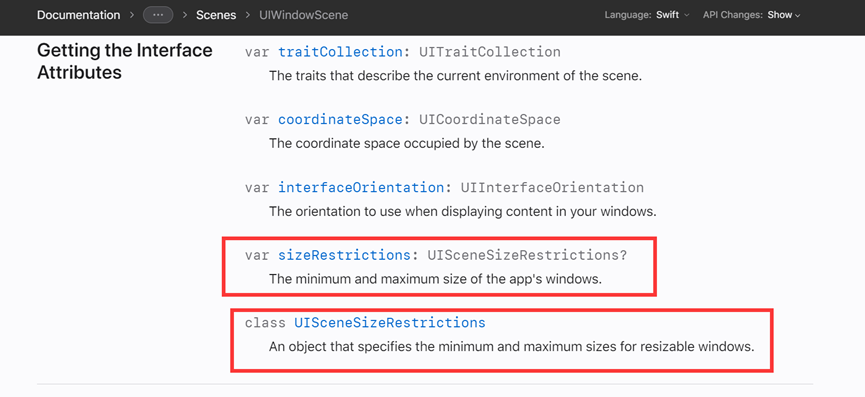
Reference: UISceneSizeRestrictions | Apple Developer Documentation
Maybe modifying MinimumSize and MaximumSize can indirectly achieve window size changes. So I tried modifying them and found that when I changed MinimumSize, the window actually changed. However, a weird thing happened: the window’s width and height didn’t match the values I set (I discovered this because after getting the screen’s size and setting it directly, the window didn’t maximize). After some research, I found that apparently you need to multiply by 1.3 to get the actual value. I’m not sure why it’s 1.3 (if anyone knows, please let me know), because it’s not even the dpi value. Anyway, after this workaround, the problem is solved. To maximize the window, just feed the screen size directly.
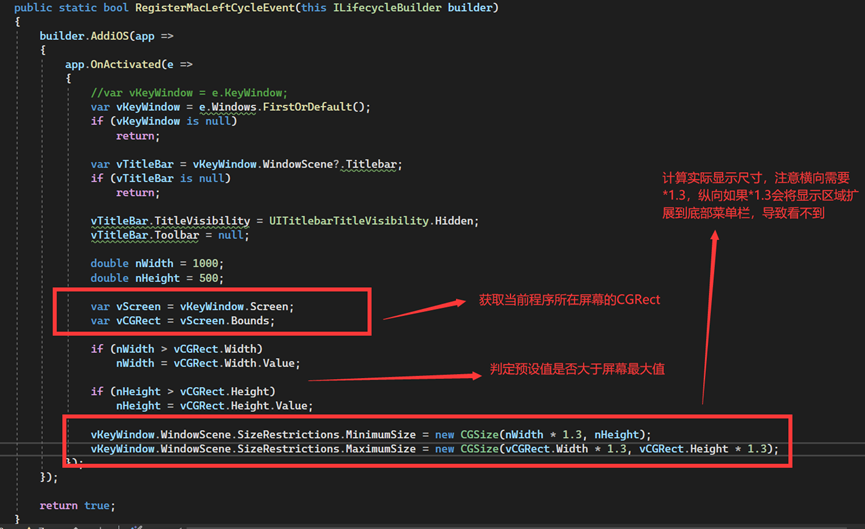
- Code as follows:
builder.AddiOS(app =>
{
    app.OnActivated(e =>
    {
        //var vKeyWindow = e.KeyWindow;
        var vKeyWindow = e.Windows.FirstOrDefault();
        if (vKeyWindow is null)
            return;

        var vTitleBar = vKeyWindow.WindowScene?.Titlebar;
        if (vTitleBar is null)
            return;

        vTitleBar.TitleVisibility = UITitlebarTitleVisibility.Hidden;
        vTitleBar.Toolbar = null;

        double nWidth = 1000;
        double nHeight = 500;

        var vScreen = vKeyWindow.Screen;
        var vCGRect = vScreen.Bounds;

        if (nWidth > vCGRect.Width)
            nWidth = vCGRect.Width.Value;

        if (nHeight > vCGRect.Height)
            nHeight = vCGRect.Height.Value;

        vKeyWindow.WindowScene.SizeRestrictions.MinimumSize = new CGSize(nWidth * 1.3, nHeight);
        vKeyWindow.WindowScene.SizeRestrictions.MaximumSize = new CGSize(vCGRect.Width * 1.3, vCGRect.Height * 1.3);
    });
});
- Result (demonstration of window maximization):
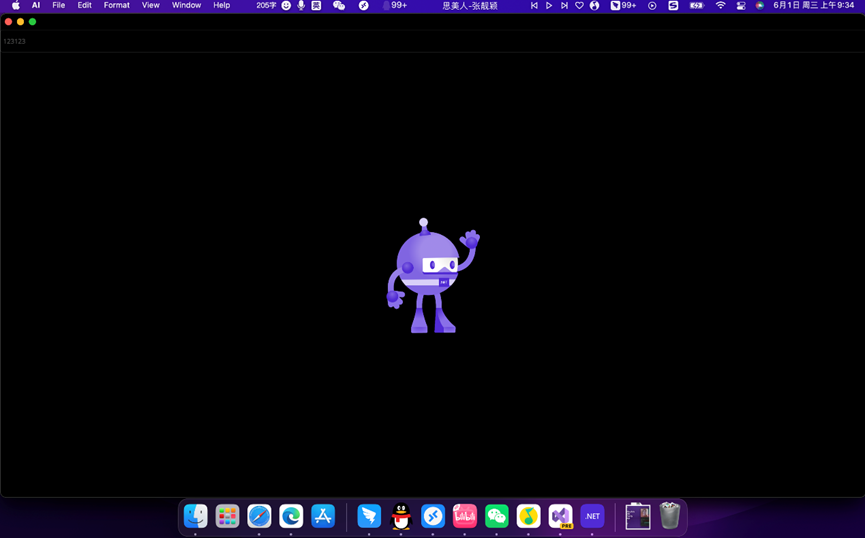
Note: Apple’s program remembers the last window size every time it runs. So if you first enlarge the interface, you cannot reduce it using the method above. You need to reduce the MaximumSize to make the window smaller.
In the end, I didn’t find a way to enable full‑screen mode on Mac apps. Sorry about that (if anyone knows how to make UIKit go full‑screen, feel free to ping me).
One more thing I have to complain about: Apple’s official documentation is really good at hiding things. If Microsoft’s development docs are second, no one dares to say they are first. If I want to look up a Windows API, I just go to MSDN and search; it’s everywhere. But honestly, I don’t even know how to search for MacOS API on Apple’s official site.
I checked the Xamarin.Mac official docs. Back then, Xamarin.Mac used the Appkit approach, so it doesn’t seem very useful for reference.
However, surprisingly, I found that Microsoft’s official UIKit documentation is actually more comprehensive than Apple’s own. That’s really exciting. Reference: UIKit Namespace | Microsoft Docs
In the end, it’s still my softy—Microsoft is truly awesome.