
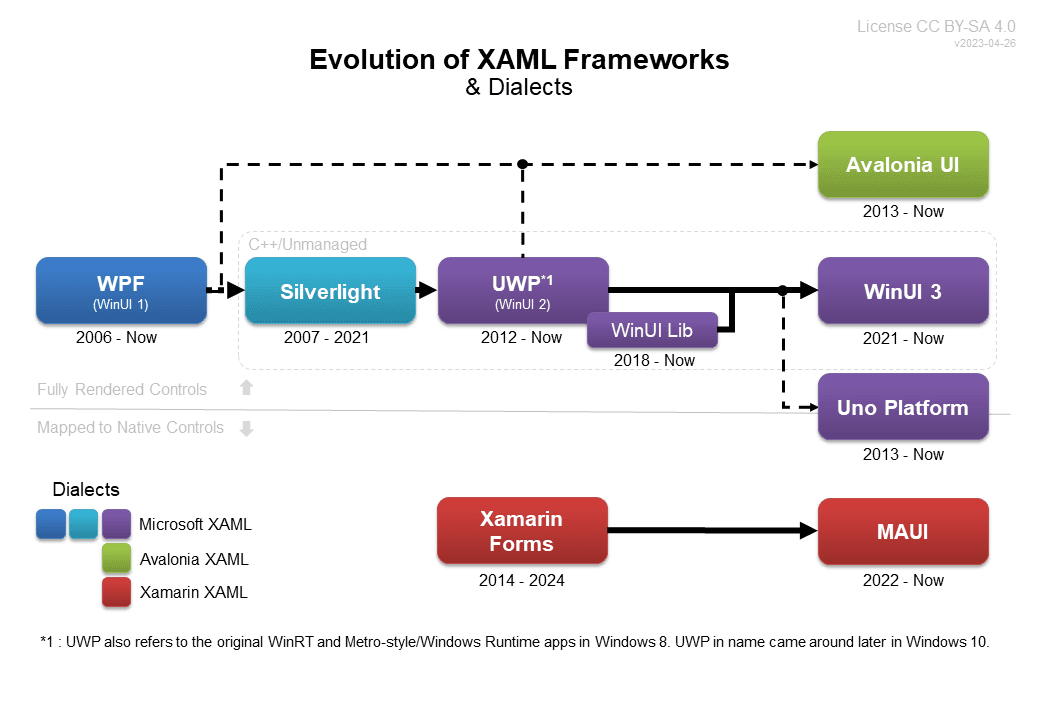
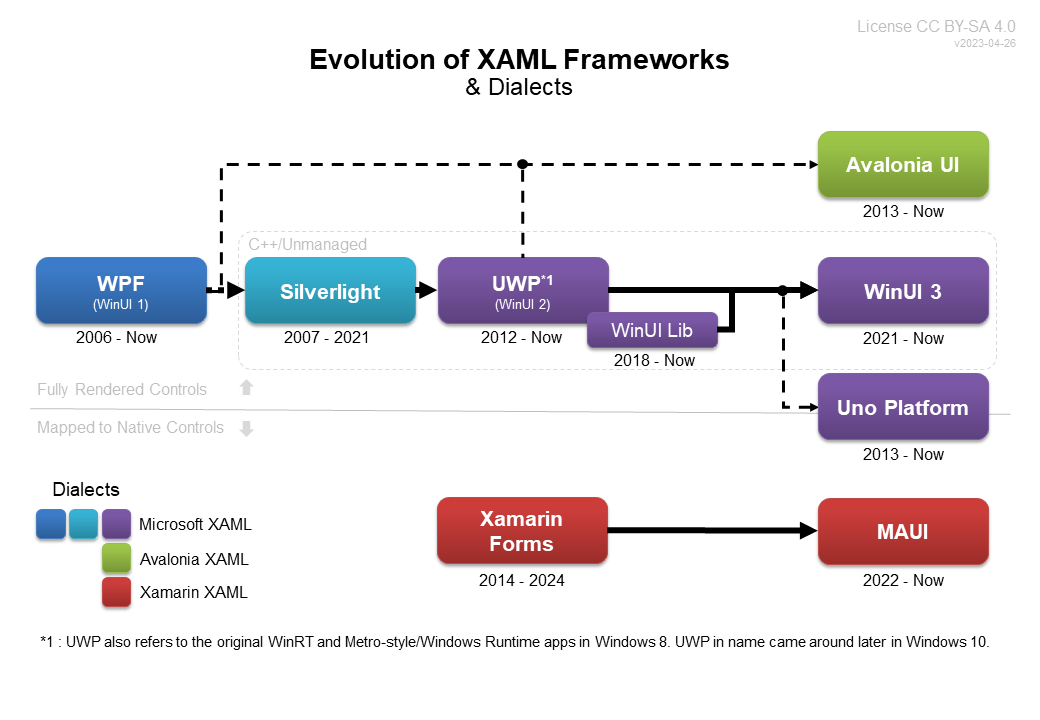
多年来,基于 XAML 的 UI 框架已经有了很大的发展,下面的图表是最好的说明。这些框架主要包含:支持跨平台应用的 Avalonia UI, Uno Platform 和 .NET MAUI。事实上,除了 Avalonia UI 之外,对跨平台 XAML 的需求是其发展的主要驱动力。如果微软早点推出一个类似 Flutter 这样的跨平台 UI 框架,我们可能就不会有这么多的选择。这样有利有弊:好处在于我们有很多跨平台方案可以选择,坏处在于不同的框架有不同的对象模型以及各自的特有的 XAML 语法(dialect of XAML)。
在关注各种 .NET UI 框架时,我们会提出同一个问题:应该使用哪一个 XAML UI 框架来开发我们的应用?这是一个合理且重要的问题。迄今为止还没有一个明确的答案。但是,对于每个具体的应用,这个问题很容易回答,因为可以针对特定的应用需求比较分析每一种框架的优点和缺点。通过概述基于 XAML 的主要 UI 框架的优点和缺点,本文档旨在帮助公司和开发人员回答以下问题:
应该选择哪一个 XAML 框架开发我的跨平台应用?
高屋建瓴地看,可以从架构上描述这些基于 XAML 的跨平台 UI 框架的差异。这些框架都是基于相同的 .NET(以前的 Mono)工具。不容忽视的是,Xamarin 对 .NET 的贡献使得这些框架存在。此外,在 .NET 6+ 中,这些框架在每个平台上都使用相同的运行时和核心库。
- Avalonia UI : 完全自己呈现控件和用户界面元素,这一点和 Flutter 相同。
- .NET MAUI : 标准化一组名称、属性、事件,并将它们应用/链接到特定平台的原生控件。如果单个平台不支持某项功能,该功能则不会出现在所有平台的 MAUI 中(不涉及特定平台的代码)
- Uno Platform : 使用选定的几个特定于平台的基本元素来构建和渲染控件。 对于高级控件,这提供了近乎像素完美的结果。这意味着 Uno Platform 像 Avalonia UI 和 Flutter 那样完全渲染控件; 不过, 它还支持直接嵌入特定平台的原生控件,是一个混合架构。
因为 WPF 和 UWP/WinUI 这些基于 XAML 的微软框架不是跨平台的,所以这里不进行详细比较。但是 WPF 可以通过Wine Mono 或者 Avalonia XPF跨平台运行。WinUI/UWP 已通过接下来讨论的 Uno Platform 支持跨平台运行。
项目链接
| Project | Website | GitHub | Docs |
|---|---|---|---|
| Avalonia UI | avaloniaui.net | github.com/AvaloniaUI/Avalonia | docs.avaloniaui.net |
| .NET MAUI | maui | github.com/dotnet/maui | docs.microsoft.com/en-us/dotnet/maui/ |
| Uno Platform | platform.uno | github.com/unoplatform/uno | platform.uno/docs/ |
其他框架
还有一些其他可用于 .NET 跨平台开发的解决方案在本文不再详细描述。即便本文不会进行详细对比,这些框架或者解决方案也值得了解一下:
- WPF : 正如上文所讲,WPF 可以通过Wine Mono 或者 Avalonia XPF跨平台运行。对于 WPF 代码量较大的现有应用,可以考虑这种跨平台解决方案。
- Eto.Forms : 一个类似于 .NET MAUI 的 UI 框架,使用平台原生控件构建 UI,XAML 也可以用于序列化和构造 UI。
- Noesis GUI : 用于游戏开发, Noesis GUI 重新创建 WPF,用于游戏引擎(如 Unity)以构建用户界面。Noesis GUI 对 XAML 的支持非常广泛,可以和 Microsoft Blend 一起使用。 如果它可以在游戏引擎之外工作,并且对较小的应用程序有更好的许可,那么它将是一项早于其他跨平台 XAML 实现的有趣技术。
- .NET MAUI + Blazor Hybrid : .NET MAUI 可以托管 Blazor Web 应用(在 BlazorWebView 控件内),使其更像是应用程序和服务容器。对于那些希望将现有 Web 应用程序重新打包并分发为移动应用程序的人来说,这是一个非常有吸引力的选择。
- .NET MAUI + Avalonia UI Hybrid : .NET MAUI 还可以托管 Avalonia UI(在 AvaloniaView 控件里),使其更像是一个应用程序和服务的容器。 由于 Avalonia 只是一个 UI 框架,要轻松获取 .NET MAUI 的所有附加平台抽象功能 (Essentials) 以及更轻松地打包和部署移动应用时,这是一个非常有吸引力的选择。
更多时候将 .NET MAUI 作为应用程序加服务容器,然后托管其他 UI 框架(如 Blazor 或 Avalonia UI)是一个有吸引力的选择。这种架构可能会在未来获得更多的关注,绝对是一个值得密切关注的领域。
框架对比
每个框架都有不同的表现——在某些地方很明显。下表中重点关注具有较高影响力的领域和特征。对于所有框架表象相同的地方将不在下表中呈现(仅关注差异)。
这种比较是基于对各种框架的大量研究和经验;结果不免有些主观,还需要注意的是,. NET MAUI 的使用经验是三个选项中最少的,这可能会影响排名的准确性。
- ✔️ 表示支持该特性 ❌ 表示不支持
- ⭐⭐⭐ 是最高/最好的评分, ⭐ 是最低/最差的
| Avalonia | .NET MAUI | Uno Platform | |
|---|---|---|---|
| ▶ 特性 | |||
| MVVM 模式 | ✔️ | ⭐⭐⭐ | ✔️ | ⭐⭐ | ✔️ | ⭐⭐⭐ |
| MVU 模式 | ❌ | ✔️ | ⭐⭐ | ✔️ | ⭐ |
| Pixel-perfect rendering | ✔️ | ⭐⭐⭐ | ❌ | ✔️ | ⭐⭐ |
| 控件 | ✔️ | ⭐⭐⭐ | ❌ | ✔️ | ⭐⭐⭐ |
| 样式和主题 | ✔️ | ⭐⭐⭐ | ✔️ | ⭐ | ✔️ | ⭐⭐⭐ |
| 支持统一的外观 | ✔️ | ⭐⭐⭐ | ❌ | ✔️ | ⭐⭐⭐ |
| 平台原生外观 | ❌ | ✔️ | ⭐⭐⭐ | ✔️ | ⭐ |
| 平台一致性 | ✔️ | ⭐⭐⭐ | ✔️ | ⭐ | ✔️ | ⭐⭐ |
| 原生控件集成 | ✔️ | ⭐ | ✔️ | ⭐⭐⭐ | ✔️ | ⭐⭐⭐ |
| XAML 语法和代码共享 | ✔️ | ⭐⭐ | ✔️ | ⭐ | ✔️ | ⭐⭐⭐ |
| C# 代码隐藏共享 | ✔️ | ⭐⭐ | ✔️ | ⭐ | ✔️ | ⭐⭐⭐ |
| 热重载 | ❌ | ✔️ | ⭐⭐⭐ | ✔️ | ⭐⭐⭐ |
| 第三方支持 | ✔️ | ⭐ | ✔️ | ⭐⭐⭐ | ✔️ | ⭐⭐ |
| 高级文本格式 | ✔️ | ⭐⭐⭐ | ❌ | ❌ |
| 非用户界面功能 | ❌ | ✔️ | ⭐⭐ | ✔️ | ⭐⭐⭐ |
| ▶ Strategy & Development | |||
| 性能(理论) | ⭐⭐⭐ | ⭐⭐⭐ | ⭐⭐ |
| 移动应用稳定性 | ⭐ | ⭐⭐ | ⭐⭐ |
| 桌面应用稳定性 | ⭐⭐⭐ | ⭐⭐ | ⭐ |
| 可用控件 | ⭐ | ⭐⭐ | ⭐⭐⭐ |
| 代码许可证 | ⭐⭐⭐ | ⭐⭐⭐ | ⭐⭐ |
| 免费支持 | ⭐ | ⭐⭐ | ⭐⭐⭐ |
| 付费支持 | ⭐⭐⭐ | ⭐⭐ | ⭐⭐⭐ |
| 项目速度 | ⭐⭐ | ⭐⭐ | ⭐⭐ |
| 易于贡献 | ⭐⭐⭐ | ⭐⭐ | ⭐⭐ |
| 代码库可读性 | ⭐⭐⭐ | ⭐ | ⭐ |
| 开发人员体验 | ⭐⭐⭐ | ⭐⭐ | ⭐ |
| 企业支持 | ⭐⭐ | ⭐⭐ | ⭐⭐⭐ |
| ▶ IDE 和集成工具 | |||
| Visual Studio | ✔️ | ⭐⭐ | ✔️ | ⭐⭐⭐ | ✔️ | ⭐⭐ |
| Visual Studio Code | ✔️ | TBD | ✔️ | ⭐⭐ | ✔️ | ⭐⭐⭐ |
| Rider | ✔️ | ⭐⭐⭐ | ✔️ | ⭐ | ✔️ | ⭐⭐ |
| Design tool integration | ❌ | ❌ | ✔️ | ⭐⭐ |
| ▶ 平台支持 | |||
| iOS | ✔️ | ⭐ | ✔️ | ⭐⭐⭐ | ✔️ | ⭐⭐ |
| Android | ✔️ | ⭐ | ✔️ | ⭐⭐⭐ | ✔️ | ⭐ |
| Windows 桌面应用 | ✔️ | ⭐⭐ | ✔️ | ⭐ | ✔️ | ⭐⭐⭐ |
| macOS 桌面应用 | ✔️ | ⭐⭐⭐ | ✔️ | ⭐ | ✔️ | ⭐ |
| Linux 桌面应用 | ✔️ | ⭐⭐⭐ | ❌ | ✔️ | ⭐ |
| Web Browser (WASM) | ✔️ | ⭐ | ❌ | ✔️ | ⭐⭐⭐ |
| ▶ 整体平台支持 | |||
| 移动端 | ✔️ | ⭐ | ✔️ | ⭐⭐⭐ | ✔️ | ⭐⭐ |
| 桌面程序 | ✔️ | ⭐⭐⭐ | ✔️ | ⭐ | ✔️ | ⭐ |
| Web | ✔️ | ⭐ | ❌ | ✔️ | ⭐⭐⭐ |
该表格最近一次更新是在 2023 年 7 月.
备注
MVU 模式
.NET MAUI 对传统上认为的带有 C# Markup and Comet的 MVU 模式具有最完整的支持. 这是一个活跃的试验性和开发领域,预计未来将得到和 MVVM 的相同级别的支持。Uno Platform 开发了自己的 MVU 变体,称为 MVU-X。这与其他产品有很大不同,并且具有更高的学习曲线,但确实与 XAML 数据绑定集成得更好。MVU 模式这一全新方法的长期可行性还有待观察,在这实验性的方案稳定之前,最好谨慎选择。Avalonia 没有直接的支持 MVU 模式。但是,它提供了两个类库支持使用声明性语法替代 XAML 编写 UI 界面。Avalonia.Markup.Declarative通过在 Avalonia 上提供帮助方法和扩展来支持许多 C#标记概念。这提供了一种用 C#编写 UI 界面的好方法,该方法可以遵循 MVU 模式而不需要使用 XAML。F# 开发人员的另一个选择是Avalonia.FuncUI,它专门为 F#语言提供了类似的支持。值得注意的是,在所有框架中,Avalonia 对 F# 的支持最好(由社区提供)。
Pixel-Perfect Rendering
在这三个框架中,只有 Avalonia 支持真正的“pixel-perfect”渲染。这是由于架构的原因,只有 Avalonia 完全绘制了自己的用户界面和控件。虽然 Uno Platform 试图实现“pixel-perfect”,但由于使用原生的基本控件,在不同平台之间经常存在差异。Uno Platform(skia 除外)从未完全绘制自己的控件,因此只是趋近于“pixel-perfect”。
无固定外观控件(Lookless Controls), 样式 & 主题
当开发人员想到 XAML 时,他们通常会想到无固定外观控件(lookless controls)。能够完全更改控件的样式和默认模板以将其转换为完全不同的内容是 WPF 的一个主要功能。Avalonia 和 Uno Platform 都完整支持自己版本的无固定外观控件(lookless controls)和模板重定义。但是,MAUI 不具备此功能,仅支持更改一些常见的属性。在这方面,可以把 MAUI 看作是 Windows Forms 这类较旧的界面工具包。例如,这意味着在 MAUI 中不支持在按钮内放置图标或图形,而在其他的 XAML 框架中则很容易实现。什么是Lookless Controls WPF 控件的行为是固定的。例如,按钮有一组固定的事件,包括单击事件。不管你用按钮控件做什么操作,它仍然会有一个点击事件。 WPF 控件没有固定的“外观”。Lookless 这个词恰好可以简洁的表达这个意思。 按钮的默认外观是由默认的 XAML 模板定义的,可以替换一个完全不同的模板,从而完全改变按钮控件的外观。
平台一致性
在使用跨平台框架进行开发时,应用程序和代码的一致性非常重要。您不想在一个平台上开发和验证的功能,然后发现它在另一个平台上的运行效果不同。在这方面,.NET MAUI 非常差,因为它链接到每个平台上的原生控件。这不仅需要对所有地方进行验证,而且需要多次编写自定义控件,同时花费大量时间调整内容以使其看起来一致(类似于让网页在所有浏览器上正确呈现)大多数情况下,Uno Platform 比 MAUI 表现得更好。但是,它也存在一些严重的问题,一些功能并不是在所有平台上都支持。那些所有平台上都有的功能通常表现一致,但也可能存在很难修复的细微差异。由于架构差异,Avalonia UI 在平台一致性的问题上很容易超越其他框架。Avalonia 完全自己渲染,因此它在每个平台上看起来总是完全相同(字体、输入差异、弹出窗口等除外)。
原生控件集成
.NET MAUI 和 Uno Platform 都建立在 Xamarin Native 之上,并与之完全集成。这意味着两个框架都可以通过 c#绑定访问特定于平台的原生控件。这对于访问原生平台功能和控件来说非常强大,几乎没有任何妥协。可以直接在 XAML 和代码隐藏中添加原生控件,就像框架本身内置的任何其他控件一样。相比之下,Avalonia UI 是它自己的 UI 层,它不直接与 Xamarin Native(及其特定于平台的控件)集成。作为替代,Avalonia 提供了一个允许在 Avalonia 应用程序中嵌入本地控件的 NativeControlHost。但是,这并不像 MAUI 或者 Uno Platform 中那样简洁。类似于 WPF 中的 WindowsFormsHost,但与之不同的是,Avalonia UI 还使用 3D 元素解决了“空域问题”,可以直接在各种表面上绘制 UI。这实际上允许 Avalonia 在游戏引擎或 DirectX 上运行,这在其他框架中是不可能的。
XAML 语法和代码共享
在代码共享方面,Uno Platform 拥有最高的评分。它使用与 UWP/WinUI 相同的 XAML 方言和对象模型,这使得它在 XAML 和 C# 100% 兼容。Avalonia 和 MAUI 都偏离了过去的 XAML 版本,与 WPF 或 UWP/WinUI 都不兼容。尽管如此,Avalonia 努力在对象模型方面与 WPF 相似, MAUI 会因为很少的原因(Height/Width, TextBlock 等)而偏离。在一些情况下,Avalonia 还成功地成为了更强大的下一代 WPF 语法和对象模型。由于对 XAML 的一些改变(样式,bool 类型的 IsVisible,简化的网格行/列语法等),使得一些操作在 Avalonia 中更容易。与 MAUI 相比,Avalonia 与现有 WPF 代码的兼容性和代码共享更好,因此总体评分也更高。
高级文本格式
最初的 XAML 框架 WPF 具有非常先进的文本格式 API(FlowDocument)。这仍然比今天在 WinUI 3 或之前的 UWP 中发现的更高级。事实上,在 Avalonia UI 版本 11.0 之前,没有其他跨平台 XAML 框架支持高级文本特性。现在,Avalonia UI 具有与 WPF 几乎相同的 API,并且可以完成在 .NET MAUI 和 Uno Platform 上根本不可能完成的文本格式化和测量。由于架构上的差异,在可预见的未来,Avalonia UI 很可能仍将是唯一支持高级文本(不依赖第三方控件)的框架。这包括诸如 RichTextBox 之类的控件,这些控件可以在 Avalonia 中实现,但在 Uno Platform 中非常困难,在 .NET MAUI 中几乎是不可能的。
非 UI 功能
Avalonia UI 的主要缺点是它只是一个 UI 框架。.NET MAUI 有必备的软件包,Uno Platform 是继 UWP 之后的一个完整的应用开发平台。可以说.NET MAUI 和 Uno Platform 都不仅仅是一个 UI 框架。这意味着在.NET MAUI 和 Uno Platform 中诸如持久化设置、文件处理、身份验证、本地化和设备权限等内容都可以立即使用,但在 Avalonia 不行。Uno Platform 甚至具有一些仅在 UWP 中才能找到的音频相关的高级 API,并且可以跨平台。Uno Platform 试图覆盖整个 UWP 的对外暴露的 API(API-surface),这包含大量的 API。整个 API 是自动生成的,其中许多功能未实现 stubs。这意味着大多数非 UI 的 API 不可用,如果在应用中使用它们,则会引发异常。这确实会在开发过程中产生一些问题,但编译器会显示正在使用哪些未实现的 API。尽管如此,Uno Platform 依然比其他框架拥有更多的非 UI 功能。
性能
XAML 源自于桌面应用,本身也相当消耗资源。WPF(最初的 XAML 框架)通常在运行时从 XAML 标记中构建整个视图,这在首次加载时可能会严重影响性能。此外,使用 MVVM 是通过反射绑定把控件绑定到 viewmodel 上,相比于编译后的代码,反射绑定本来就慢一些。最重要的是,传统的 XAML 控件具有更高的性能和系统要求,这可能是移动平台或云平台需要考虑的问题。UWP 和 Uno Platform 通过 x:Load 允许懒加载来改进这一点。它们都支持使用 x:Bind 进行编译绑定。MAUI 的体系结构通过使用原生控件完全避免了第一个问题。Avalonia UI 已在很大程度上切换到预编译的 XAML 和编译绑定,这也解决了这两个问题。这三种框架理论上性能都优于 WPF。与性能相关的 MVU 模式不应被忽视。UI 不是由 XAML 标记构造的,它通常是在代码中和代码隐藏中的业务逻辑一起构造。默认情况下,这意味着控件和用户界面元素只有在被代码引用并需要显示时才会构造。通过这种方式,使用 MVU 模式的性能有望超过 MVVM 模式应用程序的性能。MAUI 和 Uno Platform 都支持 MVU 模式。Avalonia 也完全支持在代码中创建 UI,而不使用 XAML,从而获得同样的性能优势。MAUI 的性能并非故意评为两颗星,低于 Avalonia 的三颗星。其原因是:MAUI 使用原生控件,是互操作。本机编译在很大程度上缓解了这一问题,但 C#和 Android 控件集成都会降低性能。然而,Avalonia 完全渲染自己,并且不与 android 原生控件交互(除非托管本机视图)。这意味着 Avalonia 基本上可以拥有视频游戏(video game)的性能。Uno Platform 的性能在大多数平台上通常都是足够的。但是,在 Android 上,.NET 运行时和 Java 运行时之间存在严重的互操作性能问题。这是.NET 和 Android 本身的问题。然而,由于 Uno Platform 的体系结构(与本机控件集成),这种互操作总是必需的。这意味着,在 Android 上,Uno Platform 的性能从根本上不如其他框架,并且 Android 上的高性能 Uno Platform 应用程序目前是不可能实现的。
应用稳定性
MAUI 的移动应用稳定性与 Uno Platform 排名相同;但是,在不同平台上遇到需要用大量针对特定情况的代码和标记来处理的布局问题是很常见的。Uno Platform 还有许多没有处理的情况和一些 bug,这些都会在整个开发过程中出现。这在很大程度上是快速开发速度优于正确性和稳定性的策略带来的结果。相比之下,Avalonia UI 从一开始就考虑到稳定性:它的功能是完整的。在实践中,Avalonia UI 可能是最稳定和最容易开发的。
代码的许可协议
Uno Platform 采用的不是 MIT license,而是 Apache 2.0。Apache license 不像 MIT 那样宽松。除了别的方面,这阻止了代码共享回其他 MIT 许可的框架。Uno Platform 可以使用 MIT 许可项目(如 WinUI、WPF 和 Avalonia)的源代码,但这些项目基本上不能使用 Uno Platform 的代码。这就是为什么 Uno Platform 在这里排名较低。Avalonia UI 最初完全是 MIT 授权的,并获得了三星评级。但是,随着 re-licensing of the composition renderer,禁止以原始二进制形式以外的任何形式进行修改和分发,这降低了分数。合成渲染器(composition renderer)是 Avalonia 版本 11+中唯一支持的渲染器,其他渲染器已被删除。这使得修改 Avalonia 并在您自己的应用程序中分发它被禁止。该团队已经澄清,该许可证将“在 v11 进入 GA 时恢复到 MIT”。(此部分于 2023 年 7 月废弃,有下一段内容替代。) Avalonia UI 完全是 MIT 授权的,可以在大多数.NET 基金会和 WinUI 项目之间免费共享代码。对于需要完全掌控 UI 框架以达到快速推送修复,确保特定应用稳定性的目的,甚至是想替换自定义的内部组件的公司来说,Avalonia UI 是一个理想的选择。
支持
尽管 MAUI 是由 Microsoft 开发的,Avalonia 和 Uno Platform 在付费支持方面的排名依旧都高于 MAUI。这主要是由于小公司的敏捷性。Microsoft 现在高度官僚主义,任何反馈或变化,即使是微小的,都需要广泛的讨论才能采取行动。这与 Avalonia 形成鲜明对比,Avalonia 可以非常快速地采用新功能,Uno Platform 沟通速度也非常快。在免费支持方面,Uno Platform 社区的响应次数与更为庞大的 MAUI 社区相当。但是 Uno Platform 通常可以更快的解决 bugs 并实现功能。
代码库的易读性和易于贡献
Avalonia UI 拥有最干净的代码库,大大降低了公众贡献的门槛。Uno Platform 和 .NET MAUI 的要复杂得多,可以从代码上看出这点。从长远来看,复杂性的增加通常在维护和稳定性方面成本变得很高。在 Uno Platform 中,这种复杂性对于满足体系结构目标和支持原生控制集成是必要的。
开发体验
Avalonia UI 拥有最好的整体开发体验。代码库易于阅读,使用 Rider 的开发调试体验是一流的(在其他 IDE 上则要差一些)。.NET MAUI 紧随其后,因为它现在与 Visual Studio 的集成超过了所有其他的框架。由于需要在每个平台上分别验证/调整每个特性/视图,.NET MAUI 在整体开发体验方面存在不足。Uno Platform 的开发体验很差,与 Visual Studio 的集成较少,编译时间长,调试也很困难。有关开发体验的更多详细信息,请参阅 IDE 集成部分。
企业支持
乍一看,Microsoft 开发的 .NET MAUI 似乎拥有最强大的企业支持。然而,Microsoft 并没有在这个项目上投入大量资源,根据 Microsoft 放弃 UI 框架的历史,对 MAUI 的支持也存在不确定性。Avalonia 虽然最初是完全开源的,但现在得到了一些核心团队成员的公司的支持。这为维持项目提供了良好的稳定性和收入衡量标准。但是,需要谨慎的是企业对其影响的增加以及代码库闭源的进展。例如,合成渲染引擎现在不是可以修改的自由许可证(而其余代码是 MIT 许可的),这一点会在 V11 正式版发布后改回来。Uno Platform 凭借创新和令人难以置信的沟通和响应次数,在企业赞助方面依然独树一帜。值得注意的是,它们与 Microsoft 有着合作以及密切的沟通。
Visual Studio 集成
没有一个框架在 Visual Studio 集成方面有三星。这是因为 Visual Studio 历来专注于 windows 平台框架,如 WinForms、WPF、UWP 和 WinUI,并以不可扩展的方式对这些框架进行硬编码支持。但是,.NET MAUI 的支持有了很大的改进(从发布时几乎无法使用开始)。Uno Platform 的 Visual Studio 集成还有很多需要改进的地方,显然是三者中开发体验较差的一个。这不是他们的错,因为 Microsoft 不合理地支持使用 .xaml 文件的任何其他项目类型。Visual Studio 中的 Avalonia 支持提供了可靠的预览器支持,并且大多数功能都可以工作- 通过使用特殊的.axaml 扩展名 - 但 XAML 并不像其他 IDE(如 Rider)那样流畅。
Visual Studio Code 集成
Uno Platform 团队为Visual Studio Code 开发了一个扩展,支持开发,更重要的是,可以调试移动和 Web 应用程序。这是 VS Code 工具向前迈出的一大步,而 VS Code 工具作为 C#/.NET 应用程序的 IDE 历来对开发人员不友好。令人惊讶的是,该扩展还支持.NET MAUI 应用程序。Uno Platform 团队确实在这方面迈出了一步,填补了 VS Code 支持 C#/.NET 应用程序方面长期存在的空白,因此 Uno Platform 在这款 IDE 集成方面获得了三颗星的评价。Uno Platform 应用程序现在在 Visual Studio Code 中得到了最好的支持(除非在 Windows 上开发 WinUI,其中 Visual Studio 仍然是最好的)。请注意,这个扩展不是开源的。Avalonia UI 于 2023 年 7 月公布 了一个支持 XAML 预览和代码补全的Visual Studio Code 插件预览版。这使得 Avalonia UI 在 Visual Studio Code 中更易于开发,并将使其成为一个可选的 IDE。
设计工具集成
目前只有 Uno Platform 支持设计工具(Figma)来构建 UI。这种支持是由一个闭源 XAML 生成器提供的。过去 Microsoft Blend 可供 WPF 支持相同的作用。生成的 XAML 的质量和效率可能不足,但是,对于那些在设计与开发团队之间有明确划分的公司来说,它有助于设计师到开发人员的过渡。.NET MAUI 不支持任何设计工具,并且由于其体系结构可能永远不会。然而,它对 XAML 的实时编辑提供了开箱即用的支持,这使得设计人员可以在添加代码之前直接在应用程序中调整和添加一些 UI 元素。Uno Platform 也支持 XAML 的实时编辑。
平台支持
Uno Platform 支持大多数平台,几乎可以在任何设备上运行,并取得不同程度的成功(它最强大的领域是移动端和网页)。Uno Platform 通过 WinUI/UWP 直接支持 Windows 桌面应用,因此在 Windows 桌面原生应用中获得了最高的排名,需要注意的是,在 Uno Platform 中,某些后端和平台缺少其他后端和平台具有的功能。这可能会导致你可以在 iOS/Android 上做一些不能在 Linux 上做的事情。因此,平台支持并不一致,应该仔细审查。在 macOS 上尤其如此,Uno Platform 在上次测试(2021 年)时运行极差。如今,使用 macCatalyst 构建 macOS 应用通常会更好,因为 Uno Platform 对 iOS 的支持明显更好、更完整。Skia 后端也适用于所有桌面平台(甚至是旧版本的 Windows)。请记住(如性能部分所述)Uno Platform 在 Android 上的性能不如 iOS。Avalonia UI 远远领先于 macOS 和 Linux 桌面平台的其他框架。Avalonia 在 Windows 桌面平台上的得分也很高,但没有使用原生 UI 工具包,所以得分比 Uno Platform 低一些。移动端和 Web 支持是 11.0 版中新发布的,可能需要一些时间才能稳定下来,因此目前得分较低。Avalonia 的 Web 实现呈现为 HTML5 canvas。这永远不会像 Uno Platforms 架构那样好,在 Uno Platforms 中,它完全集成为 HTML 元素。.NET MAUI 根本不支持 Linux 或 Web。在平台覆盖面上明显不如其他两个框架。
各平台框架推荐
在每个平台上,都有性能最佳的框架。这也是主观的; 但是,总体而言,评估应该是正确的,并考虑到所有的因素。
| 平台 | 最佳框架 | |
|---|---|---|
| Windows | WPF/WinUI | |
| macOS |  |
Avalonia UI |
| Linux | ||
| Android | ||
| iOS |  |
|
| Web/Wasm |
如果一个应用程序只需要用于桌面平台,Avalonia 是一个非常好的选择。它对 Windows 的支持是一流的,只是因为不是原生 UI,所以排在 WinUI 或 WPF 之后。然而,Avalonia 在桌面应用程序中没有明显的短板,许多桌面应用程序已经在使用它了。事实上,Avalonia 甚至支持在 WPF 中无法完成的操作,例如在 DirectX 表面上覆盖 XAML 控件。
如果应用程序需要跨平台,可以先用 WinUI 或 WPF 编写。在 Windows 上使用 WPF 代码库可以很好地转换为 Avalonia,但仍然需要三种不同的 XAML 变体。出于这个原因,通常最好使用 WinUI,因为它可以与 Uno Platform 的代码 100%共享。这样就只需要两种 XAML 变体。
另请注意:
- Web/Wasm 是 Uno Platform 的一个明显优势。由于架构差异(完全使用 Skia 渲染),Avalonia 很难在这个方面竞争。
- Avalonia UI 更像是 Flutter 的竞争对手。它使用 Skia(或者选用 Windows 上的 Direct2D)在每个平台上完全渲染自己。这比 UnoPlatform 有很大的性能优势,尤其是在 macOS 和 Android 上。通过这种方式,Avalonia 拥有所有框架中最纯粹的架构和最低的社区参与门槛。
- Avalonia UI 被定位为下一代 WPF,它重新实现了大部分功能。Avalonia 从 WPF(Grid, text formatting)和 WinUI (ItemsRepeater, touch input APIs)中汲取思想和代码,同时仍然有一些其他 XAML 框架中没有的独特想法(在某些方面更接近 CSS 的高级样式系统)。它现已为桌面应用开发人员准备就绪,尤其是那些已有 WPF 代码的开发人员。对于 UWP/WinUI 开发人员来说,这个过渡不太平滑,但在版本 11 中添加了 UWP/WinUI 的最新功能以改进过渡。对于不想更改现有 WPF 代码的企业应用程序,Avalonia 还提供了 Avalonia XPF,它在 Avalonia 渲染引擎之上实现了开源的 WPF 代码库。
- .NET MAUI 特意没有列为任何平台最佳方案。它对于没有复杂 UI 的小型应用程序最有用。即便是在中等复杂程度的应用程序中,它的实用性以及在不同平台之间共享代码的能力,很快就要落后于其他的框架。然而,在某些业务线或更简单的应用程序中,MAUI 可能是更好的选择。MAUI 最近还能够同时托管 Blazor 和 Avalonia UI,这为某些场景提供了一个有趣的选择。
- Windows 10 之前的版本最合适的选择是 Avalonia。虽然 Uno Platform 也有依托 Skia 的解决方案,但它在功能,稳定性和完整性方面远远落后。
- 如上表所示,使用两种 XAML 方言(dialects of XAML)可以很好地支持所有平台。WinUI/UWP 适用于 Windows(Uno Platform 用于移动端),其余的使用 Avalonia。
参考和链接
- Question: XAML Flavor, Architecture & Roadmap
- The New .NET Multi-platform App UI
- Goodbye Xamarin.Forms
- Putting “Universal” back into UWP
- Evolution of Client Development: Richard Campbell
- [Spec] Slim Renderer Architecture
- Discussion: Compatibility with WPF, UWP and WinUI
- Project Reunion: An End to Microsoft’s UI Madness?
结论
我们花了数年时间才走到这一步,但我们终于有了一些涵盖所有用途的强大的 .NET UI 框架。有趣的是,这些框架都发展了一些各自特有且几乎互补的功能。您可能想要尝试的所有内容都包含在其中一种方法中。今天,我们可以编写运行良好的跨平台 XAML/C# 应用程序。大多数这项技术(除了 UI 层)都是基于 Mono 的,所以大部分功劳都归功于 Xamarin。
每个框架所取得的成就都是了不起的。然而,没有一个在所有平台上都占主导地位,每个框架都有自己的优势和劣势。Uno Platform 源自于 Android/iOS,它在移动平台和 web 端是最强的。Avalonia 源自桌面应用程序,在 Windows/Linux/macOS 上运行效果最好,但移动设备支持上正在迅速发展。截至 2023 年,Uno Platform 的 macOS 支持充其量只是实验性的,只能用于开发简单的应用程序。截至 2023 年,Avalonia 最初仅支持移动设备,但实际上在所有平台上都更加稳定。不过,目前可能还是需要使用两种不同的 UI 框架实现基于 XAML 的跨平台 UI。
原文链接:https://github.com/robloo/PublicDocs/blob/master/XAMLFrameworkComparison.md
作者:czwy
出处:https://www.cnblogs.com/czwy/p/17572226.html
版权:本作品采用「署名-相同方式共享 4.0 国际」许可协议进行许可。