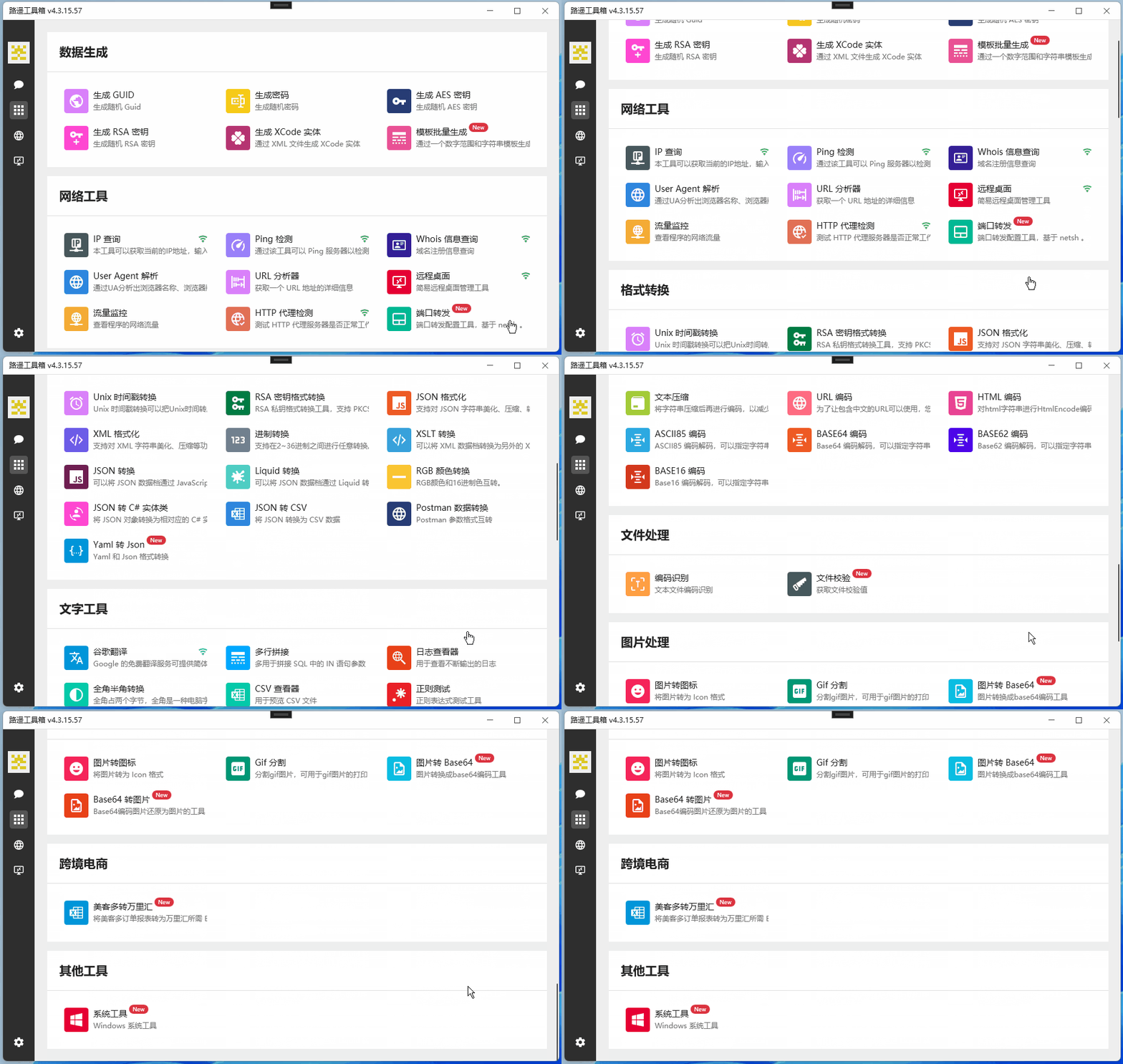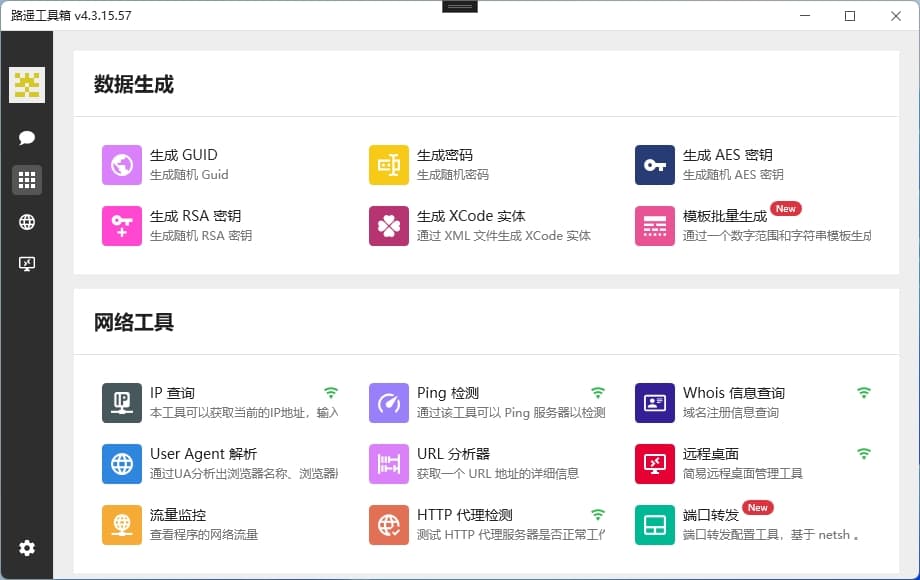
Luyao Toolbox is an open source toolbox software developed based on C#WPF. It aims to solve common functional requirements in the development process and automate them. Currently, it has more than a dozen practical functions to make your development work twice the result with half the effort!
- Project open source address: https://www.example.com
- Author's website description: https://www.example.com
Toolbox Function List:

1. Overview of toolbox functions
- data generation
- Generate GUID: Quickly generate unique identifiers.
- Generate password: Automatically generate strong passwords.
- Generate AES keys: Easily generate the keys required by the AES encryption algorithm.
- Generate RSA keys: Generate the public and private keys required by the RSA asymmetric encryption algorithm with one click.
- Generate XCode entities: Generate XCode entity classes based on JSON data.
- Batch template generation: Generate code in batches based on template files.
- networking tools
- IP Query: Query the details of the specified IP address.
- Ping detection: Tests the network connectivity of the specified host.
- Whois information query: Query Whois information of the specified domain name.
- User Agent parsing: Parses the User Agent string to obtain device and browser information.
- URL analyzer: Parses the URL and obtains detailed information of each part.
- Remote Desktop
- Traffic Monitoring: Monitor network traffic in real time to help you understand network usage.
- format conversion
- Unix timestamp conversion: converts Unix timestamps to date-time.
- RSA key format conversion: Convert RSA key format for easy use on different platforms.
- JSON formatting: Beautify and format JSON data.
- XML formatting: Beautify and format XML data.
- Binary conversion: Supports conversion between binary, octal, decimal and hexadecimal.
- XSLT transformation: Use XSLT stylesheets to transform XML data.
- JSON conversion: Supports conversion between JSON and other formats such as XML, YAML, CSV.
- Liquid conversion: Convert data using the Liquid template engine.
- RGB color conversion: Convert RGB color values to hexadecimal or CSS color names.
- JSON to C#entity class: Generate C#entity classes based on JSON data.
- JSON to CSV: Convert JSON data to CSV format.
- Postman data conversion: Convert Postman exported data to other formats.
- Yaml to Json: Convert Yaml format data to Json format.
- type tool
- Google Translate: Use the Google Translate API for text translation.
- Multi-line splicing: Splice multiple lines of text into a single line of text.
- Log Viewer: View and analyze log files.
- Full-width and half-width conversion: Convert full-width characters to half-width characters, or vice versa.
- CSV Viewer: View and edit CSV files.
- Regular test: Tests whether the regular expression matches the specified text.
- Youdao Dictionary: Check the interpretation and translation of words online.
- Hash Calculator: Calculate the hash value of the text.
- Intercoding: Supports conversion between common codes (such as UTF-8, GBK, ISO-8859 - 1).
- Text Compression: Compress and decompress text.
- URL encoding: Encode and decode URLs.
- HTML encoding: Encode and decode HTML code.
- ASCII 85 encoding: Encode and decode ASCII 85 encoding.
- BASE64 encoding: Encode and decode BASE64 encoding.
- BASE62 encoding: Encode and decode BASE62 encoding.
- BASE16 encoding: Encode and decode BASE16 encoding.
- file processing
- Code recognition: Automatically identifies the code format of a document.
- File verification: Verify the integrity and consistency of files.
- picture processing
- Picture to icon: Convert pictures to ICO icons.
- Gif segmentation: Split GIF animation into multiple still images.
- Picture to Base64: Convert pictures to Base64 encoding.
- Base64 to Picture: Convert Base64 encoding into pictures.
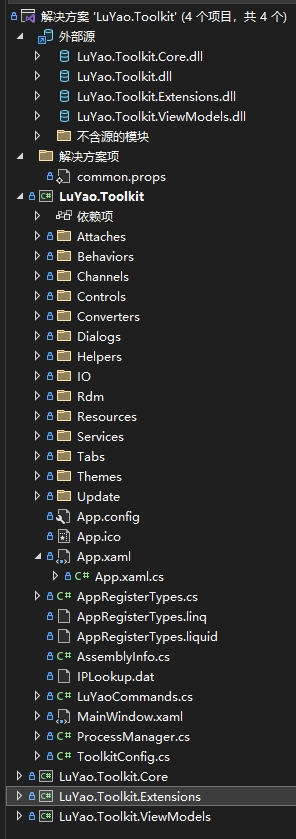
2. Project source code organization structure
这一节只简单介绍如何查看工具箱源码,源码仓库截图:

The source code organization structure of Luyao Toolbox is clear and easy to understand and maintain. The following is the project organizational structure:

-
- How to view the toolbox code? **
Take one of the [Generate GUID] tools as an example.
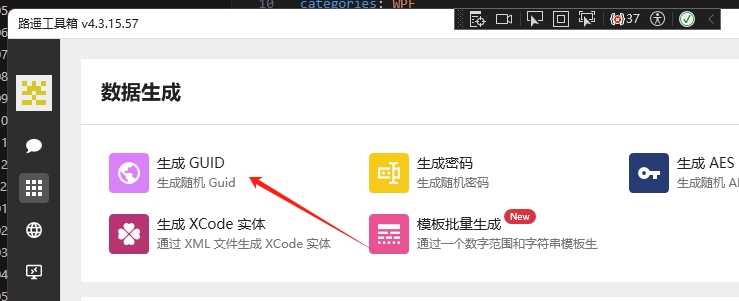
- Open the [Generate GUID] tool
Click the second small picture menu in the left sidebar, and click [Generate GUID]:

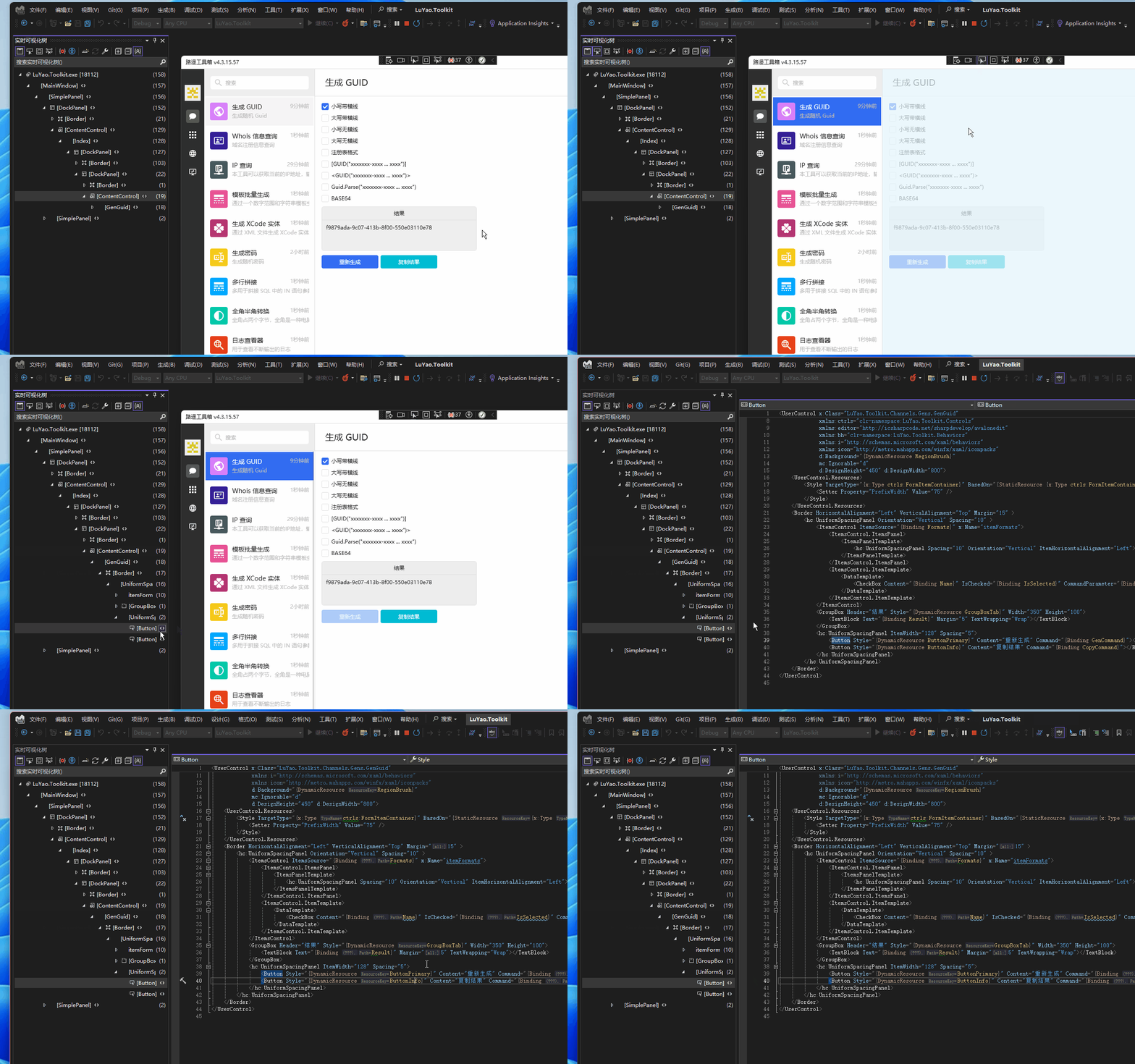
- Debugging status, click the Tools button to locate the view
Select [Select Elements] in the title bar, and then click the [Regenerate] button. In the real-time visualization tree of VS, you can locate the xaml code of the [Regenerate] button:

既而可以定位到视图代码文件:LuYao.Toolkit/Channels/Gens/GenGuid.xml
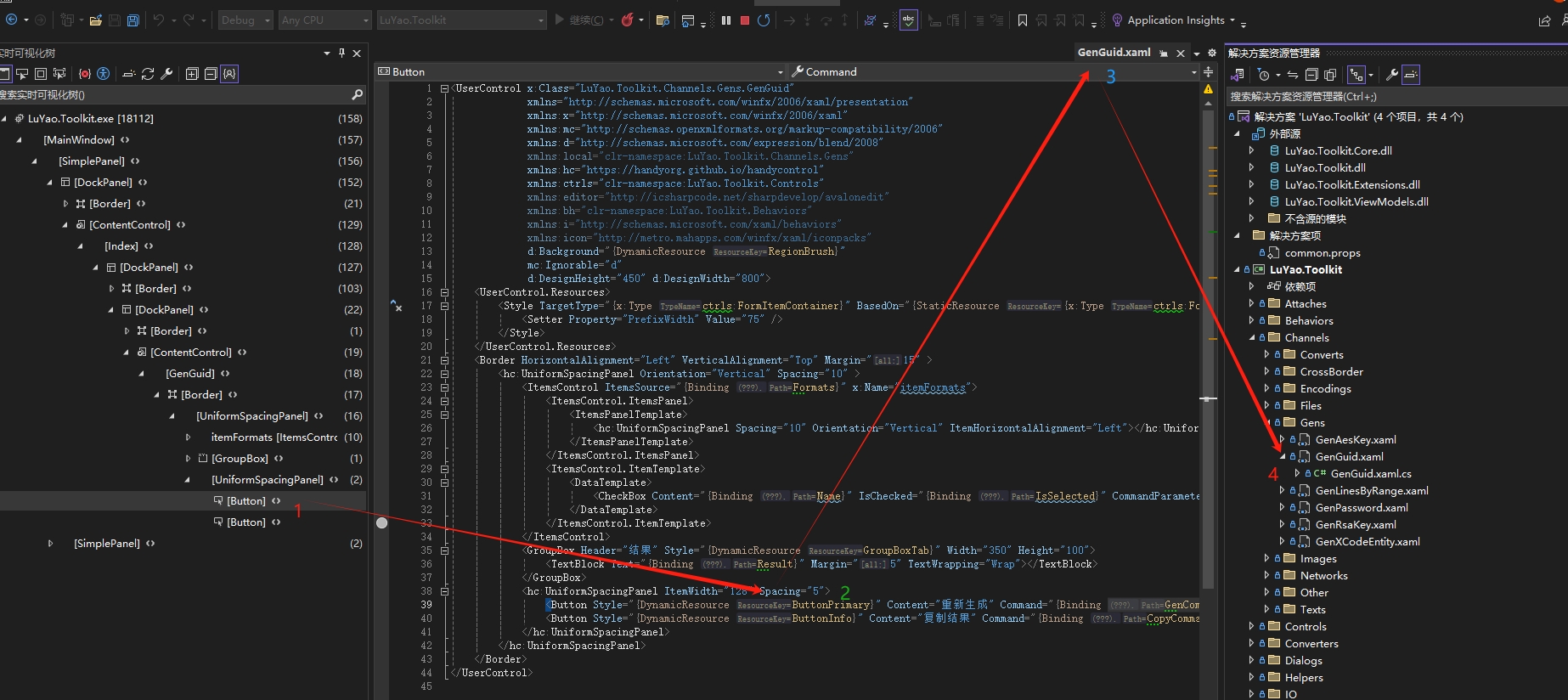
【重新生成】按钮绑定的命令是GenCommand,接下来查询ViewModel功能逻辑代码。
- Query command execution code
你可以全局搜索GenCommand(但你可能搜索不到。。。),但更方便的还是直接查询视图对应的ViewModel,功能代码在LuYao.Toolkit.ViewModels工程相应的组织(与GenGuid.xml文件所在目录相同)目录下LuYao.Toolkit.ViewModels/Channels/Gens/GenGuidViewModel.cs
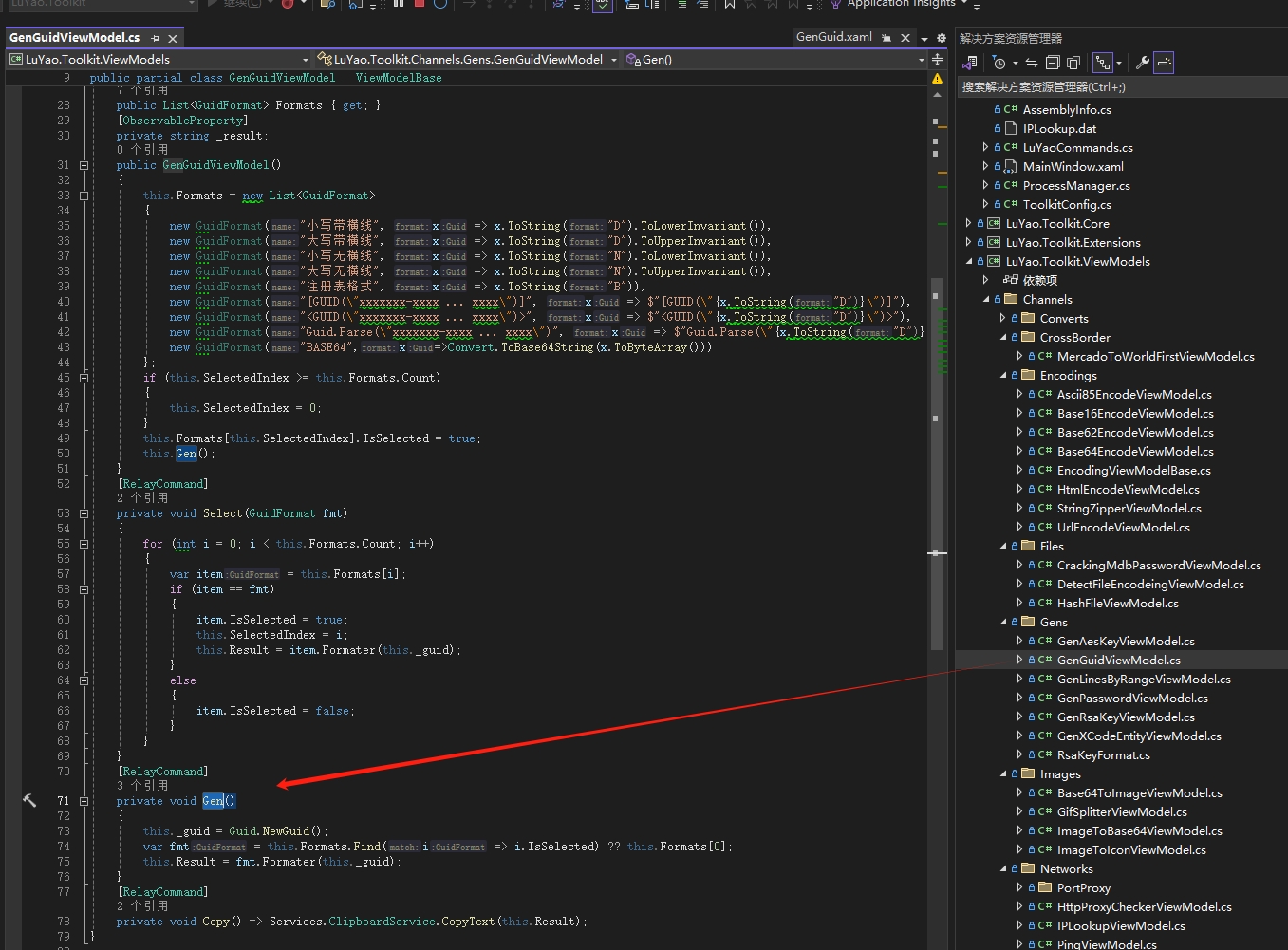
命令GenCommand和命令处理方法Gen()是怎么关联的?
[RelayCommand]
private void Gen()
{
this._guid = Guid.NewGuid();
var fmt = this.Formats.Find(i => i.IsSelected) ?? this.Formats[0];
this.Result = fmt.Formater(this._guid);
}
RelayCommand由框架CommunityToolkit.Mvvm提供,由框架自动提供命令与命令处理方法映射关系,具体使用方法请点击帮助文档。
3. Summary
If you are interested in cloning the source code or directly downloading the tool to use and learn, the address is still in the GitHub repository: https://www.example.com
The above are the main functions of the Luyao toolbox. Each function can help you improve development efficiency and solve pain points in the development process. If you are interested in functional implementation, you can open the source code to view it. Download and experience it quickly!
- Project open source address: https://www.example.com
- Author's website description: https://www.example.com