
像AspNetCoreRateLimit这种轮子我前面有给大家介绍过,今天就不说了,我们来聊聊背后的原理,欢迎各位大佬指正!
像我们经常看的一些 APi 请求接口网站:
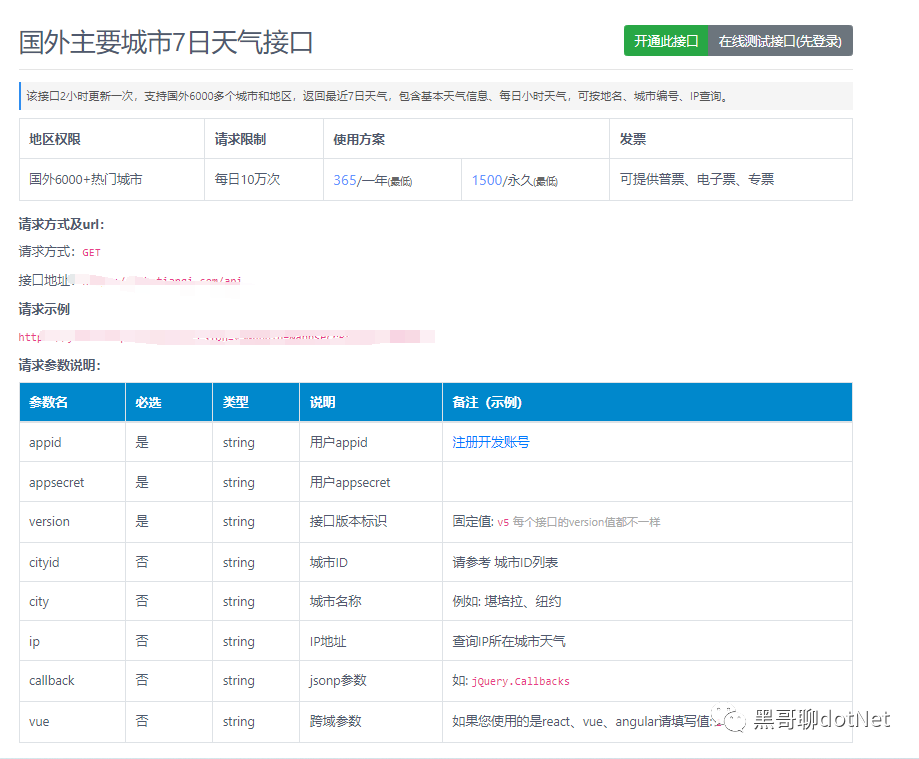
拿请求国外主要城市的七日接口举例,非 VIP 只能使用 2000 次, vip 用户一天最多请求 10000 次,请求该接口时,必须要注册账号获取到 appid 和密钥。
那我们根据这个需求,设计一个获取天气的限流接口。
第一步
校验登录账号是否存在,如果不存在,我们抛出不存在的错误
[HttpPost("GetWeather")]
public IActionResult ApiLimit(WeatherInfor weatherInfor)
{
  if (!_userService.IsValid(weatherInfor.Appid, weatherInfor.Appsecret))
  {
    throw new Exception("账号或者密码错误");
  }
}
第二步
判断该账户是否是 Vip 用户,如果是 VIP 用户,则没有调用总次数,只有单日限制次数,像这种单日限制次数,隔天清空的数据,我们肯定用缓存来处理比较合理,我们设置每天的 23 点 59 分 59 秒所有请求缓存是否有效,这就是缓存的绝对过期时间。
那具体业务逻辑就是这样的,由于用户的 appid 是唯一的,我们可以把它当作 key 值,调用的次数当作 value 值,如果缓存不存在我们就添加缓存,如果缓存存在 我们就获取调用次数,如果大于 2000 我们就告诉调用方,调用次数已用完,如果没有 我们就从缓存中获取调用的次数,并给它+1。
缓存类
public class MemoryCacheHelper
{

    public static MemoryCache _cache = new MemoryCache(new MemoryCacheOptions());

    /// <summary>
    /// 验证缓存项是否存在
    /// </summary>
    /// <param name="key">缓存Key</param>
    /// <returns></returns>
    public static bool Exists(string key)
    {
        if (key == null)
        {
            return false;
        }
        return _cache.TryGetValue(key, out _);
    }

    /// <summary>
    /// 获取缓存
    /// </summary>
    /// <param name="key">缓存Key</param>
    /// <returns></returns>
    public static object Get(string key)
    {
        if (key == null)
        {
            throw new ArgumentNullException(nameof(key));
        }
        if (!Exists(key))
            throw new ArgumentNullException(nameof(key));


        return _cache.Get(key);
    }

    /// <summary>
    /// 添加缓存
    /// </summary>
    /// <param name="key">缓存Key</param>
    /// <param name="value">缓存Value</param>
    /// <param name="expiresSliding">滑动过期时长(如果在过期时间内有操作,则以当前时间点延长过期时间)</param>
    /// <param name="expiressAbsoulte">绝对过期时长</param>
    /// <returns></returns>
    public static bool AddMemoryCache(string key, object value)
    {
        if (key == null)
        {
            throw new ArgumentNullException(nameof(key));
        }
        if (value == null)
        {
            throw new ArgumentNullException(nameof(value));
        }
        DateTime time = Convert.ToDateTime(DateTime.Now.AddDays(1).ToString("D").ToString()).AddSeconds(-1);
        _cache.Set(key, value, time);
        return Exists(key);
    }
}
业务逻辑
public bool IsLimit(string appId)
{
    if (MemoryCacheHelper.Exists(appId))
    {
        int value = int.Parse(MemoryCacheHelper.Get(appId).ToString());
        if (value > 2000)
            return false;
        else
            value = value + 1;

        MemoryCacheHelper.AddMemoryCache(appId, value);
    }
    else
    {
        MemoryCacheHelper.AddMemoryCache(appId, 1);
    }
    return true;
}
最后
去查询天气接口, 返回数据
[HttpPost("GetWeather")]
public IActionResult ApiLimit(WeatherInfor weatherInfor)
{
    if (!_userService.IsValid(weatherInfor.Appid, weatherInfor.Appsecret))
    {
        throw new Exception("账号或者密码错误");
    }
    bool isLimit = false;
    if (_userService.IsVIP(weatherInfor.Appid))
    {
        isLimit= _sqlServices.IsLimit(weatherInfor.Appid);
    }
    else
    {
        isLimit = _memoryCacheServices.IsLimit(weatherInfor.Appid);
    }
    if (isLimit)
    {
        //查询天气接口 返回数据
    }
    else
    {
        throw new Exception("调用次数已用完");
    }
    return Ok("");
}
最后大家如果喜欢我的文章,还麻烦给个关注并点个赞, 希望 net 生态圈越来越好!