Getting Started Guide to Blazor Server and WebAssembly Applications

Getting Started Guide to Blazor Server and WebAssembly Applications

If you've been following the latest trends in the. NET world, you've heard of Blazor by now.

最后更新 12/9/2021 9:25 PM
技术译民
预计阅读 17 分钟
分类
Blazor
标签
.NET C# Blazor

翻译自 Waqas Anwar 2021 年 3 月 12 日的文章 《A Beginner’s Guide To Blazor Server and WebAssembly Applications》

A-Beginner-Guide-To-Blazor-Server-and-WebAssembly-Applications

If you've been following the latest trends in the. NET world, you've heard of Blazor by now. There is a lot of hype about Blazor in the. NET community right now, and the most common reason for this hype is that it introduces something that most. NET developers have been dreaming of for more than a decade: the ability to run C#on both the server and the browser. Blazor allows us to build interactive web applications using HTML, CSS, and C#instead of JavaScript. In this tutorial, I will introduce the basic concepts of Blazor and outline the different hosting models available for Blazor. I will also cover the pros and cons of each hosting model so that you can make the best decision for the next Blazor project hosting model.

What is Blazor?

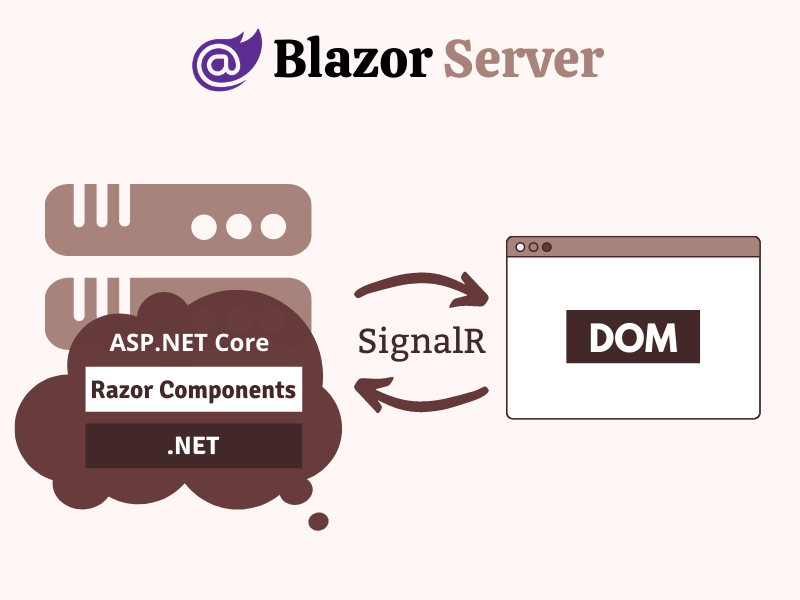
Blazor is a free, open source single-page application (SPA) development framework that enables developers to build interactive web applications using C#on both the server and client sides. Blazor does not require any plug-ins installed on the client to execute C #/. NET code in the browser. It uses WebAssembly, a web standard supported by all major browsers, to execute. NET code. Blazor can also run. NET code and build the UI on the server, and then transfer only the updated DOM to the client via a SignalR connection.

BLAZOR

What is WebAssembly?

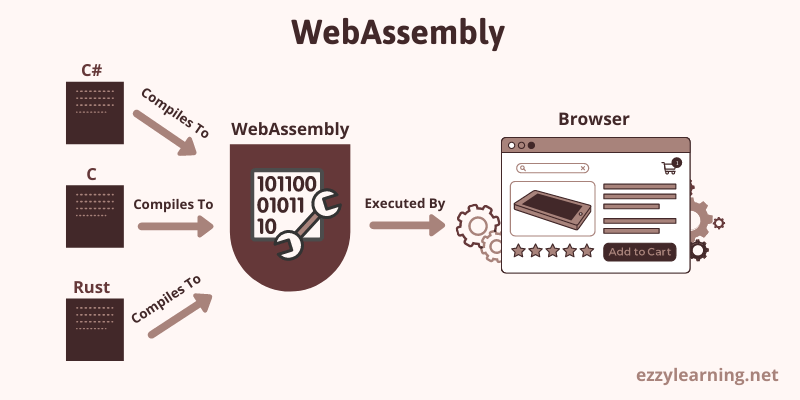
WebAssembly (sometimes abbreviated as Wasm) is a portable binary format (low-level instruction set) designed to run on any host capable of interpreting these instructions. WebAssembly's main goal is to allow developers to build high-performance Web applications, but its format is also designed to be executable and integrated into other environments. WebAssembly is currently supported by all major browsers, such as Chrome, Chrome for Android, Edge, Firefox, Safari, Opera, etc.

WebAssembly

Blazor hosting model

The Blazor component model is the core of Blazor and is designed in a way that separates computing UI changes and rendering UI from each other. This is why no matter what method you use to render your application, the basic component model remains the same. At the time of writing, four rendering/hosting models are available, all in different stages of development.

  1. Blazor Server
  2. Blazor WebAssembly
  3. Blazor Electron
  4. Mobile Blazor Bindings

Blazor Electron and Mobile Blazor Bindings are currently in the experimental stage, and Microsoft has not committed to releasing these hosted models, so I won't discuss them in this article.

What is Blazor Server App?

Blazor Server applications run on the server and enjoy full. NET Core runtime support. All processing is done on the server, and UI/DOM changes are transmitted back to the client through the SignalR connection. This two-way SignalR connection is established when a user first loads an application from a browser. Because the. NET code is already running on the server, you don't need to create an API for the front end. You can access services, databases, etc. directly and do whatever you want on traditional server-side technology.

Blazor-Server-Apps

§ When to use Blazor Server

  1. When you want to run your application on the full. NET Core runtime
  2. When you want to keep the initial download size of the application very small
  3. When you want to keep app launch times very fast
  4. When you want to keep the application's code on the server and don't want it to be downloaded to the client
  5. When you want a fast application development cycle and existing. NET developers need almost no learning curve
  6. When you want your app to be search engine friendly
  7. When you want your application to run on an old browser rather than relying on WebAssembly
  8. When you want to debug. NET code in Visual Studio like a normal. NET application
  9. When you want to build an intranet or low-demand public-facing application

§ When not to use Blazor Server

  1. When your application is running in a high-latency environment
  2. When you want your application to work offline without requiring a fixed SignalR connection to the server
  3. When you don't want to increase server resources to respond to a large number of connected SignalR clients

What is Blazor WebAssembly App?

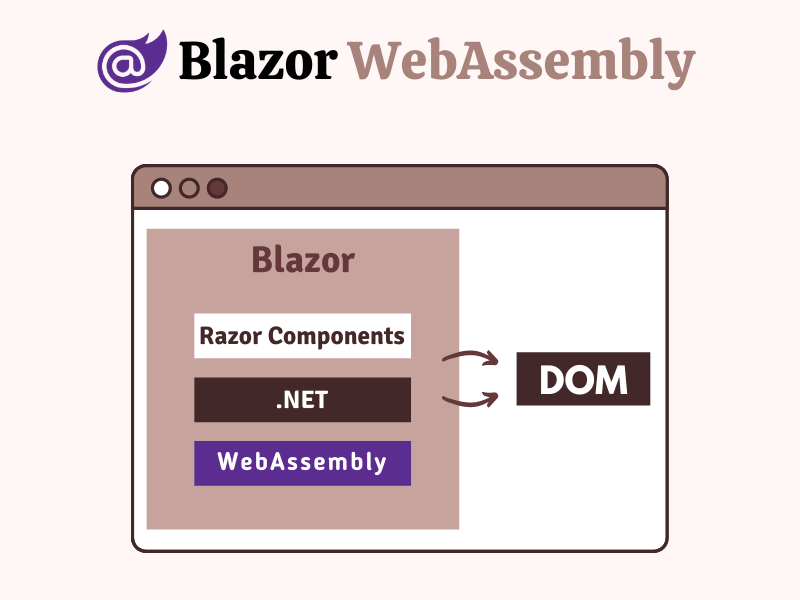
This managed model is a direct competitor to modern popular SPA frameworks such as Angular, Vue, and React, and is the main reason why most developers are interested in learning Blazor. It allows developers to use C#instead of JavaScript to write all front-end UI logic. In this managed model, the application's DLL, all of its dependencies and the small size Mono. NET runtime are downloaded to the client on the first request. The Mono runtime in the client then loads and executes the application code. Blazor WebAssembly programs can be written in other languages such as C and C#and then compiled into WebAssembly bytecode.

Blazor-WebAssembly-Apps

§ When to use Blazor WebAssembly

  1. When you want to compile the entire application into static files and provide them to the client without requiring a. NET runtime on the server. This means that your backend can be written in PHP, Node, or Rails and serve front-end applications written in Blazor.
  2. When you want to build an application that can run offline on the client without having to be continuously connected to the server.
  3. When you want to shift processing to the client and reduce the load on the server.
  4. When you want to share code and libraries between clients and servers.

§ When not to use Blazor WebAssembly

  1. When you cannot compromise on the payload due to too many files/DLLs downloaded to the client.
  2. When you can't compromise on slow startup times, especially if you have a poor network connection.
  3. When you cannot compromise that your application must run in a browser sandbox environment with full security restrictions.

To better understand the Blazor hosting model, let's create a Blazor Server and a Blazor WebAssembly application in Visual Studio 2019.

Creating Blazor Server apps in Visual Studio 2019

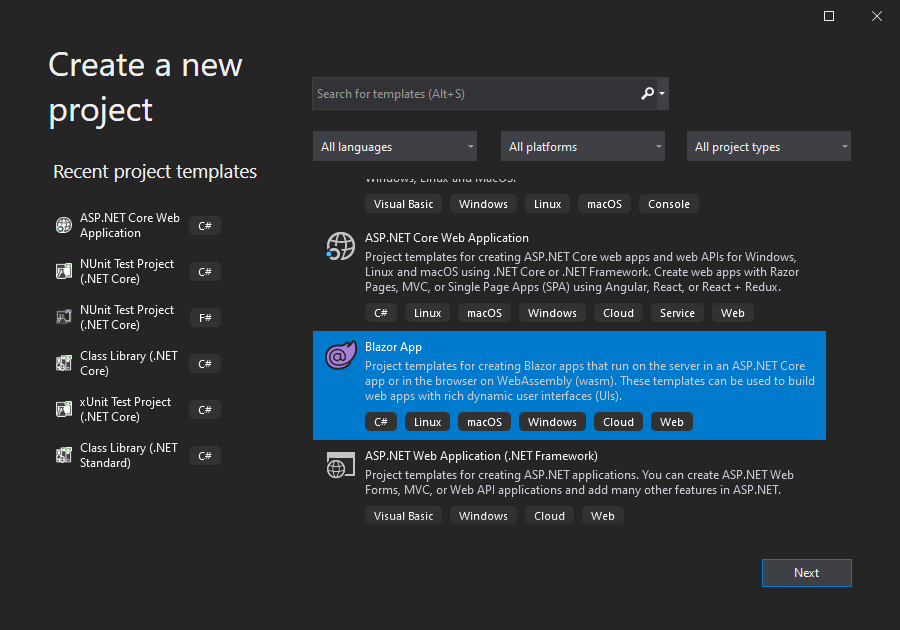
Open Visual Studio 2019 and click Create New Project. Select the Blazor App template from the list of available templates and click Next.

Create-New-Blazor-App-Project-in-Visual-Studio-2019

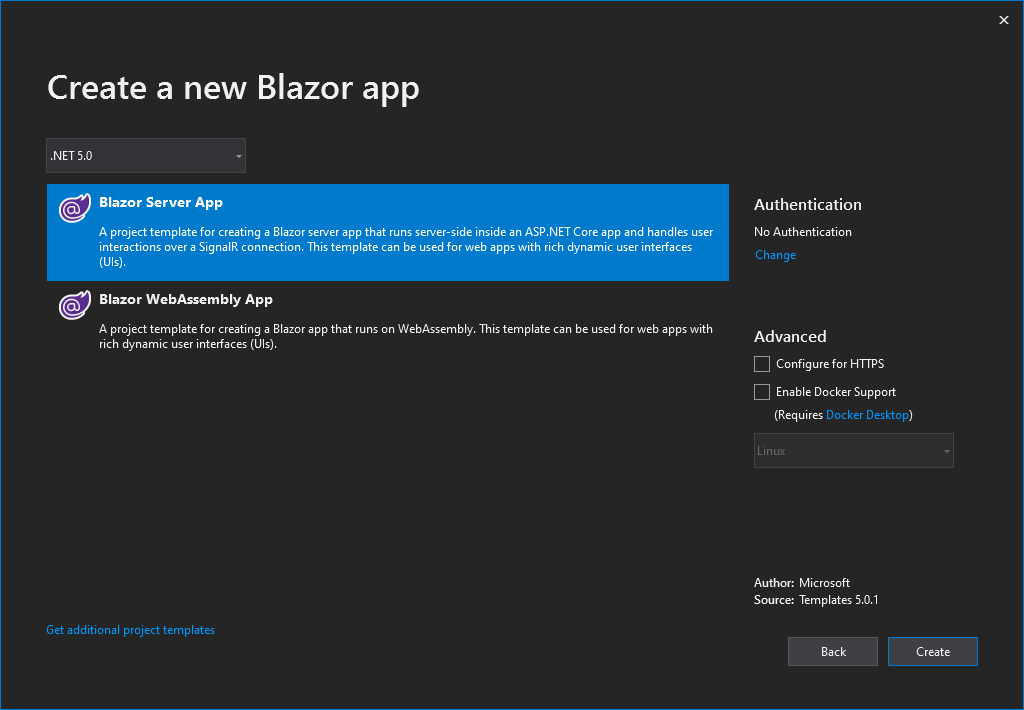
Specify the project name (such as BlazorServerApp) and click Next. You will see the following dialog box asking you to choose the type of Blazor application you want to create. We want to create a Blazor Server app, so please select the Blazor Server app and click the Create button.

Blazor-Server-App-in-Visual-Studio-2019

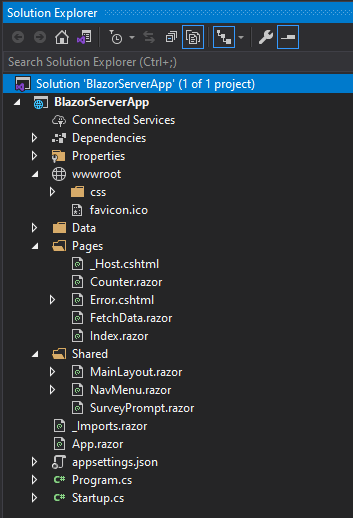
Visual Studio will create a Blazor Server application for us that will include the following folders and files in Solution Explorer.

Blazor-Server-App-in-Solution-Explorer

Let's discuss some of the important files and folders available in the Blazor Server App.

§Program.cs

This file contains the Main method, which is the entry point for the project. Call the CreateHostBuilder method in the Main method to configure the default ASP.NET Core host for us.

public class Program
{
    public static void Main(string[] args)
    {
        CreateHostBuilder(args).Build().Run();
    }

    public static IHostBuilder CreateHostBuilder(string[] args) =>
        Host.CreateDefaultBuilder(args)
            .ConfigureWebHostDefaults(webBuilder =>
            {
                webBuilder.UseStartup<startup>();
            });
}

§Startup.cs

它与我们在标准 ASP.NET Core 项目中使用的文件相同。需要重点注意的一点是 ConfigureServices 方法中调用了 AddServerSideBlazor,该方法添加 Blazor Server App 相关的服务。

public void ConfigureServices(IServiceCollection services)
{
    services.AddRazorPages();
    services.AddServerSideBlazor();
    services.AddSingleton<weatherforecastservice>();
}

在此文件的 Configure 方法中我们还有以下两行重要的代码。MapBlazorHub 方法配置 Blazor Server App 所需的 SignalR Hub Endpoints。MapFallbackToPage 方法会将所有未与任何控制器、razor 页面等匹配的请求映射到 _Host 页面,这将允许所有动态内容请求路由到 SPA 框架,而不是抛出 404 Not Found。

app.UseEndpoints(endpoints =>
{
    endpoints.MapBlazorHub();
    endpoints.MapFallbackToPage("/_Host");
});

§_Host.cshtml

这是应用程序的根页面,每个 Razor 组件/页面都将在此 host 页面中呈现。它具有基本的 HTML 元素,例如 html、head 和 body,以及一些特殊元素。请注意,Blazor 是一个基于组件的框架,Blazor 中的每一内容都是一个组件。<component> 指定了我们想让应用程序根组件呈现的位置。

<component type="typeof(App)" render-mode="ServerPrerendered"></component>

该文件还在末尾注入了 blazor.server.js 文件,此 JavaScript 文件包含设置 SignalR 连接到服务端的代码。此连接在浏览器加载应用程序后立即建立,然后被用于服务端和客户端浏览器之间的实时通信。如果您想了解有关 SignalR 的更多知识,请阅读我的文章 Display Live Sports Updates using ASP.NET Core SignalR

<script src="_framework/blazor.server.js"></script>

§App.razor

This is the main component of the Blazor App, and its main job is to intercept routes and render the ** Found ** or ** NotFound ** components. If a matching component is found, the ** Found ** component is rendered, and if no matching component is found, the ** NotFound ** component is rendered.

<Router AppAssembly="@typeof(Program).Assembly" PreferExactMatches="@true">
  <Found Context="routeData">
    <RouteView RouteData="@routeData" DefaultLayout="@typeof(MainLayout)" />
  </Found>
  <NotFound>
    <LayoutView Layout="@typeof(MainLayout)">
      <p>Sorry, there's nothing at this address.</p>
    </LayoutView>
  </NotFound>
</Router>

§MainLayout.cshtml

The MainLayout file contains the main layout of the application, and its markup can be shared by multiple Razor components. This layout component typically contains common UI elements of the application, such as headers, menus, footers, sidebars, etc. The default MainLayout generated for us has a sidebar to render the ** NavMenu ** component, and it also uses the Razor syntax **@Body ** to specify where the content of other components will be rendered in the layout tag.

@inherits LayoutComponentBase

<div class="page">
  <div class="sidebar">
    <NavMenu />
  </div>

  <div class="main">
    <div class="top-row px-4">
      <a href="https://docs.microsoft.com/aspnet/" target="_blank">About</a>
    </div>

    <div class="content px-4">@Body</div>
  </div>
</div>

§ wwwroot folder

This folder contains static files such as pictures, fonts, icons, CSS and JavaScript files.

§ Pages and Shared Folders

This folder contains the_Host.cshtml file we discussed earlier, as well as some Razor components. A Blazor application is a collection of Razor components with the. razor extension. Some of these components are called routable components because they can be accessed using their routes. For example, when we navigate to the application root URL, the following ** Index.razor ** component will be rendered. The URL is specified using the **@page ** command at the top of the ** Index. razor ** component.

§Index.razor

@page "/"

<h1>Hello, world!</h1>

Welcome to your new app.

<SurveyPrompt Title="How is Blazor working for you?" />

Please note that the above page also uses a subcomponent ** SurveyPrompt **, which is called a subcomponent because it does not have the **@page ** directive and can be embedded in other components.

There are other razor components in the Pages folder that can be accessed using the path specified at the top of the file. For example, when we navigate to the **/counter ** path, the ** Counter ** component will render. Similarly, the ** FetchData ** component will be rendered using the **/fetchdata ** path.

Razor Server applications also have a Shared folder that contains shared components. These components can be used by any component throughout the application, just like the SurveyPrompt component we saw above. Another interesting shared component in the Shared folder is the NavMenu component, which presents the top navigation bar of the Blazor Server application.

§_Imports.razor

This file is similar to our_ViewImports.cshtml file in the ASP.NET MVC Web application, and contains a list of namespaces we can use in different razor components. The advantage of declaring all these namespaces in the_Imports. razor file is that we don't need to introduce them repeatedly in every razor component.

@using System.Net.Http @using Microsoft.AspNetCore.Authorization @using
Microsoft.AspNetCore.Components.Authorization @using
Microsoft.AspNetCore.Components.Forms @using
Microsoft.AspNetCore.Components.Routing @using
Microsoft.AspNetCore.Components.Web @using
Microsoft.AspNetCore.Components.Web.Virtualization @using Microsoft.JSInterop

现在是时候运行我们的 Blazor Server 应用程序并在浏览器中查看它的运行情况了。在 Visual Studio 中按 F5,您将看到一个漂亮的默认 Blazor Server 应用程序。试试从侧边栏导航到不同的页面,并尝试在 Counter 页面上使用计数器,您会注意到没有页面刷新或回传到服务器。一切都像经典的 SPA 那样流畅和快速,浏览器和服务端的所有通信都是使用 SignalR 连接进行的。
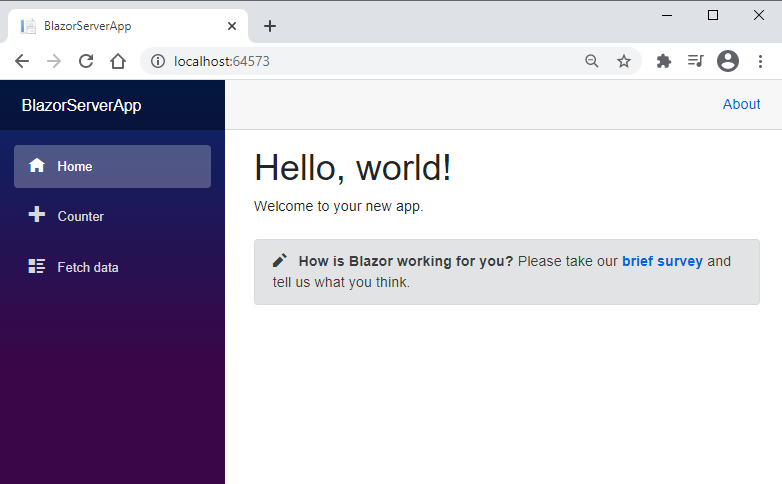
Default-Blazor-Server-App-Running-in-Browser

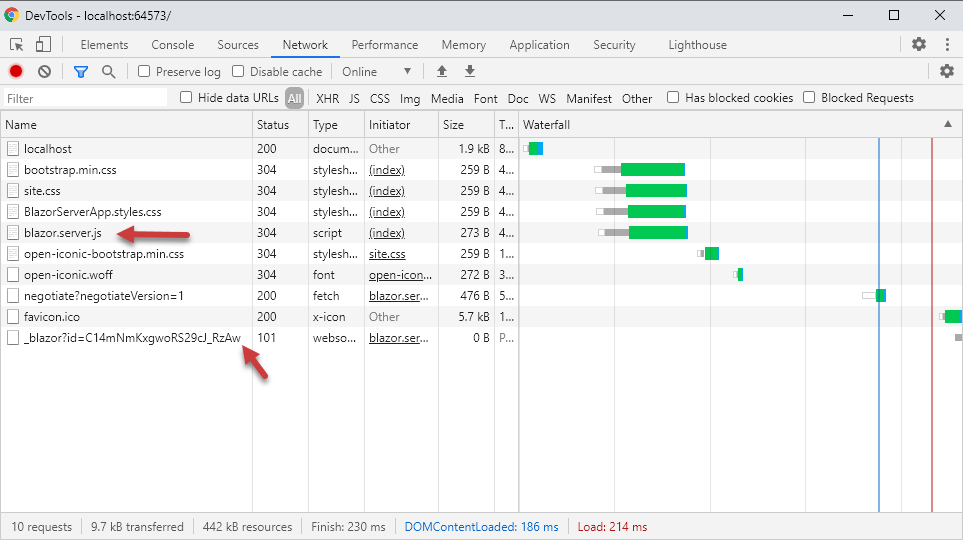
You can also open the Browser Developer Tools and you'll notice that all standard CSS and JavaScript files (including the blazor.server.js file) are downloaded to the client and a SignalR connection is established through Web Sockets.

Blazor-Server-App-Files-in-Browser-Developer-Tools

Creating a Blazor WebAssembly app in Visual Studio 2019

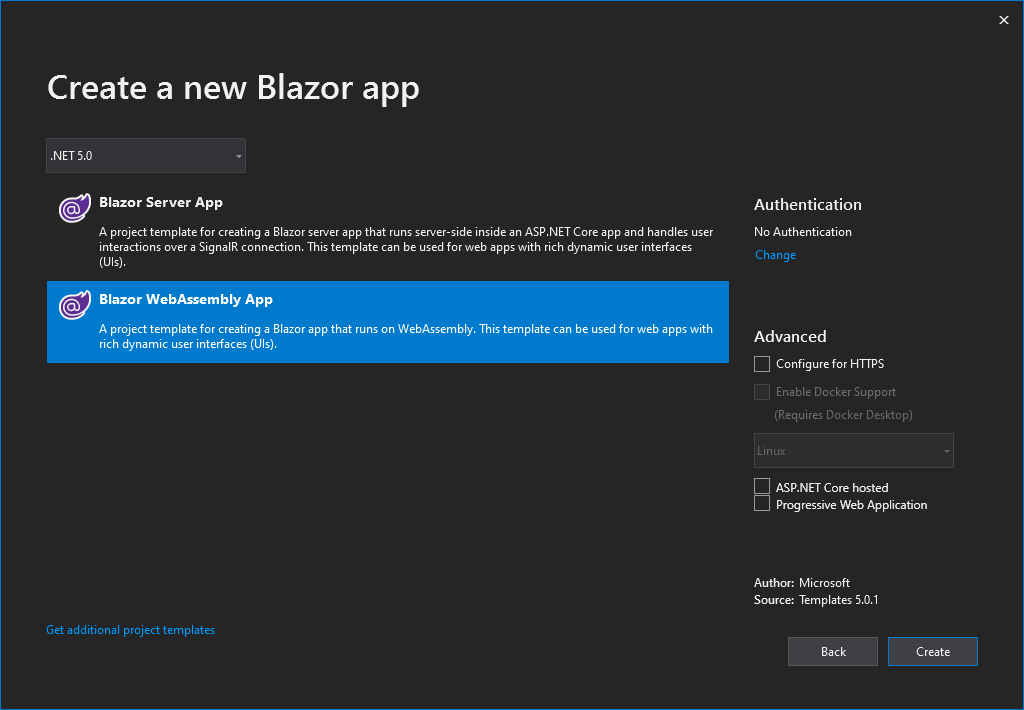
We have learned the basics of the Blazor Server App and seen it running in the browser. Now let's create a Blazor WebAssembly App so that we can understand the differences. Follow the same steps we mentioned above and use the ** Blazor App ** template to create a new Blazor application in Visual Studio. When you are asked to choose the type of Blazor App, you need to choose ** Blazor WebAssembly App ** this time.

Create-Blazor-WebAssembly-App-in-Visual-Studio-2019

Visual Studio will create a Blazor WebAssembly application for us that includes the following folders and files in Solution Explorer.

Blazor-Client-App-in-Solution-Explorer

You can easily spot some of the differences between these two types of applications. For example, the following files do not exist in the Blazor WebAssembly application:

  1. _Host.cshtml
  2. Error.cshtml
  3. Startup.cs
  4. appsettings.json

§index.html

In the Blazor WebAssembly application, we will have a ** index.html ** file in the ** wwwroot ** folder as the main page, which is injected at the end with the ** blazor. webassembly.js ** file provided by the framework to handle downloading the. NET runtime, the Blazor application and all its dependencies. It also contains code to initialize the runtime in order to run the application.

§Program.cs

In a Blazor WebAssembly application, the root component of the application is specified in the Main method in the Program.cs file. The root component of the application is ** App.razor **, and you can see how it is added to the RootComponents collection.

public class Program
{
    public static async Task Main(string[] args)
    {
        var builder = WebAssemblyHostBuilder.CreateDefault(args);
        builder.RootComponents.Add<app>("#app");

        builder.Services.AddScoped(sp => new HttpClient { BaseAddress = new Uri(builder.HostEnvironment.BaseAddress) });

        await builder.Build().RunAsync();
    }
}

在 Visual Studio 中按 F5,您将看到一个相似的 Blazor WebAssembly 应用程序。尝试从侧边栏导航到不同的页面,并尝试像之前在 Blazor Server App 中所做的那样在 Counter 页面上使用计数器。 一切看起来感觉一模一样,也没有服务器端回传。
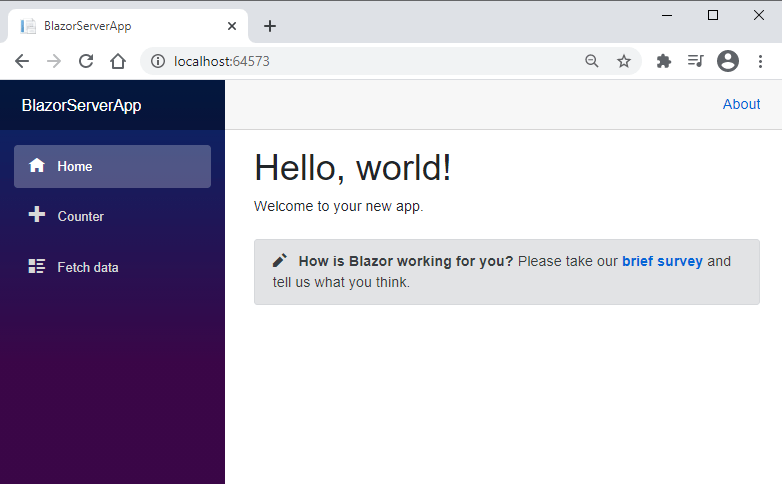
Default-Blazor-Server-App-Running-in-Browser

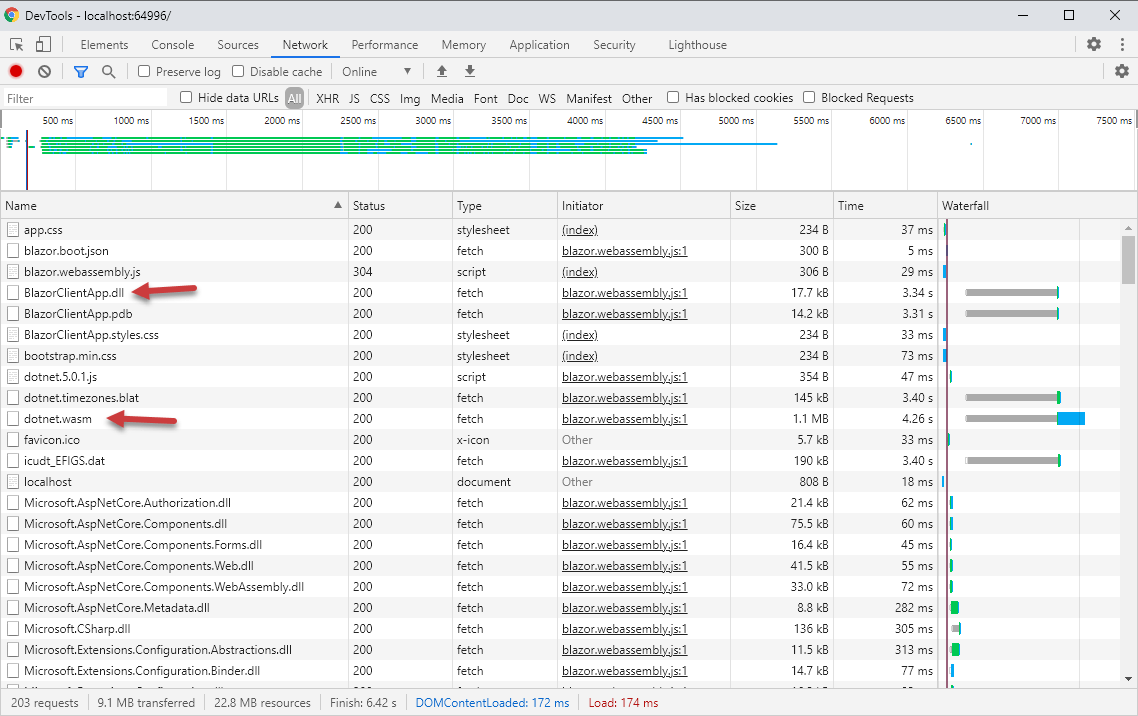
As we already know, the Blazor WebAssembly application downloads the application and all of its dependencies on the client, so if you open the browser developer tool, you will see a large number of DLLs downloaded by the client (only on the first browsing).

Blazor-Client-App-Files-in-Browser-Developer-Tools

All of the above files are downloaded only on the first request, and then they are cached in the browser. If you refresh the page again, you will see that there are very few files downloaded this time.

Blazor-Client-App-Files-in-Browser-Developer-Tools-Second-Request

summary

In this article, I try to introduce you to the basic concepts of the Blazor SPA framework, where we see two Blazor applications being hosted using two different hosting models. Because the Blazor framework relies heavily on the razor component, most of the code and files in both projects are the same. These components are the building blocks of the Blazor application, and we can build them in a similar way regardless of which managed model we use. If you like this article, please share it and spread your knowledge.

Written by Waqas Anwar

翻译: 技术译站

链接: 英文原文

Keep Exploring

延伸阅读

更多文章
同分类 / 同标签 11/6/2024

Why is my blog site back in Blazor?

The blog website has gone through hardships in development. It has tried nearly 10 versions such as MVC, Vue, and Go. Now it has returned to Blazor and adopts static SSR. The speed has skyrocketed and it has been successfully launched.

继续阅读
同分类 / 同标签 2/29/2024

Data display can also be done in Winform

In the process of developing winform, data display functions are often needed. I have been using the gridcontrol before. Today, I want to use an example to introduce to you how to use the table component in ant design blazor hybrid to display data.

继续阅读
同分类 / 同标签 2/29/2024

Can Winform's interface become better?

A few days ago, I introduced to you the use of blazor hybrid in winform, and I also said that with blazor's ui, our winform program design can be more beautiful. Next, I want to use an example of drawing in winform blazor hybrid to illustrate it, hoping to be helpful to you.

继续阅读