- Author | Mohamad Lawand
- Translator | Zhang Weibin
- Planner | Ding Xiaoyun
Essentially, an API is a protocol between a server and a client that specifies how the server provides specific data based on the client's request.
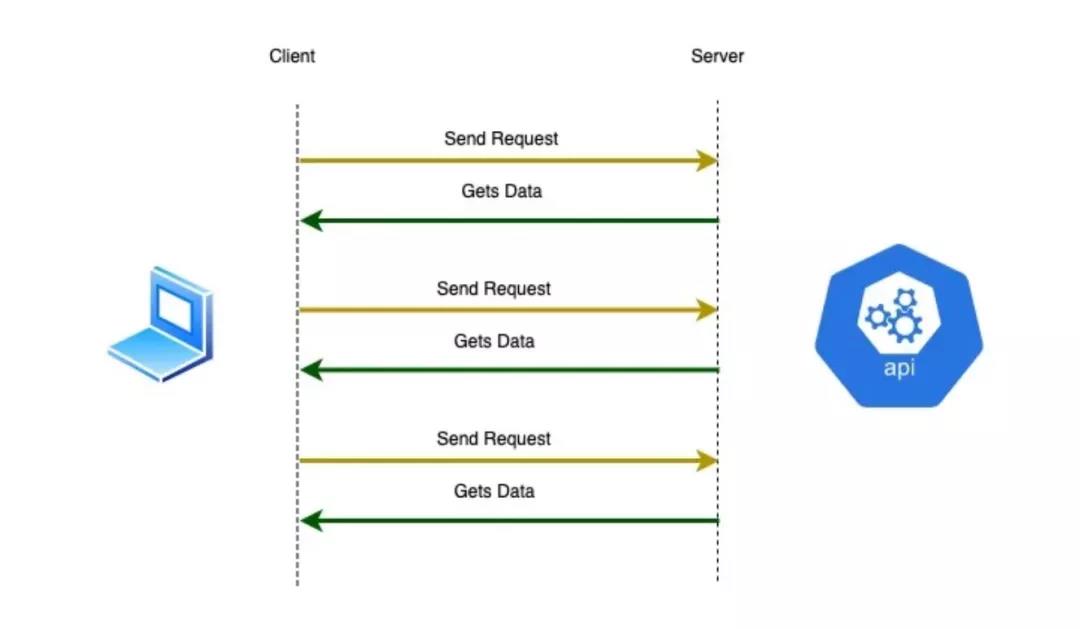
When building APIs, we consider different technologies. Depending on the requirements, the technology we choose for API development may vary. In the current era, there are two main technologies for creating APIs:
- gRPC
- REST
Both technologies use HTTP as their transport mechanism. Despite using the same underlying transport mechanism, their implementations are completely different.
Let's compare these two technologies before diving deeper into gRPC.
REST
REST is a set of architectural constraints, not a protocol or standard. API developers can implement REST in various ways.
For an API to be considered RESTful, we need to follow some constraints:
Client-server architecture: All requests must use HTTP as the transport mechanism.
Statelessness: The API should be stateless, meaning the server should not store any client session state on the server side. Every request from the client to the server must contain all the necessary information to understand the request. The server cannot use any stored context on the server side.
Cacheability: All data flowing between the client and server must be cacheable, meaning it can be stored for later retrieval and use.
Uniform interface: There must be an interface between the client and server to standardize information transfer.
Layered system: All servers involved between the client's request and the server's response must be organized according to their responsibilities, and the organization must not affect the request or response.
gRPC
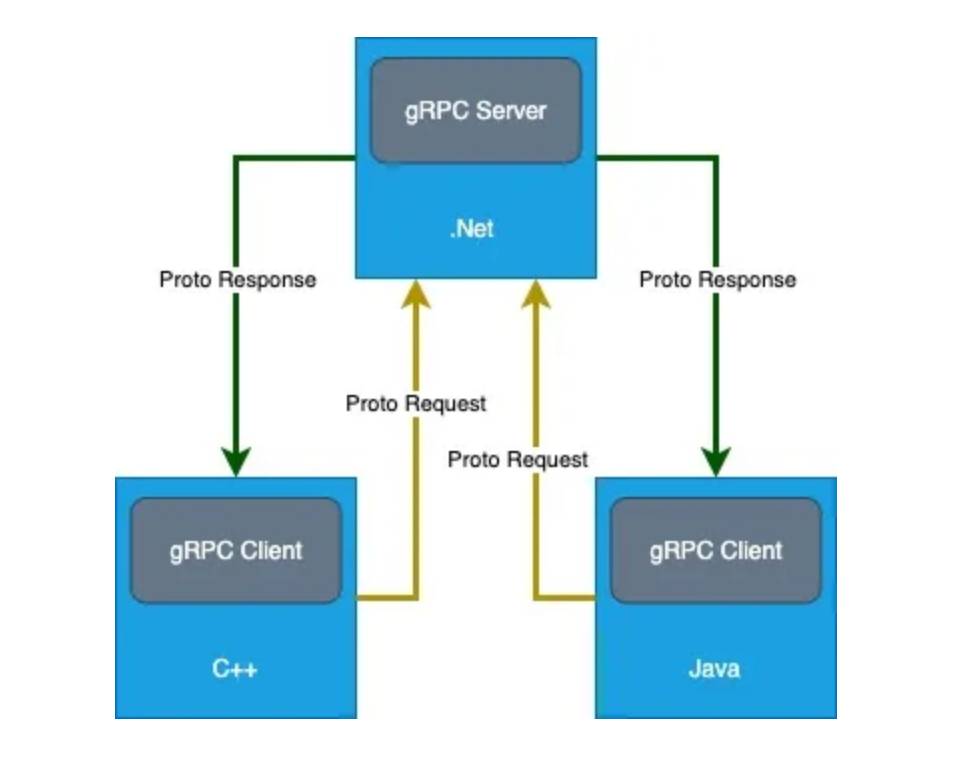
gRPC builds on the solid foundation of the RPC (Remote Procedure Call) protocol and has entered the API domain. gRPC is a free, open-source framework developed by Google that uses HTTP/2 for API communication, hiding the HTTP implementation from API designers.
gRPC has many features that make it a fundamental building block for next-generation web applications, whether in microservices or web/mobile API communication:
Interoperability: Regardless of the current HTTP version or infrastructure changes (e.g., upgrading from HTTP 2 to HTTP 3), the protocol must adapt and change.
Layered architecture: The core aspects of the technology stack must be able to evolve and upgrade independently without breaking any applications that use it.
Payload agnostic: Different services may require different message types and encodings, such as Protobuf (Protocol Buffers), JSON, XML, etc. gRPC supports all these formats and can compress payloads using pluggable compression mechanisms.
Streaming: gRPC allows large datasets to be streamed from the server to the client and vice versa.
Pluggable: gRPC supports plugging in different features and services as needed, such as health checks, failure recovery, and load balancing. The framework implementation provides extension points to insert these features.
Similar to Docker and Kubernetes, gRPC is part of the Cloud Native Computing Foundation (CNCF).
In short, the benefits of gRPC include:
- Modern and fast
- Open source
- Leverages HTTP/2
- Language-neutral
- Easy to add authentication and logging
To use gRPC:
- We need to define messages and services using Protobuf (Protocol Buffers).
- gRPC code is automatically generated, and we provide the implementation.
- The .proto file supports 12 different languages on both the server and client sides.
By default, gRPC uses Google's open-source Protocol Buffers mechanism for serializing structured data:
- Language-neutral
- Generates code for any modern programming language
- Binary and efficient data transmission
- Highly extensible
- Allows sending large amounts of data
- Allows extending and evolving APIs
Case Study
In today's technological trends, a modern approach is to build microservices. In this example, we'll study the process of building an airline ticketing system:
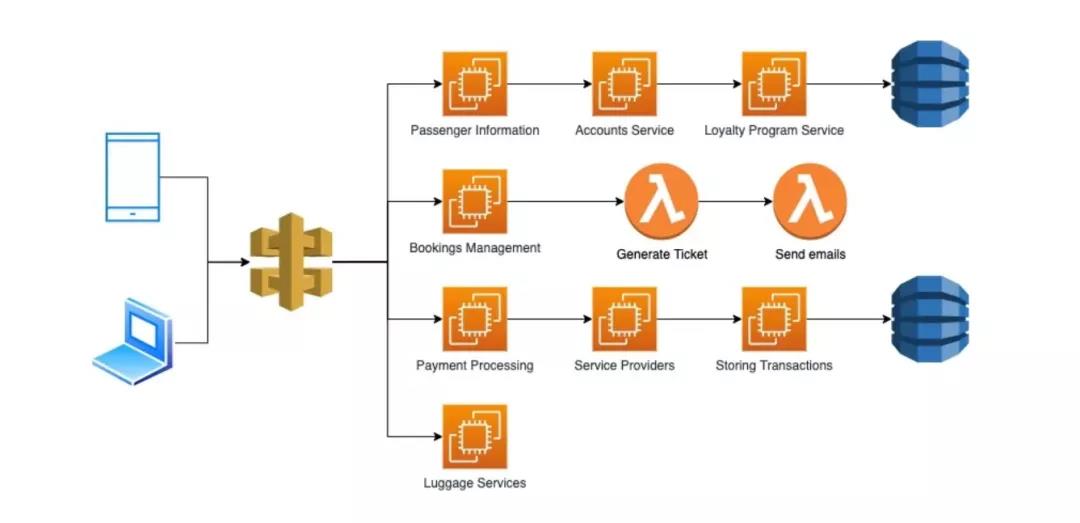
The image above shows a microservices-based airline ticketing system. Here are some key points related to this type of architecture:
- Microservices are often built with different languages. For example, booking management could be based on .NET, payment processing on Java, and passenger information on Node.js.
- Each service has different business functions.
Suppose we have microservices written in different languages that need to communicate with each other. When these microservices want to exchange information, they need to agree on things like:
- The API for exchanging data
- Data format
- Error format
- Rate limits
REST is the most popular approach for building APIs. However, this decision depends on various architectural considerations related to our implementation:
- Designing the data model types
- What endpoints will look like
- How errors should be handled
- How many calls a client can make
- How authorization is implemented
Given these factors, let's look at the differences between gRPC and REST:
gRPC
- Contract-first API development: The contract (services and messages) is defined in .proto files, which are the core of gRPC. This defines the API in a language-neutral way. These files can then be used by other programming languages to generate code (e.g., strongly typed clients and message classes).
- Binary content: HTTP/2 and Protobuf are binary protocols, designed for computer and high performance.
- gRPC's design hides the complexity of remote operations. Using gRPC libraries and code generation, we don't need to worry about routing, headers, serialization, etc. When we need to call a method on the client, we simply call the method.
- Supports bidirectional asynchronous streaming: After a gRPC call establishes a stream, both client and server can send asynchronous streams to each other at any time. Server streaming and client streaming (where only one of the response or request is a stream) are also supported.
- Designed for high performance and high productivity in distributed applications.
REST API
- Content-first API development (URLs, HTTP methods, JSON): Focuses on readability and formatting.
- Text-based content (HTTP/1.1 and JSON), human-readable. This makes them great for debugging but not performance-friendly.
- Greater emphasis on HTTP. We need to consider low-level issues, which is good because we have more control over HTTP requests.
- CRUD-oriented.
- Broadest audience: Every computer can use HTTP/1.1 and JSON, easy to get started.
Based on these comparisons, both approaches have their strengths. However, we can see that gRPC provides a powerful set of features for microservice scenarios.
Creating a Server-Client Application with gRPC
Before coding, install the following on your computer:
After installation, we need to create the project structure (in this article, we will use dotnet commands directly in the terminal/command line):
dotnet new grpc -n GrpcService
We also need to configure SSL trust:
dotnet dev-certs https --trust
Next, open the new project in VS Code and see what was created. We automatically have:
- Protos folder
- Services folder
In the Protos folder, there is a greet.proto file. As mentioned earlier, .proto defines the API in a language-neutral way.
From this file, we see it contains a Greeter service and a SayHello method. We can think of the Greeter service as a controller and SayHello as an action. The .proto file content is as follows:
// Declare the latest schema we can use
syntax = "proto3";

// Define the namespace for this proto, usually the same as our gRPC server
option csharp_namespace = "GrpcService";

package greet;

// We can think of a service as a class
service Greeter {
  // Send a greeting
  rpc SayHello (HelloRequest) returns (HelloReply);
}

// Request message is like a model in C#, defining properties
// The numbers here are used to order properties
message HelloRequest {
  string name = 1;
}

// Response message contains the greeting
message HelloReply {
  string message = 1;
}
The SayHello method receives a HelloRequest (a message) and returns a HelloReply (also a message).
In the GreeterService file, we see a GreeterService class that inherits from Greeter.GreeterBase, which is auto-generated from the .proto file.
In the SayHello method, we receive a request (HelloRequest) and return a response (HelloReply). They are also auto-generated for us from the .proto file.
Code generation creates the required files based on the .proto file definitions. gRPC handles all the heavy lifting for code generation, routing, and serialization. All we need to do is implement the base class and override the method implementation.
Next, try running the gRPC service:
dotnet run
From the auto-generated endpoint results, we see that we cannot use gRPC like using a web browser as a REST client. In this case, we need to create a gRPC client to communicate with the service. For our client, gRPC also requires the .proto file because it is a contract-first RPC framework. Currently, our web browser knows nothing about the client (we don't have the .proto file), so it doesn't know how to handle the request.
We create a custom .proto file named customers.proto. This file must be created in the Protos folder with the following content:
syntax = "proto3";

option csharp_namespace = "GrpcService";

package customers;

service Customer {
    rpc GetCustomerInfo (CustomerFindModel) returns (CustomerDataModel);
}

message CustomerFindModel {
    int32 userId = 1; // bool, int32, float, double, string
}

message CustomerDataModel {
    string firstName = 1;
    string lastName = 2;
}
After saving the file above, we need to add it to the .csproj file:
<ItemGroup>
  <Protobuf Include="Protos\\customers.proto" GrpcServices="Server" />
</ItemGroup>
Now, build the application:
dotnet build
Next, add our CustomerService class to the Services folder and update its content as follows:
public class CustomerService : Customer.CustomerBase
{
    private readonly ILogger<CustomerService> _logger;
    public CustomerService(ILogger<CustomerService> logger)
    {
        _logger = logger;
    }

    public override Task<CustomerDataModel> GetCustomerInfo(CustomerFindModel request, ServerCallContext context)
    {
       CustomerDataModel result = new CustomerDataModel();

       // This is demo code
       // In a real scenario, this information should come from a database
       // Application data should not be hardcoded
       if(request.UserId == 1) {
           result.FirstName = "Mohamad";
           result.LastName = "Lawand";
       } else if(request.UserId == 2) {
           result.FirstName = "Richard";
           result.LastName = "Feynman";
       } else if(request.UserId == 3) {
           result.FirstName = "Bruce";
           result.LastName = "Wayne";
       } else {
           result.FirstName = "James";
           result.LastName = "Bond";
       }

        return Task.FromResult(result);
    }
}
Now, we need to update the Startup.cs class to inform our application that our newly created service has a new endpoint. To do this, inside the Configure method (in app.UseEndpoints), add the following code:
endpoints.MapGrpcService<CustomerService>();
Note for macOS:
Since macOS does not support HTTP/2 over TLS, we need to update Program.cs with the following approach:
webBuilder.ConfigureKestrel(options =>
{
    // Set up HTTP/2 endpoint without TLS
    options.ListenLocalhost(5000, o => o.Protocols =
        HttpProtocols.Http2);
});
Next, create our client application:
dotnet new console -o GrpcGreeterClient
Now, add the necessary packages to the client console application so it can recognize gRPC. This can be done in the GrpcGreeterClient class:
dotnet add package Grpc.Net.Client
dotnet add package Google.Protobuf
dotnet add package Grpc.Tools
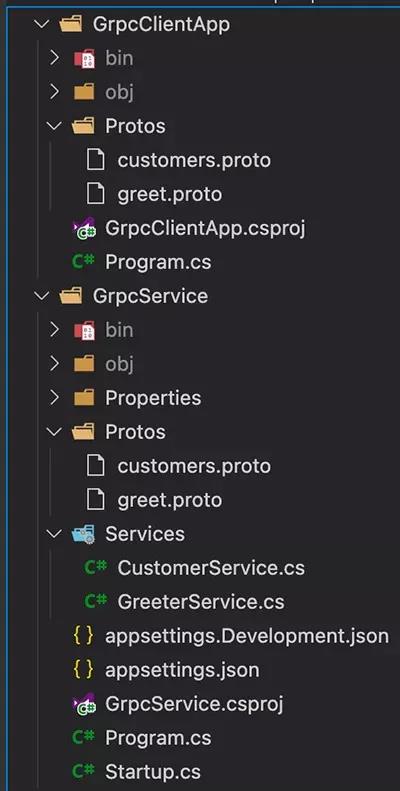
Since the client needs the same contract as the server, we need to add the .proto files created earlier to the client application. To do this:
- First, add a folder named Protos to the client project.
- Copy the contents from the Protos folder in the gRPC greeter service to the gRPC client project, i.e.,
- greet.proto
- customers.proto
- After pasting the files, update the namespace to match the client application:
option csharp_namespace = "GrpcGreeterClient"; - Update the GrpcGreeterClient.csproj file to let it know about our newly added .proto files:
<ItemGroup>
    <Protobuf Include="Protos\\greet.proto" GrpcServices="Client" />
</ItemGroup>
<ItemGroup>
  <Protobuf Include="Protos\\customers.proto" GrpcServices="Client" />
</ItemGroup>
The Protobuf element is how the code generation feature knows about the .proto files. With these changes, we indicate that we want the client to use our newly added .proto files.
Build the client and ensure everything builds successfully:
dotnet build
Now, add some code to the console application to call the server. In the Program.cs file, make the following changes:
// Create a channel, which represents the connection from client to server
// The URL added here is provided by the server's Kestrel
var channel = GrpcChannel.ForAddress("https://localhost:5001");

// This strongly-typed client is created by code generation when we added the .proto file
var client = new Greeter.GreeterClient(channel);

var response = await client.SayHelloAsync(new HelloRequest
{
    Name = "Mohamad"
});

Console.WriteLine("From Server: " + response.Message);

var customerClient = new Customer.CustomerClient(channel);

var result = await customerClient.GetCustomerInfoAsync(new CustomerFindModel()
{
    UserId = 1
});

Console.WriteLine($"First Name: {result.FirstName} - Last Name: {result.LastName}");
Now, add streaming functionality to the application.
Go back to the customers.proto file and add a streaming method to the Customer service:
// We want to return a list of customers
// But in gRPC we cannot return a list; we need to return a stream
rpc GetAllCustomers (AllCustomerModel) returns (stream CustomerDataModel);
As we can see, we added the stream keyword in the return, meaning we are adding a stream composed of "multiple" replies.
Also, add an empty message:
// In gRPC, we cannot define methods with empty parameters
// So we define an empty message
message AllCustomerModel {

}
To implement this method, go to the Services folder and add the following code to the CustomerService class:
public override async Task GetAllCustomers(AllCustomerModel request, IServerStreamWriter<CustomerDataModel> responseStream, ServerCallContext context)
{
    var allCustomers = new List<CustomerDataModel>();

    var c1 = new CustomerDataModel();
    c1.Name = "Mohamad Lawand";
    c1.Email = "mohamad@mail.com";
    allCustomers.Add(c1);

    var c2 = new CustomerDataModel();
    c2.Name = "Richard Feynman";
    c2.Email = "richard@physics.com";
    allCustomers.Add(c2);

    var c3 = new CustomerDataModel();
    c3.Name = "Bruce Wayne";
    c3.Email = "bruce@gotham.com";
    allCustomers.Add(c3);

    var c4 = new CustomerDataModel();
    c4.Name = "James Bond";
    c4.Email = "007@outlook.com";
    allCustomers.Add(c4);

    foreach(var item in allCustomers)
    {
        await responseStream.WriteAsync(item);
    }
}
Now, copy the changes from the server-side customers.proto to the client-side customers.proto:
service Customer {
    rpc GetCustomerInfo (CustomerFindModel) returns (CustomerDataModel);

    // We want to return a list of customers
    // But in gRPC we cannot return a list; we need to return a stream
    rpc GetAllCustomers (AllCustomerModel) returns (stream CustomerDataModel);
}

// In gRPC, we cannot define methods with empty parameters
// So we define an empty message
message AllCustomerModel {

}
Now, build the application again:
dotnet build
Our next step is to update the Program.cs file in GrpcClientApp to handle the new streaming method:
var customerCall = customerClient.GetAllCustomers(new AllCustomerModel());

await foreach(var customer in customerCall.ResponseStream.ReadAllAsync())
{
    Console.WriteLine($"{customer.Name} {customer.Email}");
}
Now, go back to GrpcGreeter and update the greet.proto file to add a streaming method:
rpc SayHelloStream(HelloRequest) returns (stream HelloReply);
As we can see, we added the keyword stream in the return, meaning we are adding a stream composed of "multiple" replies. To implement this method, go to the Services folder and add the following content to GreeterService:
public override async Task SayHelloStream(HelloRequest request, IServerStreamWriter<HelloReply> responseStream, ServerCallContext context)
{
  for (int i = 0; i < 10; i ++)
  {
    await responseStream.WriteAsync(new HelloReply
    {
      Message = "Hello " + request.Name + " " + i
    });

    await Task.Delay(TimeSpan.FromSeconds(1));
  }
}
Now, copy the changes to greet.proto from the server to the client and build it. In the client's greet.proto file, add this line:
rpc SayHelloStream(HelloRequest) returns (stream HelloReply);
Make sure to build the application after saving the .proto file.
dotnet build
Now, open Program.cs and use the new method:
var call = client.SayHelloStream(new HelloRequest
{
    Name = "Mohamad"
});

await foreach(var item in call.ResponseStream.ReadAllAsync())
{
    Console.WriteLine("Result " + item.Message);
}
This example illustrates how to implement a gRPC client-server application in .NET 5.
Conclusion
We can see the power of gRPC in building applications, but harnessing this power is not easy because building gRPC services requires more setup time and coordination between the client and server. With REST, we can start consuming endpoints with almost no setup.
gRPC will not necessarily replace REST, as both technologies have their specific use cases. Please choose the appropriate technology for your project based on your business scenarios and requirements.
Author Bio:
Mohamad Lawand is a dedicated, forward-thinking technology architect with over 13 years of experience across industries ranging from financial institutions to government entities. Proactive and adaptable, he specializes in SaaS and blockchain technologies across multiple platforms. Mohamad also has a YouTube channel where he shares his knowledge.
Original Link: