

借助虚拟机和测试机,检测各版本操作系统对.NET的支持情况。
安装操作系统后,安装相应运行时并能够运行星尘代理或幸运四叶草为通过条件。
测试平台:VMware Workstation
镜像来源:MSDN I Tell You
参考:
安装dotNet
参考[《LuckyClover]新生命团队dotNet安装神器》
支持运行时的标准条件
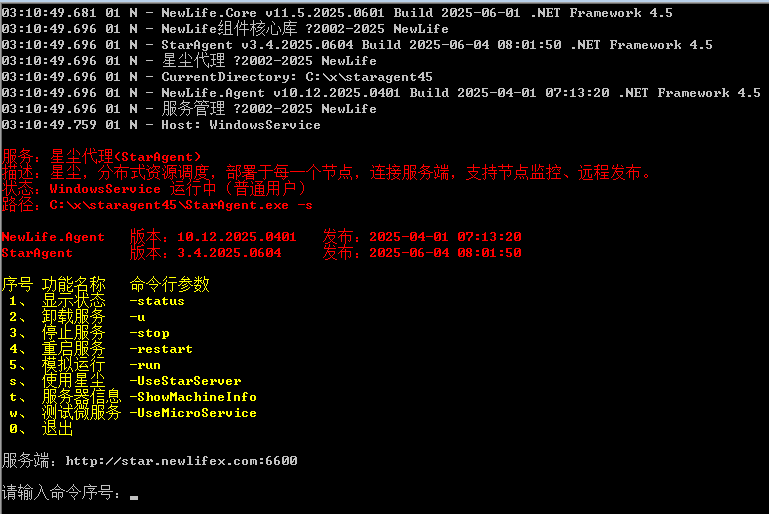
星尘代理
代表复杂业务应用软件,大量访问操作系统,具有互联网Http接口访问和局域网UDP通信功能。
幸运四叶草
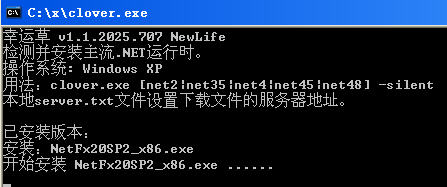
C++版幸运草支持所有系统,仅支持安装net20/net40。
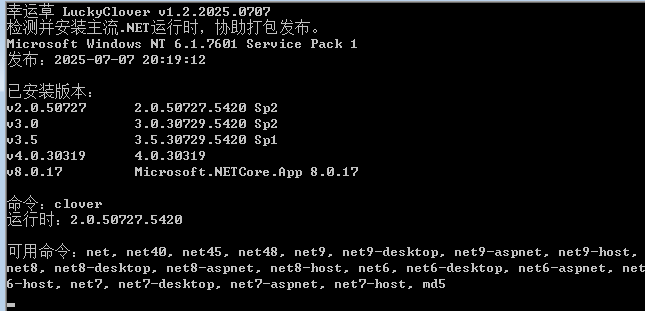
.NET版幸运草依赖.NET2.0运行时,支持检测或安装所有版本.NET运行时。.NET版幸运草同时作为检测.NET运行时的条件,发布有.NET2.0/.NET4.0/.NET4.5/.NET6.0/.NET8.0等多个版本。
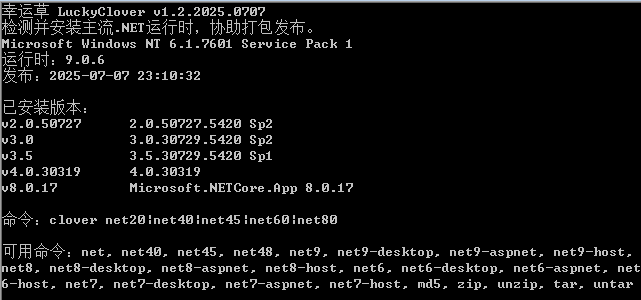
AOT版幸运草基于.NET9.0运行时独立发布,支持.NET版幸运草所有功能。
幸运AOT
基于net9-aot独立发布,仅输出程序集信息。以下测试表中的AOT项,如果不支持AOT版幸运草(含网络功能),仅支持幸运AOT(仅输出文本信息),则标记为“支持。简易”。
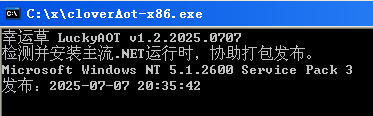
WinXP系列
| 系统(20250707更新) | .NET2.0 SP2 | .NET4.0 | .NET4.5 | AOT9 | Mono3.2.3 |
|---|---|---|---|---|---|
| WindowsXP Professional | 失败。要求SP2 | 失败。系统不支持 | 失败 | 失败 | 简易.NET4.5 |
| WindowsXP Professional SP1 | 失败。要求SP2 | 失败 | 失败 | 支持。简易 | 简易.NET4.5 |
| WindowsXP Professional SP2 | 支持。KB893803 | 支持。需wic_x86 | 失败 | 支持。简易 | 简易.NET4.5 |
| WindowsXP Professional SP3 | 支持 | 支持 | 失败 | 支持。简易 | 简易.NET4.5 |
| WindowsXP Home | 失败。要求SP2 | 失败。系统不支持 | 失败 | 失败 | 简易.NET4.5 |
| WindowsXP Home SP3 | 支持 | 支持 | 失败 | 支持。简易 | 简易.NET4.5 |
| WindowsXP Pro SP2 x64 | 支持 | 支持。需wic_x64 | 失败 | 支持。简易 | 简易.NET4.5 |
| Windows 2003 R2 | 支持 | 支持 | 失败 | 支持。简易 | 简易.NET4.5 |
- win2003r2需要先安装net3.5sp1,才能支持安装net2sp2,也不能提前安装net4.0
- KB893803 就是 Windows Installer 3.1
- KB942288 就是 Windows Installer 4.5
- AOT9使用了 YY-Thunck,支持简单功能,不支持完整幸运草中的网络和加密功能
- Mono3.2.3是支持WindowsXP的最后一个版本,“简易.NET4.5”表示支持clover45.exe,但不支持星尘代理StarAgent45,主要原因是星尘代理大量访问系统函数。
- 社区朋友反馈,在Mono6源码中加入 YY-Thunck 后编译,支持WinXP,但有运行程序少量问题。
- 开源项目OCA(One-Core-Api)安装后,可在WinApi上安装各种版本.NET运行时,但运行.NET应用异常,进程崩溃。
YY也好,OCA也罢,或者Mono,即使能够在WinXP上安装.NET运行时,也会在运行中因系统函数而出错!
Win7/Vista系列
| 操作系统(20250708) | 自带 | NET4 | .NET4.5 | .NET4.8 | NET6 | NET8 | AOT9 |
|---|---|---|---|---|---|---|---|
| Win7 Enterpri SP1 x86 | .NET3.5 | 支持 | 支持 | 支持 | 支持 | 支持 | 完整支持 |
| Win7 Enterprise | .NET3.5 | 支持 | 支持 | 失败 | 失败 | 失败 | 完整支持 |
| Win7 Enterprise SP1 | .NET3.5 | 支持 | 支持 | 支持 | 支持 | 支持 | 完整支持 |
| Win7 Professional | .NET3.5 | 支持 | 支持 | 失败 | 失败 | 失败 | 完整支持 |
| Win7 Professional SP1 | .NET3.5 | 支持 | 支持 | 支持 | 支持 | 支持 | 完整支持 |
| Win7 Ultimate | .NET3.5 | 支持 | 支持 | 失败 | 失败 | 失败 | 完整支持 |
| Win7 Ultimate SP1 | .NET3.5 | 支持 | 支持 | 支持 | 支持 | 支持 | 完整支持 |
| Vista Business | .NET2.0 | 支持 | 支持 | 失败 | |||
| Vista Enterprise SP2 | .NET3.0 | 支持 | 支持 | 失败 | |||
| Win2008 SP2 | .NET2.0 | 支持 | 支持 | 失败 | 失败 | 失败 | 完整支持 |
| Win2008 R2 SP1 | .NET4.0 | 支持 | 支持 | 支持 | 支持 | 支持 | 完整支持 |
- win7打上sp1以后,可以安装vc++2019,然后就能跑AOT应用了。
- net9应用引入NuGet包VC-LTL,再发布AOT,可以直接运行在win7上,无需sp1。
- win7能够安装net7,但是占用内存很大,空白应用启动起码占500M内存,官方直接说net7不支持win7。
- win7sp1安装net48时,需要KB3063858,clover自动支持
- win7和win2008r2安装net48时,可能需要更新证书链,clover自动支持
- win7无法支持net6/net8,主要是因为缺少 api-ms-win-crt-runtime-l1-1-0.dll,vc运行时需要vc2022,而最新vc运行时又依赖sp1。net应用引入NuGet包VC-LTL可以绕开这些依赖。
Win8系列
| 操作系统 | 自带 | .NET4.8 | .NET7.0 | NativeAOT |
|---|---|---|---|---|
| Windows 8 | .NET4.5 | 失败。不支持 | 支持 | 支持 |
| Windows 8.1 | .NET4.5.1 | 支持。需KB2919355 | 支持 | 失败。缺vc++2019但装不上 |
| Windows 2012 | .NET4.5 | 支持 | 支持 | 支持。需vc++2019 |
| Windows 2012 R2 | .NET4.5.1 | 支持。需KB2919355 | 支持 | 失败。缺vc++2019但装不上 |
Win10/Win11系列
| 操作系统 | 自带 | .NET4.8 | NET7 | NET8 | AOT8 |
|---|---|---|---|---|---|
| Windows 10 LTSC 2019 | .NET 4.7.2 | 支持 | 支持 | 支持 | 支持 |
| Windows 10 22H2 | .NET 4.8 | 支持 | 支持 | 支持 | 支持 |
| Windows 11 22H2 | .NET 4.8 | 支持 | 支持 | 支持 | 支持 |
| Windows 2016 | .NET 4.6.1 | 支持 | 支持 | 支持 | |
| Windows 2016 VL | .NET 4.6.2 | 支持 | 支持 | 支持 | |
| Windows 2019 | .NET 4.7.2 | 支持 | |||
| Windows 2019 UP2020 | 支持 | ||||
| Windows 2022 |
Linux系列
| 操作系统 | Mono | NET3.1 | NET6 | NET7 | NET8 | AOT | 备注 |
|---|---|---|---|---|---|---|---|
| Deepin 20 | 5.18 | 支持 | 支持 | 支持 | 支持 | 容易 | |
| Ubuntu 16 | 支持 | ||||||
| Ubuntu 18 | 支持 | ||||||
| Ubuntu 20 | 6.8 | 支持 | 支持 | 支持 | 支持 | 较容易 | |
| Debian 11 | 6.8 | 支持 | 支持 | 支持 | 支持 | ||
| CentOS 7.6 | 支持 | NET8需替换libstdc++ | |||||
| CentOS 8 | |||||||
| Kali 2022.3 | 6.12 | 支持 | 支持 | 支持 | 支持 | 自带.NETCore3.1 | |
| Fedora 37 | 支持 | 支持 | 支持 | ||||
| UOS 20 Home | 5.18 | 支持 | 支持 | 支持 | |||
| UOS 20 Pro Arm64 | 支持 | 支持 | 支持 | HUAWEI Kunpeng 920 | |||
| UOS 20 Pro Mips64 | 支持 | 失败 | 失败 | 失败 | Loongson-3 | ||
| openKylin | 6.12 | 支持 | 支持 | 支持 | 支持 | 容易 | |
| NeoKylin7 | 支持 | 支持 | 支持 | 支持 | NET8需替换libstdc++ | ||
| Kylin Desktop V10 SP1 | 6.12 | 支持 | 支持 | 支持 | |||
| Kylin Server V10 SP1 | 6.12 | 支持 | 支持 | 支持 | |||
| Kylin V10 SP1 | 支持 | Phytium,FT-2000+/64 | |||||
| Kylin Desktop V10 SP1 | 支持 | 支持 | loongarch64,需龙芯源 | ||||
| Linx V6 | 支持 | NET8需替换libstdc++ | |||||
| SmartOS A4 | 支持 | 支持 | 支持 |
感谢 @_well 在UOS上的支持,感谢 @lindexi 在龙芯上的支持。
.NET Framework 版本历史
| 版本 | 发布日期 | 终止支持 |
|---|---|---|
| .NET Framework 4.8.1 | 2022年8月9日 | |
| .NET Framework 4.8 | 2019年4月18日 | |
| .NET Framework 4.7.2 | 2018年4月30日 | |
| .NET Framework 4.7.1 | 2017年10月17日 | |
| .NET Framework 4.7 | 2017年4月5日 | |
| .NET Framework 4.6.2 | 2016年8月2日 | |
| .NET Framework 3.5 SP1 | 2008年11月18日 | 2029年1月9日 |
| .NET Framework 4.6.1 | 2015年11月30日 | 2022年4月26日 |
| .NET Framework 4.6 | 2015年7月20日 | 2022年4月26日 |
| .NET Framework 4.5.2 | 2014年5月5日 | 2022年4月26日 |
| .NET Framework 4.5.1 | 2013年10月17日 | 2016年1月12日 |
| .NET Framework 4.5 | 2012年8月15日 | 2016年1月12日 |
| .NET Framework 4.0 | 2010年4月12日 | 2016年1月12日 |
Windows自带及最高支持
| Windows版本 | 自带.NET Framework 版本 | 支持最高的 .NET Framework 版本 |
|---|---|---|
| Windows NT 4.0 SP6a、2000 | .NET Framework 1.1 SP1 | |
| Windows 98, 98SE, Me, 2000 SP3 | .NET Framework 2.0 | |
| Windows 2000 SP4 | .NET Framework 2.0 SP2 | |
| Windows XP SP1 | .NET Framework 1.0 SP2 | .NET Framework 1.0 SP2 |
| Windows XP SP2 | .NET Framework 1.1 SP1 | .NET Framework 3.5 SP1 |
| Windows XP SP3 | .NET Framework 1.1 SP1 | .NET Framework 4.0 |
| Windows Vista | .NET Framework 3.0 | .NET Framework 3.5 SP1 |
| Windows Vista SP1 | .NET Framework 3.0 SP1 | .NET Framework 4.0 |
| Windows Vista SP2 | .NET Framework 3.0 SP2 | .NET Framework 4.6 |
| Windows 7 | .NET Framework 3.5.1 SP1 | .NET Framework 4.5 |
| Windows 7 SP1 | .NET Framework 3.5.1 SP1 | Latest |
| Windows 8 | .NET Framework 3.5.1 SP1 + 4.5 | .NET Framework 4.6.2 |
| Windows 8.1 | .NET Framework 3.5.1 SP1 + 4.5.1 | .NET Framework 4.5.2 |
| Windows 8.1 Update | .NET Framework 3.5.1 SP1 + 4.5 | Latest |
| Windows 10 (1507) | .NET Framework 4.6 | Latest |
| Windows 10 (1511) | .NET Framework 4.6.1 | Latest |
| Windows 10 (1607) | .NET Framework 4.6.2 | Latest |
| Windows 10 (1703) | .NET Framework 4.7 | Latest |
| Windows 10 (1709) | .NET Framework 4.7.1 | Latest |
| Windows 10 (1803 ~ 1809) | .NET Framework 4.7.2 | Latest |
| Windows 10 (1903 ~ v20H2) | .NET Framework 4.8 | Latest |
| Windows 11 | .NET Framework 4.8 | Latest |
安装dotNet星尘代理幸运四叶草幸运AOTWinXP系列Win7/Vista系列Win8系列Win10/Win11系列Linux系列.NET Framework 版本历史Windows自带及最高支持
作者:大石头 发布:2025-10-14 03:12:20
- 作者:大石头
- 发布:2025-10-14 03:12:20
- 原文链接:各版本操作系统对.NET支持情况(250707更新)