
做 .NET 开发时,偶尔需要调用第三方提供的本地库(Native Library),比如硬件SDK、加密库或底层通信组件。这篇文章通过一个实际的Demo项目,分享我在引入跨平台本地库时的两大方案和避坑经验。
1. 项目准备
Demo项目使用了一个简单的C++动态库 TimeMeaning,它提供了一个API:
// 传入秒级时间戳,返回一段人生/时间意境文案
const char* GetTimeMeaning(int timestampSecond);
时间戳取模10后返回对应文案,寓意每个时刻都有不同的人生感悟:
static const char* TIME_MEANINGS[] = {
    "黎明破晓,万物苏醒,新的一天带来新的希望",
    "晨光熹微,思绪清晰,适合规划一天的行程",
    "日出东方,阳光灿烂,充满活力与朝气",
    "上午时光,精力充沛,专注做事效率高",
    "正午时分,阳光明媚,适合休息片刻",
    "午后暖阳,慵懒惬意,时光静静流淌",
    "夕阳西下,余晖满天,美好的黄昏时分",
    "夜幕降临,星光点点,思绪开始沉淀",
    "夜深人静,皓月当空,适合反思与冥想",
    "午夜时分,万籁俱寂,梦想在黑暗中萌芽"
};
第三方库通常会提供针对不同平台的版本,目录结构如下:
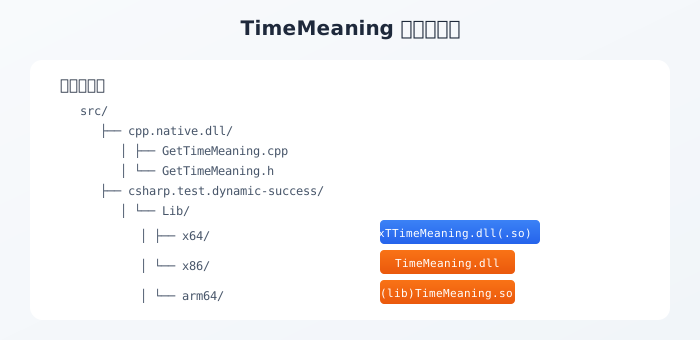
Lib/
├── x64/
│   ├── TimeMeaning.dll        # 64位 Windows
│   └── (lib)TimeMeaning.so    # 64位 Linux
├── x86/
│   └── TimeMeaning.dll        # 32位 Windows
└── arm64/
    └── (lib)TimeMeaning.so    # ARM64 Linux
我们希望:
- 代码保持统一:不需要针对每个平台写不同的调用代码
- 自动适配:编译或发布时自动选择对应平台的库文件
Directory.Build.props 全局宏定义
首先,我们在解决方案根目录创建 Directory.Build.props,默认定义 PLATFORM_WIN_X86 条件编译宏:
<Project>
	<PropertyGroup>
		<DefineConstants>$(DefineConstants);PLATFORM_WIN_X86</DefineConstants>
	</PropertyGroup>
</Project>
然后通过 publish.bat 发布脚本调用 SetPlatformMacro.ps1,在发布前根据目标平台修改全局宏定义:
# SetPlatformMacro.ps1
$macro = ""
switch ($Platform) {
    "linux-x64" { $macro = "PLATFORM_LINUX_X64" }
    "linux-arm64" { $macro = "PLATFORM_LINUX_ARM64" }
    "win-x64" { $macro = "PLATFORM_WIN_X64" }
    "win-x86" { $macro = "PLATFORM_WIN_X86" }
}
$content = $content -replace '<DefineConstants>.*?</DefineConstants>', "<DefineConstants>`$(DefineConstants);$macro</DefineConstants>"
这样在代码中就可以方便地区分当前编译的平台版本:
#if PLATFORM_WIN_X64
var platform = "Windows X64";
#elif PLATFORM_WIN_X86
var platform = "Windows X86";
#elif PLATFORM_LINUX_X64
var platform = "Linux X64";
#elif PLATFORM_LINUX_ARM64
var platform = "Linux ARM64";
#else
var platform = "Unknown";
#endif
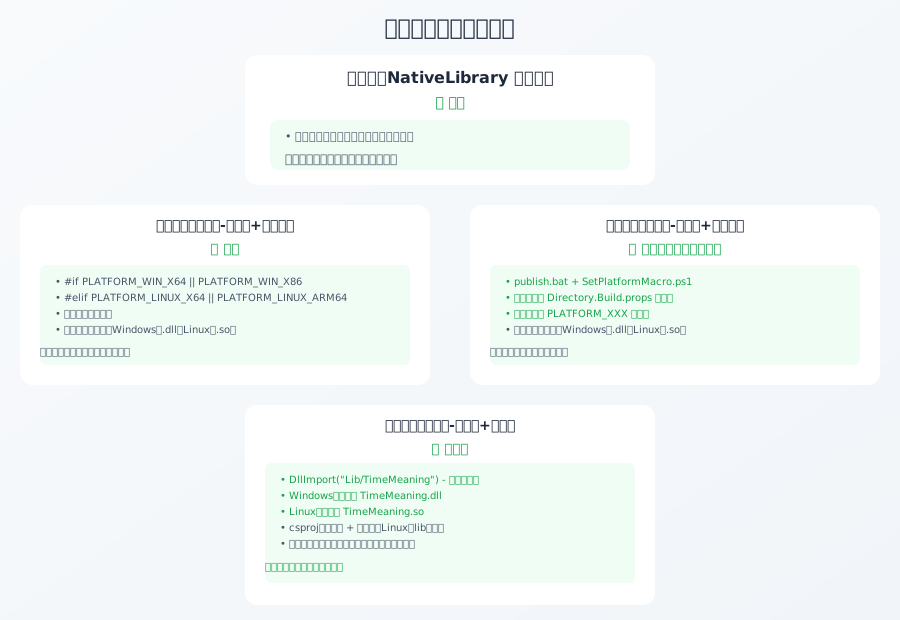
2. 两大方案概述
引入本地库主要分为两大方案:
- 动态加载:使用
NativeLibraryAPI 运行时手动加载 - 静态加载:使用
DllImport特性声明(做了3种情况测试)
VC-LTL 和 YY-Thunks(所有示例通用)
所有 4 个示例程序都引入了以下两个 NuGet 包,目前测试的示例都支持Win7及以上Windows版本,以及Linux平台:
Windows 7运行原理:虽然微软官方.NET 10已不再支持Windows 7,但通过使用 net10.0-windows 目标框架配合 AOT 发布,可让程序在Windows 7上正常运行。AOT将.NET代码静态编译为原生可执行文件,完全摆脱对.NET运行时的依赖;配合VC-LTL和YY-Thunks分别提供轻量C运行时支持和旧Windows API兼容层,实现跨版本兼容。
<PackageReference Include="VC-LTL" Version="5.3.1" />
<PackageReference Include="YY-Thunks" Version="1.2.1-Beta.4" />
- VC-LTL:使用开源的 VC 运行时库,无需安装系统补丁,大幅减少程序体积,兼容旧系统。配合AOT(
PublishAot=true)发布可摆脱.NET运行时依赖,直接生成原生可执行文件 - YY-Thunks:为旧版 Windows 提供新 API 的兼容层,让现代代码也能在 Win7/XP 上正常运行(XP未测试文章示例)
3. 方案一:动态加载(✅ 成功)
动态加载是最灵活的方式,使用 NativeLibrary API 在运行时手动加载本地库。这种方式的优势是可以完全自定义库的加载逻辑,能够处理相同库但存储在不同目录、使用不同文件命名的复杂场景。对于某些特殊需求,比如需要在运行时根据条件选择加载不同的版本,或者库的路径需要动态计算,动态加载是最好的选择。
代码实现
using System.Runtime.InteropServices;

namespace csharp.test.dynamic;

internal static class TimeMeaningNative
{
    // 根据当前操作系统判断库文件名:Windows用dll,Linux用so
    private static readonly string DllName = OperatingSystem.IsWindows()
        ? "TimeMeaning.dll"
        : "libTimeMeaning.so";

    // 定义与C++函数相同调用约定的委托,用于后续转换
    [UnmanagedFunctionPointer(CallingConvention.Cdecl, CharSet = CharSet.Unicode)]
    private delegate IntPtr GetTimeMeaningDelegate(int timestampSecond);

    // 用于存储转换后的委托(调用时会用到)
    private static GetTimeMeaningDelegate? _getTimeMeaning;
    // 用于存储库的句柄(用于后续释放)
    private static IntPtr _handle;

    // 静态构造函数,在第一次使用该类时自动执行
    static TimeMeaningNative()
    {
        // 拼接库的完整路径:应用程序根目录 + Lib子目录 + 文件名
        var dllPath = Path.Combine(AppContext.BaseDirectory, "Lib", DllName);

        // NativeLibrary.Load:加载指定路径的本地库,返回库句柄
        _handle = NativeLibrary.Load(dllPath);

        // NativeLibrary.GetExport:从已加载的库中获取指定名称的函数地址
        var funcPtr = NativeLibrary.GetExport(_handle, "GetTimeMeaning");

        // Marshal.GetDelegateForFunctionPointer:将函数指针转换为可调用的委托
        _getTimeMeaning = Marshal.GetDelegateForFunctionPointer<GetTimeMeaningDelegate>(funcPtr);
    }

    // 提供手动释放库的方法,避免内存泄漏
    public static void Free()
    {
        if (_handle == IntPtr.Zero) return;
        NativeLibrary.Free(_handle);
        _handle = IntPtr.Zero;
    }

    // 封装对外的调用接口,返回字符串结果
    public static string GetTimeMeaningString(int timestampSecond)
    {
        if (_getTimeMeaning == null)
        {
            throw new InvalidOperationException("动态库未正确加载");
        }

        // 调用委托,得到C++函数返回的指针
        var ptr = _getTimeMeaning(timestampSecond);
        // 将UTF8编码的字符指针转换为C#字符串
        return Marshal.PtrToStringUTF8(ptr) ?? string.Empty;
    }
}
代码说明:
NativeLibrary.Load- 核心API,传入完整路径加载本地库NativeLibrary.GetExport- 从已加载库中获取导出函数的指针Marshal.GetDelegateForFunctionPointer- 将非托管函数指针转换为.NET委托,这样就可以像调用普通方法一样调用本地函数了Marshal.PtrToStringUTF8- 将C++返回的UTF8字符串指针转换为C#字符串
项目配置(csproj)
<Project Sdk="Microsoft.NET.Sdk">

	<PropertyGroup>
		<OutputType>Exe</OutputType>
		<TargetFrameworks>net10.0;net10.0-windows</TargetFrameworks>
		<ImplicitUsings>enable</ImplicitUsings>
		<Nullable>enable</Nullable>

		<WindowsSupportedOSPlatformVersion>6.1</WindowsSupportedOSPlatformVersion>
		<TargetPlatformMinVersion>6.1</TargetPlatformMinVersion>
	</PropertyGroup>

	<ItemGroup>
		<PackageReference Include="CodeWF.Log.Core" Version="11.3.14" />
		<PackageReference Include="VC-LTL" Version="5.3.1" />
		<PackageReference Include="YY-Thunks" Version="1.2.1-Beta.4" />
	</ItemGroup>

	<ItemGroup>
		<!-- 调试状态默认复制Win x64的库,便于本地调试 -->
		<None Update="Lib\x64\TimeMeaning.dll" Condition="'$(Configuration)' == 'Debug'">
			<CopyToOutputDirectory>PreserveNewest</CopyToOutputDirectory>
			<Link>Lib\TimeMeaning.dll</Link>
		</None>
	</ItemGroup>
	<ItemGroup>
		<None Update="Lib\x64\libTimeMeaning.so" Condition="'$(RuntimeIdentifier)' == 'linux-x64'">
			<CopyToOutputDirectory>PreserveNewest</CopyToOutputDirectory>
			<Link>Lib\libTimeMeaning.so</Link>
		</None>
		<None Update="Lib\x64\TimeMeaning.dll" Condition="'$(RuntimeIdentifier)' == 'win-x64'">
			<CopyToOutputDirectory>PreserveNewest</CopyToOutputDirectory>
			<Link>Lib\TimeMeaning.dll</Link>
		</None>
		<None Update="Lib\x86\TimeMeaning.dll" Condition="'$(RuntimeIdentifier)' == 'win-x86'">
			<CopyToOutputDirectory>PreserveNewest</CopyToOutputDirectory>
			<Link>Lib\TimeMeaning.dll</Link>
		</None>
	</ItemGroup>

</Project>
csproj配置说明:
Condition="'$(Configuration)' == 'Debug'"- 在Debug模式下,默认复制Windows x64版本的库,方便直接在Visual Studio中调试运行Condition="'$(RuntimeIdentifier)' == 'linux-x64'"- 当使用-r linux-x64发布时,复制Linux版本的库Link属性指定了库在输出目录中的路径,确保与代码中加载的路径一致
关键点说明
动态加载流程:
- 运行时根据操作系统判断库文件名
- 拼接完整路径加载库
- 获取导出函数地址
- 转换为委托调用
4. 方案二:静态加载
静态加载使用 DllImport 特性声明,这是.NET中调用本地库的标准方式。我们做了3种情况测试:主要是测试三方库封装代码是直接放在主工程,还是提取出来通过NuGet分发时,使用条件编译宏是否可行、路径灵活度如何。
条件编译宏的两种定义方式
使用条件编译宏前,需要先定义 PLATFORM_XXX 宏,有两种方式:
方式1:在发布配置文件(pubxml)中定义
在 Properties/PublishProfiles/*.pubxml 文件的 <PropertyGroup> 中添加:
<PropertyGroup>
    <DefineConstants>$(DefineConstants);PLATFORM_WIN_X64</DefineConstants>
</PropertyGroup>
方式2:在项目文件(csproj)中定义
在项目文件的 <PropertyGroup> 中添加:
<PropertyGroup Condition="'$(RuntimeIdentifier)' == 'linux-x64'">
    <DefineConstants>$(DefineConstants);PLATFORM_LINUX_X64</DefineConstants>
</PropertyGroup>

<PropertyGroup Condition="'$(RuntimeIdentifier)' == 'linux-arm64'">
    <DefineConstants>$(DefineConstants);PLATFORM_LINUX_ARM64</DefineConstants>
</PropertyGroup>

<PropertyGroup Condition="'$(RuntimeIdentifier)' == 'win-x64'">
    <DefineConstants>$(DefineConstants);PLATFORM_WIN_X64</DefineConstants>
</PropertyGroup>

<PropertyGroup Condition="'$(RuntimeIdentifier)' == 'win-x86'">
    <DefineConstants>$(DefineConstants);PLATFORM_WIN_X86</DefineConstants>
</PropertyGroup>

<PropertyGroup Condition="'$(RuntimeIdentifier)' == ''">
    <DefineConstants>$(DefineConstants);PLATFORM_EMPTY</DefineConstants>
</PropertyGroup>
重要说明:方式2在工程文件中添加的条件编译宏定义,仅对主工程有效。因为子工程编译时 $(RuntimeIdentifier) 是空的(不会继承主工程的 RID),所以子工程会匹配到 $(RuntimeIdentifier) == '' 条件,定义 PLATFORM_EMPTY 宏。这意味着在子工程中无法通过这种方式正确区分平台。如果需要在子工程中使用平台宏,需要配合发布脚本动态修改 Directory.Build.props 全局宏定义(见情况2)。
情况1:单工程 + 条件编译(✅ 成功)
直接在主工程中使用 DllImport,通过条件编译宏设置库路径,适合不封装为类库的场景,比如小工具或者不需要复用率低的项目。
静态加载使用条件编译宏的优势:可以灵活处理不同平台库名完全不同的情况,当然也包括不同目录(实际场景有可能),比如 Windows 用 Lib/Windows x64/TimeMeaning.dll,Linux 用 Lib/Linux x64/libTimeMeaning.so,这与方案一的动态加载有点像,都能处理复杂的路径差异。
代码实现
using System.Runtime.InteropServices;

namespace csharp.test.static_;

internal static class TimeMeaningNative
{
#if PLATFORM_WIN_X64 || PLATFORM_WIN_X86
    const string DLL = "Lib/TimeMeaning.dll";
#elif PLATFORM_LINUX_X64 || PLATFORM_LINUX_ARM64
    const string DLL = "Lib/libTimeMeaning.so";
#else
    const string DLL = "Lib/TimeMeaning.dll";
#endif

    [DllImport(DLL, CallingConvention = CallingConvention.Cdecl, CharSet = CharSet.Unicode)]
    private static extern IntPtr GetTimeMeaning(int timestampSecond);

    public static string GetTimeMeaningString(int timestampSecond)
    {
        var ptr = GetTimeMeaning(timestampSecond);
        return Marshal.PtrToStringUTF8(ptr) ?? string.Empty;
    }
}
结果
✅ 成功:在单工程场景下,条件编译宏正常工作,Windows和Linux都能正确加载对应库文件。
情况2:多工程 + 条件编译(✅ 成功,推荐)
将库调用封装到独立的类库工程,再由主工程引用。通过 publish.bat 发布脚本在发布前调用 SetPlatformMacro.ps1 修改全局宏定义,解决了类库不继承条件编译宏的问题。
类库代码(TimeMeaningNative.csproj)
using System.Runtime.InteropServices;

namespace TimeMeaningNative;

public static class TimeMeaningApi
{
#if PLATFORM_WIN_X64 || PLATFORM_WIN_X86
    const string DLL = "Lib/TimeMeaning.dll";
#elif PLATFORM_LINUX_X64 || PLATFORM_LINUX_ARM64
    const string DLL = "Lib/libTimeMeaning.so";
#else
    const string DLL = "Lib/TimeMeaning.dll";
#endif

    [DllImport(DLL, CallingConvention = CallingConvention.Cdecl, CharSet = CharSet.Unicode)]
    private static extern IntPtr GetTimeMeaning(int timestampSecond);

    public static string GetTimeMeaningString(int timestampSecond)
    {
        var ptr = GetTimeMeaning(timestampSecond);
        return Marshal.PtrToStringUTF8(ptr) ?? string.Empty;
    }
}
发布脚本(publish.bat)
for %%p in (%platforms%) do (
    set "tfm="
    set "pubxml="

    if "%%p"=="linux-x64" set "tfm=net10.0" & set "pubxml=FolderProfile_linux-x64.pubxml"
    ...

    powershell -ExecutionPolicy Bypass -File "SetPlatformMacro.ps1" -Platform "%%p"

    for %%d in (%project_paths%) do (
        dotnet publish "%%d" -f !tfm! /p:PublishProfile="%%d\Properties\PublishProfiles\!pubxml!"
    )
)
成功原因
✅ 成功:publish.bat 发布前调用 SetPlatformMacro.ps1 脚本修改 Directory.Build.props 中的全局宏定义,使子工程也能正确获取平台宏定义(如 PLATFORM_LINUX_X64),而不是依赖编译时的 RuntimeIdentifier。
备注:具体脚本可在测试仓库查看,仓库地址在文末。
⚠️ 重要:NuGet 打包限制
注意:此方案仅适用于同一源码仓库内的多工程引用。如果将此类库工程打包为 NuGet 包分发给其他项目使用,会存在以下问题:
- Directory.Build.props 不会被打包:NuGet 包中不会包含仓库根目录的
Directory.Build.props,上游用户无法继承宏定义 - 宏已在编译时固定:打包时,代码已按当时的宏条件完成分支裁剪,生成的 dll 不再受上游宏影响
- 上游无法改变行为:安装 NuGet 包的项目,即使定义了自己的
PLATFORM_XXX宏,也无法改变已打包库的代码分支
解决方案:如需通过 NuGet 分发跨平台库,推荐使用方案四(多工程+仅库名),或者使用 NuGet build props 机制(详见下方补充说明)。
情况3:多工程 + 仅库名(✅ 推荐)
这是最推荐的方案,相较动态加载方式,减小了使用难度。类库中不使用条件编译宏,只指定库名(不加扩展名),解决跨平台库引用问题。
类库代码(TimeMeaningNative.csproj)
using System.Runtime.InteropServices;

namespace TimeMeaningNative;

public static class TimeMeaningApi
{
    const string DLL = "Lib/TimeMeaning";
    [DllImport(DLL, CallingConvention = CallingConvention.Cdecl, CharSet = CharSet.Unicode)]
    private static extern IntPtr GetTimeMeaning(int timestampSecond);

    public static string GetTimeMeaningString(int timestampSecond)
    {
        var ptr = GetTimeMeaning(timestampSecond);
        return Marshal.PtrToStringUTF8(ptr) ?? string.Empty;
    }
}
主工程配置(csproj)
这里有一个关键技巧:如果Linux库有lib等前缀,需要去掉,和Windows dll改为相同文件名,Linux下复制时去掉 lib 前缀!
<ItemGroup>
    <!-- Linux 下关键:复制时去掉 lib 前缀! -->
    <None Update="Lib\x64\libTimeMeaning.so" Condition="'$(RuntimeIdentifier)' == 'linux-x64'">
        <CopyToOutputDirectory>PreserveNewest</CopyToOutputDirectory>
        <Link>Lib\TimeMeaning.so</Link>
    </None>
    ...
</ItemGroup>
工作原理
- Windows:
DllImport("Lib/TimeMeaning")自动查找Lib/TimeMeaning.dll - Linux:
DllImport("Lib/TimeMeaning")会查找Lib/TimeMeaning或Lib/TimeMeaning.so,不会查找Lib/libTimeMeaning.so - 所以Linux下需要通过
<Link>Lib\TimeMeaning.so</Link>将libTimeMeaning.so复制为TimeMeaning.so
结果
✅ 成功:这是最推荐的方案,简单可靠,懒得定义条件编译宏,只需要确保不同平台的库文件名统一(Linux下去掉lib前缀)。
方案对比总结
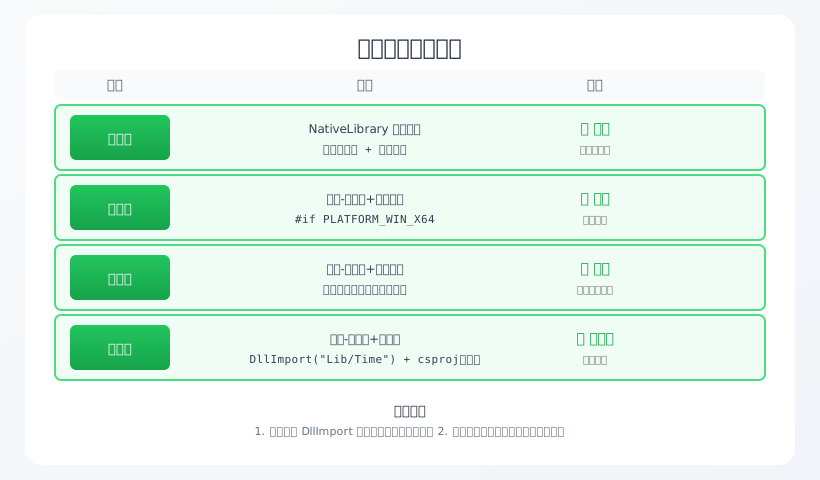
| 类别 | 方案 | 做法 | 结果 | 适用场景 |
|---|---|---|---|---|
| 动态加载 | NativeLibrary 动态加载 | 代码中手动判断操作系统并加载库 | ✅ 全平台可用 | 需要灵活控制加载路径 |
| 静态加载 | 单工程 + 条件编译 | #if PLATFORM_WIN_X64 条件编译 |
✅ 成功 | 仅主工程使用,不封装类库,支持不同路径库 |
| 静态加载 | 多工程 + 条件编译 | 发布前通过脚本全局设置宏 | ✅ 成功(配合发布脚本) | 推荐,需要不同平台库路径不同 |
| 静态加载 | 多工程 + 仅库名(无扩展名) | 类库只写库名 + csproj 条件复制(Linux去lib前缀) | ✅ 跨平台完美成功 | 最推荐,简单可靠,希望统一库文件名 |
6. 核心经验
- 推荐使用 DllImport 常量库名(不加扩展名),这是最稳定可靠的方案,重点是简单好理解。方案一动态加载也可行,只是使用上稍微麻烦一点
- 静态加载使用条件编译宏能处理库名不同的情况,适用于单工程和多工程(多工程需要配合发布脚本全局设置宏)
- 多工程场景下宏不继承的问题可以通过发布脚本解决:使用
publish.bat+SetPlatformMacro.ps1在发布前修改全局宏 - 不要依赖类库编译时的 RuntimeIdentifier,因为类库编译时可能没有 RuntimeIdentifier 上下文,导致条件编译宏不生效
- Linux 下注意去掉 lib 前缀,通过 csproj 的
<Link>机制重命名 - 需要支持 Windows 7 时,安装 VC-LTL 和 YY-Thunks NuGet 包
- 可以将库文件放在 Lib 子目录,不一定非要在根目录
- ⚠️ 重要:Directory.Build.props 全局宏不支持 NuGet 分发:如果将使用条件编译宏的类库打包为 NuGet,上游项目完全继承不到该宏,且 NuGet 包内部代码也会在打包时就固定编译分支。如需通过 NuGet 分发,推荐使用方案四(仅库名,不依赖条件编译宏)
补充说明:对于初学者来说,先掌握情况3(多工程+仅库名)是最好的,这是最稳妥且容易理解的方式。如果确实需要灵活处理路径差异,再考虑动态加载或情况2。
7. 补充:NuGet 打包与条件编译宏
7.1 Directory.Build.props 与 NuGet 的限制
结论:Directory.Build.props 是源码仓库级别的构建配置,不属于项目本身,更不属于 NuGet 包。
生效范围
| 场景 | 是否生效 | 说明 |
|---|---|---|
| 本地多工程开发 | ✅ 是 | MSBuild 自动从项目目录向上遍历加载 |
| 打包时编译 | ✅ 是 | 打包时编译阶段会应用宏,裁剪分支 |
| NuGet 包内部(运行时) | ❌ 否 | 宏已在编译时消失,dll 分支已固定 |
| 上游项目安装后 | ❌ 否 | NuGet 不包含 Directory.Build.props,无法继承 |
核心原因
- NuGet 本质是编译产物:包含 dll + 元数据,不包含构建配置
- 宏是编译时概念:
#if在编译时已完成分支裁剪,运行时不再存在 - Directory.Build.props 不打包:只在本地仓库结构中生效
7.2 NuGet 分发的替代方案
方案 A:使用 NuGet build props(向下游传递宏)
如果确实需要通过 NuGet 向下游项目传递宏定义,可以在库项目中添加 build/ 文件夹:
<!-- build/YourPackageName.props -->
<Project>
  <PropertyGroup>
    <!-- 基于 RuntimeIdentifier 自动定义宏 -->
    <DefineConstants Condition="'$(RuntimeIdentifier)'=='win-x86'">
      $(DefineConstants);PLATFORM_WIN_X86
    </DefineConstants>
    <DefineConstants Condition="'$(RuntimeIdentifier)'=='win-x64'">
      $(DefineConstants);PLATFORM_WIN_X64
    </DefineConstants>
    <DefineConstants Condition="'$(RuntimeIdentifier)'=='linux-x64'">
      $(DefineConstants);PLATFORM_LINUX_X64
    </DefineConstants>
    <DefineConstants Condition="'$(RuntimeIdentifier)'=='linux-arm64'">
      $(DefineConstants);PLATFORM_LINUX_ARM64
    </DefineConstants>
  </PropertyGroup>
</Project>
然后在库项目的 csproj 中配置打包:
<ItemGroup>
  <None Include="build\**" Pack="true" PackagePath="build\" />
</ItemGroup>
注意:这只能让下游项目获得宏定义,但无法改变已打包库内部的代码分支(因为库 dll 已在编译时固定)。
方案 B:库内部不使用条件编译宏(推荐)
最稳妥的 NuGet 分发方案是避免在库代码中使用条件编译宏,改用方案四(仅库名)或运行时判断:
// 推荐:库内使用运行时判断或仅库名方式
public static class TimeMeaningApi
{
    const string DLL = "Lib/TimeMeaning"; // 不加扩展名

    [DllImport(DLL, CallingConvention = CallingConvention.Cdecl)]
    private static extern IntPtr GetTimeMeaning(int timestampSecond);

    // ...
}
方案 C:按 RID 分别打包 NuGet
为每个平台单独打包 NuGet,使用不同的包 ID 或版本:
YourLibrary.win-x64YourLibrary.linux-x64- 等等
不过这会增加维护成本,通常不推荐。
7.3 最终建议
- 同一仓库内多工程:可以使用
Directory.Build.props+ 发布脚本(情况2) - 需要 NuGet 分发:强烈推荐方案四(仅库名,不依赖条件编译宏)
- 必须用条件编译 + NuGet:考虑 NuGet build props + 运行时判断结合
8. 常见问题 Q&A
Q1: Linux 下为什么要去掉 lib 前缀?
A: 分两种情况:
- 库在根目录:
DllImport("TimeMeaning")在 Linux 下会查找TimeMeaning、TimeMeaning.so、libTimeMeaning.so,无需去掉前缀 - 库在子目录:
DllImport("Lib/TimeMeaning")在 Linux 下仅会查找Lib/TimeMeaning、Lib/TimeMeaning.so,不会查找Lib/libTimeMeaning.so**,因此需要通过 csproj 的机制将libTimeMeaning.so复制为TimeMeaning.so`
Q2: 库文件必须和可执行文件在同一目录吗?
A: 不需要!可以放在子目录(如 Lib/),只需要在 DllImport 中指定子目录路径,如 DllImport("Lib/TimeMeaning")。注意使用子目录时Linux不会查找带lib前缀的库。
Q3: CallingConvention 是什么意思?
A: 定义了函数调用时参数传递和栈清理的方式。常见的有:
Cdecl:C 语言默认约定,调用者清理栈(Linux 常用)StdCall:Windows API 常用,被调用者清理栈Winapi:平台默认(Windows 下是 StdCall,Linux 下是 Cdecl)
Q4: macOS 支持吗?
A: 支持!macOS 使用 .dylib 后缀,同样可以用 DllImport("Lib/TimeMeaning"),系统会自动查找 Lib/TimeMeaning.dylib。csproj 配置中增加 osx-x64 和 osx-arm64 的配置即可。
Q5: 调试时如何知道库文件是否正确加载?
A: 可以通过以下方式:
- 检查输出目录的
Lib/子目录是否有正确的库文件 - 使用 Process Monitor(Windows)或 lsof(Linux)监视库文件加载
- 在代码中调用
NativeLibrary.TryLoad测试加载是否成功
以上内容基于实际 Demo 项目整理,包含C++库代码及四大方案的完整代码示例,如有错误或更好的方案,欢迎在评论区留言指正!
开源项目地址:https://github.com/dotnet9/DotnetCrossPlatformNativeLibrary