

- 作者 | Mohamad Lawand
- 译者 | 张卫滨
- 策划 | 丁晓昀
从本质上来讲,API 就是服务器和客户端之间的一个协议,指定了服务器如何基于客户端的请求提供特定的数据。
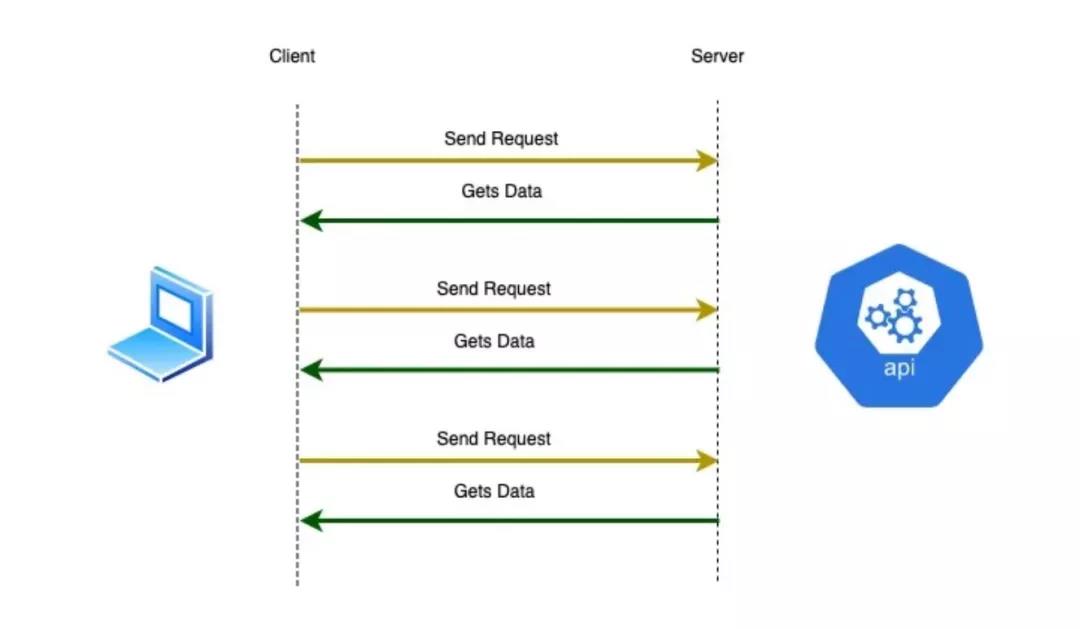
在构建 API 的时候,我们会想到不同的技术。根据需求不同,我们所选择的开发 API 的技术也会随之发生变化。在目前的这个时代,主要有两种用于创建 API 的技术:
- gRPC
- REST
这两种技术都使用 HTTP 作为传输机制。尽管使用了相同的底层传输机制,但是它们的实现却是完全不同的。
我们先对比一下这两项技术,然后再深入了解 gRPC。
REST
REST 是一套架构约束,而不是协议或标准。API 开发人员可以使用各种方式来实现 REST。
为了让一个 API 被认作是 RESTful 的,我们需要遵循一些约束条件:
客户端 - 服务器端架构:所有的请求必须使用 HTTP 作为传输机制;
无状态:API 应该是无状态的,这意味着,服务器不应该在服务器端存储任何关于客户端会话的状态。从客户端到服务器的每个请求都必须要包含所有必要的信息以理解该请求。服务器不能使用任何在服务器端所存储的上下文。
可缓存:客户端 - 服务器间流过的所有数据必须都是可缓存的,这意味着它们可以被存储起来,以便于后续检索和使用。
统一接口:客户端和服务器之间必须有一个接口,以便于信息以标准的形式进行传输。
分层的系统:在客户端的请求以及服务器端的响应之间所涉及的所有服务器必须要按照它们的职责来进行组织,组织方式不能影响到请求或响应。
gRPC
gRPC 构建在 RPC(远程过程调用,Remote Procedure Call)协议坚实的基础之上,它也进入了 API 的领域之中。gRPC 是由谷歌开发的免费、开源的框架,它使用 HTTP/2 进行 API 通信,为 API 的设计者隐藏了 HTTP 实现。
gRPC 有很多特征,所以不管是在微服务还是在 web/ 移动 API 通信方面,都使其成为下一代 web 应用的基础模块:
互操作性(Interoperability):不管当前的 HTTP 版本是什么,无论基础设施如何变化(比如,从 HTTP 2 升级到 HTTP 3),协议必须能够适应和改变。
分层架构:技术栈的核心面必须能够独立地演进和升级,而不会破坏任何使用它的应用程序。
载荷的中立性(Agnostic):不同的服务可能会需要不同的消息类型和编码,比如 Protobuf(Protocol buffer)、JSON、XML 等。gRPC 支持所有的这些格式,并且能够通过利用可插拔的压缩机制来压缩载荷。
流:gRPC 允许将大的数据集以流的方式从服务器中转到客户端,反之亦然。
可插拔(Pluggable):gRPC 支持按需插入不同的功能和服务以满足我们的需求,比如健康检查、故障恢复和负载均衡。框架实现提供了扩展点,允许我们插入这些功能。
与 docker 和 kubernetes 类似,gRPC 是云原生基金会(CNCF)的一部分。
简而言之,gRPC 的好处包括:
现代、快速
开源
利用 HTTP/2
语言中立
易于添加认证、日志
为了使用 gRPC:
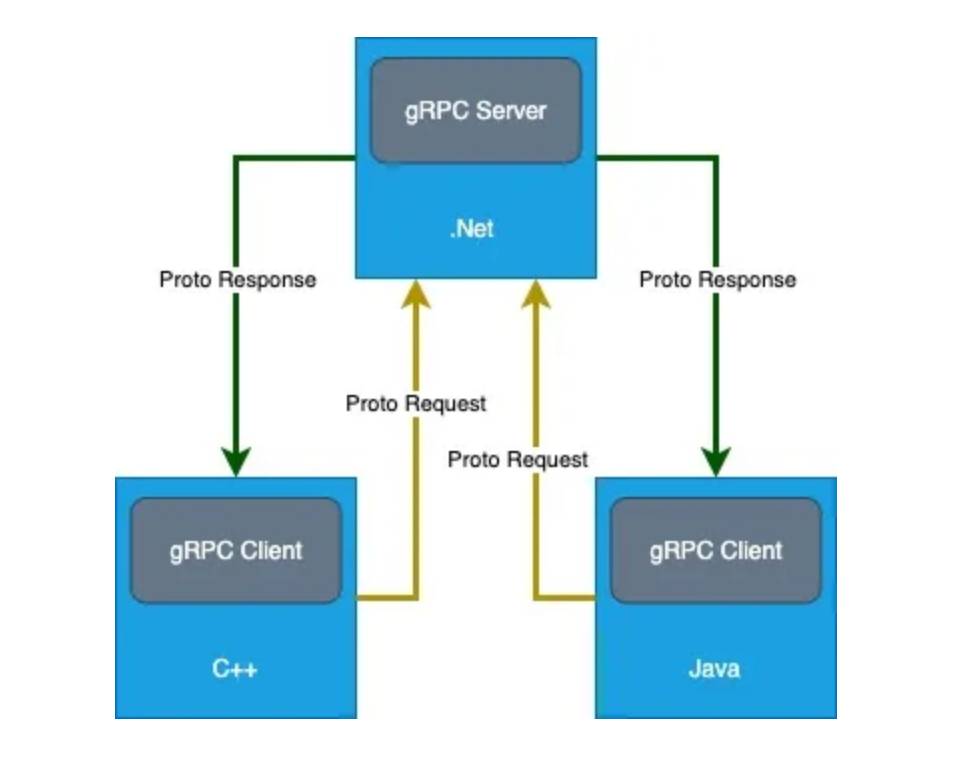
我们需要使用 Protobuf(Protocol Buffer)来定义消息和服务
gRPC 代码会自动生成,我们则需要提供具体的实现。
不管是在服务器端还是在客户端,.proto 文件都能支持 12 种不同的语言。
默认情况下,gRPC 会使用谷歌开源的 Protocol Buffers 机制来进行结构化数据的序列化:
它是语言中立的
能够为任何现代编程语言生成代码
数据传输是二进制和高效的
高度可扩展
允许我们发送大量的数据
允许我们扩展和演进 API
案例学习:
在如今的技术趋势下,比较现代的方式是构建微服务。在本例中,我们学习一下构建航空售票系统的过程:
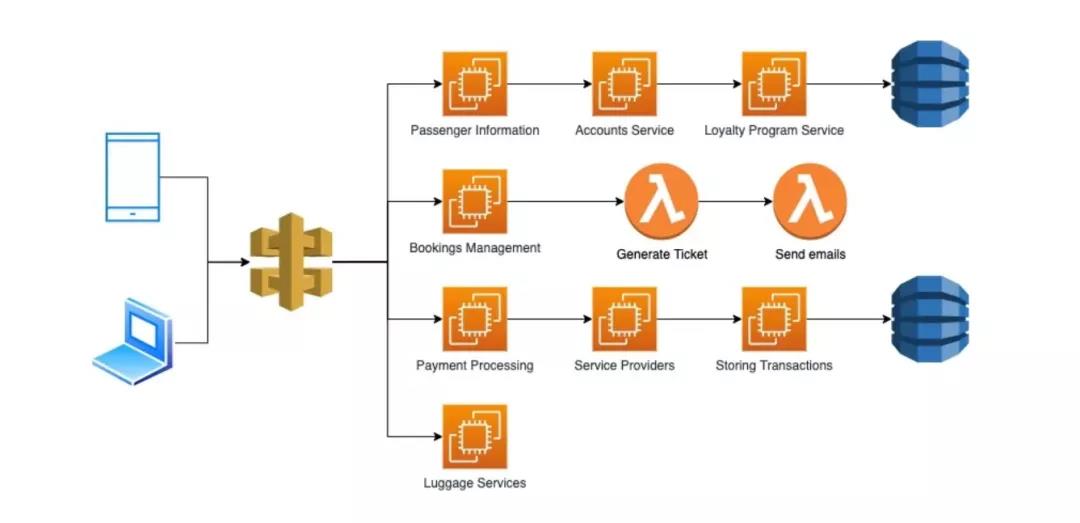
上图展现了一个基于微服务的航空售票系统。在这里,有几个与这种类型的架构相关的关键点,我们需要注意:
微服务通常是由不同的语言构建的。那么我们可以说,预订管理服务可以基于.NET 构建,支付处理可以是基于 Java 的,而乘客信息则是使用 Node.js 的。
每个服务都有不同的业务功能。
假设我们现在有使用不同语言编写的微服务,它们之间要互相进行交流。当这些微服务想要交换信息的时候,它们需要就一些事情达成共识,比如:
交换数据的 API
数据格式
错误格式
访问速度限制
REST 是最流行的构建 API 的方案。但是,这个决策取决于很多与我们的实现相关的架构考量:
设计数据模型的类型;
端点会是什么样子;
错误该如何进行处理;
一个客户端可以进行多少次调用;
授权是如何实现的。
考虑到这些因素,我们再来看一下 gRPC 和 REST 的差异:
gRPC
契约优先的 API 开发方式:契约(服务和消息)是在*.proto 文件中定义的,它们是 gRPC 的核心。这是以一种语言中立的方式来定义 API。这些文件随后可以被其他编程语言用来生成代码(如强类型的客户端和消息类)。
内容是二进制的:HTTP/2 和 Protobuf 是二进制的协议,内容是为计算机和高性能而设计的。
gRPC 的设计隐藏了远程操作的复杂性。通过使用 gRPC 库和相关的代码生成,我们不需要关心路由、头信息和序列化等问题。当需要在客户端调用一个方法时,我们只需要调用对应的方法就可以了。
gRPC 支持双向的异步流:某个 gRPC 调用建立流之后,客户端和服务器都能在任意时间向对方发送异步流。服务器流和客户端流(在这种情况下,只有响应或请求中的某一个是流)也是支持的。
gRPC 是为分布式应用的高性能和高生产率而设计的。
REST API
内容优先的 API 开发方式(URL、HTTP 方法、JSON):注重可读性和格式化。
内容是基于文本的(HTTP 1.1 和 JSON),所以是人类可读的。这样造成的结果就是,它们非常适合进行调试,但是对性能并不友好。
更加强调 HTTP。我们需要考虑低级别的一些问题,这是一件好事儿,因为我们对 HTTP 请求有很大的控制权。
面向 CRUD。
最广泛的受众:每台计算机都能使用 HTTP/1.1 和 JSON,易于上手。
基于这些对比,我们可以看到这两种方式各有其优点。但是,我们可以看到,gRPC 为基于微服务的场景提供了一组强大的特性。
使用 gRPC 创建一个服务器 - 客户端应用
在开始编码之前,我们在自己的计算机上安装以下软件:
软件安装完成之后,我们需要创建项目结构(在本文中,我们将在终端 / 命令行中直接使用 dotnet 命令):
dotnet new grpc -n GrpcService
我们还需要配置 SSL 信任:
dotnet dev-certs https --trust
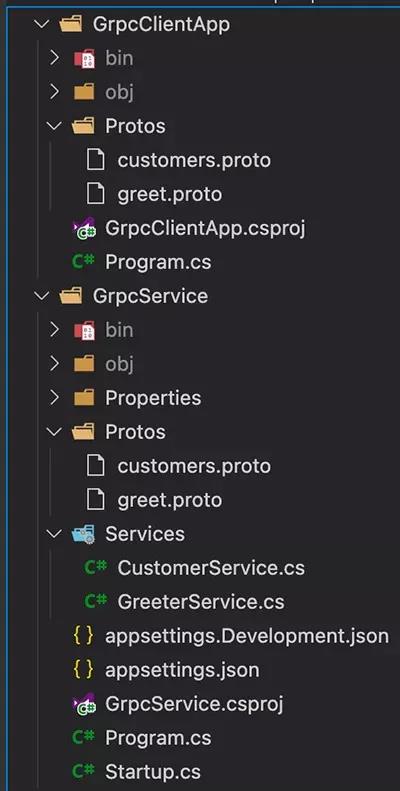
接下来,我们在 VS Code 打开这个新项目,看一下都创建了哪些内容。我们可以看到,我们自动有了如下的内容:
Protos 文件夹
Services 文件夹
在 Protos 文件夹中,我们有一个 greet.proto 文件。正如我们在前文中所提到的,.proto 能够以 语言中立的方式 来定义 API。
从这个文件中,我们可以看到,它包含一个 Greeter 服务和一个 SayHello 方法。我们可以将 Greeter 服务视为控制器,将 SayHello 方法视为一个动作。.proto 文件的内容如下所示:
// 声明我们可以使用的最新模式
syntax = "proto3";

// 为该 proto 定义命名空间,通常与我们的 Grpc 服务器相同
option csharp_namespace = "GrpcService";

package greet;

// 我们可以把一个服务看做一个类
service Greeter {
  // 发送问候语
  rpc SayHello (HelloRequest) returns (HelloReply);
}

// 请求消息类似于 C# 中的一个模型,其中会定义属性
// 这里的数字用来对属性进行排序
message HelloRequest {
  string name = 1;
}

// 响应消息包含了问候语
message HelloReply {
  string message = 1;
}
SayHello 方法接收一个 HelloRequest(这是一个消息)并返回一个 HelloReply(这也是一个消息)。
在 GreeterService 文件中,我们可以看到有一个 GreeterService 类,它继承自 Greeter.GreeterBase,后者是由.proto 文件自动生成的。
在 SayHello 方法中,我们会接收一个请求(HelloRequest)并返回一个响应(HelloReply)。它们也是由.proto 文件自动为我们生成的。
代码自动生成会基于.proto 文件定义为我们生成所需的文件。gRPC 在代码生成、路由和序列化方面为我们做了所有繁重的工作。我们所需要做的就是实现基类并覆盖方法的实现。
接下来,我们尝试运行 gRPC 服务:
dotnet run
从自动生成的端点的结果中可以看到,我们不能像使用 web 浏览器作为 REST 的客户端那样使用 gRPC。在这种情况下,我们需要创建一个 gRPC 客户端与服务进行通信。对于我们的客户端来讲,gRPC 也需要.proto 文件,因为它是一个 契约优先的 RPC 框架。目前,我们的 web 浏览器对客户端(我们并没有.proto 文件)一无所知,所以它不知道如何处理请求。
我们创建名为 customers.proto 的自定义.proto 文件。这个文件必须要在 Protos 文件夹中创建,它的内容如下所示:
syntax = "proto3";

option csharp_namespace = "GrpcService";

package customers;

service Customer {
    rpc GetCustomerInfo (CustomerFindModel) returns (CustomerDataModel);
}

message CustomerFindModel {
    int32 userId = 1; // bool, int32, float, double, string
}

message CustomerDataModel {
    string firstName = 1;
    string lastName = 2;
}
保存完上述文件之后,我们需要将它添加到.csproj 文件中:
<ItemGroup>
  <Protobuf Include="Protos\\customers.proto" GrpcServices="Server" />
</ItemGroup>
现在,我们需要构建应用:
dotnet build
下一步是添加我们的 CustomerService 类到 Services 文件夹中并更新其内容,如下所示:
public class CustomerService : Customer.CustomerBase
{
    private readonly ILogger<CustomerService> _logger;
    public CustomerService(ILogger<CustomerService> logger)
    {
        _logger = logger;
    }

    public override Task<CustomerDataModel> GetCustomerInfo(CustomerFindModel request, ServerCallContext context)
    {
       CustomerDataModel result = new CustomerDataModel();

       // 这是一个用于演示的代码
       // 在实际的场景中,这些信息应该从数据库中获取
       // 应用中的数据不应该被硬编码
       if(request.UserId == 1) {
           result.FirstName = "Mohamad";
           result.LastName = "Lawand";
       } else if(request.UserId == 2) {
           result.FirstName = "Richard";
           result.LastName = "Feynman";
       } else if(request.UserId == 3) {
           result.FirstName = "Bruce";
           result.LastName = "Wayne";
       } else {
           result.FirstName = "James";
           result.LastName = "Bond";
       }

        return Task.FromResult(result);
    }
}
现在,我们需要更新 Startup.cs 类,以通知我们的应用程序,我们新创建的服务有了一个新的端点。为了实现这一点,在 Configure 方法(位于 app.UserEndpoints 中)里面,我们需要添加如下的代码:
endpoints.MapGrpcService<CustomerService>();
MacOS 下的注意事项:
因为 MacOS 不支持 TLS 之上的 HTTP/2,所以我们需要采用如下的方案来更新 Program.cs 文件:
webBuilder.ConfigureKestrel(options =>
{
    // 设置无需 TLS 的 HTTP/2 端点
    options.ListenLocalhost(5000, o => o.Protocols =
        HttpProtocols.Http2);
});
下一步就是创建我们的客户端应用:
dotnet new console -o GrpcGreeterClient
现在,我们需要添加必要的包到客户端控制台应用中,使其能够识别 gRPC。这可以通过在 GrpcGreeterClient 类中实现:
dotnet add package Grpc.Net.Client
dotnet add package Google.Protobuf
dotnet add package Grpc.Tools
因为我们需要客户端具有和服务器端相同的契约,所以需要将前面步骤中创建的.proto 文件添加到客户端应用中。为了实现这一点:
首先,我们需要添加一个名为 Protos 的文件夹到客户端项目中。
我们需要复制 gRPC greeter 服务中 Protos 文件夹里的内容到 gRPC 客户端项目,即
greet.proto
customers.proto
- 在粘贴完文件之后,我们需要更新命名空间,使其与客户端应用相同:
option csharp_namespace = "GrpcGreeterClient"; 4. 我们需要更新 GrpcGreeterClient.csproj 文件,以便让它知道我们新增加的.proto 文件:
<ItemGroup>
    <Protobuf Include="Protos\\greet.proto" GrpcServices="Client" />
</ItemGroup>
<ItemGroup>
  <Protobuf Include="Protos\\customers.proto" GrpcServices="Client" />
</ItemGroup>
这个 Protobuf 元素是代码自动生成特性了解.proto 文件的方式。通过上面的改动,我们在这里表明,希望客户端使用我们新添加的.proto 文件。
我们需要构建客户端并确保所有内容都能构建成功:
dotnet run
现在,我们添加一些代码到控制台应用中,以便于调用服务器端。在 Program.cs 文件中,我们需要做如下的改动:
// 我们创建一个通道,它代表了客户端到服务器的连接
// 我们在这里添加的 URL 是由服务器的 Kestrel 所提供的
var channel = GrcpChannel.ForAddress("<https://localhost:5001>");

// 这个强类型的客户端是当我们添加.proto 文件时,由代码生成功能所创建的
var client = new Greeter.GreeterClient(channel);

var response = await client.SayHelloAsync(new HelloRequest
{
    Name = "Mohamad"
});

Console.WriteLine("From Server: "  + response.Message);

var customerClient = new Customer.CustomerClient(channel);

var result = await customerClient.GetCustomerInfoAsync(new CustomerFindModel()
{
    UserId = 1
});

Console.WriteLine($"First Name: {result.FirstName} - Last Name: {result.LastName}");
现在,我们为应用添加流处理的功能。
我们回到 customers.proto 文件并在 Customer 服务中添加一个流方法:
// 我们要返回一个消费者的列表
// 但是在 gRPC 中我们不能返回列表,而是需要返回一个流
rpc GetAllCustomers (AllCustomerModel) returns (stream CustomerDataModel);
正如我们所看到的,在返回中,我们添加了 stream 关键字,这意味着我们正在添加由“多个”回复所组成的 stream。
同时,我们还需要添加一个空消息
// 在 gRPC 中,我们不能定义具有空参数的方法
// 所以,我们定义一个空消息
message AllCustomerModel {

}
要实现这个方法,我们需要到 Services 文件夹下并添加如下的代码到 CustomerService 类中:
public override async Task GetAllCustomers(AllCustomerModel request, IServerStreamWriter<CustomerDataModel> responseStream, ServerCallContext context)
{
    var allCustomers = new List<CustomerDataModel>();

    var c1 = new CustomerDataModel();
    c1.Name = "Mohamad Lawand";
    c1.Email = "mohamad@mail.com";
    allCustomers.Add(c1);

    var c2 = new CustomerDataModel();
    c2.Name = "Richard Feynman";
    c2.Email = "richard@physics.com";
    allCustomers.Add(c2);

    var c3 = new CustomerDataModel();
    c3.Name = "Bruce Wayne";
    c3.Email = "bruce@gotham.com";
    allCustomers.Add(c3);

    var c4 = new CustomerDataModel();
    c4.Name = "James Bond";
    c4.Email = "007@outlook.com";
    allCustomers.Add(c4);

    foreach(var item in allCustomers)
    {
        await responseStream.WriteAsync(item);
    }
}
现在,我们需要复制服务器端 customers.proto 文件的变化到客户端的 customers.proto 文件中:
service Customer {
    rpc GetCustomerInfo (CustomerFindModel) returns (CustomerDataModel);

    // 我们要返回一个消费者的列表
    // 但是在 gRPC 中我们不能返回列表,而是需要返回一个流
    rpc GetAllCustomers (AllCustomerModel) returns (stream CustomerDataModel);
}

// 在 gRPC 中,我们不能定义具有空参数的方法
// 所以,我们定义一个空消息
message AllCustomerModel {

}
现在,我们需要再次构建应用:
dotnet build
我们下一步需要更新 GrpcClientApp 中的 Program.cs 文件以处理新的流方法:
var customerCall = customerClient.GetAllCustomers(new AllCustomerModel());

await foreach(var customer in customerCall.ResponseStream.ReadAllAsync())
{
    Console.WriteLine($"{customer.Name} {customer.Email}");
}
现在,我们回到 GrpcGreeter 并更新 greet.proto 文件,为其添加流方法:
rpc SayHelloStream(HelloRequest) returns (stream HelloReply);
可以看到,在返回中我们添加了关键字 stream,这意味着我们正在添加由“多个”回复所组成的 stream。要实现这个方法,我们需要到 Services 文件夹下,并在 GreeterService 中添加如下的内容:
public override async Task SayHelloStream(HelloRequest request, IServerStreamWriter<HelloReply> responseStream, ServerCallContext context)
{
  for (int i = 0; i < 10; i ++)
  {
    await responseStream.WriteAsync(new HelloReply
    {
      Message = "Hello " + request.Name + " " + i
    });

    await Task.Delay(TimeSpan.FromSeconds(1));
  }
}
现在,我们需要将 greet.proto 文件的变更从服务器端复制到客户端,并对其进行构建。在客户端应用的 greet.proto 文件中,我们添加如下这行代码:
rpc SayHelloStream(HelloRequest) returns (stream HelloReply);
确保在保存.proto 文件后,对应用进行构建。
dotnet build
现在,我们可以打开 Program.cs 并使用新的方法:
var call = client.SayHelloStream(new HelloRequest
{
    Name = "Mohamad"
});

await foreach(var item in call.ResponseStream.ReadAllAsync())
{
    Console.WriteLine("Result " + item.Message);
}
该样例阐述了我们如何在.NET 5 中实现 gRPC 的客户端 - 服务器应用。
总 结
我们可以看到 gRPC 在构建应用程序中的力量,但要发挥这种力量并不容易,因为构建 gRPC 服务需要更多的搭建时间以及客户端与服务器之间的协调。而使用 REST 的时候,我们几乎不需要任何搭建过程就可以直接开始消费端点。
gRPC 不一定会取代 REST,因为这两种技术都有其特定的应用场景。请基于你的业务场景和需求,为自己的项目选择合适的技术。
作者简介:
Mohamad Lawand 是一位坚定的、具有前瞻性的技术架构师,拥有 13 年以上的工作经验,工作范围涉及从金融机构到政府实体等众多行业。他积极主动,适应性强,擅长跨多平台的 SaaS 和区块链技术。Mohamad 还拥有一个 Youtube 频道,他会在那里分享自己的知识。
原文链接: