
Preface
It's been a long time since I last wrote a blog post, so let me make up for it today. Occasionally, I find myself less willing to write blog posts—they take too much time. Still, I persist, because perhaps what I write can help some folks. Let's jump straight into the topic. Whether in EF 6.x or EF Core, the APIs for raw queries are quite limited. For example, if we only want to query a single value, they don't support it. If we only want certain columns, they don't support it either. There are too many unsupported scenarios. The only thing supported is returning all columns in a table, i.e., all fields in a class. So most of the time, I write native SQL and rarely use raw queries. Recently, a colleague who is passionate about EF asked how to implement dynamic queries using SqlQuery. I didn't have an answer—I never thought about using this method. After looking into it privately, I’ll offer some thoughts. It’s great if this helps you; if not, consider it just another blog post from me.
Implementing Dynamic Queries in EF 6.x and EF Core
public static IEnumerable<dynamic> SqlQueryDynamic(this DbContext db, string Sql, params SqlParameter[] parameters)
{
    using (var cmd = db.Database.Connection.CreateCommand())
    {
        cmd.CommandText = Sql;

        if (cmd.Connection.State != ConnectionState.Open)
        {
            cmd.Connection.Open();
        }

        foreach (var p in parameters)
        {
            var dbParameter = cmd.CreateParameter();
            dbParameter.DbType = p.DbType;
            dbParameter.ParameterName = p.ParameterName;
            dbParameter.Value = p.Value;
            cmd.Parameters.Add(dbParameter);
        }

        using (var dataReader = cmd.ExecuteReader())
        {
            while (dataReader.Read())
            {
                var row = new ExpandoObject() as IDictionary<string, object>;
                for (var fieldCount = 0; fieldCount < dataReader.FieldCount; fieldCount++)
                {
                    row.Add(dataReader.GetName(fieldCount), dataReader[fieldCount]);
                }
                yield return row;
            }
        }
    }
}
After the above query returns a dynamic collection, how do we convert it to a collection of objects? Without hesitation, I directly serialize and then deserialize it. If you have a better solution, feel free to implement it yourself.
using (var ctx = new EfDbContext())
{
    ctx.Database.Log = Console.WriteLine;

    var dynamicOrders = ctx.SqlQueryDynamic("select * from dbo.Orders");
    var ordersJson = JsonConvert.SerializeObject(dynamicOrders);
    var orders = JsonConvert.DeserializeObject<List<Order>>(ordersJson);
};
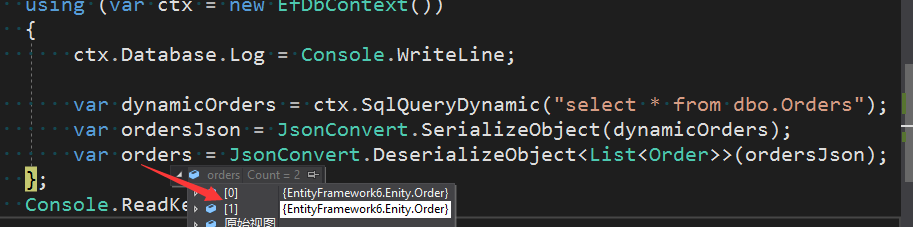
Of course, the above is just a simple query on one table. If you have multiple tables, it still works—just deserialize into different objects accordingly. Not tested, you can test it yourself.
Using Multiple DbContext Instance Pools in EF Core
Many people, whether in EF 6.x or EF Core, have always used a single DbContext. But have we ever thought about using multiple DbContexts? For example, in an e-commerce project, you could use a ProductDbContext for product-related operations, a CartDbContext for adding to cart, and an OrderDbContext for order operations. What's the benefit? You can split database tables—i.e., entities—into different business domains. I haven't seen many people do this, but if it were me, I would at least do it.
//Add DbContext
var dbConnetionString = Configuration.GetConnectionString("DbConnection");
services.AddDbContextPool<ShopCartDbContext>(options =>
{
    options.UseSqlServer(dbConnetionString);
}).AddDbContextPool<BookDbContext>(options =>
{
    options.UseSqlServer(dbConnetionString);
}).AddDbContextPool<OrderDbContext>(options =>
{
    options.UseSqlServer(dbConnetionString);
});
In EF Core 2.0, the DbContext pooling feature was introduced, similar to connection pooling in ADO.NET. But if you take this at face value, you'd be completely mistaken. The essence of DbContext pooling (I started writing a book on EF 6.x and EF Core last year, which will be published soon) is not the same as ADO.NET connection pooling. So, does using multiple DbContext pools as above actually work? Sorry, this configuration is wrong. Running the program will throw an exception like the following:
Exception message:
System.ArgumentException: Expression of type 'Microsoft.EntityFrameworkCore.DbContextOptions`1[MultiContext.Contexts.BContext]' cannot be used for constructor parameter of type 'Microsoft.EntityFrameworkCore.DbContextOptions`1[MultiContext.Contexts.AContext]' Parameter name: arguments[0]
Stack trace:
...........
When this feature came out, everyone cheered that it could improve performance. Sorry, although DbContext pooling may improve performance to some extent, I can only say it's a possible performance improvement. If you know or have read about how EF Core implements DbContext pooling, you'll understand the essence and suddenly realize what I mean by "possible performance improvement." As for why you cannot register multiple DbContext pools, I encountered this issue while working on a private project. For details, please refer to GitHub:
https://github.com/aspnet/EntityFrameworkCore/issues/9433
Summary
Alright, that's it for today. I didn't go into too much explanation or narrative—just straight to the point. Lately, my mind has been wandering, and I'm gradually losing interest in blogging. Occasionally, I get emotional. When I'm fully recharged and in a better mood, I'll come back to share more technology with you. I'm still here. Not writing blog posts for a while might be because I'm tired, or because I'm learning IdentityServer or other technologies on the side. In this field, unless you change careers, you just have to steadily accumulate experience and learn more skills. If you don't strive when you're young, when will you? Today I've been rambling, feeling a bit scattered—don't mind me.
What you see is not the thing itself, but the meaning interpreted and bestowed upon it.