

讲故事
前几天有点空闲时间,在 github 上看一些.Net 的开源库,看到了关于爬虫相关的库,于是加入了一个 QQ 群,看到里面各位大佬讨论的是爬的越好,进去越快,于是我自己也想做一个爬虫相关的东西,但是爬虫是个危险的东西,自己也不敢随便爬别人的网页,于是找到了一个朋友,拿他的网站来进行练习!

练习
对于.Net 来说,爬虫相关的库还是蛮多的,于是我选择了HtmlAgilityPack来做一个爬虫练习!
当然什么是爬虫呢?
简而言之:
爬虫的基本流程是:下载数据(发送 HTTP 请求并获得返回的 resonse) -> 解析返回的文本(可以是 text、json、html) -> 存储解析到的数据
学习一个框架,我们肯定是从它的官方文档开始, 地址:https://html-agility-pack.net/
Html 解析器
- From File(从文件加载 HTML 文档)
- From String (从指定的字符串加载 HTML 文档)
- From Web (从 Internet 资源中获取 HTML 文档)
- From Browser(从 WebBrowser 获取 HTML 文档)
于是我选择了 From Web 来解析我们的 html 文档,代码如下:
var html = @"https://dotnet9.com/";
HtmlWeb web = new HtmlWeb();
var htmlDoc = web.Load(html);
既然 Html 文档被我们获取到了,我们肯定就要对 Html 内容进行一个解析了。
Html 选择器
- SelectNodes()(选择与 XPath 表达式匹配的节点列表)
- SelectSingleNode(String)(选择与 XPath 表达式匹配的第一个 XmlNode)
打开网站,找到我们想要爬取的网站,今天我们就来爬该网站的特色专辑下的所有文章。

打开调试模式,我们可以看到特色专辑是一个a标签,我们再来查看该标签的上一级元素是li,li上一级元素是ul,那我们就可以来获取该节点
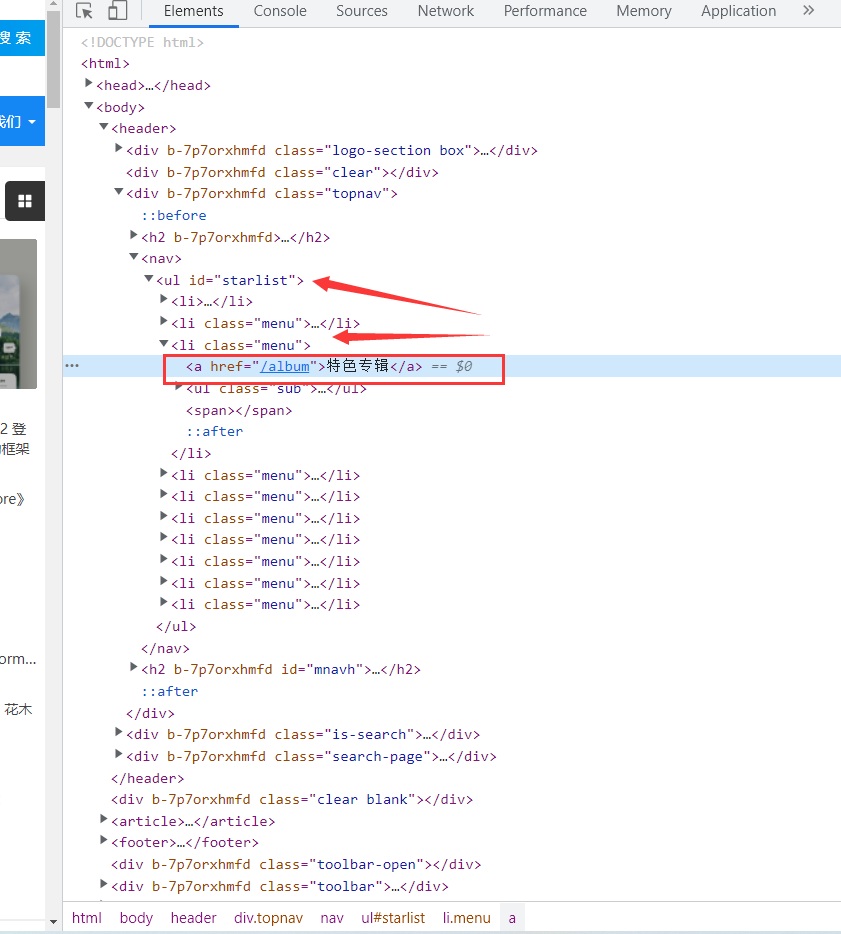
var allNodes = htmlDoc.DocumentNode.SelectNodes("//ul[@id='starlist']//li[@class='menu']");
当然我们也可以使用Xpath来获取节点内容
var singNodes = htmlDoc.DocumentNode.SelectSingleNode("/html[1]/body[1]/header[1]/div[3]/nav[1]/ul[1]/li[3]//ul[1]")
然后我们再来获取该特色专辑下的子菜单的的网址,经发现,a标签的href 属性规定链接的目标地址,那我们第一步肯定是要获取该子菜单下的所有链接!
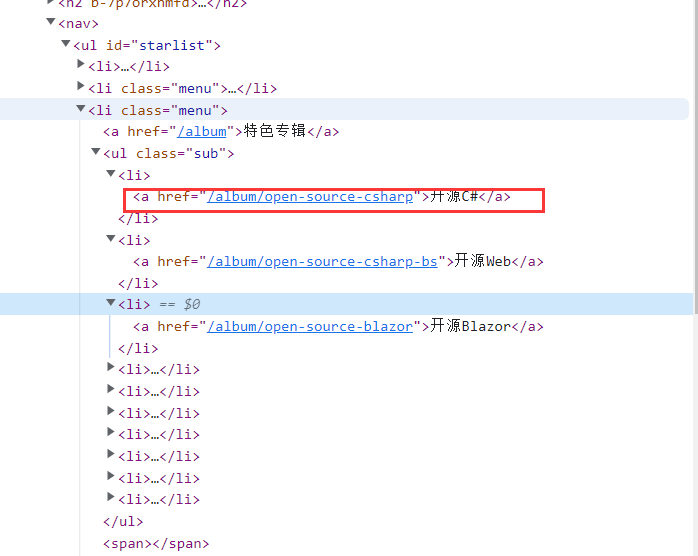
var singNodes = htmlDoc.DocumentNode.SelectSingleNode("/html[1]/body[1]/header[1]/div[3]/nav[1]/ul[1]/li[3]//ul[1]")
    .ChildNodes.Where(o => o.Name=="li");

List<string> lstUrl = new List<string>();
foreach (var item in singNodes)
{
    var aNodes = item.ChildNodes.Where(o => o.Name == "a").First();
    string url = aNodes.Attributes["href"].Value;
    lstUrl.Add(url);
}
随意打开一个子菜单,可以看到相关的文章标题描述以及图片等!这就是我们想要的内容了!分析方法还是和刚才一样!代码如下:

foreach (var item in lstUrl)
{
    htmlDoc = web.Load("https://dotnet9.com"+item);
    var resultNodes = htmlDoc.DocumentNode.SelectSingleNode("//div[@class='pics-list-box whitebg']//ul")
        .ChildNodes.Where(o=>o.Name=="li");
    foreach (var itemResultNodes in resultNodes)
    {
        WebData webData = new WebData();
        var aNodes = itemResultNodes.ChildNodes.Where(o => o.Name == "a").First();
        webData.Url= aNodes.Attributes["href"].Value;
        webData.Title = aNodes.ChildNodes["h2"].InnerText;
        webData.Desc = aNodes.ChildNodes["p"].InnerText;
        webData.Img = aNodes.ChildNodes["i"].ChildNodes["img"].Attributes["src"].Value;
        Console.WriteLine($"标题:{webData.Title}-描述:{webData.Desc}-Img:{webData.Img}-{webData.Url}\r\n");
    }
}
这样我们就能够获取到我们想要的东西了!运行一下代码,我们的第一个爬虫就成功了。

总结
即兴发挥写了第一个爬虫,大家要是有更好的方案,欢迎交流,独乐乐不如众乐乐,本篇就说到这里啦,希望对您有帮助。
最后声明一下: 总的来说,技术本无罪,但是你利用技术爬取别人隐私、商业数据,那你就是蔑视法律了,请各位守好各自的底线!