
Hello everyone, I am Wolf at the End of the Desert.
This article first raises the following questions. Please find the answers in the article and feel free to respond in the comments:
- What is API interception?
- A method is called from many places. How can you record the time before and after the method call without modifying the method's source code?
- Same as 2, without modifying the source code, how can you correct (tamper with) the method's parameters?
- Same as 3, without modifying the source code, how can you forge the method's return value? ...
1. Introduction
The introduction is translated from a foreign article that is easier to understand - Hacking .NET – rewriting code you don’t control:
Have you ever encountered a class library method that doesn't belong to you but you want to change its behavior? Usually, the method is non-public and there is no good way to override its behavior. You can see how it works (because you're awesome and use decompilation tools like Resharper, dnSpy, right?), you just can't change it. You really need to change it for XXX reason.
Several options are available to you:
Obtain the source code by decompiling or downloading it if available. This is often risky because it usually comes with a complex build process, many dependencies, and now you are responsible for maintaining the entire branch of the library, even if you only want to make a small change.
Decompile the application using
ILDasm, directly patch theILcode, and then useILAsto assemble it back. In many ways, this is better because you can make a strategic surgical incision rather than a full "from scratch" approach. The downside is that you have to implement your method entirely in IL, which is a non-trivial adventure.
If you are dealing with signed libraries, the above two methods also do not work.
Now let's look at another workaround - memory patching. This is the same technique used by game cheat engines for decades, which attach to a running process, find memory locations, and alter their behavior. Sounds complicated? In fact, doing this in .NET is much easier than it sounds. We will use a library called Harmony, available on NuGet as the "Lib.Harmony" package. This is a memory patching engine for .NET, mainly targeting games built with Unity, but not limited to Unity.
In this article, the site owner will show you how to change what you thought was impossible - from intercepting (hooking) your own library to intercepting (hooking) WPF libraries and .NET base libraries.
2. Intercepting (Hooking) Your Own Library
2.1. Preparation
- Create a console program
HelloHookand add a classStudent:
namespace HelloHook;

public class Student
{
    public string GetDetails(string name)
    {
        return $"Hello everyone, I am the site owner of Wolf at the End of the Desert: {name}";
    }
}
The Student class defines a GetDetails method that returns formatted personal introduction information. This method will be used later for interception experiments.
- Add the
Studentcall inProgram.cs:
using HelloHook;

var student = new Student();
Console.WriteLine(student.GetDetails("Wolf at the End of the Desert"));
Running the program outputs:
Hello everyone, I am the site owner of Wolf at the End of the Desert: Wolf at the End of the Desert
Basic preparation is complete; this is a simple console program. The following content will be expanded based on these two projects.
2.2. Intercepting the GetDetails Method
- Introduce the interception package - Lib.Harmony
We use the Lib.Harmony package; API interception relies on it. Add the following NuGet package to the HelloHook project:
<PackageReference Include="Lib.Harmony" Version="2.2.2" />
- Interception handling
Add the interception class HookStudent:
using HarmonyLib;

namespace HelloHook;

[HarmonyPatch(typeof(Student))]
[HarmonyPatch(nameof(Student.GetDetails))]
public class HookStudent
{
    public static bool Prefix()
    {
        Console.WriteLine($"Prefix");
        return true;
    }

    public static void Postfix()
    {
        Console.WriteLine($"Postfix");
    }

    public static void Finalizer()
    {
        Console.WriteLine($"Finalizer");
    }
}
Looking at the comments in the code, the HookStudent class has two HarmonyPatch attributes:
- The first associates the intercepted class
Studenttype; - The second associates the intercepted class method
GetDetails;
That is, when the GetDetails method of the Student class is called in the program, the methods defined in HookStudent will be executed respectively. The execution order of the three methods is Prefix -> Postfix -> Finalizer. Of course, there are more than these three convention methods; actually, we commonly use Prefix and Postfix. The meaning of the convention methods is explained later. If not, see Harmony wiki...
2.3. Registering the Interception
Modify Program.cs to add Harmony interception for the entire assembly:
using HarmonyLib;
using HelloHook;
using System.Reflection;

var student = new Student();
Console.WriteLine(student.GetDetails("Wolf at the End of the Desert"));

var harmony = new Harmony("https://dotnet9.com");
harmony.PatchAll(Assembly.GetExecutingAssembly());

Console.WriteLine(student.GetDetails("Wolf at the End of the Desert"));

Console.ReadLine();
Running the program outputs:
Hello everyone, I am the site owner of Wolf at the End of the Desert: Wolf at the End of the Desert
Prefix
Postfix
Finalizer
Hello everyone, I am the site owner of Wolf at the End of the Desert: Wolf at the End of the Desert
The above code completes interception handling for a custom class. Using PatchAll automatically discovers the patch class HookStudent, thus automatically intercepting calls to the GetDetails method of the Student class. You can see that when student.GetDetails("Wolf at the End of the Desert") is called the second time, all three lifecycle methods of Harmony are invoked.
We can do some logging (Console.WriteLine\ILogger.LogInfo, etc.) in the interception class's convention methods (Prefix and Postfix, etc.), similar to AOP interception in B/S applications; operation logs are just right to record here.
That's it? What are you saying? This is just the beginning.
2.4. What About the Promised Parameter Tampering? And API Result Forgery?
Modify Program.cs to print a few more lines for distinction:
using HarmonyLib;
using HelloHook;
using System.Reflection;

var student = new Student();
Console.WriteLine(student.GetDetails("Wolf at the End of the Desert"));

var harmony = new Harmony("https://dotnet9.com");
harmony.PatchAll(Assembly.GetExecutingAssembly());

Console.WriteLine(student.GetDetails("Desert Fox"));
Console.WriteLine(student.GetDetails("Dotnet"));

Console.ReadLine();
Before registering Harmony, print once; after registration, print twice. Note the difference in parameters.
Modify HookStudent, we only use the Prefix method. Other methods like Postfix are similar; see Harmony wiki for more usage. The modification is as follows:
using HarmonyLib;

namespace HelloHook;

[HarmonyPatch(typeof(Student))]
[HarmonyPatch(nameof(Student.GetDetails))]
public class HookStudent
{
    public static bool Prefix(ref string name, ref string __result)
    {
        if ("Desert Fox".Equals(name))
        {
            __result = $"This is my former online alias";
            return false;
        }

        if (!"Wolf at the End of the Desert".Equals(name))
        {
            name = "Non-site owner name";
        }

        return true;
    }
}
First, run to see the output:
Hello everyone, I am the site owner of Wolf at the End of the Desert: Wolf at the End of the Desert
This is my former online alias
Hello everyone, I am the site owner of Wolf at the End of the Desert: Non-site owner name
- Line 1: "Hello everyone, I am the site owner of Wolf at the End of the Desert: Wolf at the End of the Desert" - this is the normal formatted output without registration interception;
- Line 2: "This is my former online alias" - here the result is forged;
- Line 3: "Hello everyone, I am the site owner of Wolf at the End of the Desert: Non-site owner name" - here the parameter is tampered.
Result Forgery
Note the parameter ref string __result in the Prefix method: ref indicates pass by reference, allowing modification of the result; string must match the return type of the original method; __result is the convention name for the return value, with two underscores at the front - the naming must be __result.
if ("Desert Fox".Equals(name))
{
    __result = $"This is my former online alias";
    return false;
}
Note the return value is false, indicating that the original method should not be called. Here the return value of the intercepted method is successfully forged.
Parameter Tampering
Look at the passed-in parameter ref string name: ref indicates the parameter is passed by reference, allowing modification; string name must match the original method's parameter definition.
if (!"Wolf at the End of the Desert".Equals(name))
{
    name = "Non-site owner name";
}
The Prefix method returns true by default, indicating that the original method should be called. Here, the tampered parameter will be passed to the original method, and the original method's execution result will combine the tampered parameter to return "Hello everyone, I am the site owner of Wolf at the End of the Desert: Non-site owner name".
Note:
The original parameter name and the return value __result are optional; if no tampering is needed, you can remove ref.
The above example source code here.
3. Intercepting (Hooking) WPF's API
We create a simple WPF program HookWpf to intercept the MessageBox.Show method:
public static MessageBoxResult Show(string messageBoxText, string caption)
First, use automatic interception registration in App:
public partial class App : Application
{
    protected override void OnStartup(StartupEventArgs e)
    {

        base.OnStartup(e);

        var harmony = new Harmony("https://dotnet9.com");
        harmony.PatchAll(Assembly.GetExecutingAssembly());
    }
}
Define the interception class HookMessageBox:
using HarmonyLib;
using System.Windows;

namespace HookWpf;

[HarmonyPatch(typeof(MessageBox))]
[HarmonyPatch(nameof(MessageBox.Show))]
[HarmonyPatch(new [] { typeof(string), typeof(string) })]
public class HookMessageBox
{
    public static bool Prefix(ref string messageBoxText, string caption)
    {
        if (messageBoxText.Contains("garbage"))
        {
            messageBoxText = "This is a nice website";
        }

        return true;
    }
}
The class HookMessageBox is associated with the intercepted MessageBox.Show overload. In Prefix, the prompt box content is validated for legality; if illegal, it is corrected.
Finally, add two buttons to the window MainWindow.xaml to display prompt boxes:
<Window x:Class="HookWpf.MainWindow"
        xmlns="http://schemas.microsoft.com/winfx/2006/xaml/presentation"
        xmlns:d="http://schemas.microsoft.com/expression/blend/2008"
        xmlns:x="http://schemas.microsoft.com/winfx/2006/xaml"
        xmlns:mc="http://schemas.openxmlformats.org/markup-compatibility/2006"
        mc:Ignorable="d"
        Title="MainWindow" Height="450" Width="800">
    <StackPanel>
        <Button Content="Show default prompt" Width="120" Height="30" Click="ShowDialog_OnClick"></Button>
        <Button Content="This is a garbage website" Width="120" Height="30" Click="ShowBadMessageDialog_OnClick"></Button>
    </StackPanel>
</Window>
Handle button click events in the code-behind to display prompt boxes:
using System.Windows;

namespace HookWpf;

public partial class MainWindow : Window
{
    public MainWindow()
    {
        InitializeComponent();
    }

    private void ShowDialog_OnClick(object sender, RoutedEventArgs e)
    {
        MessageBox.Show("https://dotnet9.com is a programmer website keen on technical sharing", "Dotnet9");
    }

    private void ShowBadMessageDialog_OnClick(object sender, RoutedEventArgs e)
    {
        MessageBox.Show("This is a garbage website", "https://dotnet9.com");
    }
}
The result is as follows:
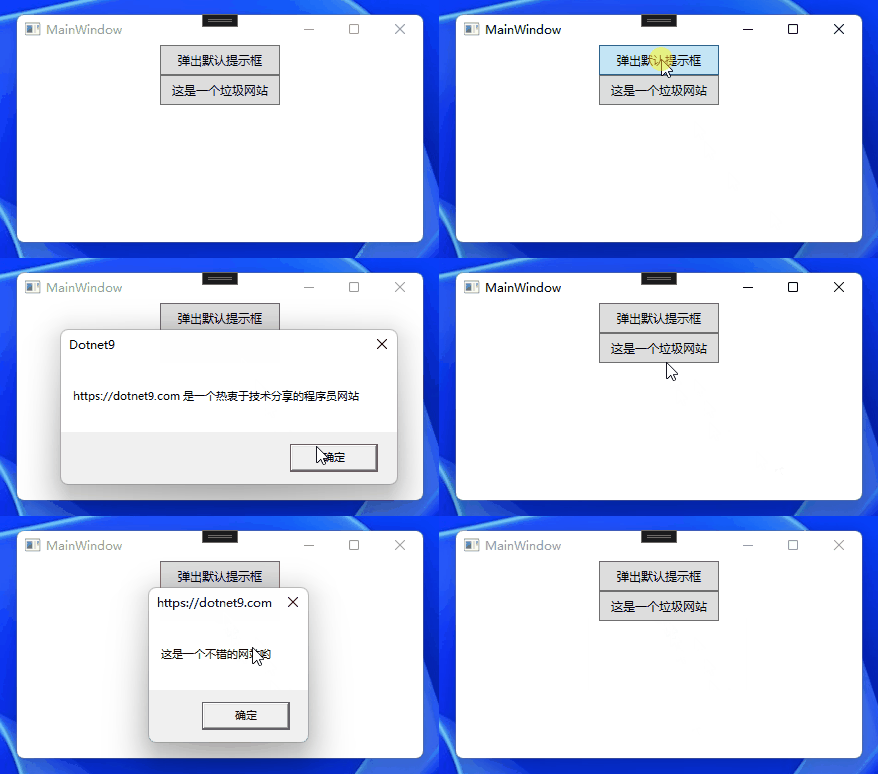
The above effect accomplishes validation of the prompt box content; if the content contains the keyword "garbage", it is replaced with nice words ("This is a nice website").
The example source code here.
4. Intercepting (Hooking) .NET Default API
Create a console program HookDotnetAPI, introduce the Lib.Harmony NuGet package, and modify Program.cs as follows:
using HarmonyLib;

var dotnet9Domain = "https://dotnet9.com";
Console.WriteLine($"Position of 9: {dotnet9Domain.IndexOf('9',0)}");

var harmony = new Harmony("com.dotnet9");
harmony.PatchAll();

Console.WriteLine($"Position of 9: {dotnet9Domain.IndexOf('9', 0)}");

[HarmonyPatch(typeof(String))]
[HarmonyPatch(nameof(string.IndexOf))]
[HarmonyPatch(new Type[] { typeof(char), typeof(int) })]
public static class HookClass
{
    public static bool Prefix(ref int __result)
    {
        __result = 100;
        return false;
    }
}
The usage is similar to the previous ones. The string.IndexOf method is intercepted and always returns 100, regardless of the character's position. Of course, this test code is meaningless; it's just a demonstration. The result is as follows:
Position of 9: 14
Position of 9: 100
5. Summary and Sharing
5.1. Summary
Harmony's principle is to use reflection to obtain methods in the corresponding class, then add attribute annotations for logic control, achieving updates without destroying the original code.
Harmony is a library for patching, replacing, and decorating .NET/.NET Core methods at runtime. However, this technique can be used with any .NET version. Multiple changes to the same method are cumulative rather than overriding.
Let's analyze possible scenarios that require interception to deepen your memory of this article:
- Some .NET methods may not be directly modifiable at the code level;
- Third-party libraries do not provide source code, but we want to modify some of their methods;
- Third-party libraries provide source code. Although we can modify their source code, if the third-party library later iterates and upgrades and we have to update, our modifications might become troublesome to keep up with;
Interception Note: As you can see, this provides a lot of new possibilities. Remember, with great power comes great responsibility. Since you are overriding behavior in ways not intended by the original developer, there is no guarantee that your patch code will work when they release a new version of the code. That is the third point above; the third-party library's API structure may change during upgrades, and we must adjust the interception logic accordingly.
Translated from Harmony wiki patching the following usage notes:
- The latest 2.0 version supports .NET Core;
- Harmony supports manual (Patch, see Harmony wiki for usage) and automatic (PatchAll, as demonstrated in this article; Lib.Harmony uses C# attribute mechanism);
- It creates a DynamicMethod for each original method and weaves code into it, which calls custom methods at the beginning (Prefix) and end (Postfix). It also allows you to write filters (Transpiler) to handle the original IL code, enabling more detailed operations on the original method;
- Getter/Setter, virtual/non-virtual methods, static methods;
- Patch methods must be static;
- Prefix needs to return void or bool (void means no interception);
- Postfix needs to return void, or the return type must match the first parameter (passthrough mode);
- If the original method is not static, you can use a parameter named
__instance(two underscores) to access the object instance; - You can use a parameter named
__result(two underscores) to access the method's return value. For Prefix, you get the default value of the return type; - You can use a parameter named
__state(two underscores) to store a value of any type in the Prefix patch and then use it in Postfix. You are responsible for initializing its value in Prefix; - You can use parameters with the same names as in the original method to access the corresponding parameters. If you want to write to a non-reference type, remember to use the
refkeyword; - Parameters used by the patch must strictly match the type (or use object type) and name;
- Our patch only needs to define the parameters we need; we don't have to write all parameters;
- To allow patch reuse, you can inject the original method using a parameter named
__originalMethod(two underscores).
Finally, I forgot to add one more point. There are still some issues with using Harmony in .NET 7. The site owner spent 2 or 3 nights testing WPF API and .NET base library interception demos, which never took effect. Thinking it was a usage problem, I finally saw the Harmony issue .NET 7 Runtime Skipping Patches #504, and downgrading the program to .NET 6 solved it.
5.2 Sharing
Readers, I believe many of you have used Harmony or other .NET Hook libraries. Feel free to share in the comments, ask questions, or share your experience:
- I have used this library for API hooking, it is XXX;
- I have implemented similar functionality myself, sharing the article link XXX;
- I want to ask, can I intercept this API? The scenario is XXXX
[My sharing] + [Your sharing] ∈ [A small power of the .NET circle]
6. References
The following articles were referenced when writing this article. I recommend everyone read them, especially Harmony wiki which details Harmony's usage:
- Harmony
- Harmony wiki
- Harmony API documentation
- Hacking .NET – rewriting code you don’t control
- Rimworld Mod Making Tutorial 6: Using Harmony to Patch C# Code
- Getting Started with Dynamic IL Weaving Framework Harmony
- An open-source framework for dynamic IL injection (Hook or patch tool): Lib.Harmony
- .NET 7 Runtime Skipping Patches #504
7. Supplement
- September 23, 2023 - Manual registration interception
How to intercept non-public classes and methods: Intercept | Tamper | Forge non-public classes and methods in .NET class libraries