

大家好,我是沙漠尽头的狼。
本文先抛出以下问题,请在文中寻找答案,可在评论区回答:
- 什么是API拦截?
- 一个方法被很多地方调用,怎么在不修改这个方法源码情况下,记录这个方法调用的前后时间?
- 同2,不修改源码的情况下,怎么对方法的参数进行校正(篡改)?
- 同3,不修改源码的情况下,怎么对方法的返回值进行伪造? ...
1. 前言
前言翻译自一个国外的文章,他写的更容易让人理解 - Hacking .NET – rewriting code you don’t control:
您是否曾经遇到过不属于您但想要更改其行为的类库方法?通常,该方法是非公开的,并且没有很好的方法来覆盖其行为。你可以看到它是如何工作的(因为你很棒,并且使用像Resharper、dnSpy之类反编译工具,对吧?),你只是无法改变它。你真的需要改变它,因为XXX原因。
有几个选项可供您使用:
通过反编译或下载源代码(如果首先可用)获取源代码。这通常很冒险,因为它经常伴随着复杂的构建过程,许多依赖项,现在你负责维护库的整个分支,即使你只想做一个很小的改变。
使用
ILDasm反编译应用,直接修补IL代码,然后使用ILAs将其组装回来。在许多方面,这更好,因为您可以创建一个战略性的手术切口,而不是全面的“从头开始”的方法。缺点是您必须完全在IL中实现您的方法,这是一个不平凡的冒险。
如果您正在处理已签名的库,上述两种方法也不起作用。
现在让我们看一下另一种解决方法-内存修补。这与游戏作弊引擎几十年来使用的技术相同,这些引擎附加到正在运行的进程,查找内存位置并改变其行为。听起来很复杂? 实际上,在 .NET 中做到这一点比听起来容易得多。我们将使用一个名为Harmony的库,该库在NuGet上可通过“Lib.Harmony”包获得。这是一个用于 .NET 的内存修补引擎,主要针对使用 Unity 构建的游戏,当然不止Unity。
站长将在本文向您展示如何更改您认为不可能的事情 - 从拦截(Hook)自己的库开始,到拦截(Hook) WPF库和.NET基础库结束。
2. 拦截(Hook)自己的库
2.1. 准备工作
- 创建一个控制台程序
HelloHook,添加类Student:
namespace HelloHook;

public class Student
{
    public string GetDetails(string name)
    {
        return $"大家好,我是沙漠尽头的狼网站站长:{name}";
    }
}
Student类中定义了一个GetDetails方法,返回格式化的个人介绍信息,这个方法后面拦截试验使用。
Program.cs中添加Student调用:
using HelloHook;

var student = new Student();
Console.WriteLine(student.GetDetails("沙漠尽头的狼"));
运行程序输出如下:
大家好,我是沙漠尽头的狼网站站长:沙漠尽头的狼
基本工作准备完成,这就是一个简单的控制台程序,后文的内容就根据这两个工程展开细说。
2.2. 拦截GetDetails方法
- 引入拦截包-Lib.Harmony
我们使用Lib.Harmony包,API的拦截就靠它了,在HelloHook工程中添加如下NuGet包:
<PackageReference Include="Lib.Harmony" Version="2.2.2" />
- 拦截处理
添加拦截类HookStudent:
using HarmonyLib;

namespace HelloHook;

[HarmonyPatch(typeof(Student))]
[HarmonyPatch(nameof(Student.GetDetails))]
public class HookStudent
{
    public static bool Prefix()
    {
        Console.WriteLine($"Prefix");
        return true;
    }

    public static void Postfix()
    {
        Console.WriteLine($"Postfix");
    }

    public static void Finalizer()
    {
        Console.WriteLine($"Finalizer");
    }
}
看代码中的注释,HookStudent类上添加了两个HarmonyPatch特性:
- 第一个是关联被拦截的类
Student类型; - 第二个是关联被拦截的类方法
GetDetails;
即当程序中调用Student类的GetDetails方法时,HookStudent内定义的方法就会分别执行,三个方法执行顺序是Prefix->Postfix->Finalizer,当然约定的方法不止这三个,其实我们常用的应该是Prefix和Postfix,约定方法的意义见后方说明,没说就看Harmony wiki...
2.3. 注册拦截
对Program.cs进行修改,添加Harmony对整个程序集的拦截:
using HarmonyLib;
using HelloHook;
using System.Reflection;

var student = new Student();
Console.WriteLine(student.GetDetails("沙漠尽头的狼"));

var harmony = new Harmony("https://dotnet9.com");
harmony.PatchAll(Assembly.GetExecutingAssembly());

Console.WriteLine(student.GetDetails("沙漠尽头的狼"));

Console.ReadLine();
运行程序输出如下:
大家好,我是沙漠尽头的狼网站站长:沙漠尽头的狼
Prefix
Postfix
Finalizer
大家好,我是沙漠尽头的狼网站站长:沙漠尽头的狼
上面代码就完成了一个自定义类的拦截处理,使用PatchAll能自动发现补丁类HookStudent,从而自动拦截Student类的GetDetails方法调用,发现第二次调用student.GetDetails("沙漠尽头的狼")时,Harmony的三个生命周期方法都被调用了。
我们可以在拦截类的约定方法(Prefix和Postfix等)里做一些日志记录(Console.WriteLine\ILogger.LogInfo等),类似于B/S中的AOP拦截,操作日志在这里记录正合适。
这就完了?说啥呢,这才开始。
2.4. 说好的参数篡改呢?还有API结果伪造呢?
修改Program.cs,多打印几行数据方便区分:
using HarmonyLib;
using HelloHook;
using System.Reflection;

var student = new Student();
Console.WriteLine(student.GetDetails("沙漠尽头的狼"));

var harmony = new Harmony("https://dotnet9.com");
harmony.PatchAll(Assembly.GetExecutingAssembly());

Console.WriteLine(student.GetDetails("沙漠之狐"));
Console.WriteLine(student.GetDetails("Dotnet"));

Console.ReadLine();
在注册Harmony之前,打印一次,注册后打印两次,注意看参数的不同。
修改HookStudent,我们只使用Prefix方法,其他Postfix等方法类似,可看Harmony wiki了解更多的使用方法,修改如下:
using HarmonyLib;

namespace HelloHook;

[HarmonyPatch(typeof(Student))]
[HarmonyPatch(nameof(Student.GetDetails))]
public class HookStudent
{
    public static bool Prefix(ref string name, ref string __result)
    {
        if ("沙漠之狐".Equals(name))
        {
            __result = $"这是我的曾用网名";
            return false;
        }

        if (!"沙漠尽头的狼".Equals(name))
        {
            name = "非站长名";
        }

        return true;
    }
}
先运行看输出:
大家好,我是沙漠尽头的狼网站站长:沙漠尽头的狼
这是我的曾用网名
大家好,我是沙漠尽头的狼网站站长:非站长名
- 第1行“大家好,我是沙漠尽头的狼网站站长:沙漠尽头的狼”,这是没有注册拦截之前的正常格式化输出;
- 第2行“这是我的曾用网名”,这里实现的是结果的伪造;
- 第3行“大家好,我是沙漠尽头的狼网站站长:非站长名”,这里实现的是参数的篡改。
结果伪造
注意看Prefix方法传入的参数ref string __result:其中ref表示引用传递,允许对结果进行修改;string与原方法的返回值类型必须一致;__result为返回值的约定命名,前面是两个"_",即命名必须为__result。
if ("沙漠之狐".Equals(name))
{
    __result = $"这是我的曾用网名";
    return false;
}
注意返回值是false,表示不调用原生方法,这里就将被拦截的方法返回值伪造成功了。
参数篡改
看传入的参数ref string name:ref表示参数是引用传递,允许对参数进行修改;string name必须与原方法参数定义一样。
if (!"沙漠尽头的狼".Equals(name))
{
    name = "非站长名";
}
Prefix方法默认返回的true,表示需要调用原生方法,这里会将篡改的参数传入原生方法,原生方法执行结果会将篡改的参数组合返回为“大家好,我是沙漠尽头的狼网站站长:非站长名”。
注意:
原生参数name和返回值__result是可选的,如果不进行篡改,去掉ref也是可以的。
上面的示例源码点这。
3. 拦截(Hook)WPF的API
我们创建一个简单的WPF程序HookWpf,拦截MessageBox.Show方法:
public static MessageBoxResult Show(string messageBoxText, string caption)
首先在App中使用自动拦截注册:
public partial class App : Application
{
    protected override void OnStartup(StartupEventArgs e)
    {

        base.OnStartup(e);

        var harmony = new Harmony("https://dotnet9.com");
        harmony.PatchAll(Assembly.GetExecutingAssembly());
    }
}
定义拦截类HookMessageBox:
using HarmonyLib;
using System.Windows;

namespace HookWpf;

[HarmonyPatch(typeof(MessageBox))]
[HarmonyPatch(nameof(MessageBox.Show))]
[HarmonyPatch(new [] { typeof(string), typeof(string) })]
public class HookMessageBox
{
    public static bool Prefix(ref string messageBoxText, string caption)
    {
        if (messageBoxText.Contains("垃圾"))
        {
            messageBoxText = "这是一个不错的网站哟";
        }

        return true;
    }
}
类HookMessageBox上关联拦截的MessageBox.Show重载方法,在Prefix里对提示框内容进行合法性验证,不合法进行修正。
最后就是在窗体MainWindow.xaml里添加两个弹出提示框的按钮:
<Window x:Class="HookWpf.MainWindow"
        xmlns="http://schemas.microsoft.com/winfx/2006/xaml/presentation"
        xmlns:d="http://schemas.microsoft.com/expression/blend/2008"
        xmlns:x="http://schemas.microsoft.com/winfx/2006/xaml"
        xmlns:mc="http://schemas.openxmlformats.org/markup-compatibility/2006"
        mc:Ignorable="d"
        Title="MainWindow" Height="450" Width="800">
    <StackPanel>
        <Button Content="弹出默认提示框" Width="120" Height="30" Click="ShowDialog_OnClick"></Button>
        <Button Content="这是一个垃圾网站" Width="120" Height="30" Click="ShowBadMessageDialog_OnClick"></Button>
    </StackPanel>
</Window>
后台处理按钮点击事件,弹出提示框:
using System.Windows;

namespace HookWpf;

public partial class MainWindow : Window
{
    public MainWindow()
    {
        InitializeComponent();
    }

    private void ShowDialog_OnClick(object sender, RoutedEventArgs e)
    {
        MessageBox.Show("https://dotnet9.com 是一个热衷于技术分享的程序员网站", "Dotnet9");
    }

    private void ShowBadMessageDialog_OnClick(object sender, RoutedEventArgs e)
    {
        MessageBox.Show("这是一个垃圾网站", "https://dotnet9.com");
    }
}
运行结果如下:
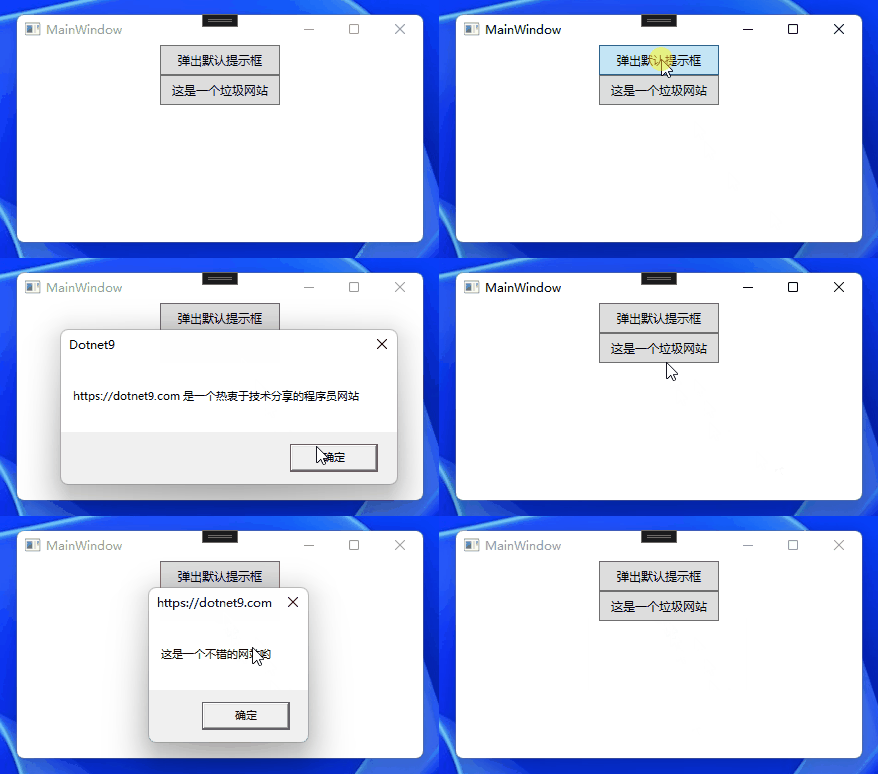
上面效果即完成了提示框内容的验证,如果内容含有“垃圾”关键字,就换成好听的话(这是一个不错的网站哟)。
本示例源码在这。
4. 拦截(Hook).NET默认的API
创建控制台程序HookDotnetAPI,引入Lib.Harmonynuget包,Program.cs修改如下:
using HarmonyLib;

var dotnet9Domain = "https://dotnet9.com";
Console.WriteLine($"9的位置:{dotnet9Domain.IndexOf('9',0)}");

var harmony = new Harmony("com.dotnet9");
harmony.PatchAll();

Console.WriteLine($"9的位置:{dotnet9Domain.IndexOf('9', 0)}");

[HarmonyPatch(typeof(String))]
[HarmonyPatch(nameof(string.IndexOf))]
[HarmonyPatch(new Type[] { typeof(char), typeof(int) })]
public static class HookClass
{
    public static bool Prefix(ref int __result)
    {
        __result = 100;
        return false;
    }
}
使用方法和前面类似,string.IndexOf方法被拦截后,总是返回100,不论查找的字符位置在哪,当然这个测试代码没有任何意义,这里只是演示而已,运行结果如下:
9的位置:14
9的位置:100
5. 总结及分享
5.1. 总结
Harmony的原理是利用反射获取对应类中的方法,然后加上特性标签进行逻辑控制,达到不破坏原有代码进行更新的效果。
Harmony用于在运行时修补替换和装饰 .NET/.NET Core 方法的库。 但是该技术可以与任何.NET版本一起使用。它对同一方法的多次更改是累积而不是覆盖。
再次分析可能产生的场景需要拦截,加深您对本文的记忆:
- .NET的一些方法,我们直接在代码层面可能无法直接修改;
- 第三库未提供源码,但我们想改它的部分方法;
- 第三库提供了源码,虽然可以修改它的源码,但万一第三库后面迭代升级,我们又不得不更新时,那自己做的修改跟着升级可能麻烦了;
拦截注意:如您所见,这提供了大量新的可能性。请记住,权力越大,责任越大。由于您以原始开发人员不打算的方式覆盖行为,因此无法保证您的补丁代码在他们发布新版本的代码时会起作用。即上面第3点,不排除第三库升级API结构也变了,我们也要跟着修改拦截逻辑哦
从《Harmony wiki patching》中翻译出以下使用注意事项:
- 最新2.0版支持 .NET Core ;
- Harmony支持手动(Patch,参考Harmony wiki上的使用)和自动(PatchAll,本文演示使用的这种方式,Lib.Harmony使用的是C#的特性机制);
- 它为每个原始方法创建DynamicMethod方法,并向其织入代码,该代码在开始(Prefix)和结束时(Postfix)调用自定义方法。它还允许您编写过滤器(Transpiler)来处理原始的IL代码,从而可以对原始方法进行更详细的操作;
- Getter/Setter、虚/ 非虚 方法、 静态 方法;
- 补丁方法必须是静态方法;
- Prefix需要返回void或者bool类型(void即不拦截);
- Postfix需要返回void类型,或者返回的类型要与第一个参数一致(直通模式);
- 如果原方法不是静态方法,则可以使用名为__instance(两个下划线)的参数来访问对象实例;
- 可以使用名为__result(两个下划线)的参数来访问方法的返回值,如果是Prefix,则得到返回值的默认值;
- 可以使用名为__state(两个下划线)的参数在Prefix补丁中存储任意类型的值,然后在Postfix中使用它,你有责任在Prefix中初始化它的值;
- 可以使用与原方法中同名的参数来访问对应的参数,如果你要写入非引用类型,记得使用ref关键字;
- 补丁使用的参数必须严格对应类型(或者使用object类型)和名字;
- 我们的补丁只需要定义我们需要用到的参数,不用把所有参数都写上;
- 要允许补丁重用,可以使用名为__originalMethod(两个下划线)的参数注入原始方法。
最后忘了补一条,.NET 7中使用Harmony还有点点问题,站长在测试WPF API和.NET基础库拦截Demo时一直不生效,折腾了2、3个晚上,以为是自己的使用问题,最后看到Harmony issue .NET 7 Runtime Skipping Patches #504,将程序降级为.NET 6即可。
5.2 分享
读者朋友们,相信不少人使用过Harmony或者其他的 .NET Hook库,可在评论中留言分享,可提出自己的疑问,或自己的使用心得:
- 我使用过这个库进行API的Hook,它是XXX;
- 我自己实现过类似功能,分享文章链接是XXX;
- 想问,我能拦截这个API吗?场景是XXXX
[我的分享] + [你的分享] ∈ [.NET圈子的一份小力量]
6. 参考
写作本文时以下文章都做了参考,建议大家都看看,特别是 Harmony wiki中写了Harmony的详细使用方法:
- Harmony
- Harmony wiki
- Harmony API文档
- Hacking .NET – rewriting code you don’t control
- Rimworld Mod制作教程6 使用Harmony对C#代码Patch
- 动态IL织入框架Harmony简单入手
- 一个开放源代码,实现动态IL注入(Hook或补丁工具)框架:Lib.Harmony
- .NET 7 Runtime Skipping Patches #504
7. 补充
- 2023年9月23号 手动注册拦截
非public类及方法如何拦截拦截|篡改|伪造.NET类库中不限于public的类和方法