
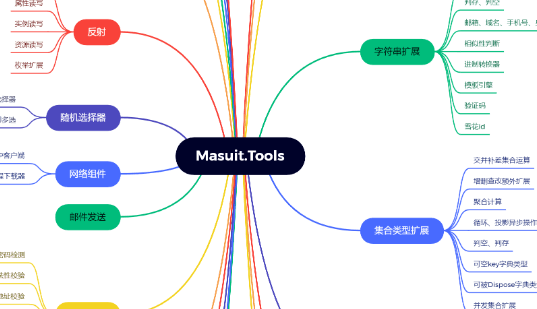
- 仓库地址:https://github.com/ldqk/Masuit.Tools
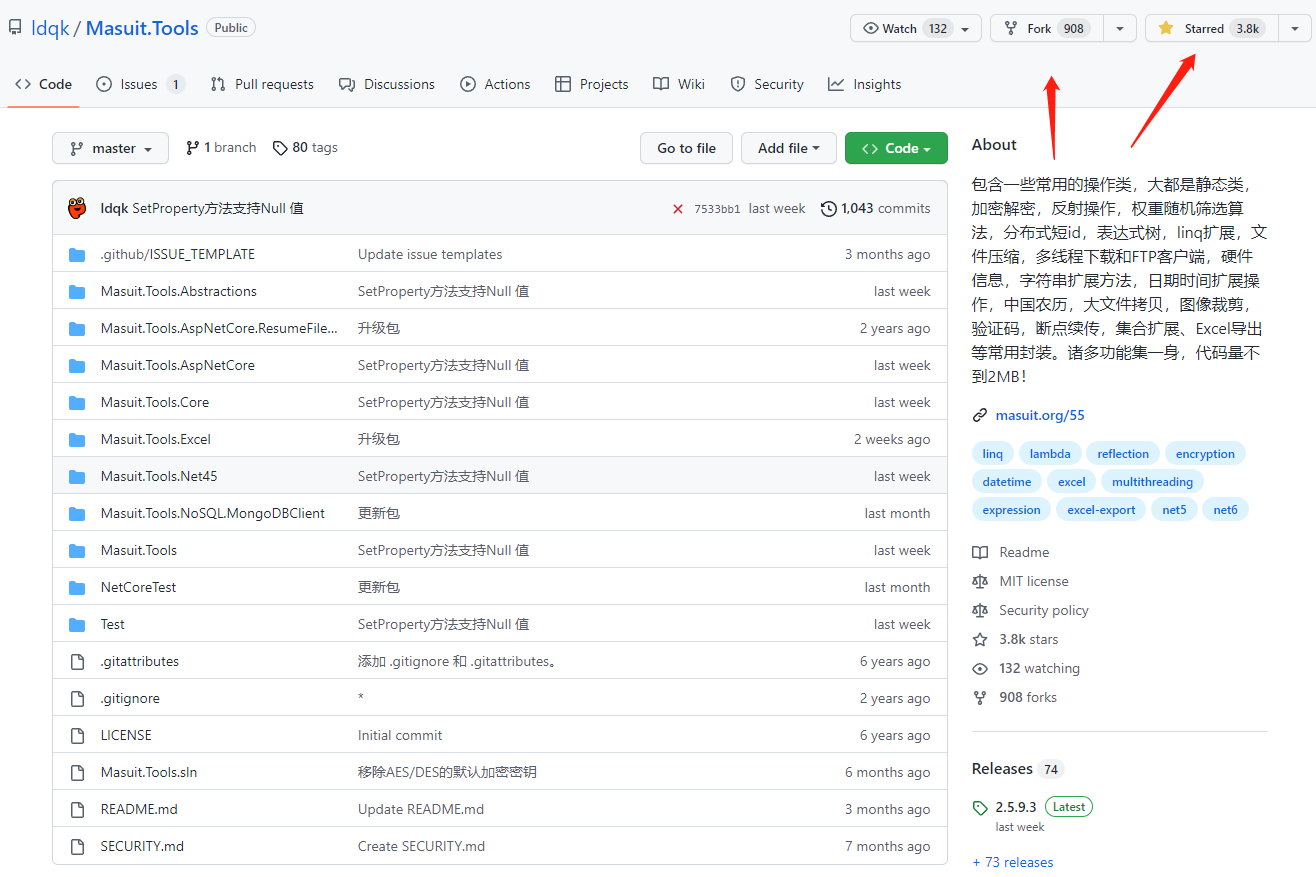








包含一些常用的操作类,大都是静态类,加密解密,反射操作,权重随机筛选算法,分布式短 id,表达式树,linq 扩展,文件压缩,多线程下载和 FTP 客户端,硬件信息,字符串扩展方法,日期时间扩展操作,中国农历,大文件拷贝,图像裁剪,验证码,断点续传,集合扩展、Excel 导出等常用封装。诸多功能集一身,代码量不到 2MB!
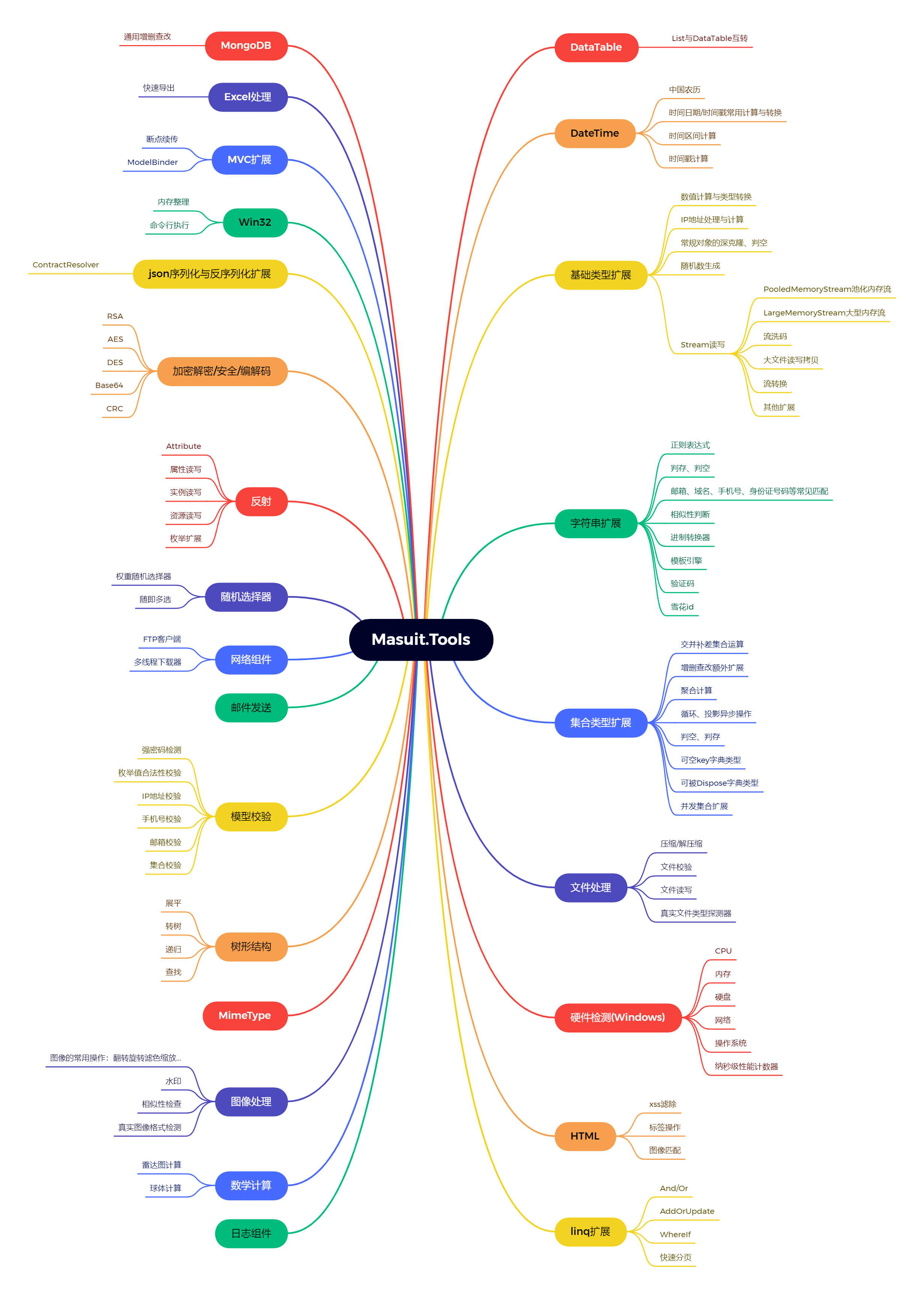
项目开发模式:日常代码积累+网络搜集
⭐⭐⭐ 喜欢这个项目的话就 Star、Fork、Follow 素质三连关 ♂ 注一下吧 ⭐⭐⭐
关于本项目,如果你有任何不懂的地方或使用过程中遇到任何问题,可以直接提 issue 或私信联系我,我会为你提供完全免费的技术指导,当然,如果你觉得不好意思接受免费的指导,想适当打赏我也是不会拒绝的!🤣🤣🤣
本项目已得到JetBrains的支持!

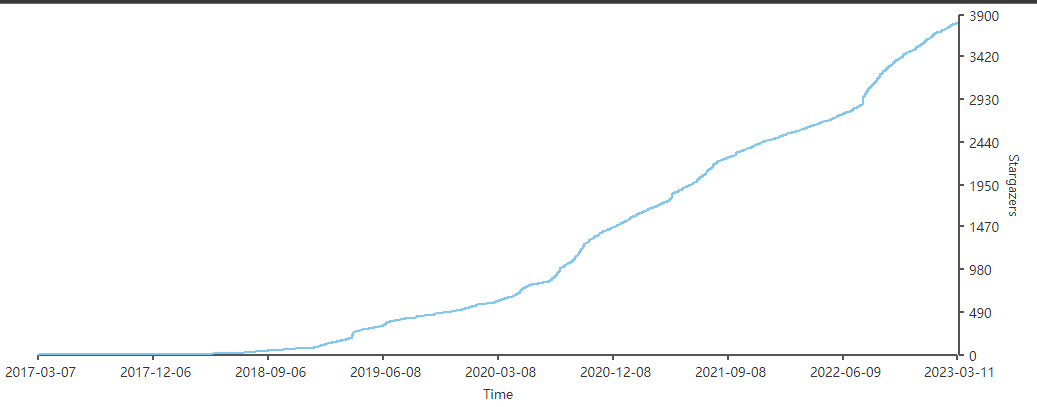
Star 趋势
请注意:
一旦使用本开源项目以及引用了本项目或包含本项目代码的公司因为违反劳动法(包括但不限定非法裁员、超时用工、雇佣童工等)在任何法律诉讼中败诉的,一经发现,本项目作者有权利追讨本项目的使用费(公司工商注册信息认缴金额的 2-5 倍作为本项目的授权费),或者直接不允许使用任何包含本项目的源代码!任何性质的外包公司或996公司需要使用本类库,请联系作者进行商业授权!其他企业或个人可随意使用不受限。996 那叫用人,也是废人。8 小时工作制才可以让你有时间自我提升,将来有竞争力。反对 996,人人有责!
建议开发环境
操作系统:Windows 10 1903 及以上版本
开发工具:VisualStudio2019 v16.5 及以上版本
SDK:.NET Core 2.1.0 及以上所有版本
安装程序包
基础功能包
.NET Framework版本的包因打包环境异常,无法正常发布更新,目前暂时停更~
.NET Framework ≥ 4.6.1
PM> Install-Package Masuit.Tools.Net
.NET Standard ≥ 2.1 或只想使用一些基本功能
通用项目推荐首选包
PM> Install-Package Masuit.Tools.Abstraction
.NET Core ≥ 2.1
.NET Core项目推荐首选包
PM> Install-Package Masuit.Tools.Core
.NET Framework 4.5 特供版
请注意:这是.NET Framework 4.5的专用版本,相比4.6.1及.NET Core的版本,阉割了Redis、HTML、文件压缩、ASP.NET扩展、硬件监测、Session扩展等一些功能。如果你的项目版本高于 4.5,请务必使用上述版本的包,以享受完整的功能体验!
PM> Install-Package Masuit.Tools.Net45
增值包
Masuit.Tools.AspNetCore
AspNetCore项目推荐首选包
ASP.NET Core Web 专用包,包含 Masuit.Tools.Core 的全部功能,并且增加了一些对 ASP.NET Core Web 功能的额外支持。
Masuit.Tools.Excel
Excel 导入导出的专用独立包
Masuit.Tools.NoSQL.MongoDBClient
mongodb 的封装操作类独立包
为工具库注册配置
工具库需要用到外部配置节,.NET Framework 项目配置在 web.config/app.config 的 AppSettings 配置节中,.NET Core 项目配置在 appsettings.json 中:
EmailDomainWhiteList,邮箱校验需要用到的白名单域名,英文逗号分隔,每个元素支持正则表达式,若未配置,则不启用邮箱校验白名单,示例:
"^\\w{1,5}@qq.com,^\\w{1,5}@163.com,^\\w{1,5}@gmail.com,^\\w{1,5}@outlook.com"EmailDomainBlockList,邮箱校验需要用到的黑名单域名,英文逗号分隔,每个元素支持正则表达式,且黑名单优先级高于白名单,若未配置,则不启用邮箱校验黑白名单
public Startup(IConfiguration configuration)
{
    configuration.AddToMasuitTools(); // 若未调用,则默认自动尝试加载appsettings.json
}
特色功能示例代码
在线体验
https://replit.com/@ldqk/MasuitToolsDemo?v=1#main.cs
1.检验字符串是否是 Email、手机号、URL、IP 地址、身份证号等
var (isMatch, match) = "337845818@qq.com".MatchEmail(); // 可在appsetting.json中添加EmailDomainWhiteList和EmailDomainBlockList配置邮箱域名黑白名单,逗号分隔,如"EmailDomainBlockList": "^\\w{1,5}@qq.com,^\\w{1,5}@163.com,^\\w{1,5}@gmail.com,^\\w{1,5}@outlook.com",
bool isInetAddress = "114.114.114.114".MatchInetAddress();
bool isUrl = "http://ldqk.org/20/history".MatchUrl();
bool isPhoneNumber = "15205201520".MatchPhoneNumber();
bool isIdentifyCard = "312000199502230660".MatchIdentifyCard();// 校验中国大陆身份证号
bool isCNPatentNumber = "200410018477.9".MatchCNPatentNumber(); // 校验中国专利申请号或专利号,是否带校验位,校验位前是否带“.”,都可以校验,待校验的号码前不要带CN、ZL字样的前缀
2.硬件监测(仅支持 Windows,部分函数仅支持物理机模式)
float load = SystemInfo.CpuLoad;// 获取CPU占用率
long physicalMemory = SystemInfo.PhysicalMemory;// 获取物理内存总数
long memoryAvailable = SystemInfo.MemoryAvailable;// 获取物理内存可用率
double freePhysicalMemory = SystemInfo.GetFreePhysicalMemory();// 获取可用物理内存
double temperature = SystemInfo.GetCPUTemperature();// 获取CPU温度
int cpuCount = SystemInfo.GetCpuCount();// 获取CPU核心数
var ipAddress = SystemInfo.GetLocalIPs();// 获取本机所有IP地址
string localUsedIp = SystemInfo.GetLocalUsedIP();// 获取本机当前正在使用的IP地址
IList<string> macAddress = SystemInfo.GetMacAddress();// 获取本机所有网卡mac地址
string osVersion = Windows.GetOsVersion();// 获取操作系统版本
RamInfo ramInfo = SystemInfo.GetRamInfo();// 获取内存信息
var cpuSN=SystemInfo.GetCpuInfo()[0].SerialNumber; // CPU序列号
var driveSN=SystemInfo.GetDiskInfo()[0].SerialNumber; // 硬盘序列号

// 快速方法
var cpuInfos = CpuInfo.Locals; // 快速获取CPU的信息
var ramInfo = RamInfo.Local; // 快速获取内存的信息
var diskInfos = DiskInfo.Locals; // 快速获取硬盘的信息
var biosInfo = BiosInfo.Local; // 快速获取主板的信息
3.html 的防 XSS 处理:
string html = @"<link href='/Content/font-awesome/css' rel='stylesheet'/>
        <!--[if IE 7]>
        <link href='/Content/font-awesome-ie7.min.css' rel='stylesheet'/>
        <![endif]-->
        <script src='/Scripts/modernizr'></script>
        <div id='searchBox' role='search'>
        <form action='/packages' method='get'>
        <span class='user-actions'><a href='/users/account/LogOff'>退出</a></span>
        <input name='q' id='searchBoxInput'/>
        <input id='searchBoxSubmit' type='submit' value='Submit' />
        </form>
        </div>";
string s = html.HtmlSantinizerStandard();//清理后:<div><span><a href="/users/account/LogOff">退出</a></span></div>
4.整理 Windows 系统的内存:
类似于各大系统优化软件的加速球功能
Windows.ClearMemorySilent();
5.任意进制转换
可用于生成短 id,短 hash,随机字符串等操作,纯数学运算。
NumberFormater nf = new NumberFormater(36);//内置2-62进制的转换
//NumberFormater nf = new NumberFormater("0123456789abcdefghijklmnopqrstuvwxyz");// 自定义进制字符,可用于生成验证码
string s36 = nf.ToString(12345678);
long num = nf.FromString("7clzi");
Console.WriteLine("12345678的36进制是:" + s36); // 7clzi
Console.WriteLine("36进制的7clzi是:" + num); // 12345678
var s = new NumberFormater(62).ToString(new Random().Next(100000, int.MaxValue)); //配合随机数生成随机字符串
//扩展方法形式调用
var bin=12345678.ToBase(36);// 10进制转36进制:7clzi
var num="7clzi".FromBase(36);// 36进制转10进制:12345678
//超大数字的进制转换
var num = "e6186159d38cd50e0463a55e596336bd".FromBaseBig(16); // 大数字16进制转10进制
Console.WriteLine(num); // 十进制:305849028665645097422198928560410015421
Console.WriteLine(num.ToBase(64)); // 64进制:3C665pQUPl3whzFlVpoPqZ,22位长度
Console.WriteLine(num.ToBase(36)); // 36进制:dmed4dkd5bhcg4qdktklun0zh,25位长度
Console.WriteLine(num.ToBase(7)); // 7进制:2600240311641665565300424545154525131265221035,46位长度
Console.WriteLine(num.ToBase(12)); // 12进制:5217744842749978a756b22135b16a5998a5,36位长度
Console.WriteLine(num.ToBase(41)); // 41进制:opzeBda2aytcEeudEquuesbk,24位长度
6.纳秒级性能计时器
HiPerfTimer timer = HiPerfTimer.StartNew();
for (int i = 0; i < 100000; i++)
{
    //todo
}
timer.Stop();
Console.WriteLine("执行for循环100000次耗时"+timer.Duration+"s");
double time = HiPerfTimer.Execute(() =>
{
    for (int i = 0; i < 100000; i++)
    {
        //todo
    }
});
Console.WriteLine("执行for循环100000次耗时"+time+"s");
7.产生分布式唯一有序短 id(雪花 id)
var sf = SnowFlake.GetInstance();
string token = sf.GetUniqueId();// rcofqodori0w
string shortId = sf.GetUniqueShortId(8);// qodw9728
var set = new HashSet<string>();
double time = HiPerfTimer.Execute(() =>
{
    for (int i = 0; i < 1000000; i++)
    {
        set.Add(SnowFlake.GetInstance().GetUniqueId());
    }
});
Console.WriteLine(set.Count == 1000000); //True
Console.WriteLine("产生100w个id耗时" + time + "s"); //2.6891495s
8.农历转换
ChineseCalendar.CustomHolidays.Add(DateTime.Parse("2018-12-31"),"元旦节");//自定义节假日
ChineseCalendar today = new ChineseCalendar(DateTime.Parse("2018-12-31"));
Console.WriteLine(today.ChineseDateString);// 二零一八年十一月廿五
Console.WriteLine(today.AnimalString);// 生肖:狗
Console.WriteLine(today.GanZhiDateString);// 干支:戊戌年甲子月丁酉日
Console.WriteLine(today.DateHoliday);// 获取按公历计算的节假日
...
9.Linq 表达式树扩展
Expression<Func<string, bool>> where1 = s => s.StartsWith("a");
Expression<Func<string, bool>> where2 = s => s.Length > 10;
Func<string, bool> func = where1.And(where2)
    .AndIf(!string.IsNullOrEmpty(name),s=>s==name)
    .Compile(); // And和AndIf可供选择,满足条件再执行And
bool b=func("abcd12345678");//true
Expression<Func<string, bool>> where1 = s => s.StartsWith("a");
Expression<Func<string, bool>> where2 = s => s.Length > 10;
Func<string, bool> func = where1
    .Or(where2)
    .OrIf(!string.IsNullOrEmpty(name),s=>s==name)
    .Compile(); // Or和OrIf可供选择,满足条件再执行Or
bool b=func("abc");// true
queryable.WhereIf(!string.IsNullOrEmpty(name),e=>e.Name==name)
    .WhereIf(()=> age.HasValue,e=>e.Age>=age); // IQueryable的WhereIf扩展函数,满足条件再执行Where
10.模版引擎
var tmp = new Template("{{name}},你好!");
tmp.Set("name", "万金油");
string s = tmp.Render();//万金油,你好!
var tmp = new Template("{{one}},{{two}},{{three}}");
string s = tmp.Set("one", "1").Set("two", "2").Set("three", "3").Render();// 1,2,3
var tmp = new Template("{{name}},{{greet}}!");
tmp.Set("name", "万金油");
string s = tmp.Render();// throw 模版变量{{greet}}未被使用
11.List 转 Datatable
var list = new List<MyClass>()
{
    new MyClass()
    {
        Name = "张三",
        Age = 22
    },
    new MyClass()
    {
        Name = "李四",
        Age = 21
    },
    new MyClass()
    {
        Name = "王五",
        Age = 28
    }
};
var table = list.Select(c => new{姓名=c.Name,年龄=c.Age}).ToDataTable();// 将自动填充列姓名和年龄
12.文件压缩解压
.NET Framework
MemoryStream ms = SevenZipCompressor.ZipStream(new List<string>()
{
    @"D:\1.txt",
    "http://ww3.sinaimg.cn/large/87c01ec7gy1fsq6rywto2j20je0d3td0.jpg",
});//压缩成内存流
SevenZipCompressor.Zip(new List<string>()
{
    @"D:\1.txt",
    "http://ww3.sinaimg.cn/large/87c01ec7gy1fsq6rywto2j20je0d3td0.jpg",
}, zip);//压缩成zip
SevenZipCompressor.UnRar(@"D:\Download\test.rar", @"D:\Download\");//解压rar
SevenZipCompressor.Decompress(@"D:\Download\test.tar", @"D:\Download\");//自动识别解压压缩包
SevenZipCompressor.Decompress(@"D:\Download\test.7z", @"D:\Download\");
ASP.NET Core
Startup.cs
services.AddSevenZipCompressor();
构造函数注入 ISevenZipCompressor
private readonly ISevenZipCompressor _sevenZipCompressor;
public Test(ISevenZipCompressor sevenZipCompressor)
{
    _sevenZipCompressor = sevenZipCompressor;
}
使用方式同.NET Framework 版本
13.简易日志组件(又不是不能用.jpg)
LogManager.LogDirectory=AppDomain.CurrentDomain.BaseDirectory+"/logs";
LogManager.Event+=info =>
{
    //todo:注册一些事件操作
};
LogManager.Info("记录一次消息");
LogManager.Error(new Exception("异常消息"));
14.FTP 客户端
FtpClient ftpClient = FtpClient.GetAnonymousClient("192.168.2.2");//创建一个匿名访问的客户端
//FtpClient ftpClient = FtpClient.GetClient("192.168.2.3","admin","123456");// 创建一个带用户名密码的客户端
ftpClient.Delete("/1.txt");// 删除文件
ftpClient.Download("/test/2.txt","D:\\test\\2.txt");// 下载文件
ftpClient.UploadFile("/test/22.txt","D:\\test\\22.txt",(sum, progress) =>
{
    Console.WriteLine("已上传:"+progress*1.0/sum);
});//上传文件并检测进度
List<string> files = ftpClient.GetFiles("/");//列出ftp服务端文件列表
...
15.多线程后台下载
var mtd = new MultiThreadDownloader("https://attachments-cdn.shimo.im/yXwC4kphjVQu06rH/KeyShot_Pro_7.3.37.7z",Environment.GetEnvironmentVariable("temp"),"E:\\Downloads\\KeyShot_Pro_7.3.37.7z",8);
mtd.Configure(req =>
 {
     req.Referer = "https://masuit.com";
     req.Headers.Add("Origin", "https://baidu.com");
});
mtd.TotalProgressChanged+=(sender, e) =>
{
    var downloader = sender as MultiThreadDownloader;
    Console.WriteLine("下载进度:"+downloader.TotalProgress+"%");
    Console.WriteLine("下载速度:"+downloader.TotalSpeedInBytes/1024/1024+"MBps");
};
mtd.FileMergeProgressChanged+=(sender, e) =>
{
    Console.WriteLine("下载完成");
};
mtd.FileMergedComplete+=(sender,e)=>{
    Console.WriteLine("文件合并完成");
};
mtd.Start();//开始下载
//mtd.Pause(); // 暂停下载
//mtd.Resume(); // 继续下载
16.加密解密/hash
var enc="123456".MDString();// MD5
var enc="123456".MDString("abc");// MD5加盐
var enc="123456".MDString2();// MD5两次
var enc="123456".MDString2("abc");// MD5两次加盐
var enc="123456".MDString3();// MD5三次
var enc="123456".MDString3("abc");// MD5三次加盐

string aes = "123456".AESEncrypt();// AES加密为密文
string s = aes.AESDecrypt(); //AES解密为明文
string aes = "123456".AESEncrypt("abc");// AES密钥加密为密文
string s = aes.AESDecrypt("abc"); //AES密钥解密为明文

string enc = "123456".DesEncrypt();// DES加密为密文
string s = enc.DesDecrypt(); //DES解密为明文
string enc = "123456".DesEncrypt("abcdefgh");// DES密钥加密为密文
string s = enc.DesDecrypt("abcdefgh"); //DES密钥解密为明文

RsaKey rsaKey = RsaCrypt.GenerateRsaKeys();// 生成RSA密钥对
string encrypt = "123456".RSAEncrypt(rsaKey.PublicKey);// 公钥加密
string s = encrypt.RSADecrypt(rsaKey.PrivateKey);// 私钥解密

string s = "123".Crc32();// 生成crc32摘要
string s = "123".Crc64();// 生成crc64摘要
string s = "123".SHA256();// 生成SHA256摘要

string pub="hello,world!";
string hidden="ldqk";
var str = pub.InjectZeroWidthString(hidden); // 扩展函数调用:将"ldqk"以零宽字符串的方式隐藏在"hello,world!"中
var str = ZeroWidthCodec.Encrypt(pub,hidden); // 类调用:将"ldqk"以零宽字符串的方式隐藏在"hello,world!"中
var dec = str.DecodeZeroWidthString(); // 扩展函数调用:将包含零宽字符串的密文解密出隐藏字符串"ldqk"
var dec = ZeroWidthCodec.Decrypt(str); // 类调用:将包含零宽字符串的密文解密出隐藏字符串"ldqk"
var enc = hidden.EncodeToZeroWidthText(); // 扩展函数调用:将字符串编码成零宽字符串
var enc = ZeroWidthCodec.Encode(); // 类调用:将字符串编码成零宽字符串
17.实体校验
public class MyClass
{
    [IsEmail] //可在appsetting.json中添加EmailDomainWhiteList配置邮箱域名白名单,逗号分隔
    public string Email { get; set; }

    [IsPhone]
    public string PhoneNumber { get; set; }

    [IsIPAddress]
    public string IP { get; set; }

    [MinValue(0, ErrorMessage = "年龄最小为0岁"), MaxValue(100, ErrorMessage = "年龄最大100岁")]
    public int Age { get; set; }

    [ComplexPassword]//密码复杂度校验
    public string Password { get; set; }

    [EnumOf] // 检测是否是有效枚举值
    public MyEnum MyEnum { get; set; }

    [MinItemsCount(1)] // 检测集合元素最少1个
    public List<string> Strs { get; set; }
}
18.HTML 操作
List<string> srcs = "html".MatchImgSrcs().ToList();// 获取html字符串里所有的img标签的src属性
var imgTags = "html".MatchImgTags();//获取html字符串里的所有的img标签
var str="html".RemoveHtmlTag(); // 去除html标签
...
19.DateTime 扩展
double milliseconds = DateTime.Now.GetTotalMilliseconds();// 获取毫秒级时间戳
double microseconds = DateTime.Now.GetTotalMicroseconds();// 获取微秒级时间戳
double nanoseconds = DateTime.Now.GetTotalNanoseconds();// 获取纳秒级时间戳
double seconds = DateTime.Now.GetTotalSeconds();// 获取秒级时间戳
double minutes = DateTime.Now.GetTotalMinutes();// 获取分钟级时间戳
...
20.IP 地址和 URL
bool inRange = "192.168.2.2".IpAddressInRange("192.168.1.1","192.168.3.255");// 判断IP地址是否在这个地址段里
bool isPrivateIp = "172.16.23.25".IsPrivateIP();// 判断是否是私有地址
bool isExternalAddress = "http://baidu.com".IsExternalAddress();// 判断是否是外网的URL

//以下需要配置baiduAK
string isp = "114.114.114.114".GetISP(); // 获取ISP运营商信息
PhysicsAddress physicsAddress = "114.114.114.114".GetPhysicsAddressInfo().Result;// 获取详细地理信息对象
Tuple<string, List<string>> ipAddressInfo = "114.114.114.114".GetIPAddressInfo().Result;// 获取详细地理信息集合
21.元素去重
var list = new List<MyClass>()
{
    new MyClass()
    {
        Email = "1@1.cn"
    },
    new MyClass()
    {
        Email = "1@1.cn"
    },
    new MyClass()
    {
        Email = "1@1.cn"
    }
};
List<MyClass> classes = list.DistinctBy(c => c.Email).ToList();
Console.WriteLine(classes.Count==1);//True
22.枚举扩展
public enum MyEnum
{
    [Display(Name = "读")]
    [Description("读")]
    Read,

    [Display(Name = "写")]
    [Description("写")]
    Write
}
Dictionary<int, string> dic1 = typeof(MyEnum).GetDictionary();// 获取枚举值和字符串表示的字典映射
var dic2 = typeof(MyEnum).GetDescriptionAndValue();// 获取字符串表示和枚举值的字典映射
string desc = MyEnum.Read.GetDescription();// 获取Description标签
string display = MyEnum.Read.GetDisplay();// 获取Display标签的Name属性
var value = typeof(MyEnum).GetValue("Read");//获取字符串表示值对应的枚举值
string enumString = 0.ToEnumString(typeof(MyEnum));// 获取枚举值对应的字符串表示
23.定长队列和 ConcurrentHashSet 实现
如果是.NET5及以上,推荐使用框架自带的Channel实现该功能
LimitedQueue<string> queue = new LimitedQueue<string>(32);// 声明一个容量为32个元素的定长队列
ConcurrentLimitedQueue<string> queue = new ConcurrentLimitedQueue<string>(32);// 声明一个容量为32个元素的线程安全的定长队列
var set = new ConcurrentHashSet<string>(); // 用法和hashset保持一致
24.反射操作
MyClass myClass = new MyClass();
PropertyInfo[] properties = myClass.GetProperties();// 获取属性列表
myClass.SetProperty("Email","1@1.cn");//给对象设置值
myClass.DeepClone(); // 对象深拷贝,带嵌套层级的
25.获取线程内唯一对象
CallContext<T>.SetData("db",dbContext);//设置线程内唯一对象
CallContext<T>.GetData("db");//获取线程内唯一对象
26.邮件发送
new Email()
{
    SmtpServer = "smtp.masuit.com",// SMTP服务器
    SmtpPort = 25, // SMTP服务器端口
    EnableSsl = true,//使用SSL
    Username = "admin@masuit.com",// 邮箱用户名
    Password = "123456",// 邮箱密码
    Tos = "10000@qq.com,10001@qq.com", //收件人
    Subject = "测试邮件",//邮件标题
    Body = "你好啊",//邮件内容
}.SendAsync(s =>
{
    Console.WriteLine(s);// 发送成功后的回调
});// 异步发送邮件
27.图像的简单处理
ImageUtilities.CompressImage(@"F:\src\1.jpg", @"F:\dest\2.jpg");//无损压缩图片

"base64".SaveDataUriAsImageFile();// 将Base64编码转换成图片

Image image = Image.FromFile(@"D:\1.jpg");
image.MakeThumbnail(@"D:\2.jpg", 120, 80, ThumbnailCutMode.LockWidth);//生成缩略图

Bitmap bmp = new Bitmap(@"D:\1.jpg");
Bitmap newBmp = bmp.BWPic(bmp.Width, bmp.Height);//转换成黑白
Bitmap newBmp = bmp.CutAndResize(new Rectangle(0, 0, 1600, 900), 160, 90);//裁剪并缩放
bmp.RevPicLR(bmp.Width, bmp.Height);//左右镜像
bmp.RevPicUD(bmp.Width, bmp.Height);//上下镜像

var marker=ImageWatermarker(stream);
stream=maker.AddWatermark("水印文字","字体文件",字体大小,color,水印位置,边距); // 给图片添加水印
stream=maker.AddWatermark(水印图片,水印位置,边距,字体大小,字体); // 给图片添加水印

// 图像相似度对比
var hasher = new ImageHasher();
var hash1 = hasher.DifferenceHash256("图片1"); // 使用差分哈希算法计算图像的256位哈希
var hash2 = hasher.DifferenceHash256("图片2"); // 使用差分哈希算法计算图像的256位哈希
//var hash1 = hasher.AverageHash64("图片1"); // 使用平均值算法计算图像的64位哈希
//var hash2 = hasher.AverageHash64("图片2"); // 使用平均值算法计算图像的64位哈希
//var hash1 = hasher.DctHash("图片1"); // 使用DCT算法计算图像的64位哈希
//var hash2 = hasher.DctHash("图片2"); // 使用DCT算法计算图像的64位哈希
//var hash1 = hasher.MedianHash64("图片1"); // 使用中值算法计算给定图像的64位哈希
//var hash2 = hasher.MedianHash64("图片2"); // 使用中值算法计算给定图像的64位哈希
var sim=ImageHasher.Compare(hash1,hash2); // 图片的相似度,范围:[0,1]

var imageFormat=stream.GetImageType(); // 获取图片的真实格式
28.随机数
Random rnd = new Random();
int num = rnd.StrictNext();//产生真随机数
double gauss = rnd.NextGauss(20,5);//产生正态高斯分布的随机数
var s = new NumberFormater(62).ToString(new Random().Next(100000, int.MaxValue));//生成随机字符串
29.权重筛选功能
var data=new List<WeightedItem<string>>()
{
     new WeightedItem<string>("A", 1),
     new WeightedItem<string>("B", 3),
     new WeightedItem<string>("C", 4),
     new WeightedItem<string>("D", 4),
};
var item=data.WeightedItem();//按权重选出1个元素
var list=data.WeightedItems(2);//按权重选出2个元素
var selector = new WeightedSelector<string>(new List<WeightedItem<string>>()
{
    new WeightedItem<string>("A", 1),
    new WeightedItem<string>("B", 3),
    new WeightedItem<string>("C", 4),
    new WeightedItem<string>("D", 4),
});
var item = selector.Select();//按权重选出1个元素
var list = selector.SelectMultiple(3);//按权重选出3个元素
30.EF Core 支持 AddOrUpdate 方法
/// <summary>
/// 按Id添加或更新文章实体
/// </summary>
public override Post SavePost(Post t)
{
    DataContext.Set<Post>().AddOrUpdate(t => t.Id, t);
    return t;
}
31.敏感信息掩码
"13123456789".Mask(); // 131****5678
"admin@masuit.com".MaskEmail(); // a****n@masuit.com
32.集合扩展
var list = new List<string>()
{
    "1","3","3","3"
};
list.AddRangeIf(s => s.Length > 1, "1", "11"); // 将被添加元素中的长度大于1的元素添加到list
list.AddRangeIfNotContains("1", "11"); // 将被添加元素中不包含的元素添加到list
list.RemoveWhere(s => s.Length<1); // 将集合中长度小于1的元素移除
list.InsertAfter(0, "2"); // 在第一个元素之后插入
list.InsertAfter(s => s == "1", "2"); // 在元素"1"后插入
var dic = list.ToDictionarySafety(s => s); // 安全的转换成字典类型,当键重复时只添加一个键
var dic = list.ToConcurrentDictionary(s => s); // 转换成并发字典类型,当键重复时只添加一个键
var dic = list.ToDictionarySafety(s => s, s => s.GetHashCode()); // 安全的转换成字典类型,当键重复时只添加一个键
dic.AddOrUpdate("4", 4); // 添加或更新键值对
dic.AddOrUpdate(new Dictionary<string, int>()
{
    ["5"] = 5,["55"]=555
}); // 批量添加或更新键值对
dic.AddOrUpdate("5", 6, (s, i) => 66); // 如果是添加,则值为6,若更新则值为66
dic.AddOrUpdate("5", 6, 666); // 如果是添加,则值为6,若更新则值为666
dic.GetOrAdd("7",77); // 字典获取或添加元素
dic.GetOrAdd("7",()=>77); // 字典获取或添加元素
dic.AsConcurrentDictionary(); // 普通字典转换成并发字典集合
var table=list.ToDataTable(); // 转换成DataTable类型
table.AddIdentityColumn(); //给DataTable增加一个自增列
table.HasRows(); // 检查DataTable 是否有数据行
table.ToList<T>(); // datatable转List
var set = list.ToHashSet(s=>s.Name);// 转HashSet
var cts = new CancellationTokenSource(100); //取消口令
await list.ForeachAsync(async i=>{
    await Task.Delay(100);
    Console.WriteLine(i);
},cts.Token); // 异步foreach

await list.ForAsync(async (item,index)=>{
    await Task.Delay(100);
    Console.WriteLine(item+"_"+index);
},cts.Token); // 异步for,带索引编号
await list.SelectAsync(async i=>{
    await Task.Delay(100);
    return i*10;
}); // 异步Select
await list.SelectAsync(async (item,index)=>{
    await Task.Delay(100);
    return item*10;
}); // 异步Select,带索引编号
string s=list.Join(",");//将字符串集合连接成逗号分隔的单字符串
var max=list.MaxOrDefault(); // 取最大值,当集合为空的时候不会报错
var max=list.MaxOrDefault(selector); // 取最大值,当集合为空的时候不会报错
var max=list.MaxOrDefault(selector,default); // 取最大值,当集合为空的时候不会报错
var max=list.MinOrDefault(); // 取最小值,当集合为空的时候不会报错
var max=list.MinOrDefault(selector); // 取最小值,当集合为空的时候不会报错
var max=list.MinOrDefault(selector,default); // 取最小值,当集合为空的时候不会报错
var stdDev=list.Select(s=>s.ConvertTo<int>()).StandardDeviation(); // 求标准差

var pages=queryable.ToPagedList(1,10); // 分页查询
var pages=await queryable.ToPagedListAsync(1,10); // 分页查询

var nums=Enumerable.Range(1, 10).ExceptBy(Enumerable.Range(5, 10), i => i); // 按字段取差集
var nums=Enumerable.Range(1, 10).IntersectBy(Enumerable.Range(5, 10), i => i); // 按字段取交集
var nums=Enumerable.Range(1, 10).SequenceEqual(Enumerable.Range(5, 10), i => i); // 判断序列相等
var nums=Enumerable.Range(1, 10).OrderByRandom(); // 随机排序

// 多个集合取交集
var list=new List<List<MyClass>>(){
    new List<MyClass>(){
        new MyClass(){Name="aa",Age=11},
        new MyClass(){Name="bb",Age=12},
        new MyClass(){Name="cc",Age=13},
    },
    new List<MyClass>(){
        new MyClass(){Name="bb",Age=12},
        new MyClass(){Name="cc",Age=13},
        new MyClass(){Name="dd",Age=14},
    },
    new List<MyClass>(){
        new MyClass(){Name="cc",Age=13},
        new MyClass(){Name="dd",Age=14},
        new MyClass(){Name="ee",Age=15},
    },
};
var sect=list.IntersectAll(m=>m.Name); // new MyClass(){Name="cc",Age=13}

var list=new List<List<int>>(){
    new(){1,2,3},
    new(){2,3,4},
    new(){3,4,5}
};
var sect=list.IntersectAll();// [3]

// 集合元素改变其索引位置
list.ChangeIndex(item,3); // 将元素item的索引位置变为第3个
list.ChangeIndex(t=>t.Id=="123",2); // 将id为123的元素的索引位置变为第2个
33.Mime 类型
var mimeMapper = new MimeMapper();
var ext = mimeMapper.GetExtensionFromMime("image/jpeg"); // .jpg
var mime = mimeMapper.GetMimeFromExtension(".jpg"); // image/jpeg
34.日期时间扩展
DateTime.Now.GetTotalSeconds(); // 获取该时间相对于1970-01-01 00:00:00的秒数
DateTime.Now.GetTotalMilliseconds(); // 获取该时间相对于1970-01-01 00:00:00的毫秒数
DateTime.Now.GetTotalMicroseconds(); // 获取该时间相对于1970-01-01 00:00:00的微秒数
DateTime.Now.GetTotalNanoseconds(); // 获取该时间相对于1970-01-01 00:00:00的纳秒数
var indate=DateTime.Parse("2020-8-3").In(DateTime.Parse("2020-8-2"),DateTime.Parse("2020-8-4"));//true
DateTime time="2021-1-1 8:00:00".ToDateTime(); //字符串转DateTime

//时间段计算工具
var range = new DateTimeRange(DateTime.Parse("2020-8-3"), DateTime.Parse("2020-8-5"));
range.Union(DateTime.Parse("2020-8-4"), DateTime.Parse("2020-8-6")); //连接两个时间段,结果:2020-8-3~2020-8-6
range.In(DateTime.Parse("2020-8-3"), DateTime.Parse("2020-8-6"));//判断是否在某个时间段内,true
var (intersected,range2) = range.Intersect(DateTime.Parse("2020-8-4"), DateTime.Parse("2020-8-6"));//两个时间段是否相交,(true,2020-8-3~2020-8-4)
range.Contains(DateTime.Parse("2020-8-3"), DateTime.Parse("2020-8-4"));//判断是否包含某个时间段,true
...
35.流相关
stream.SaveAsMemoryStream(); // 任意流转换成内存流
stream.ToArray(); // 任意流转换成二进制数组
stream.ToArrayAsync(); // 任意流转换成二进制数组
stream.ShuffleCode(); // 流洗码,在流的末端随即增加几个空字节,重要数据请谨慎使用,可能造成流损坏

// 池化内存流,用法与MemorySteam保持一致
using var ms=PooledMemoryStream();

// 大型内存流,最大可支持1TB内存数据,推荐当数据流大于2GB时使用,用法与MemorySteam保持一致
using var ms=LargeMemoryStream();

//文件流快速复制
FileStream fs = new FileStream(@"D:\boot.vmdk", FileMode.OpenOrCreate, FileAccess.ReadWrite);
{
        //fs.CopyToFile(@"D:\1.bak");//同步复制大文件
        fs.CopyToFileAsync(@"D:\1.bak");//异步复制大文件
        string md5 = fs.GetFileMD5Async().Result;//异步获取文件的MD5
        string sha1 = fs.GetFileSha1();//异步获取文件的SHA1
}
memoryStream.SaveFile("filename"); // 将内存流转储成文件
36.数值转换
1.2345678901.Digits8(); // 将小数截断为8位
1.23.ConvertTo<int>(); // 小数转int
1.23.ConvertTo<T>(); // 小数转T基本类型
bool b=1.23.TryConvertTo<T>(out result); // 小数转T基本类型
var num=1.2345.ToDecimal(2); //转decimal并保留两位小数
37.INI 配置文件操作(仅支持 Windows)
INIFile ini=new INIFile("filename.ini");
ini.IniWriteValue(section,key,value); // 写值
ini.IniReadValue(section,key); // 读值
ini.ClearAllSection(); // 清空所有配置节
ini.ClearSection(section); // 清空配置节
38.雷达图计算引擎
应用场景:计算两个多边形的相似度,用户画像之类的
var points=RadarChartEngine.ComputeIntersection(chart1,chart2); //获取两个多边形的相交区域
points.ComputeArea(); //计算多边形面积
39.树形结构实现
基本接口类:
ITreeChildren:带 Children 属性的接口
ITreeParent:带 Parent 属性的接口
ITree:继承 ITreeParent 和 ITreeChildren,同时多了 Name 属性
相关扩展方法:
trees.Filter(func); // 从树形集合中过滤
trees.Flatten(); // 将数据平铺开
tree.AllChildren(); // 获取所有的子级
tree.AllParent(); // 获取所有的父级
tree.IsRoot(); // 是否是根节点
tree.IsLeaf(); // 是否是叶子节点
tree.Level(); // 所处深度/层级
tree.Path(); // 全路径

var tree=list.ToTree(c => c.Id, c => c.Pid);//继承自ITreeParent<T>, ITreeChildren<T>的集合转换成树形结构
var tree=list.ToTreeGeneral(c => c.Id, c => c.Pid);//一般的集合转换成树形结构
40.简单的 Excel 导出
需要额外依赖包:Masuit.Tools.Excel
var stream=list.Select(item=>new{
    姓名=item.Name,
    年龄=item.Age,
    item.Gender,
    Avatar=Image.FromStream(filestream) //图片列
}).ToDataTable().ToExcel("Sheet1"); //自定义列名导出
var stream=list.ToDataTable("Sheet1").ToExcel("文件密码");
一些约定规则:
- 图片列支持 Stream、Bitmap、IEnumerable
、IEnumerable 、IDictionary<string,Stream>、IDictionary<string,MemoryStream>、IDictionary<string,Bitmap>类型; - 其中,如果是 IDictionary 类型的图片列,字典的键为图片超链接的完整 url;
- 默认字段名作为列名导出;
- 若 list 是一个具体的强类型,默认会先查找每个字段的 Description 标记,若有 Description 标记,则取 Description 标记作为列名显示
- ToExcel 方法支持 DataTable、List
、Dictionary<string, DataTable>类型的直接调用
41.EFCore 实体对比功能
获取指定实体的变更
var changes=dbContext.GetChanges<Post>();//获取变更字段信息
var added=dbContext.GetAdded<Post>();//获取添加的实体字段信息
var removed=dbContext.GetRemoved<Post>();//获取被移除的实体字段信息
var allchanges=dbContext.GetAllChanges<Post>();//获取增删改的实体字段信息
获取所有实体的变更
var changes=dbContext.GetChanges();//获取变更字段信息
var added=dbContext.GetAdded();//获取添加的实体字段信息
var removed=dbContext.GetRemoved();//获取被移除的实体字段信息
var allchanges=dbContext.GetAllChanges();//获取增删改的实体字段信息
对比信息包含属性信息、旧值、新值、实体信息、键信息、变更状态等
42.任何类型支持链式调用
a.Next(func1).Next(func2).Next(func3);
"123".Next(s=>s.ToInt32()).Next(x=>x*2).Next(x=>Math.Log(x));
43.Newtonsoft.Json 的只允许字段反序列化行为的契约解释器
DeserializeOnlyContractResolver
该解释器针对类属性被 DeserializeOnlyJsonPropertyAttribute 标记的,在反序列化的时候生效,在序列化的时候忽略
public class ClassDto
    {
        [DeserializeOnlyJsonProperty]
        public string MyProperty { get; set; }

        public int Num { get; set; }
    }

    JsonConvert.SerializeObject(new MyClass(),new JsonSerializerSettings()
    {
        ContractResolver = new DeserializeOnlyContractResolver() // 配置使用DeserializeOnlyContractResolver解释器
    });
如果是 WebAPI 全局使用:
        //在Startup.ConfigureServices中
        services.AddMvc().AddNewtonsoftJson(options =>
             {
                 var resolver = new DeserializeOnlyContractResolver();
                 resolver.NamingStrategy = new CamelCaseNamingStrategy();
                 options.SerializerSettings.ContractResolver = resolver;
             });
FallbackJsonPropertyResolver
该解释器针对某个属性设置多个别名,反序列化时支持多个别名 key 进行绑定,弥补官方 JsonProperty 别名属性只能设置单一别名的不足
    public class ClassDto
    {
        [FallbackJsonProperty("MyProperty","a","b")]
        public string MyProperty { get; set; }

        public int Num { get; set; }
    }

    JsonConvert.SerializeObject(new MyClass(),new JsonSerializerSettings()
    {
        ContractResolver = new FallbackJsonPropertyResolver() // 配置使用FallbackJsonPropertyResolver解释器
    });
CompositeContractResolver
该解释器是 DeserializeOnlyContractResolver 和 FallbackJsonPropertyResolver 的融合版
44. ASP.NET Core Action 同时支持 queryString、表单和 json 请求类型的模型绑点器 BodyOrDefaultModelBinder
用法:
引入包:Masuit.Tools.AspNetCore
PM> Install-Package Masuit.Tools.AspNetCore
Startup 配置:
    services.AddMvc(options =>
        {
             options.ModelBinderProviders.InsertBodyOrDefaultBinding();
        })
在 action 的参数模型前打上标记:[FromBodyOrDefault]即可,当然也可以省略,示例代码如下:
        [HttpGet("query"),HttpPost("query")]
        public IActionResult Query([FromBodyOrDefault]QueryModel query)
        {
            return Ok(...);
        }

        [HttpGet("query"),HttpPost("query")]
        public IActionResult Query([FromBodyOrDefault]int id,[FromBodyOrDefault]string name)
        {
            return Ok(...);
        }
45. 字符串 SimHash 相似度算法
var dis="12345678".HammingDistance("1234567");
var dis=new SimHash("12345678").HammingDistance(new SimHash("1234567"));
46. 真实文件类型探测
// 多种方式,任君调用
var detector=new FileInfo(filepath).DetectFiletype();
//var detector=File.OpenRead(filepath).DetectFiletype();
//var detector=FileSignatureDetector.DetectFiletype(filepath);
detector.Precondition;//基础文件类型
detector.Extension;//真实扩展名
detector.MimeType;//MimeType
detector.FormatCategories;//格式类别
默认支持的文件类型
| 扩展名 | 说明 |
|---|---|
| 3GP | 3GPP, 3GPP 2 |
| 7Z | 7-Zip |
| APK | ZIP based Android Package |
| AVI | Audio-Video Interleave |
| SH | Shell Script |
| BPLIST | Binary Property List |
| BMP, DIB | Bitmap |
| BZ2 | Bunzip2 Compressed |
| CAB | Microsoft Cabinet |
| CLASS | Java Bytecode |
| CONFIG | .NET Configuration File |
| CRT, CERT | Certificate |
| CUR | Cursor |
| DB | Windows Thumbs.db Thumbnail Database |
| DDS | DirectDraw Surface |
| DLL | Windows Dynamic Linkage Library |
| DMG | Apple Disk Mount Image |
| DMP | Windows Memory Dump File |
| DOC | Microsoft Office Word 97-2003 Document |
| DOCX | Microsoft Office Word OpenXML Document |
| EPUB | e-Pub Document |
| EXE | Windows Executive |
| FLAC | Loseless Audio |
| FLV | Flash Video |
| GIF | Graphics Interchage Format |
| GZ | GZ Compressed |
| HDP | HD Photo(JPEG XR) Image |
| HWP | Legacy HWP, HWPML, CFBF HWP |
| ICO | Icon |
| INI | Initialization File |
| ISO | ISO-9660 Disc Image |
| LNK | Windows Shortcut Link |
| JP2 | JPEG 2000 Image |
| JPG, JPEG | Joint Photographic Experts Group Image |
| LZH | LZH Compressed |
| M4A | MP4 Container Contained Audio Only |
| M4V | MP4 Container Contained Video |
| MID | Midi Sound |
| MKA | Matroska Container Contained Audio Only |
| MKV | Matroska Container Contained Video |
| MOV | QuickTime Movie Video |
| MP4 | MP4 Container Contained Contents |
| MSI | Microsoft Installer |
| OGG | OGG Video or Audio |
| ODF | OpenDocument Formula |
| ODG | OpenDocument Graphics |
| ODP | OpenDocument Presentation |
| ODS | OpenDocument Spreadsheet |
| ODT | OpenDocument Text |
| PAK | PAK Archive or Quake Archive |
| PDB | Microsoft Program Database |
| Portable Document Format | |
| PFX | Microsoft Personal Information Exchange Certificate |
| PNG | Portable Network Graphics Image |
| PPT | Microsoft Office PowerPoint 97-2003 Document |
| PPTX | Microsoft Office PowerPoint OpenXML Document |
| PPSX | Microsoft Office PowerPoint OpenXML Document for Slideshow only |
| PSD | Photoshop Document |
| RAR | WinRAR Compressed |
| REG | Windows Registry |
| RPM | RedHat Package Manager Package |
| RTF | Rich Text Format Document |
| SLN | Microsoft Visual Studio Solution |
| SRT | SubRip Subtitle |
| SWF | Shockwave Flash |
| SQLITE, DB | SQLite Database |
| TAR | pre-ISO Type and UStar Type TAR Package |
| TIFF | Tagged Image File Format Image |
| TXT | Plain Text |
| WAV | Wave Audio |
| WASM | Binary WebAssembly |
| WEBM | WebM Video |
| WEBP | WebP Image |
| XAR | XAR Package |
| XLS | Microsoft Office Excel 97-2003 Document |
| XLSX | Microsoft Office Excep OpenXML Document |
| XML | Extensible Markup Language Document |
| Z | Z Compressed |
| ZIP | ZIP Package |
Asp.Net MVC 和 ASP.NET Core 的支持断点续传和多线程下载的 ResumeFileResult
在 ASP.NET Core 中通过 MVC/WebAPI 应用程序传输文件数据时使用断点续传以及多线程下载支持。
它提供了ETag标头以及Last-Modified标头。 它还支持以下前置条件标头:If-Match,If-None-Match,If-Modified-Since,If-Unmodified-Since,If-Range。
支持 ASP.NET Core 2.0+
从.NET Core2.0 开始,ASP.NET Core 内部支持断点续传。 因此只是对 FileResult 做了一些扩展。 只留下了“Content-Disposition” Inline 的一部分。 所有代码都依赖于基础.NET 类。
如何使用
.NET Framework
在你的控制器中,你可以像在FileResult一样的方式使用它。
using Masuit.Tools.Mvc;
using Masuit.Tools.Mvc.ResumeFileResult;
private readonly MimeMapper mimeMapper=new MimeMapper(); // 推荐使用依赖注入

public ActionResult ResumeFileResult()
{
    var path = Server.MapPath("~/Content/test.mp4");
    return new ResumeFileResult(path, mimeMapper.GetMimeFromPath(path), Request);
}

public ActionResult ResumeFile()
{
    return this.ResumeFile("~/Content/test.mp4", mimeMapper.GetMimeFromPath(path), "test.mp4");
}

public ActionResult ResumePhysicalFile()
{
    return this.ResumePhysicalFile(@"D:/test.mp4", mimeMapper.GetMimeFromPath(@"D:/test.mp4"), "test.mp4");
}
ASP.NET Core
要使用 ResumeFileResults,必须在Startup.cs的ConfigureServices方法调用中配置服务:
using Masuit.Tools.AspNetCore.ResumeFileResults.Extensions;
public void ConfigureServices(IServiceCollection services)
{
    services.AddResumeFileResult();
}
然后在你的控制器中,你可以像在FileResult一样的方式使用它。
点击查看代码
using Masuit.Tools.AspNetCore.ResumeFileResults.Extensions;
private const string EntityTag = "\"TestFile\"";

private readonly IHostingEnvironment _hostingEnvironment;

private readonly DateTimeOffset _lastModified = new DateTimeOffset(2016, 1, 1, 0, 0, 0, TimeSpan.Zero);

/// <summary>
///
/// </summary>
/// <param name="hostingEnvironment"></param>
public TestController(IHostingEnvironment hostingEnvironment)
{
    _hostingEnvironment = hostingEnvironment;
}

[HttpGet("content/{fileName}/{etag}")]
public IActionResult FileContent(bool fileName, bool etag)
{
    string webRoot = _hostingEnvironment.WebRootPath;
    var content = System.IO.File.ReadAllBytes(Path.Combine(webRoot, "TestFile.txt"));
    ResumeFileContentResult result = this.ResumeFile(content, "text/plain", fileName ? "TestFile.txt" : null, etag ? EntityTag : null);
    result.LastModified = _lastModified;
    return result;
}

[HttpGet("content/{fileName}")]
public IActionResult FileContent(bool fileName)
{
    string webRoot = _hostingEnvironment.WebRootPath;
    var content = System.IO.File.ReadAllBytes(Path.Combine(webRoot, "TestFile.txt"));
    var result = new ResumeFileContentResult(content, "text/plain")
    {
        FileInlineName = "TestFile.txt",
        LastModified = _lastModified
    };
    return result;
}

[HttpHead("file")]
public IActionResult FileHead()
{
    ResumeVirtualFileResult result = this.ResumeFile("TestFile.txt", "text/plain", "TestFile.txt", EntityTag);
    result.LastModified = _lastModified;
    return result;
}

[HttpPut("file")]
public IActionResult FilePut()
{
    ResumeVirtualFileResult result = this.ResumeFile("TestFile.txt", "text/plain", "TestFile.txt", EntityTag);
    result.LastModified = _lastModified;
    return result;
}

[HttpGet("stream/{fileName}/{etag}")]
public IActionResult FileStream(bool fileName, bool etag)
{
    string webRoot = _hostingEnvironment.WebRootPath;
    FileStream stream = System.IO.File.OpenRead(Path.Combine(webRoot, "TestFile.txt"));

    ResumeFileStreamResult result = this.ResumeFile(stream, "text/plain", fileName ? "TestFile.txt" : null, etag ? EntityTag : null);
    result.LastModified = _lastModified;
    return result;
}

[HttpGet("stream/{fileName}")]
public IActionResult FileStream(bool fileName)
{
    string webRoot = _hostingEnvironment.WebRootPath;
    FileStream stream = System.IO.File.OpenRead(Path.Combine(webRoot, "TestFile.txt"));

    var result = new ResumeFileStreamResult(stream, "text/plain")
    {
        FileInlineName = "TestFile.txt",
        LastModified = _lastModified
    };

    return result;
}

[HttpGet("physical/{fileName}/{etag}")]
public IActionResult PhysicalFile(bool fileName, bool etag)
{
    string webRoot = _hostingEnvironment.WebRootPath;

    ResumePhysicalFileResult result = this.ResumePhysicalFile(Path.Combine(webRoot, "TestFile.txt"), "text/plain", fileName ? "TestFile.txt" : null, etag ? EntityTag : null);
    result.LastModified = _lastModified;
    return result;
}

[HttpGet("physical/{fileName}")]
public IActionResult PhysicalFile(bool fileName)
{
    string webRoot = _hostingEnvironment.WebRootPath;

    var result = new ResumePhysicalFileResult(Path.Combine(webRoot, "TestFile.txt"), "text/plain")
    {
        FileInlineName = "TestFile.txt",
        LastModified = _lastModified
    };

    return result;
}

[HttpGet("virtual/{fileName}/{etag}")]
public IActionResult VirtualFile(bool fileName, bool etag)
{
    ResumeVirtualFileResult result = this.ResumeFile("TestFile.txt", "text/plain", fileName ? "TestFile.txt" : null, etag ? EntityTag : null);
    result.LastModified = _lastModified;
    return result;
}
以上示例将为您的数据提供“Content-Disposition:attachment”。 当没有提供 fileName 时,数据将作为“Content-Disposition:inline”提供。
另外,它可以提供ETag和LastModified标头。
[HttpGet("virtual/{fileName}")]
public IActionResult VirtualFile(bool fileName)
{
    var result = new ResumeVirtualFileResult("TestFile.txt", "text/plain")
    {
        FileInlineName = "TestFile.txt",
        LastModified = _lastModified
    };
    return result;
}
推荐项目
基于 EntityFrameworkCore 和 Lucene.NET 实现的全文检索搜索引擎:Masuit.LuceneEFCore.SearchEngine
开源博客系统:Masuit.MyBlogs