
Disclaimer
The user assumes full responsibility for any direct or indirect consequences and losses resulting from the dissemination and use of the information provided by this public account. The public account and the author assume no responsibility for these consequences. If any consequences arise, please bear the responsibility yourself. Thank you!
Hello everyone, I am the Wolf at the End of the Desert.
This article was first published on Dotnet9. Combining the previous two articles (How to debug third-party library code without its source code? and Intercepting, tampering with, and forging classes and methods in .NET class libraries that are not limited to public), this article will design a case study and guide you step by step in applying the skills covered in those two articles. It will also introduce a compatibility solution that supports multiple versions of a library (involving decompilation and strong-naming of third-party libraries).
The table of contents for this article is as follows:
- Introduction
- Case Design
- Debugging with dnSpy
- Intercepting with Lib.Harmony
- Introducing a High Version of Lib.Harmony: Compatibility Solution for Multiple Versions of a Library
- Summary
1. Introduction
The existence of technology is reasonable; the key lies in how it is used. In a previous article, a reader commented:
Lib.Harmony doesn’t seem like a legitimate library. Are there any legal scenarios where it would be needed?
The site owner replied: It is very legitimate. When you use a third-party library and have already determined the version and gone live, sometimes you cannot upgrade the third-party library at will because of potential risks. In that case, you can only modify your own code without touching the third-party library.
Another reader made a valid point:
This tool is very powerful, but it can also be scary.
Since readers had questions, I wrote this article to simulate a more practical application scenario as much as possible. You can follow along and see whether this tool is actually legitimate or not. This article provides a detailed step-by-step tutorial.
2. Case Design
This is a small animated game that I have already published on NuGet: Dotnet9Games. In this small animated game, I have set two traps. We will solve these problems one by one following my steps. First, we create a WPF empty project (.NET Framework 4.6.1) called Dotnet9Playground. I assume most people use this version for desktop applications; if not, please let me know in the comments.
2.1. Introducing the Dotnet9Games Package
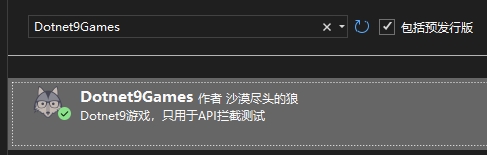
I have published the (fictional) game I created on NuGet as a third-party package. To simulate a more realistic scenario, simply install the latest version (this article is based on version 1.0.3):
2.2. Adding the Target Game
Open MainWindow.xaml and introduce the Dotnet9Games namespace:
xmlns:dotnet9="https://dotnet9.com"
The complete code for MainWindow.xaml is as follows:
<Window
    x:Class="Dotnet9Playground.MainWindow"
    xmlns="http://schemas.microsoft.com/winfx/2006/xaml/presentation"
    xmlns:x="http://schemas.microsoft.com/winfx/2006/xaml"
    xmlns:d="http://schemas.microsoft.com/expression/blend/2008"
    xmlns:dotnet9="https://dotnet9.com"
    xmlns:mc="http://schemas.openxmlformats.org/markup-compatibility/2006"
    Title="Comprehensive Case Simulation: Simulating .NET application scenarios, comprehensively applying decompilation, third-party library debugging, interception, and multi-version library compatibility"
    Width="800"
    Height="450"
    Background="Bisque"
    Icon="Resources/favicon.ico"
    mc:Ignorable="d">
    <Border Padding="10">
        <Grid>
            <Grid.RowDefinitions>
                <RowDefinition Height="40" />
                <RowDefinition Height="*" />
            </Grid.RowDefinitions>
            <StackPanel
                Grid.Row="0"
                VerticalAlignment="Center"
                Orientation="Horizontal">
                <TextBlock
                    VerticalAlignment="Center"
                    FontSize="20"
                    Foreground="Blue"
                    Text="Generate" />
                <TextBox
                    x:Name="TextBoxBallCount"
                    Width="50"
                    Height="25"
                    Margin="10,0"
                    VerticalAlignment="Center"
                    HorizontalContentAlignment="Center"
                    VerticalContentAlignment="Center"
                    FontSize="20"
                    Foreground="Red"
                    Text="{Binding ElementName=MyBallGame, Path=BallCount, Mode=TwoWay}" />
                <TextBlock
                    Margin="0,0,10,0"
                    VerticalAlignment="Center"
                    FontSize="20"
                    Foreground="Blue"
                    Text=" balloons, click " />
                <Button
                    Padding="15,2"
                    Background="White"
                    BorderBrush="DarkGreen"
                    BorderThickness="2"
                    Click="StartGame_OnClick"
                    Content="Start Game"
                    FontSize="20"
                    Foreground="DarkOrange" />
            </StackPanel>
            <dotnet9:BallGame
                x:Name="MyBallGame"
                Grid.Row="1"
                BallCount="8" />
        </Grid>
    </Border>
</Window>
The code for MainWindow.xaml.cs is as follows:
using System.Windows;

namespace Dotnet9Playground;

/// <summary>
/// Comprehensive Case Simulation: Simulating .NET application scenarios, comprehensively applying decompilation, third-party library debugging, interception, and multi-version library compatibility
/// </summary>
public partial class MainWindow : Window
{
    public MainWindow()
    {
        InitializeComponent();
    }

    private void StartGame_OnClick(object sender, RoutedEventArgs e)
    {
        MyBallGame.StartGame();
    }
}
After preparation, run the program:
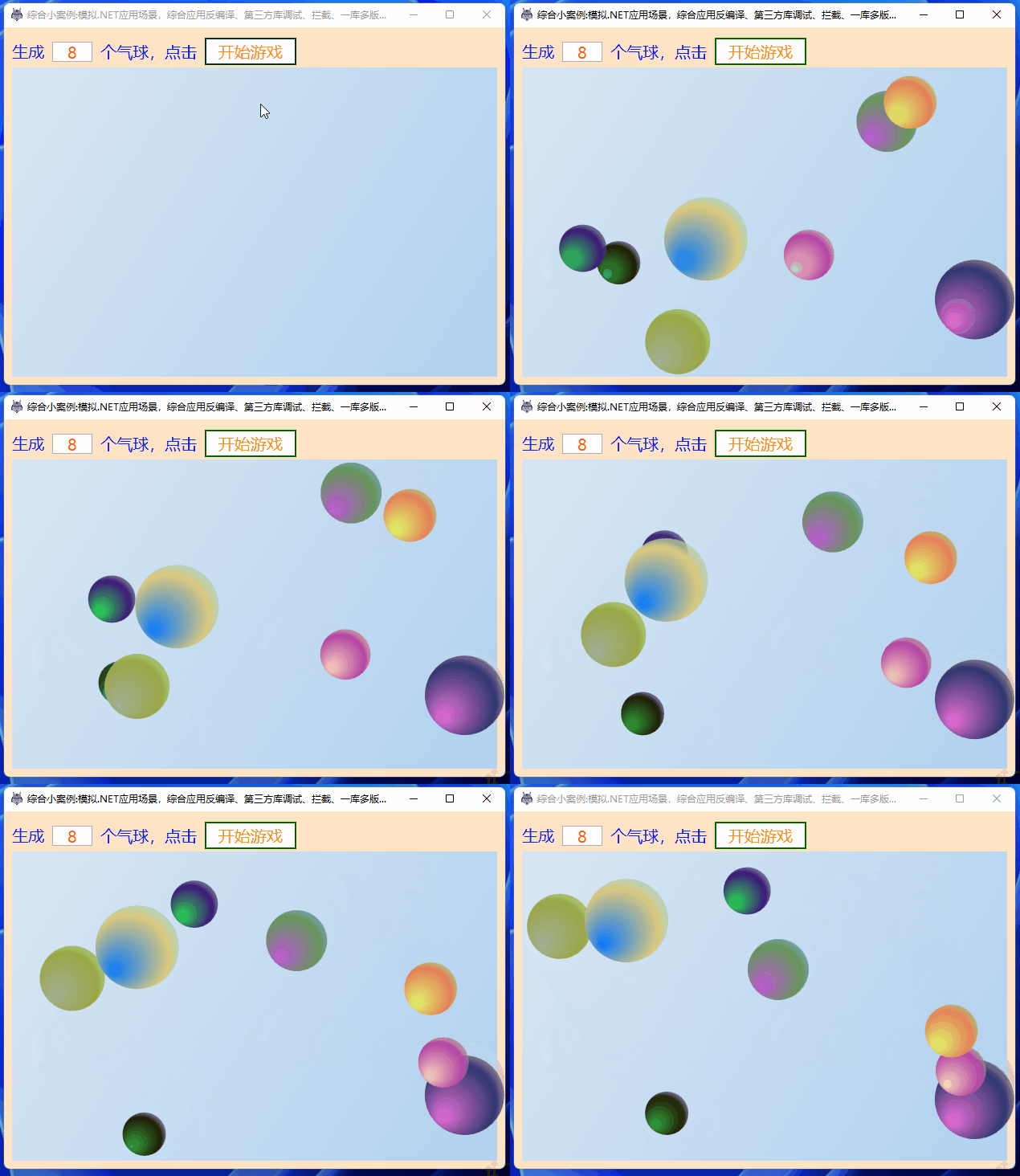
This game is relatively simple, mainly consisting of the following steps:
- Provide a text input box on the main interface to enter the number of balloons to generate. The value of the text box can be bound to the game's
BallCountproperty via data binding. - Provide a
Start Gamebutton. Clicking the button triggersMyBallGame.StartGame(), which generates balloons and plays the animation.
2.3. Introducing the First Trap
Generating 8 balloons might be too few. Let's generate 80 balloons:
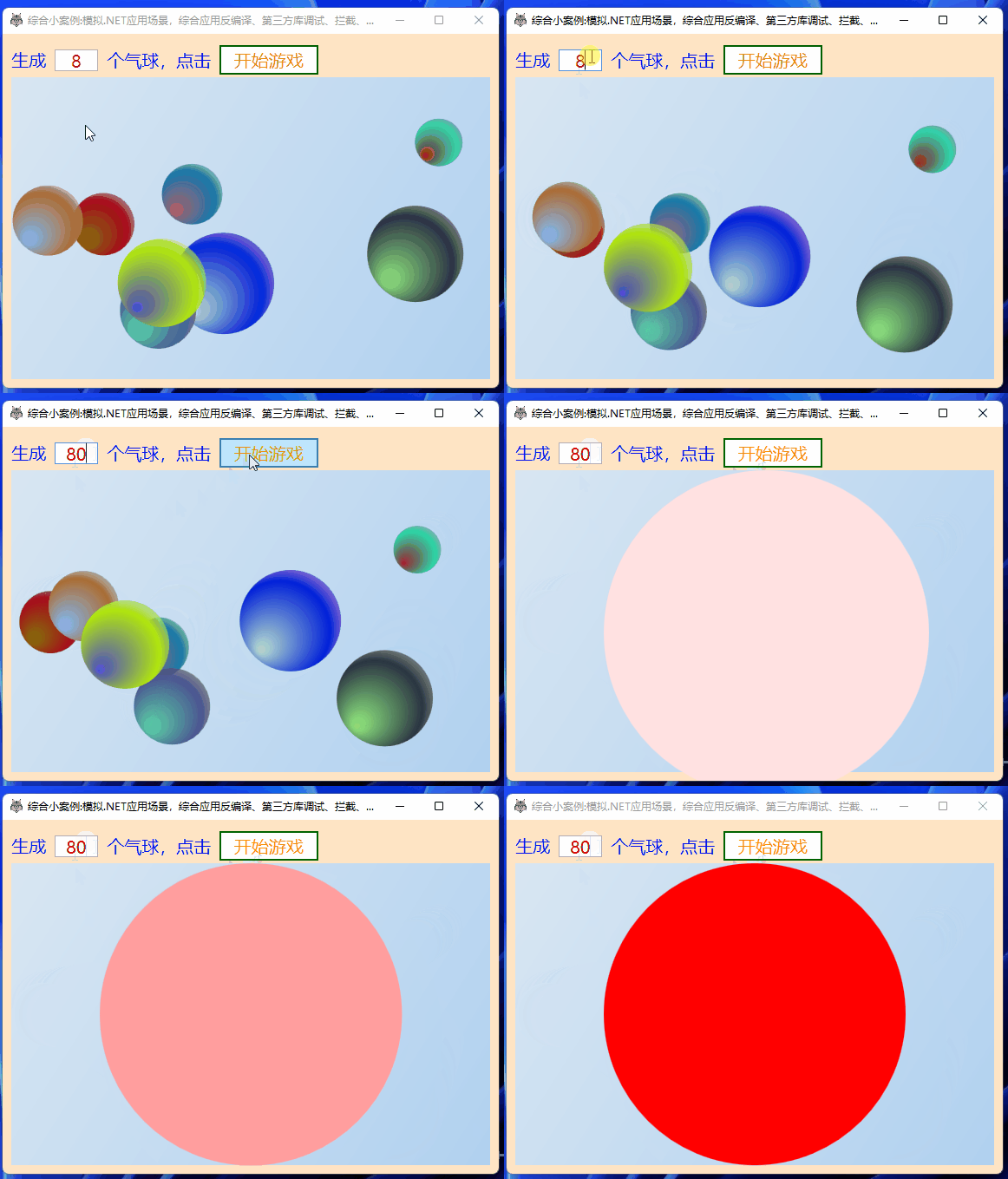
Why does a big red circle pop up, and all the balloons disappear? That's the trap!
3. Debugging with dnSpy
3.1. Analysis
After entering 80 balloons, clicking Start Game calls the game's method StartGame(). We open dnSpy (the link provides 32-bit and 64-bit download links), drag Dotnet9Games.dll into it, and find the method code:
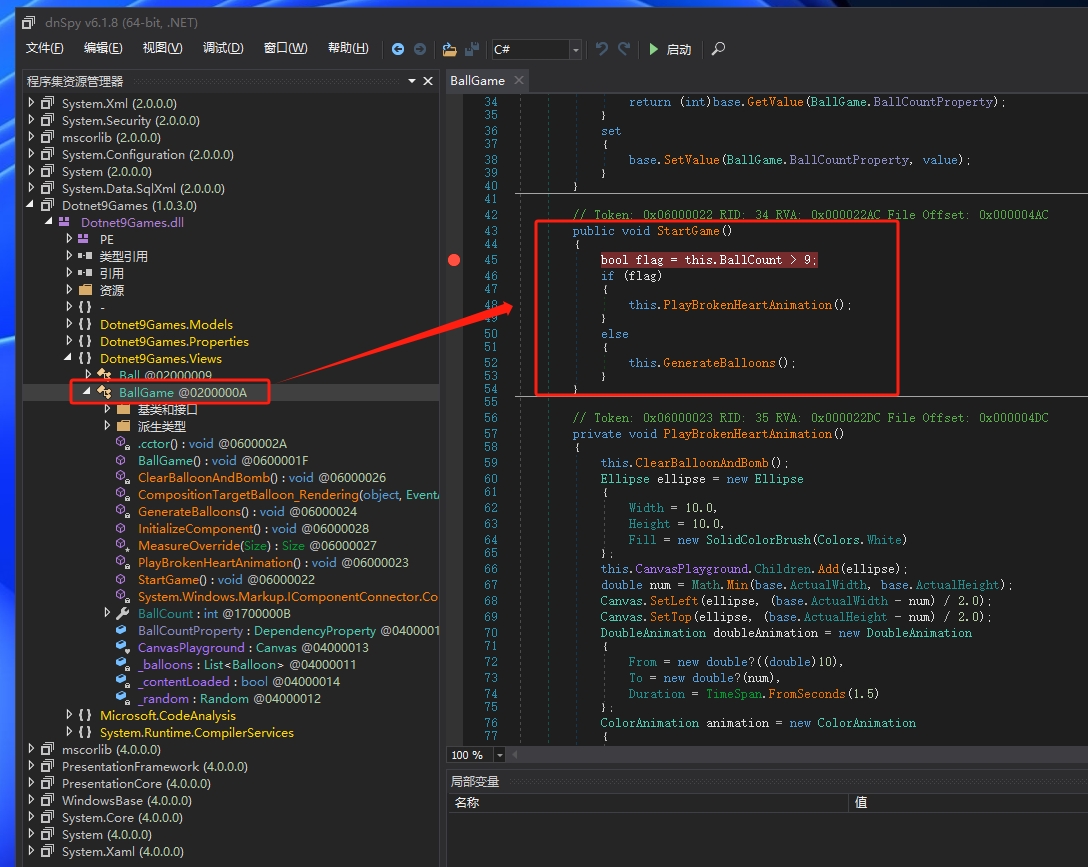
// Token: 0x06000022 RID: 34 RVA: 0x000022AC File Offset: 0x000004AC
public void StartGame()
{
    bool flag = this.BallCount > 9;
    if (flag)
    {
        this.PlayBrokenHeartAnimation();
    }
    else
    {
        this.GenerateBalloons();
    }
}
It turns out that when the number of balloons exceeds 9, it calls the PlayBrokenHeartAnimation() method. What does this method do? Check the code:
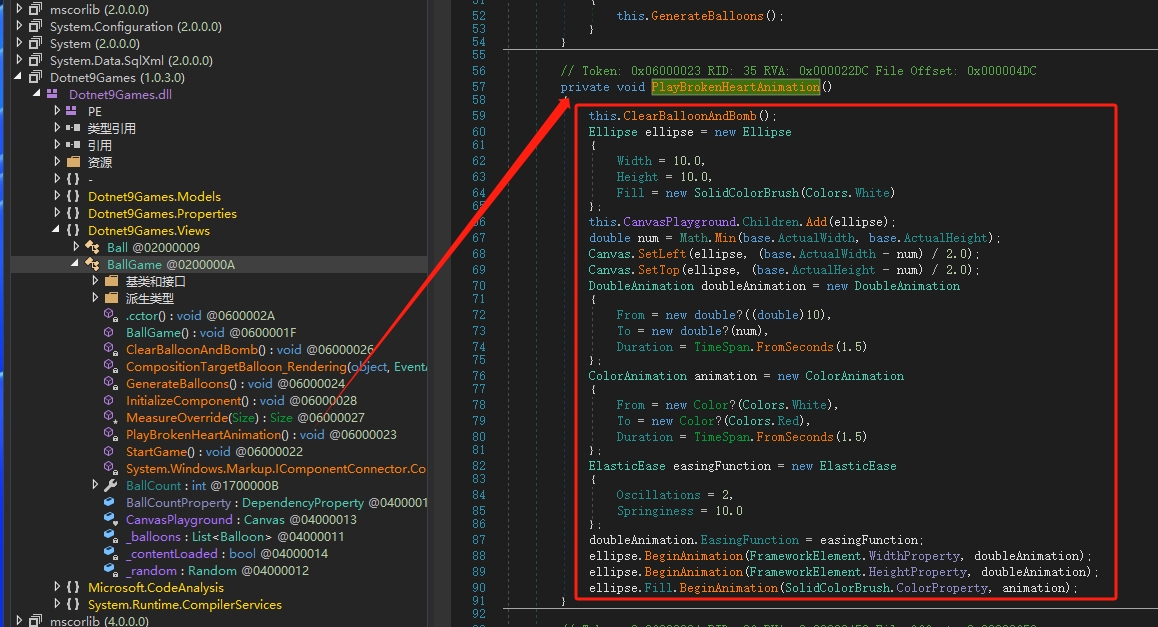
Can you roughly see it? It first clears the balloon control and then adds a red circle animation. Let's try debugging it.
3.2. Debugging Verification
Roughly follow these steps:
- Set a breakpoint on the first line of the
StartGame()method. - Click the
Startbutton in dnSpy. - In the
Debug Programdialog that appears, keep the defaultDebug Engineas.NET Framework, select our WPF main program's executableDotnet9Playground.exeas theExecutable Program, and clickOKto run the WPF program. - Enter a number of balloons greater than 9 on the main program interface, e.g., 80.
- Click the
Start Gamebutton. - The breakpoint is hit; step through and see that it indeed enters the
PlayBrokenHeartAnimation()method.

4. Intercepting with Lib.Harmony
Once we understand the reason, we use Lib.Harmony to intercept the StartGame() method.
4.1. Installing the Lib.Harmony Package
We install the lowest version 1.2.0.1:

Why install the lowest version?
To later introduce the need for multi-version library compatibility. The low version of Lib.Harmony has bugs, so let's continue, haha.
4.2. Writing the Interception Class
Add the interception class /Hooks/HookBallGameStartGame.cs:
using Dotnet9Games.Views;
using Harmony;
using System.Reflection;

namespace Dotnet9Playground.Hooks;

internal class HookBallGameStartGame
{
    /// <summary>
    /// Intercept the game's StartGame method
    /// </summary>
    public static void StartHook()
    {
        var harmony = HarmonyInstance.Create("https://dotnet9.com/HookBallGameStartGame");
        var hookClassType = typeof(BallGame);
        var hookMethod =
            hookClassType!.GetMethod(nameof(BallGame.StartGame), BindingFlags.Public | BindingFlags.Instance);
        var replaceMethod = typeof(HookBallGameStartGame).GetMethod(nameof(HookStartGame));
        var replaceHarmonyMethod = new HarmonyMethod(replaceMethod);
        harmony.Patch(hookMethod, replaceHarmonyMethod);
    }

    /// <summary>
    /// Replacement method for StartGame
    /// </summary>
    /// <param name="__instance">BallGame instance</param>
    /// <returns></returns>
    public static bool HookStartGame(ref object __instance)
    {
        #region Original method code

        //if (BallCount > 9)
        //{
        //    // Play explosion animation effect
        //    PlayExplosionAnimation();
        //}
        //else
        //{
        //    // Generate colorful balloons
        //    GenerateBalloons();
        //}

        #endregion

        #region Interception replacement method logic

        // 1. Remove the balloon count limit logic
        // 2. The GenerateBalloons method is private, we call it via reflection
        var instanceType = __instance.GetType();
        var hookGenerateBalloonsMethod =
            instanceType.GetMethod("GenerateBalloons", BindingFlags.Instance | BindingFlags.NonPublic);

        // Generate colorful balloons
        hookGenerateBalloonsMethod!.Invoke(__instance, null);

        #endregion

        return false;
    }
}
The code above has relevant comments. Let me reiterate:
- The
StartHook()method associates the intercepted methodStartGamewith the replacement methodHookStartGame. HookStartGameis the replacement method. The commented code in the method is the original logic.- In the replacement code, you could increase the balloon count limit or, like the site owner, directly remove the
if (BallCount > 9)check and directly call the balloon generation methodGenerateBalloons.
Register the interception class in App.xaml.cs:
public partial class App : Application
{
    protected override void OnStartup(StartupEventArgs e)
    {
        base.OnStartup(e);

        // Intercept the balloon animation playback method
        HookBallGameStartGame.StartHook();
    }
}
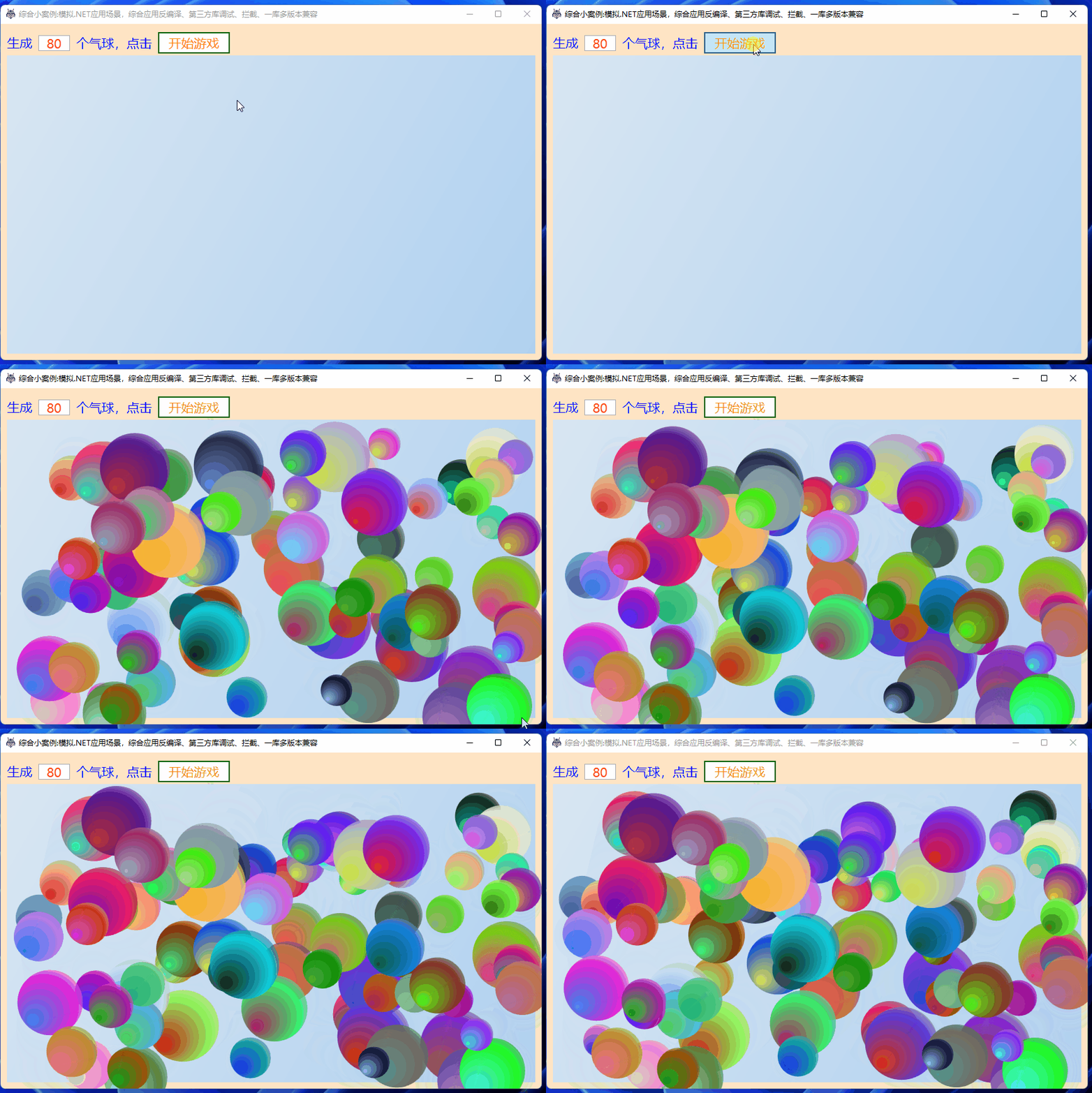
Now run the WPF program again. Change the balloon count to 80, and the balloons are generated normally:
4.3. That's it? No, here comes another trap
Watch the balloons moving. Try resizing the window (it's recommended to try this in Debug mode because the program may crash, causing the operating system to freeze for a while):
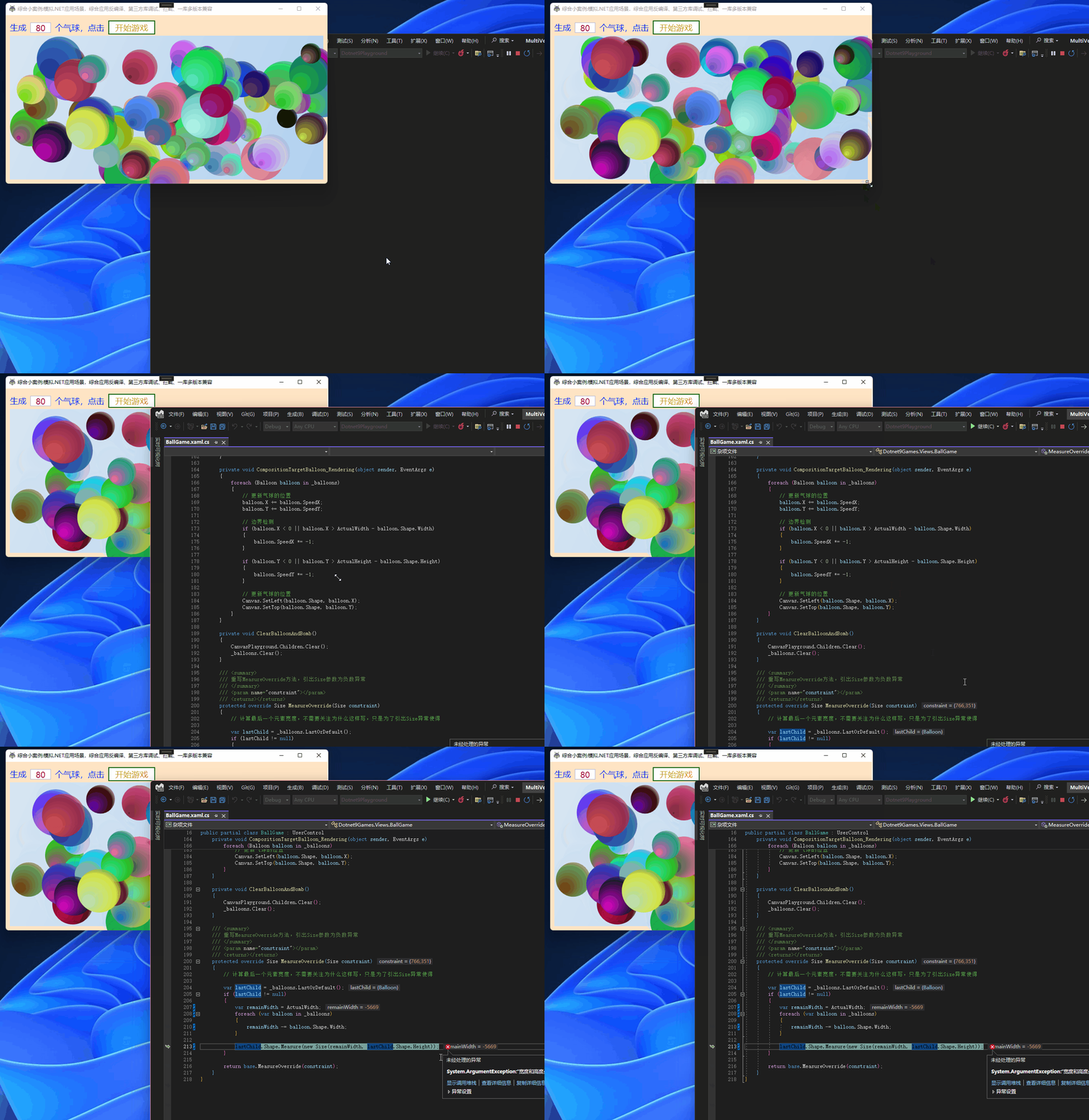
The program throws an exception. Let's take a screenshot:
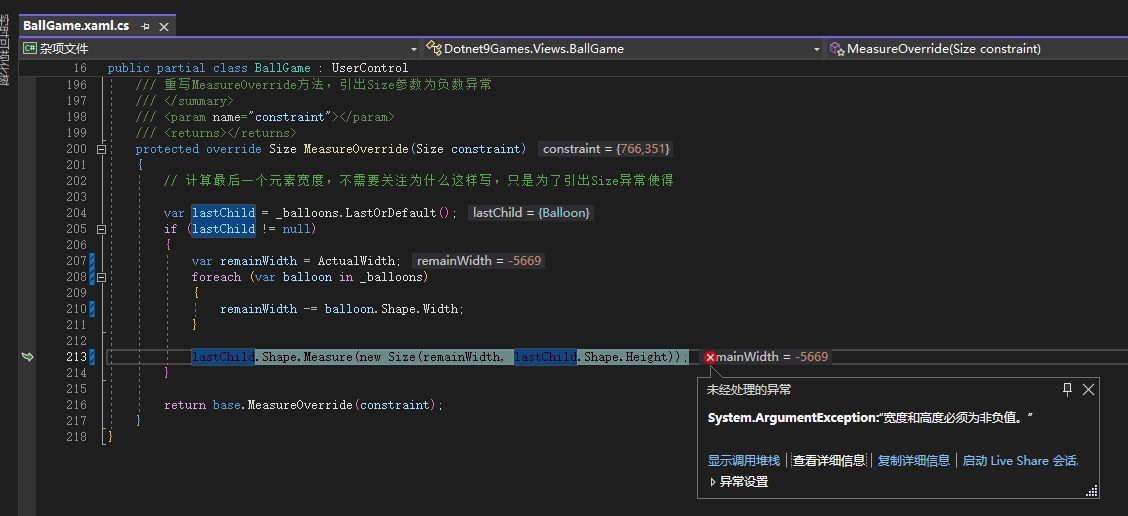
Paste the exception code:
/// <summary>
/// Override the MeasureOverride method to trigger an exception when the Size parameter is negative
/// </summary>
/// <param name="constraint"></param>
/// <returns></returns>
protected override Size MeasureOverride(Size constraint)
{
    // Calculate the width of the last element. You don't need to worry about why it's written this way; it's just to trigger a Size exception

    var lastChild = _balloons.LastOrDefault();
    if (lastChild != null)
    {
        var remainWidth = ActualWidth;
        foreach (var balloon in _balloons)
        {
            remainWidth -= balloon.Shape.Width;
        }

        lastChild.Shape.Measure(new Size(remainWidth, lastChild.Shape.Height));
    }

    return base.MeasureOverride(constraint);
}
Analysis
- When resizing the window, the
MeasureOverridemethod of the game user controlBallGameis triggered, causing a recalculation of the layout. - Logic inside the method:
- If there is a moving balloon, calculate the difference between the actual width of
BallGameand the sum of all child balloons' widths, resulting inremainWidth. - Use
remainWidthto recalculate the size of the last balloon. - Since
remainWidthis computed via subtraction, if there are enough balloons so that the game control's width is less than the sum of the balloon widths,remainWidthbecomes negative. - Now look at the
Sizeconstructor code (if you're using VS, it's recommended to install ReSharper, which makes it very convenient to view the methods of referenced libraries), as shown in the screenshot below:
- If there is a moving balloon, calculate the difference between the actual width of

Copy the code here for viewing:
  /// <summary>Implements a structure that is used to describe the <see cref="T:System.Windows.Size" /> of an object. </summary>
  [TypeConverter(typeof (SizeConverter))]
  [ValueSerializer(typeof (SizeValueSerializer))]
  [Serializable]
  public struct Size : IFormattable
  {
    // Many lines omitted here
    /// <summary>Initializes a new instance of the <see cref="T:System.Windows.Size" /> structure and assigns it an initial <paramref name="width" /> and <paramref name="height" />.</summary>
    /// <param name="width">The initial width of the instance of <see cref="T:System.Windows.Size" />.</param>
    /// <param name="height">The initial height of the instance of <see cref="T:System.Windows.Size" />.</param>
    public Size(double width, double height)
    {
      this._width = width >= 0.0 && height >= 0.0 ? width : throw new ArgumentException(MS.Internal.WindowsBase.SR.Get("Size_WidthAndHeightCannotBeNegative"));
      this._height = height;
    }
    // Many lines omitted here
  }
When the width or height is negative, an exception is thrown, which makes sense. Now we use Lib.Harmony to intercept the BallGame's MeasureOverride method, following the same approach.
Add the /Hooks/HookBallgameMeasureOverride.cs class to intercept:
using Dotnet9Games.Views;
using Harmony;
using System.Reflection;

namespace Dotnet9Playground.Hooks;

/// <summary>
/// Intercept the BallGame's MeasureOverride method
/// </summary>
internal class HookBallgameMeasureOverride
{
    /// <summary>
    /// Intercept the game's MeasureOverride method
    /// </summary>
    public static void StartHook()
    {
        var harmony = HarmonyInstance.Create("https://dotnet9.com/HookBallgameMeasureOverride");
        var hookClassType = typeof(BallGame);
        var hookMethod = hookClassType!.GetMethod("MeasureOverride", BindingFlags.NonPublic | BindingFlags.Instance);
        var replaceMethod = typeof(HookBallgameMeasureOverride).GetMethod(nameof(HookMeasureOverride));
        var replaceHarmonyMethod = new HarmonyMethod(replaceMethod);
        harmony.Patch(hookMethod, replaceHarmonyMethod);
    }

    /// <summary>
    /// Replacement method for MeasureOverride
    /// </summary>
    /// <param name="__instance">BallGame instance</param>
    /// <returns></returns>
    public static bool HookMeasureOverride(ref object __instance)
    {
        // Temporarily do nothing, returning false means
        return false;
    }
}
Then add the interception registration in App.xaml.cs:
using Dotnet9Playground.Hooks;
using System.Windows;

namespace Dotnet9Playground
{
    /// <summary>
    /// Interaction logic for App.xaml
    /// </summary>
    public partial class App : Application
    {
        protected override void OnStartup(StartupEventArgs e)
        {
            base.OnStartup(e);

            // Intercept the balloon animation playback method
            HookBallGameStartGame.StartHook();

            // This is the second interception method: intercept the balloon MeasureOverride method
            HookBallgameMeasureOverride.StartHook();
        }
    }
}
Now run the program:
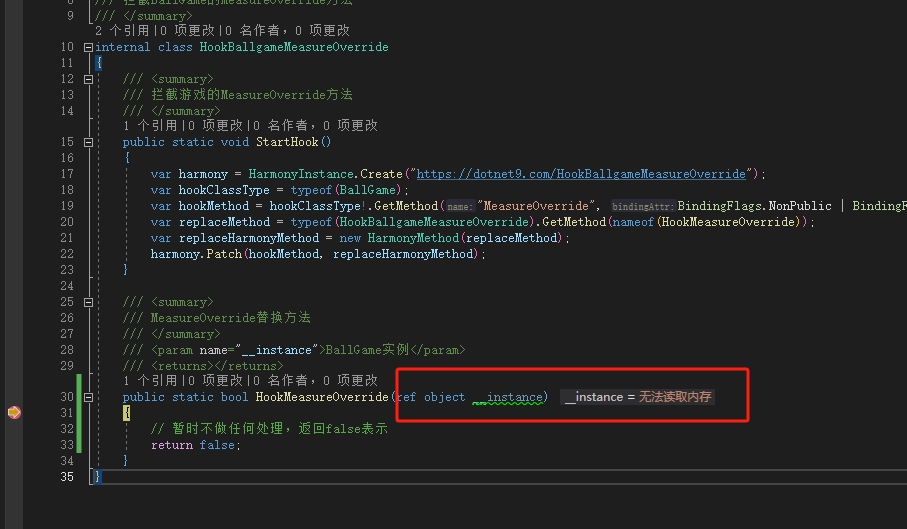
The interception method hits the breakpoint, but it cannot get the BallGame instance, showing Unable to read memory. Returning false (not executing the original method) results in the following exception:
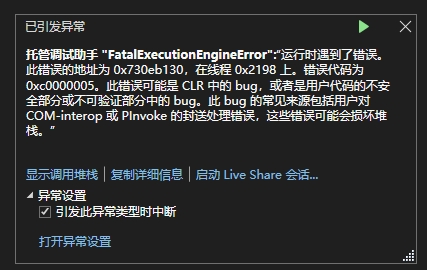
The program exits abnormally. We change the interception method to return true (continue executing the original method), and we get another prompt:
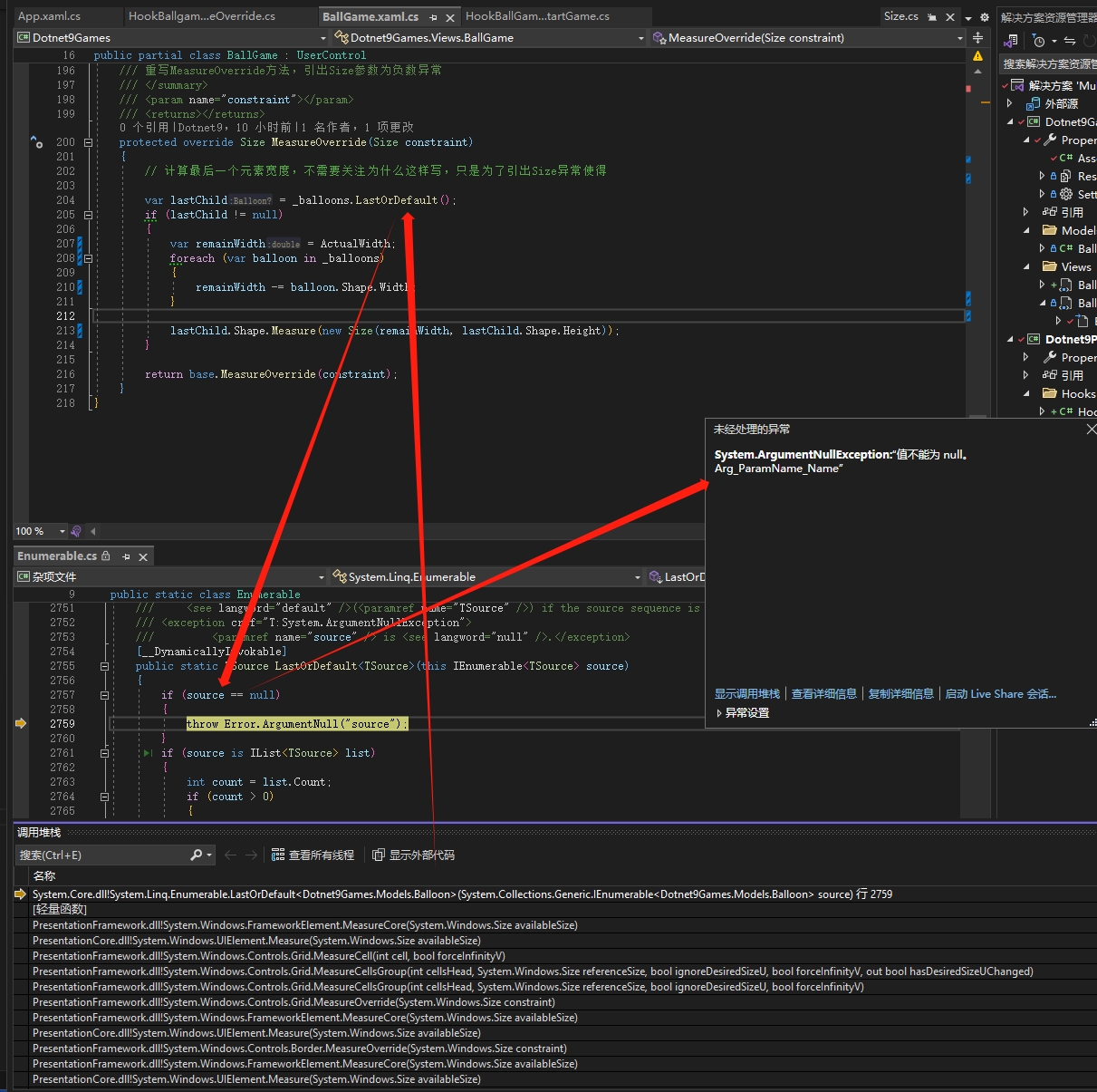
Because continuing with the original method, the code that gets the last balloon var lastChild = _balloons.LastOrDefault(); throws an error. It's quite frustrating.
After consulting a company expert:
Because
Sizeis a struct pointer, version 1.2.0.1 of0Harmonytreats the pointer as 4 bytes, but "our program" is 64-bit, where pointers are 8 bytes, causing memory errors.
So, should we use a higher version of Lib.Harmony?
5. Introducing a High Version of Lib.Harmony: Compatibility Solution for Multiple Versions of a Library
5.1. Create a New Project and Introduce the High Version of Lib.Harmony
Reason
It's possible that the program is already using a low version of the
Lib.Harmonylibrary for many interception operations. Upgrading all at once without thorough testing could lead to a massive program crash (currently, this program only has one interception classHookBallGameStartGame), and directly referencing the same library with multiple versions in theDotnet9Playgroundproject is not feasible (if readers have suggestions, they are welcome to leave comments).
Add a new class library Dotnet9HookHigh and install the latest stable version 2.2.2 of Lib.Harmony via NuGet:

Also add the Dotnet9Games NuGet package. Cut the previously added HookBallgameMeasureOverride class into this library. There are differences in usage between the high and low versions of Lib.Harmony, which are commented in the code. Pay attention to the comparison. The updated HookBallgameMeasureOverride class definition:
using Dotnet9Games.Views;
using HarmonyLib;
using System.Reflection;

namespace Dotnet9HookHigh;

/// <summary>
/// Intercept the BallGame's MeasureOverride method
/// </summary>
public class HookBallgameMeasureOverride
{
    /// <summary>
    /// Intercept the game's MeasureOverride method
    /// </summary>
    public static void StartHook()
    {
        //var harmony =  HarmonyInstance.Create("https://dotnet9.com/HookBallgameMeasureOverride");
        // The above is the low version Harmony instance creation code, below is the high version
        var harmony =  new Harmony("https://dotnet9.com/HookBallgameMeasureOverride");
        var hookClassType = typeof(BallGame);
        var hookMethod = hookClassType!.GetMethod("MeasureOverride", BindingFlags.NonPublic | BindingFlags.Instance);
        var replaceMethod = typeof(HookBallgameMeasureOverride).GetMethod(nameof(HookMeasureOverride));
        var replaceHarmonyMethod = new HarmonyMethod(replaceMethod);
        harmony.Patch(hookMethod, replaceHarmonyMethod);
    }

    /// <summary>
    /// Replacement method for MeasureOverride
    /// </summary>
    /// <param name="__instance">BallGame instance</param>
    /// <returns></returns>
    public static bool HookMeasureOverride(ref object __instance)
    {
        return false;
    }
}
The difference is shown in the image below. The code for creating the Harmony instance has changed; everything else remains the same:
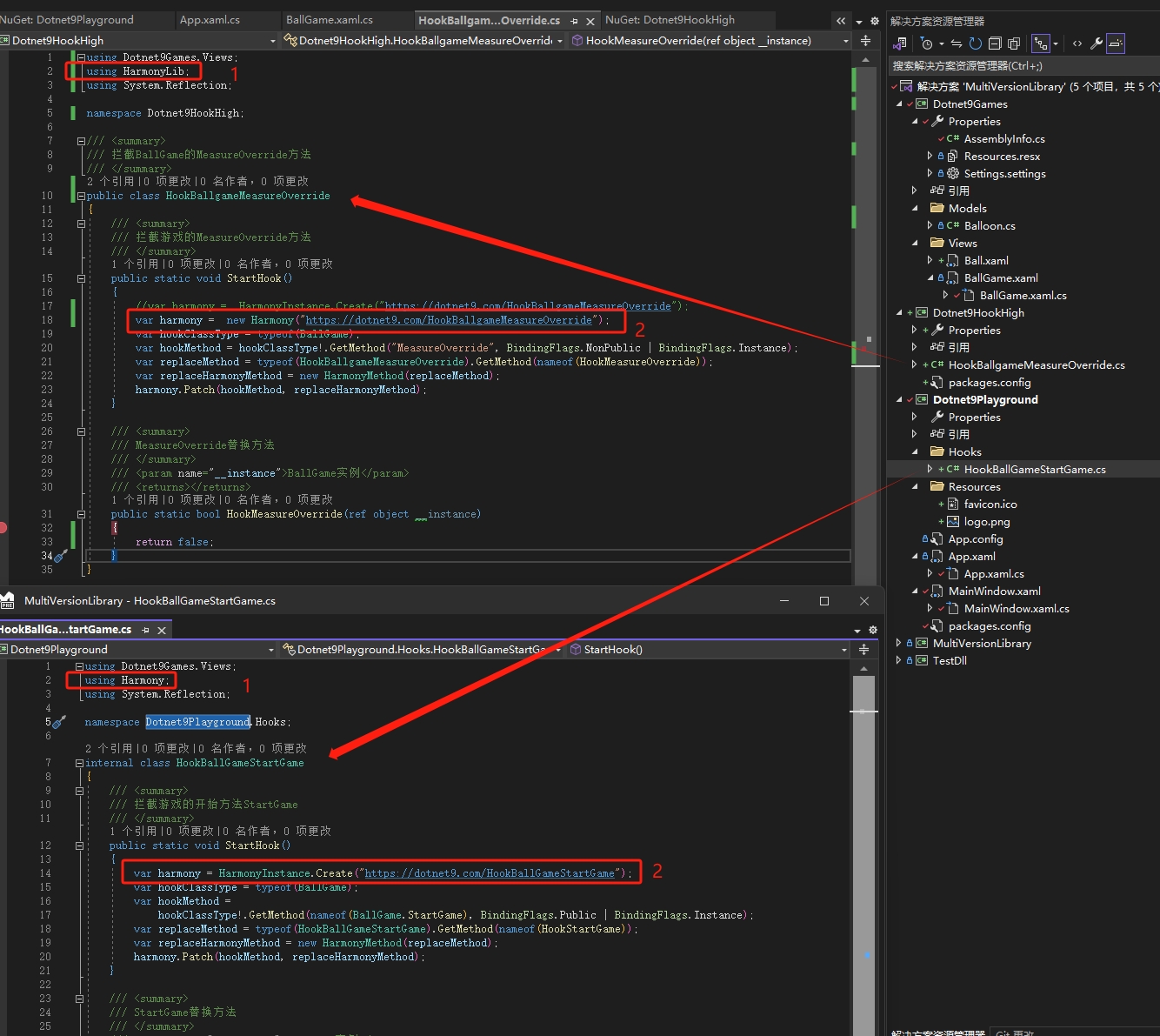
The main project Dotnet9Playground adds a reference to the Dotnet9HookHigh project, and App.xaml.cs adds the using Dotnet9HookHigh; namespace. The code is as follows:
using Dotnet9HookHigh;
using Dotnet9Playground.Hooks;
using System.Windows;

namespace Dotnet9Playground
{
    /// <summary>
    /// Interaction logic for App.xaml
    /// </summary>
    public partial class App : Application
    {
        protected override void OnStartup(StartupEventArgs e)
        {
            base.OnStartup(e);

            // Intercept the balloon animation playback method
            HookBallGameStartGame.StartHook();

            // This is the second interception method: intercept the balloon MeasureOverride method
            HookBallgameMeasureOverride.StartHook();
        }
    }
}
Is that it? Run it and see:

This prompt indicates that the new project Dotnet9HookHigh has not successfully applied the high version of Lib.Harmony (2.2.2), or that the main project Dotnet9Playground has not successfully recognized and loaded the high version of Lib.Harmony. What to do? Watch my next moves!
5.2. Store Different Versions of the Library in Separate Directories
5.2.1. Analyze the Program Output Directory
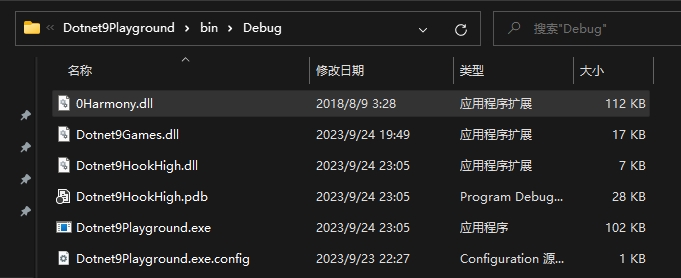
The program output directory has only one 0Harmony.dll. For two versions (low and high), there should be two libraries. What to do?
5.2.2. Create a New Directory
Keep the low version unchanged (still store it in the root of the output directory). For compatibility, we store the high version in a different directory, e.g., Lib/Lib.Harmony/2.2.2/0Harmony.dll. Store the library in the project Dotnet9HookHigh according to the directory structure:
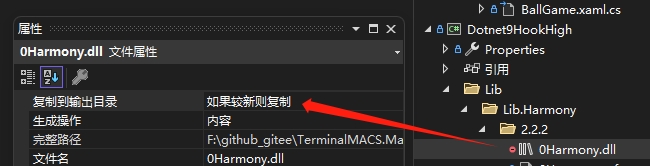
- Set the property of
0Harmony.dlltoCopy to Output Directory=Copy if newer. - Remove the
Lib.HarmonyNuGet reference fromDotnet9HookHighand replace it with a local reference (the old-fashioned way of browsing to the local path).

Is that all? Why does it still show the same error?
5.3. Configuring Multiple Versions of the Same Library
5.3.1. Configure Multiple Versions in App.config
Modify the App.config file of Dotnet9Palyground to add the two versions of 0Harmony.dll and their paths:
<?xml version="1.0" encoding="utf-8" ?>
<configuration>
    <startup>
        <supportedRuntime version="v4.0" sku=".NETFramework,Version=v4.6.1" />
    </startup>
	<runtime>
		<assemblyBinding xmlns="urn:schemas-microsoft-com:asm.v1">
			<dependentAssembly>
				<assemblyIdentity name="0Harmony"
				  publicKeyToken="null"/>
				<codeBase version="1.2.0.1" href="0Harmony.dll" />
			</dependentAssembly>
			<dependentAssembly>
				<assemblyIdentity name="0Harmony"
				  publicKeyToken="null"/>
				<codeBase version="2.2.2.0" href="Lib\Lib.Harmony\2.2.2\0Harmony.dll" />
			</dependentAssembly>
		</assemblyBinding>
	</runtime>
</configuration>
Run it again, and it still shows the same error? Oh, I'm getting dizzy....
5.3.2. Key Point: Strong-Naming of the Library
Separating directories and configuring version paths in the config file are not enough. The main project still cannot distinguish between the two versions of the Lib.Harmony library. This involves .NET library strong naming, which is the publicKeyToken attribute in the App.config above. Adding this allows the main program to recognize it. There is an explanation online about strong naming: .Net assembly strong naming detailed explanation:
- Strong-named DLLs can be registered in the GAC, and different applications can share the same DLL.
- Strong-named libraries or applications can only reference strong-named DLLs; they cannot reference non-strong-named DLLs. However, non-strong-named DLLs can reference strong-named DLLs.
- Strong naming cannot protect source code; strong-named DLLs can still be decompiled.
- Strong-named DLLs can prevent third-party malicious tampering.
Here, we keep the 0Harmony.dll version 1.2.0.1 unchanged and only strong-name the high version 2.2.2. The steps for strong naming are based on VS2008 version introducing third-party DLLs without strong naming. Let’s do it together. We'll use the Everything tool to search for the command programs needed; it's recommended to download it in advance.
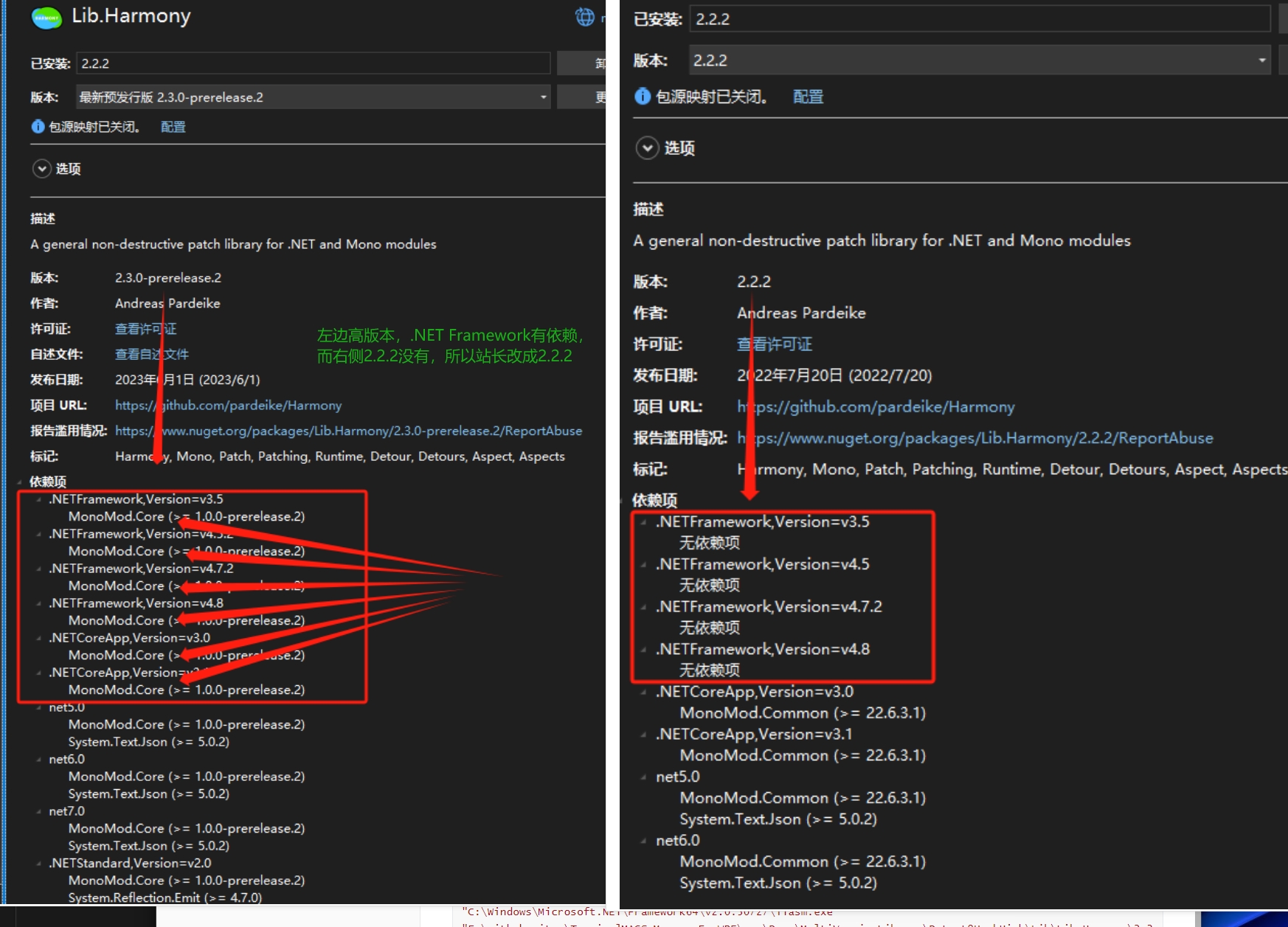
Note: Do not use the latest preview version 2.3.0-prerelease.2 for now. The site owner spent two nights unsuccessfully trying to sign this version for this example. Switching to 2.2.2 worked. The images below were also re-recorded. This might be because that version has other dependencies; it's just speculation:
- Create a new random key pair
0Harmony.snk
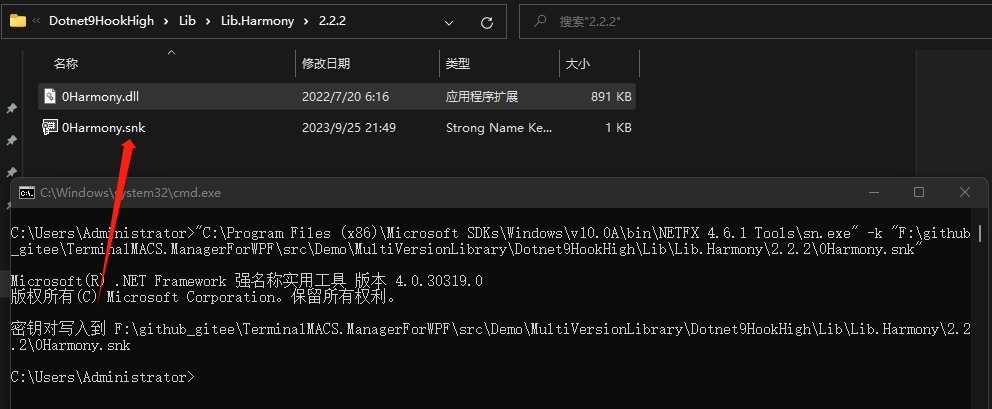
Use Everything to find an sn.exe program, for example: "C:\Program Files (x86)\Microsoft SDKs\Windows\v10.0A\bin\NETFX 4.6.1 Tools\sn.exe". Generate a key pair file 0Harmony.snk in the high-version directory with the following command:
"C:\Program Files (x86)\Microsoft SDKs\Windows\v10.0A\bin\NETFX 4.6.1 Tools\sn.exe" -k "F:\github_gitee\TerminalMACS.ManagerForWPF\src\Demo\MultiVersionLibrary\Dotnet9HookHigh\Lib\Lib.Harmony\2.2.2\0Harmony.snk"
- Decompile
0Harmony.dll
Find ildasm.exe, e.g., C:\Program Files (x86)\Microsoft SDKs\Windows\v10.0A\bin\NETFX 4.6.1 Tools\ildasm.exe. Execute the following command to generate the IL intermediate file for 0Harmony.dll:
"C:\Program Files (x86)\Microsoft SDKs\Windows\v10.0A\bin\NETFX 4.6.1 Tools\ildasm.exe" "F:\github_gitee\TerminalMACS.ManagerForWPF\src\Demo\MultiVersionLibrary\Dotnet9HookHigh\Lib\Lib.Harmony\2.2.2\0Harmony.dll" /out="F:\github_gitee\TerminalMACS.ManagerForWPF\src\Demo\MultiVersionLibrary\Dotnet9HookHigh\Lib\Lib.Harmony\2.2.2\0Harmony.il"
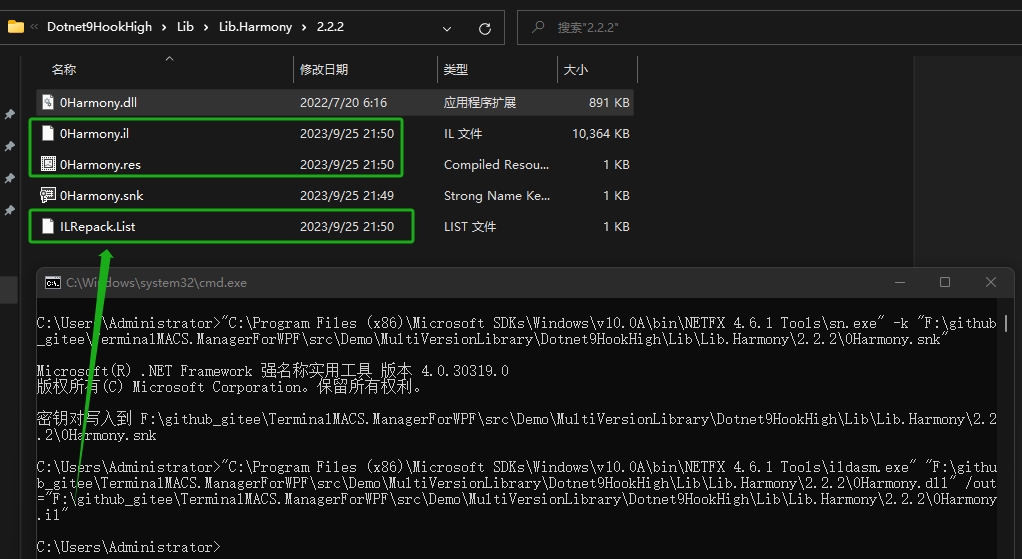
- Recompile with strong naming parameter
Find ilasm.exe, e.g., C:\Windows\Microsoft.NET\Framework64\v2.0.50727\ilasm.exe. Execute the following command to sign:
"C:\Windows\Microsoft.NET\Framework64\v2.0.50727\ilasm.exe" "F:\github_gitee\TerminalMACS.ManagerForWPF\src\Demo\MultiVersionLibrary\Dotnet9HookHigh\Lib\Lib.Harmony\2.2.2\0Harmony.il" /dll /resource="F:\github_gitee\TerminalMACS.ManagerForWPF\src\Demo\MultiVersionLibrary\Dotnet9HookHigh\Lib\Lib.Harmony\2.2.2\0Harmony.res" /key="F:\github_gitee\TerminalMACS.ManagerForWPF\src\Demo\MultiVersionLibrary\Dotnet9HookHigh\Lib\Lib.Harmony\2.2.2\0Harmony.snk" /optimize
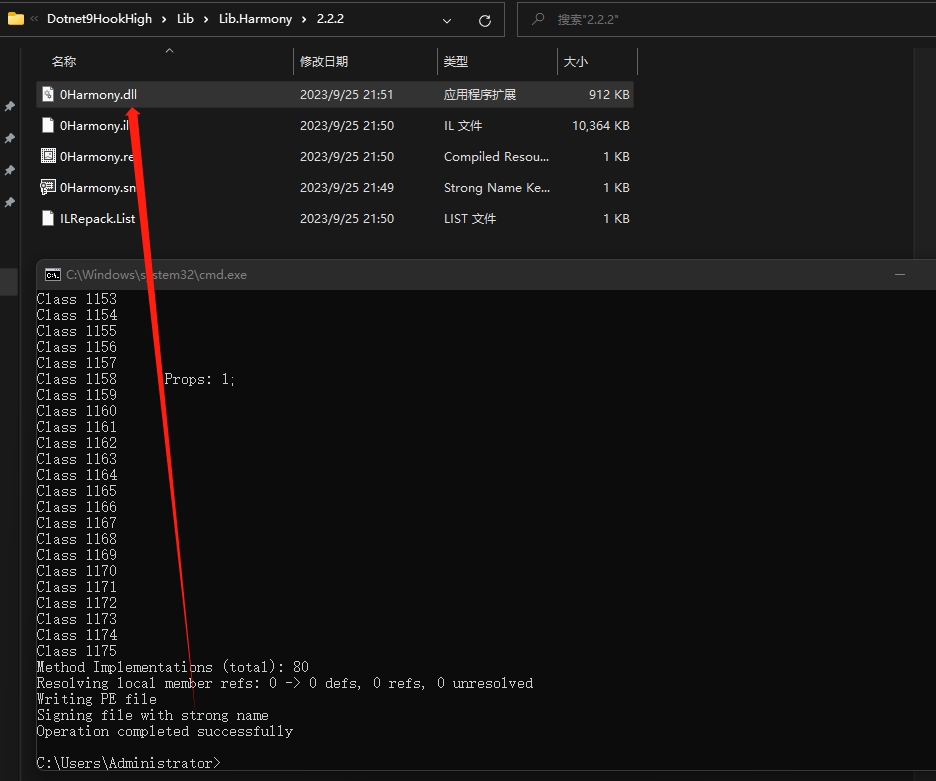
- Verify the signature
"C:\Program Files (x86)\Microsoft SDKs\Windows\v10.0A\bin\NETFX 4.6.1 Tools\sn.exe" -v "F:\github_gitee\TerminalMACS.ManagerForWPF\src\Demo\MultiVersionLibrary\Dotnet9HookHigh\Lib\Lib.Harmony\2.2.2\0Harmony.dll"

You can also drag the generated dll into dnSpy to check:
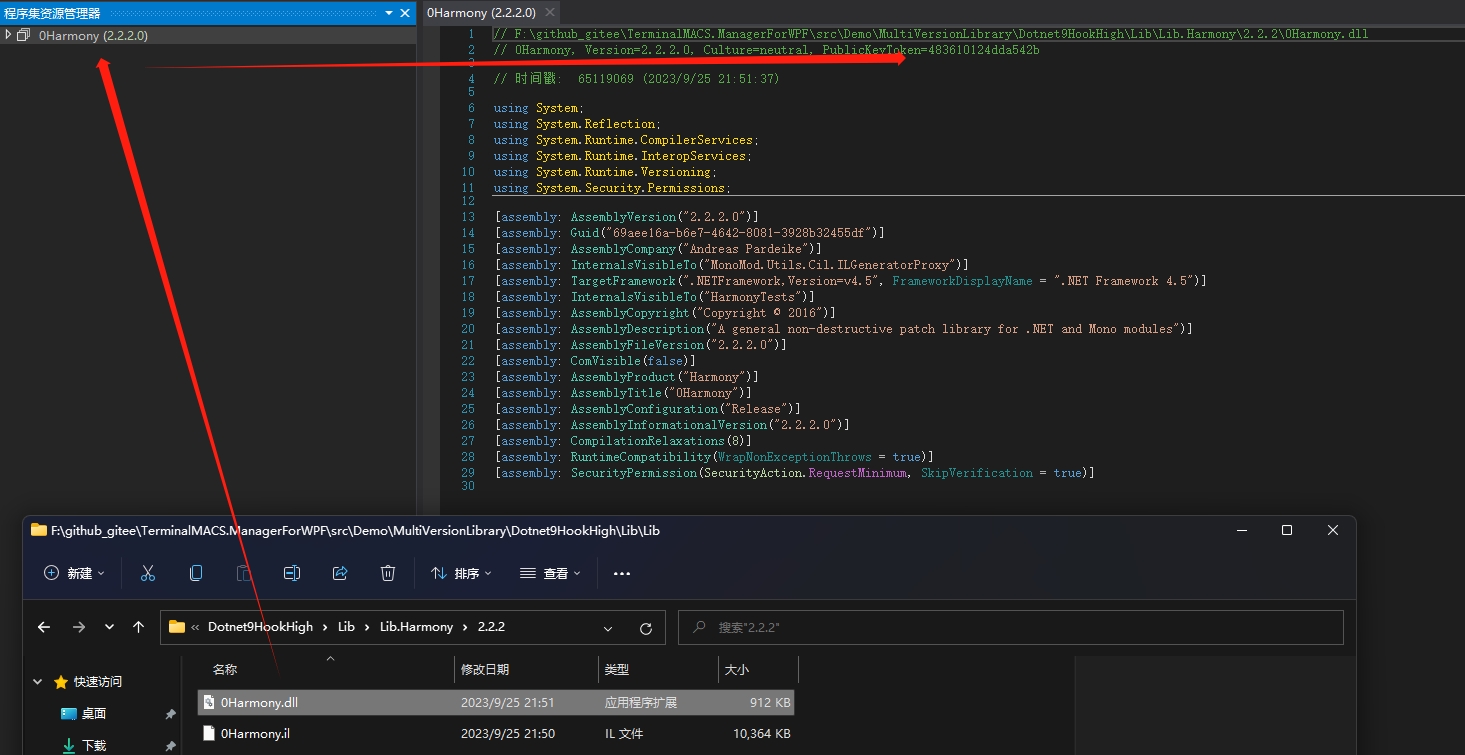
For comparison, Lib.Harmony downloaded from NuGet is not signed:
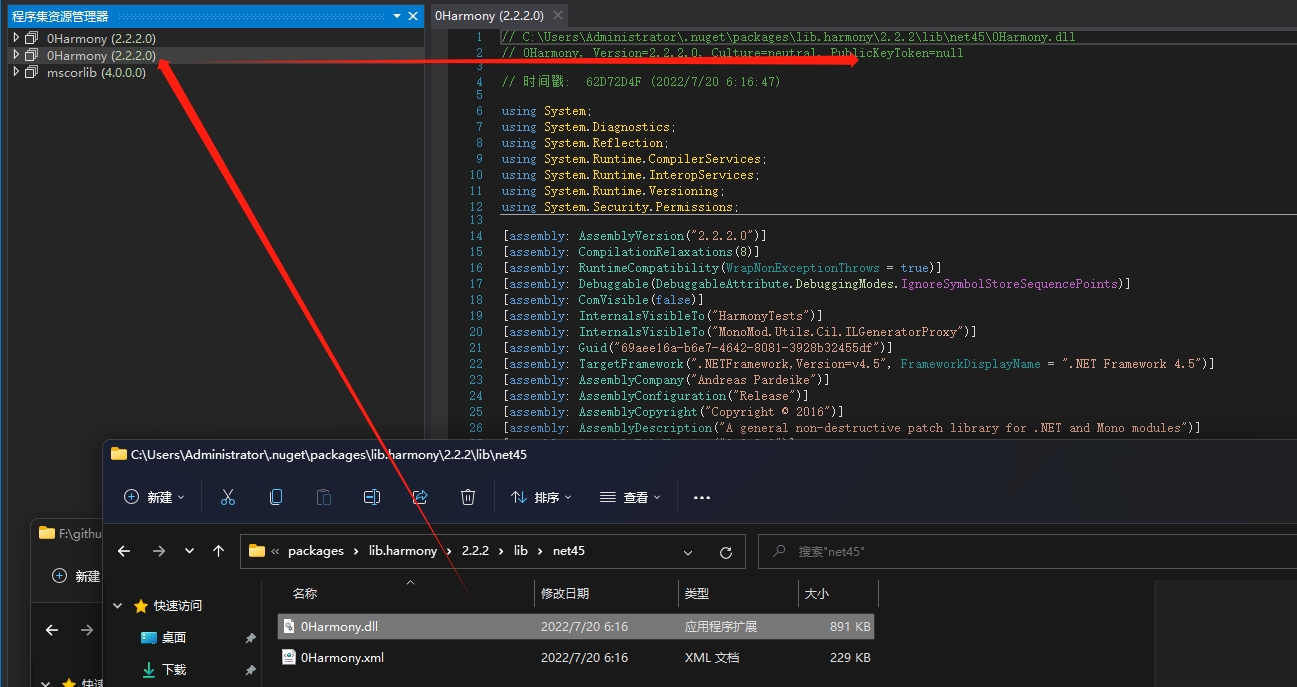
We add the signature into the App.Config file.

Note: Since we used a random key pair, the signature you generate will definitely differ from mine.
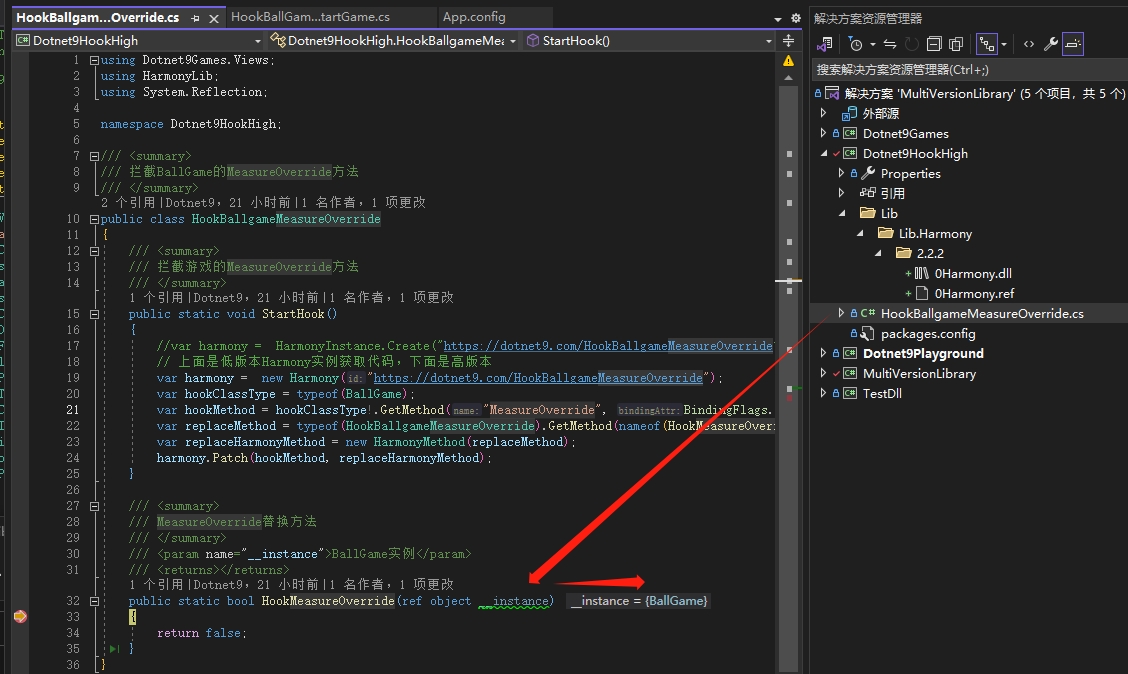
Now debug again. The MeasureOverride method is intercepted successfully, and the passed instance can correctly display BallGame (is that it? Yes, it took me two nights...):
5.4. Everything is ready, finalize the last interception
The code is as follows:
using Dotnet9Games.Views;
using HarmonyLib;
using System.Collections;
using System.Data;
using System.Linq;
using System.Reflection;
using System.Windows;
using System.Windows.Controls;
using System.Windows.Shapes;

namespace Dotnet9HookHigh;

/// <summary>
/// Intercept the BallGame's MeasureOverride method
/// </summary>
public class HookBallgameMeasureOverride
{
    /// <summary>
    /// Intercept the game's MeasureOverride method
    /// </summary>
    public static void StartHook()
    {
        //var harmony =  HarmonyInstance.Create("https://dotnet9.com/HookBallgameMeasureOverride");
        // The above is the low version Harmony instance creation code, below is the high version
        var harmony = new Harmony("https://dotnet9.com/HookBallgameMeasureOverride");
        var hookClassType = typeof(BallGame);
        var hookMethod = hookClassType!.GetMethod("MeasureOverride", BindingFlags.NonPublic | BindingFlags.Instance);
        var replaceMethod = typeof(HookBallgameMeasureOverride).GetMethod(nameof(HookMeasureOverride));
        var replaceHarmonyMethod = new HarmonyMethod(replaceMethod);
        harmony.Patch(hookMethod, replaceHarmonyMethod);
    }

    /// <summary>
    /// Replacement method for MeasureOverride
    /// </summary>
    /// <param name="__instance">BallGame instance</param>
    /// <returns></returns>
    public static bool HookMeasureOverride(ref object __instance)
    {
        #region Original method code logic

        //// Calculate the width of the last element. You don't need to worry about why it's written this way; it's just to trigger a Size exception

        //var lastChild = _balloons.LastOrDefault();
        //if (lastChild != null)
        //{
        //    var remainWidth = ActualWidth;
        //    foreach (var balloon in _balloons)
        //    {
        //        remainWidth -= balloon.Shape.Width;
        //    }

        //    lastChild.Shape.Measure(new Size(remainWidth, lastChild.Shape.Height));
        //}

        //return base.MeasureOverride(constraint);

        #endregion

        #region Interception replacement code

        var instanceType = __instance.GetType();
        var balloonsField = instanceType.GetField("_balloons", BindingFlags.NonPublic | BindingFlags.Instance);
        var balloons = (IEnumerable)balloonsField!.GetValue(__instance);

        var lastChild = balloons.Cast<object>().LastOrDefault();
        if (lastChild == null)
        {
            return false;
        }

        var remainWidth = ((UserControl)__instance).ActualWidth;
        foreach (object balloon in balloons)
        {
            remainWidth -= GetBalloonSize(balloon).Width;
        }

        // Note: The key code is here, only recalculate the last child if the remaining width is greater than 0
        // This code may not be meaningful; modify it according to actual development needs
        if (remainWidth > 0)
        {
            var lashShape = GetBalloonShape(lastChild);
            lashShape.Measure(new Size(remainWidth, lashShape.Height));
        }

        #endregion

        return false;
    }

    private static Ellipse GetBalloonShape(object balloon)
    {
        var shapeProperty = balloon.GetType().GetProperty("Shape");
        var shape = (Ellipse)shapeProperty!.GetValue(balloon);
        return shape;
    }

    private static Size GetBalloonSize(object balloon)
    {
        var shape = GetBalloonShape(balloon);
        return new Size(shape.Width, shape.Height);
    }
}
The key code is:
// Note: The key code is here, only recalculate the last child if the remaining width is greater than 0
// This code may not be meaningful; modify it according to actual development needs
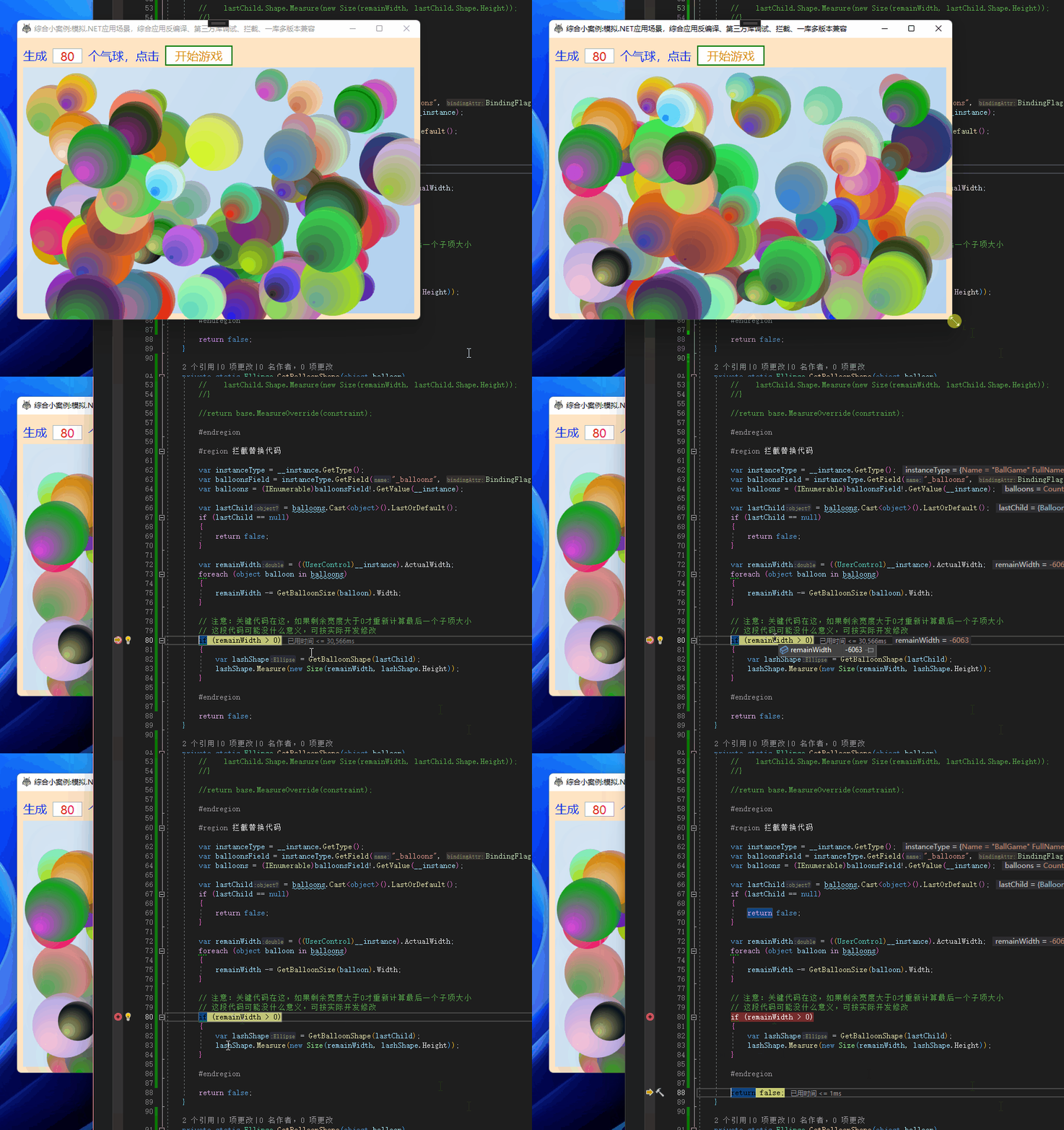
if (remainWidth > 0)
{
    var lashShape = GetBalloonShape(lastChild);
    lashShape.Measure(new Size(remainWidth, lashShape.Height));
}
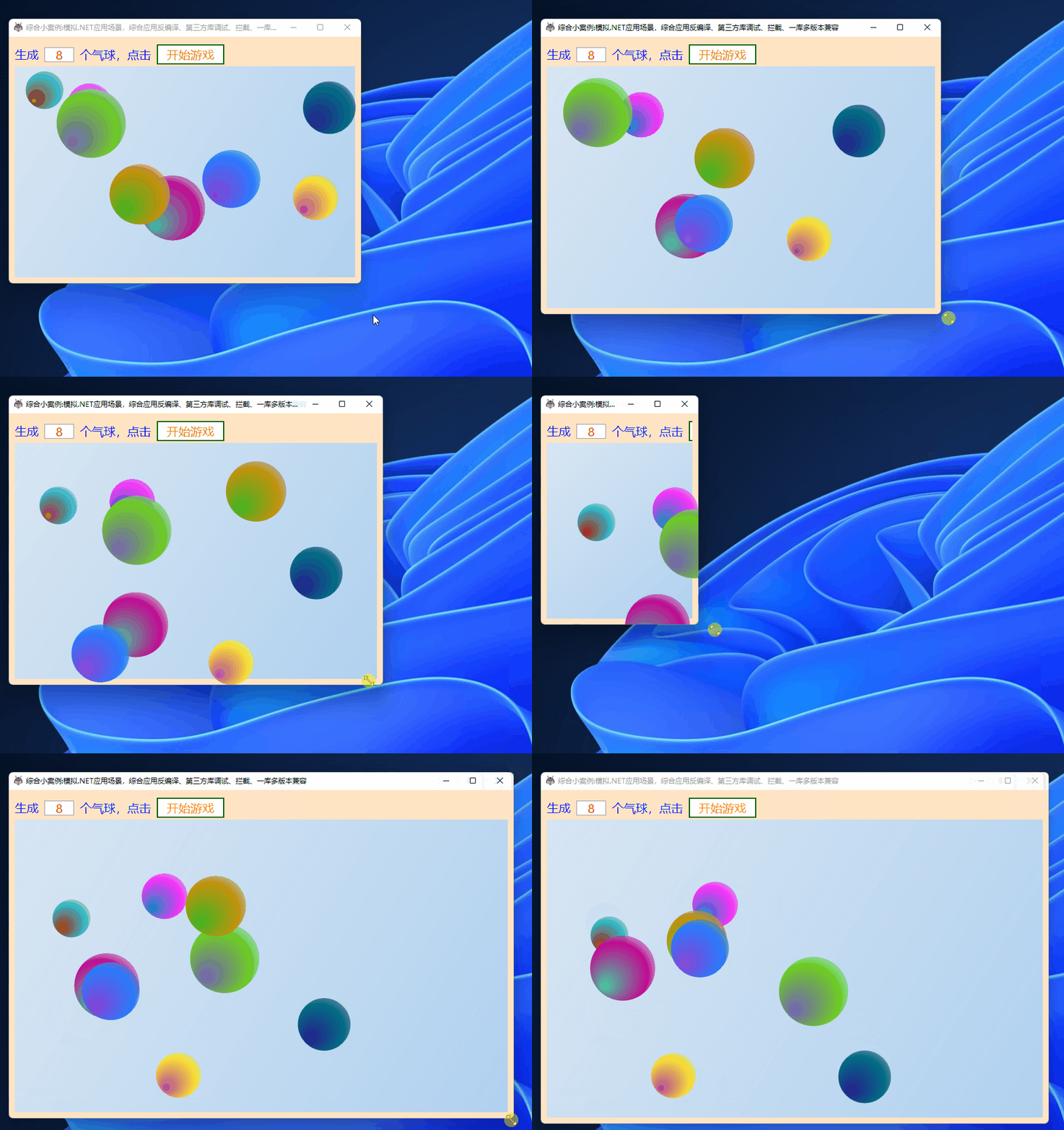
The rest of the code is just reflection usage; no further explanation is needed. Run the program. Now you can freely resize the window:
When the remaining width is less than 0, skip recalculating the last child's size
5.4. Minor Optimization
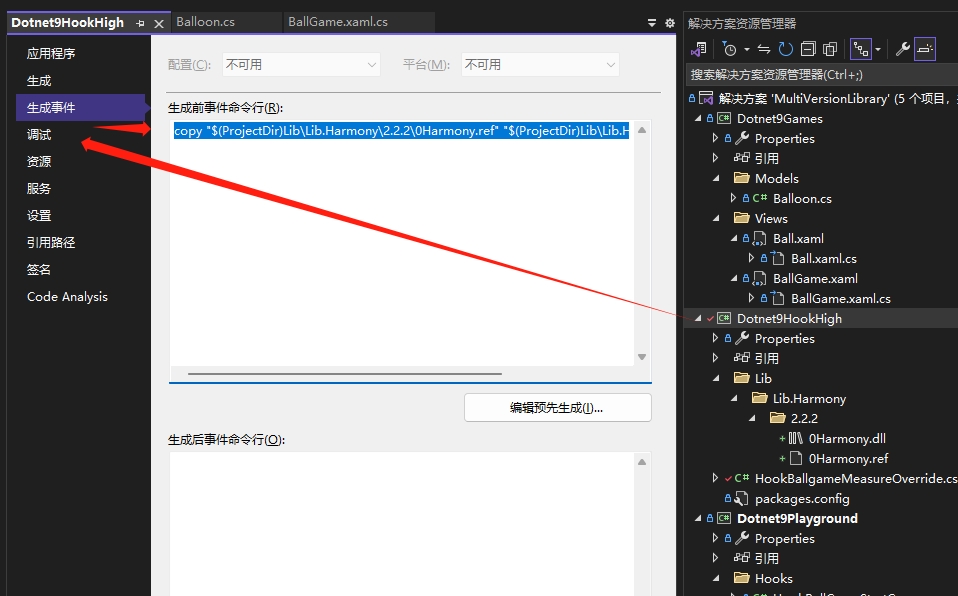
You may have noticed the 0Harmony.ref file in some of the screenshots above. Let me briefly explain.
Git is usually configured to not allow uploading executable programs or .dll files. However, multi-version .dll files are special, as some libraries cannot be directly referenced from NuGet. Therefore, the high-version Lib.Harmony library in this article must use its own strong-named version. We change the .dll file extension to .ref to allow uploading. Others can use it normally. For the program to compile and generate correctly, add a pre-build command line to the Dotnet9HookHigh project, which copies the .ref file to .dll at build time:
copy "$(ProjectDir)Lib\Lib.Harmony\2.2.2\0Harmony.ref" "$(ProjectDir)Lib\Lib.Harmony\2.2.2\0Harmony.dll"
6. Summary
Example code in the article: MultiVersionLibrary
The case in the article is mediocre, especially the second trap. If you are interested, you can read the game-related code and submit a PR to discuss together, making this case more reasonable, interesting, and fun. This would allow the second trap to be written with more interesting effects, achieving different outcomes after interception. That is the joy of interception.
This article helps you apply the skills covered in the previous two articles (debugging third-party libraries with dnSpy and intercepting third-party libraries with Lib.Harmony) through a simulated real-world case. It also introduces a compatibility solution that supports multiple versions of a library.
Through the introduction of the compatibility solution for multiple versions of a library, readers can briefly learn how to decompile third-party libraries and how to use strong-naming technology to ensure library compatibility (and security – not elaborated in this article; you can read A Brief Discussion on .NET Assembly Security Signing). I hope the case provided in this article helps readers better understand and apply these skills.