
概述
本文为.NET 开发者们分享一款轻量级开源的将数字编码成字符串的加密(短 ID 生成)工具类库—Hashids.net。
无论在前端还是后端的编程开发中,都会遇到让系统自动生成一些编码或者 ID 的场景,并且要求生成的编码或 ID 是不重复的(重复率极低的)。
前端开发中,常用的有nanoid。而后端开发中,常用的技术则有:自增 ID,雪花 ID,GUID 等。其中,自增 ID 在中小型系统中使用比较常见,它占用的存储空间相对较小,检索速度相对较快,但它不适用于分布式系统的构建,而雪花 ID 和 GUID 等占用字节较多,占用存储空间较大,检索速度相对较慢,但后两者适用于分布式的系统构建。
另外,还有一些场景,为了隐藏后端的真实 ID,在显示到客户端时,对真实 ID 进行加密处理,将真实的数字加密生成一个短的字符串,比如国外知名视频网站油管的视频地址类似https://www.yt.com/watch?v=yVd7vbeFj-g,其中的参数v的值yVd7vbeFj-g即为一个加密的字符串。
在.NET, .NET Core, .NET 5\6\7\8 等程序开发中,如果你也想生成类似的加密字符串,本文为.NET 开发者们推荐Hashids.net这个开源的短 ID 生成(加密)类库。
Hashids.net 功能和特性
Hashids.net可以将数字转换成字符串,比如将347转换成yr8,或者将数字数组[27, 986]转换成3kTMd。当然,你也可以将转换后的字符串再次转换成数字或者数字数组。这在将多个参数捆绑成一个参数、隐藏实际 ID 或简单地将它们用作短字符串 ID 时非常有用。
Hashids.net 主要有如下的特性:
- 将整数转换成惟一的短 ID(仅支持包含零在内的正整数)
- 为自增 ID 生成不可推测的非连续 id
- 支持单个数字或数字数组
- 允许自定义字母和盐
- 允许指定最小哈希长度
Hashids.net 的安装
Hashid.net 以 NuGet 包发布,所以有如下的安装方式:
1.NuGet 命令行
Install-Package Hashids.net
2.NuGet 程序包管理工具
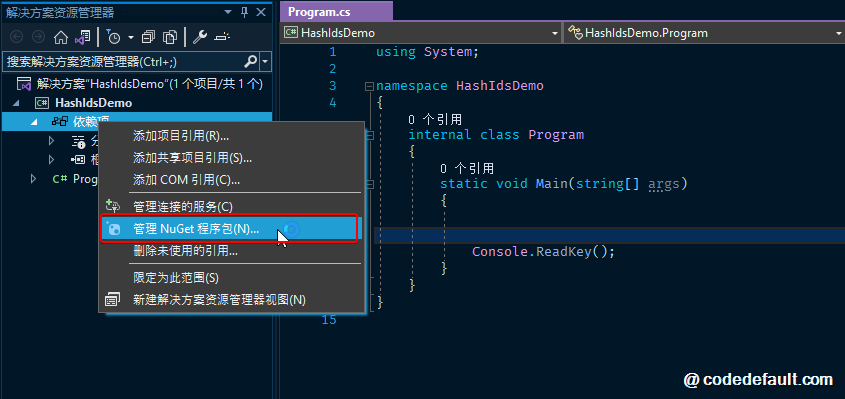
在项目中右键单击依赖项,如图:
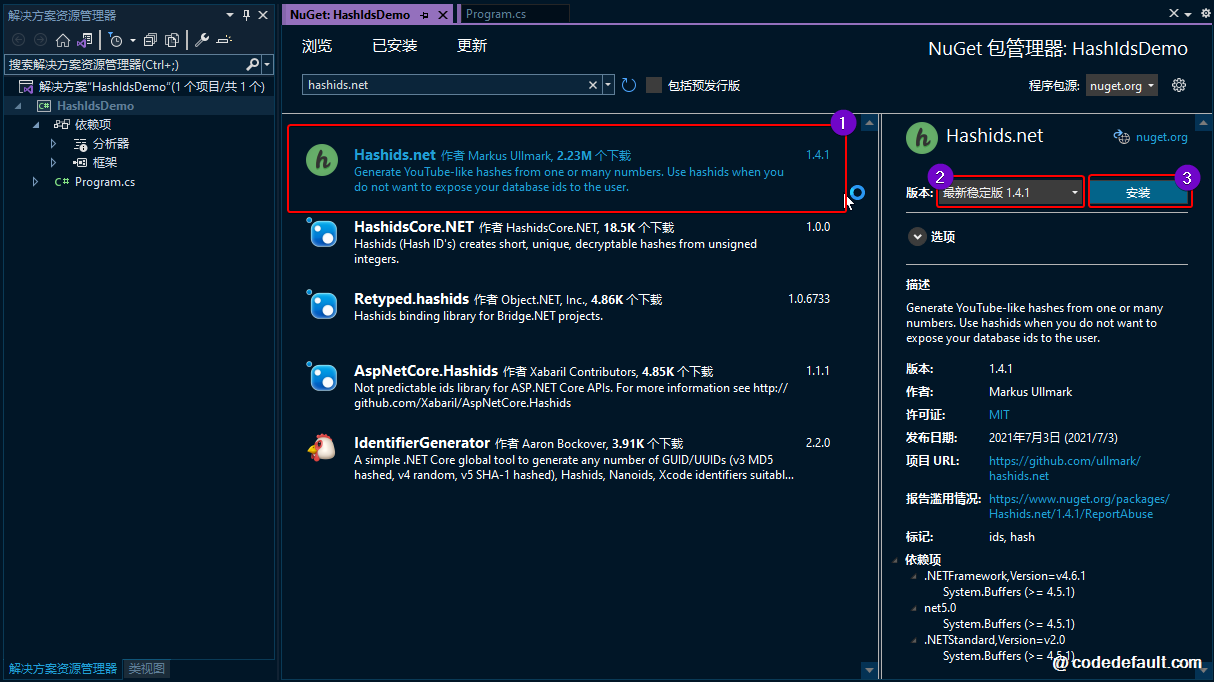
然后,在打开的 NuGet 程序包管理界面输入关键字Hashids.net,在搜索到的结果中选中Hashids.net类库组件并安装,如图:
Hashids.net 的使用
导入 Hashids.net 的命名空间
using HashidsNet;
编码单个数字
实例化Hashids对象时,你可以传递一个唯一的盐值,这样你的哈希值就不同于其他人的哈希值。这里使用this is my salt作为例子。
var Hashids = new Hashids("this is my salt");
var hash = hashids.Encode(12345);
运行结果为:NkK9
如果要转换一个Int64类型的数字,则需要调用EncodeLong()方法,如下:
var hashids = new Hashids("this is my salt");
var hash = hashids.EncodeLong(666555444333222L);
运行结果为:KVO9yy1oO5j
解码
Hashids.net提供了将已编码的字符串反解码的功能,但解码时需使用与编码相同的盐值:
var hashids = new Hashids("this is my salt");
numbers = hashids.Decode("NkK9");
运行结果为:[ 12345 ]
var hashids = new Hashids("this is my salt");
numbers = hashids.DecodeLong("KVO9yy1oO5j");
运行结果为:[ 666555444333222L ]
使用不同的盐值解码
如果解码时的盐值与编码时不相同,则解码将失败:
var hashids = new Hashids("this is my pepper");
numbers = hashids.Decode("NkK9");
运行结果为:[]
编码多个数字
var hashids = new Hashids("this is my salt");
var hash = hashids.Encode(683, 94108, 123, 5);
运行结果为:aBMswoO2UB3Sj
多个数字编码后的解码
var hashids = new Hashids("this is my salt");
var numbers = hashids.Decode("aBMswoO2UB3Sj")
运行结果为:[ 683, 94108, 123, 5 ]
指定编码后的最小哈希长度
以下示例将对整数 1 进行编码,并将最小哈希长度设置为 8(默认情况下是 0——这意味着哈希将是可能的最短长度)。
var hashids = new Hashids("this is my salt", 8);
var hash = hashids.Encode(1);
运行结果为:gB0NV05e
解码
var hashids = new Hashids("this is my salt", 8);
var numbers = hashids.Decode("gB0NV05e");
运行结果为:[ 1 ]
自定义哈希字母
以下示例指定了自定义的哈希字母为abcdefghijkABCDEFGHIJK12345:
var hashids = new Hashids("this is my salt", 0, "abcdefghijkABCDEFGHIJK12345")
var hash = hashids.Encode(1, 2, 3, 4, 5)
运行结果为:Ec4iEHeF3
Hashids.net 的随机性
Hashids.net的主要目的是混淆 ID,此外,它还可以让有规律的数字变得不可猜测和不可预测。
编码重复的数字
var hashids = new Hashids("this is my salt");
var hash = hashids.Encode(5, 5, 5, 5);
编码后,你不会看到任何重复的模式来表明哈希中有 4 个相同的数字,运行结果为:1Wc8cwcE。
编码有序的数字
var hashids = new Hashids("this is my salt");
var hash = hashids.Encode(1, 2, 3, 4, 5, 6, 7, 8, 9, 10);
运行结果为:kRHnurhptKcjIDTWC3sx
编码自增的数字
var hashids = new Hashids("this is my salt");

hashids.Encode(1); // => NV
hashids.Encode(2); // => 6m
hashids.Encode(3); // => yD
hashids.Encode(4); // => 2l
hashids.Encode(5); // => rD
编码十六进制
var hashids = new Hashids("this is my salt");
var hash = hashids.EncodeHex("DEADBEEF");
运行结果为:kRNrpKlJ
解码十六进制
var hashids = new Hashids("this is my salt");
var hex = hashids.DecodeHex("kRNrpKlJ");
运行结果为:DEADBEEF
将字符串加密生成短字符串怎样?
以下为站长扩展长字符串转短字符串方法介绍
其实很简单,将需要加密的原字符串作为盐,加密数字固定,这样就简单实现了:
public static string GetHashids(this string sourceStr, int number = 9)
{
    var hashids = new Hashids(sourceStr);
    return hashids.Encode(number);
}
单元测试如下:比如将本文别名【Is-it-possible-to-use-it-as-a-short-link-generator-Hashidsnet】加密
[TestClass]
public class HashHelperUnitTest
{
    [TestMethod]
    public void Hashids_Success()
    {
        var blogPostSlugStr = "Is-it-possible-to-use-it-as-a-short-link-generator-Hashidsnet";

        var encodeStr1 = blogPostSlugStr.GetHashids();
        var encodeStr2 = blogPostSlugStr.GetHashids();

        Assert.AreEqual(encodeStr1, encodeStr2);
    }
}
别名加密后为:【6Q】,可打开浏览器访问本文短链接地址尝试:https://dotnet9.com/6Q 。
注:这样使用不是本库的初衷,但将长字符串转成短字符串这确不失为一种好想法,哈哈,记住这不可逆哈。
小知识
将一个长字符串转成短字符串有多种方法可实现,常规做法:
- 使用数据库存储短字符串和原字符串,短字符串可自行定义规则,比如从 1 开始取值,每次取值时读数据库,根据短字符串取长字符串或根据长字符串取短字符串。
优点:短字符串与原字符串一一对应,可以实现双向转换,不会出现重复的短字符串。
缺点:需要频繁读写数据库,对数据库的性能有一定的影响。
- 将长字符串使用一种算法转成短字符串,有算法是可逆的,有的是不可逆的。
无需数据库存储,但长度可能会略长。
- 可逆算法示例(C#):
public static string ShortenString(string longString)
{
    byte[] bytes = Encoding.UTF8.GetBytes(longString);
    string shortString = Convert.ToBase64String(bytes);
    return shortString;
}

public static string RestoreString(string shortString)
{
    byte[] bytes = Convert.FromBase64String(shortString);
    string longString = Encoding.UTF8.GetString(bytes);
    return longString;
}
- 不可逆算法示例(C#):
public static string ShortenString(string longString)
{
    using (SHA256 sha256 = SHA256.Create())
    {
        byte[] hashBytes = sha256.ComputeHash(Encoding.UTF8.GetBytes(longString));
        string shortString = Convert.ToBase64String(hashBytes);
        return shortString;
    }
}
- 区别:
- 可逆算法可以通过短字符串还原为原字符串,而不可逆算法无法还原。
- 可逆算法生成的短字符串长度较长,而不可逆算法生成的短字符串长度较短。
- 使用算法自动生成短字符串无需频繁读写数据库,性能较好,但可能存在短字符串冲突的问题,即不同的长字符串可能生成相同的短字符串。
最后列出完整的单元测试希望对您有用:
using HashidsNet;
using System.Security.Cryptography;
using System.Text;

namespace Dotnet9.Commons.Test;

[TestClass]
public class HashHelperUnitTest
{
    public static string GetHashids(string sourceStr, int number = 9)
    {
        var hashids = new Hashids(sourceStr);
        return hashids.Encode(number);
    }

    [TestMethod]
    public void Hashids_Success()
    {
        var blogPostSlugStr = "Is-it-possible-to-use-it-as-a-short-link-generator-Hashidsnet";

        var encodeStr1 = GetHashids(blogPostSlugStr);
        var encodeStr2 = GetHashids(blogPostSlugStr);

        Assert.AreEqual(encodeStr1, encodeStr2);
    }


    [TestMethod]
    public void Hashids_Best_Success()
    {
        var blogPostSlugStr = "Is-it-possible-to-use-it-as-a-short-link-generator-Hashidsnet";

        var encodeStr1 = blogPostSlugStr.GetHashids();
        var encodeStr2 = ShortenString(blogPostSlugStr);
        var encodeStr3 = ShortenString2(blogPostSlugStr);

        Assert.IsTrue(encodeStr1.Length < encodeStr2.Length, "Hashids生成的短字符串比Base64还短");

        Assert.IsTrue(encodeStr1.Length < encodeStr3.Length, "Hashids生成的短字符串还是短那么一点点");
    }

    public static string ShortenString(string longString)
    {
        byte[] bytes = Encoding.UTF8.GetBytes(longString);
        string shortString = Convert.ToBase64String(bytes);
        return shortString;
    }

    public static string RestoreString(string shortString)
    {
        byte[] bytes = Convert.FromBase64String(shortString);
        string longString = Encoding.UTF8.GetString(bytes);
        return longString;
    }

    public static string ShortenString2(string longString)
    {
        using (SHA256 sha256 = SHA256.Create())
        {
            byte[] hashBytes = sha256.ComputeHash(Encoding.UTF8.GetBytes(longString));
            string shortString = Convert.ToBase64String(hashBytes);
            return shortString;
        }
    }
}
本文大部分引用知乎原文章:
原文标题:分享.NET/.NET 5 轻量级开源的将数字编码成字符串的加密(短 ID 生成)工具类库--hashids.net
原文链接:https://codedefault.com/p/lightweight-open-source-project-hashids-net-for-generating-short-ids-from-numbers