

免责声明
使用者本人对于传播和利用本公众号提供的信息所造成的任何直接或间接的后果和损失负全部责任。公众号及作者对于这些后果不承担任何责任。如果造成后果,请自行承担责任。谢谢!
大家好,我是沙漠尽头的狼。
本文首发于Dotnet9,结合前面两篇(如何在没有第三方.NET库源码的情况下调试第三库代码?和拦截、篡改、伪造.NET类库中不限于public的类和方法),本文将设计一个案例,手把手地带大家应用这两篇文章中涉及的技能,并介绍一种支持多个版本的库的兼容性解决方案(涉及第三方库的反编译和强签名)。
本文的目录如下:
- 前言
- 案例设计
- 使用dnSpy进行调试
- 使用Lib.Harmony拦截
- 引入高版本Lib.Harmony:支持多个版本的库的兼容性使用
- 总结
1. 前言
技术的存在即合理,关键在于如何使用。在前面的文章中,有读者留言:
Lib.Harmony似乎不是一个正经的库,有什么合法的场景需要使用它吗?
站长回答:非常正经。当你使用一个第三方库,并且确定了版本并已经上线,有时候不能随意升级第三方库,因为可能存在潜在的风险。这时,你只能修改自己的代码,而不动第三方库。
还有读者说得很有道理:
这个工具非常强大,但有时也很可怕。
既然读者有疑问,所以我写了这篇文章,尽量模拟一个看起来比较实际的应用场景。你可以跟着做一做,看看这个工具到底是不是正经的。本文提供了详细的手把手教程。
2. 案例设计
这是一个小动画游戏,我已经将其发布到NuGet上:Dotnet9Games。在这个小动画游戏中,我设置了两个陷阱。我们将按照我的步骤一一解决这些问题。首先,我们创建一个.NET Framework 4.6.1的WPF空项目【Dotnet9Playground】。我认为大部分人都会使用这个版本的桌面应用程序,如果不是,请在评论中告诉我。
2.1. 引入Dotnet9Games包
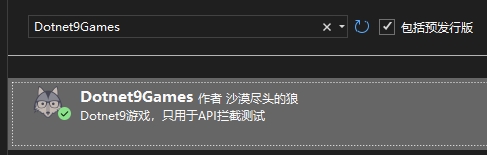
我已经将制作好的(虚构的)游戏发布在NuGet上作为第三方包使用。为了模拟一个比较真实的场景,直接安装最新版本【本文基于1.0.3版本编写】即可:
2.2. 添加目标游戏
打开MainWindow.xaml,引入Dotnet9Games命名空间:
xmlns:dotnet9="https://dotnet9.com"
MainWindow.xaml完整代码如下:
<Window
    x:Class="Dotnet9Playground.MainWindow"
    xmlns="http://schemas.microsoft.com/winfx/2006/xaml/presentation"
    xmlns:x="http://schemas.microsoft.com/winfx/2006/xaml"
    xmlns:d="http://schemas.microsoft.com/expression/blend/2008"
    xmlns:dotnet9="https://dotnet9.com"
    xmlns:mc="http://schemas.openxmlformats.org/markup-compatibility/2006"
    Title="综合小案例:模拟.NET应用场景,综合应用反编译、第三方库调试、拦截、一库多版本兼容"
    Width="800"
    Height="450"
    Background="Bisque"
    Icon="Resources/favicon.ico"
    mc:Ignorable="d">
    <Border Padding="10">
        <Grid>
            <Grid.RowDefinitions>
                <RowDefinition Height="40" />
                <RowDefinition Height="*" />
            </Grid.RowDefinitions>
            <StackPanel
                Grid.Row="0"
                VerticalAlignment="Center"
                Orientation="Horizontal">
                <TextBlock
                    VerticalAlignment="Center"
                    FontSize="20"
                    Foreground="Blue"
                    Text="生成" />
                <TextBox
                    x:Name="TextBoxBallCount"
                    Width="50"
                    Height="25"
                    Margin="10,0"
                    VerticalAlignment="Center"
                    HorizontalContentAlignment="Center"
                    VerticalContentAlignment="Center"
                    FontSize="20"
                    Foreground="Red"
                    Text="{Binding ElementName=MyBallGame, Path=BallCount, Mode=TwoWay}" />
                <TextBlock
                    Margin="0,0,10,0"
                    VerticalAlignment="Center"
                    FontSize="20"
                    Foreground="Blue"
                    Text="个气球,点击" />
                <Button
                    Padding="15,2"
                    Background="White"
                    BorderBrush="DarkGreen"
                    BorderThickness="2"
                    Click="StartGame_OnClick"
                    Content="开始游戏"
                    FontSize="20"
                    Foreground="DarkOrange" />
            </StackPanel>
            <dotnet9:BallGame
                x:Name="MyBallGame"
                Grid.Row="1"
                BallCount="8" />
        </Grid>
    </Border>
</Window>
MainWindow.xaml.cs代码如下:
using System.Windows;

namespace Dotnet9Playground;

/// <summary>
///     综合小案例:模拟.NET应用场景,综合应用反编译、第三方库调试、拦截、一库多版本兼容
/// </summary>
public partial class MainWindow : Window
{
    public MainWindow()
    {
        InitializeComponent();
    }

    private void StartGame_OnClick(object sender, RoutedEventArgs e)
    {
        MyBallGame.StartGame();
    }
}
准备操作完成,运行程序:
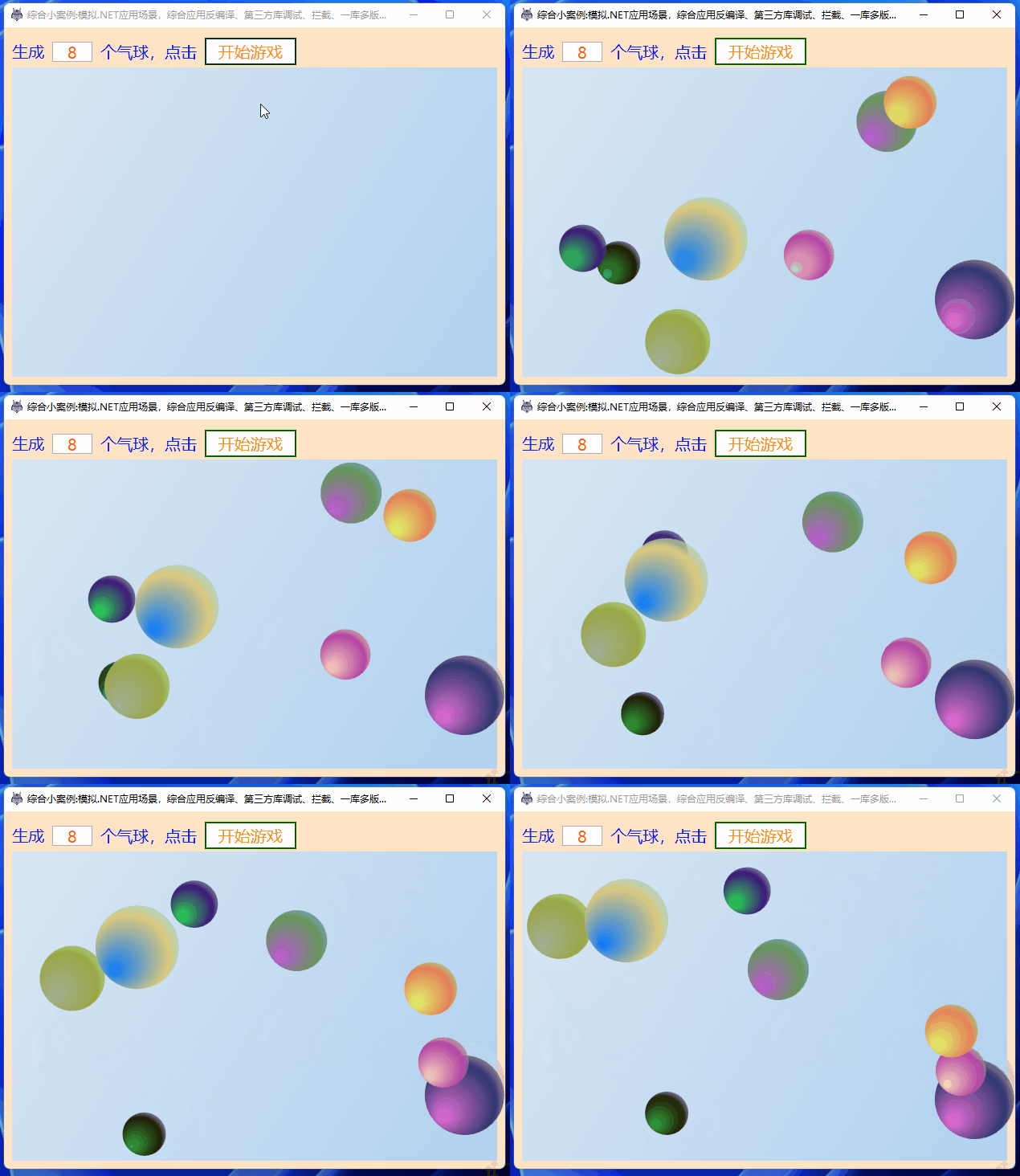
这个游戏比较简单,主要包含以下几个步骤:
- 在主界面提供一个文本输入框,用于填写生成的气球个数。可以通过数据绑定将文本框的值绑定到游戏的
BallCount属性。 - 提供一个
开始游戏按钮,点击按钮后会触发MyBallGame.StartGame()方法,用于生成气球并播放动画。
2.3. 引入第一个陷阱
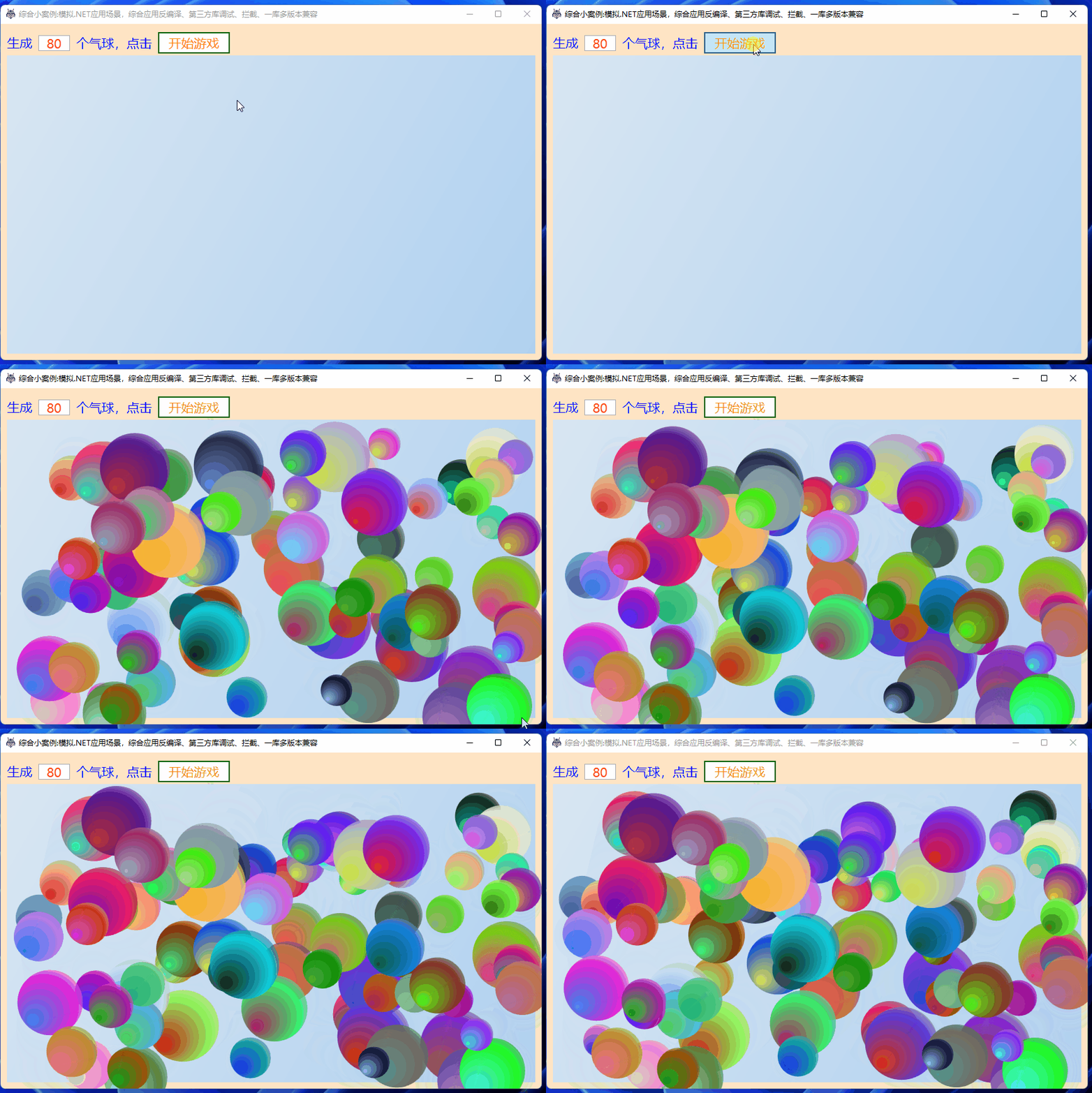
气球生成8个可能太少了,让我们来生成80个气球吧:
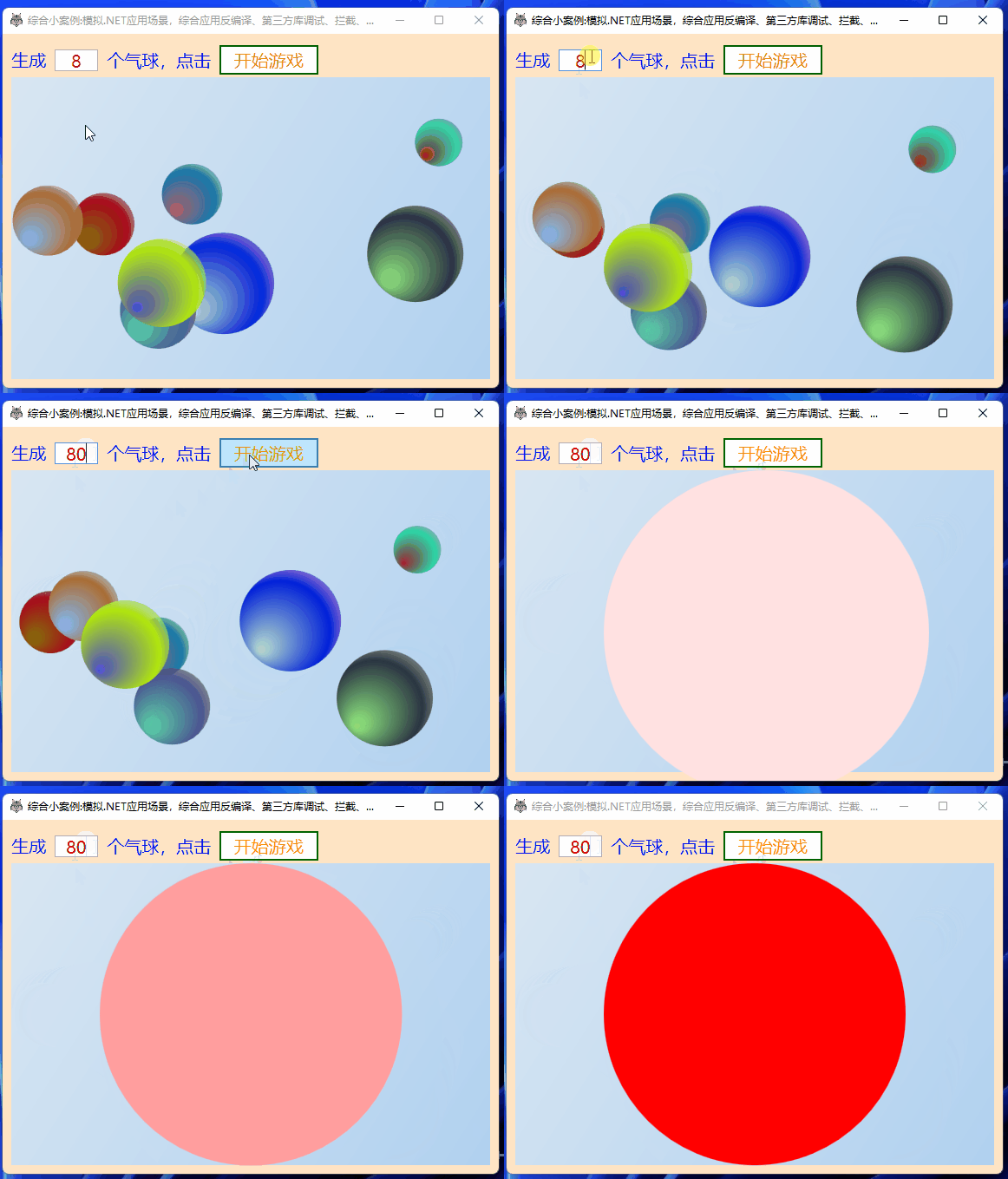
怎么弹出一个红色的大圆,气球都消失了?这就是陷阱!
3. 使用dnSpy进行调试
3.1. 分析
输入80个气球后,我们点击开始游戏是调用了游戏的方法StartGame(), 我们打开dnSpy(这个链接提供32位和64位下载链接),拖入Dotnet9Games.dll,找到该方法代码:
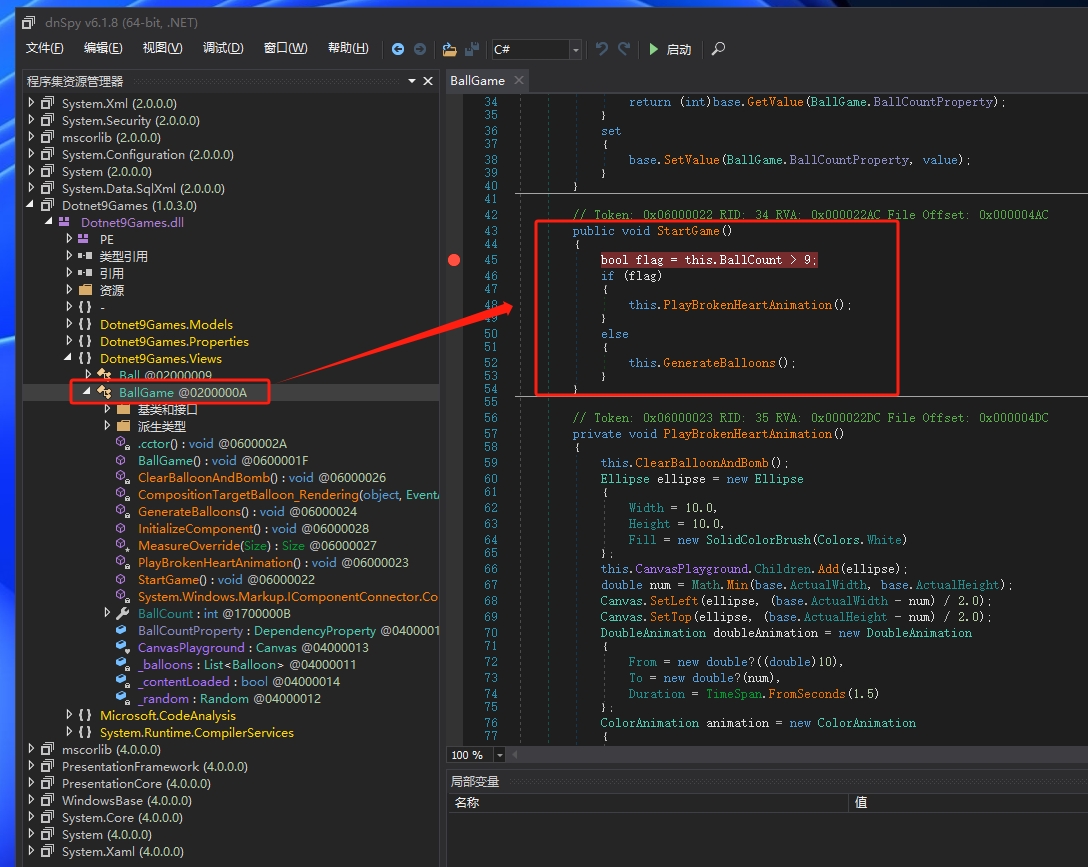
// Token: 0x06000022 RID: 34 RVA: 0x000022AC File Offset: 0x000004AC
public void StartGame()
{
    bool flag = this.BallCount > 9;
    if (flag)
    {
        this.PlayBrokenHeartAnimation();
    }
    else
    {
        this.GenerateBalloons();
    }
}
原来是当气球个数多于9个时调用了PlayBrokenHeartAnimation()方法,这个方法干啥的呢?看代码:
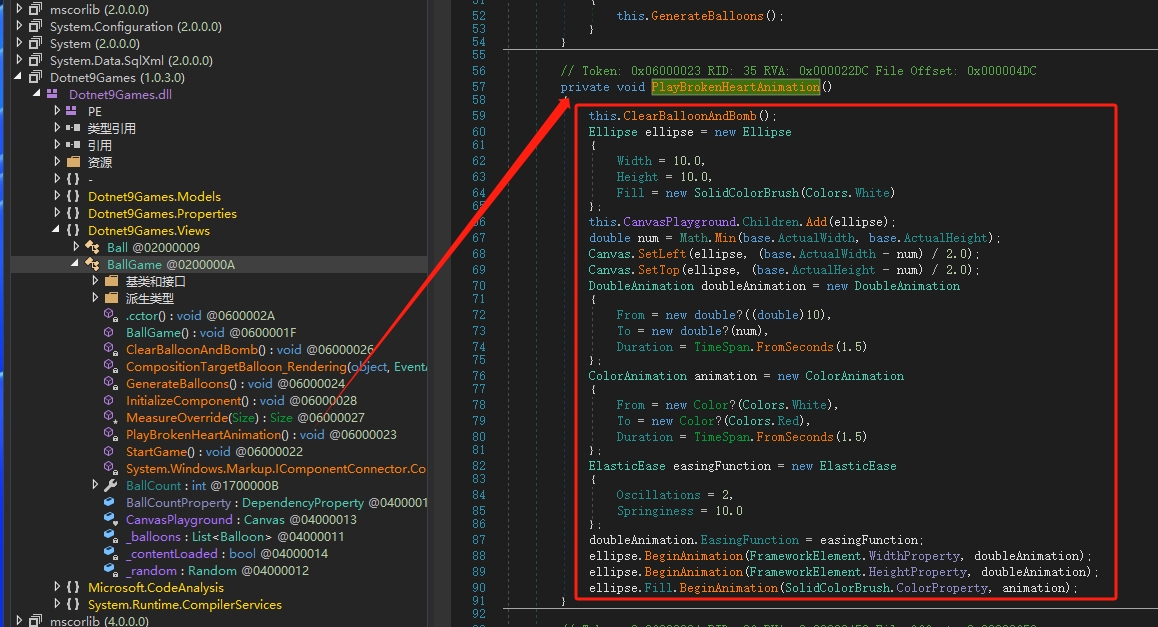
大致看出来了吗?首先是清空气球控件,然后又添加了一个红色的圆动画,我们调试试试呢?
3.2. 调试验证
大致说下步骤:
- 在
StartGame()方法第一行打上断点; - 点击
dnSpy【启动】按钮; - 在弹出的【调试程序】界面里,"调试引擎"默认选择
.NET Framework,"可执行程序"选择我们的WPF主程序Exe【Dotnet9Playground.exe】,再点击【确定】即将WPF程序运行起来了; - 主程序界面气球个数输入超过9个,比如80?
- 点击“开始游戏”按钮;
- 进入断点了,调试看看,真的进入
PlayBrokenHeartAnimation()方法

4. 使用Lib.Harmony拦截
明白了原因,我们使用Lib.Harmony拦截StartGame()方法。
4.1. 安装Lib.Harmony包
我们安装最低版本1.2.0.1:

为啥是安装最低版本?
为了后面引入一库多版本兼容需求,低版本的Lib.Harmony有Bug,我们继续,哈哈。
4.2. 编写拦截类
添加拦截类“/Hooks/HookBallGameStartGame.cs”:
using Dotnet9Games.Views;
using Harmony;
using System.Reflection;

namespace Dotnet9Playground.Hooks;

internal class HookBallGameStartGame
{
    /// <summary>
    /// 拦截游戏的开始方法StartGame
    /// </summary>
    public static void StartHook()
    {
        var harmony = HarmonyInstance.Create("https://dotnet9.com/HookBallGameStartGame");
        var hookClassType = typeof(BallGame);
        var hookMethod =
            hookClassType!.GetMethod(nameof(BallGame.StartGame), BindingFlags.Public | BindingFlags.Instance);
        var replaceMethod = typeof(HookBallGameStartGame).GetMethod(nameof(HookStartGame));
        var replaceHarmonyMethod = new HarmonyMethod(replaceMethod);
        harmony.Patch(hookMethod, replaceHarmonyMethod);
    }

    /// <summary>
    /// StartGame替换方法
    /// </summary>
    /// <param name="__instance">BallGame实例</param>
    /// <returns></returns>
    public static bool HookStartGame(ref object __instance)
    {
        #region 原方法原代码

        //if (BallCount > 9)
        //{
        //    // 播放爆炸动画效果
        //    PlayExplosionAnimation();
        //}
        //else
        //{
        //    // 生成彩色气球
        //    GenerateBalloons();
        //}

        #endregion

        #region 拦截替换方法逻辑

        // 1、删除气球个数限制逻辑
        // 2、生成气球方法为private修饰,我们通过反射调用
        var instanceType = __instance.GetType();
        var hookGenerateBalloonsMethod =
            instanceType.GetMethod("GenerateBalloons", BindingFlags.Instance | BindingFlags.NonPublic);

        // 生成彩色气球
        hookGenerateBalloonsMethod!.Invoke(__instance, null);

        #endregion

        return false;
    }
}
上面的代码加了相关的注释,这里再提一提:
StartHook()方法用于关联被拦截方法StartGame与拦截替换方法HookStartGame;HookStartGame是拦截替换方法,方法中注释的代码为原方法逻辑代码;- 替换代码你可以将气球个数改大一点,或者像站长一样直接不要
if (BallCount > 9)判断,改为直接调用气球生成方法GenerateBalloons。
在App.xaml.cs注册上面的拦截类:
public partial class App : Application
{
    protected override void OnStartup(StartupEventArgs e)
    {
        base.OnStartup(e);

        // 拦截气球动画播放方法
        HookBallGameStartGame.StartHook();
    }
}
现在再运行WPF程序,我们把气球个数改为80个,正常生成了:
4.3. 就这样?No,再来一陷阱
看着气球在动,我们缩放下窗体大小(这里建议Debug下尝试,因为程序会崩溃,导致操作系统会卡那么一小会儿):
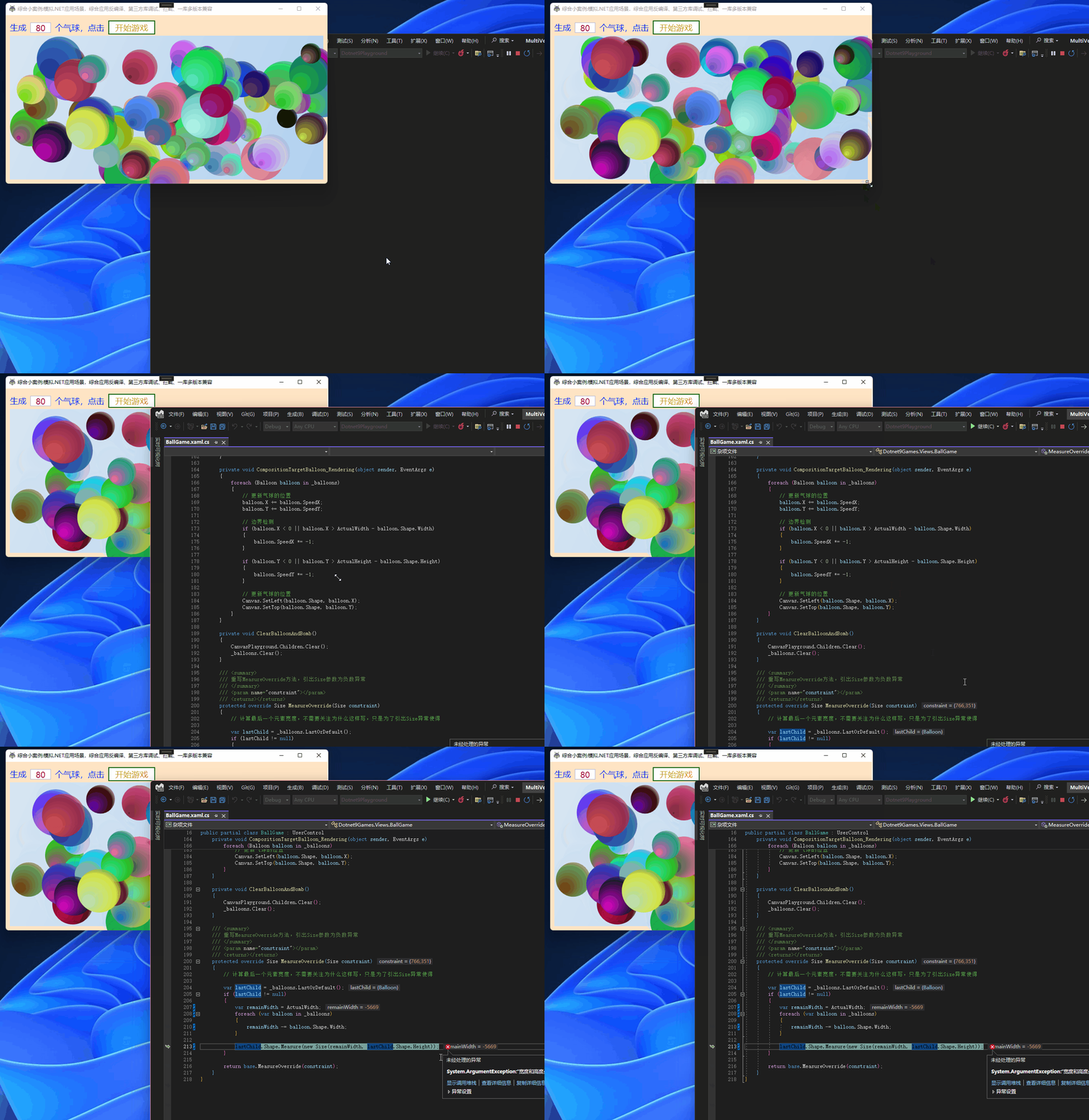
程序异常了,再截图看看:
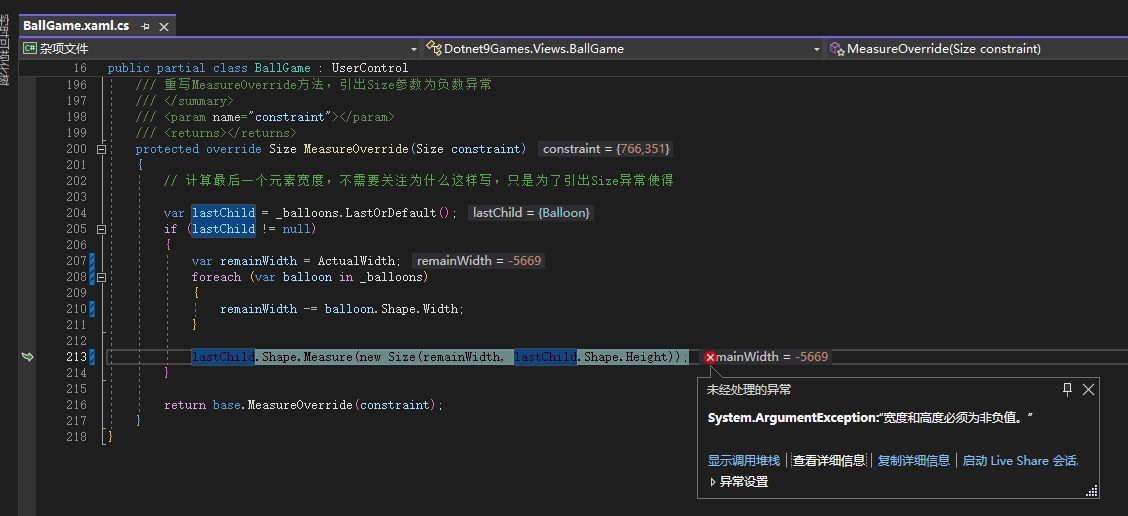
贴上异常代码:
/// <summary>
/// 重写MeasureOverride方法,引出Size参数为负数异常
/// </summary>
/// <param name="constraint"></param>
/// <returns></returns>
protected override Size MeasureOverride(Size constraint)
{
    // 计算最后一个元素宽度,不需要关注为什么这样写,只是为了引出Size异常使得

    var lastChild = _balloons.LastOrDefault();
    if (lastChild != null)
    {
        var remainWidth = ActualWidth;
        foreach (var balloon in _balloons)
        {
            remainWidth -= balloon.Shape.Width;
        }

        lastChild.Shape.Measure(new Size(remainWidth, lastChild.Shape.Height));
    }

    return base.MeasureOverride(constraint);
}
分析
- 在拖动窗体大小时,游戏用户控件
BallGame的MeasureOverride方法会触发,对布局进行重新计算; - 方法内逻辑:
-
- 如果存在一个运动的气球,那么计算
BallGame的实际宽度减去所有子气球的宽度之间的差,得到remainWidth; - 使用
remainWidth重新计算最后一个气球的大小; remainWidth在做减法操作,那么气球个数足够多,以致于游戏控件宽度小于这些气球宽之和时,就会为负数;- 我们再看看
Size构造函数代码(如果你用的VS,这里推荐大家安装ReSharper,十分方便的查看引用库方法 ),如下截图:
- 如果存在一个运动的气球,那么计算

代码复制过来看:
  /// <summary>Implements a structure that is used to describe the <see cref="T:System.Windows.Size" /> of an object. </summary>
  [TypeConverter(typeof (SizeConverter))]
  [ValueSerializer(typeof (SizeValueSerializer))]
  [Serializable]
  public struct Size : IFormattable
  {
    // 这里省略N多代码
    /// <summary>Initializes a new instance of the <see cref="T:System.Windows.Size" /> structure and assigns it an initial <paramref name="width" /> and <paramref name="height" />.</summary>
    /// <param name="width">The initial width of the instance of <see cref="T:System.Windows.Size" />.</param>
    /// <param name="height">The initial height of the instance of <see cref="T:System.Windows.Size" />.</param>
    public Size(double width, double height)
    {
      this._width = width >= 0.0 && height >= 0.0 ? width : throw new ArgumentException(MS.Internal.WindowsBase.SR.Get("Size_WidthAndHeightCannotBeNegative"));
      this._height = height;
    }
    // 这里省略N多代码
  }
当宽高为负数时会抛出异常,这就能理解了,我们再使用Lib.Harmony拦截BallGame的MeasureOverride方法,如法炮制。
添加/Hooks/HookBallgameMeasureOverride.cs类拦截:
using Dotnet9Games.Views;
using Harmony;
using System.Reflection;

namespace Dotnet9Playground.Hooks;

/// <summary>
/// 拦截BallGame的MeasureOverride方法
/// </summary>
internal class HookBallgameMeasureOverride
{
    /// <summary>
    /// 拦截游戏的MeasureOverride方法
    /// </summary>
    public static void StartHook()
    {
        var harmony = HarmonyInstance.Create("https://dotnet9.com/HookBallgameMeasureOverride");
        var hookClassType = typeof(BallGame);
        var hookMethod = hookClassType!.GetMethod("MeasureOverride", BindingFlags.NonPublic | BindingFlags.Instance);
        var replaceMethod = typeof(HookBallgameMeasureOverride).GetMethod(nameof(HookMeasureOverride));
        var replaceHarmonyMethod = new HarmonyMethod(replaceMethod);
        harmony.Patch(hookMethod, replaceHarmonyMethod);
    }

    /// <summary>
    /// MeasureOverride替换方法
    /// </summary>
    /// <param name="__instance">BallGame实例</param>
    /// <returns></returns>
    public static bool HookMeasureOverride(ref object __instance)
    {
        // 暂时不做任何处理,返回false表示
        return false;
    }
}
再在App.xaml.cs添加拦截注册:
using Dotnet9Playground.Hooks;
using System.Windows;

namespace Dotnet9Playground
{
    /// <summary>
    /// App.xaml 的交互逻辑
    /// </summary>
    public partial class App : Application
    {
        protected override void OnStartup(StartupEventArgs e)
        {
            base.OnStartup(e);

            // 拦截气球动画播放方法
            HookBallGameStartGame.StartHook();

            // 这是第二个拦截方法:拦截气球MeasureOverride方法
            HookBallgameMeasureOverride.StartHook();
        }
    }
}
再运行程序:
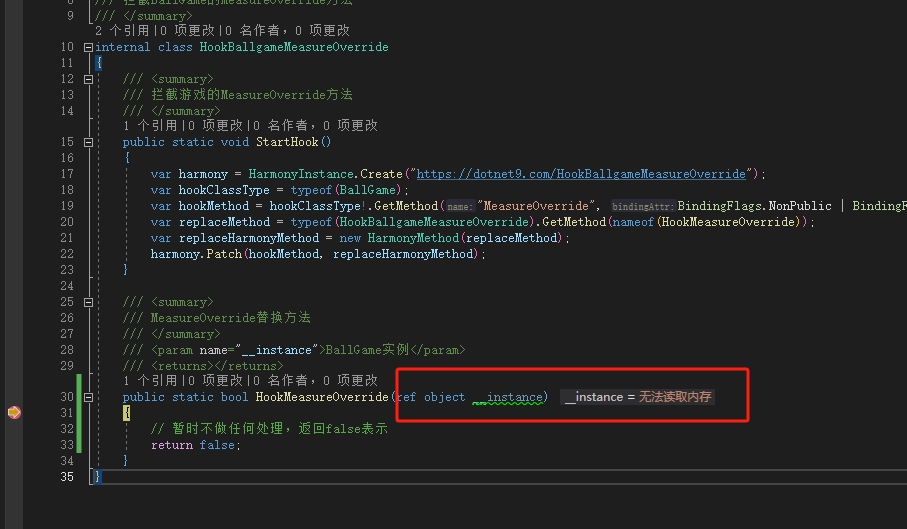
拦截方法进入了断点,但无法获取BallGame的实例,提示无法读取内存,拦截方法返回False(不执行原方法)有下面的异常:
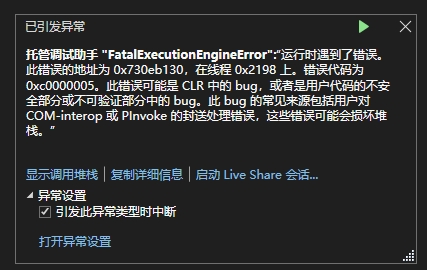
这时程序异常退出,我们将拦截方法返回True(继续执行原方法),又有提示:
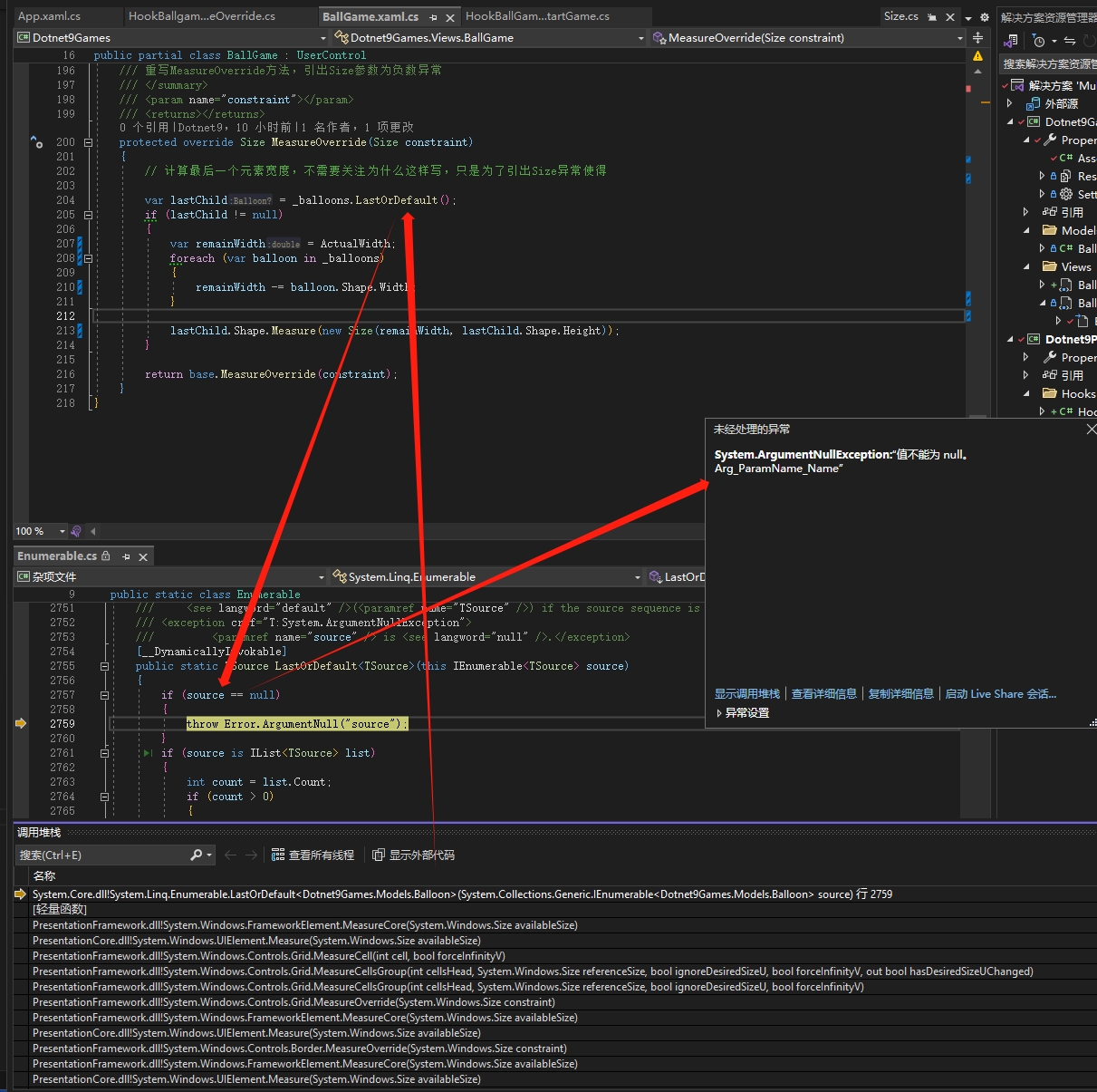
因为继续执行原方法,取最后一个气球方法又报错var lastChild = _balloons.LastOrDefault();,好无奈呀,心酸。
经过公司专家指点:
因为Size是个结构体指针,0Harmony 1.2.0.1版本把指针当成4位,但“我们的程序”是64位,指针是8位,所有内存错了。
好,那我们使用高版本Lib.Harmony?
5. 引入高版本Lib.Harmony:支持多个版本的库的兼容性使用
5.1. 新创建工程引入高版本Lib.Harmony
理由
有可能程序中使用低版本的
Lib.Harmony库做了不少拦截操作,贸然全部升级,测试不到位,容易出现程序大崩溃(当前本程序只加了一个HookBallGameStartGame拦截类),而工程Dotnet9Playground直接引入同一个库多版本无法实现(网友如果有建议欢迎留言)。
添加新类库“Dotnet9HookHigh”,并使用NuGet安装2.2.2稳定最新版Lib.Harmony库:

同时也添加Dotnet9Games的NuGet包,将前面添加的HookBallgameMeasureOverride类剪切到该库,Lib.Harmony高版本用法与低版本有所区别,在代码中有注释,注意对比,升级后的HookBallgameMeasureOverride类定义:
using Dotnet9Games.Views;
using HarmonyLib;
using System.Reflection;

namespace Dotnet9HookHigh;

/// <summary>
/// 拦截BallGame的MeasureOverride方法
/// </summary>
public class HookBallgameMeasureOverride
{
    /// <summary>
    /// 拦截游戏的MeasureOverride方法
    /// </summary>
    public static void StartHook()
    {
        //var harmony =  HarmonyInstance.Create("https://dotnet9.com/HookBallgameMeasureOverride");
        // 上面是低版本Harmony实例获取代码,下面是高版本
        var harmony =  new Harmony("https://dotnet9.com/HookBallgameMeasureOverride");
        var hookClassType = typeof(BallGame);
        var hookMethod = hookClassType!.GetMethod("MeasureOverride", BindingFlags.NonPublic | BindingFlags.Instance);
        var replaceMethod = typeof(HookBallgameMeasureOverride).GetMethod(nameof(HookMeasureOverride));
        var replaceHarmonyMethod = new HarmonyMethod(replaceMethod);
        harmony.Patch(hookMethod, replaceHarmonyMethod);
    }

    /// <summary>
    /// MeasureOverride替换方法
    /// </summary>
    /// <param name="__instance">BallGame实例</param>
    /// <returns></returns>
    public static bool HookMeasureOverride(ref object __instance)
    {
        return false;
    }
}
区别如下图,Harmony实例获取代码有变化,其他不变:
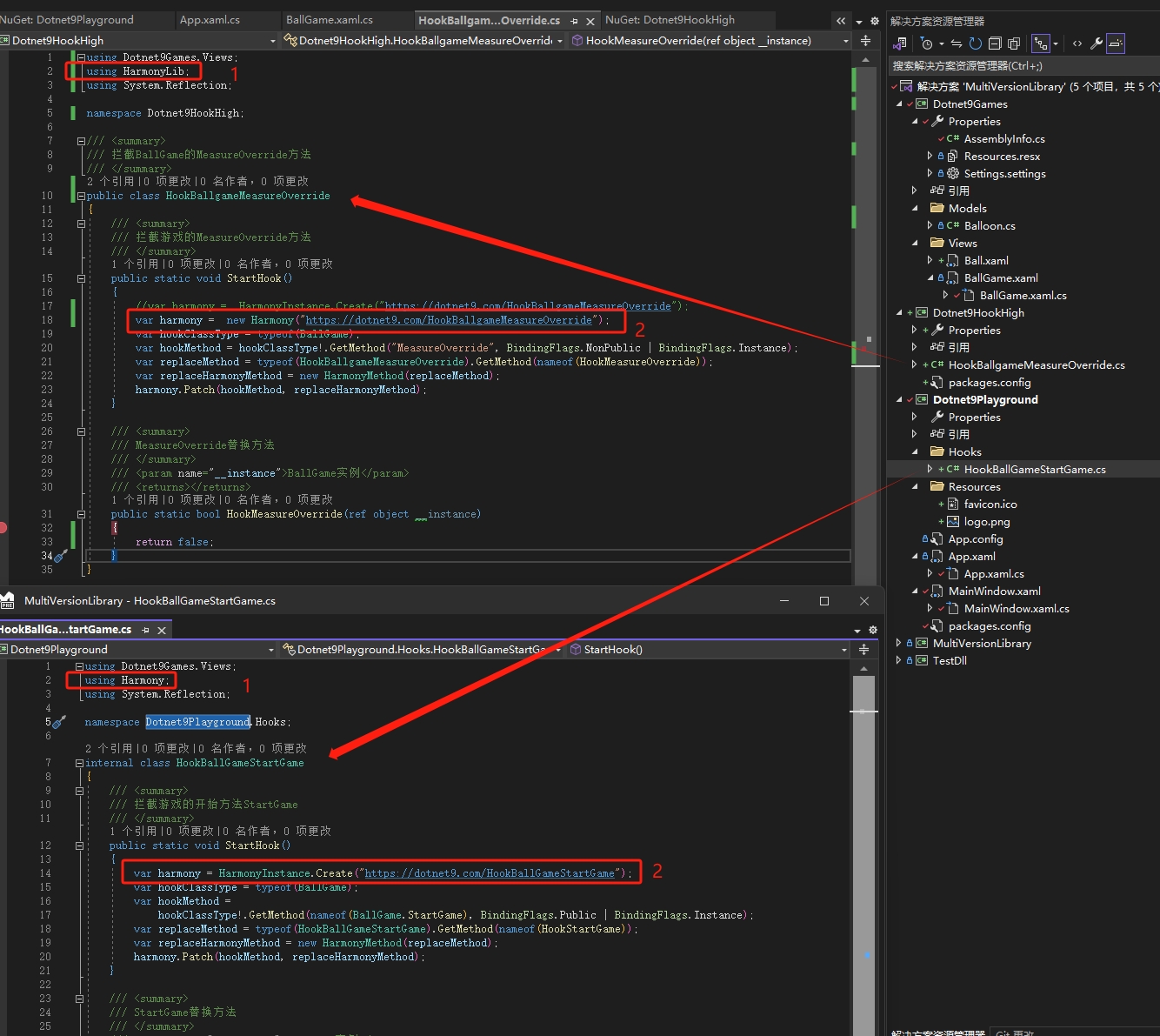
主工程Dotnet9Playground添加Dotnet9HookHigh工程的引用,App.xaml.cs中添加引用HookBallgameMeasureOverride命名空间:using Dotnet9HookHigh;,代码如下:
using Dotnet9HookHigh;
using Dotnet9Playground.Hooks;
using System.Windows;

namespace Dotnet9Playground
{
    /// <summary>
    /// App.xaml 的交互逻辑
    /// </summary>
    public partial class App : Application
    {
        protected override void OnStartup(StartupEventArgs e)
        {
            base.OnStartup(e);

            // 拦截气球动画播放方法
            HookBallGameStartGame.StartHook();

            // 这是第二个拦截方法:拦截气球MeasureOverride方法
            HookBallgameMeasureOverride.StartHook();
        }
    }
}
这就完了?运行试试:

这提示是指我的新工程Dotnet9HookHigh未成功应用高版本Lib.Harmony(2.2.2),亦指主工程Dotnet9Playground未成功识别加载高版本Lib.Harmony,怎么办?看我接下来的表演!
5.2. 高低版本的库分目录存放
5.2.1. 分析程序输出目录
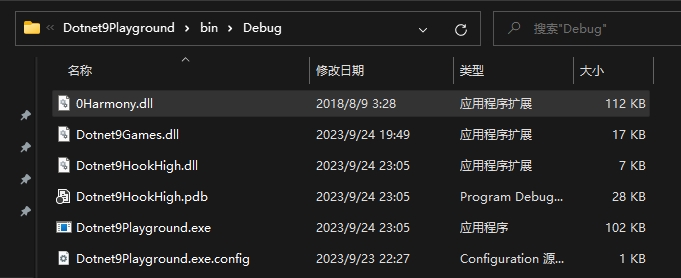
程序输出目录只有一个0Harmony.dll,高低2个版本应该是两个库才对,怎么办?
5.2.2. 新创建目录
低版本不变(存储位置依然放输出目录的根目录),为了兼容,我们把高版本改目录存放,比如:Lib/Lib.Harmony/2.2.2/0Harmony.dll,将库按目录结构存放在工程Dotnet9HookHigh中:
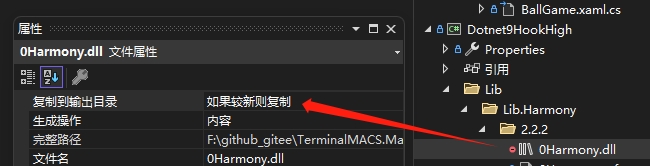
- 并将
0Harmony.dll的属性【复制到输出目录】设置为【如果较新则复制】 - 删除
Dotnet9HookHigh对Lib.Harmony库的NuGet引用,改为本地引用(原来的配方,浏览本地路径的方式);

这就完了吗?咋还是报那个错?
5.3. 同库多版本配置
5.3.1. App.config配置多版本
修改Dotnet9Palyground的App.config文件,添加0Harmony.dll两个版本及读取位置:
<?xml version="1.0" encoding="utf-8" ?>
<configuration>
    <startup>
        <supportedRuntime version="v4.0" sku=".NETFramework,Version=v4.6.1" />
    </startup>
	<runtime>
		<assemblyBinding xmlns="urn:schemas-microsoft-com:asm.v1">
			<dependentAssembly>
				<assemblyIdentity name="0Harmony"
				  publicKeyToken="null"/>
				<codeBase version="1.2.0.1" href="0Harmony.dll" />
			</dependentAssembly>
			<dependentAssembly>
				<assemblyIdentity name="0Harmony"
				  publicKeyToken="null"/>
				<codeBase version="2.2.2.0" href="Lib\Lib.Harmony\2.2.2\0Harmony.dll" />
			</dependentAssembly>
		</assemblyBinding>
	</runtime>
</configuration>
再运行,还是报上面的错?啊,我要晕了。。。。
5.3.2. 重点:库的强签名
上面分目录、配置文件版本配置目录也还不够,主工程还是无法区分两个版本的Lib.Harmony库,这里涉及.NET 库强签名,就是上面App.config配置中的publicKeyToken特性,加上这个主程序就认识了,关于强签名网上找到个说明《.Net程序集强签名详解》:
可以将强签名的dll注册到GAC,不同的应用程序可以共享同一dll。
强签名的库,或者应用程序只能引用强签名的dll,不能引用未强签名的dll,但是未强签名的dll可以引用强签名的dll。
强签名无法保护源代码,强签名的dll是可以被反编译的。
强签名的dll可以防止第三方恶意篡改。
这里,对于1.2.0.1版本的0Harmony.dll库我们依然不动,只对2.2.2高版本做强签名处理,签名步骤参考[VS2008版本引入第三方dll无强签名],我们来一起做一遍,这里会借助Everything软件搜索使用到的命令程序,建议提前下载。
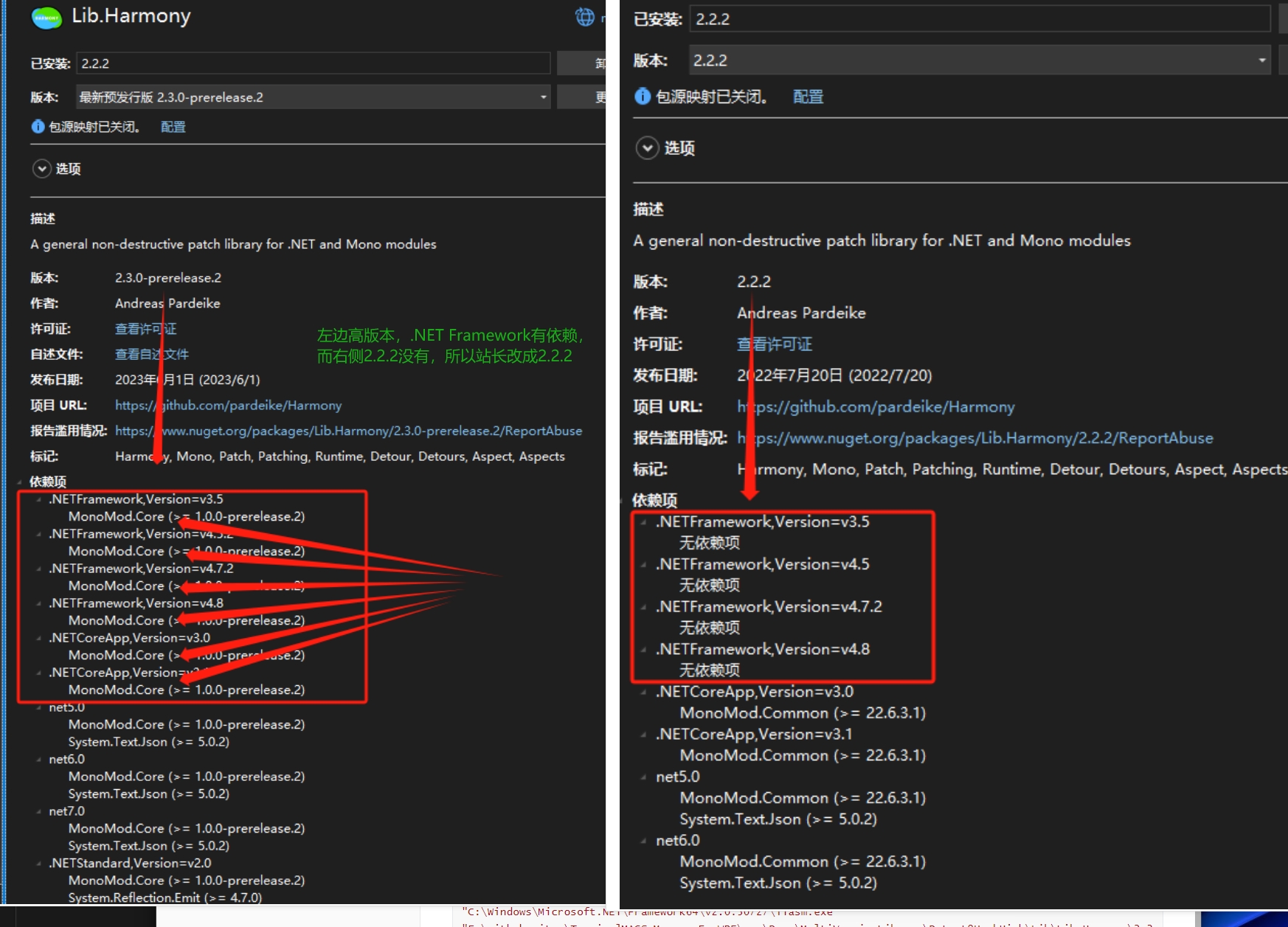
注意:暂时不要用最新预览版2.3.0-prerelease.2,站长做这个示例签名用这个版本花了2个晚上没成功,换成2.2.2就可以,下面的图也重新录了,可能该版本有其他依赖的缘故,只是猜测:
- 创建一个新的随机密钥对
0Harmony.snk
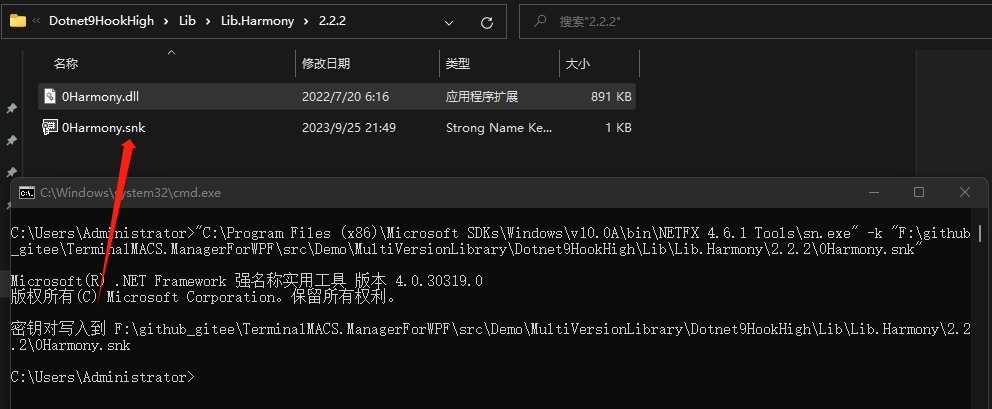
使用Everything查找一个sn.exe程序,随便使用一个,比如:"C:\Program Files (x86)\Microsoft SDKs\Windows\v10.0A\bin\NETFX 4.6.1 Tools\sn.exe",在高版本目录下生成一个密钥对文件0Harmony.snk,命令如下:
"C:\Program Files (x86)\Microsoft SDKs\Windows\v10.0A\bin\NETFX 4.6.1 Tools\sn.exe" -k "F:\github_gitee\TerminalMACS.ManagerForWPF\src\Demo\MultiVersionLibrary\Dotnet9HookHigh\Lib\Lib.Harmony\2.2.2\0Harmony.snk"
- 反编译
0Harmony.dll
查找ildasm.exe,比如C:\Program Files (x86)\Microsoft SDKs\Windows\v10.0A\bin\NETFX 4.6.1 Tools\ildasm.exe,执行以下命令生成0Harmony.dll的il中间文件:
"C:\Program Files (x86)\Microsoft SDKs\Windows\v10.0A\bin\NETFX 4.6.1 Tools\ildasm.exe" "F:\github_gitee\TerminalMACS.ManagerForWPF\src\Demo\MultiVersionLibrary\Dotnet9HookHigh\Lib\Lib.Harmony\2.2.2\0Harmony.dll" /out="F:\github_gitee\TerminalMACS.ManagerForWPF\src\Demo\MultiVersionLibrary\Dotnet9HookHigh\Lib\Lib.Harmony\2.2.2\0Harmony.il"
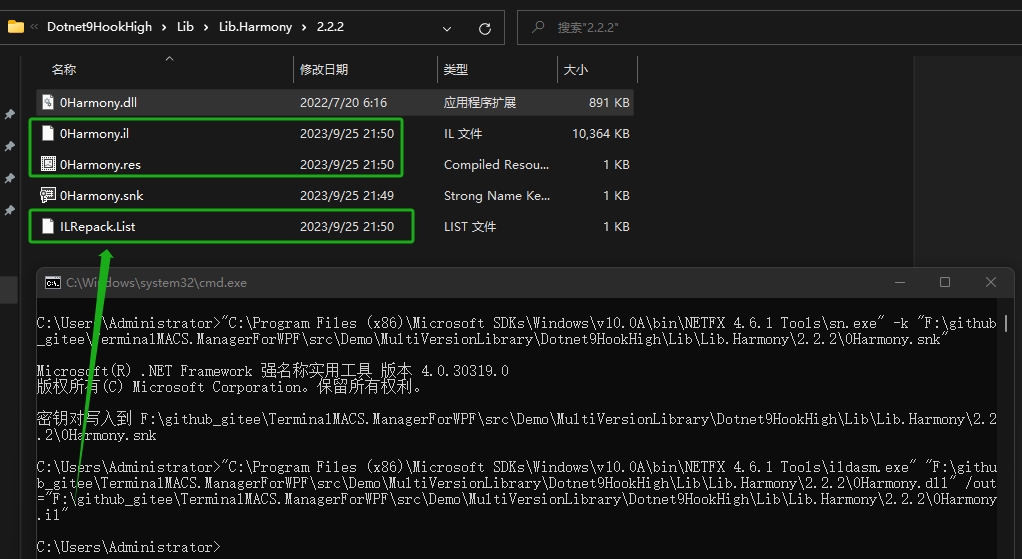
- 重新编译,附带强命名参数
查找ilasm.exe,比如C:\Windows\Microsoft.NET\Framework64\v2.0.50727\ilasm.exe,执行以下命令做签名:
"C:\Windows\Microsoft.NET\Framework64\v2.0.50727\ilasm.exe" "F:\github_gitee\TerminalMACS.ManagerForWPF\src\Demo\MultiVersionLibrary\Dotnet9HookHigh\Lib\Lib.Harmony\2.2.2\0Harmony.il" /dll /resource="F:\github_gitee\TerminalMACS.ManagerForWPF\src\Demo\MultiVersionLibrary\Dotnet9HookHigh\Lib\Lib.Harmony\2.2.2\0Harmony.res" /key="F:\github_gitee\TerminalMACS.ManagerForWPF\src\Demo\MultiVersionLibrary\Dotnet9HookHigh\Lib\Lib.Harmony\2.2.2\0Harmony.snk" /optimize
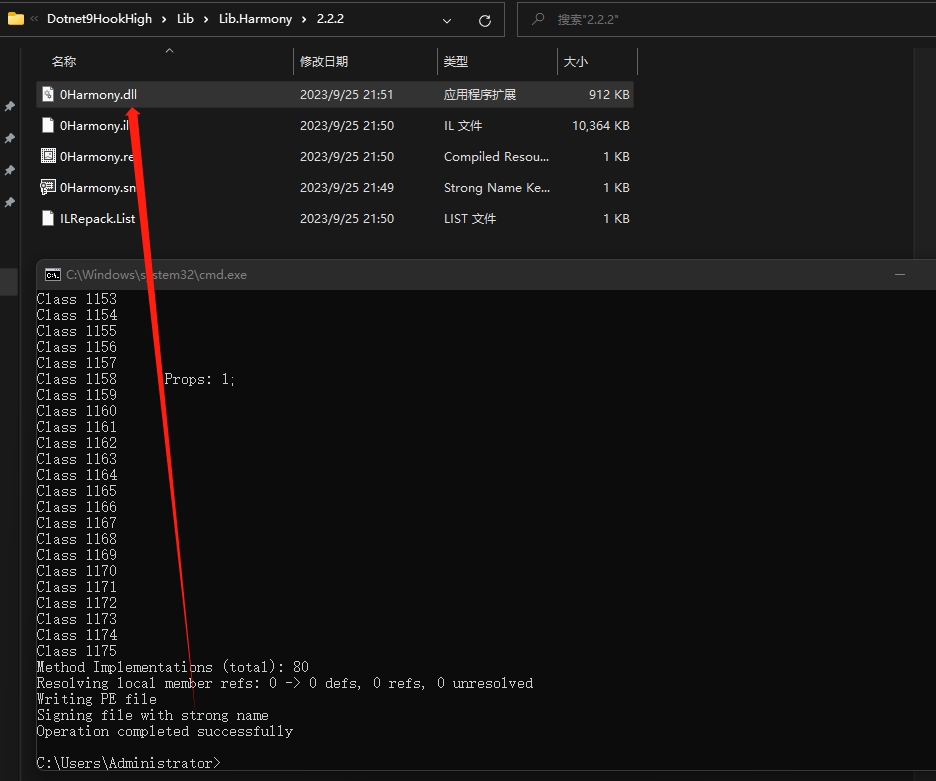
- 验证签名信息
"C:\Program Files (x86)\Microsoft SDKs\Windows\v10.0A\bin\NETFX 4.6.1 Tools\sn.exe" -v "F:\github_gitee\TerminalMACS.ManagerForWPF\src\Demo\MultiVersionLibrary\Dotnet9HookHigh\Lib\Lib.Harmony\2.2.2\0Harmony.dll"

也可将生成的dll拖入dnSpy查看:
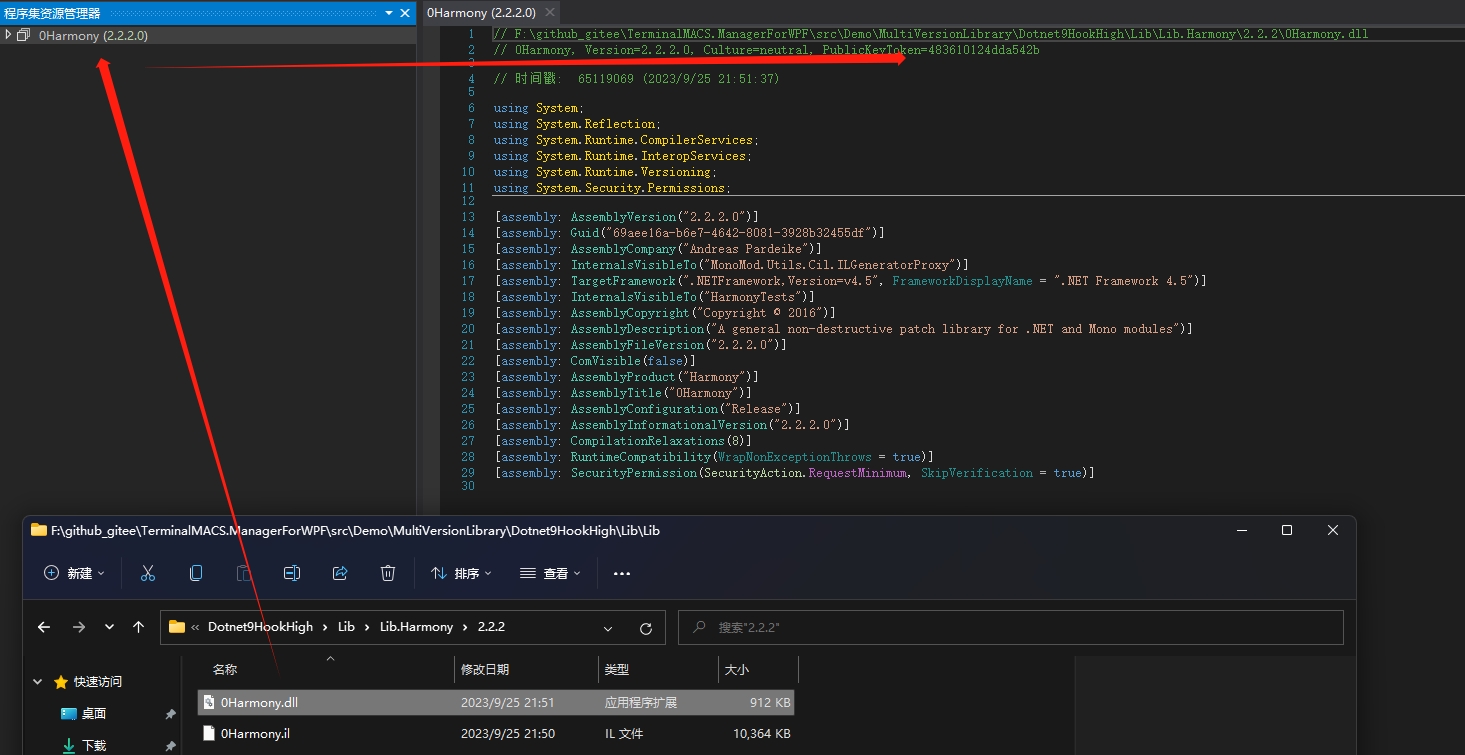
作为对比,查看NuGet下载的Lib.Harmony是没做签名的:
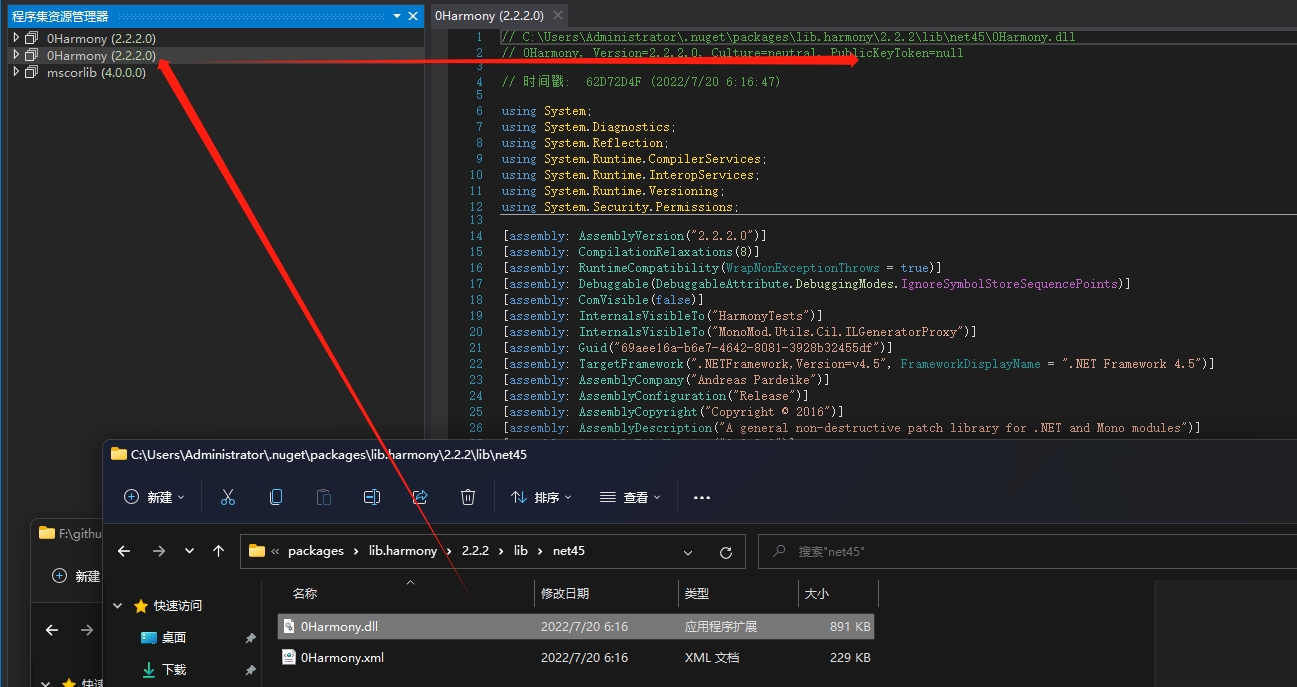
我们将签名补充进App.Config文件。

注意:因为我们使用的随机密钥对,所以您生成的签名和我的肯定不一样:
再调试,能正常拦截MeasureOverride方法了,传入的实例也能正常显示BallGame(就这?对,我搞了2个晚上。。。。):
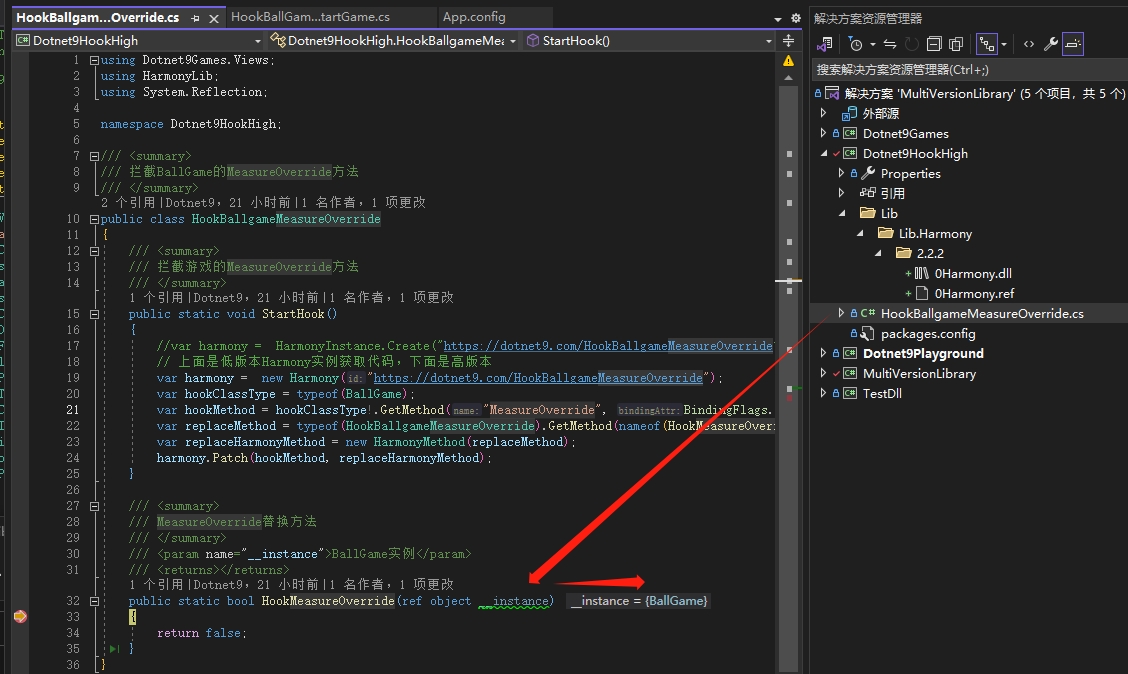
5.4. 一切就绪,完善最后一个拦截
代码如下:
using Dotnet9Games.Views;
using HarmonyLib;
using System.Collections;
using System.Data;
using System.Linq;
using System.Reflection;
using System.Windows;
using System.Windows.Controls;
using System.Windows.Shapes;

namespace Dotnet9HookHigh;

/// <summary>
/// 拦截BallGame的MeasureOverride方法
/// </summary>
public class HookBallgameMeasureOverride
{
    /// <summary>
    /// 拦截游戏的MeasureOverride方法
    /// </summary>
    public static void StartHook()
    {
        //var harmony =  HarmonyInstance.Create("https://dotnet9.com/HookBallgameMeasureOverride");
        // 上面是低版本Harmony实例获取代码,下面是高版本
        var harmony = new Harmony("https://dotnet9.com/HookBallgameMeasureOverride");
        var hookClassType = typeof(BallGame);
        var hookMethod = hookClassType!.GetMethod("MeasureOverride", BindingFlags.NonPublic | BindingFlags.Instance);
        var replaceMethod = typeof(HookBallgameMeasureOverride).GetMethod(nameof(HookMeasureOverride));
        var replaceHarmonyMethod = new HarmonyMethod(replaceMethod);
        harmony.Patch(hookMethod, replaceHarmonyMethod);
    }

    /// <summary>
    /// MeasureOverride替换方法
    /// </summary>
    /// <param name="__instance">BallGame实例</param>
    /// <returns></returns>
    public static bool HookMeasureOverride(ref object __instance)
    {
        #region 原方法代码逻辑

        //// 计算最后一个元素宽度,不需要关注为什么这样写,只是为了引出Size异常使得

        //var lastChild = _balloons.LastOrDefault();
        //if (lastChild != null)
        //{
        //    var remainWidth = ActualWidth;
        //    foreach (var balloon in _balloons)
        //    {
        //        remainWidth -= balloon.Shape.Width;
        //    }

        //    lastChild.Shape.Measure(new Size(remainWidth, lastChild.Shape.Height));
        //}

        //return base.MeasureOverride(constraint);

        #endregion

        #region 拦截替换代码

        var instanceType = __instance.GetType();
        var balloonsField = instanceType.GetField("_balloons", BindingFlags.NonPublic | BindingFlags.Instance);
        var balloons = (IEnumerable)balloonsField!.GetValue(__instance);

        var lastChild = balloons.Cast<object>().LastOrDefault();
        if (lastChild == null)
        {
            return false;
        }

        var remainWidth = ((UserControl)__instance).ActualWidth;
        foreach (object balloon in balloons)
        {
            remainWidth -= GetBalloonSize(balloon).Width;
        }

        // 注意:关键代码在这,如果剩余宽度大于0才重新计算最后一个子项大小
		// 这段代码可能没什么意义,可按实际开发修改
        if (remainWidth > 0)
        {
            var lashShape = GetBalloonShape(lastChild);
            lashShape.Measure(new Size(remainWidth, lashShape.Height));
        }

        #endregion

        return false;
    }

    private static Ellipse GetBalloonShape(object balloon)
    {
        var shapeProperty = balloon.GetType().GetProperty("Shape");
        var shape = (Ellipse)shapeProperty!.GetValue(balloon);
        return shape;
    }

    private static Size GetBalloonSize(object balloon)
    {
        var shape = GetBalloonShape(balloon);
        return new Size(shape.Width, shape.Height);
    }
}
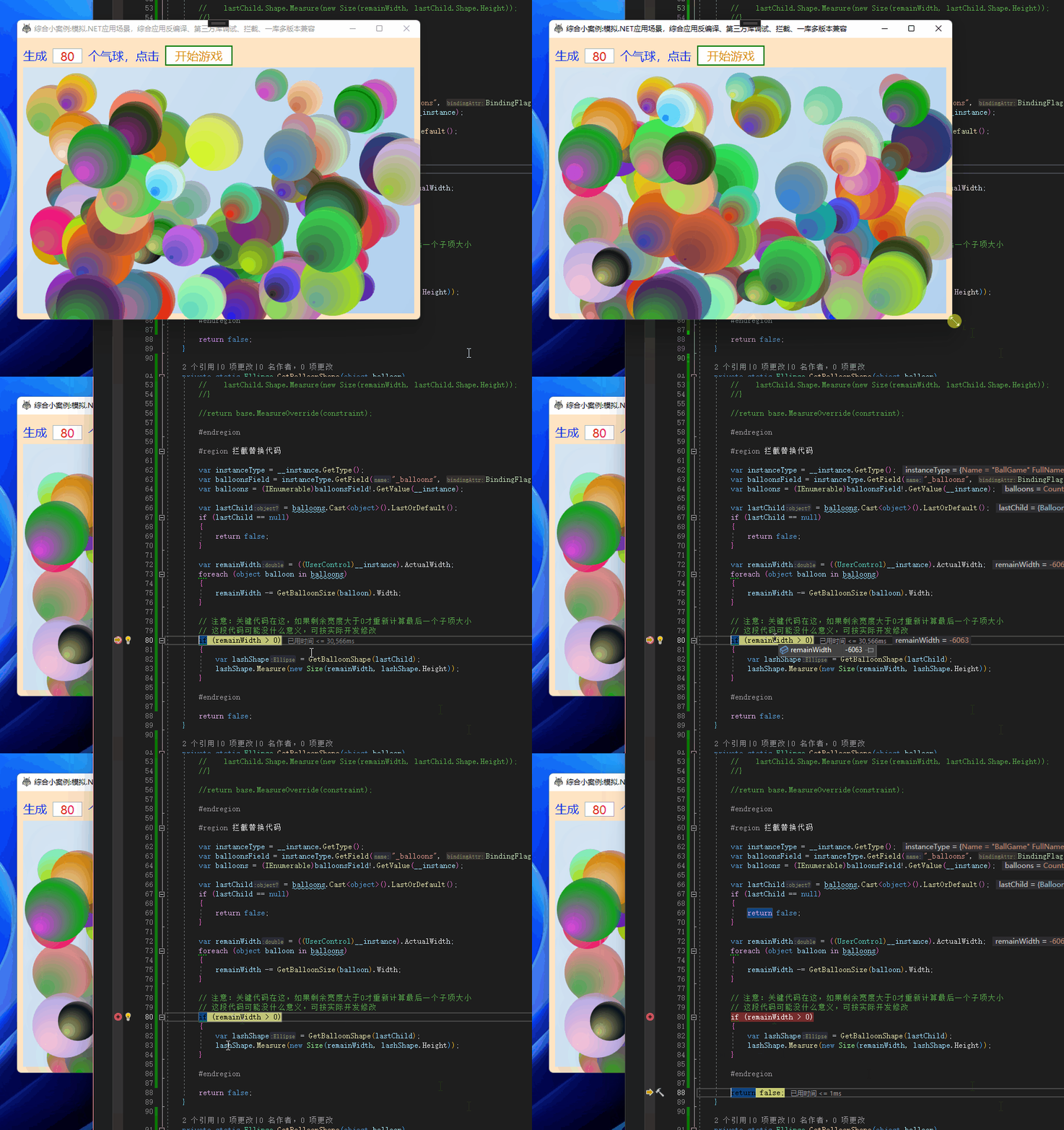
其中关键代码是:
// 注意:关键代码在这,如果剩余宽度大于0才重新计算最后一个子项大小
// 这段代码可能没什么意义,可按实际开发修改
if (remainWidth > 0)
{
    var lashShape = GetBalloonShape(lastChild);
    lashShape.Measure(new Size(remainWidth, lashShape.Height));
}
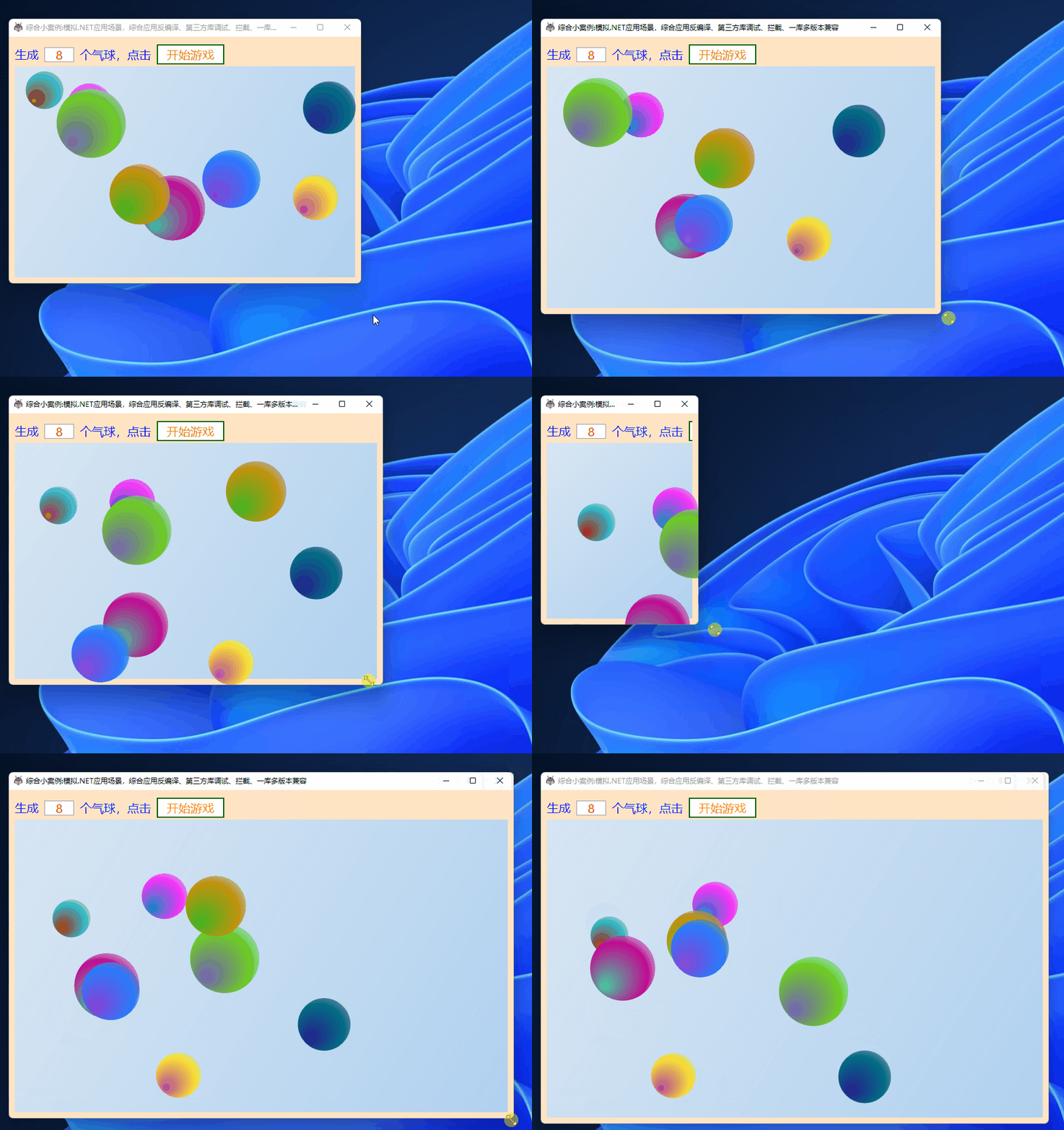
其他代码就是反射的使用,不再细说,我们运行程序,现在随便缩放窗体了:
当剩余宽度小于0时跳过计算最后一个子项大小
5.4. 小优化
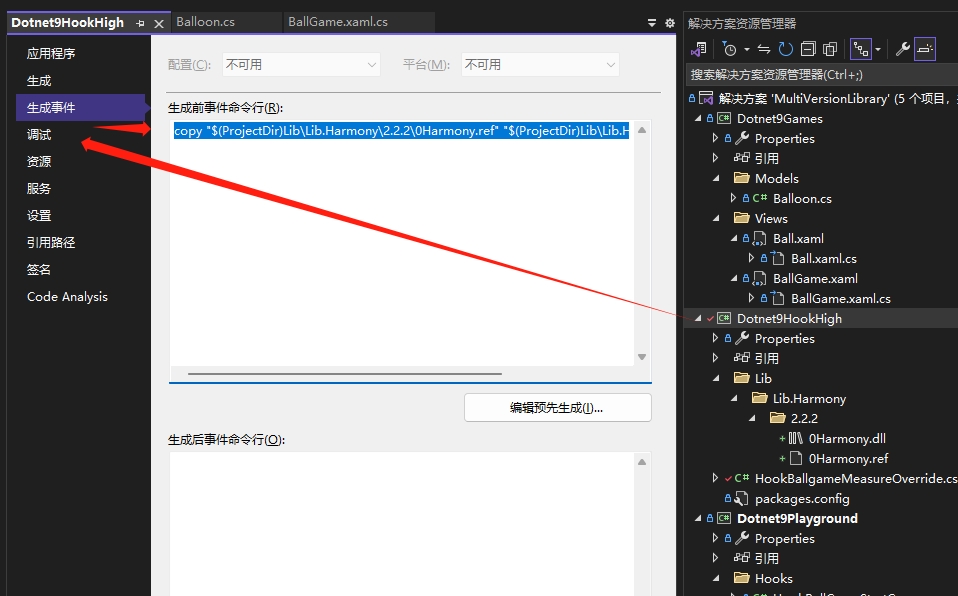
上面部分截图中可能您也看到了0Harmony.ref文件,我们简单说说。
Git一般是配置成不能上传可执行程序或dll文件的,但多版本dll特殊,部分库不能直接从NuGet引用,所以本文中的高版本Lib.Harmony库只能使用自己强签名版本,我们将dll文件扩展名改为“.ref"以允许上传,他人能正常使用,程序如果需要正常编译、生成,则给Dotnet9HookHigh工程添加生成前命令行,即生成时将.ref复制一份为.dll:
copy "$(ProjectDir)Lib\Lib.Harmony\2.2.2\0Harmony.ref" "$(ProjectDir)Lib\Lib.Harmony\2.2.2\0Harmony.dll"
6. 总结
文中示例代码:MultiVersionLibrary
文中案例写的一般,特别是第二个陷阱,有兴趣可以阅读游戏相关代码,提PR大家一起切磋,把这个案例写的更合理、更有趣、更好玩一点,能让第二个陷阱写一些好玩的特效,拦截后实现不同的效果,这才是拦截的乐趣。
本文通过一个模拟实际案例,帮助大家应用前两篇文章中涉及的技能(dnSpy调试第三方库和Lib.Harmony拦截第三方库),并且介绍一种支持多个版本的库的兼容性解决方案。
通过本文介绍支持多个版本的库的兼容性解决方案,读者可以简单了解如何反编译第三方库,以及如何使用强签名技术来保证库的兼容性(和安全性,本文未展开说,可以阅读此文浅谈.NET程序集安全签名)。希望本文提供的案例能帮助读者更好地理解和应用这些技能。