.NET 9 Officially Released

.NET 9 Officially Released

.NET 9 has been officially released! It is the most productive, modern, secure, intelligent, and highest-performing version of .NET to date.

Last updated 11/13/2024 2:47 AM
.NET Team
25 min read
Category
.NET
Tags
.NET C# Security .NET 9 Official Release

This article is translated with the assistance of AI and reviewed by the site admin.

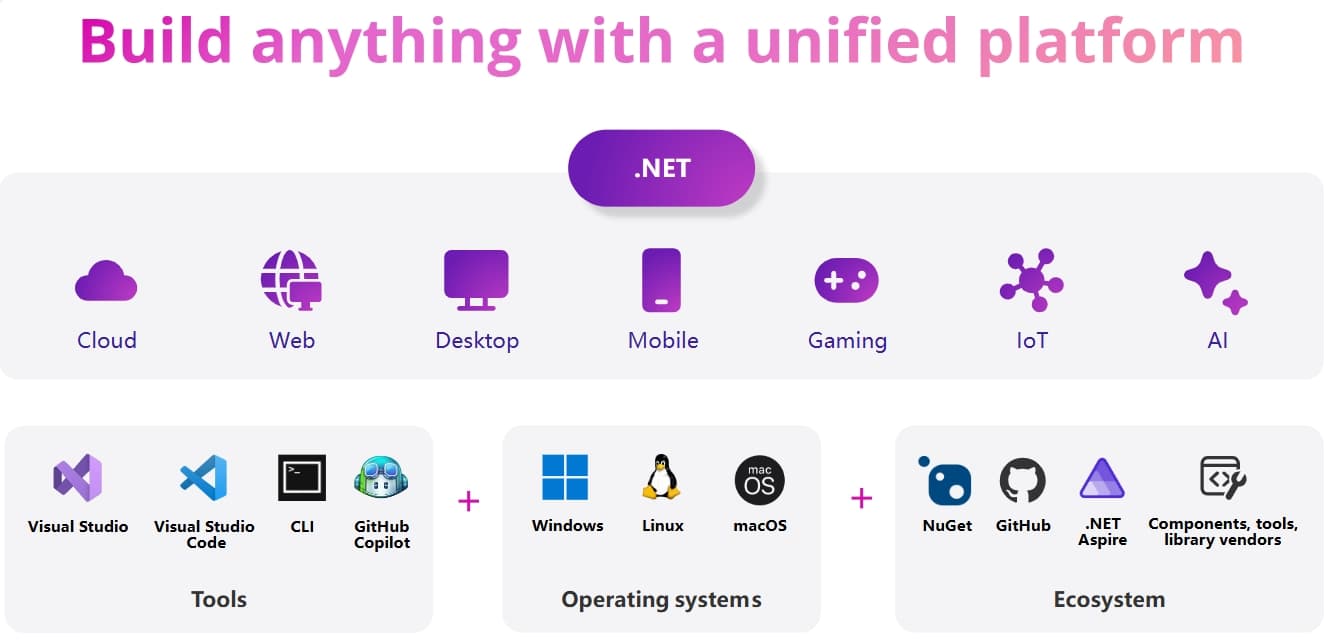
Today, we are thrilled to announce the official release of .NET 9! This is the most productive, modern, secure, intelligent, and highest-performing version of .NET yet. It represents another year of effort from thousands of developers worldwide, and this new version includes thousands of performance, security, and functional improvements. You'll find comprehensive enhancements across the entire .NET technology stack, from programming languages and development tools to workloads, allowing you to develop on a unified platform and easily infuse artificial intelligence into your applications.

Click to view an overview of .NET with workloads, tools, ecosystems, and operating systems

Download resources for .NET 9, along with updated versions of Visual Studio 2022 and the C# Dev Kit for Visual Studio Code, are now available.

🔽 Download .NET 9

Get Visual Studio 2022 v17.12

The .NET team, partners, and the .NET community will showcase the new features of .NET 9 and provide in-depth analysis of various capabilities at .NET Conf 2024 (a free three-day online developer event, November 12-14). Join us!

Let's take a look at the highlights of .NET in terms of development languages, workloads, and tools.

Unmatched Performance – Applications Run Faster, Memory Usage Lower

.NET 9 is the highest-performing version of .NET to date, with over 1000 performance-related changes across the runtime, workloads, and language, utilizing more efficient algorithms to generate better code. Stephen Toub has provided an in-depth analysis of .NET 9 Performance Improvements, which is a must-read, but let's first discuss some highlights from this version.

The Server GC has undergone significant adjustments, now adapting based on the application's memory demands rather than the resources (memory and CPU) available in the environment (machine, VM, or container). This adjustment has profound implications in multi-core environments, especially when application memory usage is small or varies over time. Previously, the implementations of Workstation and Server GC produced vastly different results, forcing users to choose between them. This change should be particularly appealing to those who use Workstation GC to control memory usage in cloud applications. Memory optimization may come at a slight throughput cost, but this cost might not be noticeable. Server GC can be configured to use the old implementation, which may be useful for testing.

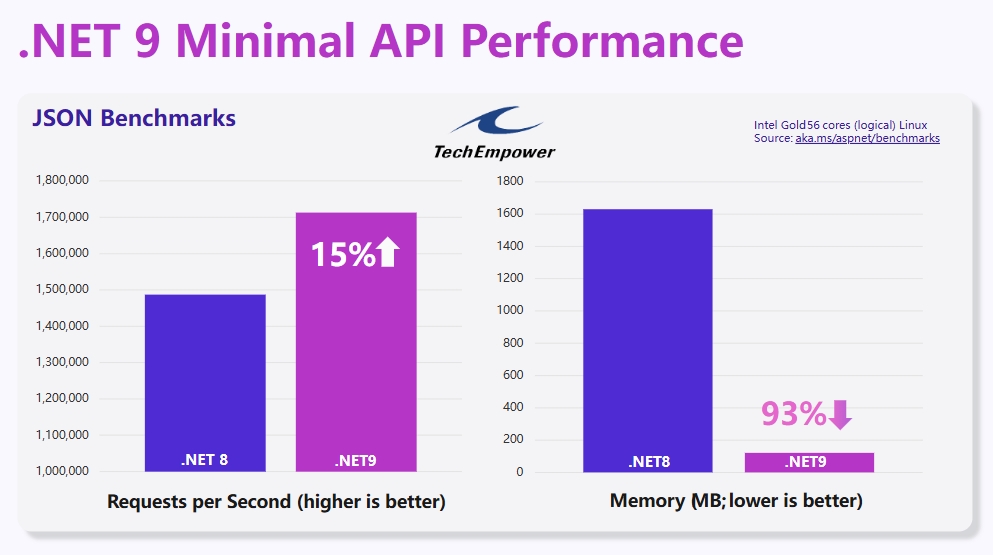
The TechEmpower benchmarks are no match for .NET 9, which achieves higher throughput while significantly reducing memory usage. The memory usage reduction is attributed to the changes in Server GC.

Chart showing 15% increase in requests per second (RPS) and 93% reduction in memory usage

The runtime has reintroduced vectorization, added support for new chip architectures, including Arm64 Scalable Vector Extension (SVE), Intel Advanced Vector Extensions 10 (AVX10), and hardware acceleration for the runtime. RyuJIT has improved performance on Arm64, loops, Profile-Guided Optimization (PGO), and bounds checking. Exception handling has been sped up by 50% thanks to adopting the exception model used by Native AOT.

Dynamic PGO has been updated to optimize more code patterns. The JIT now generates fast-path code for type casts that are common and for types that have never appeared. Type casts like (IFoo)myFoo and myFoo is IFoo are extremely common in C#. Additionally, it can unroll and vectorize operations on buffers for observed common buffer lengths. Although this change requires disabling the "ReadyToRun" feature, it can improve execution speed by up to 70%.

LINQ has also been optimized for many common scenarios. Methods like Take and DefaultIfEmpty can now return up to 10 times faster when the underlying array, collection, or enumerable is empty. Enumerable.SequenceEqual has been specifically handled for array inputs, delegating the operation to MemoryExtensions.SequenceEquals by passing arrays as spans, enabling efficient iteration and vectorization. List<T> now also has this capability.

System.Text.Json internals have been significantly optimized, with performance improvements exceeding 50% for various operations. The JsonProperty.WriteTo method now writes directly to UTF8 bytes, avoiding string allocation. The new JsonMarshal.GetRawUtf8Value API returns UTF8 bytes as an alternative to JsonElement.GetRawText (which returns a string requiring encoding and memory allocation). JsonObject can now correctly pre-size its backing storage when the number of elements from a given enumerable is known, avoiding allocation and resizing costs.

In addition to these fundamental improvements to .NET, you will find performance enhancements for all types of applications. Read on for more details.

.NET Aspire – Building Blocks for Better Applications

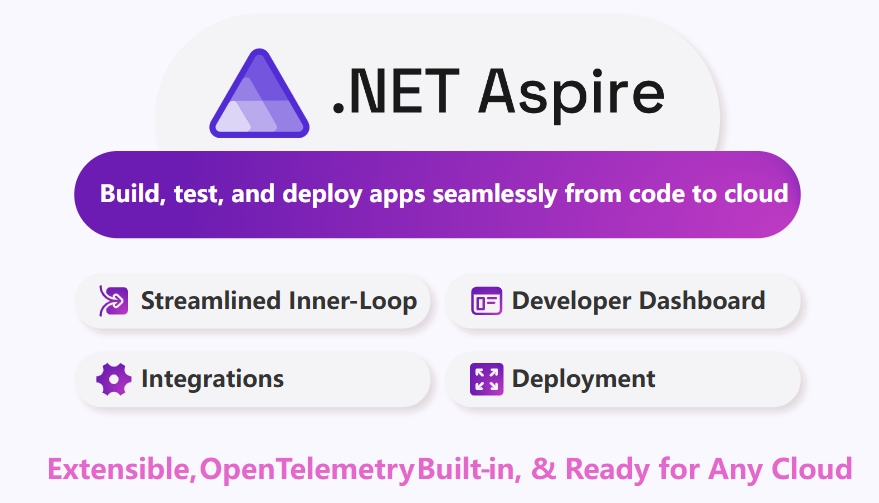
.NET Aspire is a powerful set of tools, templates, and packages designed to help seamlessly develop observable and production-ready applications. Only six months have passed since the initial release of .NET Aspire, and we have made improvements across all parts of the technology stack, from new features in telemetry and metric dashboards to more streamlined deployment processes for cloud applications. It is exciting to see various applications adopting .NET Aspire and the community embracing integrations and tools based on their scenarios. Additionally, we have seen significant internal adoption at Microsoft, with teams like Xbox and Copilot integrating .NET Aspire into existing services, leveraging easily accessible insights and various compatible Azure integrations to further optimize internal development processes.

.NET Aspire overview

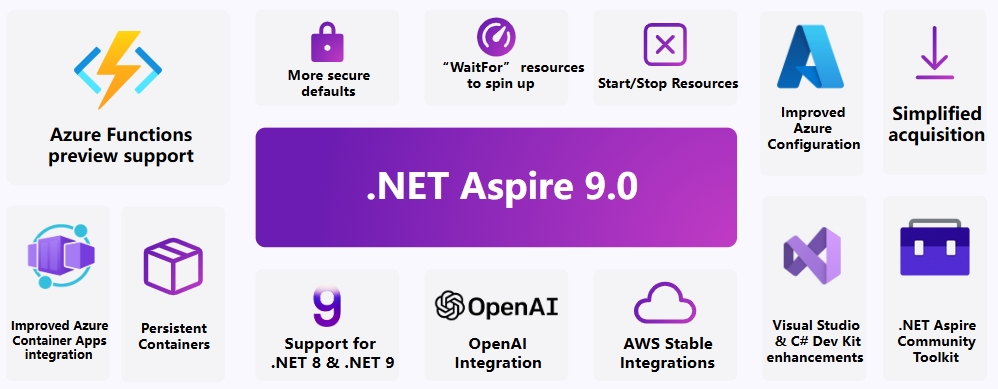
This release of .NET Aspire 9 brings several highly requested features to help simplify the application development process. You can now start and stop resources through the dashboard, keep containers running between debug sessions, and access new APIs including WaitFor to better manage resource startup. We have worked closely with the community to introduce new seamless integrations for many platforms including OpenAI, Ollama, Milvus, and more. We have simplified the process of getting .NET Aspire, making it easier to integrate into applications, improved deployment scenarios related to Azure Container Apps, and are pleased to announce preview support for .NET Aspire with Azure Functions.

.NET Aspire 9 new features overview

There is much more to explore in .NET Aspire, spanning from tooling to the broader ecosystem, such as the new .NET Aspire Community Toolkit. If you are planning to start using .NET Aspire, check out our free courses on Microsoft Learn and the new .NET Aspire certification to help you get started with .NET Aspire. Also, let us know your thoughts on .NET Aspire via GitHub, .NET Discord, or our live streams.

Artificial Intelligence – A Thriving AI Ecosystem

We continue to expand .NET's capabilities in building and infusing AI into applications. With new learning materials and examples, simplified integration with the ecosystem, a vibrant AI community built through collaboration with partners, and the ability to deploy AI solutions to the cloud more seamlessly than ever before. Many companies across various industries have adopted .NET to create first-class AI experiences for their customers, including H&R Block, Blip, and KPMG. Your favorite coding assistant, GitHub Copilot, is powered by .NET, and the new Microsoft Copilot experience is built entirely on .NET.

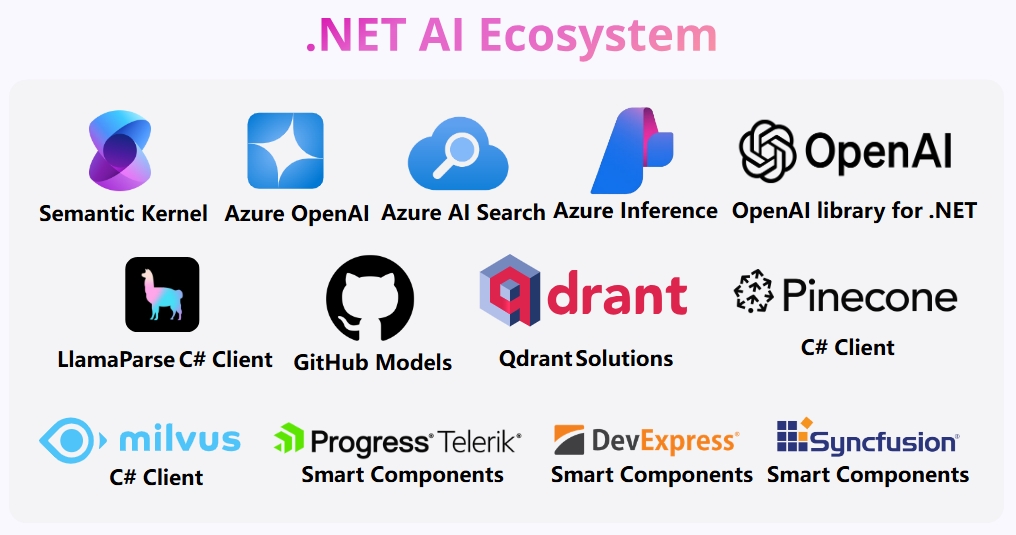
When developing AI services and applications, it is crucial for developers to have access to the latest advancements. That's why we collaborate with partners across the AI ecosystem, including Azure, OpenAI, LlamaIndex, Qdrant, Pinecone, Milvus, AutoGen, OllamaSharp, ONNX Runtime, and many others, to provide .NET developers with a powerful set of options.

Overview diagram showing various libraries and components in the .NET AI ecosystem

We have also made it easier to integrate AI-powered controls into .NET applications by building a smart component ecosystem in collaboration with community and control vendor partners.

.NET's AI Building Blocks

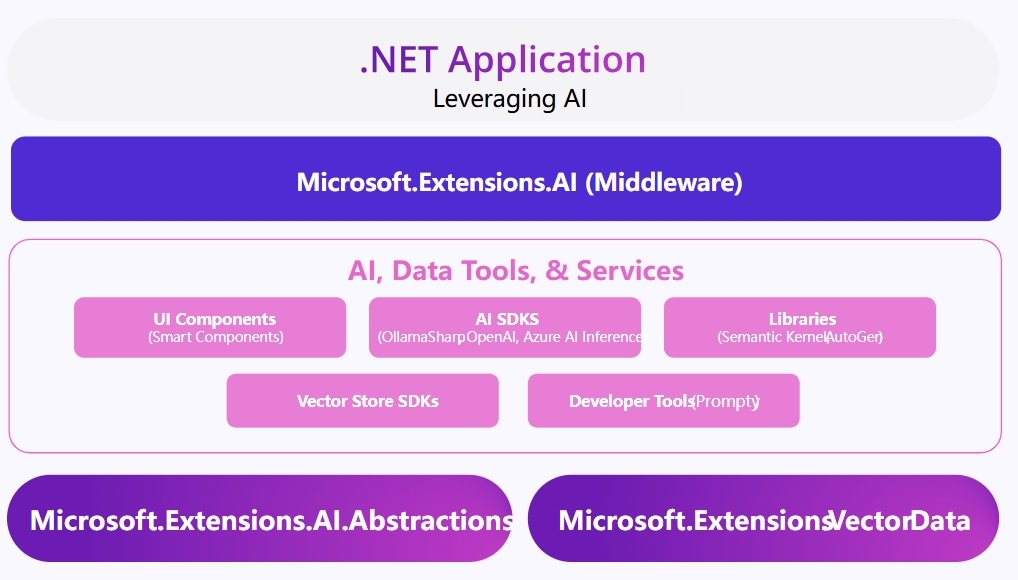
A robust ecosystem means developers have more choices than ever to select the best solution for their specific scenarios. We thought about how to simplify these integrations and eliminate the barriers to entry caused by the growing number of APIs and features in the ecosystem. To this end, we have collaborated with Semantic Kernel to introduce a set of abstractions for the .NET ecosystem under the Microsoft.Extensions.AI and Microsoft.Extensions.VectorData projects, providing a unified C# abstraction layer for interacting with AI services (such as small and large language models, embeddings, vector stores, and middleware). This simplified new approach has already yielded positive results with early adopters like Pieces and OllamaSharp.

Diagram explaining how AI extensions work

Tensors and Tokenizers

Microsoft.Extensions.AI and VectorData are just some of the building blocks provided in .NET 9. We have also made significant improvements to related libraries and fundamental data types to drive AI development. Microsoft.ML.Tokenizers has improved tokenizers for popular model families including GPT (4, o1, etc.), Llama, Phi, and Bert, and has added support for tokenization algorithms such as Byte-Level BPE, SentencePiece, and WordPiece.

With language models as a service, the barrier to entry for developers to use AI has been greatly lowered. Tensor<T> also contributes to AI development as a new data type for representing multi-dimensional data, simplifying interoperability between libraries and the application of related operations.

We can't wait to see what you create using these new building block integrations. To get started quickly, explore our AI documentation and sample code for .NET.

GitHub Copilot Enhancements for .NET Developers

GitHub Copilot improves developer productivity by providing better results in the editor experience and AI assistance in the regular workflows of .NET developers. With the latest releases of Visual Studio and Visual Studio Code, along with updates to GitHub Copilot, this experience is even better. With Copilot enabled, AI is integrated throughout the IDE, helping you at every stage of the developer lifecycle, from writing code, writing tests, to debugging applications. Here are some of the features you can expect in the latest version:

  • AI-powered variable inspection: Optimize debugging workflows with integrated AI variable inspection.
  • AI-driven enumerable visualizer: AI-powered editable LINQ expressions in the enumerable visualizer.
  • Fix code with GitHub Copilot: GitHub Copilot can help you resolve code issues.
  • Better AI completions for C#: GitHub Copilot brings more context from related source files to improve C# code completions.
  • Debug tests with GitHub Copilot: Get help debugging failing tests using the "Debug tests with GitHub Copilot" feature.

Full-Stack Web Development with ASP.NET Core and Blazor

ASP.NET Core is our full-stack web framework for .NET, providing everything needed to build modern web applications and scalable backend services. .NET 9 adds numerous new features with significant improvements in performance, accessibility, and security. Applications built with ASP.NET Core using .NET 9 are secure by default, with expanded support for AOT compilation, improved monitoring and tracing, and built-in performance enhancements, resulting in higher throughput, faster startup times, and lower memory usage.

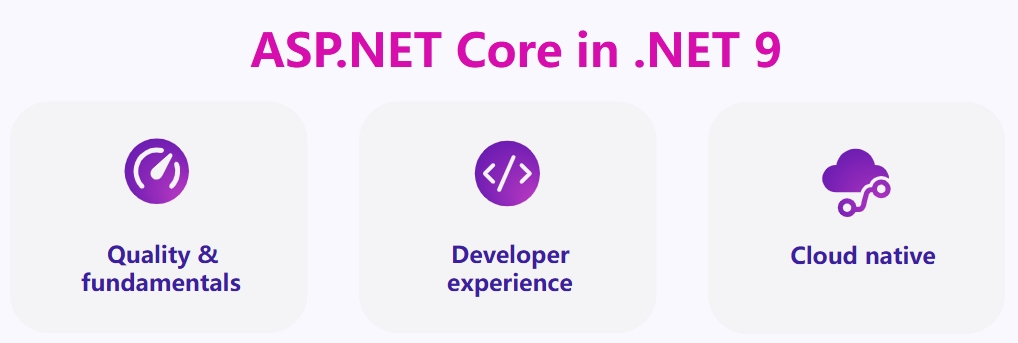
ASP.NET Core in .NET 9 – Quality, Developer Experience, Cloud-Native

Optimized Handling of Static Files in ASP.NET Core

Static web resources such as JavaScript and CSS files are part of almost every web application. ASP.NET Core in .NET 9 now optimizes these files during the build and publish process for efficient deployment. During the build phase, ASP.NET Core identifies all static web resources and generates fingerprinted versions by adding a content-based hash to the filename. This fingerprinting ensures unique filenames, prevents the use of old versions, and allows aggressive caching. When the application is published, these files are pre-compressed using the Brotli algorithm, which significantly reduces download size and reduces the server's compression workload. The runtime processes these files via endpoint routing, meaning you can now use other endpoint-aware features for static files, such as per-endpoint authorization.

Blazor Improvements in .NET 9

In .NET 9, Blazor is more powerful than ever, helping you build beautiful, modern web and hybrid applications. This release brings performance improvements across all aspects of Blazor, new Blazor Hybrid app and web app templates, and new APIs for developers to create satisfying user experiences.

Blazor can now detect a component's render mode at runtime via the new RendererInfo API and adjust component rendering accordingly. During pre-rendering, you can disable or hide interactive elements and enable them once the component becomes interactive.

Example code:

@if (RendererInfo.IsInteractive)
{
    <button class="btn btn-primary" @onclick="IncrementCount">Click me</button>
}
else
{
    <p>One moment, please</p>
}

Blazor apps using interactive server-side rendering (Blazor Server) benefit from a new reconnection experience with a more user-friendly interface, faster reconnection to the server, and automatic handling of page reloads when the user's connection is lost.

OpenAPI Enhancements in ASP.NET Core

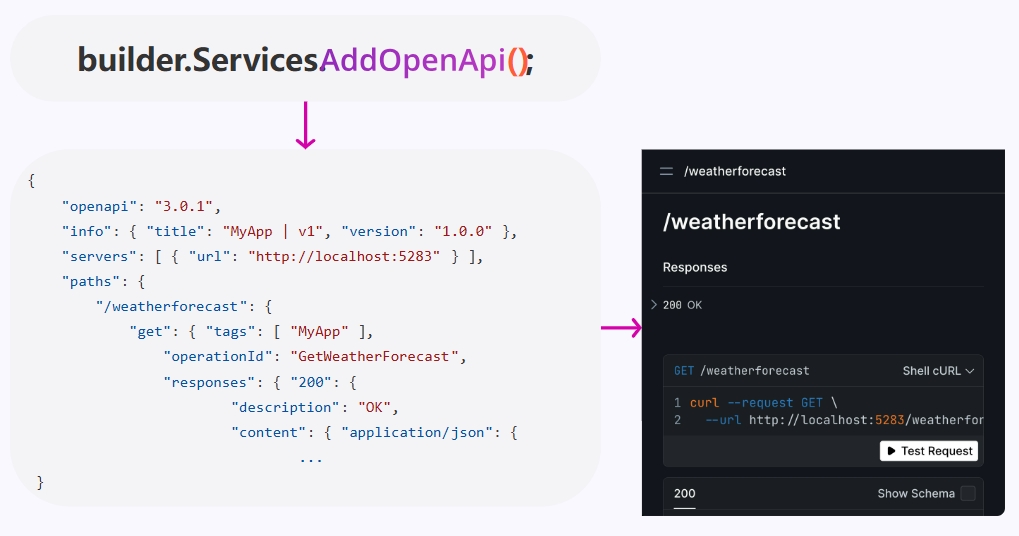
Globally, many large-scale services are built on APIs using ASP.NET Core, and we continuously improve the experience of building these APIs with each release. For API developers, a highlight in .NET 9 is the new built-in support for OpenAPI document generation via the Microsoft.AspNetCore.OpenAPI package. Metadata is automatically extracted from application code, attributes, and extension methods. The document can then be further customized using transformers that operate on operations, schemas, or the entire document. In Minimal API applications, this feature is Native AOT-friendly, allowing you to optimize your application for best performance. Additionally, OpenAPI documents can be generated at build time and integrated into local development workflows and build pipelines that utilize OpenAPI tools.

Diagram showing new API, documentation, and testing

Security Improvements in ASP.NET Core

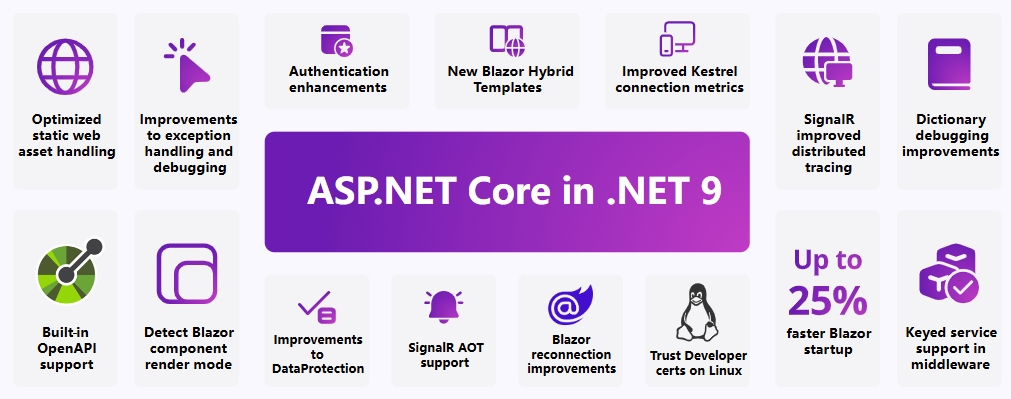
Security remains a core focus for ASP.NET Core, and you will find several improvements to help ensure applications are secure by default. Setting up trusted development certificates on Linux is now easier, facilitating the use of HTTPS during development. Blazor now includes built-in APIs for passing authentication state to the client, support for adding additional parameters to OAuth and OIDC authorization requests, and support for Pushed Authorization Requests (PAR). Finally, we have strengthened ASP.NET Core's data protection features and improved Kestrel connection metrics to make it easier to detect the cause of connection failures.

ASP.NET Core new features overview in .NET 9

.NET MAUI – Enhanced Multi-platform Application Development

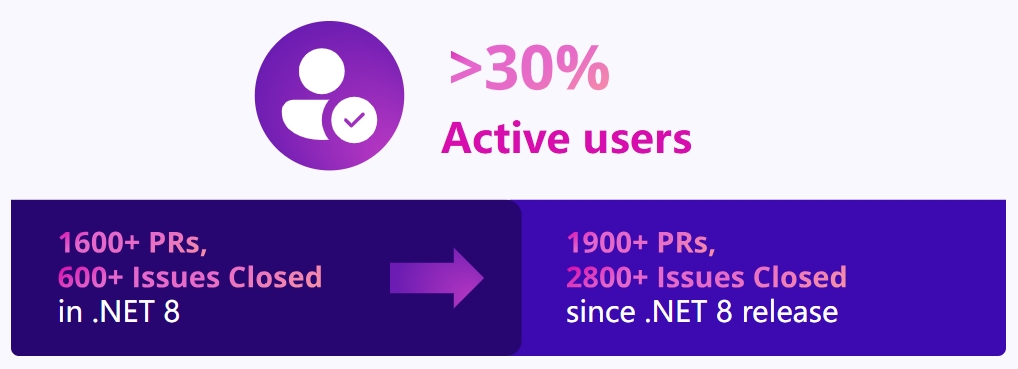
.NET MAUI is the best way to build multi-platform applications across mobile and desktop using .NET. In addition to providing a unified abstraction layer for accessing native functionality through a single API and creating great cross-platform UIs from a single codebase, it includes the fundamentals for building applications for Android, iOS, macOS, and Windows using .NET to access native APIs. In .NET 9, the primary goal for .NET MAUI is to improve quality and reliability so you can more easily bring applications to production. Over the past year, we have seen the number of applications built with .NET MAUI in the Google Play Store more than double, developer usage increase by over 30% to an all-time high, and incredible community engagement and contributions.

Image showing growth in .NET MAUI usage and PRs

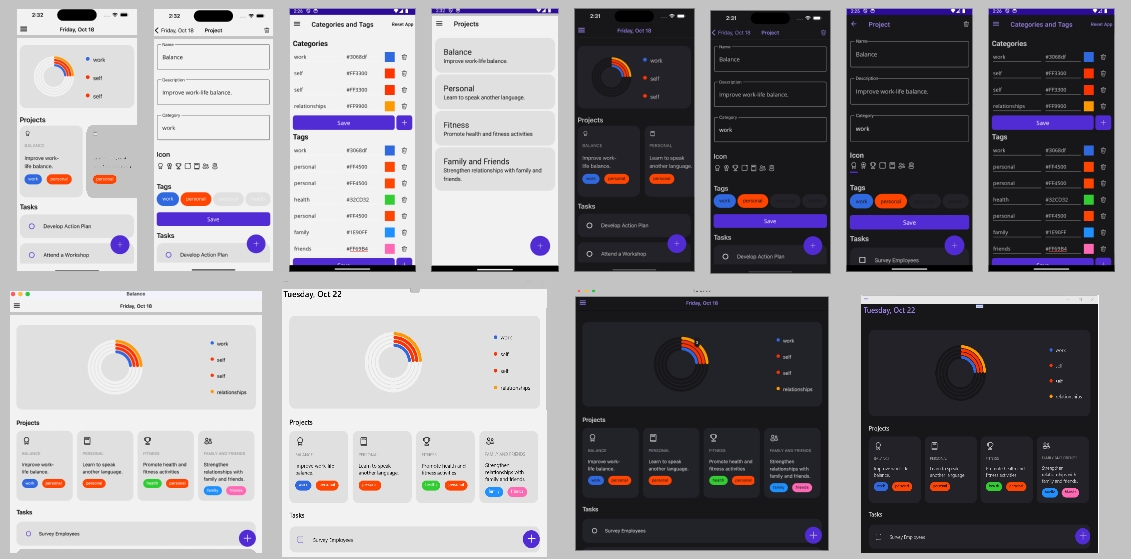
Recently, we welcomed Syncfusion, a leading component provider in the .NET ecosystem, to contribute to .NET MAUI. Since Syncfusion began contributing to .NET MAUI from July to September this year, its contributions accounted for over 55% of total community contributions, a 557% increase compared to the previous three months, thanks to its already excellent contributions. In .NET 9, we put the community at the core and introduced a new project template containing 14 free, open-source Syncfusion controls and other popular libraries from the community, showcasing recommended practices for MVVM, database access, navigation, view refresh, and other common application patterns. You can use this template to quickly start your application development.

Image showing examples of mobile and desktop applications developed with .NET MAUI

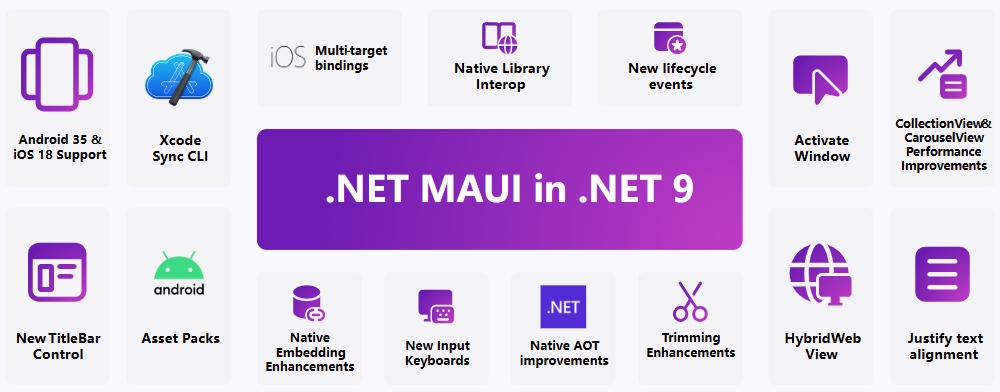
We have been listening to developer feedback, and .NET 9 brings performance improvements, reliability enhancements, and deeper integration for desktop and mobile applications. You will find significant performance improvements across .NET MAUI, including new implementations of CollectionView and CarouselView for iOS and Mac Catalyst, updates to existing controls and application lifecycle, and enhanced Native AOT and trimming capabilities to help you build smaller, faster applications. In addition to supporting the latest iOS, macOS, and Android operating systems, we have added several native platform features in .NET 9, such as Android Asset Packs, improved interaction with native libraries, and smoother integration between Xcode and Visual Studio Code via the new Xcode Sync dotnet tool.

.NET MAUI features overview in .NET 9

There is much to love and explore in .NET MAUI within .NET 9. Be sure to check out the new features documentation and try the new project template.

Windows Development with .NET 9

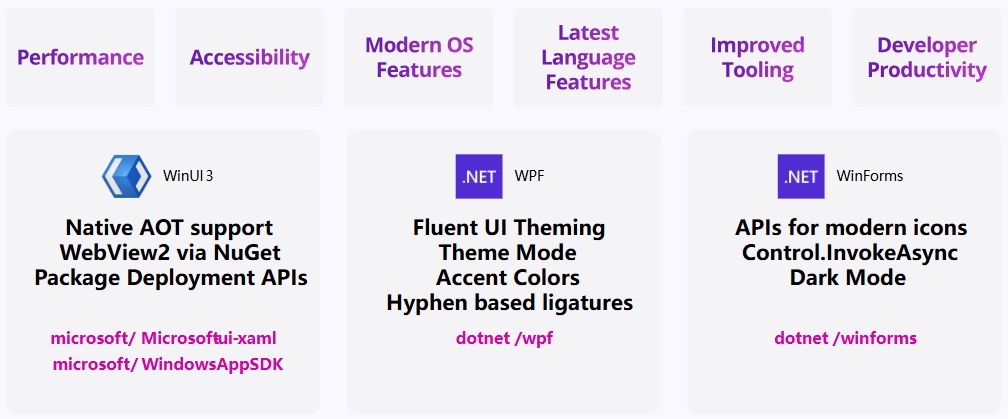
With .NET 9, your Windows applications can leverage the latest OS features and capabilities while ensuring they are more performant and accessible than ever before. Whether you are developing new modern applications with WinUI 3 and the Windows App SDK or modernizing existing WPF and Windows Forms applications, your Windows applications run best on .NET 9. We have worked closely with the Windows developer community to bring features you've been asking for. This includes Native AOT support for WinUI 3 to create smaller, faster applications; modern Fluent UI-themed enhancements for WPF; dark mode, modern icon APIs, and improved async API access via Control.InvokeAsync for WinForms.

Windows developer features overview in .NET 9

There is much more to explore for Windows development in .NET 9, so be sure to read the new features documentation for WinUI 3, WPF, and WinForms.

C# and F# – Your Favorite Languages, Even Better

C# is one of the most popular programming languages in the world. In C# 13, we focused on features that make it easier, safer, and faster to write code in the familiar programming style you love. The ability to use the params modifier in method signatures has been enhanced in C# 13 with the addition of collection expressions. This means you are no longer limited to using params with array types; you can now use any supported collection type.

C# 13 unlocks more high-performance code by introducing new ways to use ref struct values, and makes it easier to work with multi-threaded applications via System.Threading.Lock.

Example code:

Lock myLock = new();

void Concat<T>(params List<T> items)
{
    lock (myLock)
        Console.WriteLine(string.Join("\e[1mItem: \e[0m", items));
}

F# continues to provide a great functional programming experience for .NET developers. F# 9 brings various language, library, and tooling enhancements aimed at making your programs safer, more resilient, and more performant. Nullable reference types bring type safety to interop with C# libraries, optimized integer ranges speed up loops and other comprehensions, optimized equality checks avoid boxing and improve performance for many common operations. Discriminated unions automatically generate .Is* properties for quick case testing. The standard library now includes random functions for collections, useful in data science and game development. Developer productivity is also improved with diagnostics, parser recovery, and various tooling improvements.

Example code:

// FS3261: Nullness warning: Nullability of type 'string' and 'string | null' does not match.
let methodArgument (s: string | null) = File.Create s
let matchNullableString(s: string | null) =    
        match s with  // `s` is of type string | null
        | null -> 0
        | notNull -> notNull.Length // `notNull` is of type string

There are many more exciting features to discover, so be sure to browse the C# 13 new features documentation and the F# 9 new features documentation. If you are just starting your C# development journey, check out the Foundational C# certification in collaboration with freeCodeCamp.

World-Class Developer Tools

With the release of .NET 9, our developer tools have also been updated to make you more productive than ever. First, the release of Visual Studio 2022 17.12 brings a series of productivity enhancements across all aspects of the developer workflow, including significant performance improvements, better debugging and diagnostic experiences, tighter integration with .NET Aspire, deeper cloud integration, analyzer support for C# 13, enhanced Git support, and more! In fact, this Visual Studio 2022 release includes more user-requested features than ever before. There is something for everyone in this release, and we think you'll love it.

The C# Dev Kit for Visual Studio Code continues to evolve with improved editor reliability, enhanced NuGet package management, better test adapter and code coverage results, improved support for .NET MAUI development, and upgraded project startup/debug configuration. Download the latest versions of Visual Studio 2022 and the C# Dev Kit for Visual Studio Code to benefit from and improve your development workflow.

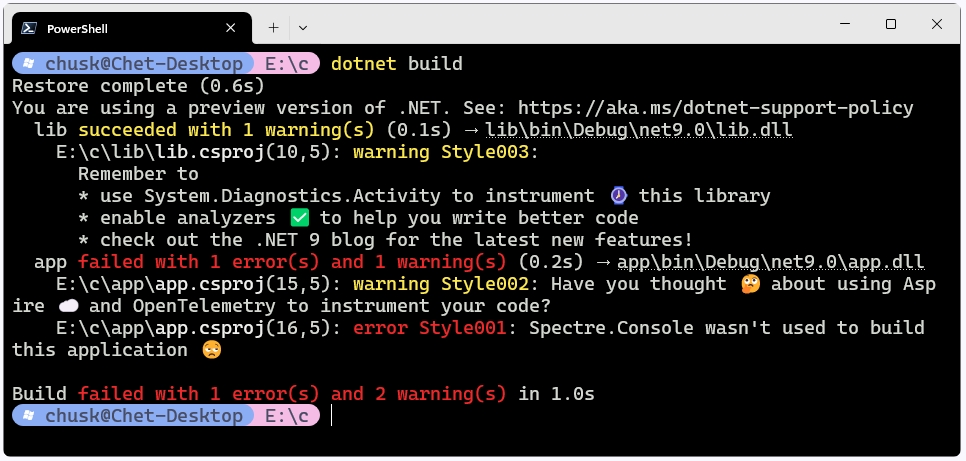
We know developers love the CLI, so we have been working hard to improve the .NET CLI experience and help it become part of a secure development approach. In .NET 9, we have completely revamped the terminal logger, including adding clickable links, duration timers, color coding, and more. The logger output is cleaner, and now at the end of the build, you'll see a summary of the total number of failures and warnings, making it more useful than ever. The dotnet restore command has also been updated to audit top-level and transitive dependencies for package vulnerabilities. This feature works well with Central Package Management, allowing you to quickly deploy package upgrades to all projects within a repository. dotnet restore will alert you in the terminal, Visual Studio, and CI/CD pipelines based on package vulnerability information from the GitHub Advisory Database.

Image highlighting new .NET CLI features

There's much more to love in the .NET SDK, so be sure to check out the new features documentation.

A Thriving Community of Creators and Contributors

We love the amazing .NET community, and .NET 9 would not have been possible without your support and contributions. We received over 26,000 contributions from more than 9,000 community members! Thank you for every issue, comment, code review, and pull request that made this version the best .NET yet. We are also pleased to see the love for .NET. In this year's Stack Overflow Developer Survey, .NET and ASP.NET Core were both named the most admired frameworks, and C# was listed as one of the top web frameworks and programming languages. Thank you for helping build this amazing global developer community.

Image with thank you text and avatars in the background

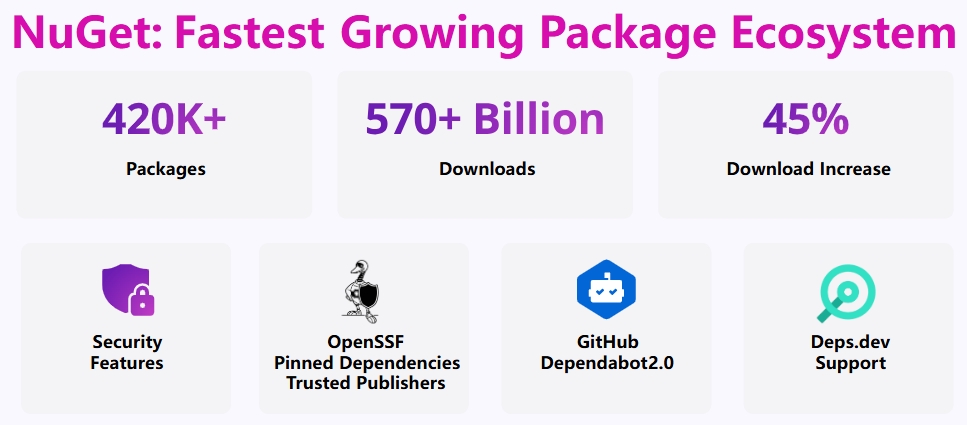
Thank you to all the library creators who help the .NET ecosystem thrive, making NuGet the fastest-growing package ecosystem each year. Today, .NET developers have access to over 420,000 packages, with download counts totaling over 570 billion – an astonishing number. We are heavily investing in continuously improving NuGet, adding features that developers love, and striving to make it the safest package ecosystem in the world.

NuGet ecosystem overview

NuGet brings major improvements for both library creators and consumers across the ecosystem. The NuGet.org website has been refreshed with dark mode support, collaboration with GitHub to add native NuGet support for Dependabot, support for OpenSSF Scorecard and pinned dependencies, and enhanced integration with deps.dev for deeper insights into project dependencies.

Start Your Development Journey with .NET 9 Now

Join us live online at .NET Conf and hear .NET team members explain the latest enhancements.

Download resources for .NET 9, along with updated versions of Visual Studio 2022 and the C# Dev Kit for Visual Studio Code, are now available.

🔽 Download .NET 9

Get Visual Studio 2022 v17.12

For an in-depth look at the new features in each part of this release, see the latest documentation for each part of .NET 9:

Additionally, over the next few months, we will publish in-depth blog posts covering new features across languages, workloads, and tools in .NET 9, so be sure to subscribe to the .NET Blog to get notified when new posts are published.

We can't wait to see what you build with .NET 9!

Keep Exploring

Related Reading

More Articles