
概述
最近在做资源管理器背景的一个功能时,需要将信息传递到DLL中去,
主要就是传递一些比较简单的参数,包括图片的契合度,透明度之类的。通信方式有多种,毕竟是练手的功能,就想找一些以前没用过的方式。
在我前面的文章中,介绍过数字水印技术,其中的两种方式就是在图像文件中嵌入数据
https://www.cnblogs.com/zhaotianff/p/17222056.html
所以这里我也想直接在图片文件中写入这些数据,然后在DLL中读取。
在网上查了一下资料,确实有一种比较简单的方式可以在JPG文件中写入自己的数据。
而且这种方式理论可以写入不限大小的数据。
再说一些题外话,不管什么格式的文件,它都有一套标准的格式。一般都会包括文件头、文件体之类 的,我们在熟悉文件结构以后,想在不破坏原始文件结构的情况下,在文件头写入一些我们自己的数据,理论上都是可以实现的。
但是这个过程是需要花费一些时间的。
我这里是直接使用了NVISO Labs 现有的方式,给有需要的小伙伴做一个分享。
实现原理
我们先用十六进制编辑器打开一个普通的JPG文件
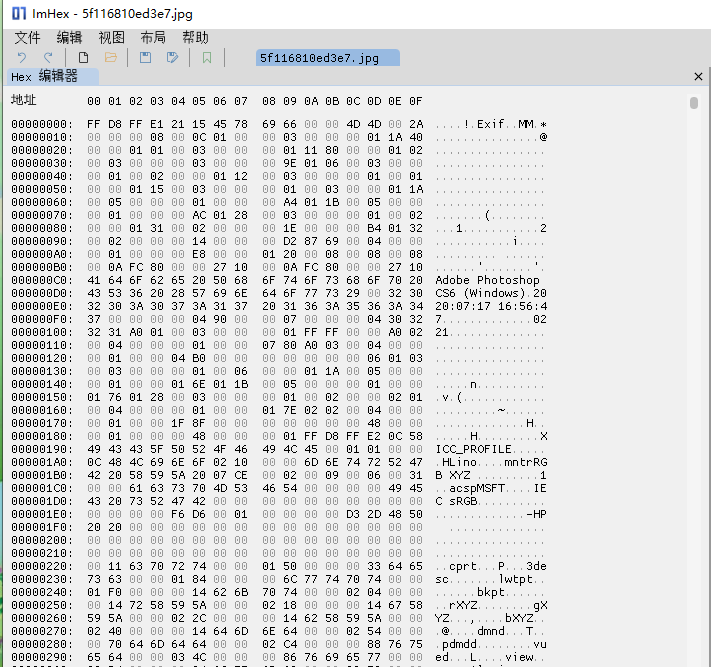
可以看到前面两个字节的内容是FF D8
FF D8 => 这是表示 JPEG 数据流开始的标记
当我们找到JPEG数据流开始的标记后,可以在它后面插入一个“注释”标记。
FF FE =>这是一个“注释”标记,JPEG 解码器也会忽略它。这些标记正是我们将要插入数据的方式,并且仍然具有有效的图像
FF FE之后紧跟2字节,代表“注释”内容的大小。
示例
假设我们在一个jpg文件中写入HelloWorld,“HelloWorld”是十个字节,所以我们在FF FE 之后写入
00 0A(10个字节) 48 65 6C 6C 6F 57 6F 72 6C 64
这里总共是14个字节,包含FF FE 2个字节的头 00 0A 2个字节的大小,和10个字节的内容。
所以我们用十六进制编辑器在FF D8之后插入14个字节
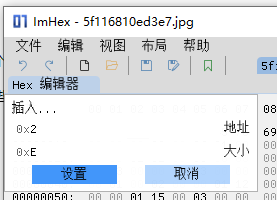
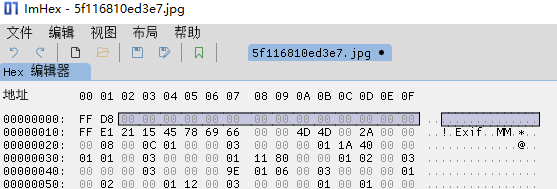
然后我们用把数据填充进去,如下所示
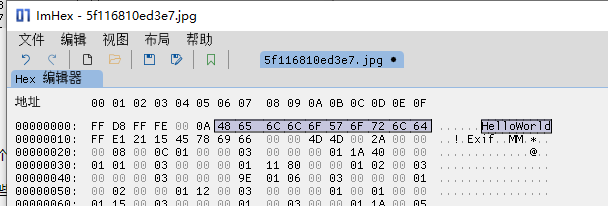
将文件保存后,JPG文件还是能正常打开
代码实现
这里以C#为例,其他语言实现方式都差不多,我这里是写入了一个opacity和strech的数据进去
private void WriteImageInfoToFile(string filePath,double opacity,int stretch)
   {
       //读取文件数据
       var buffer = System.IO.File.ReadAllBytes(filePath);

       //判断是否是JPG文件
       if (buffer[0] == 0xFF && buffer[1] == 0xD8)
       {
           //将原始数据扩容6个字节
           var newBuffer = new byte[buffer.Length + 6];

           //拷贝JPG文件开始标记 FF D8
           Array.Copy(buffer, 0, newBuffer, 0, 2);

           //设置数据
           //注释标记
           newBuffer[2] = 0xFF;
           newBuffer[3] = 0xFE;
           //大小 0x02
           newBuffer[4] = 0;
           newBuffer[5] = 0x02;
           //数据
           newBuffer[6] = (byte)nOpacity;
           newBuffer[7] = (byte)stretch;

           //将原图片剩下的数据拷贝到新buffer中
           Array.Copy(buffer, 2, newBuffer, 7, buffer.Length - 2);

           //写入文件
           System.IO.File.WriteAllBytes(filePath, newBuffer);
       }
   }
读取时,按同样的规则读取就行了。
参考资料
https://blog.nviso.eu/2020/07/13/how-to-embed-secret-data-in-jpeg-files/