
Intro
.NET 正在不断进化,致力于让开发体验更加简单高效。最近,.NET CLI(命令行工具)提出了一项令人期待的新特性:可以直接运行 C# 源文件,无需创建项目文件。这个特性被称为文件式程序(File-based Programs), 在 .NET 10 中将引入 dotnet run file 的支持,支持 dotnet sdk 直接运行,目前在 .NET 10 Preview 4 中已经可用,大家可以下载最新的 .NET 10 SDK 来尝试下,之前自己动手写的 dotnet-exec 部分功能可以使用原生的 SDK 支持了
What
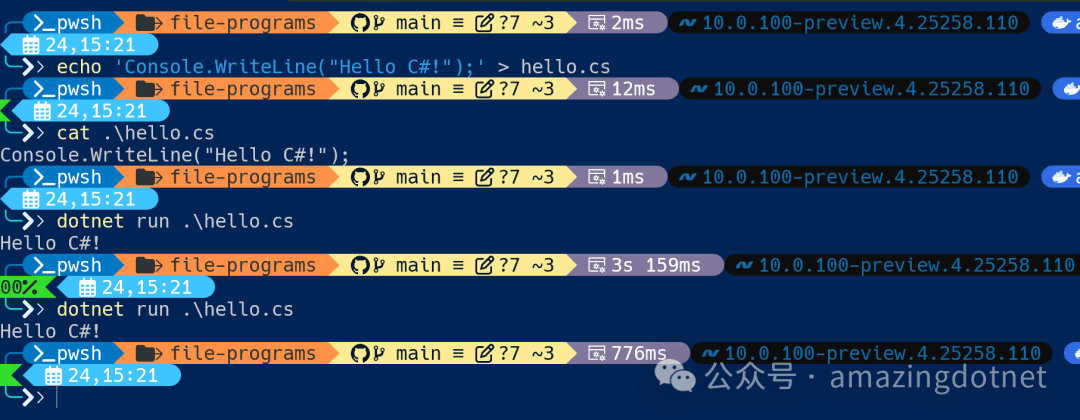
传统 .NET 应用开发都需要一个项目文件(.csproj),哪怕只是运行一段简单代码。文件式程序则打破了这个门槛,允许你直接用命令行运行任意 C# 文件:
echo 'Console.WriteLine("Hello C#!");' > hello.cs
dotnet run hello.cs
无需项目文件,无需复杂配置,像写脚本一样用 C#!
How it works
- 当你执行
dotnet run file.cs时,CLI 会自动在内存中为这个文件生成一个“隐式项目”(即虚拟项目文件),效果等同于基于dotnet new console模板创建的项目, 这保证了你用单文件脚本时,和用标准项目开发的行为一致,它的实现方式和 dotnet-exec 最近的 project compiler 很相似,不过实现的更好一些,实现的是一个虚拟项目文件,并未真实地创建文件。 - 目标文件下的所有
.cs文件(包括子目录)都会参与编译(比如公共的工具类、资源等)。 - 相关的构建文件(如
Directory.Build.props)同样会被自动应用。 - 如果你运行的文件没有入口方法,会有错误提示,避免误操作,示例如下:

More Usage
为了支持文件程序的扩展,新增了
#:指令支持,在编译项目文件时会自动忽略,针对文件程序可以解析转成项目文件里的 sdk,引用和 project 属性设置通过文件顶部的特殊指令(如
#:sdk Microsoft.NET.Sdk.Web、#:package、#:property),你可以声明 NuGet 依赖包或项目属性。例如:
#:sdk Microsoft.NET.Sdk.Web #:package System.CommandLine@2.0.0-* #:property TargetFramework net10.0
我们可以指定 `#:sdk Microsoft.NET.Sdk.Web` 来创建一个单文件的 WebApplication,

```csharp
#:sdk Microsoft.NET.Sdk.Web

var app = WebApplication.Create(args);
app.MapGet("/", () => "Hello World!");
await app.RunAsync();
通过 dotnet run webapi.cs 运行我们的单文件 webapi
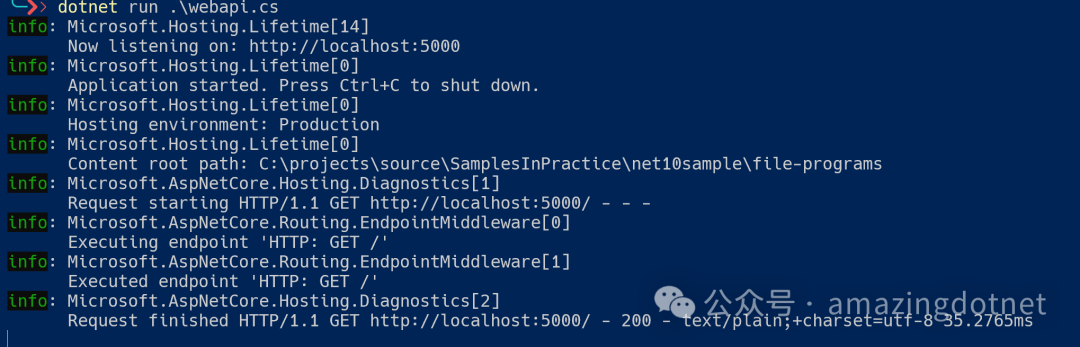
访问我们的 api
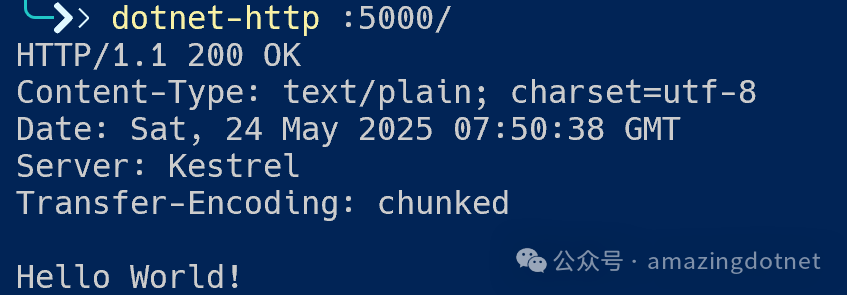
我们也可以引用 nuget package 和配置 property,示例如下:
#:sdk Microsoft.NET.Sdk.Web
#:package WeihanLi.Web.Extensions@2.1.0
#:property ManagePackageVersionsCentrally false

using WeihanLi.Web.Extensions;

var app = WebApplication.Create(args);
app.MapGet("/", () => "Hello World!");
app.MapRuntimeInfo();
await app.RunAsync();
同样地,运行 dotnet run webapi.cs
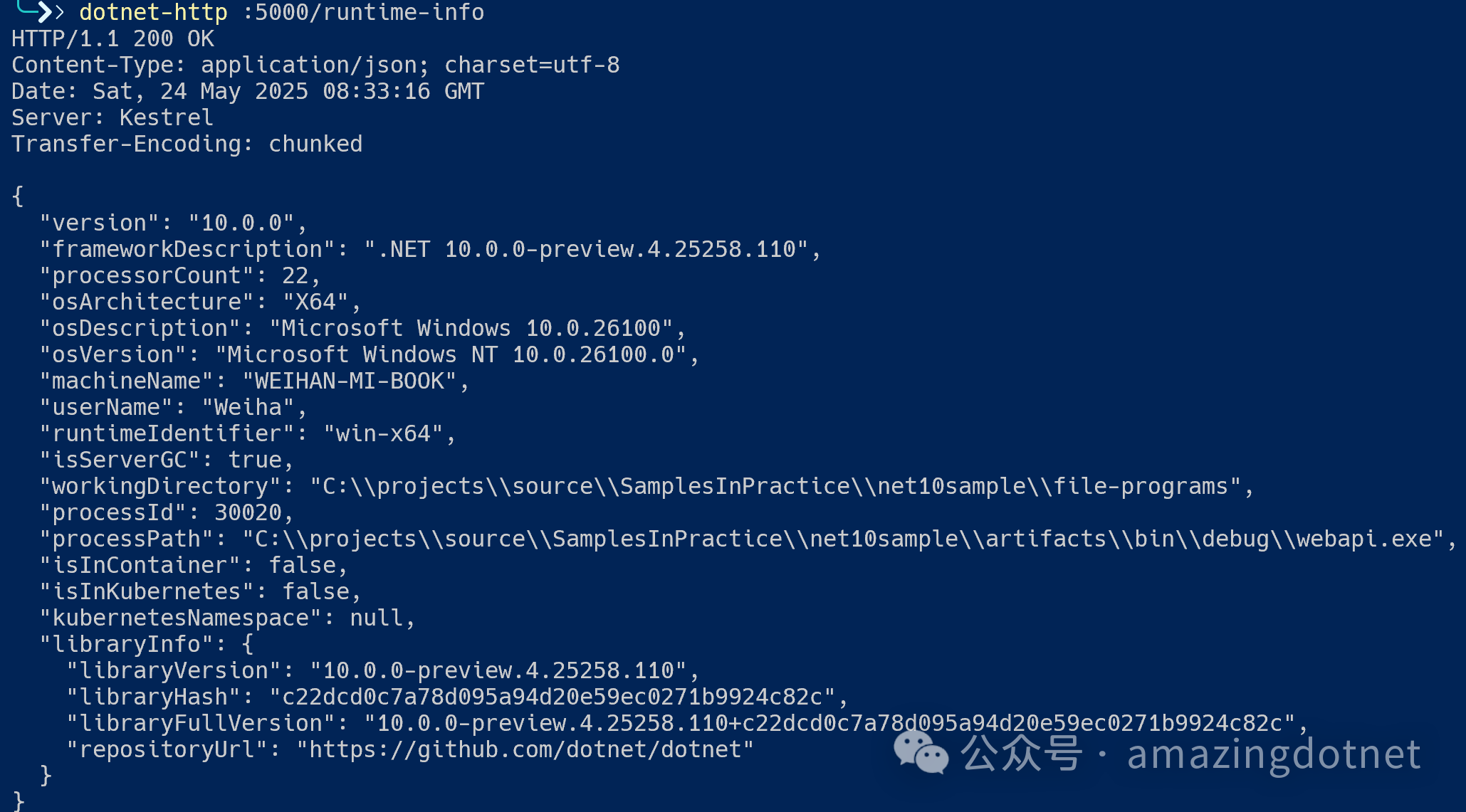
- 当你的脚本变复杂,需要更多自定义时不想使用文件程序时,只需一条命令即可将其转换为标准项目,CLI 会自动生成
.csproj文件,并迁移相关配置,代码行为不会改变:
dotnet project convert webapi.cs
转换之后的项目如下,也可以直接使用 dotnet run 运行
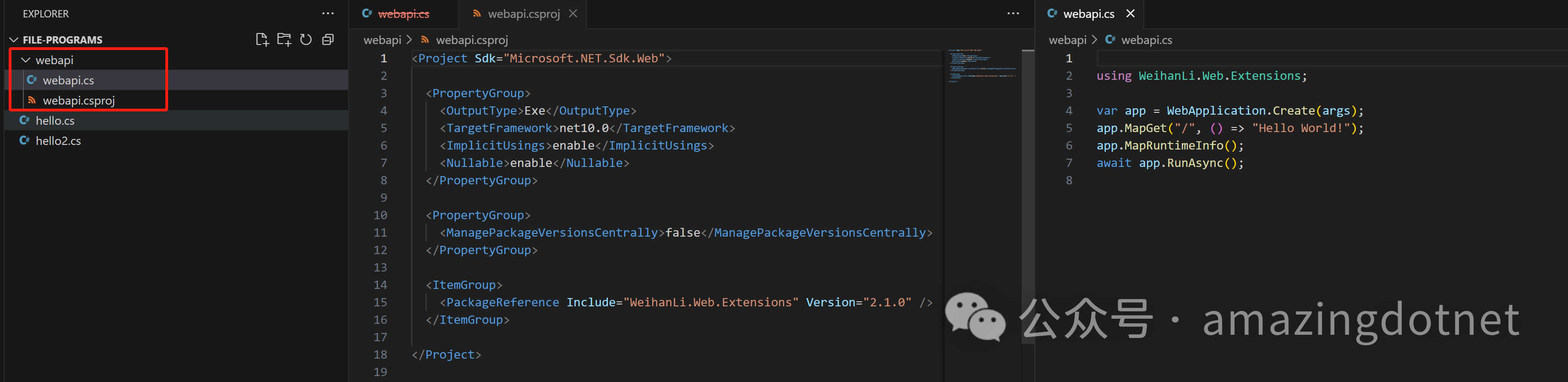
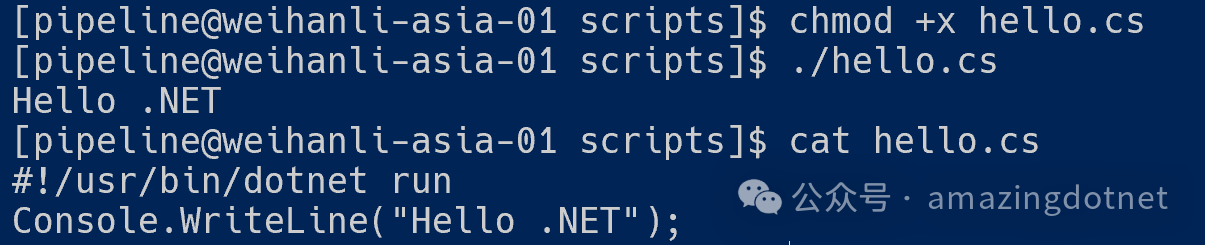
支持 Linux/Unix 下的 shebang(#!),我们可以让 C# 脚本像 Bash/Python 一样直接运行,可以执行 ./hello.cs
#!/usr/bin/dotnet run
Console.WriteLine("Hello, .NET!");
Future Features
通过 dotnet run file.cs 直接运行 C# 文件的提案,为 .NET 带来了灵活强大的脚本体验。设计文档中也展望了许多未来可能的增强,使文件式程序在 .NET 生态中变得更加实用,后续还有一些功能特性
1. 目标路径的扩展支持
- 文件夹作为目标:允许将文件夹作为
dotnet run的目标(如:dotnet run ./my-app/),可直接运行该文件夹下的主入口点。 - 标准输入和内联代码:支持
dotnet run --cs-from-stdin通过标准输入读取 C# 代码,或用dotnet run --cs-code 'Console.WriteLine("Hi")'实现原始代码脚本。
2. 统一命令行参数
- 目录与文件选项:引入
--directory、--file或统一的--path选项,让文件式和项目式程序的命令体验一致。 - 多入口点支持:增加如
--entry等参数,便于在多程序目录中选择指定入口点运行。
3. 增强集成与一致性
- 成长前后的无缝体验:确保无论是文件式还是升级为项目式,
dotnet run等命令都能顺畅运行。 - 通用选项:未来可提供一个适用于项目或文件两种格式的统一参数,让格式切换更加平滑。
4. 性能与易用性提升
- 选择性包含文件:通过参数或指令控制包含哪些文件,减少意外包含大量文件带来的困扰和性能负担。
- 嵌套文件错误提示:如子目录包含过多
.cs文件或.csproj文件时,可考虑报错或警告,避免无意间编译大量内容。
5. 多入口点场景的实现优化
- 项目结构生成:优化多入口点目录“成长”为项目时的结构生成,合理划分项目子目录,共享代码处理更清晰。
- 高级访问控制:探索
InternalsVisibleTo等特性用于更好的代码共享,并考虑未来 C# 语言的增强。
6. Shebang 与 Shell 支持
- 专用可执行文件:可能会发布
dotnet-run或dotnet-run-file可执行文件,提升 shebang(#!)在不同 shell 环境下的兼容性,让脚本跨平台直接运行。 - 支持
/usr/bin/env:研究如何规避 shell 使用 shebang 时的参数传递限制,提高 CLI 脚本的易用性。
7. 更多文件式程序命令支持
- 构建与还原:扩展
dotnet restore file.cs、dotnet build file.cs等命令,便于 IDE 和 CI 集成文件式程序。 - 包管理:
dotnet package add可直接向 C# 文件顶部添加#:package指令,简化脚本依赖管理。
8. 显式文件导入
- 导入指令:未来可能支持
#import ./another-file.cs等指令,显式指定需包含的 C# 文件,开发者控制更灵活。
More
目前我们还需要使用 dotnet run hello.cs 后续会可以简化成 dotnet hello.cs,还可以执行原始代码,期待后面更好用的特性了~~
更多信息可以参考官方文档介绍: https://github.com/dotnet/sdk/blob/main/documentation/general/dotnet-run-file.md
感觉有点不完美的是又创建了一种新的 nuget package 引用语法,和 dotnet-script 里 nuget: package@version 不同和 dotnet-script 不太兼容
目前还不支持自定义入口,后面如果能够支持自定义入口方法就更好了,期待~~
最后在 build 大会上有一个 dotnet run file 的介绍视频,大家感兴趣可以看一下
【视频可点击原公众号查看】
References
- • Document: https://github.com/dotnet/sdk/blob/main/documentation/general/dotnet-run-file.md
- • File-Based Programs IDE Spec: https://github.com/dotnet/roslyn/blob/main/docs/features/file-based-programs-vscode.md
- • Shebang in Unix: https://en.wikipedia.org/wiki/Shebang_(Unix)
- • https://github.com/dotnet/sdk/pull/46915/files
- • https://github.com/dotnet/sdk/pull/48782/files
- • https://github.com/dotnet/sdk/pulls?q=is%3Apr+label%3AArea-run-file+is%3Aclosed