
引言:为什么需要Lang.Avalonia?
在跨平台UI开发中,多语言支持是提升用户体验的核心需求之一。Avalonia作为一款强大的跨平台UI框架,虽具备灵活的扩展性,但原生多语言方案在格式支持、开发效率和模块化集成上存在局限。
Lang.Avalonia 应运而生——这是一款专为Avalonia框架设计的多语言管理库,通过插件化架构重构了多语言支持逻辑,不仅兼容传统Resx资源文件,还新增XML和JSON格式支持,同时提供类型安全的资源引用、动态语言切换等能力,让多语言开发更简单、更高效。
核心特性:为什么选择Lang.Avalonia?
- 多格式兼容:支持Resx(传统.NET资源格式)、XML、JSON三种语言文件格式,满足不同项目的格式偏好。
- 类型安全引用:通过T4模板自动生成C#常量类,避免硬编码字符串Key,编译期即可检测资源引用错误。
- 前后台无缝集成:提供XAML标记扩展(
{c:I18n})和C# API双端支持,前台UI绑定与后台逻辑调用同样便捷。 - 动态语言切换:支持运行时切换语言文化,无需重启应用即可实时更新界面文本。
- 模块化管理:支持按项目模块拆分语言文件(如主模块、开发模块),适配大型项目的多团队协作。
- 轻量易集成:插件化设计,仅需安装对应格式的NuGet包,几行代码即可完成初始化。
快速开始:安装与基础配置
第一步:安装NuGet包
根据项目使用的语言文件格式,选择对应的安装命令:
| 语言文件格式 | 安装命令 | 适用场景 |
|---|---|---|
| Resx | Install-Package Lang.Avalonia.Resx |
习惯传统.NET Resx资源文件的项目 |
| XML | Install-Package Lang.Avalonia.Xml |
偏好轻量XML格式、需手动编辑的项目 |
| JSON | Install-Package Lang.Avalonia.Json |
现代前端风格项目、需跨端共享语言文件的场景 |
第二步:创建语言文件
按规范创建语言文件,建议统一放在项目根目录的i18n文件夹中,文件命名需包含文化标识(如zh-CN代表简体中文,en-US代表美式英语)。
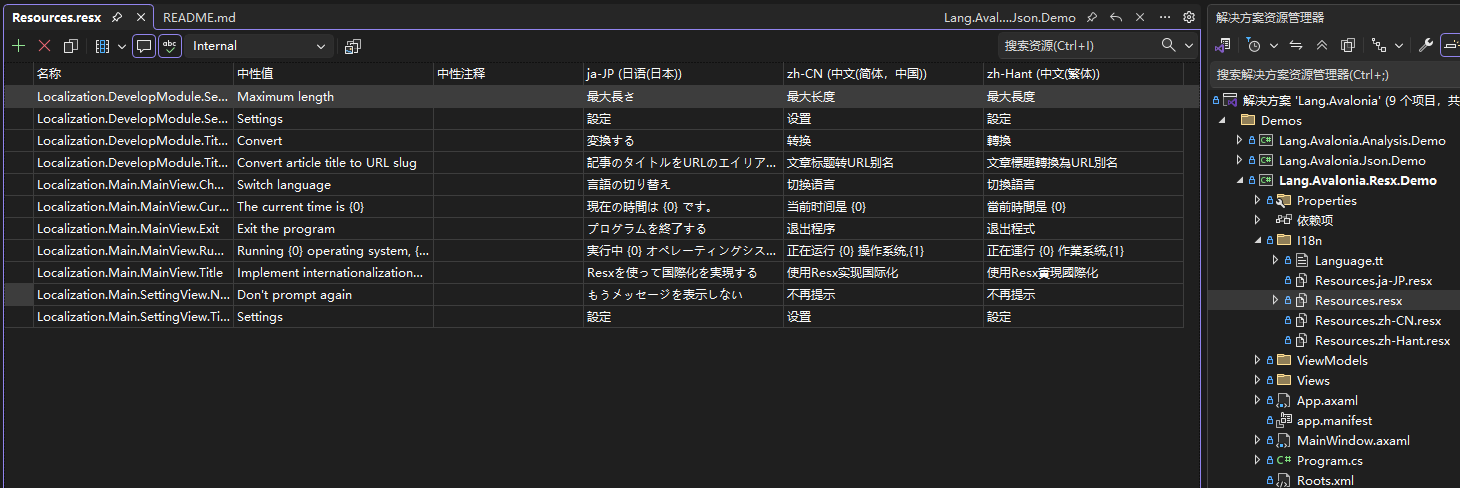
Resx格式
Resx文件需以基础文件名(如Resources.resx)+ 文化标识(可选)命名,基础文件默认为 fallback 语言,具体参考示例项目:
i18n/Resources.resx          // 默认语言(如英语)
i18n/Resources.zh-CN.resx    // 简体中文
i18n/Resources.zh-Hant.resx  // 繁体中文
i18n/Resources.ja-JP.resx    // 日语
XML格式
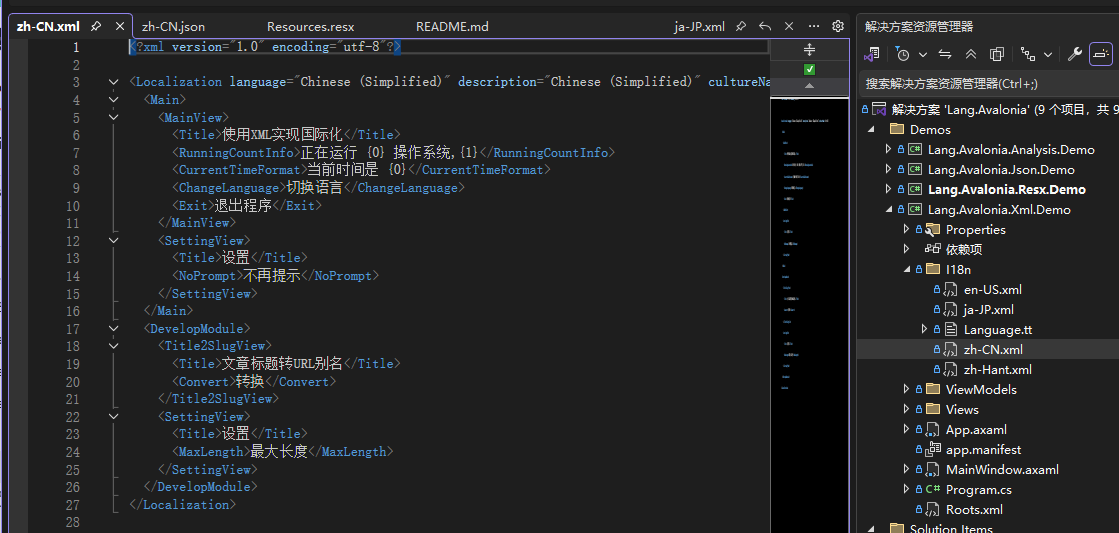
XML文件直接以文化标识命名,每个文件独立存储对应语言的资源:
i18n/en-US.xml    // 美式英语
i18n/zh-CN.xml    // 简体中文
i18n/zh-Hant.xml  // 繁体中文
i18n/ja-JP.xml    // 日语
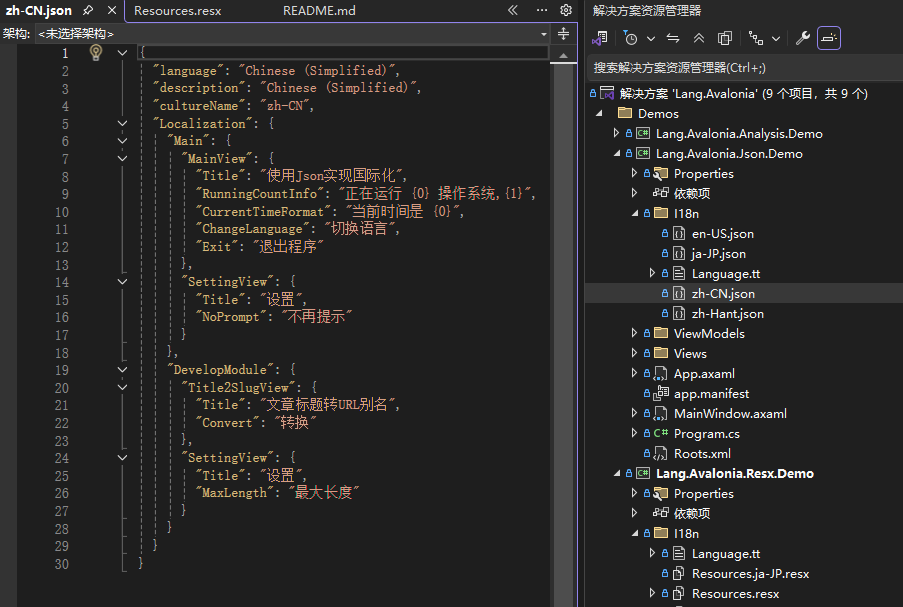
JSON格式示例
JSON文件同样以文化标识命名,采用键值对结构存储资源:
i18n/en-US.json    // 美式英语
i18n/zh-CN.json    // 简体中文
i18n/zh-Hant.json  // 繁体中文
i18n/ja-JP.json    // 日语
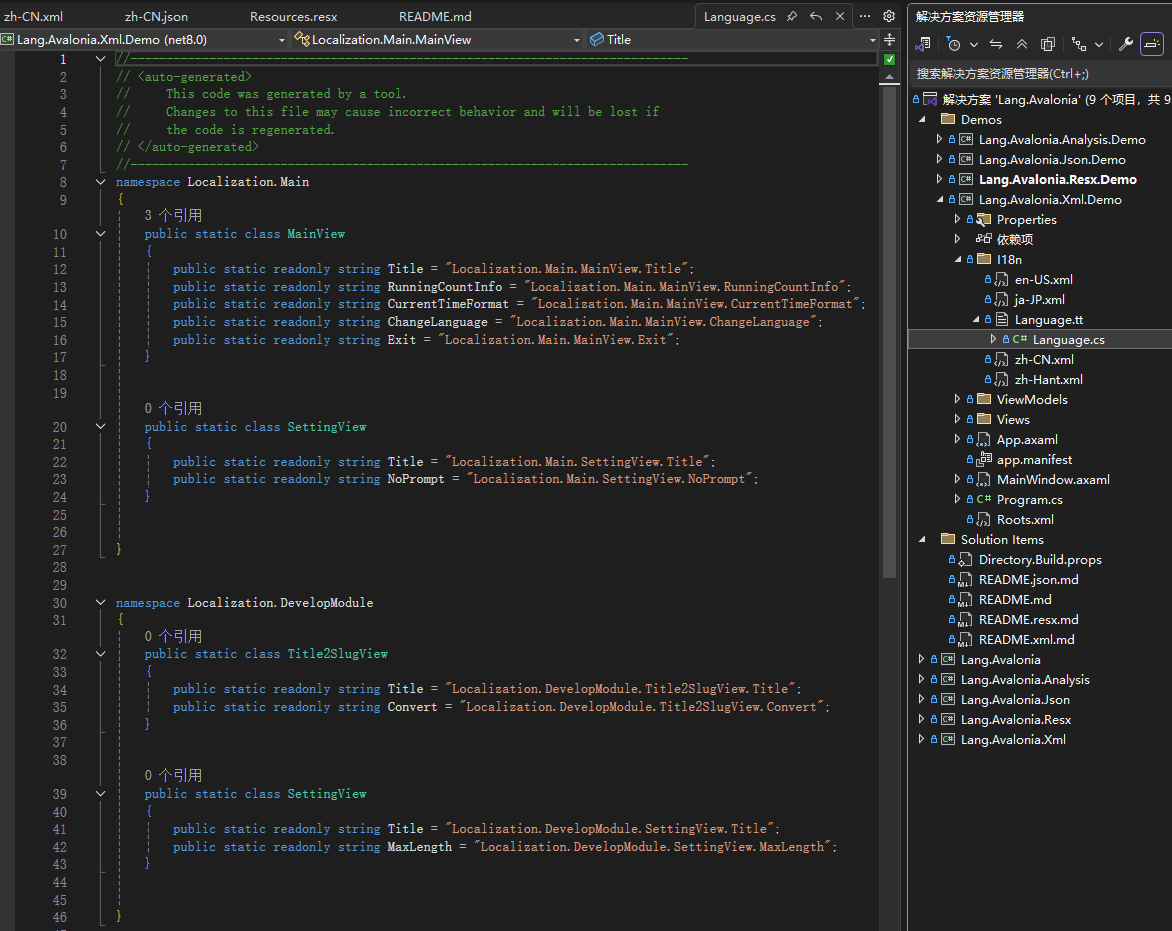
第三步:生成类型安全的资源常量(T4模板)
为避免硬编码资源Key(如直接写字符串"SettingView.Title"),通过T4模板自动生成C#常量类,支持编译期校验。
操作步骤:
- 从Lang.Avalonia.XX.Demo示例项目中复制对应格式的T4模板(Resx/XML/JSON模板不同),放入项目的
i18n文件夹(需自行创建)。 - 模板会自动扫描
i18n文件夹的语言文件,生成语言资源的常量类 - 当语言文件新增/修改Key后,打开T4模板按Ctrl + S可重新生成。
实战使用:前后台集成指南
初始化多语言管理器
在应用启动时(推荐在App.axaml.cs的Initialize方法中)初始化多语言管理器,预加载语言资源:
// 引入命名空间
using Lang.Avalonia;
using Lang.Avalonia.Resx; // 对应格式的命名空间(Resx/Xml/Json)
using System.Globalization;

public override void Initialize()
{
    base.Initialize();
    // 初始化Resx格式(其他格式替换为XmlLangPlugin/JsonLangPlugin)
    I18nManager.Instance.Register(
        plugin: new ResxLangPlugin(),  // 格式插件
        defaultCulture: new CultureInfo("zh-CN"),  // 默认语言
        error: out var error  // 错误信息(可选)
    );
    if (!string.IsNullOrEmpty(error))
    {
        // 处理初始化错误(如文件不存在)
        Console.WriteLine($"多语言初始化失败:{error}");
    }
}
前台XAML绑定使用
通过{c:I18n}标记扩展在AXAML中绑定资源,支持直接引用T4生成的常量类,还可指定特定语言:
<!-- 引入命名空间 -->
xmlns:c="https://codewf.com"  <!-- Lang.Avalonia的标记扩展命名空间 -->
xmlns:mainLangs="clr-namespace:Localization.Main"  <!-- 主模块常量类 -->
xmlns:developModule="clr-namespace:Localization.DevelopModule"  <!-- 开发模块常量类 -->

<!-- 绑定当前默认语言的资源 -->
<SelectableTextBlock Text="{c:I18n {x:Static mainLangs:SettingView.Title}}" />

<!-- 强制指定语言(如简体中文) -->
<SelectableTextBlock
    Text="{c:I18n {x:Static developModule:Title2SlugView.Title}, CultureName=zh-CN}"
/>
后台C#逻辑使用
通过I18nManager.Instance.GetResource方法在后台代码中获取资源,支持获取当前语言或指定语言的文本:
// 引入生成的常量命名空间
using Localization.Main;

// 获取当前默认语言的资源
var titleCurrent = I18nManager.Instance.GetResource(MainView.Title);

// 获取指定语言的资源(简体中文)
var titleZhCN = I18nManager.Instance.GetResource(MainView.Title, "zh-CN");

// 获取指定语言的资源(美式英语)
var titleEnUS = I18nManager.Instance.GetResource(MainView.Title, "en-US");
进阶技巧:动态切换语言
运行时切换语言只需设置属性I18nManager.Instance.Culture,界面会自动更新:
// 切换为英语
I18nManager.Instance.Culture = new CultureInfo("en-US");

// 切换为日语
I18nManager.Instance.Culture = new CultureInfo("ja-JP");
注意事项与最佳实践
- 文化标识规范:统一使用
zh-CN(简体中文)、en-US(美式英语)等标准文化名称,避免混用zh_CN等非标准格式。 - 模块化拆分:大型项目建议按功能模块拆分语言文件(如主模块、用户模块),T4模板会自动生成对应模块的常量类,避免Key冲突。
- Fallback机制:当指定语言的资源不存在时,会自动 fallback 到默认语言(初始化时指定的
defaultCulture),建议保留默认语言文件作为兜底。 - 性能优化:语言资源会在初始化时缓存,适合频繁切换语言的场景;若语言文件较大,可考虑异步加载(需结合Avalonia的异步初始化机制)。
结语
Lang.Avalonia通过插件化设计、多格式支持和类型安全特性,大幅简化了Avalonia项目的多语言开发流程。无论是传统Resx用户,还是偏好XML/JSON的现代项目,都能快速集成并享受高效的多语言管理体验。
若在使用中遇到问题或需要扩展新格式,可参考Lang.Avalonia的插件接口实现自定义语言插件,也欢迎参与项目贡献!
仓库地址:https://github.com/dotnet9/Lang.Avalonia