Blazor WebAssembly 載入優化方案
對於 Blazor WebAssembly 載入方案的優化是針對 WebAssembly 首次載入,由於 Blazor WebAssembly 是在首次載入的時候會將 .NET Core 的所有組件都載入到瀏覽器中,並且在使用的時候可能引用了很多第三方的 dll,導致載入緩慢。
優化方案:
1. 壓縮
發佈 Blazor WebAssembly 應用時,將在發佈過程中對輸出內容進行靜態壓縮,從而減小應用的大小,並免去運行時壓縮的開銷。 使用以下壓縮演算法:
從 google/brotli GitHub repository 中獲取 JavaScript Brotli 解碼器。 縮小的解碼器檔案被命名為 decode.min.js,並且位於儲存庫的 js 資料夾中。
修改 wwwroot/index.html 檔案程式碼,新增 autostart="false",阻止預設啟動載入組件
<script src="_framework/blazor.webassembly.js" autostart="false"></script>
在 Blazor 的 <script> 標記之後和結束 </body> 標記之前,新增以下 JavaScript 程式碼 <script> 區塊:
<script type="module">
  import { BrotliDecode } from './decode.min.js';
  Blazor.start({
    loadBootResource: function (type, name, defaultUri, integrity) {
    // 注意:這裡使用 localhost 的時候不會啟動壓縮
      if (type !== 'dotnetjs' && location.hostname !== 'localhost') {
        return (async function () {
          const response = await fetch(defaultUri + '.br', { cache: 'no-cache' });
          if (!response.ok) {
            throw new Error(response.statusText);
          }
          const originalResponseBuffer = await response.arrayBuffer();
          const originalResponseArray = new Int8Array(originalResponseBuffer);
          const decompressedResponseArray = BrotliDecode(originalResponseArray);
          const contentType = type ===
            'dotnetwasm' ? 'application/wasm' : 'application/octet-stream';
          return new Response(decompressedResponseArray,
            { headers: { 'content-type': contentType } });
        })();
      }
    }
  });
</script>
壓縮方案將減少載入時間,大概是壓縮 dll 的三分之一大小,效果如圖

在使用 autostart="false" 標記以後不會啟動就載入,載入組件將在上面的程式碼區塊中執行,預設是載入 br。
2. 延遲載入組件
透過等待應用程式集直到需要時才載入,提高 Blazor WebAssembly 應用啟動效能,這種方式稱為「延遲載入」。
將 Blazor WebAssembly 專案拆分細緻,透過延遲載入組件提升 Blazor WebAssembly 首次載入時間,我們將透過一個案例來講解延遲載入組件。
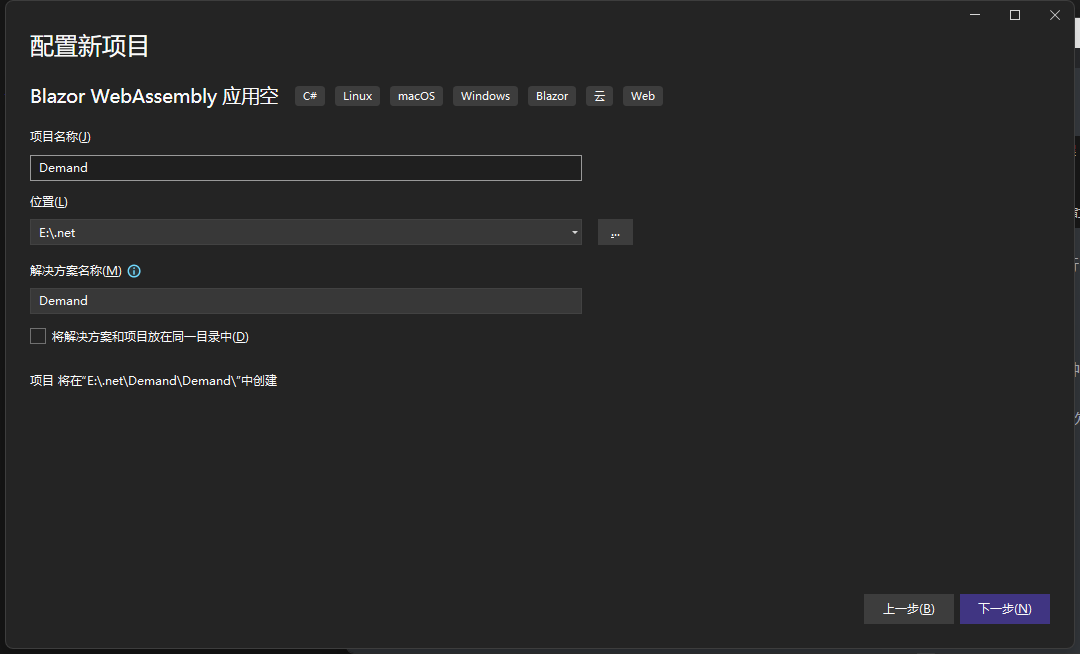
建立一個空的 Blazor WebAssembly 專案: 專案名稱 Demand:
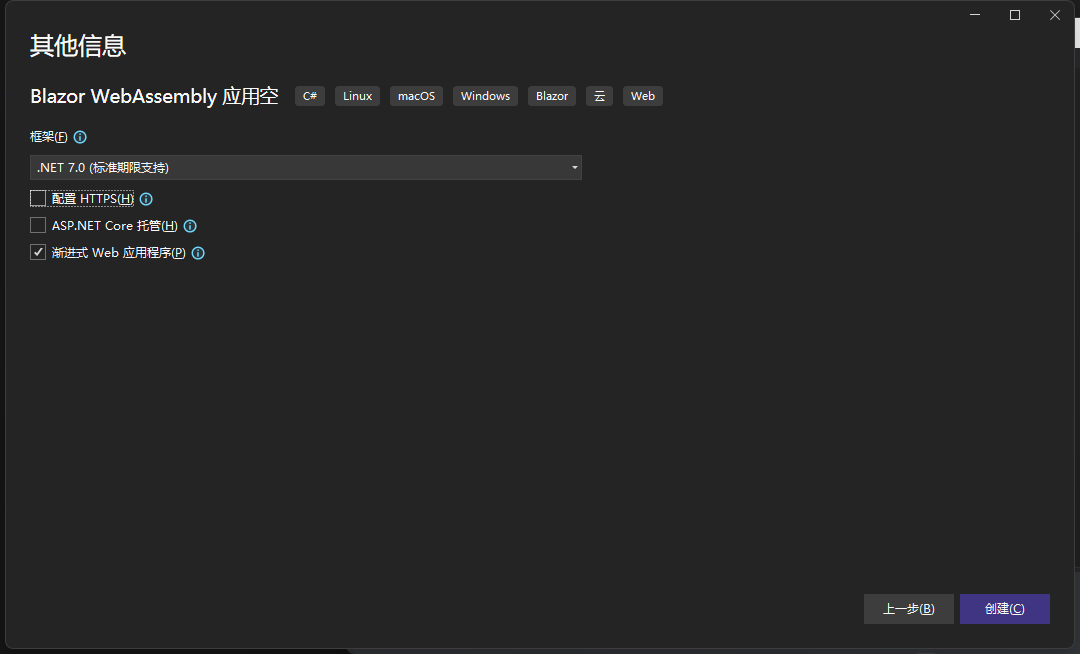
取消 HTTPS 及 使用漸進式 Web 應用程式:
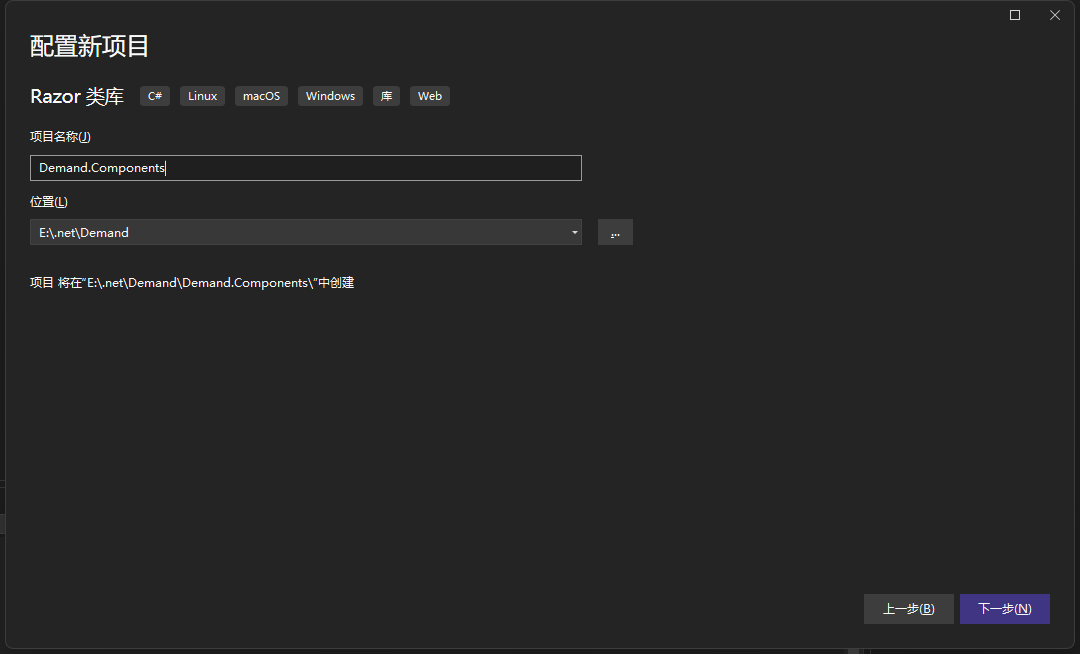
建立 Razor 類別庫,專案名稱:Demand.Components,然後預設選項建立專案:
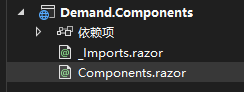
建立 Components.razor 檔案,並且刪除多餘檔案,效果如圖:
在 Components.razor 新增以下程式碼:
@inject NavigationManager NavigationManager @page "/components"

<div>
  <h1>Components</h1>
</div>
<button @onclick="Goto">跳轉到首頁</button>
@code { private void Goto() { NavigationManager.NavigateTo("/"); } }
在 Demand 專案中參考 Demand.Components 專案。
修改 App.razor 檔案,程式碼如下:
@using System.Reflection @using
Microsoft.AspNetCore.Components.WebAssembly.Services @*
這裡需要注意,WebAssembly 是預設注入的,但是 Server 並沒有注入 。
在 Server 中手動注入 builder.Services.AddScoped<LazyAssemblyLoader
  >(); *@ @inject LazyAssemblyLoader AssemblyLoader

  <Router
    AppAssembly="@typeof(App).Assembly"
    AdditionalAssemblies="@lazyLoadedAssemblies"
    OnNavigateAsync="@OnNavigateAsync"
  >
    <Found Context="routeData">
      <RouteView RouteData="@routeData" DefaultLayout="@typeof(MainLayout)" />
      <FocusOnNavigate RouteData="@routeData" Selector="h1" />
    </Found>
    <NotFound>
      <PageTitle>Not found</PageTitle>
      <LayoutView Layout="@typeof(MainLayout)">
        <p role="alert">Sorry, there's nothing at this address.</p>
      </LayoutView>
    </NotFound>
  </Router>

  @code { private List<Assembly>
    lazyLoadedAssemblies = new(); private async Task
    OnNavigateAsync(NavigationContext args) { try { if (args.Path ==
    "components") { // 這裡自定義 Demand.Components 相依的組件, var assemblies
    = await AssemblyLoader.LoadAssembliesAsync(new[] { "Demand.Components.dll"
    }); // 新增到路由組件掃描中 lazyLoadedAssemblies.AddRange(assemblies); } }
    catch (Exception ex) { } } }</Assembly
  ></LazyAssemblyLoader
>
處理指定路由元件需要載入的組件。
開啟 Demand 專案檔案,如果在 Debug 模式下可以使用新增以下忽略列表:
<ItemGroup>
    <BlazorWebAssemblyLazyLoad Include="System.Xml.dll" />
    <BlazorWebAssemblyLazyLoad Include="System.Xml.XmlSerializer.dll" />
    <BlazorWebAssemblyLazyLoad Include="System.Xml.XmlDocument.dll" />
    <BlazorWebAssemblyLazyLoad Include="System.Xml.XPath.dll" />
    <BlazorWebAssemblyLazyLoad Include="System.Xml.XPath.XDocument.dll" />
    <BlazorWebAssemblyLazyLoad Include="System.Xml.XDocument.dll" />
    <BlazorWebAssemblyLazyLoad Include="System.Xml.Serialization.dll" />
    <BlazorWebAssemblyLazyLoad Include="System.Xml.ReaderWriter.dll" />
    <BlazorWebAssemblyLazyLoad Include="System.Xml.Linq.dll" />
    <BlazorWebAssemblyLazyLoad Include="System.Windows.dll" />
    <BlazorWebAssemblyLazyLoad Include="System.Net.Quic.dll" />
    <BlazorWebAssemblyLazyLoad Include="System.IO.Compression.ZipFile.dll" />
    <BlazorWebAssemblyLazyLoad Include="System.Runtime.Numerics.dll" />
    <BlazorWebAssemblyLazyLoad Include="System.Collections.Immutable.dll" />
    <BlazorWebAssemblyLazyLoad Include="Microsoft.Win32.Registry.dll" />
    <BlazorWebAssemblyLazyLoad Include="System.Web.HttpUtility.dll" />
    <BlazorWebAssemblyLazyLoad Include="System.ValueTuple.dll" />
    <BlazorWebAssemblyLazyLoad Include="System.Security.AccessControl.dll" />
    <BlazorWebAssemblyLazyLoad Include="System.Net.Mail.dll" />
    <BlazorWebAssemblyLazyLoad Include="System.Net.NameResolution.dll" />
    <BlazorWebAssemblyLazyLoad Include="System.IO.dll" />
    <BlazorWebAssemblyLazyLoad Include="System.IO.UnmanagedMemoryStream.dll" />
    <BlazorWebAssemblyLazyLoad Include="System.IO.Pipes.dll" />
    <BlazorWebAssemblyLazyLoad Include="System.IO.Pipes.AccessControl.dll" />
    <BlazorWebAssemblyLazyLoad Include="System.IO.Pipelines.dll" />
    <BlazorWebAssemblyLazyLoad Include="System.IO.FileSystem.dll" />
    <BlazorWebAssemblyLazyLoad Include="System.IO.FileSystem.Watcher.dll" />
    <BlazorWebAssemblyLazyLoad Include="System.IO.FileSystem.Primitives.dll" />
    <BlazorWebAssemblyLazyLoad Include="System.IO.FileSystem.DriveInfo.dll" />
    <BlazorWebAssemblyLazyLoad Include="System.IO.FileSystem.AccessControl.dll" />
    <BlazorWebAssemblyLazyLoad Include="System.Data.Common.dll" />
    <BlazorWebAssemblyLazyLoad Include="Microsoft.CSharp.dll" />
    <BlazorWebAssemblyLazyLoad Include="System.Console.dll" />
    <BlazorWebAssemblyLazyLoad Include="System.Core.dll" />
    <BlazorWebAssemblyLazyLoad Include="System.Data.dll" />
    <BlazorWebAssemblyLazyLoad Include="System.Data.DataSetExtensions.dll" />
    <BlazorWebAssemblyLazyLoad Include="System.Drawing.dll" />
    <BlazorWebAssemblyLazyLoad Include="System.Drawing.Primitives.dll" />
    <BlazorWebAssemblyLazyLoad Include="System.Diagnostics.TraceSource.dll" />
    <BlazorWebAssemblyLazyLoad Include="System.Diagnostics.Tools.dll" />
    <BlazorWebAssemblyLazyLoad Include="System.Diagnostics.TextWriterTraceListener.dll" />
    <BlazorWebAssemblyLazyLoad Include="System.Diagnostics.StackTrace.dll" />
    <BlazorWebAssemblyLazyLoad Include="System.Diagnostics.Process.dll" />
    <BlazorWebAssemblyLazyLoad Include="System.Diagnostics.FileVersionInfo.dll" />
    <BlazorWebAssemblyLazyLoad Include="System.Diagnostics.DiagnosticSource.dll" />
    <BlazorWebAssemblyLazyLoad Include="System.Diagnostics.Debug.dll" />
    <BlazorWebAssemblyLazyLoad Include="System.Diagnostics.Contracts.dll" />
    <BlazorWebAssemblyLazyLoad Include="Microsoft.AspNetCore.Authorization.dll" />
    <BlazorWebAssemblyLazyLoad Include="Microsoft.AspNetCore.Components.Forms.dll" />
    <BlazorWebAssemblyLazyLoad Include="Microsoft.AspNetCore.Metadata.dll" />
    <BlazorWebAssemblyLazyLoad Include="Microsoft.Extensions.Configuration.Binder.dll" />
    <BlazorWebAssemblyLazyLoad Include="Microsoft.Extensions.FileProviders.Abstractions.dll" />
    <BlazorWebAssemblyLazyLoad Include="Microsoft.Extensions.FileProviders.Physical.dll" />
    <BlazorWebAssemblyLazyLoad Include="Microsoft.Extensions.Configuration.FileExtensions.dll" />
    <BlazorWebAssemblyLazyLoad Include="Microsoft.Extensions.FileSystemGlobbing.dll" />
    <BlazorWebAssemblyLazyLoad Include="System.IO.MemoryMappedFiles.dll" />
    <BlazorWebAssemblyLazyLoad Include="System.IO.IsolatedStorage.dll" />
    <BlazorWebAssemblyLazyLoad Include="System.IO.Compression.dll" />
    <BlazorWebAssemblyLazyLoad Include="System.IO.Compression.FileSystem.dll" />
    <BlazorWebAssemblyLazyLoad Include="System.IO.Compression.Brotli.dll" />
    <BlazorWebAssemblyLazyLoad Include="System.Formats.Tar.dll" />
    <BlazorWebAssemblyLazyLoad Include="System.Formats.Asn1.dll" />
    <BlazorWebAssemblyLazyLoad Include="System.Net.WebSockets.dll" />
    <BlazorWebAssemblyLazyLoad Include="System.Private.DataContractSerialization.dll" />
    <BlazorWebAssemblyLazyLoad Include="System.Private.Xml.dll" />
    <BlazorWebAssemblyLazyLoad Include="System.Security.Cryptography.dll" />
    <BlazorWebAssemblyLazyLoad Include="Microsoft.VisualBasic.dll" />
    <BlazorWebAssemblyLazyLoad Include="Microsoft.VisualBasic.Core.dll" />
    <BlazorWebAssemblyLazyLoad Include="System.Threading.Tasks.Dataflow.dll" />
    <BlazorWebAssemblyLazyLoad Include="System.Text.Encoding.CodePages.dll" />
    <BlazorWebAssemblyLazyLoad Include="System.Net.WebSockets.Client.dll" />
    <BlazorWebAssemblyLazyLoad Include="System.Private.Xml.Linq.dll" />
    <BlazorWebAssemblyLazyLoad Include="System.Text.RegularExpressions.dll" />
    <BlazorWebAssemblyLazyLoad Include="System.Net.Sockets.dll" />
    <BlazorWebAssemblyLazyLoad Include="System.Net.WebClient.dll" />
    <BlazorWebAssemblyLazyLoad Include="System.Net.WebProxy.dll" />
    <BlazorWebAssemblyLazyLoad Include="System.Net.Ping.dll" />
    <BlazorWebAssemblyLazyLoad Include="System.Security.Cryptography.X509Certificates.dll" />
    <BlazorWebAssemblyLazyLoad Include="System.Net.WebHeaderCollection.dll" />
    <BlazorWebAssemblyLazyLoad Include="System.Security.Cryptography.OpenSsl.dll" />
    <BlazorWebAssemblyLazyLoad Include="System.Security.Cryptography.Encoding.dll" />
    <BlazorWebAssemblyLazyLoad Include="System.Security.Cryptography.Csp.dll" />
    <BlazorWebAssemblyLazyLoad Include="System.Security.Cryptography.Cng.dll" />
    <BlazorWebAssemblyLazyLoad Include="System.Security.Claims.dll" />
    <BlazorWebAssemblyLazyLoad Include="System.Security.Cryptography.Algorithms.dll" />
    <BlazorWebAssemblyLazyLoad Include="Microsoft.Win32.Primitives.dll" />
    <BlazorWebAssemblyLazyLoad Include="System.Net.HttpListener.dll" />
    <BlazorWebAssemblyLazyLoad Include="System.AppContext.dll" />
    <BlazorWebAssemblyLazyLoad Include="System.Net.NetworkInformation.dll" />
    <BlazorWebAssemblyLazyLoad Include="System.Net.Requests.dll" />
    <BlazorWebAssemblyLazyLoad Include="System.Net.Primitives.dll" />
    <BlazorWebAssemblyLazyLoad Include="System.Net.Security.dll" />
    <BlazorWebAssemblyLazyLoad Include="System.Net.dll" />
    <BlazorWebAssemblyLazyLoad Include="System.Net.ServicePoint.dll" />
    <BlazorWebAssemblyLazyLoad Include="System.Net.Http.dll" />
    <BlazorWebAssemblyLazyLoad Include="System.Globalization.dll" />
    <BlazorWebAssemblyLazyLoad Include="System.Globalization.Calendars.dll" />
    <BlazorWebAssemblyLazyLoad Include="System.Globalization.Extensions.dll" />
    <BlazorWebAssemblyLazyLoad Include="System.Net.Http.Json.dll" />
    <BlazorWebAssemblyLazyLoad Include="System.Web.dll" />
    <BlazorWebAssemblyLazyLoad Include="WindowsBase.dll" />
    <BlazorWebAssemblyLazyLoad Include="System.Resources.Writer.dll" />
    <BlazorWebAssemblyLazyLoad Include="System.Resources.ResourceManager.dll" />
    <BlazorWebAssemblyLazyLoad Include="System.Resources.Reader.dll" />
</ItemGroup>
這些是不常用的一些組件,如果出現以下錯誤,請將找不到的組件刪除按需載入設定,

但是如果使用了上面的按需載入設定,在發佈的時候會出現異常比如下面這個圖這樣;錯誤原因是 Blazor WebAssembly 在發佈的時候預設使用裁剪,由於以下組件剛剛好是沒有使用的,在裁剪以後會設定按需載入,但是它已經被裁剪了,所以導致無法找到按需載入的組件;只要刪除報錯的組件即可;這個只有在發佈的時候才會出現,Debug 還是可以繼續使用上面的按需載入的設定,可以在偵錯的時候回應更快:

然後下一步。
新增指定專案的按需載入設定, 我們將 Demand.Components 專案設定上去,
<ItemGroup>
    <BlazorWebAssemblyLazyLoad Include="Demand.Components.dll" />
</ItemGroup>
修改 Pages/Index.razor 檔案程式碼:
@page "/" @inject NavigationManager NavigationManager
<h1>Hello, world!</h1>

<button @onclick="Goto">跳轉到 components</button>
@code { private void Goto() { NavigationManager.NavigateTo("/components"); } }
然後啟動專案,開啟 F12 開發者偵錯工具,點選 應用程式,找到儲存,點選清除網站資料(第一次載入以後程式集會快取起來):
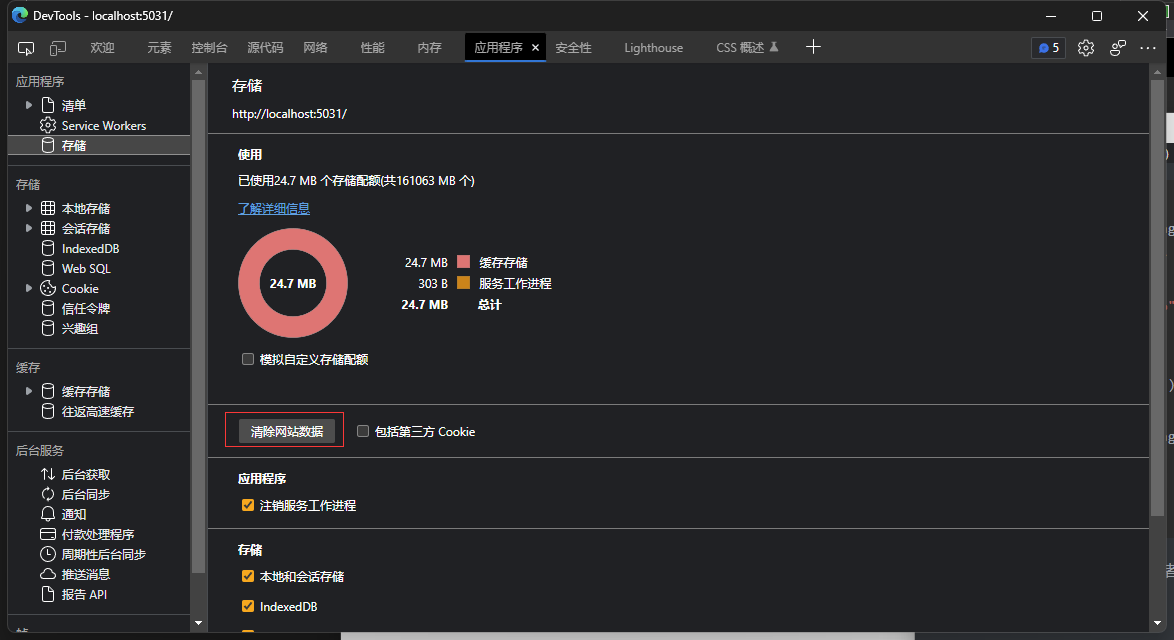
點選網路,然後重新整理介面,我們看到這裡並不會載入 Demand.Components.dll,但是這裡的組件:

然後點選介面的按鈕:

這個時候在來到 偵錯工具的網路, 我們看到 Demand.Components.dll 已經被載入了,當我們使用的時候這個組件才會載入,並且第二次加入介面的時候不會重複載入組件:
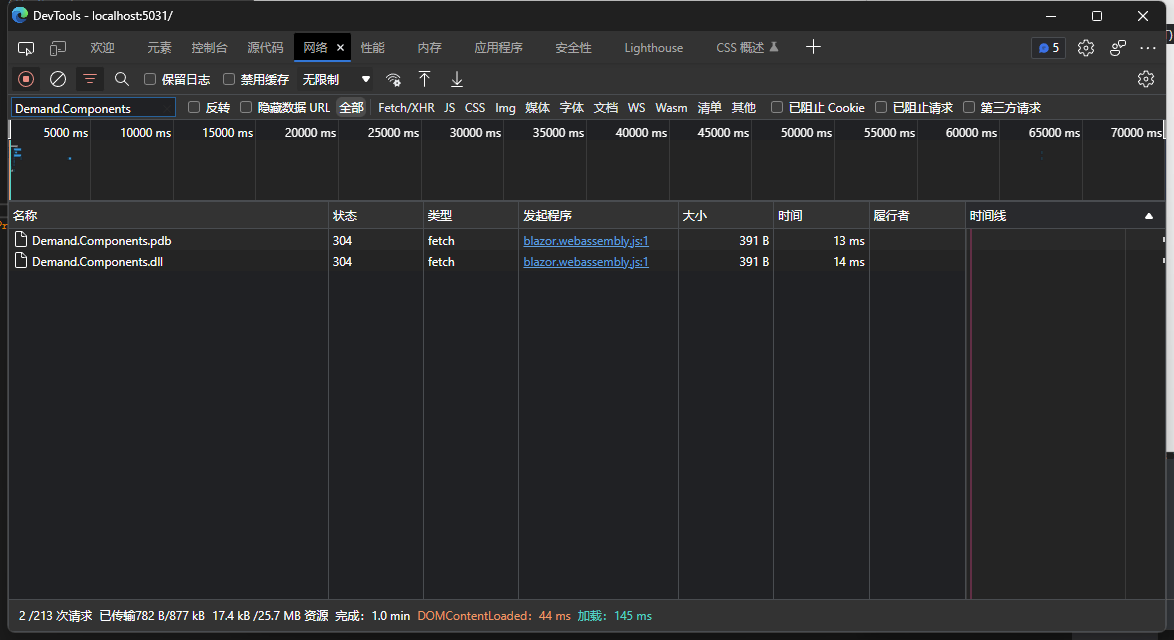
然後我們將專案發佈(發佈的時候記得上面提到的裁剪導致程式集遺失無法使用按需載入的問題,只要在按需載入的設定中清理掉被裁剪的組件即可):

然後使用 docker compose 部署一個 nginx 代理檢視效果:
建立 docker-compose.yml 檔案,並且新增以下程式碼,在 docker-compose.yml 的當前目錄下建立 conf.d 和 wwwroot 兩個資料夾:
services:
  nginx:
    image: nginx:stable-alpine
    container_name: nginx
    volumes:
      - ./conf.d:/etc/nginx/conf.d
      - ./wwwroot:/wwwroot
    ports:
      - 811:80
在 conf.d 中建立 webassembly.conf,並且新增以下程式碼:
server {
    listen 80;
    server_name http://localhost;

    location / {
        root /wwwroot;
        index index.html;
    }

}
然後在 docker-compose.yml 所屬目錄中使用 docker-compose up -d 啟動 nginx 服務
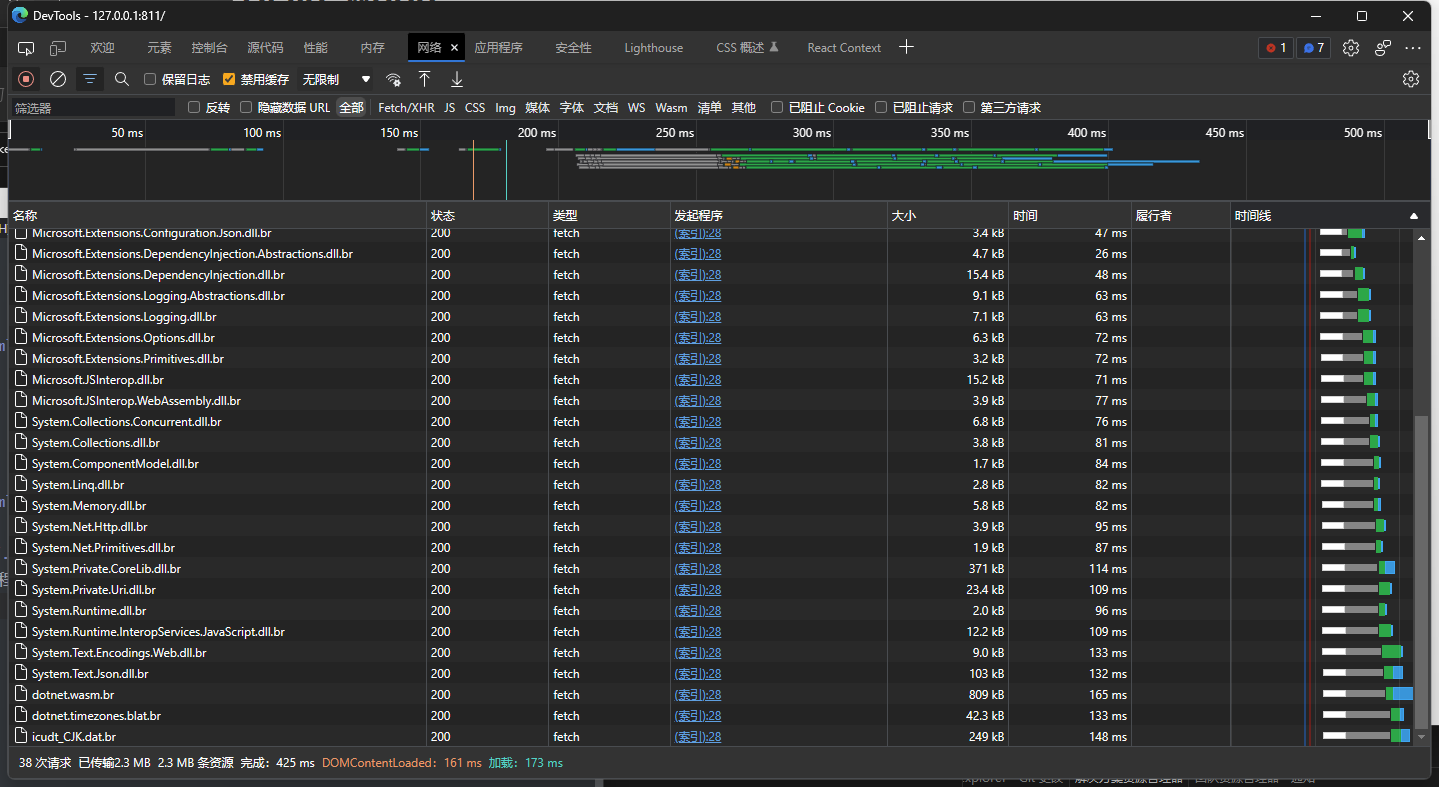
開啟瀏覽器訪問 http://127.0.0.1:811/ (不要使用 localhost 訪問,預設不會啟動壓縮的)然後開啟 f12 偵錯工具,並且在應用程式中清理掉儲存,在開啟網路選項,重新整理瀏覽器,載入完成,優化到了 2.3MB,啟動壓縮,並且在發佈的時候裁剪了未使用的組件:
極致優化 到 1MB
在 Demand 專案檔案中新增以下設定, 以下設定停用了一些功能,例如全球化等
<PublishTrimmed>true</PublishTrimmed>
<InvariantGlobalization>true</InvariantGlobalization>
<BlazorEnableTimeZoneSupport>false</BlazorEnableTimeZoneSupport>
<EventSourceSupport>false</EventSourceSupport>
<HttpActivityPropagationSupport>false</HttpActivityPropagationSupport>
<EnableUnsafeBinaryFormatterSerialization>false</EnableUnsafeBinaryFormatterSerialization>
<MetadataUpdaterSupport>false</MetadataUpdaterSupport>
<UseNativeHttpHandler>true</UseNativeHttpHandler>
然後我們繼續上面的操作將其發佈,並且部署到 nginx 中。
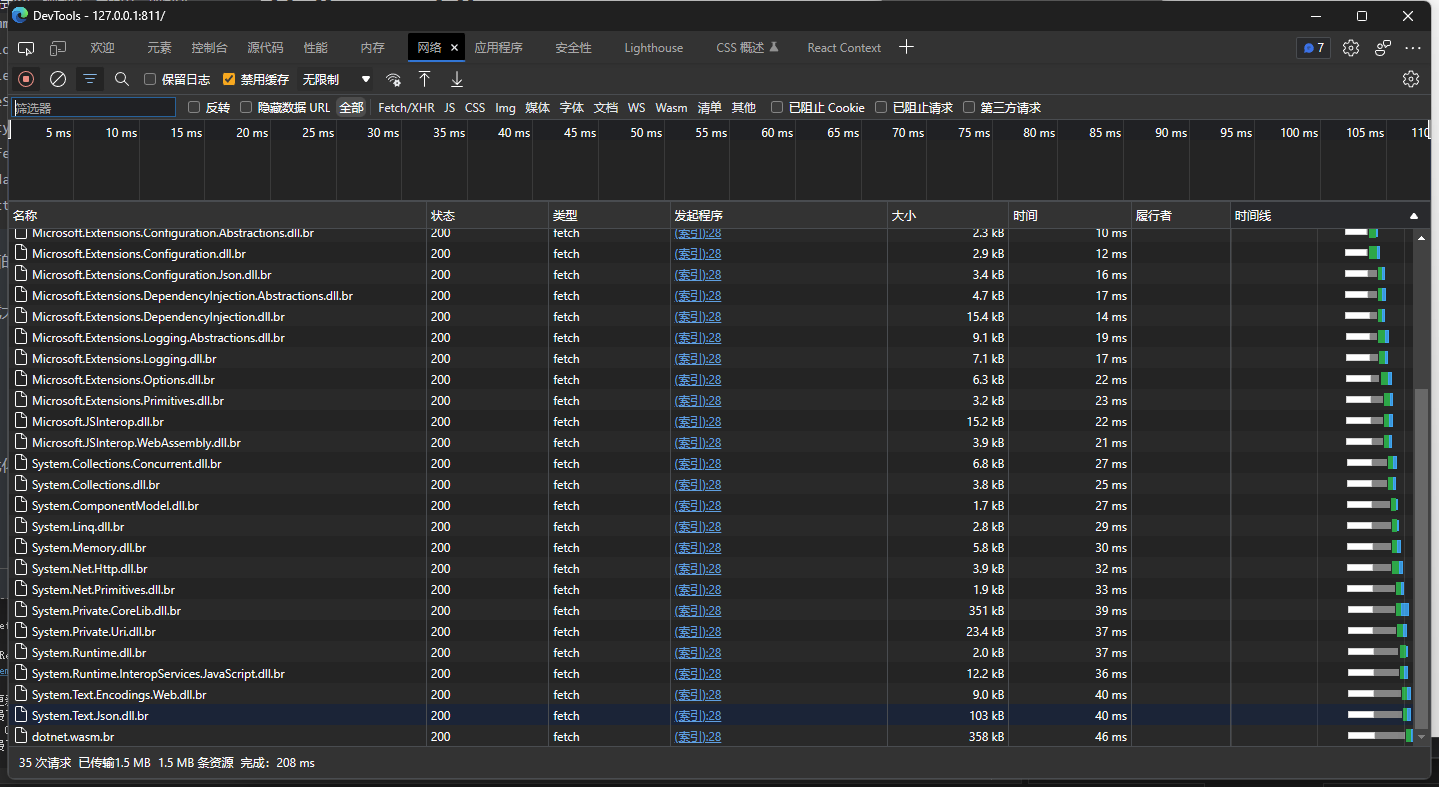
在網路中檢視載入大小,我們看到已經來到了 1MB,去掉一些 js 其實應該更小,這樣它的載入問題得到了很大的解決(來自小夜鯤大佬的建議)
結尾
如果您有更好的優化方案可以聯繫我。
來自 token 的分享。
- demo 線上訪問: http://webassembly.tokengo.top
- GitHub: https://github.com/239573049/demand
- Gitee: https://gitee.com/hejiale010426/demand
blazor 交流群:452761192
本文來自轉載。
作者:Token
原文標題:如何將 WebAssembly 優化到 1MB?
原文連結:https://www.cnblogs.com/hejiale010426/p/17076817.html