

采用 SwiftUI Core Graphics 技术,与 C#的 GDI+绘图类似,具体概念不多说,毕竟我也是新手,本文主要展示效果图及代码,本文示例代码需要请拉到文末自取。
1、图片缩放
- 完全填充,变形压缩
- 将图像居中缩放截取
- 等比缩放
上面三个效果,放一起比较好对比,如下
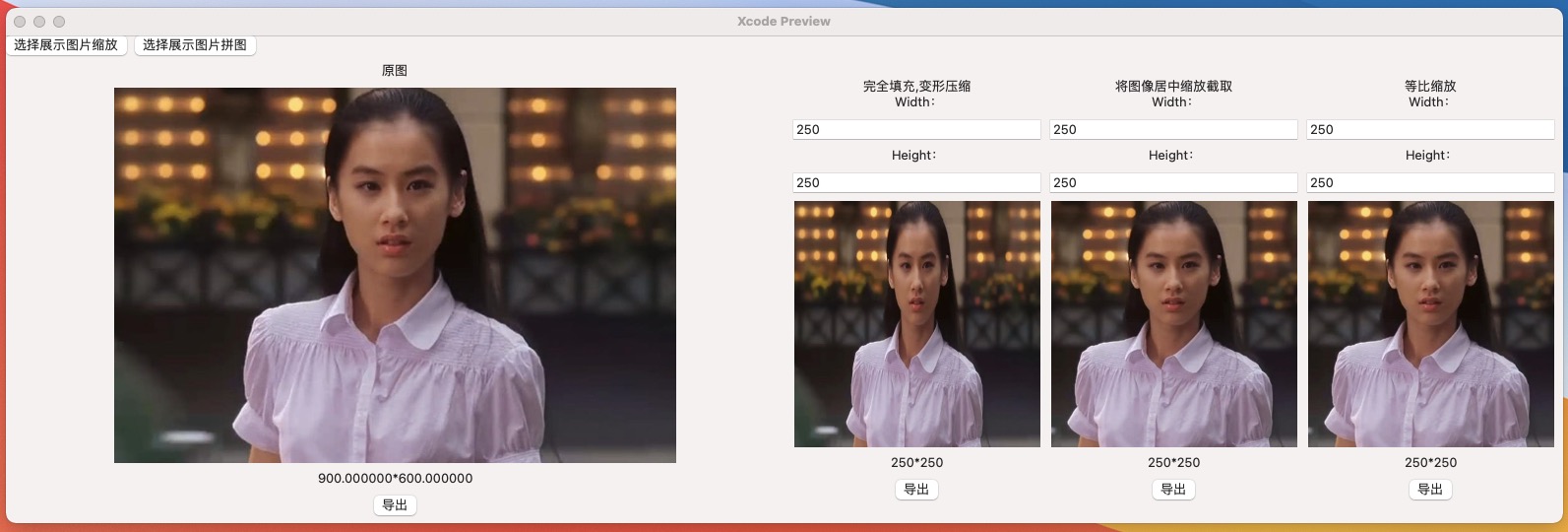
- 第 1 张为原图
- 第 2 张为完全填充,变形压缩
- 第 3 张为图像居中缩放截取
- 第 4 张为等比缩放
示例中缩放前后的图片可导出
2、图片拼图
顾名思义,将多张图片组合成一张图,以下为多张美图原图:
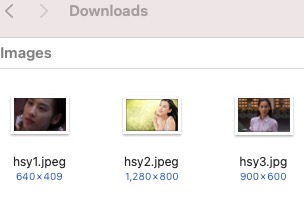
选择后,界面中预览:
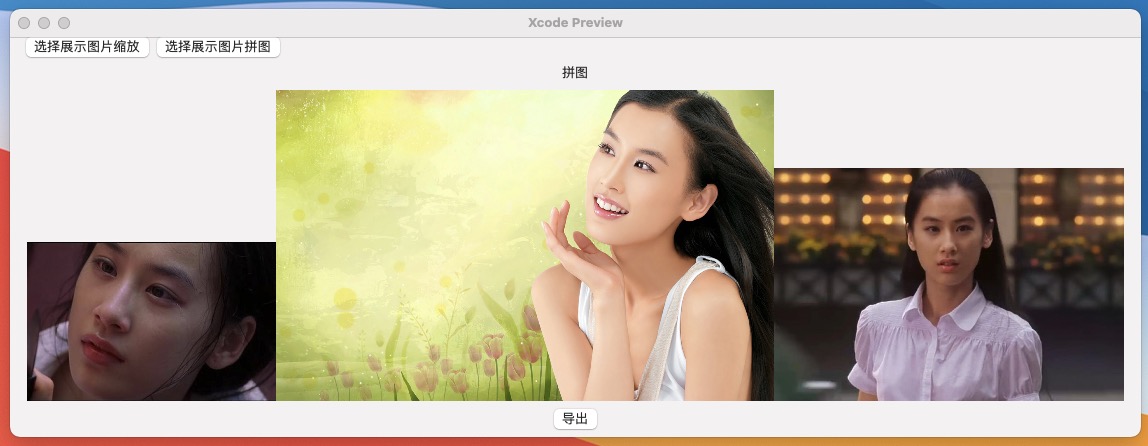
导出拼图查看效果:

3、图片操作方法
最后上图片缩放、拼图代码:
import SwiftUI

struct ImageHelper {


    static let shared = ImageHelper()
    private init() {}

    // NSView 转 NSImage
    func imageFromView(cview: NSView) -> NSImage? {

        // 从view、data、CGImage获取BitmapImageRep
        // NSBitmapImageRep *bitmap = [NSBitmapImageRep imageRepWithData:data];
        // NSBitmapImageRep *bitmap = [[[NSBitmapImageRep alloc] initWithCGImage:CGImage];
        guard let bitmap: NSBitmapImageRep = cview.bitmapImageRepForCachingDisplay(in: cview.visibleRect) else { return nil }
        cview.cacheDisplay(in: cview.visibleRect, to: bitmap)
        let image: NSImage = NSImage(size: cview.frame.size)
        image.addRepresentation(bitmap)

        return image;
    }

    // 保存图片到本地
    func saveImage(image: NSImage, fileName: String) -> Bool {
        guard var imageData = image.tiffRepresentation,
              let imageRep = NSBitmapImageRep(data: imageData) else { return false }

        //    [imageRep setSize:size];  // 只是打开图片时的初始大小,对图片本省没有影响
        // jpg
        if(fileName.hasSuffix("jpg")) {
            let quality:NSNumber = 0.85 // 压缩率
            imageData = imageRep.representation(using: .jpeg, properties:[.compressionFactor:quality])!

        } else {
            // png
            imageData = imageRep.representation(using: .png, properties:[:])!
        }

        do {
            // 写文件 保存到本地需要关闭沙盒  ---- 保存的文件路径一定要是绝对路径,相对路径不行
            try imageData.write(to: URL(fileURLWithPath: fileName), options: .atomic)
            return true
        } catch {
            return false
        }
    }

    // 将图片按照比例压缩
    // rate 压缩比0.1~1.0之间
    func compressedImageDataWithImg(image: NSImage, rate: CGFloat) -> NSData? {
        guard let imageData = image.tiffRepresentation,
              let imageRep = NSBitmapImageRep(data: imageData) else { return nil }
        guard let data: Data = imageRep.representation(using: .jpeg, properties:[.compressionFactor:rate]) else { return nil }

        return data as NSData;
    }

    // 完全填充,变形压缩
    func resizeImage(sourceImage: NSImage, forSize size: NSSize) -> NSImage {
        let targetFrame: NSRect = NSMakeRect(0, 0, size.width, size.height);

        let sourceImageRep: NSImageRep = sourceImage.bestRepresentation(for: targetFrame, context: nil, hints: nil)!
        let targetImage: NSImage = NSImage(size: size)

        targetImage.lockFocus()
        sourceImageRep.draw(in: targetFrame)
        targetImage.unlockFocus()

        return targetImage;
    }

    // 将图像居中缩放截取targetsize
    func resizeImage1(sourceImage: NSImage, forSize targetSize: CGSize) -> NSImage {

        let imageSize: CGSize = sourceImage.size
        let width: CGFloat = imageSize.width
        let height: CGFloat = imageSize.height
        let targetWidth: CGFloat = targetSize.width
        let targetHeight: CGFloat = targetSize.height
        var scaleFactor: CGFloat = 0.0


        let widthFactor: CGFloat = targetWidth / width
        let heightFactor: CGFloat = targetHeight / height
        scaleFactor = (widthFactor > heightFactor) ? widthFactor : heightFactor

        // 需要读取的源图像的高度或宽度
        let readHeight: CGFloat = targetHeight / scaleFactor
        let readWidth: CGFloat = targetWidth / scaleFactor
        let readPoint: CGPoint = CGPoint(x: widthFactor > heightFactor ? 0 : (width - readWidth) * 0.5,
                                         y: widthFactor < heightFactor ? 0 : (height - readHeight) * 0.5)


        let newImage: NSImage = NSImage(size: targetSize)
        let thumbnailRect: CGRect = CGRect(x: 0, y: 0, width: targetSize.width, height: targetSize.height)
        let imageRect: NSRect = NSRect(x: readPoint.x, y: readPoint.y, width: readWidth, height: readHeight)

        newImage.lockFocus()
        sourceImage.draw(in: thumbnailRect, from: imageRect, operation: .copy, fraction: 1.0)
        newImage.unlockFocus()

        return newImage;
    }

    // 等比缩放
    func resizeImage2(sourceImage: NSImage, forSize targetSize: CGSize) -> NSImage {

        let imageSize: CGSize = sourceImage.size
        let width: CGFloat = imageSize.width
        let height: CGFloat = imageSize.height
        let targetWidth: CGFloat = targetSize.width
        let targetHeight: CGFloat = targetSize.height
        var scaleFactor: CGFloat = 0.0
        var scaledWidth: CGFloat = targetWidth
        var scaledHeight: CGFloat = targetHeight
        var thumbnailPoint: CGPoint = CGPoint(x: 0.0, y: 0.0)

        if __CGSizeEqualToSize(imageSize, targetSize) == false {
            let widthFactor: CGFloat = targetWidth / width
            let heightFactor:  CGFloat = targetHeight / height

            // scale to fit the longer
            scaleFactor = (widthFactor > heightFactor) ? widthFactor : heightFactor
            scaledWidth  = ceil(width * scaleFactor)
            scaledHeight = ceil(height * scaleFactor)

            // center the image
            if (widthFactor > heightFactor) {
                thumbnailPoint.y = (targetHeight - scaledHeight) * 0.5
            } else if (widthFactor < heightFactor) {
                thumbnailPoint.x = (targetWidth - scaledWidth) * 0.5
            }
        }

        let newImage: NSImage = NSImage(size: NSSize(width: scaledWidth, height: scaledHeight))
        let thumbnailRect: CGRect = CGRect(x: thumbnailPoint.x, y: thumbnailPoint.y, width: scaledWidth, height: scaledHeight)
        let imageRect: NSRect = NSRect(x: 0.0, y:0.0, width: width, height: height)

        newImage.lockFocus()
        sourceImage.draw(in: thumbnailRect, from: imageRect, operation: .copy, fraction: 1.0)
        newImage.unlockFocus()

        return newImage;
    }

    // 将图片压缩到指定大小(KB)
    func compressImgData(imgData: NSData, toAimKB aimKB: NSInteger) -> NSData? {

        let aimRate: CGFloat = CGFloat(aimKB * 1000) / CGFloat(imgData.length)

        let imageRep: NSBitmapImageRep = NSBitmapImageRep(data: imgData as Data)!
        guard let data: Data = imageRep.representation(using: .jpeg, properties:[.compressionFactor:aimRate]) else { return nil }

        print("数据最终大小:\(CGFloat(data.count) / 1000), 压缩比率:\(CGFloat(data.count) / CGFloat(imgData.length))")

        return data as NSData
    }

    // 组合图片
    func jointedImageWithImages(imgArray: [NSImage]) -> NSImage {

        var imgW: CGFloat = 0
        var imgH: CGFloat = 0
        for img in imgArray {
            imgW += img.size.width;
            if (imgH < img.size.height) {
                imgH = img.size.height;
            }
        }

        print("size : \(NSStringFromSize(NSSize(width: imgW, height: imgH)))")

        let togetherImg: NSImage = NSImage(size: NSSize(width: imgW, height: imgH))

        togetherImg.lockFocus()

        let imgContext: CGContext? = NSGraphicsContext.current?.cgContext

        var imgX: CGFloat = 0
        for imgItem in imgArray {
            if let img = imgItem as? NSImage {
                let imageRef: CGImage = self.getCGImageRefFromNSImage(image: img)!
                imgContext?.draw(imageRef, in: NSRect(x: imgX, y: 0, width: img.size.width, height: img.size.height))

            imgX += img.size.width;
            }
        }

        togetherImg.unlockFocus()

        return togetherImg;

    }

    // NSImage转CGImageRef
    func getCGImageRefFromNSImage(image: NSImage) -> CGImage? {

        let imageData: NSData? = image.tiffRepresentation as NSData?
        var imageRef: CGImage? = nil
        if(imageData != nil) {
            let imageSource: CGImageSource = CGImageSourceCreateWithData(imageData! as CFData, nil)!

            imageRef = CGImageSourceCreateImageAtIndex(imageSource, 0, nil)
        }
        return imageRef;
    }

    // CGImage 转 NSImage
    func getNSImageWithCGImageRef(imageRef: CGImage) -> NSImage? {

        return NSImage(cgImage: imageRef, size: NSSize(width: imageRef.width, height: imageRef.height))
//        var imageRect: NSRect = NSRect(x: 0, y: 0, width: 0, height: 0)
//
//        var imageContext: CGContext? = nil
//        var newImage: NSImage? = nil
//
//        imageRect.size.height = CGFloat(imageRef.height)
//        imageRect.size.width = CGFloat(imageRef.width)
//
//        // Create a new image to receive the Quartz image data.
//        newImage = NSImage(size: imageRect.size)
//
//        newImage?.lockFocus()
//        // Get the Quartz context and draw.
//        imageContext = NSGraphicsContext.current?.cgContext
//        imageContext?.draw(imageRef, in: imageRect)
//        newImage?.unlockFocus()
//
//        return newImage;
    }

    // NSImage转CIImage
    func getCIImageWithNSImage(image: NSImage) -> CIImage?{

        // convert NSImage to bitmap
        guard let imageData = image.tiffRepresentation,
              let imageRep = NSBitmapImageRep(data: imageData) else { return nil }

        // create CIImage from imageRep
        let ciImage: CIImage = CIImage(bitmapImageRep: imageRep)!

        // create affine transform to flip CIImage
        let affineTransform: NSAffineTransform = NSAffineTransform()
        affineTransform.translateX(by: 0, yBy: 128)
        affineTransform.scaleX(by: 1, yBy: -1)

        // create CIFilter with embedded affine transform
        let transform:CIFilter = CIFilter(name: "CIAffineTransform")!
        transform.setValue(ciImage, forKey: "inputImage")
        transform.setValue(affineTransform, forKey: "inputTransform")

        // get the new CIImage, flipped and ready to serve
        let result: CIImage? = transform.value(forKey: "outputImage") as? CIImage
        return result;
    }
}
4、示例代码
界面布局及效果展示代码
import SwiftUI

struct TestImageDemo: View {
    @State private var sourceImagePath: String?
    @State private var sourceImage: NSImage?
    @State private var sourceImageWidth: CGFloat = 0
    @State private var sourceImageHeight: CGFloat = 0
    @State private var resizeImage: NSImage?
    @State private var resizeImageWidth: String = "250"
    @State private var resizeImageHeight: String = "250"
    @State private var resize1Image: NSImage?
    @State private var resize1ImageWidth: String = "250"
    @State private var resize1ImageHeight: String = "250"
    @State private var resize2Image: NSImage?
    @State private var resize2ImageWidth: String = "250"
    @State private var resize2ImageHeight: String = "250"
    @State private var joinImage: NSImage?
    var body: some View {
        GeometryReader { reader in
            VStack {
                HStack {
                    Button("选择展示图片缩放", action: self.choiceResizeImage)
                    Button("选择展示图片拼图", action: self.choiceJoinImage)
                    Spacer()
                }

                HStack {

                    VStack {
                        if let sImage = sourceImage {
                            Section(header: Text("原图")) {
                                Image(nsImage: sImage)
                                    .resizable().aspectRatio(contentMode: .fit)
                                    .frame(width: reader.size.width / 2)
                                Text("\(self.sourceImageWidth)*\(self.sourceImageHeight)")
                                Button("导出", action: { self.saveImage(image: sImage) })
                            }
                        }
                        if let sImage = self.joinImage {
                            Section(header: Text("拼图")) {
                                Image(nsImage: sImage)
                                    .resizable().aspectRatio(contentMode: .fit)
                                    .frame(width: reader.size.width)
                                Button("导出", action: { self.saveImage(image: sImage) })
                            }
                        }
                    }
                    VStack {
                        Section(header: Text("完全填充,变形压缩")) {
                            VStack {
                                Section(header: Text("Width:")) {
                                    TextField("Width", text: self.$resizeImageWidth)
                                }
                                Section(header: Text("Height:")) {
                                    TextField("Height", text: self.$resizeImageHeight)
                                }
                                if let sImage = resizeImage {
                                    Image(nsImage: sImage)
                                    Text("\(self.resizeImageWidth)*\(self.resizeImageHeight)")
                                    Button("导出", action: { self.saveImage(image: sImage) })
                                }
                            }
                        }
                    }
                    VStack {
                        Section(header: Text("将图像居中缩放截取")) {
                            VStack {
                                Section(header: Text("Width:")) {
                                    TextField("Width", text: self.$resize1ImageWidth)
                                }
                                Section(header: Text("Height:")) {
                                    TextField("Height", text: self.$resize1ImageHeight)
                                }
                                if let sImage = resize1Image {
                                    Image(nsImage: sImage)
                                    Text("\(self.resize1ImageWidth)*\(self.resize1ImageHeight)")
                                    Button("导出", action: { self.saveImage(image: sImage) })
                                }
                            }
                        }
                    }
                    VStack {
                        Section(header: Text("等比缩放")) {
                            VStack {
                                Section(header: Text("Width:")) {
                                    TextField("Width", text: self.$resize2ImageWidth)
                                }
                                Section(header: Text("Height:")) {
                                    TextField("Height", text: self.$resize2ImageHeight)
                                }
                                if let sImage = resize2Image {
                                    Image(nsImage: sImage)
                                    Text("\(self.resize2ImageWidth)*\(self.resize2ImageHeight)")
                                    Button("导出", action: { self.saveImage(image: sImage) })
                                }
                            }
                        }
                    }
                    Spacer()
                }
                Spacer()
            }
        }
    }

    private func choiceResizeImage() {
        let result: (fail: Bool, url: [URL?]?) =
            DialogProvider.shared.showOpenFileDialog(title: "", prompt: "", message: "选择图片", directoryURL: URL(fileURLWithPath: ""), allowedFileTypes: ["png", "jpg", "jpeg"])
        if result.fail {
            return
        }
        if let urls = result.url,
           let url = urls[0] {
            self.sourceImagePath = url.path
            self.sourceImage = NSImage(contentsOf: URL(fileURLWithPath: self.sourceImagePath!))
            self.sourceImageWidth = (self.sourceImage?.size.width)!
            self.sourceImageHeight = (self.sourceImage?.size.height)!
            if let resizeWidth = Int(self.resizeImageWidth),
               let resizeHeight = Int(self.resizeImageHeight) {
                self.resizeImage = ImageHelper.shared.resizeImage(sourceImage: self.sourceImage!, forSize: CGSize(width: resizeWidth, height: resizeHeight))
            }
            if let resize1Width = Int(self.resize1ImageWidth),
               let resize1Height = Int(self.resize1ImageHeight) {
                self.resize1Image = ImageHelper.shared.resizeImage1(sourceImage: self.sourceImage!, forSize: CGSize(width: resize1Width, height: resize1Height))
            }
            if let resize2Width = Int(self.resize2ImageWidth),
               let resize2Height = Int(self.resize2ImageHeight) {
                self.resize2Image = ImageHelper.shared.resizeImage1(sourceImage: self.sourceImage!, forSize: CGSize(width: resize2Width, height: resize2Height))
            }
        }
    }

    private func choiceJoinImage() {
        let result: (fail: Bool, url: [URL?]?) =
            DialogProvider.shared.showOpenFileDialog(title: "", prompt: "", message: "选择图片", directoryURL: URL(fileURLWithPath: ""), allowedFileTypes: ["png", "jpg", "jpeg"], allowsMultipleSelection: true)
        if result.fail {
            return
        }
        if let urls = result.url {
            var imgs: [NSImage] = []
            for url in urls {
                if let filePath = url?.path {
                    imgs.append(NSImage(contentsOf: URL(fileURLWithPath: filePath))!)
                }
            }
            if imgs.count > 0 {
                self.joinImage = ImageHelper.shared.jointedImageWithImages(imgArray: imgs)
            }
        }
    }

    private func saveImage(image: NSImage) {
        let result: (isOpenFail: Bool, url: URL?) =
            DialogProvider.shared.showSaveDialog(
                title: "选择图片存储路径",
                directoryURL: URL(fileURLWithPath: ""),
                prompt: "",
                message: "",
                allowedFileTypes: ["png"]
            )
        if result.isOpenFail || result.url == nil || result.url!.path.isEmpty {
            return
        }

        let exportImagePath = result.url!.path
        _ = ImageHelper.shared.saveImage(image: image, fileName: exportImagePath)
        NSWorkspace.shared.activateFileViewerSelecting([URL(fileURLWithPath: exportImagePath)])
    }
}

struct TestImageDemo_Previews: PreviewProvider {
    static var previews: some View {
        TestImageDemo()
    }
}
5、结尾
所有代码已贴,并且代码已上传 GitHub,见下面备注。
本文示例代码:https://github.com/dotnet9/MacTest/blob/main/src/macos_test/macos_test/TestImageDemo.swift