(2/30) Everyone learns Blazor together: Introduction to the website and Blazor

(2/30) Everyone learns Blazor together: Introduction to the website and Blazor

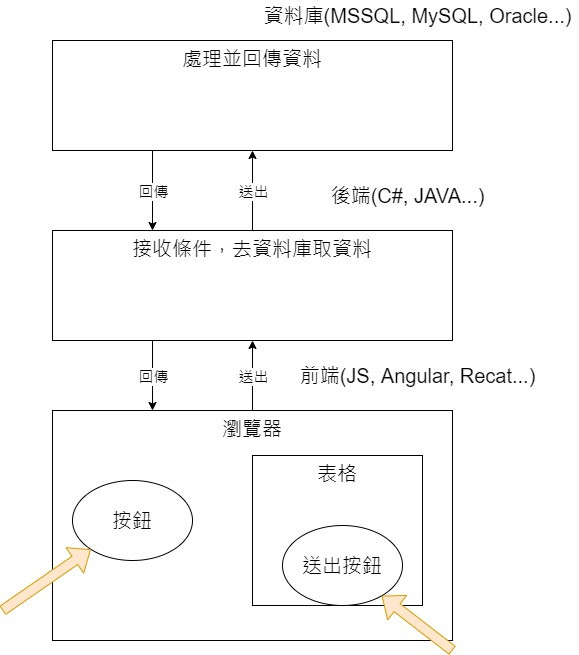
The author's understanding of the website is the front-end, back-end and database. Users press a button or form request on the browser page to trigger front-end events and package the collected conditions and send them to the back-end

最后更新 12/9/2021 11:04 PM
StrayaWorker
预计阅读 8 分钟
分类
Blazor
专题
Learn the Blazor series together
标签
.NET C# ASP.NET Core Blazor

The author's understanding of the website is the front-end, back-end and database. When a user presses a button or form request on the browser page, it triggers a front-end event, packages the collected conditions and sends them to the back-end. After receiving the conditions, the back-end goes to the database. Based on this process and judgment, after retrieving the data that the user wants, the back-end transmits the page and data back to the front-end, and the front-end then presents the corresponding data on the page. This is the most primitive front-end communication.

Later, some people found that it was too troublesome to refresh the page every time, and developed Ajax technology that could be executed asynchronously. If event A was not completed, other events B and C would not wait for A to finish, but would proceed on their own. In this way, when the user sends a form request, the web page would not keep running in small circles waiting for the refresh, but would let the user see the page first, and other things would continue to be processed where the user couldn't see it. This greatly improves the user experience.

Since the dynamic web specification has been unified by JS, even if strongly typed TyepScript later appeared (That is, the language used by front-end frameworks such as Angular, React, and Vue) will eventually still have to be compiled into JS recognized by the browser, and TyepScript is also based on JS. Therefore, if a back-end engineer wants to write a website by himself, he will inevitably have to deal with JS. For people who are accustomed to strong types, it is tantamount to pioneering from scratch. If you encounter loose company specifications and colleagues who prefer to use any type, A variable can use number and string again, which is enough to drive people crazy. Fortunately, Blazor appeared at this time.

Blazor is a compound of Browser and Razor, representing the Razor component executing on the browser.

Blazor is divided into two models, WebAssembly Hosting and Server Hosting. Simply put, they are Client side and Server side, both have their own advantages and disadvantages. But before we go on, let's explain what WebAssembly is.

WebAssembly is referred to as Wasm. It is a binary representation language. Any programming language can be converted to Wasm after specific compilation. The advantage of Wasm is that it transmits the entire program to the browser without the need for a server. Because it is binary and has been compiled, the speed of rendering web pages will be faster than JS, and the files will be smaller.

Blazor WebAssembly packages the compiled dll file and the. NET runtime and sends it to the user's browser, so it will be slow to establish a connection for the first time; Blazor Server establishes a SingalR connection between the server and the browser. When the browser triggers an event, the Server will not refresh the entire page after processing it.(Send all Html elements to the front end), but use SingalR to send changed elements (such as divs) to the browser. This is because Blazor also uses SPA(Single Page Application) mode like Angular. There is only one page from beginning to end. It is full of Components with different functions, and triggering events will only update relevant Components.

Blazor WebAssembly

Advantages:

  1. Because files are all on the browser, the speed is faster than Blazor Server.
  2. No server required
  3. No need to connect to the server at any time
  4. The browser on the Client side is fully utilized to reduce the burden on the server
  5. It can be mounted on any server, such as the cloud, Microsoft's Azure or even CDN(Content Delivery Network, a model for temporarily storing data closer to the user's geographical location. For example, if I want to log in to a website hosted in the United States, the speed must be much slower than a website hosted in Taiwan. The CDN will temporarily store data on a host in areas closer to Taiwan, such as Hong Kong and Singapore, allowing users to connect faster)

Disadvantages:

  1. The first loading will take a long time, because the browser needs to download components such as. NET runtime (Note: Before the Ironman Race, I established a new Blazor WebAssembly project and found that there are no components downloaded. There are no downloaded components in Microsoft's official pictures. Maybe there are changes in the new version)
  2. Limited by the processing power of the browser
  3. Software and hardware on the Client side are important

Blazor Server

Advantages:

  1. Loading speed is faster
  2. You can make full use of the capabilities of the server
  3. The only thing any Client needs to use this software is a browser
  4. Since the source code will not be passed to the Client, it will be safer

Disadvantages:

  1. require server
  2. Need to remain connected to the server
  3. As data is passed back and forth, the delay is felt even more severe
  4. It is not easy to improve computing power because a server can withstand limited clients. The data given by Microsoft is that a single-core Blazor Server with 3.5G of memory can handle 5000 connections; a quad-core Blazor Server with 14G of memory can handle 20000 connections.

If we list the advantages and disadvantages of Blazor WebAssembly and Blazor Server separately, we can see that no model is the most perfect, only the most suitable one. If you already have servers with other programming language architectures such as PHP, Node or Rails and need a client-side program that is provided to users and does not require constant connection to the server, Blazor WebAssembly is a good choice, and Blazor WebAssembly has PWA The (Progressive Web App) function, although developed in a website model, allows users to download it to the desktop or mobile phone just like downloading software. Well-known websites such as Twitter, Pinterest, and Starbucks are well-known examples. If you open the Twitter website with a computer, you can see the download button on the far right of the URL column; If you need to create a website from scratch that requires frequent connections to the server (such as adding, modifying, or deleting data), you are suitable for using Blazor Server.

However, Blazor is a new product from Microsoft after all. I have only used ASP.NET Core to match Blazor. Blazor WebAssembly may have other aspects to pay attention to if it wants to integrate with backend developed in non-Microsoft languages such as PHP. If you have relevant needs, you may have to consider it from multiple sources.

After talking a lot of words, I think many people still didn't understand it as much as I did when I first contacted her. Tomorrow, I will create both projects to let everyone see where the difference lies.

** Note: The code in this article is refactored through. NET 6 + Visual Studio 2022. You can click on the original link to compare and learn the refactored code. Thank you for reading and support the original author **

Keep Exploring

延伸阅读

更多文章
同分类 / 同标签 12/25/2021

(29/30) Everyone learn Blazor together: Blazor unit testing

Probably the most boring process of developing a system is to solve bugs, especially the error of trying to value null objects (`Object reference not set to an instance of an object.`). This should be the most common problem that most people encounter when they first step into the programming field. In order to relieve themselves from the boring process of solving bugs, this article introduces 'unit testing'.

继续阅读
同分类 / 同标签 12/25/2021

(28/30) Everyone learns Blazor together: Policy-based authorization

It was mentioned before that 'ASP.NET Core Identity' uses 'Claim' based authentication. In fact,'ASP.NET Core Identity' has different types of authorization methods, the simplest are 'login authorization','role authorization', and 'Claim authorization', but all of the above are implemented in one way: 'Policy-based authorization'.

继续阅读