The previous article "All You Need to Know About Blog Systems: Unveiling the Hidden Knowledge (Part 1)" introduced the history of blogs, my blog story, and the audience sources of blogs. This article continues with the exciting content, introducing the key design points of blog basic functions.
Table of Contents
Due to the length of the article, it will be divided into 4 parts for distribution. The table of contents is as follows:
- The Past and Present of "Blog"
- My Blog Story
- Who Is the Audience of a Blog?
- Key Points in Designing Basic Blog Functions
- 4.1 Post
- 4.2 Comment
- 4.3 Category
- 4.4 Tag
- 4.5 Archive
- 4.6 Page
- 4.7 Subscription
- 4.8 Version Control
- 4.9 Theme and Personalization
- 4.10 Users and Permissions
- 4.11 Plugins
- 4.12 Image and Attachment Handling
- 4.13 Spam Filtering and Comment Moderation
- 4.14 Static Generation
- 4.15 Notification System
- Blog Protocols or Standards
- 5.1 RSS
- 5.2 ATOM
- 5.3 OPML
- 5.4 APML
- 5.5 FOAF
- 5.6 BlogML
- 5.7 OpenSearch
- 5.8 Pingback
- 5.9 Trackback
- 5.10 MetaWeblog
- 5.11 RSD
- 5.12 Reader View
- What Knowledge Points Are There in Designing a Blog System?
- 6.1 Should Time Zones Always Use UTC?
- 6.2 HTML or Markdown
- 6.3 MVC or SPA
- 6.4 Security
- Conclusion
01 Post
We may read 3-5 articles of varying lengths every day. The post is the core business of a blog system, so the content and quality of blog posts are very important.
So, what should the business type "post" be named? Should the database table name and code variable name use "article"? It seems that when we were in school, we only learned that articles are called "article". In fact, the correct term for a blog-type article is "post". The difference between the English words "post" and "article" is that a post is just an article written freely, while an article refers to something carefully crafted, well-researched, and possibly published in an academic journal. Therefore, when designing a blog system, try to avoid using the word "article" to name your code. More specifically, a post can contain informal, colloquial expressions—for example, this very article counts as a post. An article, on the other hand, requires linguistic standardization, and words like "let us" or "we shall see" cannot appear.

A post needs elements such as title, slug, creation time, publish time, modification time, summary, and content. It also includes secondary information like its category, tags, reading count, and like count. Among these, the slug is a unique feature of blogs. It refers to the URL of a post. For example, my article "Try the New Azure .NET SDK" has the URL https://edi.wang/post/2019/12/5/try-the-new-azure-net-sdk, where try-the-new-azure-net-sdk is the slug of that article. The slug is meant to be "human-readable"; generally, it is an English expression corresponding to the blog title, with English words separated by hyphens. The slug also plays a key role in the blog's SEO. If your blog posts use database IDs, HTML-encoded titles, etc., as URLs, please switch to slugs. Especially for Chinese articles, if the title is URL-encoded, it is a disaster for both SEO and link sharing. Once a slug is set, try not to change it. Although most blog systems support modifying slugs, changing the slug for an article already indexed by search engines will result in a 404. More complete blog systems (like WordPress) support using 301 redirects to inform search engines that the original URL has changed.
The summary has two functions: first, to display article information preview in list views; second, for SEO, placed in the meta description tag to help search engines precisely locate the indexed content. For Chinese content, pay attention to whether the output HTML source code has been encoded. ASP.NET Core's default encoding can be a disaster for SEO (since my blog system targets English-speaking users and does not consider Chinese support, it does not address this problem).
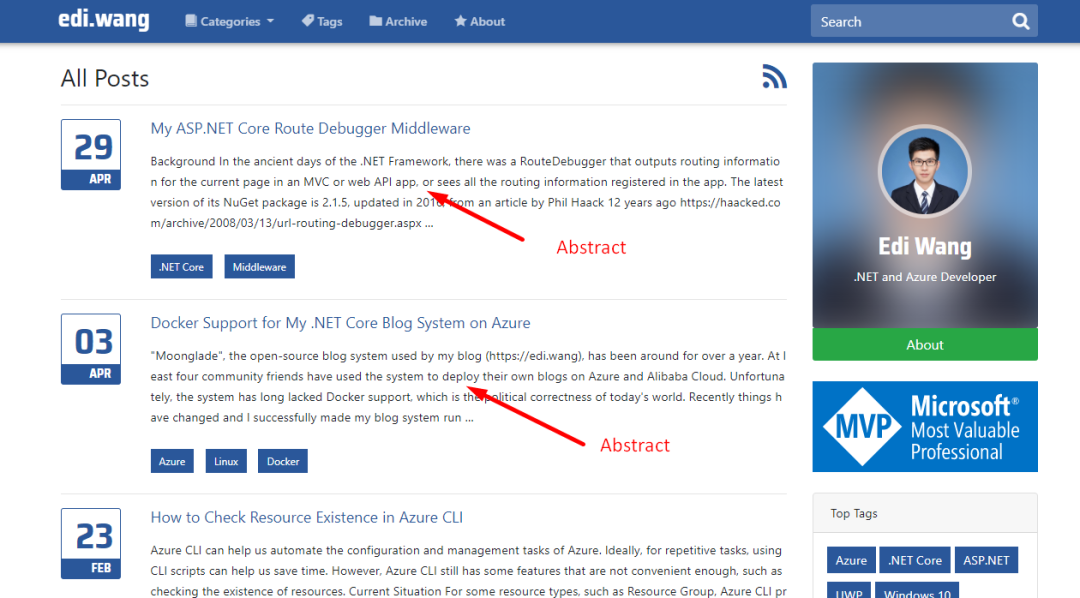

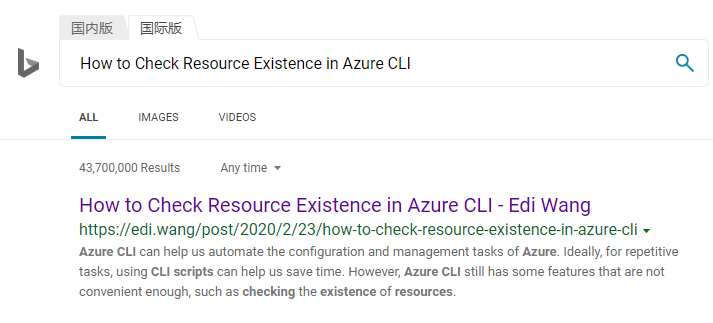
The summary can be automatically extracted from the first few hundred characters of the article, or it can require manual input like WeChat public accounts. My blog automatically takes the first 400 characters of the article. Considering SEO, I usually write the opening paragraph as a summary, so users can see the accurate content in the search engine preview page rather than irrelevant UI elements.
The status of a post usually includes: draft, published, and trashed. Users can only see published posts; administrators can change the post status in the backend.
02 Comment
Comments are the primary way for authors and readers to interact on a blog. Some blogs require readers to log in before commenting, while others allow guest comments (like my blog and WordPress). The advantage of login is that it can identify your readers and effectively prevent spam comments. However, requiring login adds an extra step for users, and those who find it troublesome may not comment.
My blog and WordPress default to requiring admin review of comments before they are displayed. This can also effectively prevent spam advertisements, harassment, or even malicious inflammatory remarks. For users who provide an email address, the admin can reply to comments from the backend, and the blog system can send email notifications to the user.
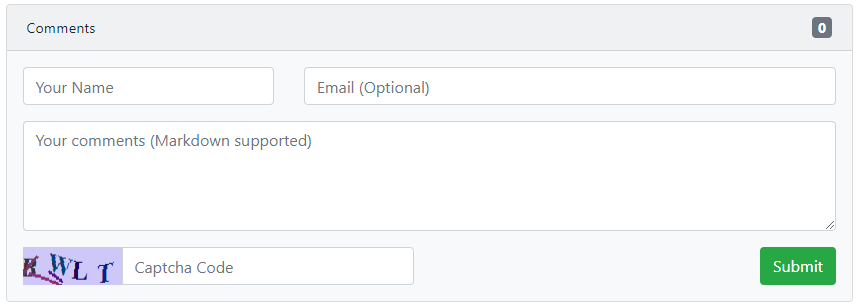
For technical blogs, comments may consider allowing Markdown format—a syntax particularly popular among programmers and widely used on GitHub.
Comments need to use CAPTCHA or other human verification technologies to prevent bots from posting ads. However, experience shows that CAPTCHA cannot 100% block spam, because modern spam is often sent by real humans organized in groups, with dedicated companies, teams, WeChat groups, etc., both domestically and abroad. Therefore, you may need to consider keyword filtering or purchasing third-party filtering interfaces.
Comments should also have word limits; otherwise, some users may "flood" or spam the screen.
If you don't want to implement your own comment functionality, you can integrate third-party comment services. That is, the blog system itself does not implement comments, but instead loads external JS from a third-party service to "inject" a comment section on the article reading page. This usually requires that the article URL is permanent (called "permalinks" in WordPress).
03 Category
Categorizing articles by content—like creating folders—is referred to as categories. After categorizing articles, it helps readers quickly find articles of the same type.
For example, articles about .NET, PHP, or JS all belong to the "Development" category. Meanwhile, tech news and career experience sharing articles belong to the "Work" category. The division of categories is entirely controlled by the user. Categories can be many-to-many. For instance, an article introducing how to develop Angular applications with ASP.NET Core can belong to both ".NET Technology" and "Front-end Development".
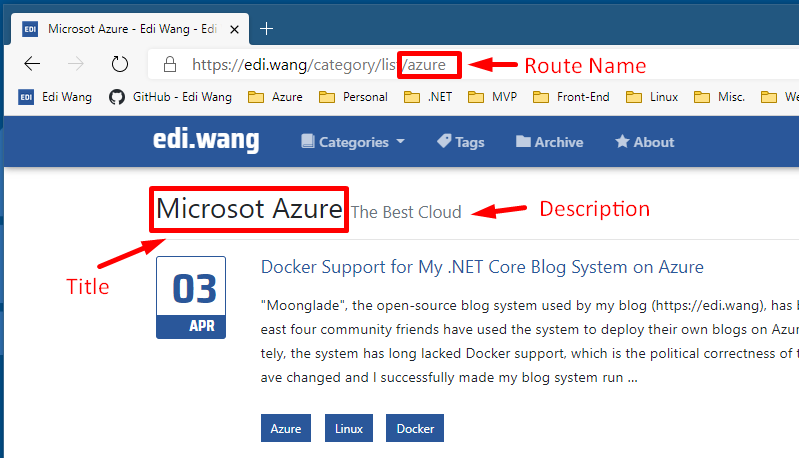
A category needs a title, a description, and a route name. For example, on my blog, the Microsoft Azure category has the title "Microsoft Azure", the description "The Best Cloud", and the route name "azure". The title needs to be displayed in the title bar for SEO. The description is a supplementary explanation of the title for user reference. The reason for designing a route name is explained in the following section on tags.
Another function of categories is to generate OPML and RSS/Atom subscription feeds, which will be covered in Chapter 5 on blog protocols.
04 Tag
The topics mentioned in an article are its tags. Like categories, tags are many-to-many relationships. Tags can be used as a basis for retrieving articles, similar to keywords, to quickly find articles related to specific topics.
Tags need to consider the possibility of duplicate meanings. For example, "VS" and "Visual Studio" have the same meaning; "VSCode", "VSC", and "Visual Studio Code" also have the same meaning. Therefore, when users select tags, it's best to use smart suggestions to recommend existing tags.
For blog system designers, the tag URL must also be considered. If the URL uses the tag content itself, it can cause many problems. When the tag name is a whole English word, e.g., "Excel", there is no problem because the URL would typically be https://yourblog/tags/excel. However, if the tag content includes things like .NET Core, C#, or Robots.txt, things get interesting. Does https://yourblog/tags/robots.txt mean requesting a file named robots.txt under the tags directory, or is it a tag? As a blog system designer, you could programmatically restrict all routes under tags to accept only tag parameters, which seems to solve the problem. But search engines and scanning tools do not think that way; they have many convention-based rules that would interpret it as requesting a file.
For tag content that requires URL encoding, the URL becomes less readable, negatively impacting SEO. Don't naively assume that modern search engines handle URL encoding well. Whether a URL is clean has a significant impact on SEO. Especially when tags are in Chinese, if fully encoded, the URL becomes very long, even affecting SEO and the blogger's ability to share links. Therefore, my blog system assigns each tag a normalized name automatically generated from the tag content to handle tag URLs. For example, ".NET Core" is normalized to "dotnet-core", resulting in a URL like https://edi.wang/tags/list/dotnet-core.
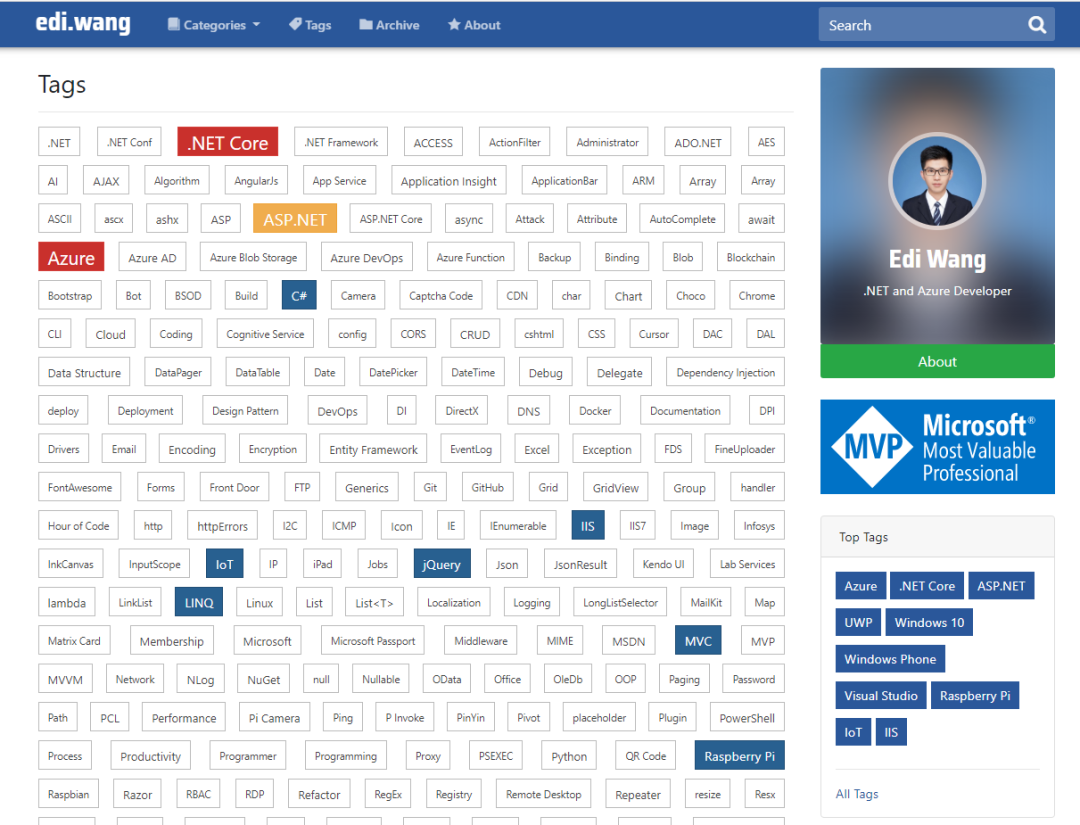
One of the most common mistakes users make is using tags as search keywords. For example, a user writes an article about Visual Studio Code and might simultaneously add tags like "VSCode", "VSC", and "Visual Studio Code". In reality, just one tag is enough. Adding too many tags with the same meaning prevents readers from finding all related articles, and the same applies to search engines. Therefore, how to use tags well is a key point that both blog designers and users need to focus on.
A tag cloud is a feature used to list the most popular tags in a blog. Usually, larger fonts and more prominent colors are used to identify tags with more associated articles. A tag cloud can serve as a personalization attribute for the blogger, giving a quick impression of what topics the blogger is passionate about (e.g., Windows Phone? 0.0).
05 Archive
Archive refers to blog articles organized by time (year, month, day). The difference from categories is that archives only use time as the criterion to divide articles. SEO for Archives is less critical compared to articles, categories, or tags. So, besides the URL being divided by year and month, there are no extra considerations.
For example, https://edi.wang/archive/2019/9 represents articles from September 2019. https://edi.wang/archive/2019 represents all articles from 2019. The archive function is mainly used for readers to query by time and see what the blogger was doing at a certain time. Designing such a feature can increase readers' interest in the blogger and is also a way to showcase personal image externally.

06 Page
Pages are an optional feature of a blog; in fact, they are closer to CMS functionality. Some content is not suitable for publishing as a post, such as an "About" page. Such pages are typically not related to the time of publication, content is updated frequently, and layout design is very flexible, not just plain text.
Pages usually do not require attributes like comments, tags, or categories, but they can have publish and edit times. Like posts, pages also need attention to slugs.

In my blog system, pages also have an option to hide the sidebar. Users can fully write the HTML and CSS code of the page and add the page as a navigation menu. WordPress handles pages more comprehensively, closer to a CMS system.
07 Subscription
The main ways for readers to subscribe to a blog are Feed (RSS/ATOM) and Newsletter. Feed is essentially a passive subscription—the client software initiates a request to the server to check if new articles have been published, then displays them in the client. Newsletters are usually actively sent to subscribers via email, but this requires the blog system developer to implement email subscription functionality and the admin to maintain an email service. Subscriptions generally only push recently published articles, such as the latest 10 or 20, rather than pushing all articles every time, which would overwhelm the client.

Subscriptions can be provided per article category, allowing readers interested only in certain categories to subscribe. Some blog systems also provide feeds for article comments, so readers can watch the "roast" discussions.
For detailed introductions to RSS and ATOM, see Chapters 5.1 and 5.2.
08 Version Control
Blog systems that are closer to a CMS often provide version control functionality, allowing users to rollback posts or pages to previous versions. When designing version control, you must consider that users should be able to rollback and also roll forward again. Typically, each time a user edits an existing article, a new version is created, similar to a git commit for a file. Blog version control is also similar to code version control. You can choose to save the full content of an article as a historical version, or you can choose to save only the delta (changes) each time. Saving full content is easy to implement and does not require extensive time and effort later, but it consumes more storage space. Saving content changes saves database space, but implementing the code can take a lot of effort.
09 Theme and Personalization
A good blog system usually supports themes, after all, personalization is one of the inherent characteristics of a blog. WordPress has accumulated a large library of themes and also allows custom themes. However, my blog only supports changing the theme color; there is still much room for improvement.
10 Users and Permissions
Blog systems are divided into personal, team, and blog platform types. A personal blog system is generally single-user (like my blog) and does not require designing permissions, registration, etc. Multi-user blogs need to implement different roles and permissions, such as blog administrator, moderation specialist, contributor, comment moderator, etc. Whether single-user or multi-user, integrating a mature third-party RBAC solution may be the most efficient choice. Most third-party solutions also support SSO, such as Azure AD, which my blog supports.
11 Plugins
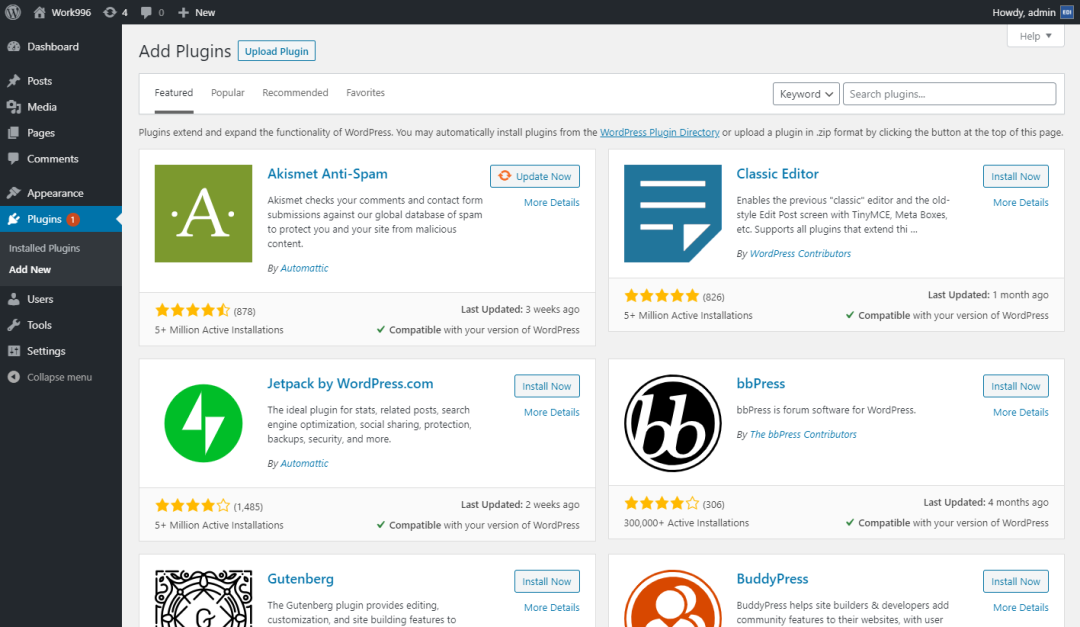
Plugin functionality allows extending the blog's functionality on demand without modifying the blog code. WordPress and BlogEngine both support plugins, but Moonglade does not yet.
12 Image and Attachment Handling
Image Format
In 2020, image formats are very flexible. General blogs use mostly JPG, programmer blogs use mostly PNG (since many are screenshots). Using WEBP format, like WeChat public accounts, is also acceptable as long as the reader's device supports it. BMP format is not recommended due to its large size causing slow network transfers. Similarly, GIFs should have size limits.
When a blog system outputs images, it needs to use the correct Mime Type to ensure client compatibility. Generally, outputting static files directly does not require the blog developer to manually handle Mime Types. However, blogs with specialized image processing logic (like my Moonglade) need to ensure they retain the original Mime Type of the image.
Image Watermark
Automatically adding watermarks to uploaded images helps protect copyright. The watermark content is usually the blog's address or the blogger's name. When adding watermarks, adjust the watermark proportionally to the image size to avoid covering important content and affecting reading. For very small images, the watermark may be selectively omitted.
Also, considering that a blog might change its name during development, it is recommended to keep a copy of the original image in the system so that watermark content can be updated later.
For specific methods, refer to my article "Adding Watermarks to Uploaded Images in ASP.NET Core".
Image Storage
Where to store images is a question worth thinking about. Generally, there are three places to store them: file system, database, or cloud blob storage service. Moonglade supports file system and Azure Blob Storage. Each has its pros and cons.
The advantage of the file system is that serving static files directly is the fastest. However, if the image directory itself is located under the website directory, it can cause the directory to be non-read-only and lead to potential security issues. For example, in early ASP forum systems, it was common to upload a web shell by changing the file extension. Although uploading executable files to a web server in 2020 is basically almost impossible, there are still hidden dangers—just like even if you hire 007 as your bodyguard, you still need to lock the door at night.
Storing images in the database offers the highest security and keeps all blog data in one place, making management and backup convenient. This was popular over a decade ago. However, reading and writing images puts overhead on the database, and then outputting them via the website adds double overhead, so it is generally not recommended.
Cloud blob storage is currently the most suitable solution for this era. Storing images in blob storage not only ensures the server directory is read-only but also uses the cloud's security features to restrict abnormal access, and can accelerate image output via CDN. The only downside might be the additional cost for cloud services; but if you're out of money, that's your problem, not the cloud's.

Image Hotlinking Protection
As a website developer, we sometimes do not want our website's images to be directly referenced by other sites. In certain scenarios, this can cause huge bandwidth consumption in your data center, meaning others use your images while you pay the bill. For example, your site is a.com, you have an image at http://a.com/facepalm.jpg, and b.com uses an img tag on their site to reference your image, causing the network request to go to your data center and consume your resources. Therefore, blogs can optionally enable hotlinking protection. For specific methods, refer to my article "ASP.NET / Core Website Image Hotlinking Protection".

Attachments
Typically, technical blogs by programmers provide readers with downloads of code samples and other attachments. Designing an attachment feature is very similar to designing image storage and is entirely feasible. However, I recommend that technical blogs host code sample attachments on other sites (such as GitHub) for readers to download.
Disadvantages of implementing attachment downloads on your own blog include:
Large Files
Different web servers and firewall products have different limits on file sizes. Users deploying the blog may not have the authority to manage these limits, making large attachments unavailable for download.
Domain and IP Blacklists
Some companies or organizations (especially software companies with high security standards) block file downloads from domains not on a whitelist. While you can browse web pages on that domain normally with a browser, downloading files (e.g., ZIP, EXE) may be blocked by firewalls that only allow HTML/CSS/JS, etc. Readers of programmer blogs are likely to be in such companies.
CDN Resource Consumption
If you have many large attachments and also put a CDN in front of your attachment system (similar to how you handle images), the cost may increase quickly depending on the CDN provider's billing model (e.g., traffic-based billing).
Benefits of using third-party file hosting (e.g., GitHub, OneDrive) include:
- √ You can share your files not only in blog posts but also elsewhere.
- √ These third-party services have their own CDN, so you don't have to worry about your wallet.
- √ Many file hosting services offer complete management features, such as file deletion, restore, version control, permissions, etc. If you were to implement all of this in your blog system, it would take a lot of time...
13 Spam Filtering and Comment Moderation
Blogs inevitably attract malicious people and advertisers, so spam filtering and comment moderation are usually needed. If comments are displayed directly under articles without moderation, it could have adverse effects on the blogger and the website. For example, if someone posts politically sensitive remarks or illegitimate advertisements that appear without backend review, and your blog is hosted in mainland China, your blog could be shut down and rectified immediately, and you could unlock the achievement of "From Programmer to Prisoner". Don't think that hosting outside mainland China makes you safe—some hateful remarks can even attract hackers to poison your blog, extorting you or your readers.

Therefore, I strongly recommend that personal blogs enable spam filtering and comment moderation. WordPress and my Moonglade blog system both support spam filtering and comment moderation.
14 Static Generation
Early news systems, blogs, and CMSs often used static generation to improve response speed under high traffic. This involved saving server-side rendered pages as real HTML files on disk and serving them as static files. Web servers serve static files very efficiently. For unchanging content, subsequent user visits do not hit the database, greatly reducing server pressure. In 2020, static generation is no longer the only option; Redis Cache can also help reduce frequent database access. For personal blogs, if traffic is not high, you don't necessarily need to spend 996 implementing static generation or Redis, increasing development and maintenance costs. However, if you are designing a blog platform, it's better to use static generation or Redis.
15 Notification System
Blogs typically send notifications to administrators or users via email. However, there is no standard or convention stating that blogs must use email for notifications; it is left to the blog system designer's discretion.
Notifications usually include:
- Notifications to the blogger: new comments, article trackbacks (see Chapters 5.8, 5.9).
- Notifications to users: new article published (newsletter subscription), comment replied, comment approved or rejected.
Email notification systems need to consider spam and user privacy protection.

Spam sent to the blogger is not a big problem, but you must pay attention to whether the email system allows sending emails to readers without the blogger's permission. This could be exploited to send spam, potentially leading to the server being blocked. Some server providers, such as Microsoft Azure, have stricter rules regarding email; code deployed on certain PaaS services that calls SMTP endpoints may be directly blocked.
For user privacy, when a user provides an email address to the blog system, you need to inform the user how the email address will be used (can be written in the privacy policy or visible area of the page). You can also let the user check whether they allow the blogger to use that email for notification pushes. Another issue is email address exposure, which often occurs in newsletter mass emails. If you put all users' email addresses in the To or CC fields, every user will know everyone else's email addresses, potentially leading to unwanted contact or fraud. Therefore, newsletters should use BCC or send individually, and allow users to unsubscribe.
Moonglade's notification system uses email but is relatively basic. A complete notification system should use message queues and event-based design, and leverage third-party services. For example, on Azure, you could use Storage Queue + Function App + SendGrid to avoid exploding when sending large volumes of emails.
The next article will mainly introduce [Blog Protocols or Standards]. Stay tuned!