How much do you know about the blog system: Uncovering the unknown knowledge (3)

How much do you know about the blog system: Uncovering the unknown knowledge (3)

Big guy said blog

最后更新 3/8/2022 10:49 PM
汪宇杰博客
预计阅读 17 分钟
分类
share
标签
share

上篇《博客系统知多少:揭秘那些不为人知的学问(二)》介绍了博客的基本功能设计要点,本篇介绍博客的协议或标准。

directory

Due to the long length of the article, this article will be divided into 4 push articles, with the following contents:

  1. The past and present life of "blog"
  2. My Blog Story
  3. Who is the audience for blogs?
  4. Basic functions design points
    • 4.1 Article (Post)
    • 4.2 Comment (Comment)
    • 4.3 Classification (Category)
    • 4.4 Tag
    • 4.5 Archive
    • 4.6 Page (Page)
    • 4.7 subscription
    • 4.8 version control
    • 4.9 Theme and personalization
    • 4.10 Users and permissions
    • 4.11 plug-in
    • 4.12 Handling of pictures and attachments
    • 4.13 Dirty word filtering and review of comments
    • 4.14 static
    • 4.15 notification system
  5. Blog agreements or standards
    • 5.1 RSS
    • 5.2 ATOM
    • 5.3 OPML
    • 5.4 APML
    • 5.5 FOAF
    • 5.6 BlogML
    • 5.7 Open Search
    • 5.8 Pingback
    • 5.9 Trackback
    • 5.10 MetaWeblog
    • 5.11 RSD
    • 5.12 Reader view
  6. What are the knowledge points in designing a blog system
    • 6.1 Do all time zones really use UTC?
    • 6.2 HTML or Markdown
    • 6.3 MVC or SPA
    • 6.4 security
  7. concluding remarks

5.1 丨 RSS

RSS (Really Simple Syndication) is an XML-based standard that is widely used on content websites, including blogs. It was invented by Dave Winer in 1999 and the young computer genius Aaron Swartz participated in defining the specification. Unfortunately, the latter committed suicide in January 2013 at the age of 26.

RSS is also one of the most iconic features of blog systems, and its popularity in blogs has become the de facto standard. A blog system without RSS is as interesting as seeing a mobile phone without a camera.

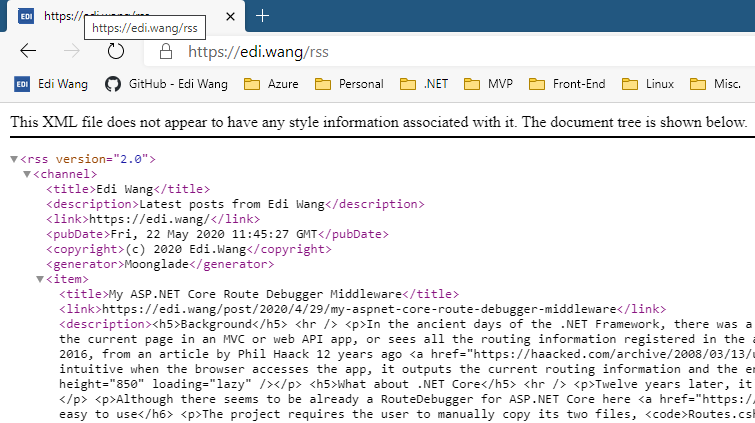
The extension of RSS files can usually be. rss or. xml, or they can have no extension defined (such as Moonlade's RSS). The content is an XML description of recently published blog posts, including title, time, author, classification, summary (or full text) and other information.

(图:Moonglade的RSS源)

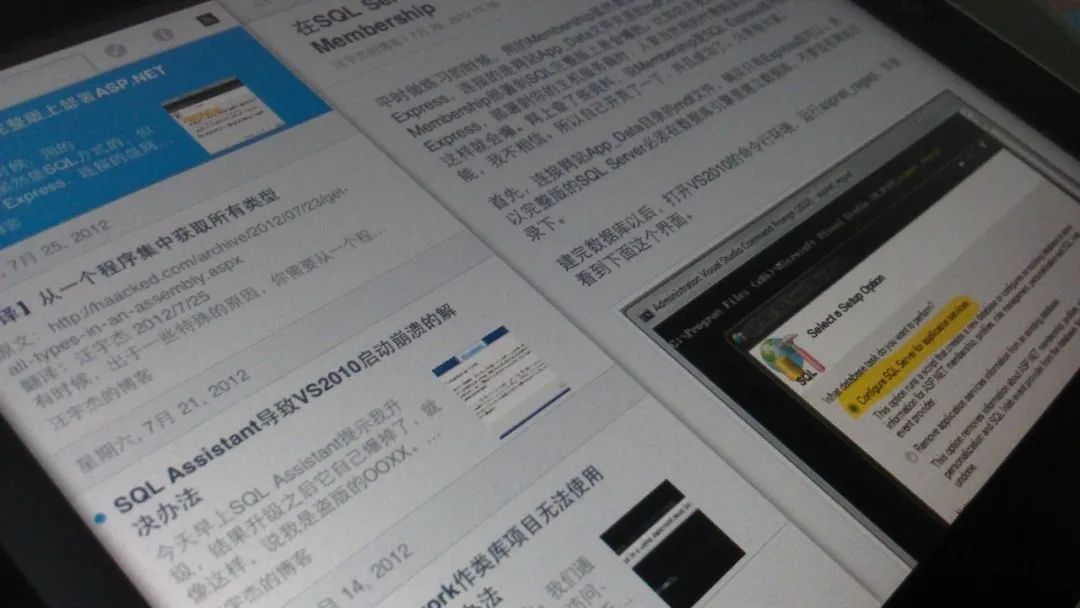
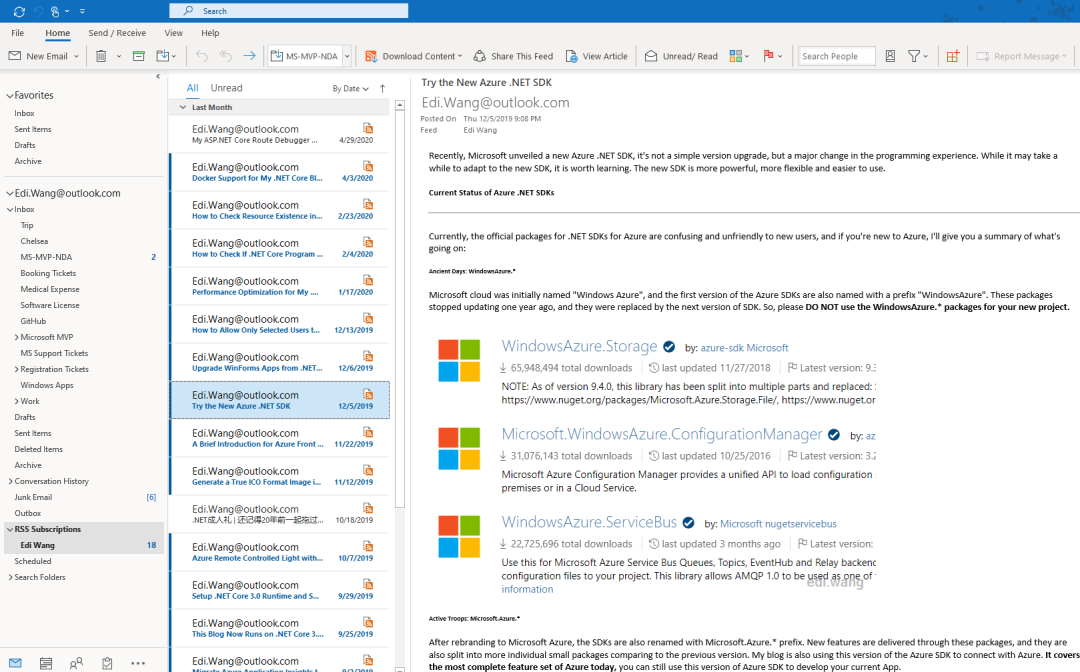
RSS is written to machines and can be used to synchronize content between websites. For example, at that time, Renren.com (formerly Xiaone.com) could import blog posts into diaries through RSS. For ordinary users, an RSS reader application is needed to subscribe to blogs. Usually, such readers subscribe to not just one author's blog, but all blogs that the user cares about. Readers are also usually cross-platform and cross-device, and users can subscribe to RSS feeds on computers, tablets, mobile phones, and even Raspberry Pi.

(图:2012年我在初代iPad上通过RSS订阅自己博客)

(图:最新版Microsoft 365 Outlook 中RSS订阅我的博客)

Some browsers (such as early Firefox) can also automatically recognize a blog's RSS address and subscribe to it in the browser. The automatic discovery principle is to find if there is such a thing in the webpage head:

<link rel="alternate" type="application/rss+xml" title="Edi Wang" href="/rss" />

但是 RSS 有个缺点,它并不能够由服务器主动向客户端推送,而需要靠客户端自动去服务器拉取。而过去 10 年中,随着移动端的兴起,消息推送服务弥补了 RSS 的不足,各大平台也几乎都推出了自己的手机 APP,因此 RSS 已经被许多网站淘汰。但并不意味着 RSS 没用了,至今仍有大量网站仍然提供 RSS 订阅。例如微软 Channel 9 电视台的 RSS: https://channel9.msdn.com/Feeds/RSS/,国内的博客园的 RSS:http://feed.cnblogs.com/blog/sitehome/rss,有意思的是博客园网站的 logo 其实就是个 RSS 图标。

When it comes to building a blog system, you usually no longer make a mobile app, and users will not download a separate app for each blog. Moreover, the blog system still needs to be synchronized with other blogs and websites. It is impossible for each partner to develop a set of synchronization protocols, and everyone still uses the recognized standard RSS. Therefore, RSS will still be the best way for blog systems to push articles in 2020.

参考:https://en.wikipedia.org/wiki/RSS

5.2 丨 ATOM

ATOM and RSS serve almost the same role, but ATOM emerged to make up for some of RSS's design flaws. For example, for the publication date of an article, ATOM uses the timestamp of RFC 3339, while RSS uses the RFC 822 standard. ATOM can also identify the language of the article, allow XHTML, XML, and Base64 encoded content that is not allowed by RSS to appear in the payload, etc.

Many blogging systems (including my Moonlade) provide both RSS and ATOM feeds.

参考链接:https://en.wikipedia.org/wiki/Atom_(Web_standard)

5.3 丨 OPML

"OPML (Overview Processor Markup Language) is an XML format used for outlines (defined as" a tree in which each node contains a set of named attributes with string values "). It was originally developed by UserLand as a native file format for outline applications in its Radio UserLand product, and has since been used for other purposes, most commonly exchanging Web feed lists between Web Feed aggregators.

The OPML specification defines an outline as a hierarchical structure, ordered list of arbitrary elements. This specification is quite open and therefore applies to many types of list data.

Mozilla Thunderbird and many other RSS reader websites and applications support importing and exporting RSS feed lists in OPML format."

参考:https://en.wikipedia.org/wiki/OPML

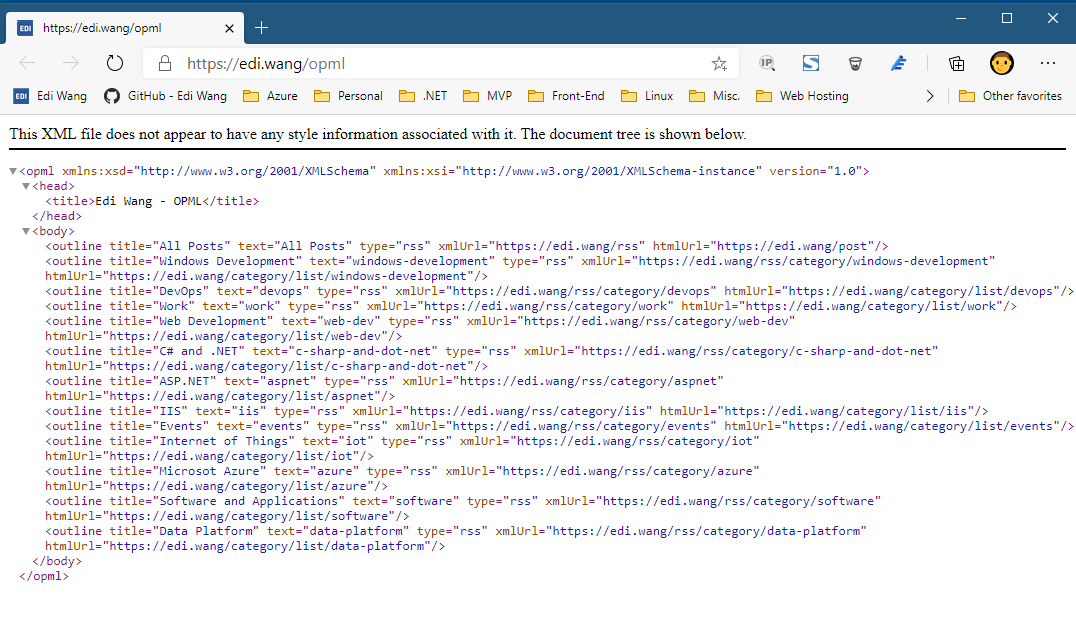
To put it plainly, OPML tells readers what subscriptions the blog has and their respective subscription addresses. Usually, each article category is a subscription source, and all articles are a subscription source.

(图:Moonglade的OPML)

5.4 丨 APML

APML stands for Attention Profiling Mark-up Language, which is less known than OPML. APML is currently very rare on the Internet, worse than WP. As one of the historical relics of the blog industry, let me introduce it briefly with emotion.

Similar to OPML, it is also an XML-formatted declaration file used to describe things or topics of personal interest and share them with other readers or bloggers to help readers or the blog system itself provide services or more targeted advertising targeted at content of interest to users.

参考链接:https://en.wikipedia.org/wiki/Attention_Profiling_Mark-up_Language

WordPress can implement APML through plug-ins, BlogEngine comes with APML, and my Moonglade does not support APML.

5.5 丨 FOAF

FOAF stands for Friend of a Friend. It is also a file written to machines and describes a human social relationship. Generally, FOAF can be used in blogs to express a "friendly link" between a blogger and other blogs, but this friendly link is written to machines. So that the machine can understand who your gay friends are and recommend the content in your gay friends 'blogs to readers.

WordPress can implement FOAF through plug-ins, BlogEngine comes with FOAF, and my Moonglade does not support FOAF. FOAF and APML are similar in status and are about to disappear.

参考链接:https://en.wikipedia.org/wiki/FOAF_(ontology)

5.6 丨 BlogML

BlogML is a set of data standards across blog systems. Any blog system that implements BlogML can import and export articles and other data from each other even if the language and platform are different. Just like HTML5 is a standard, Edge, Chrome, and Firefox are browsers, and as long as a web page written for HTML5 can run across these browsers.

BlogML was also born in the. NET community and later developed into a standard. In addition to systems such as BlogEngine, which is itself. NET, WordPress written in PHP supports BlogML. At that time, BlogML was supported by Windows Live Spaces, Subtext, DasBlog, etc. My Moonglade does not support BlogML.

The current standard schema for BlogML is 2.0 and was updated on November 25, 2006. It seems that this standard has also been...

参考:https://en.wikipedia.org/wiki/BlogML

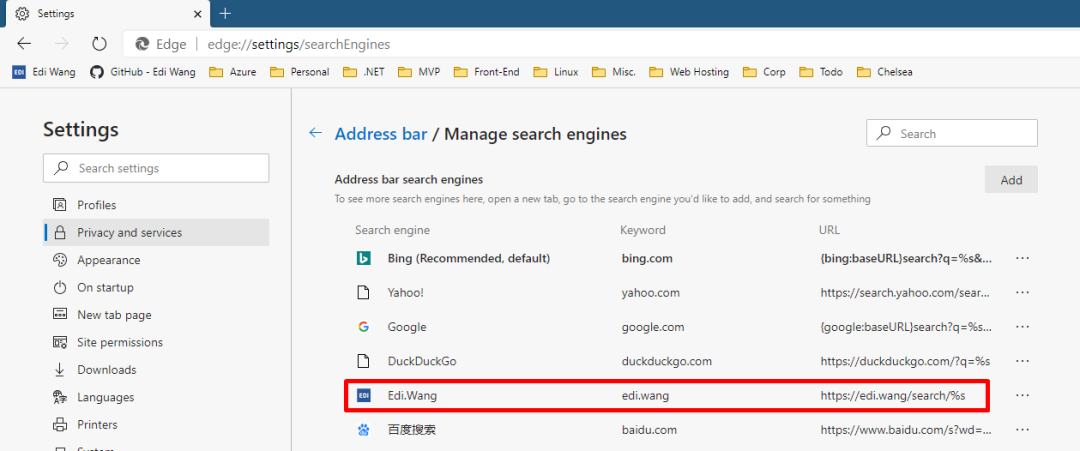
If a blog implements the Open Search specification, the blog's search functionality can be automatically integrated into the user's browser, making it easier for users to use your blog's search service as a search engine directly in the browser's address bar (just like Bing and Google).

There are only two steps to implement Open Search. First, add a link to the opensearch definition file in the head of the web page

<link
  type="application/opensearchdescription+xml"
  rel="search"
  title="Edi Wang"
  href="/opensearch"
/>

Then output the opensearch file

<OpenSearchDescription xmlns="http://a9.com/-/spec/opensearch/1.1/">
  <ShortName>Edi Wang</ShortName>

  <Description>Latest posts from Edi Wang</Description>

  <image height="16" width="16" type="image/vnd.microsoft.icon"
    >https://edi.wang/favicon.ico</image
  >

  <Url type="text/html" template="https://edi.wang/search/{searchTerms}" />
</OpenSearchDescription>

The file describes the blog's name, profile, icons, and URL pattern of search content. Once the browser recognizes this file, it will automatically register your blog in the search engine list. Readers can then search for keywords directly in the browser's address bar and display the blog's own search results page.

(图:在地址栏中搜索我博客的内容)

(图:搜索结果页面)

Open Search 的具体规范和标准可参考:https://en.wikipedia.org/wiki/OpenSearch

5.8 丨 Pingback

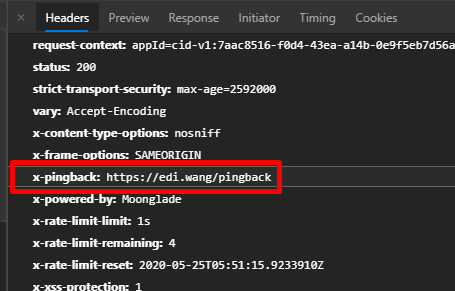
Pingback is used for communication between blog systems. Once one's article is quoted by others, one will receive a pingback request, and if one quotes another's article, one will send a pingback request to the other's blog. Therefore, completing a Pingback requires one's own and the other's blog to jointly support the pingback protocol. Since it is a standard protocol, pingback does not require blogs from both parties to use the same blog product. For example, Moonglade, which I wrote in. NET Core, can perfectly ping each other with WordPress written in PHP. Pingback also does not limit the type of website to be a blog. Any CMS or content website that wants to support Pingback has no problem.

Pingback's technical principles are not complicated either.

    • Send Pingback request: **

Get the URL A of your article, the URL B of the cited article opposite, request B, and see if it has a pingback terminal. If it does, build an HTTP Request with a piece of XML:

<methodCall>
       <methodName>pingback.ping</methodName>
       <param>
              <param><value><string>A</string></value></param>
              <param><value><string>B</string></value></param>
       </param>
</methodCall>

In this way, B's website will know that A's article quoted B's article, and after processing the pingback, it will give A's website a success response.

(图:Moonglade的pingback终端)

    • Accept Pingback request: **

My article URL A was quoted by someone else's article B and received a pingback XML. First of all, you need to verify whether someone else's pingback request looks oddly to ensure security, such as whether there is a normal methodName, whether there are legal URLs for both parties, whether the URLs can be accessed normally, and whether there are strange URLs (such as localhost or special constructs with potential attack behavior). After ensuring that there is no problem with the pingback request, request B's page, grab the title content of B's page and B's IP address, record them in your own database, and associate them with A's article.

Pingbacks received usually automatically add comments under the article as the system, but this design is not one of the specifications and you can play it freely. For example, Moonglade collects pingbacks and shows them in the background for blog administrators to view.

(图:Moonglade后台管理中查看哪些网站引用了自己博客的文章)

参考:https://en.wikipedia.org/wiki/Pingback

5.9 丨 Trackback

Trackback allows one website to notify another of updates. This is one of four types of linking methods that website authors use to request notification when someone links to one of their documents. This allows authors to track who links to their articles.

参考:https://en.wikipedia.org/wiki/Trackback

Although the functionality is similar to Pingback, Trackbacks usually need to be sent manually and provide the other party with a summary of an article. The Pingback process is a fully automated operation jointly completed by both blog systems.

5.10 丨 MetaWeblog

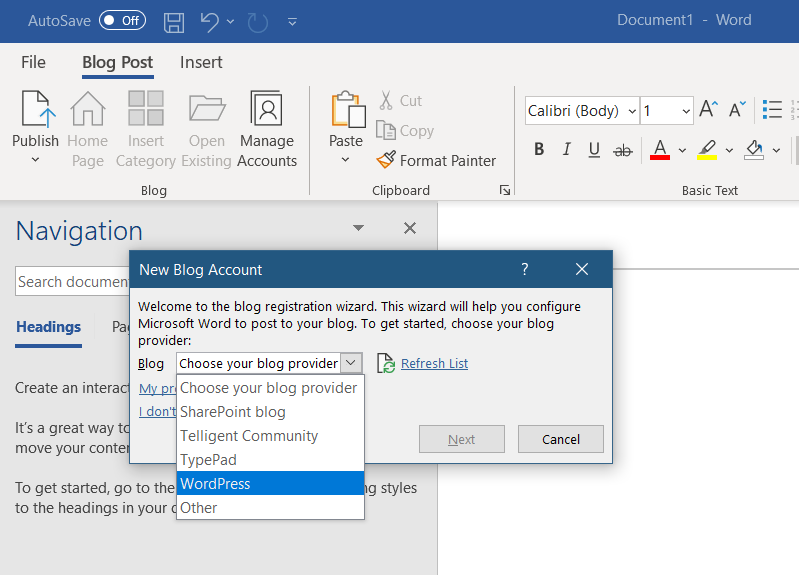
MetaWeblog is an XML-RPC-based Web service. This API defines several standard interfaces for CRUD of general blog content such as articles, categories, and tags. As long as a blog system with these interfaces is implemented, bloggers can use the client installed on the computer to write blogs without logging in to the blog background to write articles through a browser. Mainstream clients include Windows Live Writer and Microsoft Word. In the client, you can completely edit articles, insert pictures, set categories, and even synchronize blog themes to the client.

It may seem like one of the outdated blogging protocols, but as of 2020, the latest version of the Microsoft 365 suite still fully supports blogging systems that implement the MetaWeblog API.

(图:Microsoft Word的博客支持)

Blog APIs similar to MetaWeblog include Blogger API, Atom Publishing Protocol, and Micropub.

参考:https://en.wikipedia.org/wiki/MetaWeblog

In 2012, my blog fully implemented MetaWeblog + RSD in 996007, but now I am 30 years old and I don't plan to implement this in. NET Core for the time being. After all, many people still use Live Writer and Word to write blogs (cry.

5.11 丨 RSD

Really Simple Discovery (RSD) is an XML format and a publishing convention used to make services exposed by blogs or other Web software discoverable by client software. This is a way to reduce the information needed to set up editing/blogging software to three well-known elements: username, password and homepage URL. Any other key settings should be defined in the RSD file associated with the website or can be discovered using the information provided.

To use RSD, the owner of the website places a link mark in the head of the home page to indicate the location of the RSD file. An example used by MediaWiki is:

<link
  rel="EditURI"
  type="application/rsd+xml"
  href="https://en.wikipedia.org/w/api.php?action=rsd"
/>

Then use RSD files to represent the interfaces of various APIs

<?xml version="1.0"?>

<rsd version="1.0" xmlns="http://archipelago.phrasewise.com/rsd">

    <service>

        <apis>

            <api name="MediaWiki" preferred="true" apiLink="http://en.wikipedia.org/w/api.php" blogID="">

                <settings>

                    <docs xml:space="preserve">http://mediawiki.org/wiki/API</docs>

                    <setting name="OAuth" xml:space="preserve">false</setting>

                </settings>

            </api>

        </apis>

        <engineName xml:space="preserve">MediaWiki</engineName>

        <engineLink xml:space="preserve">http://www.mediawiki.org/</engineLink>

    </service>

</rsd>

参考:https://en.wikipedia.org/wiki/Really_Simple_Discovery

RSD is also used almost with the MetaWeblog interface above. In this way, tools such as Windows Live Writer and Microsoft Word can automatically discover the MetaWeblog service of blogs without the need to manually enter URLs.

5.12 Reader view

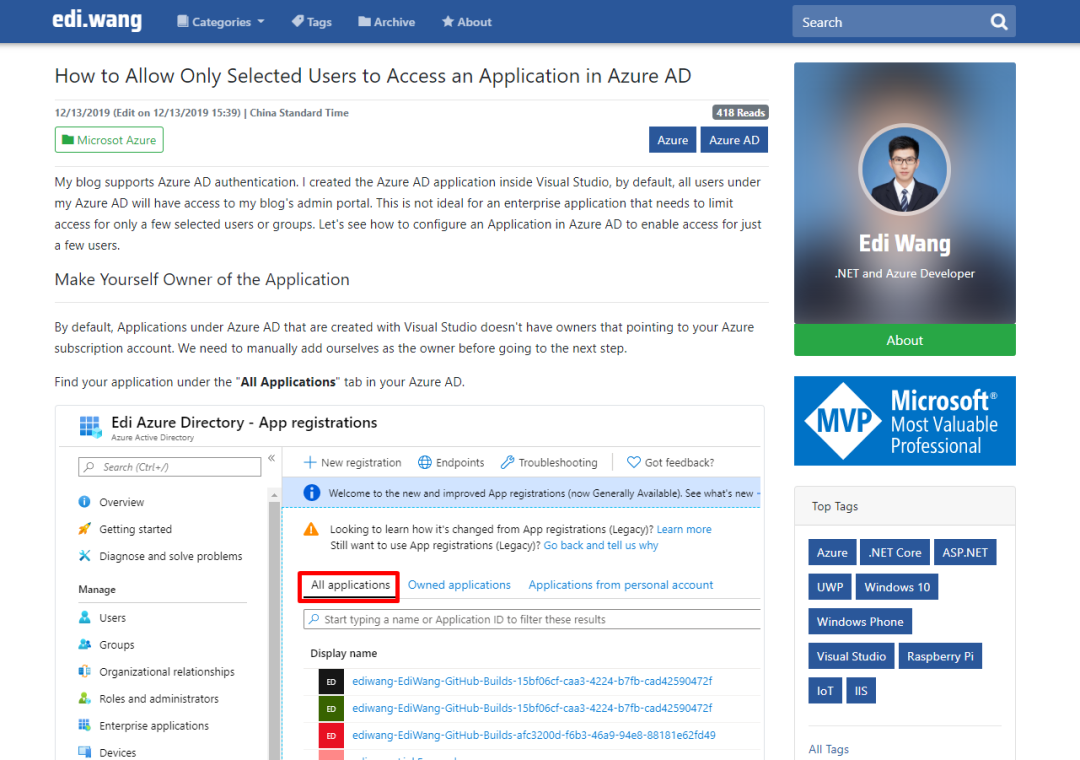
Most browsers and clients have reader views that allow readers to read articles in a completely different view from the style of blog sites 'pages. For example, the normal page length of an article on my blog is as follows:

(图:Moonglade非阅读器视图文章页)

The browser recognizes that my blog supports reader view and lights up the immersive reading button

(图:Microsoft Edge 浏览器沉浸式阅读按钮)

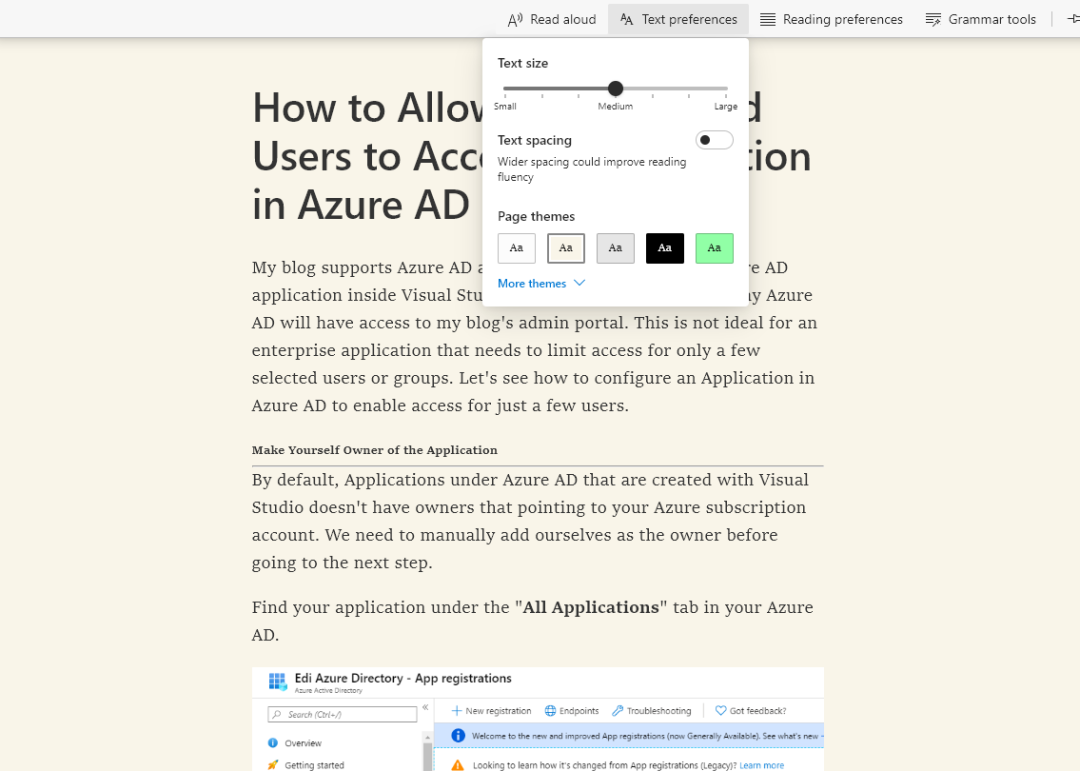
After entering the immersive reading interface, the browser will automatically extract the content of the article, identify the title, chapter, and picture of the article, remove elements unrelated to the article such as navigation bars and sidebar, and allow users to control the text size and background color., and even read the content of the article aloud.

(图:Moonglade 的文章进入沉浸式阅读界面)

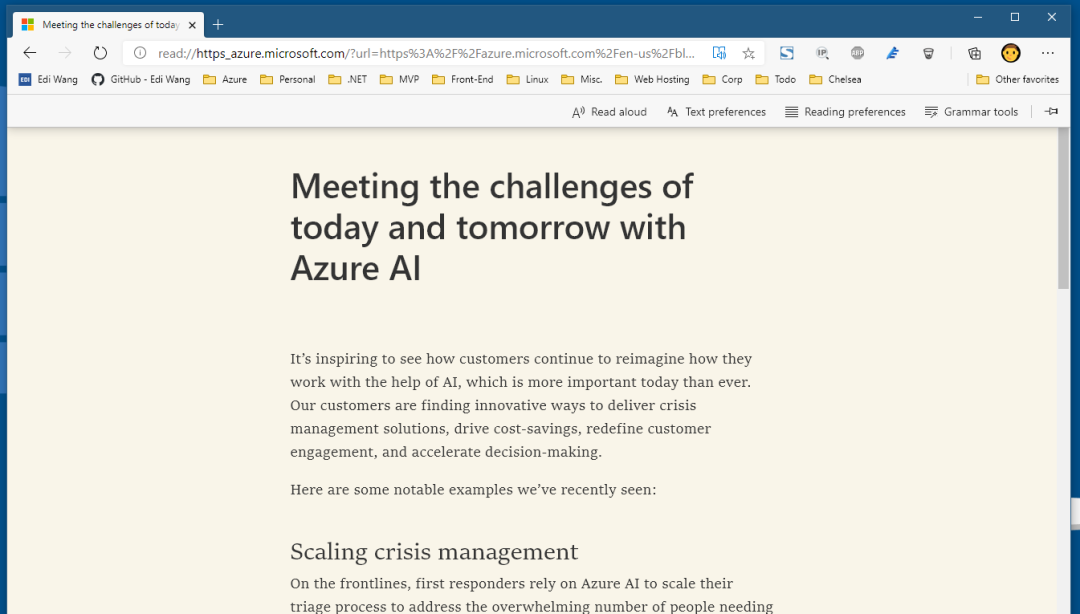
Not only do my blog have reader views, but also well-designed blogs and news content stations, such as Azure's:

(图:Azure 官方博客阅读器视图)

In addition, websites that support reader view will definitely not be bad in SEO. So when designing a blog system, consider supporting reader views.

    • The next chapter will mainly introduce [What are the knowledge points in designing a blog system] Welcome to pay attention **

汪宇杰

Keep Exploring

延伸阅读

更多文章