How much do you know about the blog system: Uncovering the unknown knowledge (2)

How much do you know about the blog system: Uncovering the unknown knowledge (2)

Big guy said blog

最后更新 3/8/2022 9:55 PM
汪宇杰博客
预计阅读 27 分钟
分类
share
标签
share

上篇《博客系统知多少:揭秘那些不为人知的学问(一)》介绍了博客的历史、我的博客故事及博客的受众来源。本篇精彩继续,介绍博客基本功能设计要点。

directory

Due to the long length of the article, this article will be divided into 4 push articles, with the following contents:

  1. The past and present life of "blog"
  2. My Blog Story
  3. Who is the audience for blogs?
  4. Basic functions design points
    • 4.1 Article (Post)
    • 4.2 Comment (Comment)
    • 4.3 Classification (Category)
    • 4.4 Tag
    • 4.5 Archive
    • 4.6 Page (Page)
    • 4.7 subscription
    • 4.8 version control
    • 4.9 Theme and personalization
    • 4.10 Users and permissions
    • 4.11 plug-in
    • 4.12 Handling of pictures and attachments
    • 4.13 Dirty word filtering and review of comments
    • 4.14 static
    • 4.15 notification system
  5. Blog agreements or standards
    • 5.1 RSS
    • 5.2 ATOM
    • 5.3 OPML
    • 5.4 APML
    • 5.5 FOAF
    • 5.6 BlogML
    • 5.7 Open Search
    • 5.8 Pingback
    • 5.9 Trackback
    • 5.10 MetaWeblog
    • 5.11 RSD
    • 5.12 Reader view
  6. What are the knowledge points in designing a blog system
    • 6.1 Do all time zones really use UTC?
    • 6.2 HTML or Markdown
    • 6.3 MVC or SPA
    • 6.4 security
  7. concluding remarks

01 Article (Post)

We may read 3 - 5 long or short articles every day. Articles are the core business of the blog system, so the content and quality of blog articles are very important.

So, how to name this business type of article? Database table names and code variable names. Do you use article for type names? It seems that when I was in school, I only learned articles called articles. In fact, the correct expression for a blog type article is post. The difference between post and article in the English word is that ** post is just an article that is written as you please, while article refers to a paper that has been carefully crafted, widely quoted, and may be published in academic journals **. Therefore, when designing a blog system, try to avoid using the word article to name code. More specifically, loose and colloquial expressions can appear in posts. For example, this article is even a post. The article emphasizes language norms, and even the words "let us" and "let's take a look" cannot appear.

图 | 网络

文章需要具备标题、Slug、创建时间、发布时间、修改时间、摘要和内容等要素,也会包含所属分类、标签、阅读量和点赞量等次要信息。其中 Slug 是博客的特色,它指的是一篇文章的 URL。例如我的文章:《Try the New Azure .NET SDK》,它的 URL 为 https://edi.wang/post/2019/12/5/try-the-new-azure-net-sdk,其中try-the-new-azure-net-sdk即为该文章的 Slug。Slug 讲究的是“人类可读”,一般情况下均为博客标题对应的英文表达,用中划线分割英文单词,Slug 也对博客的 SEO 起到了关键作用。如果你的博客文章用的是数据库 ID、文章标题的 HTML Encoding 等做 URL,请更换为 Slug。特别是遇到中文文章,如果标题被 URL Encoding 了,那么对于 SEO 和链接分享,都是灾难。一个 Slug 一旦定下,尽量不要改动,虽然大部分博客系统都支持修改 Slug,但是对于被搜索引擎收入的文章,改了 Slug 就会导致 404。比较完备的博客系统(如 WordPress)支持采用 301 重定向方式告诉搜索引擎原文地址已变化。

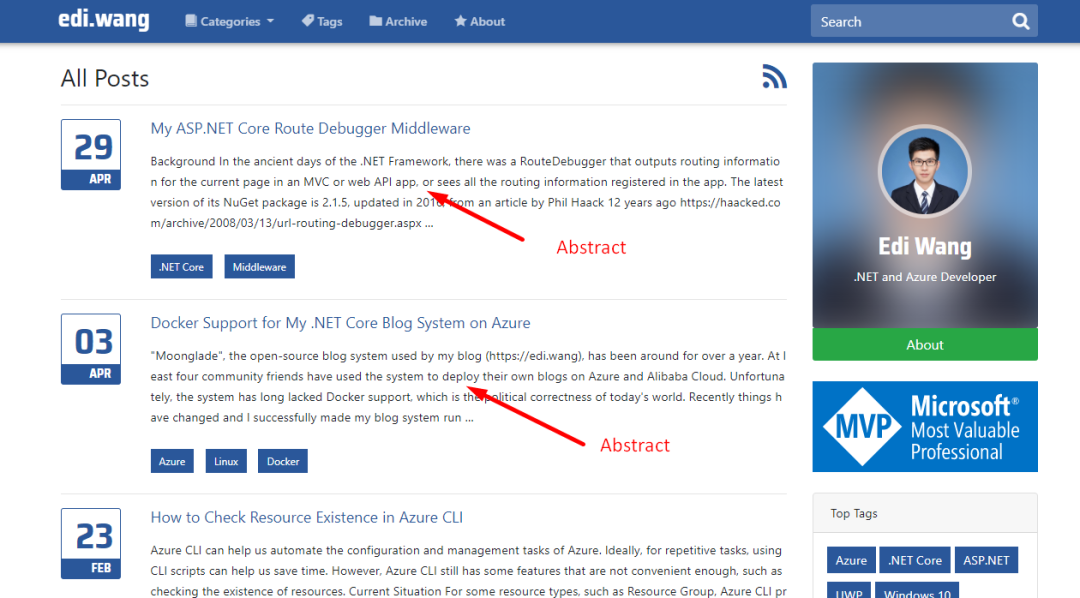
The summary has two functions. One is to display a preview of article information in the list view, and the other is to be used for SEO. It is placed in the meta tag description to help search engines accurately locate the included content. ** For Chinese content, you need to pay attention to whether the output HTML source code has been encoded. The default encoding of ASP.NET Core will cause disaster to SEO (my blog system is oriented to English users and does not consider Chinese support, so it does not solve this problem).

(图:文章列表中的摘要)

(图:meta description标签代码)

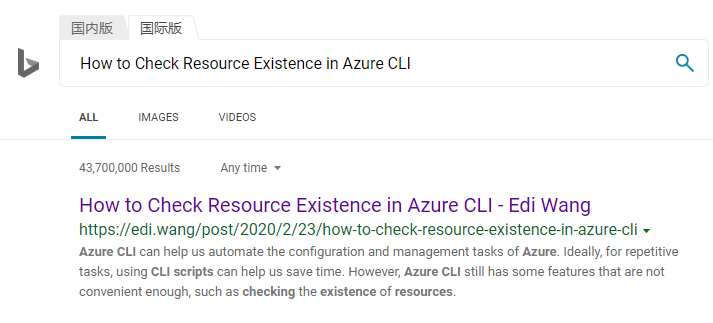
The summary can automatically grab the first few hundred words of an article, or it can require users to fill in manually like Weixin Official Accounts. My blog uses automatic fetching of the first 400 words of an article. Combined with SEO, my articles usually start with a summary, so that users can see accurate content on the search engine preview page, rather than insignificant UI elements on the page.

(图:必应搜索引擎识别的内容摘要)

The status of an article usually includes: draft, release, and recycling. Users can only see published articles, and administrators can change the status of articles in the background.

02 Comment (Comment)

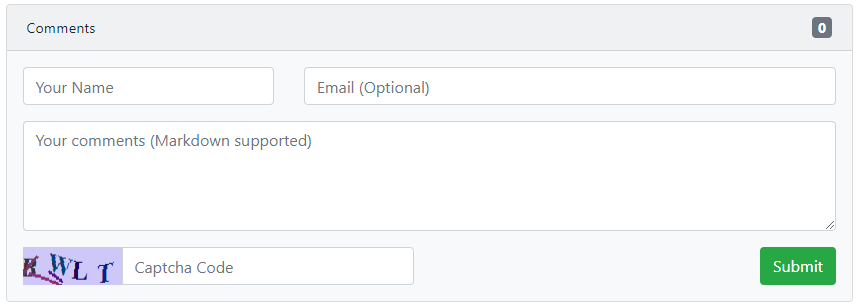
Comments are the main way for authors and readers to interact in blogs. Some blogs require readers to log in to post comments, while others allow visitors to comment (such as my blog and WordPress). The benefits of logging in are that you can identify your readers and effectively prevent spam comments. However, requiring login will also cause users to take an extra step in the operation, and users who find it troublesome will not comment.

By default, my blog and WordPress are designed to require the administrator to review comments in the background before releasing them. This can also effectively avoid spam advertisements, harassing information and even some malicious inflammatory remarks. For users who provide email addresses, administrators can also reply to users 'comments in the background, and the blog system sends email notifications to users.

(图:Moonglade的评论区)

For technical blogs, consider open markdown format for comments. This is a syntax that is particularly popular among programmers and is widely used on GitHub.

Comments need to use Captcha or other human-machine verification technology to prevent robots from advertising. But based on experience, Captcha cannot prevent spam 100%, ** Because modern spam is really sent by a group of people **, there are specialized companies, teams, WeChat groups, etc., as well as abroad. Therefore, you may need to consider keyword filtering, purchase a three-party filtering interface, etc.

You must also remember to set a word limit for comments, otherwise it may cause some users to "fill in" and swipe the screen.

If you don't want to write your own functions, you can also integrate the three-party comment services. That is, the blog system itself does not implement the comment function. External JS is loaded through the three-party service and a comment area is "injected" into the article reading page. Usually, this requires that the URL of the article remains unchanged (called permanent URL in WordPress).

03 Category

Classify articles based on content just like creating a folder. After classifying articles, it can help readers quickly retrieve articles of the same type.

For example, articles writing. NET, PHP, and JS all fall into the category of "Development". Articles such as technology news and workplace experience sharing fall into the "work" category, and the division of categories is completely controlled by users. Classification can be many-to-many. For example, writing an article introducing the development of Angular applications using ASP.NET Core can fall into both the categories of ". NET Technology" and "Front-end Development".

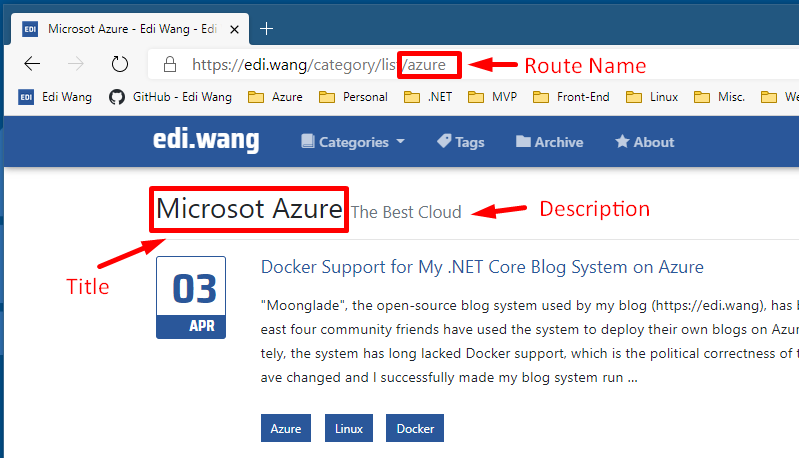
Classification requires a title, a brief introduction, and a routing name. For example, in my blog, the classification of Microsoft Cloud Azure is titled Microsoft Azure, the profile is The Best Cloud, and the routing name is azure. The title needs to be displayed in the title bar at the same time for SEO purposes. The brief introduction is a supplementary explanation to the title and is easy for users to view. Please refer to the label design described in the next paragraph for the reasons for designing the routing name.

(图:Moonglade博客系统的一个文章分类)

Another function of classification is to generate OPML and RSS/Atom feeds, which will be explained in Chapter 5, Introduction to Blog Protocols.

04 Tag

The topic mentioned in an article is the label of the article. Like classifications, tags are many-to-many relationships. Tags can be used as the basis for retrieving articles, similar to keywords, to quickly find articles with related content.

Labels need to take into account the situation where label meanings are duplicate. For example, VS and Visual Studio mean the same, and VSCode, VSC and Visual Studio Code mean the same. Then when a user selects a label, it is best to use smart prompts to recommend the user to use existing labels.

For blog system designers, the URL of the tag is also considered. If the URL uses the content of the tag itself, it will cause many problems. When the label name is the entire English word, such as Excel, there is no problem because the URL is usually https://yourblog/tags/excel. But if the label content is. NET Core, C#, Robots.txt, things become interesting. Is https://yourblog/tags/robots.txt requesting the robots.txt file under tags or requesting tags? As a blog system designer, I can of course programmatically restrict all routing parameters accepted by tags to tags, which seems to solve the problem, but SEO and scanning tools don't think so. They have a large number of by convention rules that think of request files.

For tag content that requires URL Encoding, it will lead to a lack of readability of the URL, which will affect SEO. Don't be smart enough to think that modern search engines can handle URL Encoding well. Whether a URL is clean has a great impact on SEO. Especially when the tags are in Chinese content, if all encoded, the URL will be very lengthy, even affecting SEO and bloggers sharing links. Therefore, in order to process tag URLs, my blog system has designed a normalized name for each tag, which is automatically generated by the system based on the tag content. For example, after normalized,. NET Core will become dotnet-core, and the final URL will be https://edi.wang/tags/list/dotnet-core.

(图:Moonglade博客系统的标签)

One of the most common mistakes for users is using tags as search keywords. For example, if a user writes an article about Visual Studio Code, the tags may be marked with VSCode, VSC and Visual Studio Code at the same time, but in fact, they only need to select one tag. Typing too many tags with the same meaning will prevent readers from fully retrieving all relevant articles, including search engines. ** So how to use tags well is a key point that blog designers and users need to pay attention to.

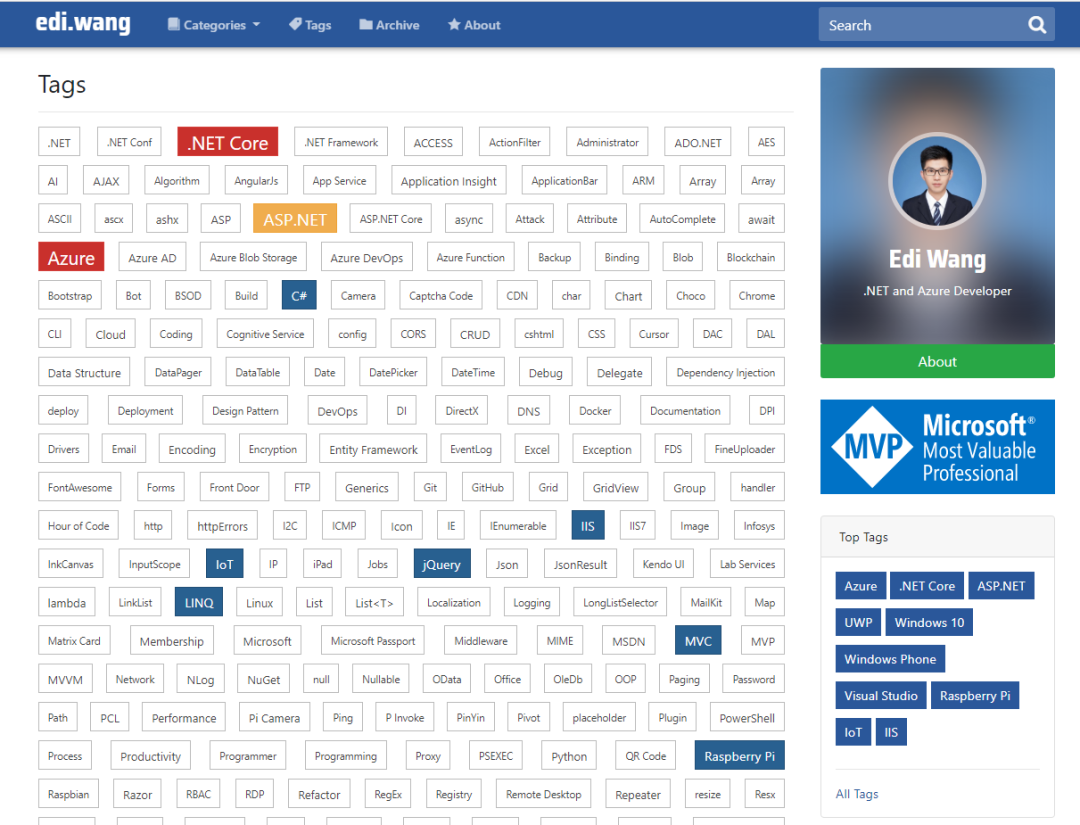
Tag Cloud is a feature used in blogs to list the most popular tags. Larger-size letters and more obvious colors are usually used to identify tags that correspond to more articles. Tag clouds can be used as a personalized attribute for blog bloggers, and you can tell at a glance what topics bloggers are keen on (such as Windows Phone? 0.0)。

05 Archive

Blog posts organized by time (year, month, day) are archives. The difference between them and classification is that archives only divide articles based on time. Archive SEO is not so critical compared to articles, categories, and tags. So there is no extra emphasis on the fact that URLs can be divided into years and years.

For example: https://www.example.com represents the September 2019 article. https://edi.wang/archive/2019 The archiving function is mainly used to provide readers with time-by-time queries to see what the blogger is doing at a certain time. Designing such a function can increase readers 'interest in bloggers and is also a display of one's external image.

(图:Moonglade博客系统的归档)

06 Page (Page)

Pages are one of the optional features of blogs, and in fact, they are closer to a CMS feature. Some content is not suitable for publishing in the form of an article, such as an "About" page. Such pages are usually irrelevant to the time of publication, the content is frequently updated, and the typography design is also very free, not just text.

Pages usually do not require attributes such as comments, tags, and categories, but can have publishing and editing times. Like articles, pages also need to pay attention to Slug.

(图:我博客的关于页面)

In my blog system, the page also chooses whether to hide the sidebar, and users can also completely write the HTML and CSS code of the page and add the page as a navigation menu. WordPress's processing of pages is more complete and close to the CMS system.

07 Subscription

The main ways for readers to subscribe to blogs are Feed (RSS/ATOM) and Newsletter. The feed method is essentially passive subscription, and requires client software to initiate a request to the server to check whether new articles have been published before they can be displayed on the client. Newsletters are generally proactively sent to subscribing users in the form of emails, but this requires the writer of the blog system to implement the email subscription function and also requires the administrator to maintain the email service. Subscriptions generally only push newly published articles, such as the first 10 or 20 articles, rather than pushing all articles every time, causing the client to explode.

(图:Moonglade的RSS/ATOM订阅源)

Subscriptions can generally be provided by article categories for readers who are only interested in certain categories. Some blog systems also provide subscription feeds for article comments so that readers can watch and comment sessions.

For a detailed introduction of RSS and ATOM, please see chapters 5.1 and 5.2.

08 Version control

Blog systems closer to CMS typically provide version control features that allow users to roll back historical versions of articles or pages. When designing version control, you can't just think about rolling back forward, you have to be able to roll back again. Normally, every time a user edits an already written article, a new version is produced, similar to git's commit to a file. Blog versioning is similar to code versioning. You can choose to save the entire content of an article as a historical version, or you can choose to save only delta information at a time. Saving complete content is not easy to spend a lot of time and effort in the subsequent period, but it will take up more storage space. Saving content changes saves database space, but implementing code easily takes up a lot of energy.

09 Theme and personalization

Easy blogging systems usually support themes. After all, personalization is one of the characteristics of a blog itself. WordPress has accumulated a large library of themes and also allows homemade themes. But my blog only supports changing the theme color, and there is still a lot of room for improvement.

10 Users and permissions

The blog system is divided into individuals, teams and blog platforms. Personal blog systems are generally single users (such as my blog) and do not require design permissions, registration and other functions. Multi-user blogs need to implement different roles and permissions, such as blog administrator, reviewer, contributor, comment manager, etc. Whether it's a single-user blog or a multi-user blog, integrating a mature three-party RBAC solution may be the most efficient choice. Most three-party solutions also support SSO, such as Azure AD supported by my blog.

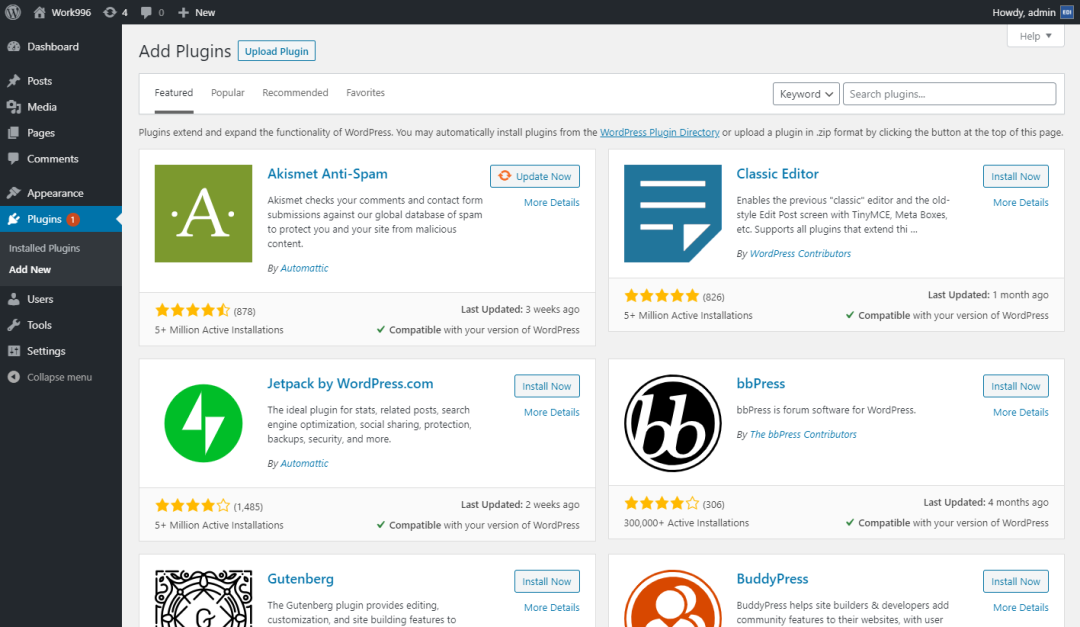
11 Plug-ins

Plug-in features allow you to expand the functionality of a blog on demand without changing the blog code. WordPress and BlogEngine both support plug-ins, but Moonglade does not yet.

(图:WordPress的插件市场)

12 Handling of pictures and attachments

picture format

In 2020, the image format has become very free. Most of the general blogs are JPG, and most of the programmers 'blogs are PNG (after all, they are all screenshots). It is also advisable to adopt the WEBP format like Weixin Official Accounts, as long as the reader's device is compatible. Generally, BMP format is not recommended due to its large size and causes slow network transmission. By the same token, GIF should also pay attention to limiting its size.

When the blog system outputs pictures, it needs to use the correct Mime Type to ensure client compatibility. Generally, directly exporting static files does not require blog writers to manually process Mime Types, but blogs with special image processing logic (such as my Moonlade) need to pay attention to retaining the original Mime Types of the pictures.

image watermark

Automatic watermarking of uploaded pictures helps protect copyright. The watermarked content is usually the blog's address or the blogger's name. When adding a watermark, pay attention to the image size and adjust the proportion of the watermark to avoid blocking important content in the picture and affecting reading. For pictures that are too small, the watermark can be optionally ignored.

In addition, considering that blogs may change their names during development, it is recommended to keep an original image in the system when adding watermarks, so that the watermark content can be updated later.

For specific methods, please refer to my article "ASP.NET Core Watermarks Uploaded Pictures".

picture storage

Where to store the pictures is a question worth thinking about. There are generally three places to store it: file system, database, and blob storage services on the cloud. Moonglade supports file systems and Azure Blob storage. Each of these three has its own advantages and disadvantages.

The advantage of the file system is that directly serving static files is the fastest, but if the picture directory itself is located under the website directory, it will cause the directory to be not read-only and cause potential security problems. For example, web shells that upload and change extensions were popular in early ASP forum systems. Although uploading executable files to web servers has basically disappeared in 2020, there are still hidden dangers, just like even if you hire 007 as a bodyguard at home, you need to lock the door at night.

Database storage has the highest security, and allows blog data to be located in only one location for easy management and backup. This was popular more than a decade ago, but in fact, reading and writing pictures cost a certain amount of money to the database, and they are then output by the website, which doubles the cost. Generally not recommended.

The cloud Blob storage service is currently the most suitable solution for this era. Storing pictures in the Blob not only ensures that the server directory is read-only, but also uses the security features of the cloud itself to limit abnormal access, and can also accelerate picture output through CDN. To insist on the shortcomings, cloud services require extra money, and lack of money is your own problem, not the cloud.

图 | 网络

Picture anti-theft chain

As website developers, we sometimes don't want the pictures of our website to be directly quoted by other websites. This can lead to huge bandwidth consumption in our own data center in some scenarios, which means that we have to pay for others to use our pictures. For example, if your website is a.com, you have an image that is http://a.com/facepalm.jpg, and b.com uses an img tag on their website to reference your image, which causes network requests to enter your data center and consume your resources. Therefore, blogs can optionally enable the hotlink protection function. For specific methods, please refer to my article "ASP.NET/ Core Website Picture Hotlink protection".

Annex

Usually, programmers 'technical blogs provide readers with attachments such as downloading code samples. Design attachment functions are very similar to design image storage and are completely feasible. But I would also recommend that technology blogs host attachments such as code examples on other websites (such as GitHub) for readers to download.

The disadvantages of downloading attachments on your own blog are:

large files

Different Web servers and firewall products have different restrictions on file size, and users deploying blogs may not have the right to manage these restrictions, which will result in large attachments not being available for download.

Domain and IP blacklist

Some companies or organizations (especially software companies with high security standards) block file downloads from non-whitelisted domains. Although you can normally open the web page of this domain with a browser, you cannot download files (firewalls only allow HTML/CSS/JS, etc., but not ZIP, EXE, etc.). Readers of programmer blogs are likely to be in such companies.

CDN resource consumption

If you have more and larger attachments, and you have set a CDN for the attachment system just like you designed image storage, at this time, depending on the different billing models of the CDN service provider, if you charge by traffic, I am afraid that your attachment downloads will cause your wallet to lose weight faster.

The benefits of using three-party file downloads (such as GitHub, OneDrive) are:

  • √ Your files can be shared not only in blog posts, but also in other locations;

  • √ These third-party services have their own CDN without worrying about consuming your own wallet;

  • √ Many file hosting services have complete management functions, such as file deletion, recovery, version control, permissions, etc. If you write this in your blog system, it will take a lot of time...

13 Sensitive word filtering and review

Blogs inevitably attract some hostile people, but they also attract advertisers, so sensitive word filtering and comment censorship are often required. If user comments are displayed directly under the article without censorship, it may have a negative impact on the blogger and the website itself. For example, if someone makes politically sensitive remarks or non-compliant advertisements, they are directly displayed without background review, and if your blog is deployed in mainland China, your blog is likely to be shut down and rectified immediately, and you will also unlock the programmer's achievements from entry to imprisonment. Don't think that it's okay just because you deploy it overseas. Some hateful remarks can even help you attract hackers, poison your blog, and blackmail you or your readers.

图 | 网络

Therefore, I strongly recommend that personal blogs enable sensitive word filtering and comment review functions. WordPress and my Moonlade blogging system both support sensitive word filtering and review of comments.

14 Static

In order to improve the response speed under large traffic, early news systems, blogs, and CMSs would use static technology, that is, save the pages rendered by the server as real HTML files on disk and output static files. Web servers The efficiency of outputting static files is very high. For unchanged content, subsequent visits by users will not hit the database, thus greatly reducing the pressure on the server. Today in 2020, static is not the only solution, and Redis Cache can also help us reduce frequent access to the database. For personal blogs, if your traffic is not high, you don't actually need to static 996 or Redis to increase development and maintenance costs. But if you're designing a blog platform, it's best to use static or Redis.

15 Notification system

Bloggers usually send notifications to administrators or users via Email. However, there is no norm or agreement that indicates whether blogs must use Email to push notifications, which can be decided by the blog system designer.

Notifications usually include:

  • Notifications sent to bloggers: new comments, articles cited by others 'blogs (see chapters 5.8 and 5.9).

  • Send notifications to users: new articles are published (subscribe to Newsletter), comments are responded to, comments are reviewed or rejected.

The Email notification system should pay attention to spam and user privacy protection issues.

图 | 网络

Sending spam to bloggers is not a big problem, but you have to pay attention to whether the email system will allow emails to be sent to readers without the permission of the blogger, which may be used by others to send spam, which may lead to the server being blocked. Some server providers, such as Microsoft Azure, have stricter regulations on email, and code calls to SMTP terminals deployed on some PaaS services will be directly blocked.

Regarding user privacy issues, when users provide Email addresses to the blog system, they need to inform the user how the Email address will be used (it can be written in the privacy agreement or visible area of the page), or they can ask the user to check whether to allow bloggers to use the Email. Send notifications. Another problem is the exposure of email addresses, which usually occurs in Newsletter's subscription group. If all users 'Email addresses are placed in To or CC, then each user will know the Email addresses of everyone else, which will lead to mutual solicitation and fraud. Therefore, Newsletter should use BCC or send it separately, and users are allowed to unsubscribe.

Moonlade's notification system uses Email, but the design is relatively basic. A complete notification system requires a message queue and event design, and a three-party service. For example, you can use Storage Queue + Function App + SendGrid on Azure to avoid exploding in situ when you encounter a large number of emails.

** The next chapter will mainly introduce [Blog Agreement or Standards] Welcome to pay attention **

汪宇杰

Keep Exploring

延伸阅读

更多文章