
How Much Do You Know About Blog Systems: Unveiling the Unknown Knowledge (Part 4)

How Much Do You Know About Blog Systems: Unveiling the Unknown Knowledge (Part 4)

Big Shot Talks About Blogging

Last updated 3/8/2022 11:18 PM
汪宇杰博客
13 min read
Category
Sharing
Tags
Sharing

The previous article “Blog System Know-How: Unveiling Those Lesser-Known Secrets (Part 3)” introduced blog protocols or standards. This final article introduces the knowledge points in designing a blog system.

Table of Contents

Due to the length of the article, it will be pushed in 4 parts, the table of contents is as follows:

  1. The Past and Present of “Blog”
  2. My Blog Story
  3. Who Is the Audience of a Blog?
  4. Key Points in Basic Blog Function Design
    • 4.1 Post
    • 4.2 Comment
    • 4.3 Category
    • 4.4 Tag
    • 4.5 Archive
    • 4.6 Page
    • 4.7 Subscription
    • 4.8 Version Control
    • 4.9 Themes and Personalization
    • 4.10 Users and Permissions
    • 4.11 Plugins
    • 4.12 Image and Attachment Handling
    • 4.13 Dirty Word Filtering and Comment Moderation
    • 4.14 Static Generation
    • 4.15 Notification System
  5. Blog Protocols or Standards
    • 5.1 RSS
    • 5.2 ATOM
    • 5.3 OPML
    • 5.4 APML
    • 5.5 FOAF
    • 5.6 BlogML
    • 5.7 Open Search
    • 5.8 Pingback
    • 5.9 Trackback
    • 5.10 MetaWeblog
    • 5.11 RSD
    • 5.12 Reader View
  6. Knowledge Points in Designing a Blog System
    • 6.1 Should Time Zones Use UTC Exclusively?
    • 6.2 HTML or Markdown
    • 6.3 MVC or SPA
    • 6.4 Security
  7. Conclusion

6.1 | Should Time Zones Use UTC Exclusively?

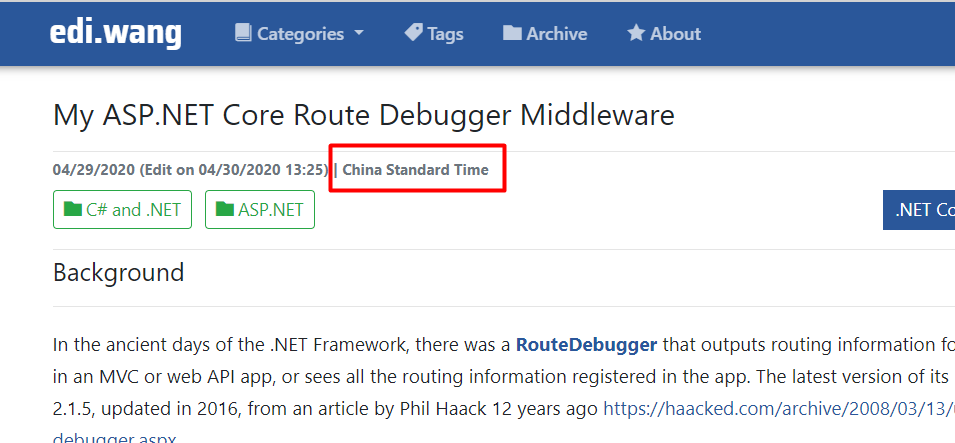
Storing time using UTC should be a well-known practice among developers by 2020, and blog systems are no different. All time data in my blog is ultimately stored in UTC. However, blogs have a special characteristic: they should not convert UTC time based on the reader's time zone for display, but rather according to the blog author's time zone.

This is not a technical issue; displaying time according to the reader's time zone won't cause code explosions. The reason lies in the original intent of blogs – to express individuality and provide bloggers with their own space on the internet. Therefore, highlighting the blogger's personal attributes is very important. The blogger's time zone is one of those attributes that helps readers understand the blogger. Hence, orthodox blog systems provide a time zone setting option and convert UTC time accordingly for display. Both WordPress and my Moonglade blog system do this. The fact that blog systems do not automatically convert to the reader's local time is purely a lesser-known sentimental design, but it must be respected.

(Image: Moonglade displays article publication time according to the blogger's set time zone)

So here's an interesting question: how should search engines understand the time of a blog article? It's best to tell search engines the UTC time only, not display it to users. The method is simple: use the datetime attribute of the HTML5 <time> tag. After the promotion of the HTML5 standard, search engines prefer to determine content meaning through tag types rather than guessing from the tag content.

In C#, ToString("u") refers to the Universal sortable date/time pattern.

<time datetime="@Model.PostModel.PubDateUtc.ToString("u")" title="GMT @Model.PostModel.PubDateUtc">@DateTimeResolver.GetDateTimeWithUserTZone(Model.PostModel.PubDateUtc).ToString("MM/dd/yyyy")</time>

For the article in the screenshot above, the HTML for the time is:

<time datetime="2020-04-29 11:41:02Z" title="GMT 4/29/2020 11:41:02 AM"
  >04/29/2020</time
>

6.2 | HTML or Markdown

Many technical people prefer using Markdown as an editor when writing a blog system. If it's purely a technical blog for personal use, there's no problem. But if you are writing a blog system for others, remember: not everyone is a programmer, and not everyone likes Markdown.

Image | Online

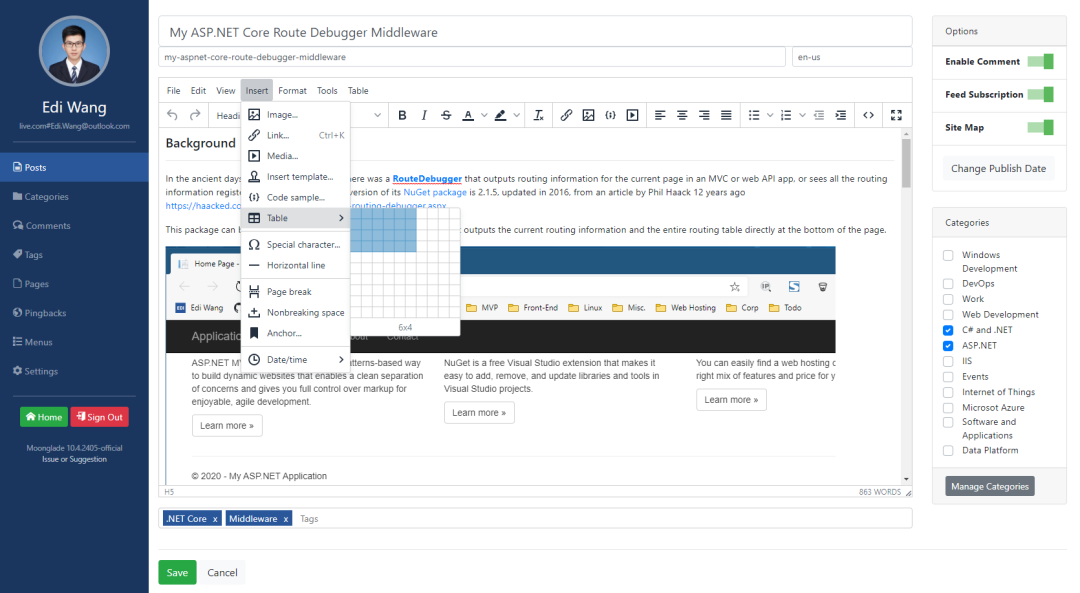
In such cases, a WYSIWYG HTML editor (like TinyMCE) is a good choice. HTML editors support more advanced formatting compared to Markdown. Moonglade supports both HTML and Markdown editors.

(Image: TinyMCE editor used by Moonglade)

When saving article content to the database, the Markdown format should store the raw content, not the generated HTML, because it needs to support subsequent editing. For HTML format, it's also not recommended to store encoded content anymore. After all, it's 2020, and mainstream databases can correctly support various magical Unicode, like emojis suddenly appearing in articles 😂. If you use encoding, you might face some blessings like my blog did: https://github.com/EdiWang/Moonglade/issues/280. Moreover, the encoding and decoding process affects performance. My Moonglade blog system has just completed the transformation to remove encoding.

6.3 | MVC or SPA

Many programmers in the community who write blog systems prefer using SPA architecture and look down on MVC, considering it outdated. Is that really the case? This issue is like asking why airplanes don’t fly in a straight line – is it because airlines don’t know how to plan? I once wrote about this in a previous blog article “Summary of My .NET Core Blog Performance Optimization Experience”:

After 2014, with the rise of SPA, frameworks like Angular gradually became mainstream for front-end development. The problem they solved was improving front-end responsiveness, making web applications closer to native app experiences. I've also faced skepticism from many friends: Why don't you use Angular for your blog? Is it because you're not good at it?

Image | Online

Actually, it's not that simple. In fact, my current job primarily involves writing Angular. The previous .NET Framework version of my blog's admin panel used AngularJS and Angular 2. After a series of practices, I found that using Angular for a content site like my blog doesn't yield significant benefits.

In fact, this is not surprising. Before blindly choosing a framework, we must note a prerequisite: SPA frameworks are actually aimed at web applications. "Application" means heavy interaction, like the Azure Portal or Outlook email, where the goal is to develop a web page as an application. In this case, SPA not only improves user experience but also reduces development costs, so why not? But blogs are content-oriented websites, not applications. If anything, only the blog's admin panel could be considered an application. The only interactions on the blog front-end are comments and search, so SPA is not suitable for this kind of work. It's like going to the market to buy groceries: riding a bicycle is more convenient than driving a tank.

Microsoft’s official documentation also provides guidance on when to choose SPA and when to choose a traditional website:

https://docs.microsoft.com/en-us/dotnet/architecture/modern-web-apps-azure/choose-between-traditional-web-and-single-page-apps

Another reason for choosing MVC for the blog front-end is to recall the beginning of this article: “Who is the audience of a blog?” I’ve been running my blog for over a decade, and statistics show that almost all users come from search engines, view only one article, and then close the page. Now think carefully: what is one of the biggest problems that SPA solves? Isn't it improving front-end performance (responsiveness) by only refreshing parts of the page? But users coming from search engines only view one article and close the page – do they really need the advantage of SPA’s partial refresh? The user only views one article; if you use an SPA framework, they have to load a bunch of framework files, including navigation, interaction features, etc. And 99% of users will never click anywhere else. So you are loading a large framework for just 1% of users. Is that improving performance or reducing it?

MVC frameworks output complete server-side rendered HTML every time. But since 99% of users view only one article and close the page, for 99% of users, the resources they need to load are far less than loading an entire SPA. It's faster and more SEO-friendly. SPA is suitable for the blog's admin portal, not the front-end.

6.4 | Security

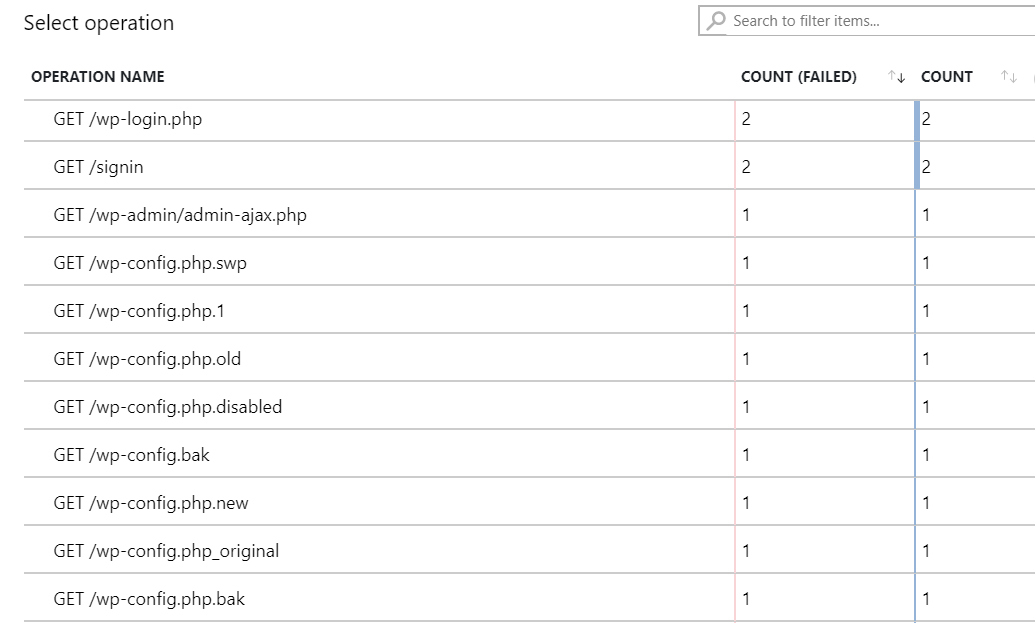
Based on years of monitoring data from running a blog, the most common attacks are fully automated vulnerability scanning tools. They request things like data.zip, wp-admin.php, git directories, etc., looking for common security oversights or trying to exploit known vulnerabilities in certain blog systems. The goal is to take control of the server, inject malicious code (like ransomware, cryptominers) into the blog pages for users, or sometimes turn the server itself into a mining rig.

(Image: Automated scanning tool requests captured by Azure backend)

When designing a blog system, common security countermeasures can refer to OWASP (https://owasp.org/), but with flexibility. For example, when implementing JavaScript CSP, consider that normal blog users may need to add third-party analytics plugins (like Azure Application Insights, CNZZ in China). Design some whitelist/blacklist or feature toggles.

Most designers know to guard against user input, i.e., blog readers. Input entry points are usually comments and search functions. But don't forget that the blogger's input in the admin panel also needs protection, because it might not be the blogger themselves operating. For example, if the blogger's account is stolen, a hacker could change the navigation bar link to point to the hacker's server or a localhost trap (yes, don't assume localhost doesn't work on normal users' computers), which would severely impact readers.

Image | Online

Regarding authentication for admin login, prioritize mature SSO solutions whenever possible. For example, Moonglade supports Azure Active Directory authentication, leveraging professional services like Microsoft to manage authorization and minimize security issues with accounts. Only fall back to local account authentication if the user has no SSO environment. Never think that using third-party services is less secure than writing your own, and that your own logic is unknown and therefore safe. Unless you are a world-class expert, your own system is much more vulnerable than third-party services.

There are also attacks initiated by bored programmers from rival groups, such as using scripts or tools to continuously request a specific URL of the blog system, attempting to DDoS it. For these annoying spammers, blog system designers can simply add rate limiting to the relevant URL endpoints. For real DDoS attacks, only cloud-based DDoS protection services or hardware DDoS firewalls can solve the problem.

Finally, don't forget things not covered by OWASP. Blog protocols also have design flaws. For example, Pingback can be used for DDoS (https://www.imperva.com/blog/wordpress-security-alert-pingback-ddos/) and server port scanning (https://www.avsecurity.in/wordpress-xml-rpc-pingback-vulnerability/).

Conclusion

Designing an excellent blog system requires careful consideration of every detail. These design decisions can never be made correctly from the start; they must be discovered and refined through long-term blog operation data. Moreover, markets change, user behavior changes, standards become obsolete, and new ones are invented. Therefore, your system needs to evolve.

Any seemingly simple system, even if it's as common as dirt, has a complete underlying system that is not visible on the surface. This is true for blogs, and even more complex for e-commerce, food delivery, and financial clearing systems. Don't start building based solely on what you see on the surface. It's like building an airplane: making a paper airplane is completely different from making a real one.

Technical people should not just use whatever is trendy. Excellent products are not made by stacking fashionable technologies; you must first analyze how your users actually use your product to make the most appropriate choices. Remember, to succeed at something, don't limit your thinking to technology itself. Learn to analyze the market and user behavior to choose and apply technology more accurately.

Image | Online

Thank you to all readers who have read this far. If you have any questions or discussions, feel free to leave a comment.

The next article will mainly introduce [Knowledge Points in Designing a Blog System], stay tuned

Wang Yujie

Keep Exploring

Related Reading

More Articles