Front-end authentication brothers: cookie, session, token, jwt, single sign-on

Front-end authentication brothers: cookie, session, token, jwt, single sign-on

HTTP based front-end authentication background, why cookies are the most convenient storage scheme, what are the ways to operate cookies, how session schemes are implemented, and what problems exist

最后更新 4/27/2022 7:31 AM
HenryLulu_几木
预计阅读 25 分钟
分类
front end
标签
authentication

In this article you will see:

  1. Background of HTTP-based front-end authentication
  2. Why cookies are the most convenient storage solution and what are the ways to operate cookies
  3. How is the session scheme implemented and what are the problems?
  4. How is the token scheme implemented, how is it encoded and tamper-resistant? What does jwt do? Implementation and significance of refresh token
  5. What are the similarities, differences, advantages and disadvantages between session and token
  6. What is single sign-on? Implementation ideas and processing under browser

1. Start from the state

1.1 HTTP stateless

We know that HTTP is stateless. In other words, the status cannot be maintained between the HTTP requester and the responder, and it is one-time. It does not know what happened to the previous requests. But in some scenarios, we need to maintain the status. The most typical example is that when a user logs in to Weibo, posts, follows, and comments should be in the user status after logging in.

1.2 marker

So what is the solution?:: Tag: :.

In a school or company, your identity and account information will be entered from the day you enter and join the job, and then you will be issued a card. In the future, you will only need to swipe this card for access control, check-in, and consumption in the park.

1.3 frontend storage

This involves one dispatch, one storage, and one area. The dispatch is easy to handle, the login interface is directly returned to the front end, and storage requires the front end to find a way.

The prerequisite is that you have to keep the card with you.

There are many front-end storage methods.

  • The worst thing is to hang it on a global variable, but this is an "experience card" that will be lost after one refresh of the page
  • For high-end ones, you can save them in cookies, localStorage, etc. This is a "membership card". No matter how you refresh it, you will always hold this status as long as the browser has not been cleared or expired.

Front-end storage is not expanded here.

There is a place to store it, and you can put it into parameters and bring it to the interface when requesting.

2. Cornerstone: cookies

But the front end is so troublesome. I have to save it myself and find a way to bring it out. Is there anything I don't have to worry about?

Yes, cookies.

Cookies are also a type of front-end storage, but compared to other methods such as localStorage, cookies can be used to make the front-end insensitive.

The general process is as follows:

  • On the interface that provides tags, it is directly "planted" on the browser through the Set-Cookie field of the HTTP return header
  • When the browser initiates a request, it will automatically send a cookie to the interface through the cookie field of the HTTP request header

2.1 Configuration: Domain/Path

You cannot use Tsinghua University campus card to enter Peking University.

Cookies are used to limit: :"spatial range":: through the Domain/Path levels.

The Domain property specifies which domain names should accompany this cookie when the browser makes an HTTP request. If this attribute is not specified, the browser will default to the first-level domain name of the current URL. For example, www.example.com will be set to www.example.com, and if you visit any subdomain name of example.com in the future, HTTP requests will also carry this cookie. If the domain name specified by the server in the Set-Cookie field does not belong to the current domain name, the browser will reject the cookie.

The Path property specifies which paths should accompany this cookie when the browser makes an HTTP request. Whenever the browser finds that the Path attribute is the beginning of the HTTP request path, it will add this cookie to the header information. For example, if the PATH attribute is/, the request/docs path will also contain the cookie. Of course, the prerequisite is that the domain names must be consistent.

—— Cookie — JavaScript 标准参考教程(alpha)

2.2 Configuration: Expires/Max-Age

Your card won't work when you graduate.

Cookies can also limit: :"Time Range"::, via one of Expires, Max-Age.

The Expires property specifies a specific expiration time after which the browser no longer retains the cookie. Its value is in UTC format. If this property is not set or set to null, the cookie is only valid for the current session. Once the browser window closes and the current session ends, the cookie will be deleted. In addition, the browser determines whether a cookie will expire based on the local time. Since the local time is inaccurate, there is no way to guarantee that the cookie will expire at the time specified by the server.

The Max-Age property specifies the number of seconds the cookie will exist from now, such as 60_60_24* 365 (i.e. one year). After this time, the browser no longer retains this cookie.

If both Expires and Max-Age are specified, the value of Max-Age will take precedence.

If the Set-Cookie field does not specify the Expires or Max-Age attribute, then the cookie is a session cookie, which means it only exists in this session. Once the user closes the browser, the browser will no longer retain the cookie.

—— Cookie — JavaScript 标准参考教程(alpha)

2.3 Configuration: Secure/HttpOnly

Some schools stipulate that they are not allowed to brush without card sleeves (what strange school, hypothesis); some schools do not allow themselves to stick stickers on cards.

Cookies can restrict: :"Usage: :."

The Secure property specifies that the browser can send this cookie to the server only under the encryption protocol HTTPS. On the other hand, if the current protocol is HTTP, the browser will automatically ignore the Secure attribute sent by the server. This property is just a switch and no value needs to be specified. If the communication is the HTTPS protocol, this switch opens automatically.

The HttpOnly property specifies that the cookie cannot be obtained through JavaScript scripts, mainly because the Document. cookie property, XMLHttpRequest object and Request API cannot be obtained. This prevents the cookie from being read by the script and will only be put on when the browser makes an HTTP request.

—— Cookie — JavaScript 标准参考教程(alpha)

2.4 HTTP header reading and writing cookies

Looking back, how does HTTP write and pass cookies and their configuration?

A Set-cookie header returned by HTTP is used to write "one (and only one)" cookie to the browser, in the format of cookie key + configuration key. For example:

Set-Cookie: username=jimu; domain=jimu.com; path=/blog; Expires=Wed, 21 Oct 2015 07:28:00 GMT; Secure; HttpOnly

So what if I want to set a few more cookies at a time? Give more Set-Cookie headers (duplication is allowed in one HTTP request)

Set-Cookie: username=jimu; domain=jimu.com
Set-Cookie: height=180; domain=me.jimu.com
Set-Cookie: weight=80; domain=me.jimu.com

The cookie header of an HTTP request is used by the browser to send all cookies that match the current "space, time, and usage" configuration to the server. Because the browser makes the filtering judgment, there is no need to return the configuration content, just send the key value.

Cookie: username=jimu; height=180; weight=80

2.5 Front-end reading and writing cookies

前端可以自己创建 cookie,如果服务端创建的 cookie 没加HttpOnly,那恭喜你也可以修改他给的 cookie。

调用document.cookie可以创建、修改 cookie,和 HTTP 一样,一次document.cookie能且只能操作一个 cookie。

document.cookie = 'username=jimu; domain=jimu.com; path=/blog; Expires=Wed, 21 Oct 2015 07:28:00 GMT; Secure; HttpOnly';

调用document.cookie也可以读到 cookie,也和 HTTP 一样,能读到所有的非HttpOnly cookie。

console.log(document.cookie);
// username=jimu; height=180; weight=80

(With just one cookie attribute, why do read and write behaviors differ? get/set to understand)

2.6 Cookies are the cornerstone of maintaining the state of HTTP requests

After learning about cookies, we know that cookies are the most convenient way to maintain the state of HTTP requests, and most front-end authentication issues are solved by cookies. Of course, other storage methods can also be used (which will be mentioned more or less later).

So with storage tools, what should we do next?

3. Application solution: server session

Now think back, what happened when you swiped your card?

In fact, there is only one ID stored on your card (it may be your student ID). When you swipe it, the property management system will check your information and account, and then decide "Can you enter this door" and "Which account to use to deduct money from this chicken leg?"

This operation is called a session in the front-end authentication system.

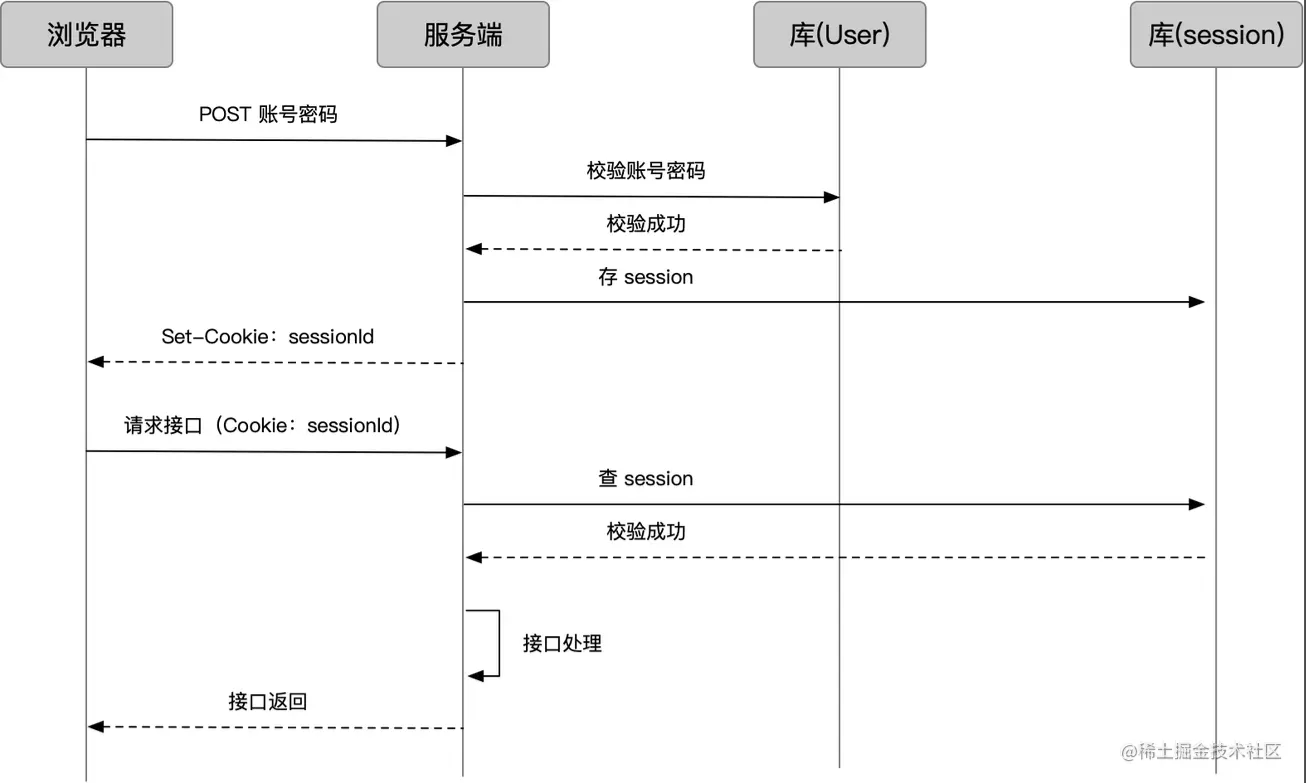
Typical session login/verification process:

  1. The browser logs in and sends the account and password, and the server checks the user database to verify the user
  2. The server saves the user login status as Session and generates a sessionId
  3. Return through the login interface and set the sessionId on the cookie
  4. After that, the browser requests the business interface again, and the sessionId is brought with the cookie
  5. The server checks the sessionId and verifies the session
  6. After success, normal business processing will be performed and results will be returned

3.1 How to store sessions

Obviously, the server only gives the cookie a sessionId, and the specific content of the session (which may include user information, session status, etc.) needs to be saved by itself. There are several storage methods:

  1. Redis(推荐):内存型数据库,redis 中文官方网站。以 key-value 的形式存,正合 sessionId-sessionData 的场景;且访问快。
  2. Memory: Put it directly into the variable. Once the service is restarted, it's gone.
  3. Database: Ordinary database. The performance is not high.

3.2 Session expiration and destruction

It's very simple, just destroy the stored session data.

3.3 Distributed Issues of Sessions

Generally, the server is a cluster, and user requests will go through a Load Balancer once, not necessarily to which machine. Then once the machine that the user subsequently requests for interface is inconsistent with the machine that he requests for login, or the machine that requests login goes down, won't the session expire? There are now several solutions to this problem.

  • The first is to store sessions centrally from the perspective of "storage". If we use a separate Redis or ordinary database, we can save all sessions in one library.
  • The second is to allow requests with the same IP to be sent to the same machine during Load Balancer from a "distribution" perspective. Taking nginx as an example, you can configure ip_hash to achieve this.

However, the first method is usually adopted, because the second method is equivalent to neutering the Load Balancer and still does not solve the problem of "machine downtime requested by users."

3.4 Session processing under node.js

前面的图很清楚了,服务端要实现对 cookie 和 session 的存取,实现起来要做的事还是很多的。在npm中,已经有封装好的中间件,比如 express-session - npm,用法就不贴了。

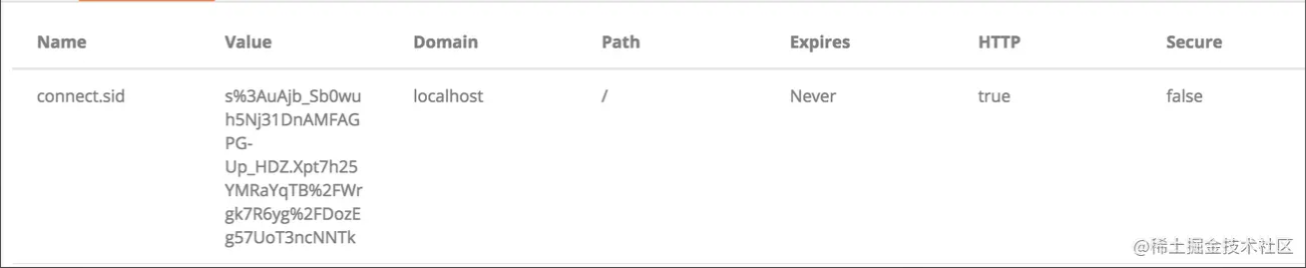
Here are the cookies it makes:

express-session - npm 主要实现了:

  1. It encapsulates the read and write operations on cookies, and provides configuration item configuration fields, encryption method, expiration time, etc.
  2. It encapsulates access operations to sessions, and provides configuration items to configure session storage methods (memory/redis), storage rules, etc.
  3. Provides the session attribute to req, controls the set/get of the attribute and responds to cookie and session access, and provides some methods to req. session.

4. Application plan: token

The maintenance of the session causes a lot of trouble for the server. We must find a place to store it, consider the issue of distribution, and even enable a Redis cluster for it. Is there a better way?

I thought of the school again. Before there was no campus card technology, we all relied on "student ID cards." The doorman directly compared the face on my student ID card with that on the student ID card to confirm the validity period, grade and other information of the student ID card, and then he can let it go.

Looking back, you don't have to save too much into the session for a login scenario, so why not just package it into cookies? In this way, the server does not need to save it. It only needs to verify the validity of the "certificate" carried by the cookie every time, and it can also carry some lightweight information.

This method is often called a token.

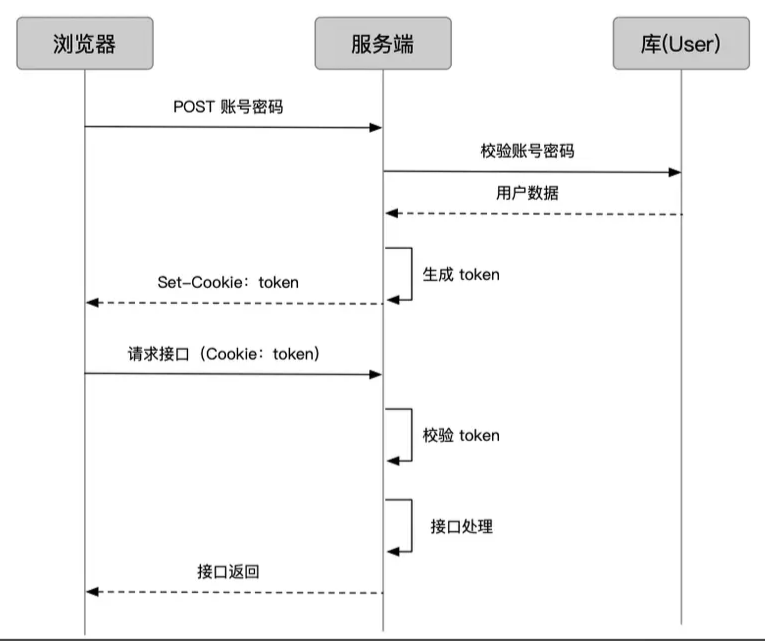
The process of token is like this:

  1. When the user logs in, the server verifies the account password and obtains user information
  2. Encode user information and token configuration into token, and set it to the browser through cookie
  3. After that, the user requests the service interface and carries the token through a cookie
  4. The interface checks the validity of the token and performs normal business interface processing

4.1 Storage method of client tokens

As cookies said earlier, cookies are not the only way for clients to store credentials. Because of its "stateless nature", token's validity period and usage restrictions are included in the token content. It relies less on cookie management capabilities, and the client appears to be more free to store. But the mainstream way of web applications is still to put them in cookies, so after all, you don't worry about it.

4.2 Expires of tokens

So how do we control the validity period of tokens? It's very simple. Insert the "expiration time" together with the data, and just judge it during verification.

4.3 Encoding of token

The coding method is up to people to be frugal.

4.3.1 base64

比如 node 端的 cookie-session - npm

不要纠结名字,其实是个 token 库,但保持了和 express-session - npm 高度一致的用法,把要存的数据挂在 session 上

Under the default configuration, when I give him a userid, he will save it like this:

这里的 eyJ1c2VyaWQiOiJhIn0=,就是 {"userid":"abb”} 的 base64 而已。

4.3.2 Tamper-proof

那问题来了,如果用户 cdd 拿{"userid":"abb”}转了个 base64,再手动修改了自己的 token 为 eyJ1c2VyaWQiOiJhIn0=,是不是就能直接访问到 abb 的数据了?

Yes. So depending on the situation, if a token involves sensitive permissions, we must find a way to prevent the token from being tampered with.

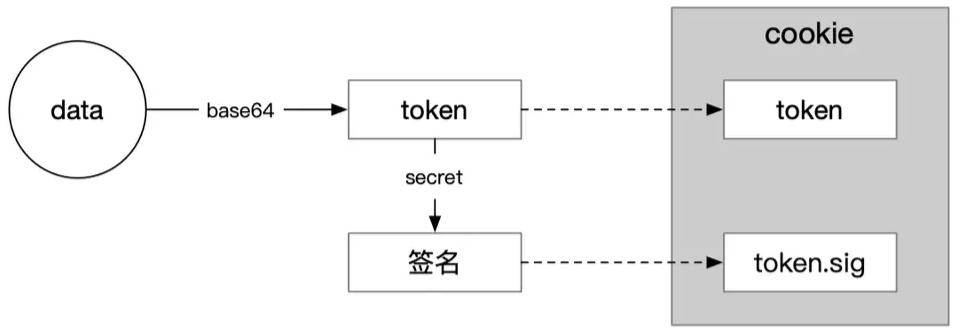
解决方案就是给 token 加签名,来识别 token 是否被篡改过。例如在 cookie-session - npm 库中,增加两项配置:

secret: 'iAmSecret',
signed: true,

这样会多种一个 .sig cookie,里面的值就是 {"userid":"abb”}iAmSecret通过加密算法计算出来的,常见的比如HMACSHA256 类 (System.Security.Cryptography) | Microsoft Docs

好了,现在 cdd 虽然能伪造出eyJ1c2VyaWQiOiJhIn0=,但伪造不出 sig 的内容,因为他不知道 secret。

4.4 JWT

但上面的做法额外增加了 cookie 数量,数据本身也没有规范的格式,所以 JSON Web Token Introduction - jwt.io 横空出世了。

JSON Web Token (JWT) is an open standard that defines a way to convey JSON information. This information is ensured to be trustworthy through digital signatures.

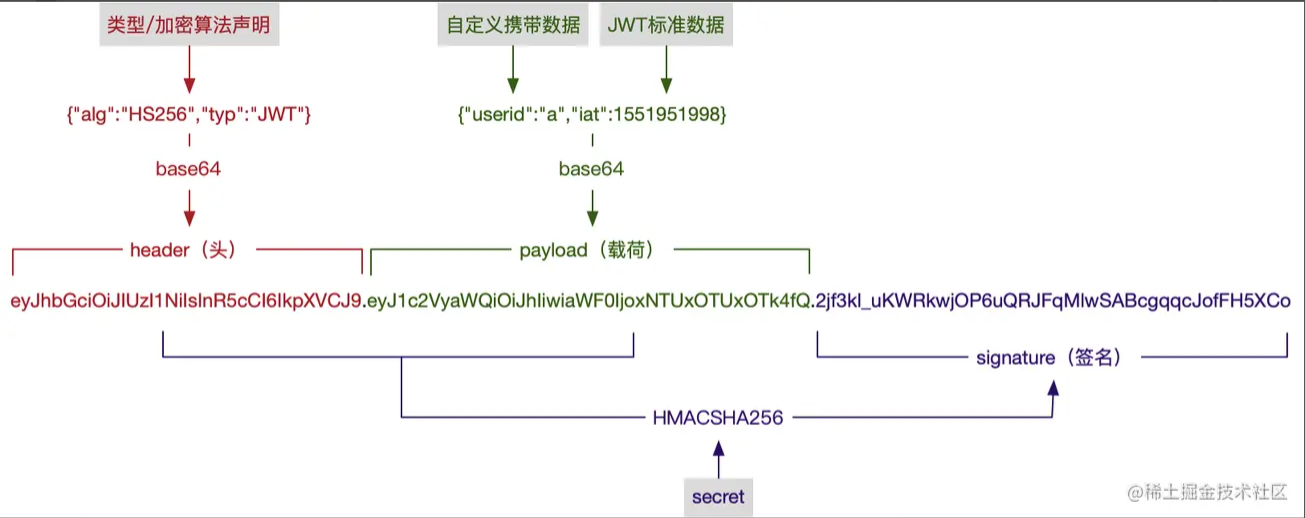
It is a mature token string generation scheme that includes the data and signatures we mentioned earlier. Why not take a direct look at what a JWT token looks like:

eyJhbGciOiJIUzI1NiIsInR5cCI6IkpXVCJ9.eyJ1c2VyaWQiOiJhIiwiaWF0IjoxNTUxOTUxOTk4fQ.2jf3kl_uKWRkwjOP6uQRJFqMlwSABcgqqcJofFH5XCo

How is this string of things generated? Look at the picture:

类型、加密算法的选项,以及 JWT 标准数据字段,可以参考 RFC 7519 - JSON Web Token (JWT)

node 上同样有相关的库实现:express-jwt - npm koa-jwt - npm

4.5 refresh token

token, as a guardian of rights, the most important thing is "security".

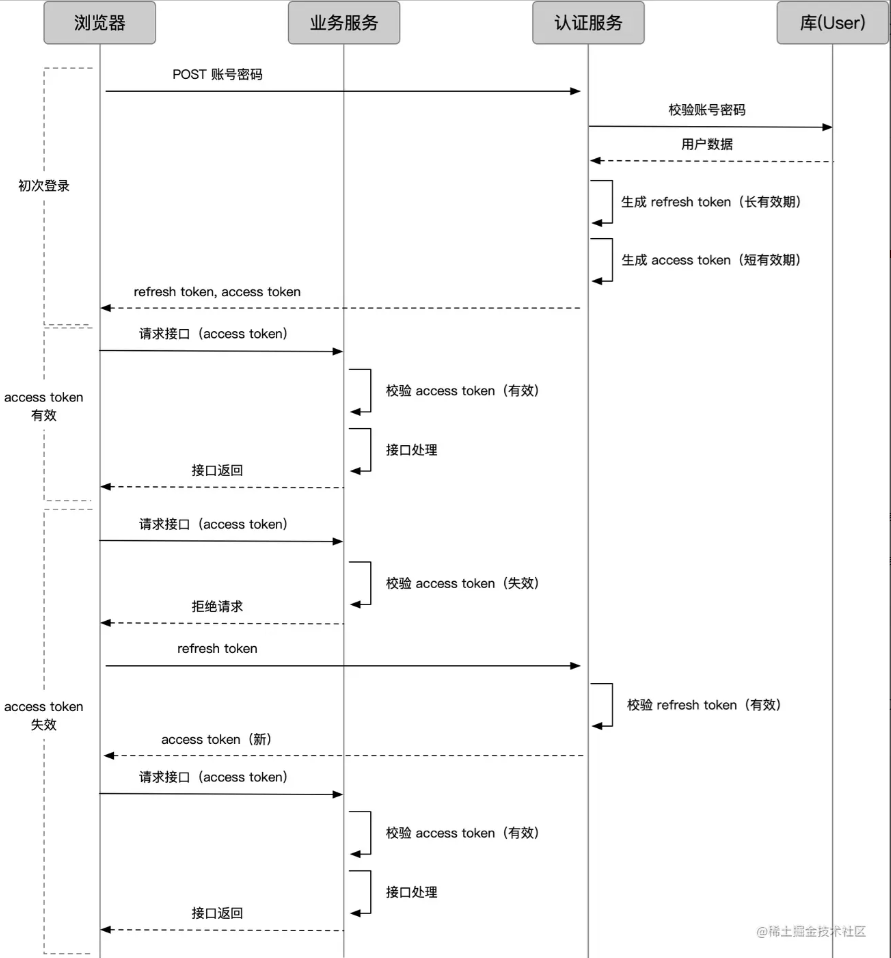
The token used by the business interface for authentication is called an access token. The more rights-sensitive the business, the more we want the access token to have a short validity period to avoid theft. However, too short validity period will cause access tokens to expire frequently. What should I do after they expire?

One way is to ask users to log in again to get new tokens, which is obviously not friendly enough. Some access tokens may expire in only a few minutes.

Another method is to have another token, a token that specifically generates access tokens, which we call refresh tokens.

  • The access token is used to access the business interface. Since the validity period is short enough, the risk of theft is small, and the request method can be more relaxed and flexible.
  • The refresh token is used to obtain an access token, which can be valid for a longer period of time. Security is increased through independent services and strict request methods; since verification is infrequent, it can also be handled like the previous session

With the refresh token, the request process becomes like this in several cases:

If the refresh token also expires, you can only log in again.

4.6 Session and token

Session and token are concepts with very vague boundaries. As mentioned above, refresh token may also be organized and maintained in the form of a session.

In the narrow sense, we usually think of session as an authentication scheme that "the data is stored on the cookie and the data is stored on the server", and token is an authentication scheme that "the client can store anywhere and the data is stored in the token." The comparison between sessions and tokens is essentially a comparison between "the client stores cookies/stores elsewhere" and "the server stores data/does not store data".

4.6 Client saves cookies/saves them elsewhere

Although storing cookies is convenient and not worrying about, the problem is also obvious:

Saving it elsewhere can solve scenarios without cookies; manually using parameters and other methods can avoid CSRF attacks.

4.7 Server stores data/does not store data

  • Storage data: Requests only need to carry id, which can greatly shorten the length of the authentication string and reduce the size of the request
  • No data stored: No complete server solution and distributed processing are required, reducing hardware costs; avoiding verification delays caused by database checking

5. single sign-on

As we already know, in the client/server authentication system under the same domain, the login state is maintained for a period of time by carrying credentials by the client.

But as we have more and more business lines, more business systems will be scattered under different domain names, which requires the ability of "one-time login, universal across the board", called "single sign-on."

5.1"Fake" single sign-on (same primary domain name)

简单的,如果业务系统都在同一主域名下,比如wenku.baidu.com tieba.baidu.com,就好办了。可以直接把 cookie domain 设置为主域名 baidu.com,百度也就是这么干的。

5.2"Real" single sign-on (different primary domain name)

比如滴滴这么潮的公司,同时拥有didichuxing.com xiaojukeji.com didiglobal.com等域名,种 cookie 是完全绕不开的。

This must be able to achieve "one-time login, universal across the board" to be a true single sign-on.

In this scenario, we need a separate authentication service, often called SSO.

** A complete process of "triggering login from system A to system B without login"**

  1. The user enters system A without a login ticket, and system A skips him to SSO
  2. SSO has not been logged in, so there is no certificate under the sso system (note that this is different from the previous A ticket). Enter the account and password to log in
  3. The SSO account password verification is successful. If you return through the interface, you can do two things: one is to plant a certificate under the sso system (record the user's SSO login status); the other is to issue a ticket.
  4. The client gets the ticket, saves it, and uses the request system A interface
  5. System A verifies the ticket, and processes the business request normally after success
  6. At this time, the user enters system B for the first time without a login ticket. System B skips him to SSO
  7. SSO has been logged in, and there is a certificate under the system. You don't have to log in again, just issue a ticket
  8. The client gets the ticket, saves it, and uses the request system B interface

5.3 Full version: Consider browser scenarios

The above process seems to be no problem, but in fact, this is enough for many apps. But it doesn't work well under the browser.

Look here:

For a browser, how can the data returned under the SSO domain be stored so that it can be brought with it when accessing A? Browsers have strict restrictions on cross-domain, and cookies, localStorage and other methods have domain restrictions.

This requires and can only be provided by A to store credentials in domain A. This is what we usually do:

In the figure, we mark the current domain name of the browser by color. Pay attention to the changes in the description of the gray background text in the figure.

  1. In the SSO domain, SSO does not directly return the ticket through the interface, but redirects it to the interface of system A through a URL with code. This interface is usually agreed upon when A registers with SSO
  2. The browser was redirected to domain A and accessed A's callback interface with code. The callback interface exchanged code for ticket
  3. This code is different from a ticket. The code is one-time and is exposed in the URL just to pass it on to change the ticket, and it will expire after changing it.
  4. After the callback interface gets the ticket, it successfully sets the cookie in its own domain.
  5. In subsequent requests, you just need to parse the ticket in the cookie and verify it by SSO
  6. The same goes for accessing system B

6. summary

  1. HTTP is stateless and requires front-end storage tags to maintain previous and subsequent requests
  2. Cookies are a complete marking method, operated through HTTP headers or js, and have corresponding security policies. They are the cornerstone of most state management solutions
  3. Session is a state management scheme. The front end stores id through cookies and the back end stores data, but the back end has to deal with distributed issues.
  4. Token is another state management solution. Compared with sessions that do not require backend storage, all data is stored in the front-end, liberating the backend and releasing flexibility.
  5. Token's coding technology is usually based on base64, or an encryption algorithm is added to prevent tampering. jwt is a mature coding scheme
  6. In complex systems, tokens can be decentralized through service token and refresh token to meet both security and user experience.
  7. The comparison between session and token is the comparison between "using cookies" and "storing them on the backend"
  8. Single sign-on requires systems in different domains to "login in one time, universal across the board." Usually, an independent SSO system records the login status and issues a ticket, and each business system cooperates to store and authenticate the ticket
Keep Exploring

延伸阅读

更多文章