
1. 前言
距离上次发《MAUI 初体验:爽》一文已经过去 2 个月了,本计划是下半年或者明年再研究 MAUI 的,现在计划提前啦,因为我觉得 MAUI Blazor 挺有意思的:在 Android、iOS、macOS、Windows 之间共享 UI,一处 UI 增加或者修改,就能得到一致的 UI 体验。
看看这篇文章《Blazor Hybrid/MAUI 简介和实战》对 MAUI Blazor 的说明:
MAUI
.NET 多平台应用程序 UI (.NET MAUI) 是一个跨平台框架,用于使用 C# 和 XAML 创建本机移动和桌面应用程序, 使用 .net MAUI,可以开发可在 Android、iOS、macOS 上运行的应用,Windows 以及从单个共享代码库运行的应用。
Blazor Hybrid 应用和 .NET MAUI
Blazor Hybrid 支持内置于 .NET 多平台应用 UI (.NET MAUI) 框架。 .NET MAUI 包含 BlazorWebView 控件,该控件运行将 Razor 组件呈现到嵌入式 Web View 中。 通过结合使用 .NET MAUI 和 Blazor,可以跨移动设备、桌面设备和 Web 重复使用一组 Web UI 组件。
今天就分享如何在 Blazor Server、Blazor Wasm、MAUI Blazor 之间共享 UI 的实验,这一步完成,后面开发应用时就方便多了(只针对 UI 修改)。
2. 先来体验下各端最终效果
- Blazor Server:https://server.dotnet9.com/
- Blazor Wasm:https://wasm.dotnet9.com/
- MAUI(Android\Windows\macOS):https://github.com/dotnet9/Dotnet9/tree/develop/src/Dotnet9.MAUI(源码自行编译)
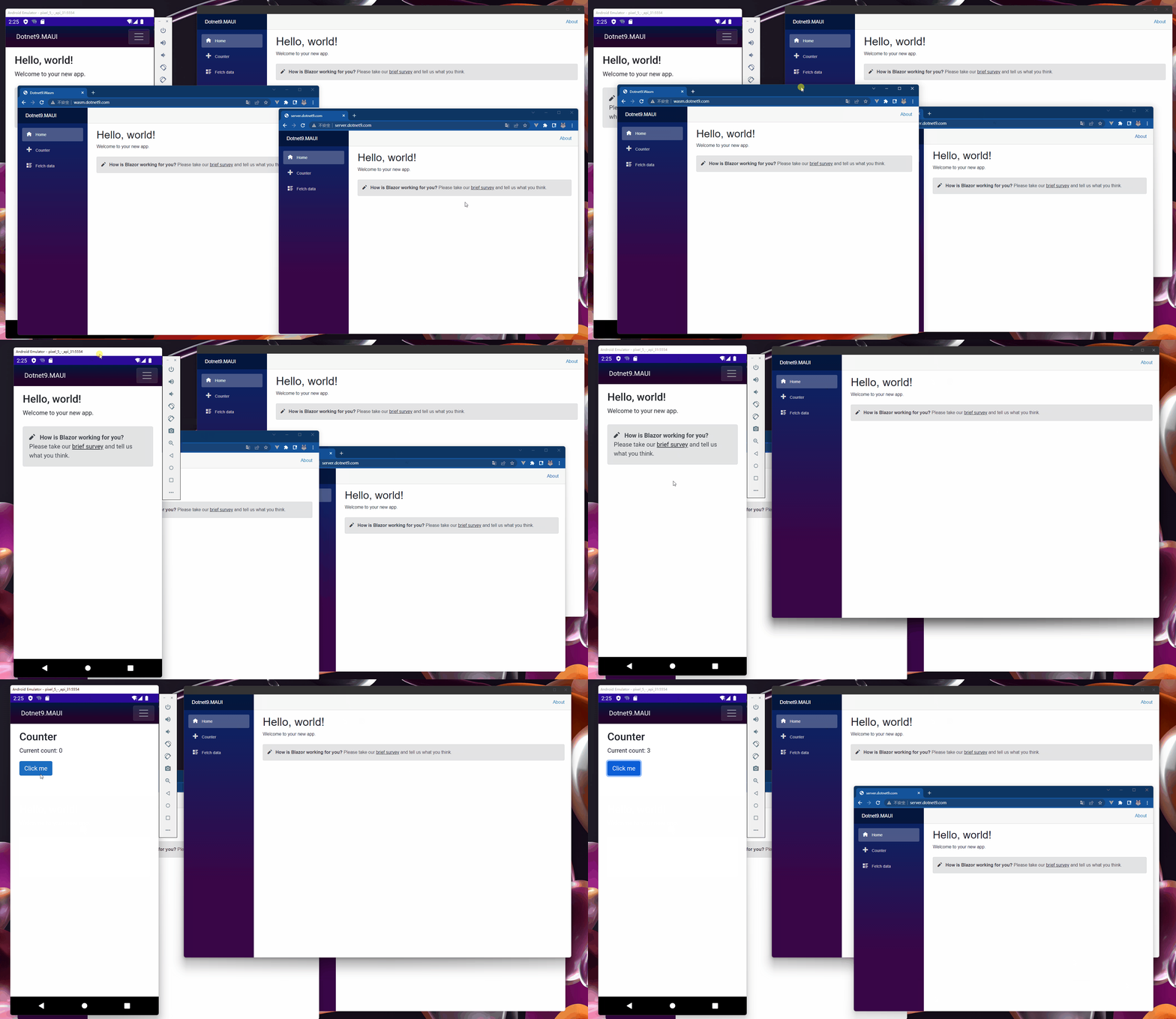
Windows 桌面、Blazor Server(在线)、Blazor Wasm(在线)、Android 效果
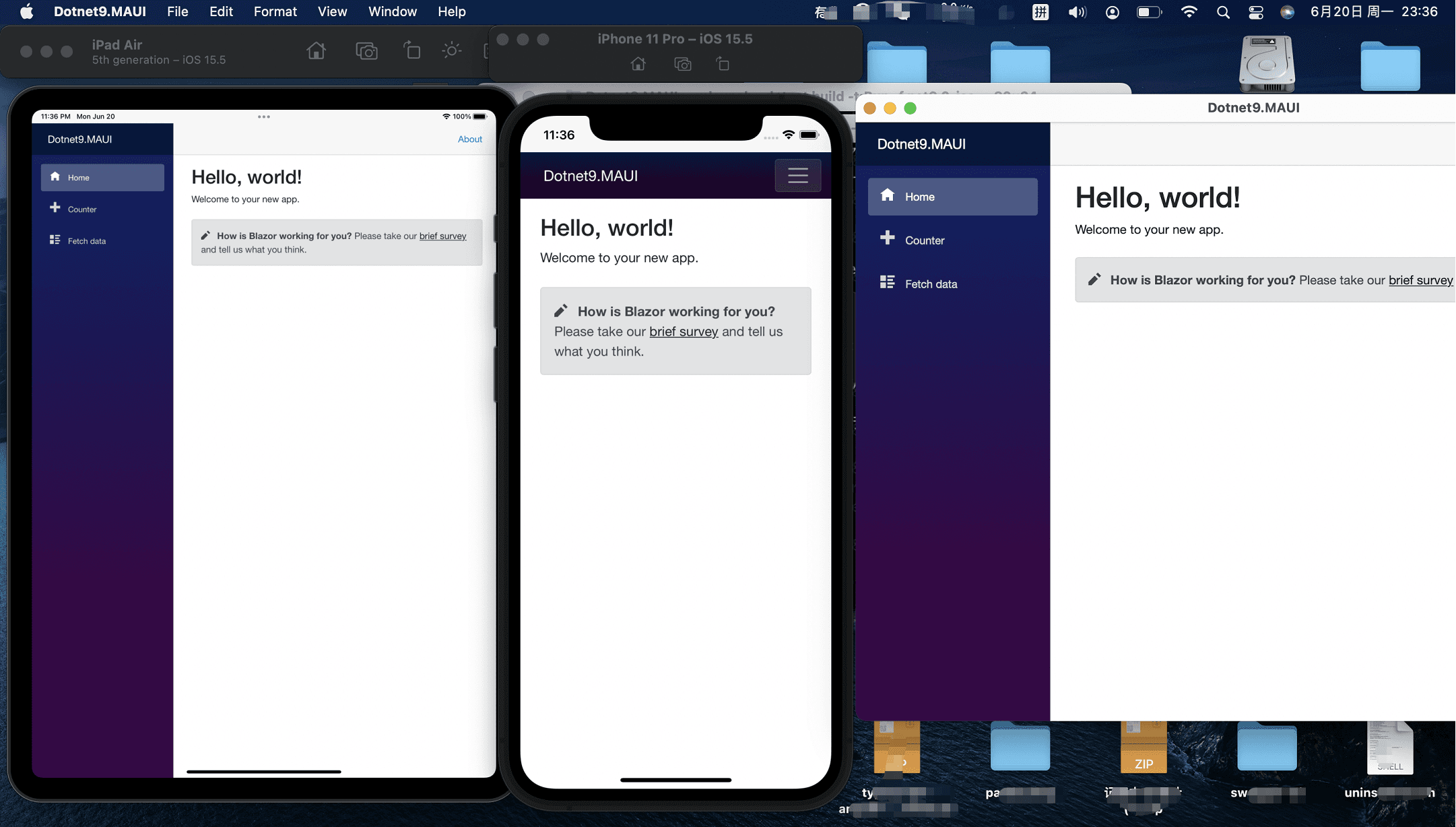
iPad Air、iOS、macOS 桌面效果
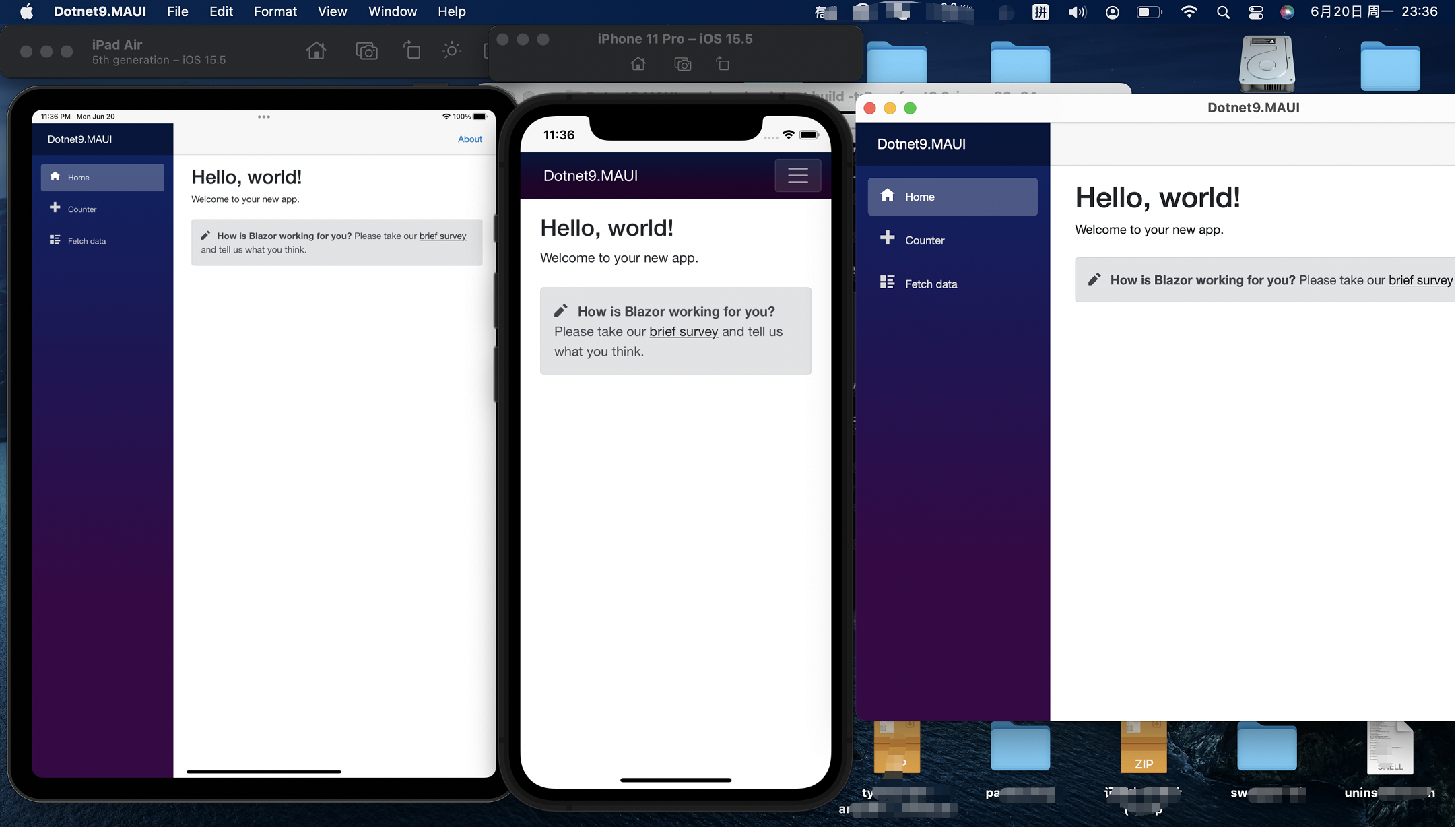
MAUI 各端未做发布文件体验(需要做相应平台的发布签名等操作),大家可以按下面介绍的方法创建项目编译体验一下。
iOS 和 macOS 效果感谢青城同学提供的图片素材,站长 mbp 安装了最新的 macOS,xCode 也是最新的,可能因为预览版 macOS 原因,xCode 无法打开,间接影响了 maui 编译?
macOS 版本和 xCode 版本
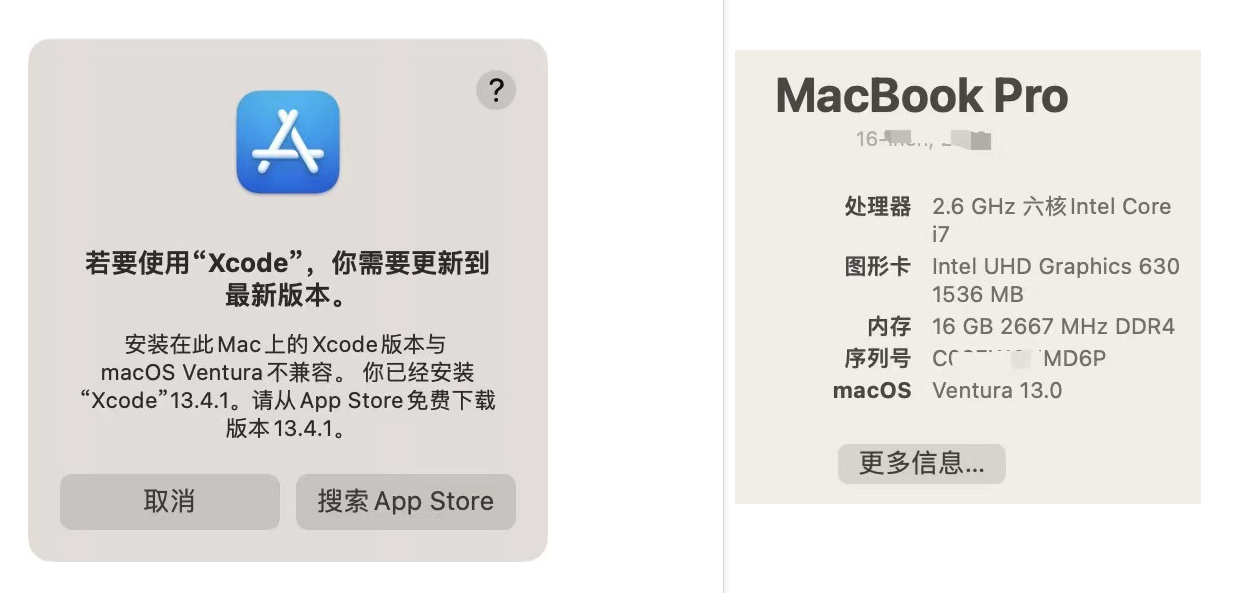
xCode 为不可用状态
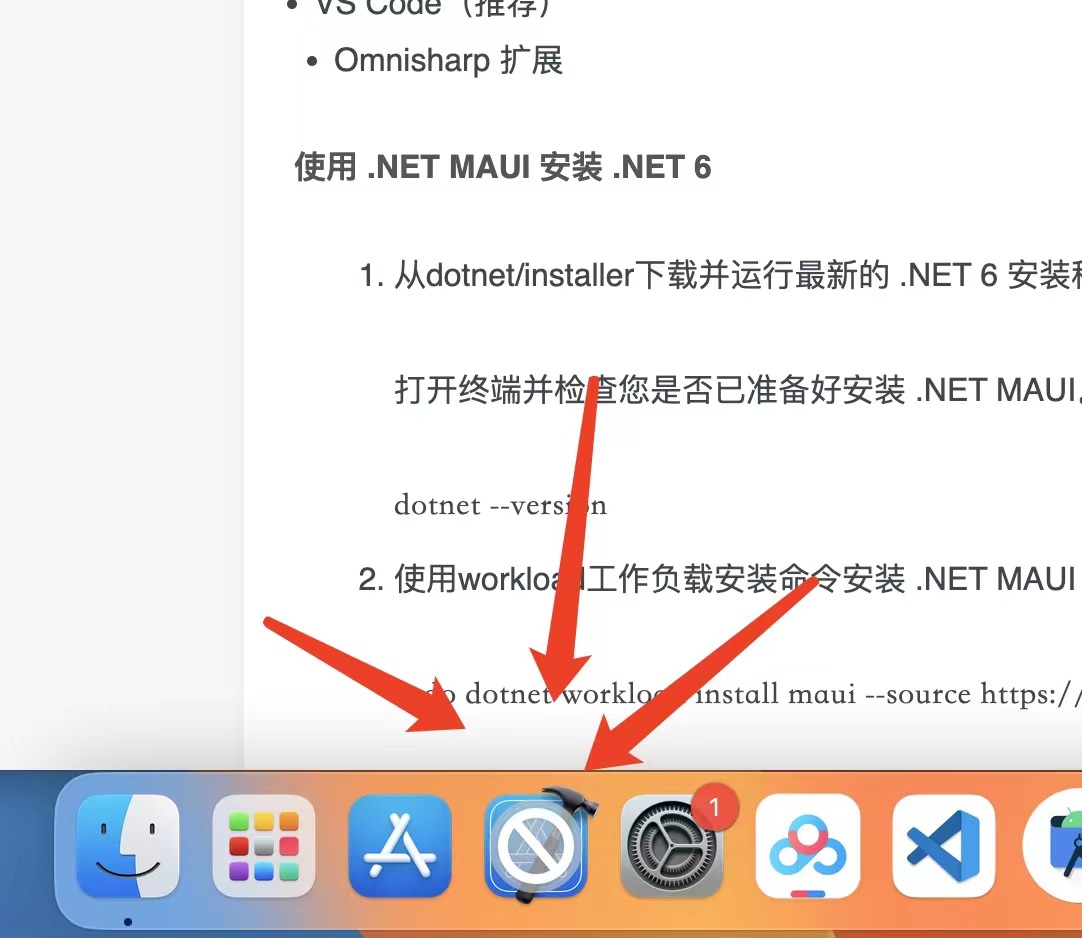
VS 编译出错,后面再解决

用 mbp 的同学建议不要安装预览版操作系统,不要当勇士....
3. 新建项目
关于 MAUI 的环境搭建可参考这篇文章《在 MAUI 中使用 Masa Blazor》,本文不再介绍环境搭建,直接使用 VS 2022 最新预览版项目模板创建项目。
3.1 创建 Blazor Server 项目:Dotnet9.Server
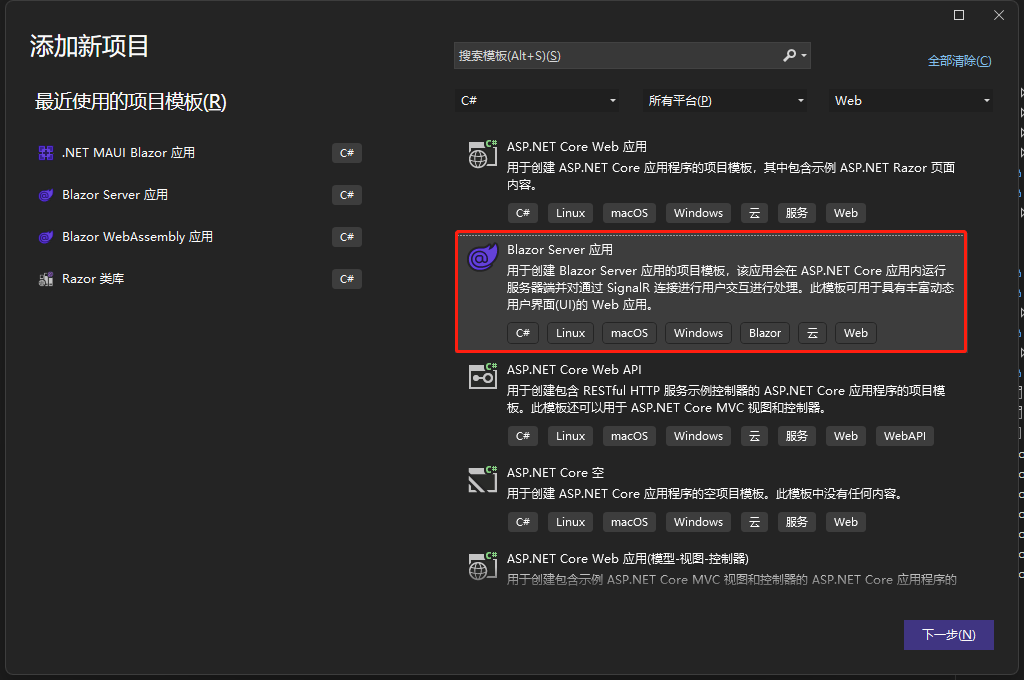
3.2 创建 Blazor WebAssembly 项目:Dotnet9.Wasm
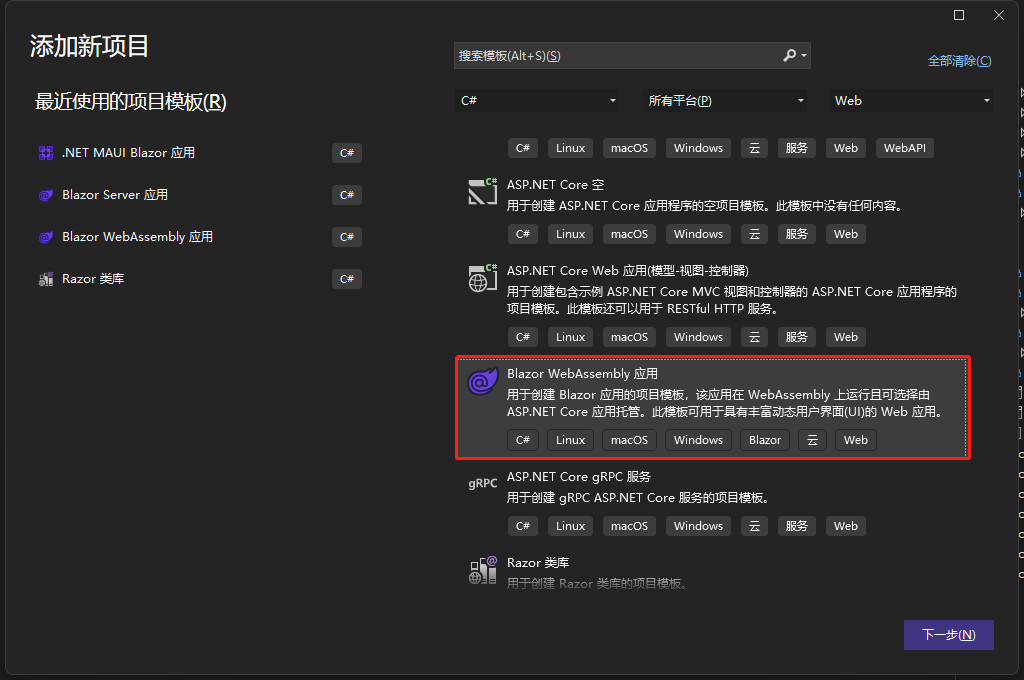
3.3 创建 MAUI Blazor 项目:Dotnet9.MAUI
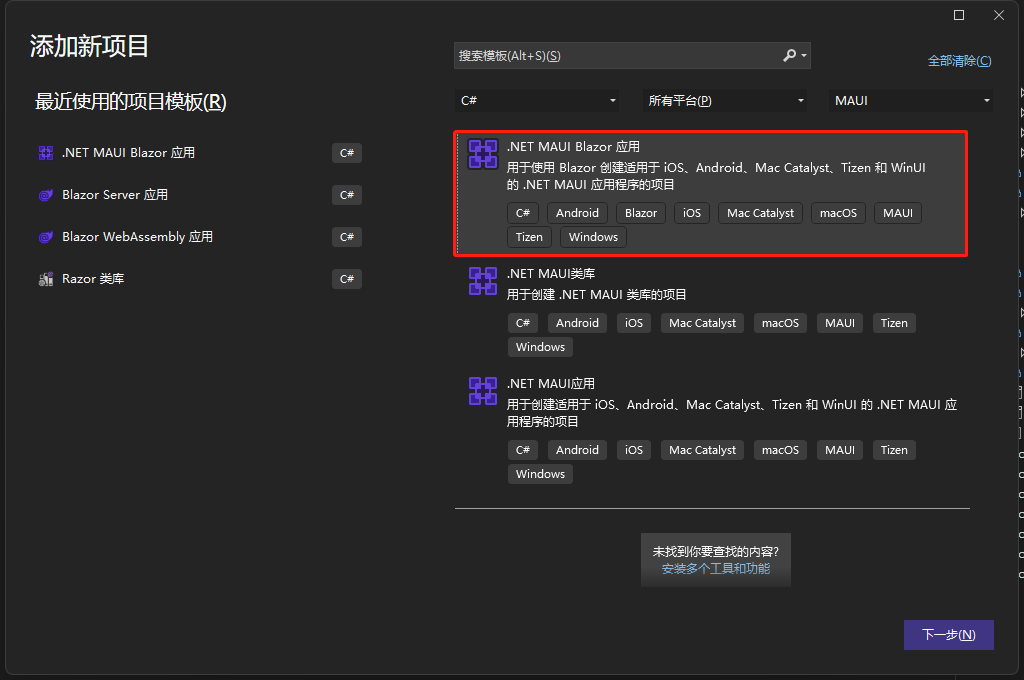
3.4 查找共同点
在 3 个项目的上一层目录,打开 PowerShell,输入tree /f查看详细的目录文件组织结构:
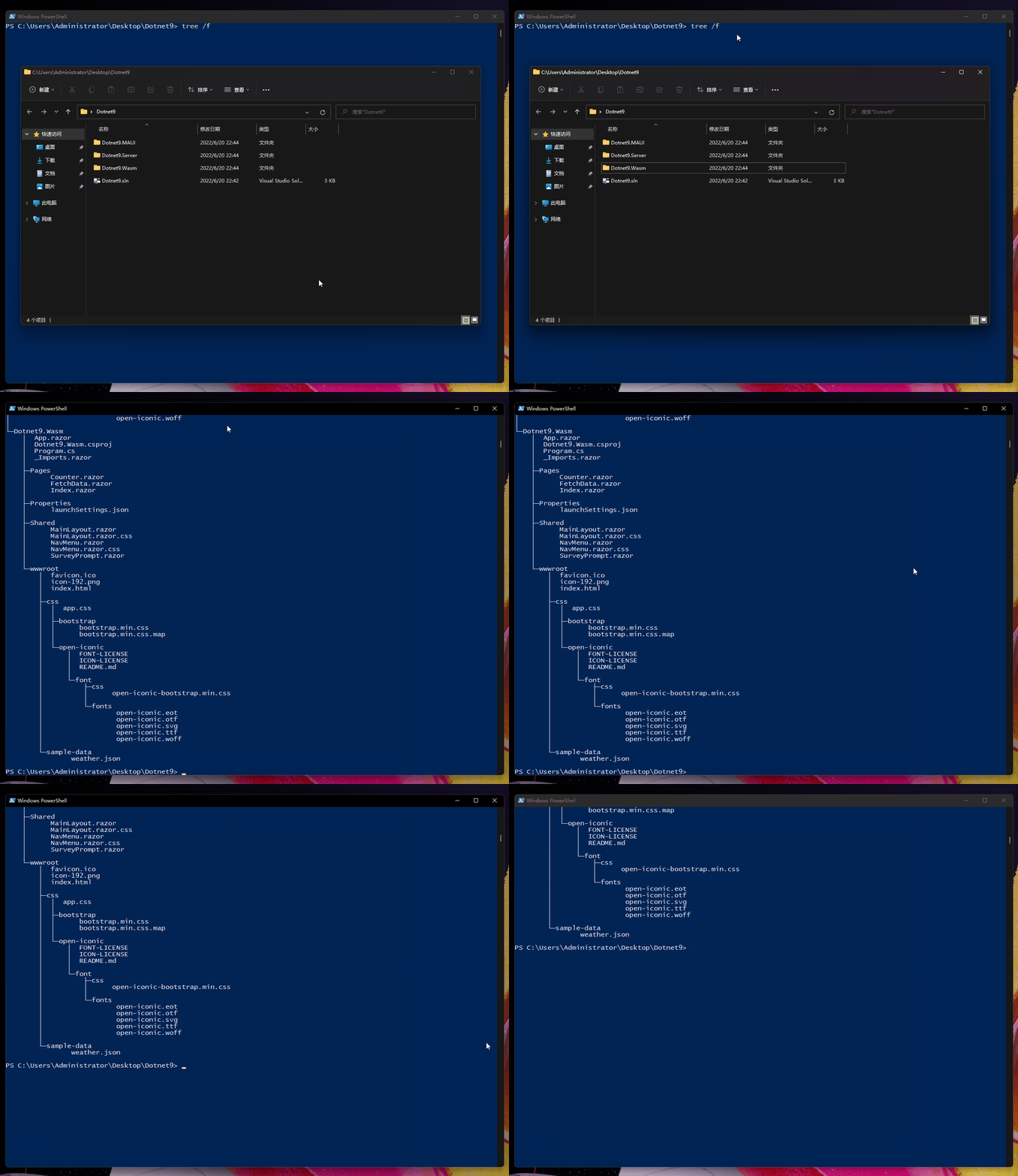
仔细查看三个模板项目文件结构,我们找出共同的文件查看:
文件夹 PATH 列表
卷序列号为 76F5-AF62
C:.
│  Dotnet9.sln
│
├─Dotnet9.MAUI
【1 这里省略数个文件】
│  │
│  ├─Data
│  │      WeatherForecast.cs
│  │      WeatherForecastService.cs
│  │
│  ├─Pages
│  │      Counter.razor
│  │      FetchData.razor
│  │      Index.razor
【2 这里省略数个文件】
│  │
│  ├─Shared
│  │      MainLayout.razor
│  │      MainLayout.razor.css
│  │      NavMenu.razor
│  │      NavMenu.razor.css
│  │      SurveyPrompt.razor
【3 这里省略数个文件】
│
├─Dotnet9.Server
│  │  App.razor
【4 这里省略数个文件】
│  │
│  ├─Data
│  │      WeatherForecast.cs
│  │      WeatherForecastService.cs
│  │
│  ├─Pages
│  │      Counter.razor
│  │      Error.cshtml
│  │      Error.cshtml.cs
│  │      FetchData.razor
│  │      Index.razor
│  │      _Host.cshtml
│  │      _Layout.cshtml
│  │
│  ├─Properties
│  │      launchSettings.json
│  │
│  ├─Shared
│  │      MainLayout.razor
│  │      MainLayout.razor.css
│  │      NavMenu.razor
│  │      NavMenu.razor.css
│  │      SurveyPrompt.razor
【5 这里省略数个文件】
│
└─Dotnet9.Wasm
【6 这里省略数个文件】
    │
    ├─Pages
    │      Counter.razor
    │      FetchData.razor
    │      Index.razor
    │
    ├─Properties
    │      launchSettings.json
    │
    ├─Shared
    │      MainLayout.razor
    │      MainLayout.razor.css
    │      NavMenu.razor
    │      NavMenu.razor.css
    │      SurveyPrompt.razor
【7 这里省略数个文件】
发现都有Data目录和Pages目录(其中 Wasm 项目没有 Data 目录,使用的示例类是直接写在FetchData.razor文件@code{}中的),那把这部分文件直接提取到类库中就可以了,那就做吧。
4. 提取 UI 到 Razor 类库
创建 Razor 类库:Dotnet9.WebApp
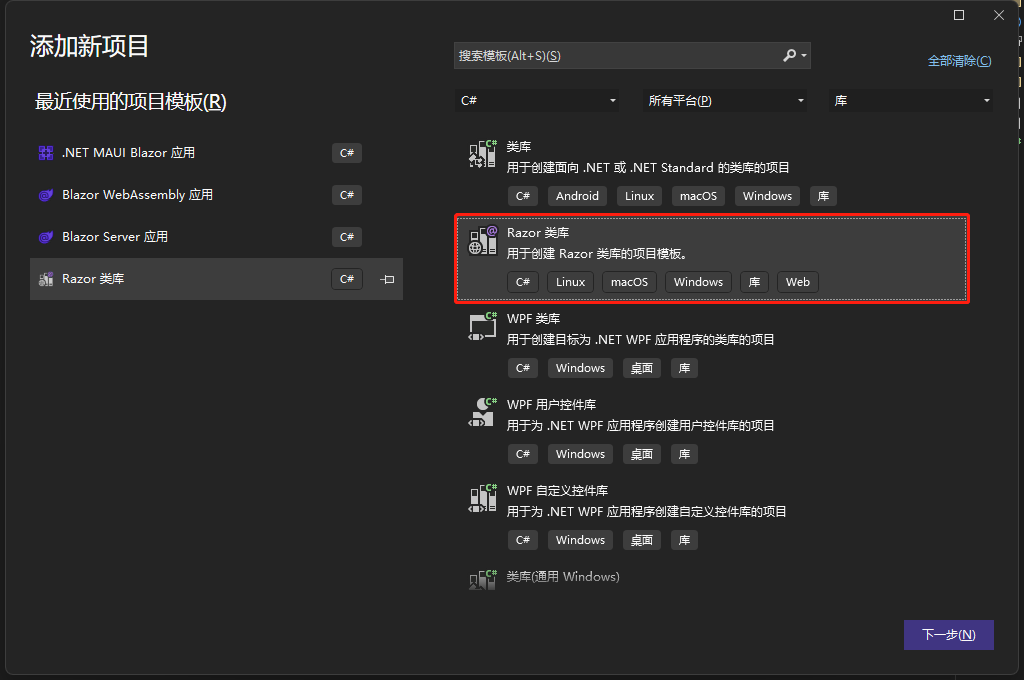
下面开始 UI 的提取
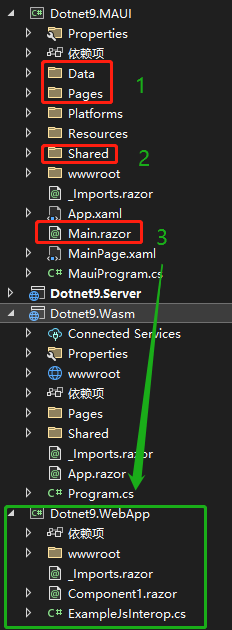
如上图,将Dotnet9.MAUI项目的Data、Pages、Shared三个目录外加Main.razor文件剪切到Dotnet9.WebApp项目中,然后修改剪切后相应文件的命名空间Dotnet9.MAUI[xxx]为Dotnet9.WebApp[xxx],打开Dotnet9.WebApp项目的_Import.razor文件,参考Dotnet9.MAUI项目的_Import.razor文件部分命名空间,修改如下:
@using System.Net.Http
@using Microsoft.AspNetCore.Authorization
@using Microsoft.AspNetCore.Components.Forms
@using Microsoft.AspNetCore.Components.Routing
@using Microsoft.AspNetCore.Components.Web
@using Microsoft.AspNetCore.Components.Web.Virtualization
@using Microsoft.JSInterop
@using Dotnet9.WebApp
@using Dotnet9.WebApp.Shared
上面部分命名空间可以删除(未尝试),编译Dotnet9.WebApp项目,检查是否正确编译。
5. 各端项目修改
5.1 MAUI 项目
- 添加
Dotnet9.WebApp项目引用 Program.cs中using Dotnet9.MAUI.Data;改为using Dotnet9.WebApp.Data- 删除
Data、Pages、Shared三个目录外加Main.razor文件,上一步是剪切的话这步省略 - 修改
_Imports.razor文件,主要是添加Dotnet9.WebApp项目命名空间引用
@using System.Net.Http
@using Microsoft.AspNetCore.Components.Forms
@using Microsoft.AspNetCore.Components.Routing
@using Microsoft.AspNetCore.Components.Web
@using Microsoft.AspNetCore.Components.Web.Virtualization
@using Microsoft.JSInterop
@using Dotnet9.MAUI
@using Dotnet9.WebApp
@using Dotnet9.WebApp.Shared
MauiProgram.cs修改引用的命名空间:using Dotnet9.MAUI.Data;=>using Dotnet9.WebApp.Data;- 打开
MainPage.xaml,对路由组件命名空间的引用修改
添加命名空间xmlns:webApp="clr-namespace:Dotnet9.WebApp;assembly=Dotnet9.WebApp",修改代码如下:
修改前:
<RootComponent Selector="#app" ComponentType="{x:Type local:Main}" />
修改后:
<RootComponent Selector="#app" ComponentType="{x:Type webApp:Main}" />
修改完毕,编译运行Dotnet9.MAUI项目吧,接下来修改Dotnet9.Server项目。
5.2 Blazor Server 项目
- 添加
Dotnet9.WebApp项目引用 Program.cs中using Dotnet9.Server.Data;改为using Dotnet9.WebApp.Data;- 删除
Data目录 - 删除
Pages目录中的Counter.razor、FetchData.razor、Index.razor三个文件(包括同名的.cs、.css文件) - 删除
Shared目录 - 修改
_Imports.razor文件,主要是添加Dotnet9.WebApp项目命名空间引用
@using System.Net.Http
@using Microsoft.AspNetCore.Authorization
@using Microsoft.AspNetCore.Components.Authorization
@using Microsoft.AspNetCore.Components.Forms
@using Microsoft.AspNetCore.Components.Routing
@using Microsoft.AspNetCore.Components.Web
@using Microsoft.AspNetCore.Components.Web.Virtualization
@using Microsoft.JSInterop
@using Dotnet9.Server
@using Dotnet9.WebApp
@using Dotnet9.WebApp.Shared
- 删除
App.razor文件,打开./Pages/_Host.cshtml文件,添加命名空间引用@using Dotnet9.WebApp,修改代码如下:
修改前:
<component type="typeof(App)" render-mode="ServerPrerendered" />
修改后:
<component type="typeof(Main)" render-mode="ServerPrerendered" />
修改完毕,编译运行Dotnet9.Server项目吧,接下来修改Dotnet9.Wasm项目。
5.3 Blazor Wasm 项目
- 添加
Dotnet9.WebApp项目引用 - 删除
Pages、Shared目录外加App.razor文件 Program.cs中using Dotnet9.Wasm;改为using Dotnet9.WebApp;,同时修改代码
修改前
builder.RootComponents.Add<App>("#app");
修改后
builder.RootComponents.Add<Main>("#app");
- 修改
_Imports.razor文件,主要是添加Dotnet9.WebApp项目命名空间引用
@using System.Net.Http
@using Microsoft.AspNetCore.Authorization
@using Microsoft.AspNetCore.Components.Authorization
@using Microsoft.AspNetCore.Components.Forms
@using Microsoft.AspNetCore.Components.Routing
@using Microsoft.AspNetCore.Components.Web
@using Microsoft.AspNetCore.Components.Web.Virtualization
@using Microsoft.JSInterop
@using Dotnet9.Server
@using Dotnet9.WebApp
@using Dotnet9.WebApp.Shared
修改完毕,编译运行Dotnet9.Wasm项目,至此三种项目模板已经修改完成,最终解决方案如下图:
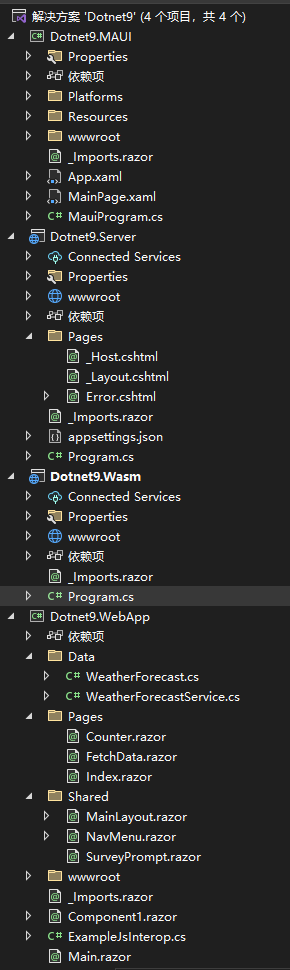
6 总结
总结就是下图:
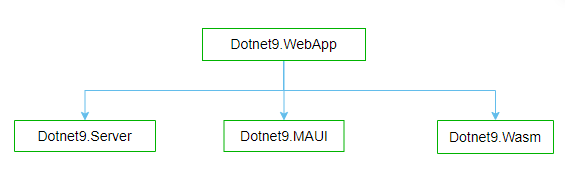
- Dotnet9.WebApp:blazor 组件相关的代码、路由组件等放在这个工程,供其他项目引用
- Dotnet9.Server:Blazor Server 模板项目
- Dotnet9.Wasm:Blazor WebAssembly 项目
- Dotnet9.MAUI:MAUI Blazor 项目
一句话:将 UI 封装到 Razor 类库Dotnet9.WebApp,其他终端工程(Dotnet9.Server、Dotnet9.MAUI、Dotnet9.Wasm)引用此工程即可实现 UI 共享。
- 本文代码地址:https://github.com/dotnet9/Dotnet9
- 原文:https://dotnet9.com/2022/06/Share-razor-library-between-maui-and-blazor-server-or-client
参考