
本文示例代码可用于动态加载本地图片,为了便于演示文中代码文件路径写死的。
首先在 MAUI Blazor 中无法直接读取外部文件显示 ,但是可以通过 base64 去显示,但是由于 base64 太长可能影响界面卡顿...
这个时候我们可以使用 blob 链接去加载外部图片,它不需要copy文件到wwwroot中,它会将byte转换一个url供Blazor去读取。
来看实现 :
首先第一步在wwwroot中的index.html添加一个js方法 用来将byte转换blob链接 将以下方法复制进去
<script>
/**
 * 将图片字节数组转换blob url
 */
function imgToLink(blob) {
    var myBlob = new Blob([blob], { type: "image/png" });
    return (window.URL || window.webkitURL || window || {}).createObjectURL(myBlob);
}

</script>
我们在Index.razor中添加以下代码
@page "/"
@inject IJSRuntime JS

<img src="@url" height="200px" width="200"/>

@code
{
    private string url;
    protected override async Task OnInitializedAsync()
    {
        // 放在项目目录下的logo.png会被打包到cache文件夹中 这里你也可以放外部文件链接 但是你需要保证再读取前有读取权限负责会报错
        var logo = Path.Combine(FileSystem.CacheDirectory, "logo.png");
        // 读取转换byte[]
        var data = await File.ReadAllBytesAsync(logo);
        // 通过js转换blob链接
        url = await JS.InvokeAsync<string>("imgToLink", data);
        await base.OnInitializedAsync();
    }
}
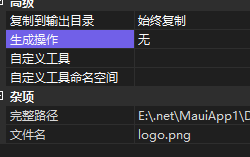
完成以后我们将图片添加到项目中:

修改图片属性为始终复制:
然后直接执行程序:

这种效果比转base64更好,不会在界面残留太多字符串,极力推荐使用,如果你有更好的办法请推荐给我,欢迎在下方留言。
示例代码:
- gitee:https://gitee.com/hejiale010426/img-to-blob
- github:https://github.com/239573049/ImgToBlob
来自 token 的分享
技术交流群:737776595
本文来自转载。
作者:dotnet-simple
原文标题:Maui 读取外部文件显示到 Blazor 中
原文链接:https://www.cnblogs.com/hejiale010426/p/17040997.html